1
Trigger input
Your Remote Starter is equipped with a negative trigger input. This input can
be connected to another remote control device or timer output. If this input is
connected, consult device manual or ask your technician which command is
associated with start/stop function. All start/stop functions controlled by this
input operate in same way as input controlled by remote control.
START ONLY
With horn confirmation.
Programmable as Active or Inactive during installation.
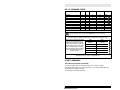
This command sounds the horn to confirm your vehicle has started when you cannot
see it. Enter command from table; if command has been received properly, you will get
a confirmation (horn: 1, lights: 1). Remote Starter will then send another message to
confirm that engine has started properly (horn: 2, lights: 1). Parking lights will remain on
all the time engine is running. You may repeat this command as often as you wish; it
does not stop engine.
CONTINUOUS MODE
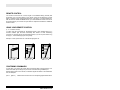
Continuous Mode consists of sending a “Start” command while engine is already
running with key in ignition so that you can then remove ignition key.
This mode allows you to leave engine running when you leave vehicle for a short period
of time and also leaves heating/air-conditioning system on.
Enter a “Start” command while engine is running. Parking lights, engine and preset
accessories will stay on for programmed time. Remove key, exit vehicle and lock doors.
Steering column will be locked and all safety devices will remain active.
SENTINEL (LOW TEMPERATURE) MODE
Programmable as Active or Inactive during installation.
In Sentinel Mode, system can start your engine automatically when temperature falls
below -15ºC (5ºF). Engine will run for programmed time, after which Sentinel Mode will
wait 2½ hours and then start engine again if temperature is still below -15ºC (5ºF). All
actions that normally stop engine when it is started by remote control (applying brakes,
opening hood, etc.) have same effect in this mode.
6