1
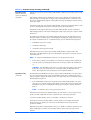
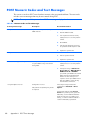
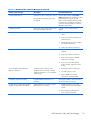
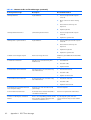
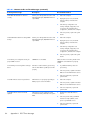
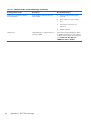
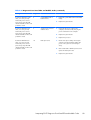
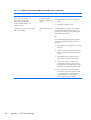
Table A-1 Numeric Codes and Text Messages (continued)
Control panel message
Description
Recommended action
Network Server Mode Active and No
Keyboard Attached
Keyboard failure while Network Server
Mode enabled.
1.
Reconnect keyboard with computer
turned off.
2.
Check connector for bent or missing
pins.
3.
Ensure that none of the keys are
depressed.
4.
Replace keyboard.
Parity Check 2
86
Parity RAM failure or a PCI/PCIe device is
asserting a SERR#.
Appendix A POST Error Messages
Run Computer Setup and Diagnostic utilities.
To disable a PCI/PCIe device from asserting
a SERR#, run the Computer Setup utility and
select Advanced > Bus Options >
SERR# Generation > Disable.