1
User Guide
June 2000 Edition
Siemens ID Mouse V3.1
Working with the Application
If the user is found in the archive, the First Name and Last Name of that user appear.
“Repeat Logon” Button
If the finger was not placed on the sensor in time or the user is not stored in the archive, or if
an error occurs on identification, you can use this button to start the identification process
again.
“Shut Down” Button
If no identification is possible, this button can be used to shut down the PC.
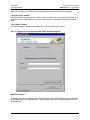
2.2.1.2 Logging on to the System with a User ID and Password
Mask Description
This mask can only be displayed if the system administrator has enabled a logon with a user
ID and password in the Options mask. The user logs on to the PC by specifying the user ID
and password.
Page 17