1
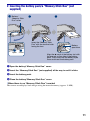
2 Inserting the battery pack/a “Memory Stick Duo” (not
supplied)
Battery/
“Memory Stick
Duo” cover
Insert the “Memory Stick
Duo” with the terminal side
facing the lens.
Open
Close
Battery
eject lever
Align the v mark of the battery slot with
the v mark on the side of the battery
pack. Press and hold the battery eject
lever and insert the battery pack.
1 Open the battery/“Memory Stick Duo” cover.
2 Insert the “Memory Stick Duo” (not supplied) all the way in until it clicks.
3 Insert the battery pack.
4 Close the battery/“Memory Stick Duo” cover.
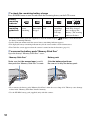
[ When there is no “Memory Stick Duo” inserted
The camera records/plays back images using the internal memory (approx. 31 MB).
11