1
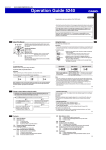
Operation Guide 5240
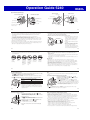
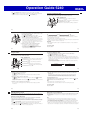
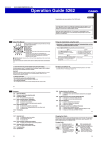
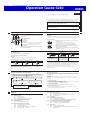
Approximate Reception Ranges
UK and German Signals
Japanese Signals
North American Signal
Chinese Signal
Fukushima
500 kilometers
500 kilometers
2,000 miles
(3,000 kilometers)
Anthorn
Beijing
Shangqiu
Shanghai
Chengdu
Hong Kong
Fukuoka/Saga
500 kilometers
600 miles
(1,000 kilometers)
1,500 kilometers
Fort Collins
Mainflingen
Changchun
1,500 kilometers
1,000 kilometers
The Anthorn signal is receivable
within this area.
E-21
E-20
x Signal reception may not be possible at the distances noted below during certain times
of the year or day. Radio interference may also cause problems with reception.
− Mainflingen (Germany) or Anthorn (England) transmitters: 500 kilometers
(310 miles)
− Fort Collins (United States) transmitter: 600 miles (1,000 kilometers)
− Fukushima or Fukuoka/Saga (Japan) transmitters: 500 kilometers (310 miles)
− Shangqiu (China) transmitter: 500 kilometers (310 miles)
x As of December 2010, China does not use Daylight Saving Time (DST). If China
does go to the Daylight Saving Time system in the future, some functions of this
watch may no longer operate correctly.
x Using this watch in a country covered by a time calibration signal that is different
from the countries it supports may result in incorrect time indication due to local
application of daylight saving time (summer time), etc.
To get ready for a receive operation
1. Confirm that the watch is in the Timekeeping Mode. If it isn’t, hold down C for at
least two seconds to enter the Timekeeping Mode.
2. Place the watch in a location where signal reception is good.
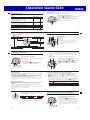
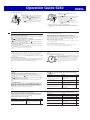
x Position the watch as shown in the
nearby illustration, with 12 o’clock
pointed towards a window. Make
12 o’clock
sure there are no metal objects
nearby.
or
x Signal reception normally is better
at night.
x The receive operation takes from
two to seven minutes, but in some
cases it can take as long as
14 minutes. Take care that you do
not perform any button operation or
move the watch during this time.
E-22
E-23
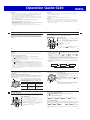
x Signal reception may be difficult or even impossible under the conditions
described below.
Inside or
among
buildings
Inside a
vehicle
Near
household
appliances,
office
equipment,
or a mobile
phone
Near a
construction
site, airport,
or other
sources of
electrical
noise
Near
high-tension
power lines
Among
or behind
mountains
3. What you should do next depends on whether you are using Auto Receive or
Manual Receive.
x Auto Receive: Leave the watch over night in the location you selected in step 2.
See “Auto Receive” on page E-25 for details.
x Manual Receive: Perform the operation under “To perform manual receive” on
page E-26.
Auto Receive
x With Auto Receive, the watch performs the receive operation each day
automatically up to six times (up to five times for the Chinese calibration signal)
between the hours of midnight and 5 a.m. (according to the Timekeeping Mode
time). When any receive operation is successful, none of the other receive
operations for that day are performed.
x When a calibration time is reached, the watch will perform the receive operation
only if it is in the Timekeeping Mode. The receive operation is not performed if a
calibration time is reached while you are configuring settings.
E-24
E-25
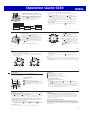
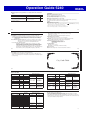
To perform manual receive
1. In the Timekeeping Mode (page E-33), keep B depressed (for about two seconds)
as the x Second Hand goes through the following sequence.
x Moves to Y (YES) or N (NO) to indicate the last signal reception result, then to
R (READY).
2. The x Second Hand indicates the operations the watch is currently performing.
When the x Second Hand is It means this:
pointed here:
@
R (READY)
Watch is setting up for reception.
W (WORK)
Reception is in progress.
x If signal reception is unstable, the x Second Hand may
move between W (WORK) and R (READY).
x When the receive operation is successful, the watch
adjusts the time setting accordingly, and then resumes
regular timekeeping. It does not adjust the setting if the
operation failed.
E-26
To check the result of the latest receive operation
In the Timekeeping Mode, press B. The x Second
@
Hand will move to Y (YES) or N (NO) to indicate the last
calibration signal receive result.
x The x Second Hand will move to Y (YES) if the latest
receive operation was successful, or N (NO) if it was not.
After about 10 seconds, regular timekeeping will resume.
x Press B to return to regular timekeeping. The watch will
also return to regular timekeeping if you do not perform
any operation for about 10 seconds.
Note
x The x Second Hand will indicate N (NO) if you have adjusted the time or day
setting manually since the latest receive operation.
E-27
To turn auto receive on and off
1. In the Timekeeping Mode, press B. The x Second
Y (YES)
Hand will move to Y (YES) or N (NO) to indicate the last
@
calibration signal receive result.
2. Pull out the crown.
The x Second Hand will perform one full revolution and
then stop at the current on/off setting.
N (NO)
E-28
Note
x To interrupt a receive operation and return to the Timekeeping Mode, press any
button.
3. Rotate the crown to move the x Second Hand to the
setting you want.
x To turn on auto receive, select Y (YES).
x To turn off auto receive, select N (NO).
4. Push the crown back in to return to the Timekeeping
Mode.
Radio-controlled Atomic Timekeeping Precautions
x Strong electrostatic charge can result in the wrong time setting.
x Even if a receive operation is successful, certain conditions can cause the time
setting to be off by up to one second.
x The watch is designed to update its day setting automatically for the period from
January 1, 2000 to December 31, 2099. Updating of the day setting by signal
reception will no longer be performed starting from January 1, 2100.
x If you are in an area where signal reception is not possible, the watch keeps time
with the precision noted in “Specifications” (page E-82).
x The receive operation is disabled under any of the following conditions.
− While power is at Level 2 or lower (page E-14)
− While the watch is in the power recovery mode (page E-15)
− While the watch is in the function sleep state (power saving, page E-17)
− While the watch is in the World Time Mode (page E-53)
− While a countdown timer operation is in progress (page E-63)
x A receive operation is cancelled if an alarm sounds while it is being performed.
E-29