1
Operation Guide 5240
Important!
x The watch will not be able to produce correct temperature readings if you make a
mistake during the correction procedure. Check to make sure that the value you
use for correction produces correct temperature readings.
x Before performing the following procedure, remove the watch from your wrist and
leave it for about 20 or 30 minutes to allow the case temperature to become the
same as the air temperature.
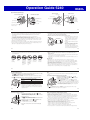
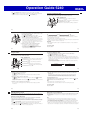
1. While the hands are indicating a temperature reading, pull out the crown.
2. Rotate the crown to adjust the temperature setting.
Holding down A and B at the same time will return the temperature reading to the
factory default setting.
x Each rotation of the crown moves the hands by 1°C (2°F).
x You can adjust the temperature reading within the range of –10 to 60°C (or 14
to 140°F).
Important!
x To cancel a temperature reading correction setting, hold down A and B at the
same time. The watch will beep.
3. Push the crown back in.
x After about ten seconds, regular timekeeping will resume.
Important!
x If you do not perform any operation with the crown for about two minutes after
pulling it out, crown operations will become disabled and the watch hands will no
longer move when you rotate the crown. If this happens, push the crown back in
and then pull it out again.
E-50
E-51
Temperature Reading Precautions
Checking the Current Time in a Different Time Zone
Body temperature, direct sunlight, and humidity all have an effect on temperature
readings. To help ensure more accurate temperature readings, remove the watch
from your wrist, wipe it dry of any moisture, and place it in a well-ventilated location
not exposed to direct sunlight for about 20 to 30 minutes before taking temperature
readings.
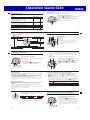
You can use World Time to view the current time in one of 29 time zones around the
globe. The currently selected city is called the “World Time City”.
NYC (NEW YORK)
@
+
B
*
6
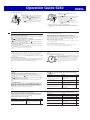
Hands and Indicators
z Hour Hand: Indicates the hour of the current time in the
World Time City.
x Second Hand: Indicates the current World Time City
for about three seconds after the World
Time mode is entered.
c Minute Hand
b Lower Dial Hand: Points to WT.
n Day Indicator
x Pressing A causes the x Second Hand to move to the
current World Time City for about three seconds.
E-52
E-53
Important!
x Time calibration signal reception is disabled while the watch is in the World Time
Mode.
To view the time in another time zone
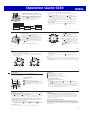
1. In the Timekeeping Mode, press C once to enter the World Time Mode.
x The b Lower Dial Hand will move to WT.
x To select the UTC zone as your World Time, simply hold down B for about three
seconds. No other operation is required.
2. Pull out the crown.
x The x Second Hand points to the currently selected World Time city code.
x The b Lower Dial Hand will indicate AT (AUTO), STD (standard time) or DST
(daylight saving time), which indicates the current daylight saving time setting.
x If you do not perform any operation with the crown for about two minutes after
pulling it out, crown operations will become disabled and the watch hands will no
longer move when you rotate the crown. If this happens, push the crown back in
and then pull it out again.
3. Rotate the crown to move the x Second Hand to the city code you want to select
as the World Time City.
x Each time you select a city code, the z Hour Hand, c Minute Hand, and n Day
Indicator move to the current time and day for that city code. For details about
city codes, see the “City Code Table” at the back of this manual.
x If you think that the time indicated for the selected World Time City is not correct,
it probably means that there is something wrong with your Home City settings.
Use the procedure under “To configure Home City settings” (page E-34) to
correct the Home City settings.
4. Hold down A for about one second to cycle through the summer time settings as
shown below.
A
A
AT (AUTO)
STD
DST
A
E-54
E-55
5. After selecting the city you want, push the crown back in to return to the World
Time Mode.
Swapping your Home City and World Time City
You can use the procedure below to swap your Home City and World Time City. This
capability can come in handy when you frequently travel between two locations in
different time zones.
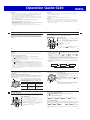
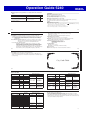
The following example shows what happens when the
@
Home City and World Time City are swapped while the
Home City originally is TYO (Tokyo) and the World Time
City is NYC (New York).
Home City
World Time City
Before
swapping
Tokyo
10:08 p.m.
(Standard time)
New York
9:08 a.m.
(Daylight saving time)
After
swapping
New York
9:08 a.m.
(Daylight saving time)
Tokyo
10:08 p.m.
(Standard time)
To swap your Home City and World Time City
In the World Time Mode, hold down A for about three
seconds until the watch beeps.
x This indicates that your Home City and World Time City
have been swapped.
x After swapping the Home City and World Time City, the
watch will stay in the World Time Mode. The x Second
Hand will point to your new World Time City (TYO in this
example).
Note
x If your current World Time City supports time calibration
signal reception, making it your Home City enables
calibration signal reception for that city.
@
E-56
E-57
Using the Stopwatch
You can use the stopwatch to measure elapsed times. A flyback feature (page E-59)
lets you reset the stopwatch to zero without stopping time measurement.
To enter and exit the Stopwatch Mode
In the Timekeeping Mode, press C twice to enter the Stopwatch Mode.
x The b Lower Dial Hand will move to ST.
To perform an elapsed time operation
+
Hands and Indicators
>@
*
E-58
B
z Hour Hand: Indicates the stopwatch minute count
(1 revolution = 60 minutes).
x Second Hand: Indicates the 0.05-second count during
stopwatch operation.
c Minute Hand: Indicates the stopwatch seconds count.
v Upper Dial Hand: Indicates the stopwatch minute count
(1 revolution = 120 minutes).
b Lower Dial Hand: Points to ST.
A
A
Start
A
Stop
A
(Restart)
B
(Stop)
Zero Reset
To perform flyback timing
Pressing B while an elapsed time operation is in progress performs zero reset and
immediately resumes timing from there. You can do this as many times as you want.
A
Start 1
B
Start 2
B
Start 3
.....
A
Stop
B
Zero Reset
x An ongoing elapsed time measurement operation is not affected by pulling out the
crown.
E-59