1
Jan 11, 1993
Software Version 1.3
SYSTEM
MANUAL
PC4OOO
Book 4
DOC NOTICE
FCC COMPLIANCE STATEMENT
NOTICE: The Canadian Department of Communications label identifies certified
equipment. This certification means that the equipment meets certain
telecommunications network protective, operational and safety requirements. The
Department does not guarantee the equipment will operate to the user's satisfaction.
CAUTION: Changes or modifications not expressly approved by Digital Security
Controls Ltd. could void your authority to use this equipment.
Before installing this equipment, users should ensure that it is permissible to be
connected to the facilities of the local telecommunications company. The equipment
must also be installed using an acceptable method of connection. In some cases, the
company's inside wiring associated with a single line individual service may be
extended by means of certified connector assembly (telephone extension cord). The
customer should be aware that compliance with the above conditions may not
prevent degradation of service in some situations.
Repairs to certified equipment should be made by an authorized Canadian
maintenance facility designated by the supplier. Any repairs or alterations made by
the user to this equipment, or equipment malfunctions, may give the
telecommunications company cause to request the user to disconnect the equipment.
User should ensure for their own protection that the electrical ground connections of
the power utility, telephone lines and internal metallic water pipe system, if present,
are connected together. This precaution may be particularly important in rural areas.
CAUTION: Users should not attempt to make such connections themselves, but
should contact the appropriate electric inspection authority, or electrician, as
appropriate.
The Load Number (LN) assigned to each terminal device denotes the percentage of
the total load to be connected to a telephone loop which is used by the device, to
prevent overloading. The termination on a loop may consist of any combination of
devices subject only to the requirement that the total of the Load Numbers of all the
devices does not exceed 100.
The Load Number of this device is 10.
AVIS: L'étiquette du ministère des Communications du Canada identifie le matériel
homologué. Cette étiquette certifie que le matériel est conforme à certaines normes
de protection, d'exploitation et de sécurité des réseaux de télécommunications. Le
Ministère n'assure toutefois pas que le matétiel fonctionnera à la satisfaction de
l'utilisateur.
Avant d'installer ce matériel, l'utilisateur doit s'assurer qu'il est permis de le
raccorder aux installations de l'entreprise locale de télécommunication. Le matériel
doit également être installé en suivant une méthod acceptée de raccordement. Dans
certains cas, les fils intérieurs de l'entreprise utilisés pour un service individuel a
ligne unique peuvent être prolongés au moyen d'un dispositif homologué de
rassordement (cordon prolongateur tèlèphonique interne). L'abonné ne doit pas
oublier qu'il est possible que la conformité aux conditions énoncées ci-dessus
n'empechent pas la dégradation du service dans certaines situations. Actuellement,
les entreprises de télécommunication ne permettent pas que l'on raccorde leur
matériel a des jacks d'abonné, sauf dans les cas précis prévus par les tarrifs
particuliers de ces entreprises.
Les réparations de matériel homologué doivent etre effectuées par un centre
d'entretien canadien autorisé désigné par le fournisseur. La compagnie de
télécommunications peut demander à l'utilisateur de débrancher un appareil à la suite
de réparations ou de modifications effectuées par l'utilisateur ou à cause de mauvais
fonctionnement.
Pour sa propre protection, l'utilisateur doit s'assurer que tous les fils de mise à la
terre de la source d'énergie électrique, des lignes téléphoniques et des canalisations
d'eau métalliques, s'il y en a, sont raccordés ensemble. Cette précaution est
particulièrement importante dans les régions rurales.
AVERTISSEMENT: L'utilisateur ne doit pas tenter de faire ces raccordements luimeme; il doit avoir recours a un service d'inspection des installations électriques, ou
à electricien, selon le cas.
L'indice de charge (IC) assigné a chaque dispositif terminal indique, pour éviter toute
surcharge, le pourcentage de la charge totale qui peut etre raccordée a un circuit
téléphonique bouclé utilisé par ce dispositif. La terminaison du circuit bouclé peut
etre constituée de n'import quelle combinaison de dispositifs, pourvu que la somme
des indices de charge de l'ensemble des dispositifs ne dépasse pas 100.
L'indice de charge de cet dispositif est 10.
This equipment has been tested and found to comply with the limits for a Class B
digital device, pursuant to Part 15 of the FCC Rules. These limits are designed to
provide reasonable protection against harmful interference in a residential
installation. This equipment generates, uses and can radiate radio frequency energy
and, if not installed and used in accordance with the instructions, may cause
harmful interference to radio communications. However, there is no guarantee that
interference will not occur in a particular installation. If this equipment does cause
harmful interference to radio or television reception, which can be determined by
turning the equipment off and on, the user is encouraged to try to correct the
interference by one or more of the following measures:
■ Re-orient the receiving antenna.
■ Increase the separation between the equipment and receiver.
■ Connect the equipment into an outlet on a circuit different from that to which the
receiver is connected.
■ Consult the dealer or an experienced radio/television technician for help.
The user may find the following booklet prepared by the FCC useful: “How to
Identify and Resolve Radio/Television Interference Problems”. This booklet is
available from the U.S. Government Printing Office, Washington D.C. 20402, Stock
# 004-000-00345-4.
IMPORTANT INFORMATION
This equipment complies with Part 68 of the FCC Rules. On the side of this
equipment is a label that contains, among other information, the FCC registration
number of this equipment.
NOTIFICATION TO TELEPHONE COMPANY Upon request, the customer shall
notify the telephone company of the particular line to which the connection will be
made, and provide the FCC registration number and the ringer equivalence of the
protective circuit.
FCC Registration Number: F53CAN-73256-AL-E
Ringer Equivalence Number: 0.1B
USOC Jack: RJ-31X
TELEPHONE CONNECTION REQUIREMENTS Except for the telephone company
provided ringers, all connections to the telephone network shall be made through
standard plugs and telephone company provided jacks, or equivalent, in such a
manner as to allow for easy, immediate disconnection of the terminal equipment.
Standard jacks shall be so arranged that, if the plug connected thereto is
withdrawn, no interference to the operation of the equipment at the customer’s
premises which remains connected to the telephone network shall occur by reason
of such withdrawal.
INCIDENCE OF HARM Should terminal equipment or protective circuitry cause
harm to the telephone network, the telephone company shall, where practicable,
notify the customer that temporary disconnection of service may be required;
however, where prior notice is not practicable, the telephone company may
temporarily discontinue service if such action is deemed reasonable in the
circumstances. In the case of such temporary discontinuance, the telephone company
shall promptly notify the customer and will be given the opportunity to correct the
situation.
ADDITIONAL TELEPHONE COMPANY INFORMATION The security control
panel must be properly connected to the telephone line with a USOC RJ-31X
telephone jack.
The FCC prohibits customer-provided terminal equipment be connected to party
lines or to be used in conjunction with coin telephone service. Inter-connect rules
may vary from state to state.
CHANGES IN TELEPHONE COMPANY EQUIPMENT OR FACILITIES The
telephone company may make changes in its communications facilities, equipment,
operations or procedures, where such actions are reasonably required and proper in
its business. Should any such changes render the customer’s terminal equipment
incompatible with the telephone company facilities the customer shall be given
adequate notice to the effect modifications to maintain uninterrupted service.
RINGER EQUIVALENCE NUMBER (REN) The REN is useful to determine the
quantity of devices that you may connect to your telephone line and still have all of
those devices ring when your telephone number is called. In most, but not all areas,
the sum of the RENs of all devices connected to one line should not exceed five
(5.0). To be certain of the number of devices that you may connect to your line, you
may want to contact your local telephone company.
This manual is for the PC4000 software version 1.3.
EQUIPMENT MAINTENANCE FACILITY If you experience trouble with this
telephone equipment, please contact the facility indicated below for information on
obtaining service or repairs. The telephone company may ask that you disconnect
this equipment from the network until the problem has been corrected or until you
are sure that the equipment is not malfunctioning.
Digital Security Controls Ltd. 160 Washburn St., Lockport, NY 14094
INTRODUCTION
The PC4000 is a highly flexible and versatile control
which will enable the installer to meet the most
demanding security requirements. The heart of the
system is the main control panel, designated the
PC4000, which is connected to other system elements
using common 4 conductor unshielded station wire. The
main panel processes signal information and
communicating with the monitoring station. The main
panel is capable of supervising 16 zones, any of which
may be defined for fire or burglary applications and also
manages up to eight separate and fully independent
partitions, assigning zones and their controlling keypads
in accordance with installer programming.
The basic 16 zone capability of the PC4000 can be
expanded using either PC4108 or PC4116 modules
which provide 8 or 16 zones of additional inputs
respectively up to a system maximum of 128 zones. The
PC4108 and PC4116 are designed for use within any of
the cabinets and are shipped as PC boards only.
Programming and system operation are carried out using
the LCD4500 liquid crystal display keypad. The
LCD4500 connects at any point in the system to the four
wire communication bus or “COMBUS”, its specific
identification being determined automatically in the
process of installing it. A maximum of 16 LCD4500
keypads may be used on any one system regardless of
size.
The PC4204 relay output module is available for
installations requiring additional power beyond the 500
mA supplied by the PC4000 main panel. This module
comprises a 12 volt DC power supply of 1.5 Amp
capacity and four 12 volt relays with form C contacts
which will provide switched outputs under any of the 23
options available in the list of programmable outputs.
The PC4204 connects to the COMBUS via four wires as
with other system elements. It requires a 16-18 volt, 40
VA transformer and a 12 volt battery. Up to 16 PC4204
modules may be installed on any one system. The
PC4204 is shipped as a PC board only.
The use of any power source other than a PC4204
to repower the COMBUS will result in a system
malfunction.
The PC4216 low current module provides 16 separate
outputs. Each output may be programmed to operate
under the control of 1 of 23 options as listed in the
programmable options section of the installation manual.
Up to 8 other PC4216’s may be used to provide outputs
for graphic annunciator or similar devices for the
maximum of 128 zones. The PC4216 connects to the
COMBUS with four wires. A maximum of 9 PC4216’s
may be connected to a system. The PC4216 may be
installed in the main cabinet or in other cabinet options
and is shipped as a board only.
The PC4000 includes the capability of driving a serial
printer using a PC4400 RS232 output module. The
PC4400 connects to the COMBUS with four wires. The
printer may be located up to 200 feet (60 meters) away
from the module. The PC4400 is shipped as a board
only.
1
SYSTEM OVERVIEW
Maximum System Capabilities
■
■
■
■
■
■
■
■
■
■
Supervised Alarm Output
Control Units - 1 PC4000 Main Board
128 Zones
PC4000 Main Board: 16 zones
PC4108 Expansion Module: 8 zones
PC4116 Expansion Module: 16 zones
64 High Current Outputs - Up to 16 PC4204 Modules
144 Low Current Outputs
- 9 PC4216 16 Output Modules
1 RS-232 Interface - PC4400
16 Remote LCD Keypads - LCD-4500
1 Main Board Fully Programmable Output
1 12 VDC Switched Fully Programmable Auxiliary
Power Supply (Main Board)
1 Supervised Fully Programmable Bell / Siren Output
(Main Board)
1 Telephone Interface (Main Board)
■
■
■
Bell Output, 700 mA fused at 5 Amps, 12 VDC
unregulated ❶
Steady or Pulsed Output
Programmable for 1 of 23 options
Event Buffer
■
■
512 events
Date and time stamp
8 True Partitions
■
■
■
■
■
Separate or shared zones from other partitions
Individual keypads per partition (minimum 1 keypad)
Individual access codes for each partition
Individual keypad zones (Fire, Emergency, Panic)
Individual outputs programmable per partition
RS-232 Interface Module (PC4400)
■
Used to output data to a local printer
128 Programmable Zones
■
■
■
■
16 zones on main board expandable by using 8 and
16 zone modules
Several zone types including: instant, 2 types of
interior, 3 delay, 3 fire, 4-24 hour, forced answer,
momentary, and maintained arming
Zone expansion is done by enrolling an expansion
module
Zones can be assigned independently to any
partition(s)
Internal Memory
■
■
Keypad User Options
They are all menu driven, including:
■ Programming of up to 11 types of security codes, 128
in total
■ Bypassing from the keypad by authorized personnel
■ Utility functions such as remote control of lights, door
strikes, etc.
LCD Keypads (LCD-4500)
■
■
Retains programmed data even when both AC and
Battery have been removed.
The clock will have to be reset after a power down
condition which will be indicated by an audible trouble.
Total of 16 on the system
Can be assigned to any partition
Communicator
209 Outputs
■
■
■
■
■
1 main board transistor switch to ground with 3A
capabilities (programmable for 1 of 23 options)
64 relay outputs programmable for 1 of 23 options
each (16-4204 modules with 4 outputs each)
16 switched transistor outputs programmable for 1 of
23 options each (1-4216 module with 16 outputs)
128 alarm status indicators (8-4216 modules with 16
outputs each)
■
■
■
■
■
■
■
■
■
Switched Auxiliary Output
■
■
Programmable for 1 of 23 options
■
■
■
❶ Values shown
2
Communicates in all 10 and 20 BPS single line and
extended formats
Radionics Rounds and Radionics Parity
Sescoa Superfast format
Ademco Contact ID format
SIA 1986 format
Surgard 4/3 DTMF format
3/1 and 4/2 formats
Hexadecimal numbers
DTMF and Pulse dialing
DPDT line seizure
True dial tone detect
Anti-jam feature
Three telephone numbers and nine account codes
Split reporting
GETTING
STARTED
When designing a security system with the PC4000
that will be larger than 16 zones or have two or more
Partitions it is best to first lay out the system on paper.
This will help determine the total number of zones,
additional expansion and power supply modules and
other system elements that may be needed.
When the location of all points of protection is known
the location of the zone expanders can be made. You
will find that working from a plan, a layout will reveal
the most economical use of system modules; two eight
zone expansion modules instead of one sixteen zone,
for example, can save long wire runs because of the
location of zones.
The plan will also enable you to make the most efficient
layout for the communications bus (COMBUS). This is
the four conductor cable which can be standard station
wire (four 22 AWG wires color coded red, black , yellow
and green) to which all system modules are connected
in parallel. It is not necessary to run the COMBUS in
shield unless it is being run through an area of high
electrical noise.
The COMBUS may be up to 1,000 ft (300 m) from the
main board to the farthest module, with any number of
modules in between. More than one COMBUS of 1,000
ft (300 m) can run from the PC4000.
When zone expanders are enrolled to the PC4000 the
zones will be added to the system in sequence. For
example, if an eight zone expander (PC4108) is added
the additional zones would be assigned the next eight
zones available on the system. As the first sixteen zones
are on the main panel the additional zones, 17 through 24
would be assigned to the eight zone expander. If a
sixteen zone expander (PC4116) were to follow the eight
zone expander it would receive zones numbered from 25
to 40.
On your layout, determine the order in which the zone
expanders will be enrolled to the system. This will allow
you to correctly assign zone numbers.
Next determine the number of keypads required for
each Partition and their location on the system. The
maximum number of keypads allowed is 16.
When the number of zones, keypads and their locations,
expansion modules and separately controlled systems
(Partitions) have been decided upon you can now
determine what other modules in the PC4000 system
you require to complete the installation.
The PC4400 provides serial output to an on-site printer
that will record the identity of the system, description of
the occurrence (alarm, trouble etc.) arm/disarm by user,
date and time.
The PC4216 module provides up to 16 programmable
outputs each of which may be programmed to trigger
on up to 21 different options. It is also used to display
zones on a graphic annunciator. When used in this
manner all 16 outputs must be used to display alarm
inputs. A total of eight PC4216 modules would be
needed to display all 128 zones of the PC4000.
COMBUS Power and Operation
The PC4000 main board can provide up to 500 mA to
power modules, keypads and devices. A PC4204 power
module is required when additional current is needed
either for powering detection devices or operating bells
and sirens. The PC4204 requires its own transformer and
battery and can provide up to 1.5A at 12 VDC. Four
relays on the module provide form C switched outputs
with contact ratings of 3 amps @ 12 VDC for a variety of
programmable options. When used to repower the
COMBUS the PC4204 must be wired in accordance with
the instructions supplied with the unit. Use of a power
source other than the PC4204 power supply module to
supply additional power to the PC4000 system is not
recommended for the following reasons:
If the main panel loses communications with a module,
within a maximum of 90 seconds the panel will perform
a system reset in which power to the COMBUS is
removed. Five seconds later power is reapplied and
the panel will attempt to communicate with the module.
If the panel is unsuccessful communicating with the
module it will display and report a COMBUS
communications fault.
When the main panel performs a reset, relay 1 when
programmed for “COMBUS POWER” will open. This will
disconnect the power supplied to the modules, resetting
them so that communications to the main panel are
reinitialized.
For example, if the microprocessor on the module has
been scrambled due to a transient, the PC4000 will
power down the COMBUS, the PC4204 will mimic the
PC4000 and cut off its power supply to the module.
The module will be powered down. When the PC4000
returns power to the COMBUS, the PC4204 will
reconnect its power supply, and the power to the
module will return. Because the module was powered
down and powered up, the module is now reset, and
can communicate with the PC4000.
If a power supply other than a PC4204 was used, the
module would never power down, never reset, and the
module will stay off line requiring the attention of service
personnel.
3
CAUTION:
When used to power a module, the “RLY 1 COM”
terminal of the PC4204 must be connected to the
“RED COMBUS” terminal of the module only. The
positive (RED) conductor of the COMBUS must be
left unconnected to the module that is powered by
the PC4204. The “BLK COMBUS” of the module
should be run common to the negative (“BLK”) of
the COMBUS. Use of a power source other than the
PC4204 power supply module to supply additional
power to the PC4000 system is not recommended.
The COMBUS is a four conductor cable to which all
modules and keypads are connected in parallel.
Connections to the COMBUS do not have to be homerun. For example if a storage building had an 8 zone
expander (PC4108) and a keypad (LCD4500) located
in it, the zone expander and keypad could be spliced
together and run back on a single 4 wire cable to the
nearest point on the COMBUS.
Enroll every module to the system. Make sure you put
down the number of each module enrolled. Refer to the
Programming Manual for the required procedure.
When enrolling any PC4108 or PC4116 zone expander
module make sure to note the zones which you
assigned to the module.
This information is very important if it becomes
necessary to Add or Delete zones to or from a
Partition. Zones 1 through 16 are assigned to Partition
1 by default. This can be changed later in Installer
Programming.
In Book 2 (Programming Work Sheets) you will find a
four page System Overview section. Fill in the
information as each module is enrolled. These sheets
are designed to be left in the panel so if future service
is required, the location and assigned number of each
module will be readily available.
Once all modules are enrolled perform a diagnostics
check on the panel to determine if any problems are
present (See - DIAGNOSTICS).
Programming the System
The PC4000 has the capability to operate as 8 separate
alarm systems called Partitions. Dividing the panel into
Partitions will allow you to control access to specific
areas.
When the PC4000 is first powered up all zones on the
main board and User Codes are assigned to Partition 1.
If no other Partitions are required the entire system will
be considered Partition 1. This is important to keep in
mind as often in programming the panel will require you
to enter the Partition to program.
For example, when programming entry and exit times,
you must select the menu option ‘ADD/EDIT PAR’. The
keypad will then prompt you for the Partition to add or
edit. You must select Partition 1 for a system that has no
additional Partitions.
The factory default setting for all options is provided
in the Programming Work Sheets as well as page
reference numbers, chart reference numbers and the
programming ‘HOTKEYS’ for the option to allow quick
programming.
Complete the Programming Work Sheets located in
Book 2. Having this information prepared before
programming the panel will speed up the process
considerably.
All information for the 16 zones on the main panel may
be entered in the Programming Work Sheets.
Any zone expanders on the system will include a similar
sheet and the information should be completed for these
as well.
There is no set order in which the panel must be
programmed, however, if you use the following guideline
it may simplify the programming of the panel for the first
time.
Mounting the Panel
Select a dry location close to an unswitched AC source,
a ground connection and a telephone connection for
mounting the Main Control Cabinet.
Remove the PC4000 printed circuit board, mounting
hardware, and keypad from the cardboard retainer
inside the large cabinet. Before attaching the cabinet to
the wall, press the five white nylon printed circuit board
mounting studs into the cabinet from the back.
Pull all cables into the cabinet and prepare them for
connection before mounting the circuit board to the
back of the cabinet. Press the circuit board down onto
the mounting studs.
There is room in the Main Control Cabinet (PC4001C)
for any two modules (PC4108, PC4116, PC4216 or
PC4400). Modules requiring power (AC and battery
PC4204) must be installed in the large Expander
Cabinet (PC4002C). This enclosure will accommodate
one module (PC4108, PC4116, PC4216 or PC4400) and
a powered output (PC4204) or any three modules. A
small Expander Cabinet (PC4003C) is available for a
single module that does not require external power.
Once the wiring is completed power the system up by
first connecting the battery followed by the AC
transformer. All LCD4500 keypads should display the
message ‘PC4000 DSC Ltd.’. Press a key on any
keypad that is to be assigned to Partition 1. The keypad
will beep and display the message ‘4500 Mod. #1' and
the keypad is automatically assigned to Partition 1.
4
LOCAL” button. Arm the panel, wait for the exit delay to
expire and trip a detector on an instant circuit. Wait for
the communication to complete. Disarm the panel and
check with the monitoring station to confirm acceptance
of the transmission. Perform additional transmissions
required by the monitoring station.
Check the “TROUBLE” light on the keypad. If it is on,
press [✱] then [2] to determine the trouble. The “Trouble
Display” section in “Keypad Functions” gives a
description of the different trouble conditions.
Step 1 - Define all Partitions
When the panel is first powered up the 16 zones on the
main panel are assigned to Partition 1. Any additional
zones enrolled to the system are NOT assigned to any
Partition.
Any zones from 1 through 16 that are required on a
different Partition must be DELETED from Partition 1
before they are ADDED to another Partition. Any zones
above Zone 16 must be ADDED to the proper Partition.
See “Zone Assignment” in the Programming Manual for
the procedure to add and delete zones.
When you ADD each zone to the proper Partition it will
save time if you also program the Zone Label, Zone
Type, Zone Options and Reporting codes for the zone.
All of this information may be entered in the
Programming Work Sheets located in Book 2 and in the
program sheets included with each Zone Expansion
module.
Step 5 - Instructing the End User
Describe system operation to authorized users.
Provide user with the instruction manual and instruct
them to read it to become familiar with the system
operation.
Instruct the user to test the system on a regular basis
as described in the Instruction Manual. The Master
Code should be changed from the default setting and
recorded.
There is a wide range of possible uses for the [✱][4]
and [✱][7] commands which are not described in the
instruction manual. Be sure to explain the functions of
the [✱][4] Sensor Reset and the [✱][7] Utility Output to
the user if they are incorporated into the system.
Step 2 - Assign User Codes
From default the panel comes with one User Code
assigned as a Grand Master, code ‘1234’. The other 127
User Codes are assigned as Partition 1 codes.
If more than one Partition is being utilized it will be
necessary to assign User Codes to the additional
Partition(s). Since there are no available User Codes
(they are all assigned to Partition 1) it will be necessary
to first delete User Codes from Partition 1. Once codes
are deleted from Partition 1 they will be available to be
assigned to another Partition or as System Masters.
See “Code Assignment” in the Programming Manual.
Hardware Reset of Memory to Factory
Defaults
If the installer’s code is lost through inadvertent
programming, the only means of reprogramming the
system is by a hardware reset. If the installer’s lockout
is enabled, there is no way to reprogram the system
without entering the correct installer’s code.
The PC4000 can also be reset through software in the
installer’s programming. See “Factory Default” in the
Programming Guide.
Step 3 - Program the System
Now that the Partitions have been defined, zones
programmed and access codes assigned you are
ready to program the rest of the system. It is best to
follow the Programming Work Sheets starting at the
beginning and carefully programming each section.
Having the required information entered ahead of time
will speed up this process considerably.
Once the Installer Programming is complete you can
program access codes ([✱][5][Master Code]). Next,
features on each partition can be enabled. Go to a
keypad assigned to the desired partition and enable the
features through [✱][6][Master Code] commands.
NOTE: Panels returned to DSC with the Installer’s
Lockout feature enabled and no other apparent
problems will be subject to an additional service charge.
To reset the panel to factory default conditions:
1.Power the system down by removing both AC and
battery power to the main panel.
2.Short the zone 1 terminal and the pgm terminal on the
main panel.
3.Restore power to the main panel.
4.Wait for 20 seconds then remove the short between
the pgm and zone 1.
5.The system will have reloaded the memory with
factory defaults. All modules will have to be enrolled
again. The event buffer is the only part of memory that
is retained during a factory default.
Step 4 - Testing the System
See “Bell/Comm Test” under [✱][6] User Functions or do
the following. Contact the monitoring station to request a
transmission test. Plug the telephone cord into the RJ31X jack. If a DTS-1 is being used to monitor communicator
transmissions, connect it to the telephone line and place
the DTS-1 in the line mode by pressing the red “LINE/
5
PC4000 MAIN BOARD
SPECIFICATIONS
Control Panel
Output Voltage
16 zones
■ 16 fully programmable supervised zones (EOL
resistor)
Typically, with normal AC on and a fully charged battery,
the output voltage will be 13.8 VDC. With AC off and the
battery discharging, the voltage will go below 10 volts
and then battery cutoff will occur preventing further
discharge. Devices that require power from the control
panel should be capable of operation over the voltage
range of 10 to 14 VDC.
Audible alarm output
■ Bell output
700 mA, fused at 5 Amps, 12 VDC unregulated ❶
Steady or pulsed output
Remote Keypad
Non-volatile RAM (Internal Memory)
■ Does not lose codes or system status on complete AC
and battery failure
■
■
Programmable output
■ Transistor switch sinks 3A to ground
■ Operation controllable through program options
■
■
■
■
Powerful 1.5 amp regulated power supply
■ 500 mA auxiliary supply, 12 VDC unregulated ❶
■ Separately fused for battery, auxiliary supply and bell
output
■ Electronic shut down protection of the COMBUS
■ Supervision for loss of AC power, low battery,
electronic shut down of modules
■
Four wire (QUAD) hook-up
Alphanumeric liquid crystal display
Built-in piezoelectric buzzer
Full annunciation of zones and system status
Dimensions 5.5” x 4.5” x 1” deep (150 x 114 x 25 mm)
Maximum current draw of 55 mA
Internal clock locked to AC power frequency
Switched Auxiliary Supply Output
■ Programmable for several options
Battery
■ 12 volt 4 Ah minimum rechargeable gel-cell or sealed
lead-acid battery
Transformer
■ 16.5 VAC, 40VA
❶ Values shown are in conformance with UL specifications which do not take into
account current that may be available from a stand-by battery.
7
MODULE
SPECIFICATIONS
PC4108 Expansion Module
■
■
■
■
■
■
PC4216 Low Current Output Module
Up to 128 zones total on system
8 zone expansion module
Four wire (QUAD) hook-up to COMBUS
Nominal current draw of 25 mA
Provides Tamper and Trouble Reporting Codes
Low COMBUS supervision to PC4000 Main Board
■
■
■
■
■
■
PC4116 Expansion Module
■
■
■
■
■
■
■
Up to 128 zones in total on system
16 zone expansion module
Four wire (QUAD) hook-up to COMBUS
Nominal current draw of 30 mA
Provides Tamper and Trouble Reporting Codes
Low COMBUS supervision to PC4000 Main Board
■
PC4400 RS-232 Interface Adapter
Module
■
■
■
PC4204 High Current Output Module
■
■
■
■
■
■
■
■
■
■
■
16 output low current module
Up to 9 modules on system
1 module programmable for all 16 outputs, 1 of 23
options for each
8 modules programmable as alarm annunciators or
zone followers
Four wire (QUAD) hook-up to COMBUS
Nominal current draw of 35 mA
Provides Tamper and Trouble Reporting Codes
Low COMBUS supervision to PC4000 Main Board
4 output high current module
Up to 16 modules on system
Minimum 40 VA 16-18 volt transformer required
Minimum 4 Amp-Hour, 12 volt battery required
Each output programmable for 1 of 23 options
Four wire (QUAD) hook-up to COMBUS
Nominal current draw of 25 mA
Provides Tamper and Trouble Reporting Codes
Low COMBUS supervision to PC4000 Main Board
1.5 Amp output
■
■
■
■
True RS-232 technology
Handshake software switches
Protocol XON/ XOFF or DTR
4 possible baud rates 300, 600, 1200 and 2400
Four wire (QUAD) hook-up to COMBUS
Nominal current draw of 35 mA
Provides Tamper and Trouble Reporting Codes
Low COMBUS supervision to PC4000 Main Board
LCD-4500 Remote Keypad
■
■
■
■
■
■
■
■
■
9
Up to 16 modules on system
Alphanumeric liquid crystal display
Built-in piezoelectric buzzer
Full annunciation of zones and system status
Four wire (QUAD) hook-up to COMBUS
Nominal current draw of 25 mA (maximum 55 mA)
Provides Tamper and Trouble Reporting Codes
Low COMBUS supervision to PC4000 Main Board
Dimensions 5.75“ x 4.5” x 1” deep (144 x 114 x 25mm)
11
12
TERMINAL
CONNECTIONS
This “Terminal Connections” section only refers to the
main board of the PC4000 system. Other connections
are shown in the module wiring diagrams.
COMBUS Terminals
“R ED”, “B L K”, “YE L” a n d “ G R N”
“AC” Power Terminals
Use a 16.5 VAC transformer with a minimum 40 VA
rating to supply AC power to the PC4000. The
transformer should not be connected to an outlet that is
controlled by a switch. If AC failure occurs, it will be
displayed as a trouble on the keypad (see “Keypad
Commands, [✱][2] Trouble Conditions”). It can also be
transmitted to the monitoring station as a trouble
condition (see “Programming Manual”).
Auxiliary Power Terminals “AUX” and “GND”
The auxiliary power supply can be used to power motion
detectors and other 12 VDC devices. The “AUX”
(positive) and “GND” (negative) terminals provide 500
mA 12 VDC❶ when the PC4000 is used with one
keypad. For each additional keypad the auxiliary supply
rating must be reduced by 25 mA. The auxiliary supply
is fused at 1 amp and a Main Aux Trouble Reporting
Code can be transmitted if the fuse fails. (See
“Programming Manual”.)
Switched Auxiliary Power Terminals
“SW AUX” and “GND”
The “SW AUX” terminal is positive while the “GND”
terminal is negative. The 500 mA auxiliary supply rating
must be reduced by any current taken from the switched
auxiliary supply which shares the same fuse as the
auxiliary supply. This output is fully programmable, but is
most commonly used with the “Sensor Reset” option,
allowing the user to control the switch from the keypad.
(See “Keypad Commands”.)
Connect the red wire of the COMBUS to the “RED”
terminal, the black wire to the “BLK” terminal, the
yellow wire to the “YEL” terminal and the green wire to
the “GRN” terminal. The COMBUS is wired in the same
manner on all modules. The COMBUS is used by the
main panel to communicate with and supply power to
the modules.
The COMBUS power supply terminals are fused
electronically.
When connecting modules to the COMBUS the
system must not be powered.
Zone Input Terminals “Z1” to “Z16”
Zone inputs “Z1” to “Z16” can be supervised end of line
(E.O.L.) resistor circuits or normally closed loops. If
E.O.L. are used, each input must be terminated with a
2200 ohm E.O.L. resistor. An alarm condition will be
created if a normally open contact is used to short
across the E.O.L. resistor. A trouble is created if
normally closed contacts, wired in series with the E.O.L.
resistor, are opened. See “Zones E.O.L.” in the
Programming Manual. See the wiring diagram for
normally open and normally closed contact connections.
The type of circuit or zone definition (delay, instant, 24
hour, silent, audible, etc.) is programmed from the
keypad using the installers programming commands.
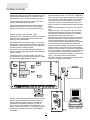
Telephone Terminals
“T I P ”, “R N G ”, “ T-1” a n d “R-1”
The wires from the RJ31-X telephone jack are
connected to these terminals in the following way.
Bell/Siren Terminals
“BELL +” and “BELL -”
These terminals are for powering bells or other devices
requiring a steady output voltage on alarm. The bell
output is fused for 5 amps. When connecting sirens
(speakers with siren driver already built-in), be sure to
observe the correct polarity. Connect the positive lead
to the “BELL +” terminal and the negative lead to the
“BELL -” terminal.
If no siren or bell is used, connect a 2200 ohm resistor
between “BELL +” and “BELL -”.
TIP
RNG
Green wire
Red wire
Incoming line from
telephone company
T-1
R-1
Brown wire
Grey wire
Outgoing line to
house telephone(s)
NOTE: For proper operation, there must be no other
telephone equipment connected between the control
panel and the telephone company’s facilities.
Ensure that plugs and jacks meet the dimension,
tolerance and metallic plating requirements of 47 C.F.R.
Part 68 Subpart F.
Battery Connections
Programmable Output Terminal “PGM”
Do not connect the battery or the transformer until the
wiring is complete. Connect the red battery lead to the
positive battery terminal and the black lead to the
negative battery terminal. If the connection is reversed
the battery fuse will blow.
The operation of the Programmable Output depends
upon which option is selected in the programming table.
See the Programming Manual for a list of options for the
“PGM” output. The “PGM” is a 3A (maximum) switch to
ground. A small relay, a buzzer or other DC operated
device may be connected between the 12 VDC “AUX”
(positive) terminal and the “PGM” (switched negative)
terminal to interface with controlled devices.
❶ Values shown are in conformance with UL specifications which
do not take into account current that may be available from a
stand-by battery.
13
SYSTEM
KEYPAD FUNCTIONS
Many of the functions in the PC4000 have limited
access so that only certain users may control several
options. The installer can program the 2nd Master Code
to enable it and have access to the entire panel’s
operations the same as the Grand Master.
System Master Codes
System Master Code users can access all end-user
options.
■ Partition Master Code users can access options
related to their partition.
■ All other types of users have options available to them
for their partitions.
All of the above mentioned keypad functions are listed in
the following pages.
■
Introduction
The LCD-4500 remote keypad provides complete
information and control of the PC4000 control panel.
The panel can be fully programmed from any keypad.
The LCD display provides alarm and status indication
for the alarm circuits as well as guiding the user in
operating the system.
■ The built-in buzzer lets the user hear correct key
entries and other alert signals.
pc4000_sysmstr_um_0225r0.p65
■ The 12 digit keypad is used for code entry and other
programming functions. All keypad entries are made
by pressing one key at a time.
■
■
The keypad is normally in the arm-disarm mode. In
this condition, the LCD message indicates the status
of the system. The “Enter Code to Arm System”
message comes on when all zones are closed. The
system can be directed to perform other functions
such as zone bypassing, displaying trouble
conditions, displaying alarm memory and
programming by entering one of the various [✱]
commands described below. Pressing the [#] key or
not making any key entry for 2 minutes always returns
the keypad to the arm-disarm mode.
Partitions
The PC4000 can have up to 128 zones. These zones
can be divided by the installer into 8 separate
partitions, that can be armed and disarmed separately.
Zones can be assigned to more than one partition.
Keypads are assigned to a specific partition, and there
can be more than one keypad per partition. User
access codes are assigned to one partition, but can
be enabled to work on other partitions in the access
code partition mask. System Master codes can arm
and disarm any partition from any keypad. The default
setting has only partition 1 enabled. To enable more
partitions, enter the Partition Area menu of the
Installer’s Programming section, and select to add/edit
the partition to be enabled.
15
System Master Codes are used for arming and
disarming the control panel, for viewing the armed/
disarmed status of the partitions, for programming
additional security codes and for entering ‘user
functions’. In the disarmed state, entering a Master
Code will cause a nine selection menu to be displayed
as follows:
[0] Arm Partition
[1] Arm Diff Part.
[2] Disarm Diff Part
[3] View Partitions
[4] Set System Time
[5] Set System Date
[6] System Reset
[7] Enable DLS Window
[8] # to Exit
[0] Arm Partition will arm the partition the keypad is on.
The keypad will display the message ‘Exit delay in
progress’ and the armed light will come on.
[1] Arm Diff Part. will show a menu of the other partitions
and their armed/disarmed status. R means it is
ready to be armed, N means it is not ready to be
armed, and A means the partition is armed. If the
partition status is R, then this partition can be
selected to be armed. If a partition is not enabled, it
will not be displayed.
[2] Disarm Diff Part will also show a menu of the other
partitions and their armed/disarmed status. Any
partition that shows the A for armed status can be
selected to be disarmed.
[3] View Partitions shows the status of the partitions. A
means armed, R means ready to be armed, and N
means not ready to be armed. If a partition is not
enabled, it will not be displayed.
[4] Set System Time programs the system’s 24 hour clock.
Enter 4 digits in 24 hour time to set the clock, the first 2
digits are the hour, the last 2 digits are the minutes. For
example, to program 2:35 pm, type in 1435.
[5] Set System Date programs the system’s calendar.
Enter 6 digits, the first two digits are the month, the
middle 2 digits are the day, and the last two digits
are the year. For example, to program Feb. 14, 1992
type 021492.
[6] System Reset. A System Reset turns off the power to
the COMBUS for 5 seconds and resets the main
panel. No programming will be lost and the time will
not have to be reprogrammed. A system reset should
be done if there is a COMBUS Communications fault
or an Internal fault.
[7] Enable DLS Window. The end user can enable ring
detect for 60 minutes to allow a computer to call the
panel. The installer can disable this function in the
DLS section of the installer’s programming.
[8] # to exit. If the user decides to do nothing, either
select this option, or press the [#] key to return to the
arm/disarm state.
The first System Master code has a default code of 1234.
This code is called the System Grand Master Code, and
is the only code that can be used to program other
System Master codes.
Installer’s Programming Code
Auto-bypass/Home-away Arming
A default installer’s programming code “4000” is
programmed into the PC4000. This code is used with
the [✱][8] command by the installer to gain access to
the system in order to enter panel or communicator
program information. The installer’s program code may
be changed by the installer.
If a correct security code is entered and you do not exit
the premises, the system will, at the end of the Exit delay
time, arm with interior zones automatically bypassed if
those interior zones have been programmed as “Homeaway” zones. These zones will remain bypassed until a
delay zone is tripped or [✱][1] is entered to reactivate
bypassed home-away zones.
This is a convenience feature for the user who wishes
to remain on the premises with the system armed. The
user does not have to manually bypass the home-away
zones.
To reactivate the Home-away zones that have been
automatically bypassed, press [✱][1]. This command is
a quick method of fully arming the system in residential
applications before going to bed.
Arming
Close all protected doors and windows and stop
movement in areas covered by motion detectors.
The “Enter Code to Arm System” message should be on
the LCD display. Check to see if [<][>] are displayed on
the LCD and press the [<][>] keys to view the extra
information if they are. The system cannot be armed
unless the “Enter Code to Arm System” or “Secure
System or Enter Code” message is displayed.
The “Secure System or Enter Code” message is used to
indicate to the user that a force armable zone is open,
and the partition can still be armed. After the partition is
armed, if the force armable zone is secured it will
become an active zone, and will cause an alarm if the
zone opens again.
To program a zone as force armable, see “Zone
Options” in the Programming Manual.
Enter a [4 Digit Security Code]. As each digit is entered
the keypad will beep.
■ If the security code was entered incorrectly, the
keypad will beep steadily for 2 seconds.
■ If the code was entered correctly but the message
“Secure System Before Arming” is on the display, the
keypad will beep quickly followed by a steady tone.
■ When the correct code is entered, the “Exit delay in
Progress” message will come on and the keypad will
beep quickly.
If enabled, a timer will appear in the right side of the
display indicating the remaining time in the exit
delay. Exit the premises through the designated exitentry door. At the end of the allowed exit time the
message on the keypad will change to “Enter Code to
Disarm System”. See the “Installer’s Programming
[✱][8] Command” section on how to change the exit
time. Also see “Quick-arm” and “At-home Arm”.
Zone Bypassing
[✱]+[1]
A bypassed zone will not cause an alarm. If a zone is
bypassed the panel may be armed even if the zone is
open. Use zone bypassing when access is needed to
part of the protected area. Also, damaged wiring or
contacts on a zone may be temporarily bypassed until
repairs can be made so that the panel can be armed.
To bypass zones, enter [✱][1]. An access code may be
required if the installer has enabled that option. A menu
will appear.
[0] Bypass Zones - This selection takes you
immediately to bypassing zones. Use the [<][>] to
select the zones to be bypassed and press the [✱] key
to select the zone. A “✱” will appear beside the zone
label to indicate the zone will be bypassed when the
partition is armed.
A zone search routine allows the user to find the desired
zone to bypass by entering in the first letter of the zone
to search for, and pressing one of the [<][>] keys. The
[<] key will search for the first zone on the partition that
begins with the letter selected. The [>] key will search
for the last zone on the partition that begins with the
letter selected.
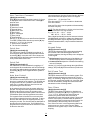
The letters of the alphabet have been divided up among
the 1-9 number keys on the keypad.
Disarming
Enter the premises through the designated exit-entry
door. The keypad buzzer will be on. Go to the keypad
and enter the [4 digit security code]. If an error is made
in entering the code, press the [#] key and enter the
code again. The “Armed” light will go out and the
keypad buzzer will stop. The correct security code must
be entered before the allowed entry time expires. To
change the entry time see “Installers Programming
Command”, [✱][8]. If an alarm occurred while the panel
was armed, the “View Memory” message will be on the
display with the zone name for the zone that caused the
alarm. The display will keep those messages on for two
minutes or until the [#] key is pressed to return the panel
to the normal arm-disarm mode.
16
1
2
3
ABC
DEF
G HI
4
5
6
JKL
M NO
PQR
7
8
9
STU
VWX
YZ
Battery Trouble...A battery trouble will be displayed
and can be reported if the battery is 11.3 volts or less,
disconnected or the battery fuse fails. Battery voltage is
checked once every 4 minutes, so the battery trouble
may not restore instantly when the battery is restored.
Initiating a bell/comm test will check the battery voltage.
AC Trouble...There is no audible annunciation on AC
power failure. The system “Trouble” light will come ON
but the audible indication will not sound until there is
a low battery condition. Transmission delay can be
programmed for 000 to 255 minutes.
Aux Supply Troub...An Aux trouble is generated if the
aux fuse on the main panel opens, or if the Aux or SW
Aux terminals are overloaded.
TLM Trouble...A telephone line trouble is generated
when the line voltage drops below 3 volts for more
than 30 seconds. A keypad trouble is generated when
the system is disarmed and if selected, a local alarm
sounds when the panel is armed.
FTC Trouble...If the digital communicator is
unsuccessful in communicating with the monitoring
station after 10 attempts, a Fail to Communicate trouble
is generated. If a later attempt to communicate is
successful the trouble is cleared.
Bell Cct Trouble...If the bell fuse opens or the bell
circuit is open, a keypad trouble and a Bell Circuit
trouble transmission are generated.
Fire Trouble...If a FIRE loop is open circuit, a keypad
trouble and a Fire Loop trouble transmission are
generated. A trouble on the FIRE loop will
unconditionally initiate an audible and visual (trouble
light) indication on the keypad. This means that even if
any other previous trouble has been silenced, a FIRE
loop trouble will restart the keypad buzzer.
Loss of Time...When the PC4000 is powered up, the
internal time of day clock needs to be set to the correct
time. This trouble is cleared when an attempt is made to
reset the internal time of day clock. See “System Master
Codes” for resetting the time of day clock.
Module Com Fault...The panel has lost
communications with a module and cannot recover it.
Check to see if the module is connected properly, then
do a system reset. See “Diagnostics” in the
Programming Manual to determine which module is not
communicating.
COMBUS Low Pwr...Modules are not getting enough
voltage from the COMBUS. Check for proper connection
of COMBUS, or the COMBUS needs to be repowered.
See 4204 modules and the 4204 PGM COMBUS power
option for supplying voltage to the COMBUS. See
“Diagnostics” in the Programming Manual to determine
which module has low voltage.
Internal Fault...a problem has occurred with the
COMBUS microprocessors. If this trouble occurs, check
connections to the COMBUS and do a system reset.
For example, to search for the first zone that begins with
the letter “R”, press the [6] key three times until the letter
“R” is displayed on the keypad between the “< >”.
Press the [>] key, the first zone that begins with the letter
“R” will then be displayed.
[1] Clear Bypasses - Removes all bypasses from all the
zones in your partition and then takes you to
bypassing zones. None of the zones will have a “✱”
beside them.
[2] Recall Bypasses - Selecting this will bypass all the
same zones that were selected the last time zones
were bypassed. This is for users that are always
bypassing the same zones.
[3] Previous Menu - takes you back to the “Enter Code
to Arm System”.
When the PC4000 is programmed, the ability to
bypass certain zones may be eliminated. In this case,
the “✱” message for those zones will not come on in
response to the bypass command. Zone bypasses are
automatically cancelled when the panel is disarmed.
The installer can choose by partition if a code must be
entered with [✱]+[1] to bypass zones. Only the zones
assigned to the same partition of the system as the
keypad can be bypassed. Only certain types of access
codes can be used to bypass (See [✱][5]).
NOTE: At no time can any armed zone be bypassed.
Trouble Display
[✱]+[2]
The PC4000 continuously monitors a number of possible
trouble conditions. If one of these conditions occurs, the
keypad “TROUBLE” indicator will light and the audible
indication will sound (two short beeps every 10
seconds). When the [#] key is pressed the audible
indication will stop, but the trouble indicator light will
remain ON until the trouble is cleared. Trouble
conditions can also be transmitted to the monitoring
station. Press the [✱] then [2] keys to display the types
of trouble conditions.
■ Battery Trouble
■ AC Trouble
■ Aux Supply Troub
■ TLM Trouble
■ FTC Trouble
■ Bell Cct Trouble
■ Fire Trouble
■ Loss of Time
■ Module Com Fault
■ COMBUS Low Pwr
■ Internal Fault
■ 4204 Battery TBL
■ 4204 AC Trouble
■ 4204 Aux Trouble
Press [#] to return to “READY”.
17
4204 Battery TBL...If any PC4204 relay output
module’s battery drops below 11.3 volts, a battery
trouble is generated.
To determine which of the PC4204’s has the low battery,
check the reporting code transmitted to the monitoring
station or check the event buffer printout if there is a
printer attached, or through downloading. The battery
voltage is checked once every 4 minutes. So the battery
trouble may not restore instantly when the battery
voltage is restored.
4204 AC Trouble...If any PC4204 relay output module
loses incoming AC power, the keypad trouble light will
indicate a 4204 AC trouble. But there will be no audible
annunciation until there is also a low battery condition.
The PC4204 AC troubles will be transmitted to the
monitoring station immediately.
4204 AUX Trouble...If the Aux fuse on any PC4204
relay module should open or if the Aux supply is
overloaded, a 4204 Aux trouble is generated.
User Programming Commands
Alarm Memory Display
[✱]+[3]
Press [✱] then [3] to enter the alarm memory mode.
Any alarm caused during the last armed period will be
displayed. The “View Memory” message will only be
displayed when an alarm occurred during the last
armed period.
Press [#] to return to “READY”.
Sensor Reset
[✱]+[4]
The Main Bell, Switched Auxiliary Supply and pgm
outputs can be programmed by the installer to be a
‘Sensor Reset’. (See ‘Sensor Reset’ in the programming
guide). This option allows the user to activate these
outputs from the keypad by pressing [✱][4]. The
keypad will display ‘Sensor Reset in Progress..’ and a
countdown timer will show how long the sensor reset will
be active. The Sensor Reset can be from 0 to 255
seconds, which is programmed by the installer. (See
PGM Pulse Times, Utility/Sensor section in the
Programming Guide).
18
[✱]+[5]+[Master Code]
The [✱][5] Access Codes programming command is
used to program additional access codes of any type.
The PC4000 has 128 access codes. In the Installer’s
Programming Section, these codes are divided up and
assigned to partitions, or are turned into System Master
Codes, which have control over all partitions. This must
be done before the user can program the access code
and the code type.
The first code is the System Grand Master Code. Only
the Installer can change this code, unless the Installer
has enabled the Installer’s Programming Commands to
make the System Master Code 001 changeable.
There are 11 types of codes:
System Grand Master Code has no limitations to its
use. It can create or delete other System Master Codes
or perform any other user feature the PC4000 user is
capable of doing.
System Master Codes can do anything on the system.
They can be used to bypass, view memory and view
trouble, etc. They may be used to create or delete any
type of code except for System Master Codes.
Partition Master Codes has unlimited access to their
own partition. These types of codes can create, delete or
alter any code type in their partition other than System
Masters. They can only assign users to their own
partition. They cannot program the group mask, to allow
access codes to be used in other partitions.
Arm/Disarm/Bypass Access Code may arm, disarm or
bypass on the partition to which it has been assigned.
Arm / Disarm Access Code can only be used to arm
or disarm the partition to which it has been assigned.
Arm Only Access Code can only arm the partition to
which it has been assigned.
Door Strike Code can only activate [✱][7] utility output
on the partition it belongs to if the partition is disarmed.
Log Only Code will only put a record on to the event
buffer.
Arm / Disarm /OTU Code may arm and disarm the
partition to which it has been assigned. The code is
erased when used to arm.
Arm Only OTU Code may only arm a partition. The
code is erased when used to arm.
Door Strike OTU Code is erased after used.
NOTE: OTU stands for One Time Use.
Programming Additional Access Codes
Using a System or Partition Master Code
1 Press the [✱], then [5] key to enter the User
Programming Commands. The keypad will display
‘Enter Master Access Code’. Either a System Master
or Partition Master Access Code may be entered.
■ If a System Grand Master Code is entered, the user
will have the option of programming System Master
Codes or Access codes in any partition.
■ If any other System Master Code is entered, the user
will have the option of programming Access Codes in
any partition.
■ If a Partition Master Code is entered, only the Access
Codes in the same partition can be programmed.
2 Upon entering the partition of codes to program, the
display will show for 3 seconds the number of free
codes and the total number of codes for that partition.
For example, if 10 codes have been assigned to a
partition by the installer, and the user has 4 access
codes already programmed, the display will say ‘6
codes free, 10 codes total’.
3 Next, ‘Sel Code (1) <>’ will be shown on the top line
of the LCD display. The number in brackets
represents which of the codes in that partition is being
programmed. For example, if 10 access codes were
assigned to the partition, the number in the brackets
would range from 1 to 10 as you toggle through the
codes using the [<][>] keys.
‘Access Code’ along with a number showing which of
the 128 access codes is being programmed will be
shown at the bottom line of the LCD display. For
example, if you have 5 codes assigned to be System
Master codes, and 10 codes assigned to partition 1,
when programming the System Master Codes the
display will show ‘Access Code 1’ to ‘Access Code 5’.
When programming codes in partition 1, the display
will show ‘Access Code 6’ to ‘Access Code 15’.
The Installer must be careful whenever he reassigns
additional codes to a partition or assigns System Master
codes after the Access codes have been programmed.
For example, if the system originally had 5 System
Master Codes and 10 codes in Partition 1, with the
access codes programmed and he then assigns 10
codes to be System Masters, 5 of the codes in Partition
1 will now be assigned to System Masters, and 5 codes
from Partition 2 will now be Partition 1 Codes, and so on.
NOTE: If the installer changes the number of codes
assigned to a partition, he must also reprogram all the
access codes.
4 Use the [<][>] keys to toggle to the code to be
programmed, and press the [✱] key to select. A menu
for editing access codes will be displayed. The menu
selections are:
19
[0] Program Code - When selected, the keypad will
display ‘Enter Digits’ and what is currently programmed
for that access code. Enter in the 4 digit code. Do not
press [✱] or [#] while entering the access code. If you
do not wish to change the code, use the [<][>] keys to
exit. When you have finished entering the code, if you
are programming System Master codes, the keypad will
return to selecting which System Master code to
program. If you were programming Access Codes for a
partition, the keypad will ask you to select the class of
the code being programmed. See ‘Edit Code Class’.
[1] Erase Code - If a code is no longer needed, this
selection will erase the code. It does not erase the code
name.
[2] Edit Code Class - Do not select this section when
programming System Master Codes, only when
programming partition access codes. Your selections of
code class types are Partition Master codes, Arm/
Disarm/Bypass, Arm/Disarm, Arm Only, Door Strike, Log
Only, Arm/Disarm/OTU, Arm Only OTU and Door Strike
OTU.
[3] Edit Code Name - This section is for editing the
access code name. If a PC4400 RS-232 module is
enrolled on the system, the access code name is
printed out when the code is used to arm and disarm.
Also, the access code name helps keep track of which
access code belongs to who when programming
codes. See ‘Custom Zone ID’ in the programming
manual for letter entry and options menu.
[4] Edit Part. Mask - Only System Master codes can
program the Partition Mask for access codes.
The Partition Mask is used to enable a code to work on
more than one partition, so that the access codes do
not have to be repeated if you want them to work on
more than one partition. For example, if an arm, disarm
or bypass access code is programmed under partition
2, and set in the partition mask to work on partitions 1,
2 and 3, the code can be entered on any keypad
belonging to partitions 1, 2 or 3. Whichever partition
the code is entered, will be armed or disarmed.
Access codes cannot be used to arm and disarm other
partitions from one keypad, like System Master codes.
DO NOT SELECT THIS SECTION WHEN
PROGRAMMING SYSTEM MASTER CODES.
It is not necessary to program the partition mask for the
partition that the access code has been programmed in.
For example, if the code has been programmed in
partition 4, and it is not going to have access to any other
partition, none of the partition mask settings need to be
programmed including partition 4. The only place it will
make a difference is viewing partitions in the [✱][6] User
Function Commands. The user can only view the status of
partitions that their codes have been enabled for.
[5] (#) To Exit - select this option to exit this menu, or
press the # key to exit this menu.
5 To exit the code programming mode press [#].
User Functions Command
[✱]+[6]+[Access Code]
Enter [✱][6][Access Code] and then use the [<][>] keys
to display the items of the function menu. Press [✱] to
select an item.
[0] Quick Arm
[1] Quick Exit
[2] Auto Arm Control
[3] Keypad Setup
[4] Bell / Comm Test
[5] Door Chime
[6] Spec. Messages
[7] User Call Up
[8] View Partitions
Item [0], [1], [5] and [6] turn on and off various functions.
To enable or disable these functions, press the [✱] key
to toggle “Y ”or “N” on the keypad.
Y - The function is enabled
N - The function is disabled
Upon selecting the Auto Arm Control function, the Auto
Arm Control menu will appear on the LCD keypad.
[0] Auto Arm
[1] Auto Arm Time
Auto Arm toggles “Y” or “N” to enable or disable the
Auto Arm function.
Auto Arm Time is the time the partition will automatically
arm itself every day.
NOTE: The Auto Arm time is a 24 hour clock and times
must be entered as two digit numbers.
E.g. HH - 01, 02,.....10,11,.....23,24
MM - 00, 01,.....35,36.....58,59
Enter 4 digits representing the time in hours and minutes
(HH:MM) based on 24 hour or military time. Always enter
a leading zero where only one digit is required, 8:05 am
would be entered as 0805, 1:30 pm would be entered as
1330.
Keypad Setup
Quick Arm
[✱]+[6]+[Access Code]+[0]
The “Quick Arm” feature is enabled by toggling to “Y”
on the keypad. When enabled the panel can be armed
by entering [✱][0]. Users with a One Time Use access
code should not use this feature because the OTU code
is only erased when used to arm.
Quick Exit
[✱]+[6]+[Access Code]+[1]
The “Quick Exit” function is enabled by toggling to “Y”
on the keypad. When enabled the user can exit through
any delay zone without altering the status of the system,
by entering [✱]+[0] on the keypad while the system is
armed.
Auto Arm Control
[✱]+[6]+[Access Code]+[2]
The Auto Arm Control options can only be accessed if
Auto Arm is enabled for the partition. The PC4000 can
be programmed to arm a partition at the same time
each day, by enabling the Auto Arm function and
programming the Auto Arm time.
At the selected Auto Arm time, the system will give a
pre-alert. The keypad buzzer begins to sound and the
Bell/Siren will pulse once every 10 seconds to alert
anyone on the premises that the system is about to arm.
The Bell/Siren pulse can be programmed to be silent.
The keypad buzzer will sound for one minute before
Auto Arming unless the Auto Arm is aborted. To abort
the Auto Arm and silence the keypad press any key
during the pre-alert. The Auto Arm will be attempted at
the same time the following day. The PC4000 can be
programmed to require a code to be entered for a user
to abort the Auto Arm.
20
[✱]+[6]+[Access Code]+[3]
This function allows the user to adjust the backlighting
and contrast of the LCD-4500 keypad. When this
function is selected, the Keypad Setup menu will appear
on the keypad.
■ Bright Control adjusts the level of backlighting on
the LCD display and the backlighting on the keys.
■ Contrast Control adjusts the contrast of the lettering
on the LCD display.
Use the [<][>] keys to toggle through the eight different
settings, and press [✱] to select the level of preference.
Bell / Comm Test
[✱]+[6]+[Access Code]+[4]
This option allows the end user to test the system. This
option activates all outputs programmed for ‘Fire and
Burg’, ‘Inv Fire/Burg’, ‘Burg Only’ and ‘Inv Burg Only’ for
two seconds, sounds the keypad’s for 2 seconds, tests
the main board battery voltage and sends a test code
transmission to the monitoring station.
Door Chime
[✱]+[6]+[Access Code]+[5]
The Door Chime feature is enabled or disabled on a
partition by pressing the [✱] key to toggle from “N” to
“Y” or “Y” to “N”. When the door chime feature is
enabled, any zone that has been selected as
chimeable will cause the keypad to beep 5 times each
time the zone opens or restores while the partition is
disarmed (Note that Fire zones and 24 hour zones are
never disarmed, therefore they can never chime).
See “Chime Function” in the Programming Manual to
enable a zone to use the chime function. While
disarmed zone bypass may be used to eliminate the
beeping.
Spec. Messages
Installers’ Programming Commands
[✱]+[6]+[Access Code]+[6]
This function enables two special event messages to
be displayed when one of the special events occurs.
The first message is “Fail to Arm”. It will be displayed
if the user is unable to arm the partition after entering
a valid code (E.g. Because of activity on the zones.).
The second message is “Alarm When Armed”. It will
be displayed if an alarm occurred during the previous
armed period.
See “Event Messages” in the Programming Guide.
[✱]+[8]+[Installer’s Code]
The PC4000 is completely programmed from the keypad
by using commands in the [✱][8] section. The commands
are described in detail in the Programming Manual.
“At-h ome” Arming
[✱]+[9]+[Access Code]
Entering [✱], [9] before the arming code, arms the panel
without any entry delay on the delay zones and
bypasses zones that are defined as “Home-away”. This
command is used for arming the system while at home.
Once the panel is Armed in this mode, using [✱], [1] will
remove the bypass from those zones defined as
“Home-away” if they have NOT been manually
bypassed. The [✱][1] command, as used here, only
removes the bypass from zones that were automatically
bypassed with the [✱][9] command.
The armed light will flash to indicate the partition is “Athome” armed.
User Call up
[✱]+[6]+[Access Code]+[7]
This function must be enabled by the installer. When
selected, the panel will call the downloading computer.
The downloading computer must be waiting for the
panel to call before downloading can be performed.
View Partitions
[✱]+[6]+[Access Code]+[8]
This function will allow the user to view the status of
other partitions that their access code has been enabled
for in the access code partition mask. The partition
mask is programmed in the [✱][5] User Programming
commands, when programming the user access codes.
For example, if an access code has been enabled in the
partition mask for partitions 1, 2 and 5, they can only
view the status of these partitions.
To view the partitions status, press the [<] or [>] key to
toggle through the partitions. The partition labels will be
displayed along with a letter to the far right. The letter
shows the status of that partition.
A means the partition is Armed,
R means the partition is secure and Ready to be
armed, and
N means Not ready to be armed because zones are
not secure.
This function must be enabled by the installer for the
user to be able to enter this section. If the installer
does not enable this section, you will hear an error tone
when selecting this section. See “View Partns” in the
Programming Manual for enabling the “View Partns”
feature.
Quick Arm
[✱]+[0]
Entering [✱][0] is accepted as a valid arming code when
the “Quick Arm” feature is activated. This command is
often used when individuals are required to arm the
system but not disarm it. This could be used with home
visitors in the case of a residential alarm or junior
employees and maintenance staff in the case of a
commercial alarm. See instructions in the “[✱][6] User
Functions Command” section for activating the “Quick
Arm” feature.
Quick Exit
[✱]+[0] When Armed
Entering [✱], [0] when the system is fully armed will
allow the user 2 minutes to exit the premises through
any delay zone without altering the status of the system
if the “Quick Exit” feature is enabled. After [✱], [0] is
entered into an armed system, one and only one delay
loop may be tripped. Any additional activity on any
other active loop will cause that loop to begin its alarm
sequence. Quick exit activation will be logged onto the
event buffer.
Keypad Zones
Utility Output
There are three zones which can be activated from the
keypad. The alarm and restoral codes for keypad
zones are programmed using the [✱][8] command.
Pressing the [F] key for 2 seconds activates a fire alarm.
The fire alarm sounds the siren/bell in a pulsed fashion.
Pressing the [A] key for 2 seconds activates a silent
emergency keypad zone.
Pressing the [P] key for 2 seconds activates a silent
panic keypad zone.
NOTE: See ‘KEYPAD TOG OPT’ in the Programming
Guide for changing keypad zones options.
[✱]+[7] or [✱]+[7]+[Access Code]
The Bell output terminals, switched auxiliary terminals or
any pgm terminals can be programmed for Utility
Output (see Utility Output in the installer’s programming
guide). Any output that is programmed for utility output
will be activated when the user enters [✱][7]. See ‘Pgm
pulse times’ for programming how long the outputs are
activated and see ‘Util Req Code’ for programming
whether a utility output requires an access code to be
activated.
21
PRINTER SETUP
The PC4400 module is used for sending serial communications through an RS232
port to a local printer for on site monitoring of the PC4000.
All programming of the PC4400 is done through the PC4000.
The printer can be located up to 200 ft (61 m) away from the PC4400.
An 80 character printer is strongly recommended.
Configuring the Printer
1. Serial interface
2. Baud rate = 300, 600, 1200 or 2400 (PC4000 default setting = 1200 baud)
3. Parity = None
4. Character length = 8 bits
5. Auto line feed = Off
6. American/Canadian character set
7. DTR Protocol or XON/XOFF (by default the PC4000 sends DTR protocol)
The PC4400 comes complete with a DB-25 (male) modular jack adapter, and a 6 ft
(2 m) six wire extension cord. A longer extension cord can be used if required, up
to 200 ft (61 m) maximum.
Power down the PC4000, PC4400 and the printer.
Connect one end of the extension cord into the PC4400, and the other end into the
DB-25 modular jack adapter.
Connect the DB-25 modular jack into the RS232 serial port of the printer.
See the PC4400 wiring diagram.
Power up the printer, then the PC4000 and PC4400. If the PC4400 is already
enrolled and the printer is on line, the PC4400 will begin transmitting to the printer.
The following is a sample of a printout from the serial printer:
Partition Label
Date
Time Event
System Area
05/26/94 11:01 HARDWARE DEFAULT
System Area
05/27/94 13:25 RS232 PRINTER ON LINE
Partition...2 05/27/94 15:00 ALARM ZONE 008
System Area
06/01/94 08:10 4204 #005 BATTERY TBL ALARM
System Area
06/02/94 08:13 Tamper LCD #001
Most actions on the PC4000 that require an access code are logged to the event
buffer, and are sent to the printer. For example:
Partition...1
05/27/94 13:40 CLOSING ACCESS CODE 001
Partition...5
05/27/94 13:51 INSTALLER LEAD IN
Partition...4
05/29/94 15:30 UTIL OUTPUT CODE ACCESS CODE 054
Partition...1
06/01/94 08:05 SW AUX CODE ACCESS CODE 008
Partition...8
06/01/94 08:01 SYS MASTER MENU ACCESS CODE 002
Partition...1
06/02/94 23:59 BYPASS WITH CODE ACCESS CODE 004
23
The partition labels, access code names and zone labels can be changed in the
PC4000. See “PAR NAME LABEL” in the Programming Manual for programming
partition labels. See “EDIT CODE NAME” in the System Manual under [✱][5]
commands to program the access code names. See “ZONE LABEL” in the
Programming Manual for programming zone labels. The printout will then be as
follows:
West Plaza
06/04/94 02:05 CLOSING Head Custodian
Assembly Plant 06/04/94 02:09 ALARM Front Office
The PC4400 sends events to the printer as they occur.
If the printer is off line or disconnected, the PC4000 keeps new events in memory
until they are ready to be printed.
When the printer is brought back on line, the PC4400 will send the new events to
the printer. If 384 new events occur before the printer is brought back on line (384
events = 75% of the buffer), the PC4000 will send the “Buf Near Full” reporting
code to the monitoring station. (See ‘Maint Rep Codes” in the Programming Flow
Charts for programming the “Buf Near Full” reporting code). If over 512 events
occur before the printer is brought back on line, the oldest events will be
overwritten.
The PC4000 contains an event buffer which stores the last 512 events.
To print out the entire event buffer, enter the “Prn Entire Buff” section in installers
programming [✱][8][Installer’s Code][3][0].
The printout will begin with the oldest event in memory and end at the most recent
one.
24
DOWNLOADING
Downloading is the use of an IBM compatible computer
to program the PC4000 system. The computer can be
located either on site, or communicate over the phone.
Downloading with an On-site Computer
Phone lines are not necessary to download to the panel
if the computer is at the same location as the PC4000.
The tip and ring lines of the modem can be directly
connected to the tip and ring terminals on the panel.
A DTS-1 must be connected to the lines and in the local
mode.
Program the downloading access code and panel I.D.
code.
Program a zone for “Forced Answer”. See “Zone Type”
in the Programming Guide. This zone is only meant to
be temporary, to initiate downloading. It can later be
changed back to the required zone type.
Make sure the access code and panel I.D. code are the
same in the panel and computer. A telephone number
must be programmed into the computer to initiate
communications, and any number entries are accepted.
Activate the computer to call the panel. When the
computer indicates “Dialing...No dial tone”, press the
dial tone button on the DTS-1 until the modem dialing
the phone number is heard. Trip the zone programmed
for “Forced Answer”. The panel will seize the phone line
and initiate communications with the computer. The
computer will then display the message “Connected to
panel...” and continue with communications.
The DTS-1 must remain connected to the phone line in
local mode during the downloading.
The DSC downloading package version 5.0 or later
supports downloading to the PC4000.
See the downloading manual for details on specific
capabilities and the “DLS” section in the PC4000
Programming Guide for programming DLS options.
Downloading over phone lines
Make sure the “TIP” and “RNG” terminals are connected
to the phone line. Program the access code and the
panel I.D. code in the PC4000.
The PC4000 panel can call the computer, or vice versa.
“Ring Detect” or “User enabs DLS” must be enabled for
the PC4000 to detect when the phone line is ringing, the
time the computer is calling the panel.
The number of times the panel allows the phone line to
ring before answering is programmable, and the default
setting is 8 rings.
If the panel calls the computer, enable “User call up”
and program the phone number of the computer. Initiate
the call by entering [✱][6][Master Code][7].
The TM1 or RJ31-X are jacks which connect single wires
into one end, and a telephone cord into the other end.
Although this jack is not necessary, it simplifies the
connection of the PC4000 to a modem. If a TM1 or
RJ31-X are not readily available, use a telephone cord.
Plug one end into the modem, cut off the other end, and
wire the green and red wires into the TIP and RNG on
the PC4000.
25
LIMITED
WARRANTY
Digital Security Controls Ltd. warrants that for a period of
twelve months from the date of purchase, the product
shall be free of defects in materials and workmanship
under normal use and that in fulfillment of any breach of
such warranty, Digital Security Controls Ltd. shall, at its
option, repair or replace the defective equipment upon
return of the equipment to its factory. This warranty
applies only to defects in parts and workmanship and
not to damage incurred in shipping or handling, or
damage due to causes beyond the control of Digital
Security Controls Ltd. such as lightning, excessive
voltage, mechanical shock, water damage, or damage
arising out of abuse, alteration or improper application of
the equipment.
The foregoing warranty shall apply only to the original
buyer, and is and shall be in lieu of any and all other
warranties, whether expressed or implied and of all other
obligations or liabilities on the part of Digital Security
Controls Ltd. This warranty contains the entire warranty.
Digital Security Controls Ltd. neither assumes, nor
authorizes any other person purporting to act on its
behalf to modify or to change this warranty, nor to
assume for it any other warranty or liability concerning
this product.
In no event shall Digital Security Controls Ltd. be liable
for any direct or indirect or consequential damages, loss
of anticipated profits, loss of time or any other losses
incurred by the buyer in connection with the purchase,
installation or operation or failure of this product.
Warning
Digital Security Controls Ltd. recommends that the entire
system be completely tested on a regular basis.
However, despite frequent testing, and due to, but not
limited to, criminal tampering or electrical disruption, it is
possible for this product to fail to perform as expected.
26
© 1993 Digital Security Controls Ltd.
Toronto, Canada
Tel:800 387 3630 FAX: 905 760 3034
29000223 R0
THE BASIC SYSTEM
Inside the box you should find the following items:
➊
4 Manuals
■
■
■
■
Book 1 - PC4000 Programming Flow Charts
For quick reference. It displays the flow charts used to
operate and program the PC4000.
Book 2 - PC4000 Programming Work Sheets
Used by the installer to record installer’s programming and
system layout.
Book 3 - PC4000 Programming Manual
Explains each section of installer’s programming.
Book 4 - PC4000 System Manual
Introduces the PC4000, explains the hookup and wiring,
and user’s programming and functions.
➋
1 PC4000 Main Control Board
➌
1 LCD4500 Remote Keypad
➍
1 Main Control Cabinet
➎
1 Hardware Package (EOL Resistors, Plastic Stand-offs etc)
Digital Security Controls Ltd.
Toronto, Canada
Tel.: 800 387 3630 FAX: 905 760 3034
PC4000 NEW FEATURES FOR VERSION 1.3
System Manual (Book 4)
1. Partition Mask ... Page 19
Access codes can be enabled for more than one partition.
2. “Secure System or Enter Code” ... Page 16
The message is displayed when a force armable zone is open, to indicate to the user that the partition can be
armed with the zone open.
3. Armed Light Flashes when “At-Home” Armed ... Page 21
The armed light will flash to indicate the partition has been armed in the [✱][9] At-home armed mode.
4. Keypad Trouble Indication for PC4204’s ... Page 17,18
[✱][2] Troubles include PC4204 AC, Battery and Aux Supply Troubles.
5. Hardware Reset ... Page 5
The zone 1 and PGM output terminals on the main panel can be shorted to reset the panel to factory defaults.
Programming Manual (Book 3)
6. XTAL Timebase ... Page 8
An option to have the 24 hour clock timing to be internally produced rather than be taken from the 60 Hz of
the incoming 120 Volts AC.
7. FTC Audible Bell ... Page 23
A failure to communicate with the monitoring station can be annunciated by the bells sounding while a
partition is armed.
8. TLM + Alarm Bell ... Page 23
An option to have the bells sound if an alarm occurs (including silent alarms) while there is a telephone line
trouble.
9. Ringback ... Page 23
An option to have the keypads beep to annunciate when the PC4000 has successfully communicated with the
monitoring station.
10. European Pulse Dialing ... Page 24
An option to use American pulse dialing or European pulse dialing.
11. Second Master Reporting Codes ... Page 27
The Second Grand Master Access Code now has its own opening and closing reporting codes when it is
used to arm and disarm.
12. PC4216 Zone Follower Option ... Page 30
The PC4216 can follow any group of 16 zones. When a zone is open the output is active. When the zone is
closed the output is inactive.
13. Zone Follower Option For PGM OUTPUTS ... Page 33
All Outputs (SW Aux, Main Bell, Main Panel PGM Output, PC4204 Outputs, PC4216 Custom PGM Array) can
be programmed to follow zones.
14. Zone Alarms Option For PGM OUTPUTS ... Page 33
All Outputs (SW Aux, Main Bell, Main Panel PGM Output, PC4204 Outputs, PC4216 Custom PGM Array) can
be programmed to annunciate alarms for individual zones. When a zone goes into alarm, the output will latch
active to annunciate an alarm.
15. Zone Follows + Alarms ... Page 9
An option to have all outputs programmed as zone followers to be an alarm annunciator when armed, and to
be a zone follower when disarmed.
16. Surgard 4/3 DTMF Communications Format ... Page 15,19
A 4/3 DTMF communications format for transmitting to a Surgard receiver.
17. Installer’s Lockout ... Page 5
Prevents the Installer’s code and the downloading access code from being reset to factory default when a
software or hardware reset occurs.
18. PC ID Restores ... Page 23
If this option is enabled the PC4000 will transmit the zone restoral reporting codes instead of the zone alarm
reporting codes for partial closing identification.