1
Contents
Contents
Warnings . . . . . . . . . . . . . . . . . . . . . . . . . . . . . . . . . . . . .2
Safety Instructions . . . . . . . . . . . . . . . . . . . . . . . . . . . . .3~4
Introduction
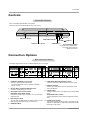
Controls and Connection Options . . . . . . . . . . . .7
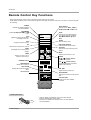
Remote Control Key Functions . . . . . . . . . . . . . .8
Installation
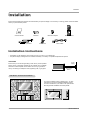
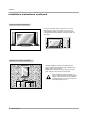
Installation Instruction . . . . . . . . . . . . . . . . . . . .9~10
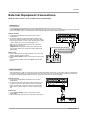
External Equipment Connections . . . . . . . . . .11~14
VCR Setup . . . . . . . . . . . . . . . . . . . . . . . . . . . .11
Cable TV Setup . . . . . . . . . . . . . . . . . . . . . . . .11
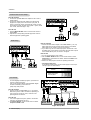
External A/V Source Setup . . . . . . . . . . . . . . . .12
DVD Setup . . . . . . . . . . . . . . . . . . . . . . . . . . . .12
DTV Setup . . . . . . . . . . . . . . . . . . . . . . . . . . . .12
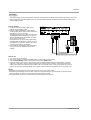
PC Setup . . . . . . . . . . . . . . . . . . . . . . . . . .13~14
Operation
Turning on the Monitor . . . . . . . . . . . . . . . . . . . . .15
Menu Language Selection . . . . . . . . . . . . . . . . . .15
Picture Menu Options
APC (Auto Picture Control) . . . . . . . . . . . . . . . .16
Manual Picture Control . . . . . . . . . . . . . . . . . . .16
Auto Color Temperature Control . . . . . . . . . . . .16
Manual Color Temperature Control . . . . . . . . . .16
Sound Menu Options
DASP (Digital Auto Sound Processing) . . . . . . .17
Manual Sound Control . . . . . . . . . . . . . . . . . . .17
AVL (Auto Volume Leveler) . . . . . . . . . . . . . . . .17
Timer Menu Options
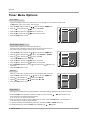
Clock Setup . . . . . . . . . . . . . . . . . . . . . . . . . . .18
On/Off Timers Setup . . . . . . . . . . . . . . . . . . . . .18
Auto Off . . . . . . . . . . . . . . . . . . . . . . . . . . . . . .18
Sleep Timer . . . . . . . . . . . . . . . . . . . . . . . . . . .18
Special Menu Options
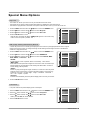
Key Lock . . . . . . . . . . . . . . . . . . . . . . . . . . . . .19
ISM (Image Sticking Minimization) Method . . . .19
Low power . . . . . . . . . . . . . . . . . . . . . . . . . . . .19
Menu Rotation For Vertical Viewing . . . . . . . . . .20
Screen Menu Options
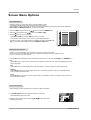
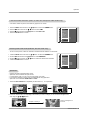
Auto Adjustment . . . . . . . . . . . . . . . . . . . . . . . .21
Setting Picture Format . . . . . . . . . . . . . . . . . . .21
Picture Size Zoom . . . . . . . . . . . . . . . . . . . . . .21
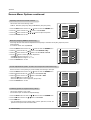
Adjusting Horizontal/Vertical Position . . . . . . . .22
Manual Configure . . . . . . . . . . . . . . . . . . . . . . .22
Screen Adjustments . . . . . . . . . . . . . . . . . . . . .22
Initializing . . . . . . . . . . . . . . . . . . . . . . . . . . . . .22
Luminance Noise Reduction . . . . . . . . . . . . . . .23
Selecting Wide VGA mode . . . . . . . . . . . . . . . .23
Split Zoom . . . . . . . . . . . . . . . . . . . . . . . . . . . .23
PIP (Picture In Picture) Feature
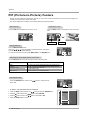
Watching PIP . . . . . . . . . . . . . . . . . . . . . . . . . .24
Swapping PIP . . . . . . . . . . . . . . . . . . . . . . . . . .24
Moving PIP . . . . . . . . . . . . . . . . . . . . . . . . . . . .24
Selecting a Input Signal Source for PIP . . . . . . .24
PIP Aspect Ratio . . . . . . . . . . . . . . . . . . . . . . . .24
Double Window Setup Options
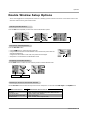
Watching Double Window . . . . . . . . . . . . . . . . .25
Sub Picture Size Adjustment . . . . . . . . . . . . . . .25
Swapping the Double Window . . . . . . . . . . . . .25
Selecting a Source for the Double Window . . . .25
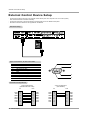
External Control Device Setup . . . . . . . . . . . . . . . .26~31
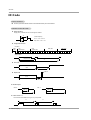
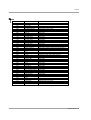
IR Code
. . . . . . . . . . . . . . . . . . . . . . . . . . . . . . . . .32~33
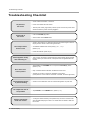
Troubleshooting Checklist . . . . . . . . . . . . . . . . . . . . . .34
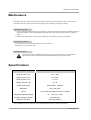
Maintenance . . . . . . . . . . . . . . . . . . . . . . . . . . . . . . . . .35
Specifications . . . . . . . . . . . . . . . . . . . . . . . . . . . . . . . .35
After reading this manual, keep it handy for future reference.
Owner’s Manual 5