1
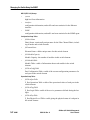
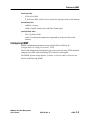
Pr
el
im
in
ar
y
SANbox-8/16
Switch Management
User’s Manual
Publication No. 59010-06 Rev. A
Pr
el
im
in
ar
y
QLogic Corporation
6321 Bury Drive
Eden Prairie, MN 55346-1739
(952) 932-4000
Release Number 06, Revision A (July, 2001)
This release obsoletes all previous releases.
The following paragraph does not apply to the United Kingdom or any country where such provisions are inconsistent
with local law: THIS PUBLICATION is printed “AS IS” WITHOUT WARRANTY OF ANY KIND, EITHER EXPRESSED OR
IMPLIED, INCLUDING, BUT NOT LIMITED TO, THE IMPLIED WARRANTIES OF MERCHANTABILITY OR FITNESS FOR A
PARTICULAR PURPOSE. Some states do not allow disclaimer of express or implied warranties in certain transactions;
therefore, this statement may not apply to you.
This publication could include technical inaccuracies or typographical errors. Changes are periodically made to the
information herein; These changes will be incorporated in new additions of the publication.
It is possible that this publication may contain reference to, or information about, products (machines and programs),
programming, or services that are not announced in your country. Such references or information must not be
construed to mean that such products, programming, or services will be offered in your country. Any reference to a
licensed program in this publication is not intended to state or imply that you can use only the licensed program
indicated. You can use any functionally equivalent program instead.
Copyright© QLogic Corporation, Inc. 2001. All rights reserved.
SANbox, SANsurfer, and Multistage are trademarks of QLogic Corporation Inc.
IBM® is a registered trademark of IBM Corporation.
Microsoft, Windows NT, and Excel are trademarks or Registered Trademarks of Microsoft Corporation.
Note to US Government Users – Documentation and programs related to restricted rights – Use, duplication, or disclosure are subject to the restrictions set forth in GSA ADP Schedule Contract.
Pr
el
im
in
ar
y
Table of Contents
Preface
How to Use This Manual 1
Intended Audience 2
Related Materials 2
QLogic Customer Support. 2
1
Introduction
Switch Management 1-1
Applications Overview 1-1
SANsurfer 1-1
Telnet (SANbox Only) 1-2
TFTP 1-2
SNMP 1-2
Ethernet Cabling 1-3
Configuring the Switch Ethernet Port 1-4
Configuring the Ethernet Port Using SANsurfer 1-5
Configuring the Ethernet Port Using Telnet 1-6
Configuring the Ethernet Port Using TFTP 1-6
2
SANsurfer Switch Management
Overview 2-1
Using SANsurfer 2-4
Getting Started 2-6
Installing SANsurfer on a Management Station 2-6
Starting SANsurfer 2-7
Set- Up or Open a Fabric 2-8
Adding a Switch to a Fabric 2-9
Removing a Switch from a Fabric 2-9
Understanding Application Windows 2-11
For Switches: 2-11
For Shelves: 2-12
For Racks: 2-12
For Faceplates: 2-12
SANSurfer Overview 2-13
Fabric Window 2-15
Entering this Window 2-16
SANbox-8/16 Switch Management
User’s Manual
59010-06 Rev. A
iii
Pr
el
im
in
ar
y
Login Information 2-16
Creating or Deleting a Fabric 2-16
Select and View a Fabric 2-17
Fabric Line 2-18
Status Field 2-18
IP Address Field 2-19
Fabric Name 2-19
Type, Mode, and Rate Fields 2-19
Traps Field 2-20
Errors Field 2-20
Statistics Recording Button 2-20
Main Menu Bar 2-20
File 2-20
Edit 2-21
View 2-21
Special 2-21
Help 2-21
Tool Bar 2-21
Apply Button 2-21
Zoom Button 2-22
Refresh Button 2-22
Delete Button 2-22
Statistics Recording Button 2-22
Topology Window 2-23
Entering this Window 2-23
Topology of Selected Fabric 2-23
Ethernet Connection(s) 2-23
Switch Chassis Icon 2-23
T_Port Link 2-26
Main Menu Bar 2-26
File 2-26
Edit 2-26
View 2-26
Special 2-26
Help 2-27
Tool Bar 2-28
Back Button 2-28
Apply Button 2-28
Zoom Button 2-28
Undo 2-28
Zoning Button 2-28
Refresh Button 2-28
iv
59010-06 Rev. A
SANbox-8/16 Switch Management
User’s Manual
Pr
el
im
in
ar
y
Delete Button 2-29
Previous Button 2-29
Next Button 2-29
Using Racks and Shelves to Manage Devices 2-29
Naming Devices 2-29
Choosing Device Icons 2-29
Add a Shelf to an Existing Rack 2-30
Remove a Shelf from a Rack: 2-30
Moving a Device from One Location to Another Within the Application 2-30
Disconnecting Attached Shelves From a Rack 2-32
Disconnecting a Rack When Attached to Another Rack 2-32
Performing an Archive/Restore of a Fabric 2-32
Network Configuration Window 2-36
Entering this Window 2-36
Network Configuration 2-37
Static IP Addr Radio Button 2-37
Set IP Addr via BOOTP Radio Button 2-37
Set IP Addr via RARP Radio Button 2-37
IP Address 2-37
Netmask 2-37
Gateway 2-38
ARP Timeout 2-38
Ethernet MAC 2-38
SNMP Configuration 2-38
SNMP Trap Authentication Check Box 2-38
Name 2-39
Contact 2-39
Location 2-39
Trap Address 2-39
Read Community (Future) 2-39
Write Community (Future) 2-39
Main Menu Bar 2-40
File 2-40
Edit 2-40
View 2-40
Special 2-40
Help 2-40
Tool Bar 2-40
Back Button 2-40
Apply Button 2-40
Undo 2-41
Refresh Button 2-41
SANbox-8/16 Switch Management
User’s Manual
59010-06 Rev. A
v
Pr
el
im
in
ar
y
Switch Faceplate Display 2-41
Entering this Window 2-42
Ethernet Connector Icon 2-43
Main Menu Bar 2-43
File 2-43
Edit 2-43
View 2-43
Special 2-44
Help 2-44
Tool Bar 2-45
Back Button 2-45
Apply Button 2-45
Zoom Button 2-45
Undo 2-45
Zoning Button 2-45
Refresh Button 2-45
Previous Button 2-45
Next Button 2-45
Chassis Parameters 2-45
Fabric ID 2-45
Chassis ID Field 2-46
Stage Type 2-46
Admin Mode 2-47
R_T_TOV 2-47
E_D_TOV 2-47
R_A_TOV 2-48
Switch Statistics 2-48
Switch Faceplate Display (View>Port States) (Default) 2-49
GBIC Icon Colors 2-49
Switch Faceplate Display (Port Display/Loop Devices) (Default) 2-50
Entering the Port Display/Loop Devices Window 2-51
Main Menu Bar 2-51
File 2-51
Edit 2-51
View 2-51
Special 2-51
Help 2-51
Port Name 2-52
Port Statistics 2-52
Start Tests Button 2-52
Stop on error 2-52
Test Length (sec) 2-53
vi
59010-06 Rev. A
SANbox-8/16 Switch Management
User’s Manual
Pr
el
im
in
ar
y
Frame Size 2-53
Data Pattern 2-53
Loop Controls 2-53
Loop Devices 2-53
Switch Faceplate Display (Port Display/TL Configuration) 2-56
Entering the Port Display/TL Configuration Window 2-56
Main Menu Bar 2-57
File 2-57
Edit 2-57
View 2-57
Special 2-57
Help 2-57
Connecting Devices to a Port 2-58
Managing the Translation Entries Lists 2-58
Initiator Table 2-58
Targets Table 2-59
Port Statistics 2-59
Initiator and Target Radio Buttons 2-59
Device List 2-59
Device 2-59
## 2-59
Address 2-59
ALPA 2-59
Port WWN 2-59
Vendor 2-59
Status 2-59
Communicating between Public Initiators to Private Targets 2-60
Communicating between Private Initiators to Private Targets 2-60
Communicating between Private Initiators to Public Targets 2-60
Switch Faceplate Display (Port Display/T_Ports) 2-62
Entering the Port Display/T_Ports Window 2-62
Switch Faceplate Display (View>Port Modes) 2-63
Entering the Port Modes Faceplate 2-63
Switch Faceplate Display (View>Port Tuning (SANbox only)) 2-64
Entering the Port Tuning Faceplate 2-64
Port Tuning 2-64
Non-I - Non-Interleaved 2-64
Min-I - Minimize-Interleave 2-64
Frame-L - Frame Limit 2-65
Normal 2-65
Switch Faceplate Display (View>Performance Data) (Default) 2-66
Entering the Performance Data 2-66
SANbox-8/16 Switch Management
User’s Manual
59010-06 Rev. A
vii
Pr
el
im
in
ar
y
Switch Faceplate Display (View>Name Service) 2-67
Entering the Name Server Data 2-67
Name Service Data File 2-68
Switch Faceplate Display (View>Trace Log) 2-69
Entering the Trace Controls 2-69
Trace Overview 2-70
Switch Faceplate Display (View>Memory Map) 2-71
Entering the Memory Map Window 2-71
Tool Bar 2-72
Apply Button 2-72
Back Button 2-72
Memory Controls 2-72
Read /Write Increment Select 2-72
Read /Write Select 2-72
Start Address Field 2-72
Length Field 2-72
Memory Data Fields 2-72
Switch Faceplate Display (Special>Update Flash) 2-73
Choosing Update Flash 2-73
Load Flash 2-73
Flash Load Fails 2-74
Switch Faceplate Display (Special>Reset) 2-75
Choosing Reset 2-75
Rack Administration Window 2-76
Entering the Rack Administration Window 2-76
Main Menu Bar 2-76
File 2-77
Edit 2-77
View 2-77
Special 2-77
Help 2-77
Tool Bar 2-77
Back Button 2-77
Apply Button 2-77
Zoom Button 2-77
Undo 2-77
Refresh Button 2-77
Delete Button 2-77
Rack Name 2-78
Email Contact 2-78
Description Field 2-78
Shelf Information 2-78
viii
59010-06 Rev. A
SANbox-8/16 Switch Management
User’s Manual
Pr
el
im
in
ar
y
Level 2-78
Name 2-78
Contact 2-78
Alerts 2-78
Shelf Administration Window 2-79
Entering the Shelf Administration Window 2-79
Main Menu Bar 2-79
File 2-80
Edit 2-80
View 2-80
Special 2-80
Help 2-80
Tool Bar 2-80
Back Button 2-80
Apply Button 2-80
Zoom Button 2-80
Undo 2-80
Refresh Button 2-80
Delete Button 2-81
Previous Button 2-81
Next Button 2-81
Shelf Name 2-81
Email Contact 2-81
Alert Information 2-81
Device Information 2-81
Icon field 2-81
## 2-81
Name 2-81
Port 2-81
Address 2-81
World-Wide-Name 2-82
Company 2-82
Zoning 2-83
Hard Zone Rules (MKII-8 and MKII-16) 2-84
Hard Zone Rules (SANbox-8 and SANbox-16) 2-85
Broadcast Zone Rules 2-86
Name Server Zone Rules (Port Zoning Method) 2-86
Name Server Zone Rules (WWN Zoning Method) (SANbox-8 and SANbox-16) 2-87
SL Zone Rules (SANbox-8 and SANbox-16) 2-87
Zoning Window 2-88
Entering the Zoning Window 2-88
Main Menu Bar 2-89
SANbox-8/16 Switch Management
User’s Manual
59010-06 Rev. A
ix
Pr
el
im
in
ar
y
File 2-89
Edit 2-89
View 2-89
Special 2-89
Help 2-89
Tool Bar 2-90
Back Button 2-90
Apply Button 2-90
Refresh Button 2-90
Delete Button 2-90
Previous Button 2-90
Next Button 2-90
Criteria for Displaying a Port 2-90
Special Condition for Fabrics using the WWN Zoning Method 2-90
Adding a Zone (Port Group Zoning Method) 2-91
Adding a Zone (WWN Group Zoning Method) 2-92
Removing a Zone 2-94
Removing a Port from a Zone 2-95
Removing a Device from a Zone 2-95
Adding a Zone (No Hard Zones Used) 2-96
Adding a Zone (Hard Zones Used) 2-97
Combining Fabrics with Zones Defined 2-98
Credit Chaining 2-99
Donor Ports 2-99
Selecting a Main Credit Chain Port for Extended Credits 2-99
User Administration Window 2-100
Entering the Administration Window 2-100
Main Menu Bar 2-100
File 2-101
Edit 2-101
View 2-101
Special 2-101
Help 2-101
Tool Bar 2-101
Back Button 2-101
Apply Button 2-101
Undo 2-101
Refresh Button 2-101
Delete Button 2-101
User List 2-102
Name 2-102
Password 2-102
x
59010-06 Rev. A
SANbox-8/16 Switch Management
User’s Manual
Pr
el
im
in
ar
y
Fabric Name 2-102
Security Level 2-102
Created 2-103
Modified 2-103
PW Expire 2-103
Acnt Expire 2-103
Wd 2-103
Ht 2-103
Installing a New Version of SANsurfer on a SANbox Switch 2-104
Using a DOS Workstation to Install a New Version 2-104
Using a Unix Workstation to Install a New Version 2-104
3
Telnet
Overview 3-1
Command Overview 3-1
Creating Security for Telnet Access 3-2
Create a New User Account 3-2
Delete an Existing User Account 3-2
General Commands 3-3
delete <user> 3-3
exit 3-3
help 3-3
login <login_name> 3-3
logout 3-4
reset switch 3-4
send LIP <port #> 3-4
set <command type> 3-4
show <command type> 3-4
whoami 3-4
set <command type> 3-4
addr <24-bit fiber channel chassis address> 3-5
config [field] 3-5
config <timeout setting> <timeout value> 3-6
loop nl-port <enable | bypass > <nl_port_addr> 3-7
loop status <port_num> <enable | disable> 3-7
memory <address> <value> [byte | word | long] 3-7
network 3-7
pagebreak <lines> 3-8
portrscn <port_num> <setting> 3-8
show <command type> 3-9
chassis 3-9
chassis_mode 3-10
SANbox-8/16 Switch Management
User’s Manual
59010-06 Rev. A
xi
Pr
el
im
in
ar
y
config 3-10
counts <port #> 3-11
ecounts 3-11
events 3-12
fcport <port_num> 3-12
links 3-14
loop <port #> [-v] 3-14
memory <start_address> [count] [byte | word | long] 3-14
monitor 3-14
nameserver 3-15
network <field> 3-15
pagebreak 3-15
portrscn [port_num] 3-15
portstate [port #] 3-16
scounts 3-16
snmp 3-16
steering <port_num> 3-17
unit 3-17
version 3-17
4
TFTP
Trivial File Transfer Protocol (TFTP) 4-1
Using TFTP 4-1
Using a Windows Management Station: 4-1
Using a Unix Management Station: 4-1
Sequence of Events for Replacing Switch Configuration 4-2
Getting the Index File 4-3
Windows: 4-3
Unix: 4-3
Retrieving the Current Switch Configuration File (config) 4-4
Windows 4-4
Unix 4-4
Editing the Configuration File (config) 4-5
The Switch Management Configuration File 4-5
Transfer a New Management Configuration File to the Switch 4-6
Windows: 4-6
Unix 4-6
Loading New Switch Control Code into Flash 4-7
Windows 4-7
Unix 4-7
Reset the Switch Using TFTP 4-8
xii
59010-06 Rev. A
SANbox-8/16 Switch Management
User’s Manual
5
SNMP
Pr
el
im
in
ar
y
Simple Network Management Protocol (SNMP) 5-1
Managing the Switch Using the SNMP 5-1
Management Information Base (MIB) 5-1
Configuring SNMP 5-3
A
Technical Support
Availability A-1
Training A-1
Contact Information A-1
B
Counter Descriptions
Glossary
Index
SANbox-8/16 Switch Management
User’s Manual
59010-06 Rev. A
xiii
Pr
el
im
in
ar
y
List of Figures
Figure 1-1
Figure 2-1
Figure 2-2
Figure 2-3
Figure 2-4
Figure 2-5
Figure 2-6
Figure 2-7
Figure 2-8
Figure 2-9
Figure 2-10
Figure 2-11
Figure 2-12
Figure 2-13
Figure 2-14
Figure 2-15
Figure 2-16
Figure 2-17
Figure 2-18
Figure 2-19
Figure 2-20
Figure 2-21
Figure 2-22
Figure 2-23
Figure 2-24
Figure 2-25
Figure 2-26
Figure 2-27
Figure 2-28
Figure 2-29
Figure 2-30
Figure 2-31
Figure 2-32
Figure 2-33
Ethernet Connection 1-3
Login 2-7
Faceplate Display Identification 2-13
SANsurfer Switch Management Application Block Diagram 2-14
Fabric Window 2-16
Topology Window for Port Group Zoning Method 2-24
Topology Window for WWN Group Zoning Method 2-25
Name Server Zoning Method Dialog Box 2-28
Shelves Created For Devices 2-31
Fabric with Failed and Replacement Switches 2-34
Failed Switch Removed 2-35
Restore Dialog Box 2-35
Zoning Method Conflict Dialog Box to Zoning Method Dialog Box 2-35
Network Configuration Window 2-36
Switch Faceplate Display 2-42
GBIC Icons 2-49
Port Display/Loop Devices Window 2-50
Port Test Parameters Window 2-52
Port Display/TL Configuration Window 2-56
TL Port Bridges (Private Initiators and Private Targets) 2-61
Port Display/T_Port 2-62
Switch Faceplate for Port Modes 2-63
Switch Faceplate for Port Tuning 2-64
View>Performance 2-66
View>Name Service for Public Loop 2-67
View>Name Service for Private Loop 2-68
View>Trace Log 2-69
View>Memory Map 2-71
Special>Update Flash 2-73
Rack Administration Window 2-76
Shelf Administration Window 2-79
WWN Zoning Window 2-88
Zoning Window for a WWN Name Server Zone 2-94
Edit User Accounts 2-100
xiv List of Figures
59010-06 Rev. A
SANbox-8/16 Switch Management
User’s Manual
Pr
el
im
in
ar
y
List of Tables
Table 2-1
Table 2-2
Table 2-3
Table B-1
Table B-2
Default Username and Password 2-8
Loop Controls Field Descriptions 2-54
Loop Display Field Descriptions 2-55
Counter Names and Descriptions (port display window and telnet) B-1
Counter Names and Descriptions (Faceplate window) B-5
SANbox-8/16 Switch Management
User’s Manual
59010-06 Rev. A
List of Tables
xv
Notes
List of Tables
59010-06 Rev. A
SANbox-8/16 Switch Management
User’s Manual
Pr
el
im
in
ar
y
Preface
How to Use This Manual
This manual has five sections, two appendices and an Index:
•
Section 1 explains how to cable a Management Station to a Switch chassis
and configure its Ethernet port.
•
Section 2 explains how to start and run the SANsurfer Switch management
application.
•
Section 3 explains the management functions available through Telnet.
Telnet is for the SANbox family of Switches only.
•
Section 4 explains the management functions provided by TFTP.
•
Section 5 explains the management functions provided by SNMP.
•
Appendix A contains information about QLogic Technical Support and how
to contact them for assistance.
•
Appendix B contains a description of counters used in the SANsurfer
windows.
Please use this manual in conjunction with the appropriate SANbox or MKII
Switch Installer’s/User’s manual. These manuals are listed in the Related Materials
paragraphs later in this section.
SANbox-8/16 Switch Management
User’s Manual
59010-06 Rev. A
Preface
1
Intended Audience
Pr
el
im
in
ar
y
This manual introduces QLogic Switch management products and explains their
installation and use. It is intended for users competent in installing and using
network management tools.
Related Materials
The following manuals and materials are referenced in the text and/or provide
additional information.
•
SANbox-8 Fibre Channel Switch Installer’s/User’s Manual, Publication
Number 59008.
•
SANbox-16HA Fibre Channel Switch Installer’s/User’s Manual, Publication
Number 59005.
•
SANbox-16STD Fibre Channel Switch Installer’s/User’s Manual, Publication
Number 59012.
•
GigWorks MKII-BASE8 Switch Installer’s/User’s Manual, Publication
Number 59004.
•
GigWorks MKII-BASE16 Switch Installer’s/User’s Manual, Publication
Number 59003.
All manuals are available from QLogic Corporation.
QLogic Customer Support.
2
Preface
Phone:
(952) 932-4040
Fax:
(952) 932-4018 Attn: Customer Support
E-Mail:
[email protected]
Web:
www.qlogic.com
59010-06 Rev. A
SANbox-8/16 Switch Management
User’s Manual
Section 1
Pr
el
im
in
ar
y
Introduction
Switch Management
The MKII and SANbox™ Switch families support management through:
•
SANsurfer™ Switch Management. SANsurfer is a Web-based (Java) application.
•
A built-in Trivial File Transfer Protocol (TFTP) server.
•
A built-in SNMP agent.
•
A built-in Telnet server.
Applications Overview
SANbox switches contain several applications that can control different aspects of
the switch.
SANsurfer
The SANsurfer application can control all aspects of switch management. The
application is embedded in each SANbox Switch chassis.
If managing Switches using a MKII Switch, you must install the SANsurfer
application on your management station prior to performing switch management. These installation instructions are located in Section 2.
Before managing a fabric with SANsurfer you must:
•
Pick a chassis through-which you will manage all the chassis in the fabric
(Fabric Management Switch).
•
Connect the Fabric Management Switch’s Ethernet interface to an isolated
Ethernet network (a direct connection using a Cross-over cable).
•
Configure the IP network address, IP subnetwork mask, and IP gateway
address.
You may configure these IP parameters using Telnet, SANsurfer, RARP,
BOOTP, or TFTP.
Refer to the “Ethernet Cabling” on page 1-3 and “Configuring the Ethernet Port
Using SANsurfer” on page 1-5 for details on connecting the management station
to a switch and using this application.
Refer to Section 2 for detailed operational steps of the SANsurfer application.
SANbox-8/16 Switch Management
User’s Manual
59010-06 Rev. A
Introduction
1-1
Applications Overview
Telnet (SANbox Only)
A Telnet server is embedded in each SANbox Switch chassis.
Pr
el
im
in
ar
y
Before managing a Switch chassis with Telnet you must:
•
Connect the Ethernet interface to an Ethernet network and
•
Configure its IP network address, its IP subnetwork mask, and its IP gateway
address.
You may configure these IP parameters using Telnet, SANsurfer, or TFTP.
Refer to the “Ethernet Cabling” on page 1-3 and “Configuring the Ethernet Port
Using Telnet” on page 1-6 for details on connecting the management station to a
switch and using this application.
Refer to Section 3 for detailed operational steps of the telnet application.
TFTP
A TFTP server is embedded in each Switch chassis.
Before managing a Switch chassis with TFTP you must:
•
Connect the Ethernet interface to an Ethernet network and
•
Configure its IP network address, its IP subnetwork mask, and its IP gateway
address.
You may configure these IP parameters using Telnet, SANsurfer, or TFTP.
Refer to “Ethernet Cabling” on page 1-3 and “Configuring the Ethernet Port Using
TFTP” on page 1-6 for details on connecting the management station to a switch
and using this application.
Refer to Section 4 for detailed operational steps of the tftp application.
SNMP
An SNMP agent is embedded in each Switch chassis.
Before managing a Switch chassis with SNMP you must:
•
Connect the Ethernet interface to an Ethernet network and
•
Configure its IP network address, its IP subnetwork mask, and its IP gateway
address.
You may configure these IP parameters using Telnet, SANsurfer, or TFTP.
1-2
Introduction
59010-06 Rev. A
SANbox-8/16 Switch Management
User’s Manual
Ethernet Cabling
Ethernet Cabling
Pr
el
im
in
ar
y
The Switch is managed through the use of a customer-supplied management
station connected to the Switch via its Ethernet port.
Refer to the appropriate Switch Installer’s/User’s manual for the location of the
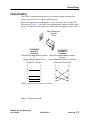
Ethernet port. Figure 1-1 shows the Switch Management connector and the cable
wiring. The Ethernet connection may be made with power applied to the Switch.
Switch Management
Connector
(RJ-45)
8
1
10/100BASE-T*
10/100BASE-T*
Straight TP
Cross-over TP
Connection
Connection
Ethernet Switch Management Connector Ethernet Switch Management Connector
directly to
to
Router, Management Station, or other Host
Repeater, Ethernet Switch, or Hub
Straight TP Connection
8
7
6
5
4
3
2
1
* NOTE:
8
7
6
5
4
3
2
1
Cross-over TP Connection
8
7
6
5
4
3
2
1
8
7
6
5
4
3
2
1
The Ethernet port on the MKII BASE-16 Switch is 10BASE-T.
Figure 1-1 Ethernet Connection
SANbox-8/16 Switch Management
User’s Manual
59010-06 Rev. A
Introduction
1-3
Configuring the Switch Ethernet Port
Configuring the Switch Ethernet Port
Pr
el
im
in
ar
y
NOTE:
The Switch cannot be managed through the Ethernet port without the management
station knowing the IP address of the Switch. If the IP configuration of the Switch
is lost, the Switch can be reset in Force PROM mode. In Force PROM mode, the
Switch always uses the default management parameters, not the parameters defined
in the configuration file. In this way, the Switch can always be returned to a
10.0.0.x network and reconfigured. Refer to the QLogic web site (http://
www.qlogic.com), Support category, and locate the FAQ for instructions on how to
place your Switch chassis into Force PROM mode.
Before the Switch can be managed using the Ethernet port, several management
parameters must be set correctly. At a minimum, the IP network address, the IP
subnetwork mask, and the IP gateway address must all be set. In addition, the
SNMP read, write, and trap community names may be set, as well as the SNMP
name, contact, and location. At this point in time, when managing a multi-chassis
fabric with anything other than SANsurfer, this setup is required for each chassis in
the fabric. If managing the multi-chassis fabric with SANsurfer, this setup is
required only for the Fabric Management Switch.
To configure the Switch management parameters, install the Switch temporarily on
an isolated network (a network with no other devices on it other than the management station and the Switch) with the subnet address 10.x.x.x (By default, the
Switch’s IP address is 10.0.0.1.). You may then use Telnet, SANsurfer, or TFTP to
configure the Switch chassis’ Ethernet port.
1-4
Introduction
59010-06 Rev. A
SANbox-8/16 Switch Management
User’s Manual
Configuring the Switch Ethernet Port
Configuring the Ethernet Port Using SANsurfer
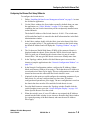
To configure the Switch chassis:
Follow “Installing SANsurfer on a Management Station” on page 2-6 to start
the SANsurfer application.
2.
Use the Fabric window (the first window opened by default when you enter
the application, see “Fabric Window” on page 2-16) to create a fabric
containing the one Switch chassis that you have temporarily installed on an
isolated network.
Pr
el
im
in
ar
y
1.
The default IP Address of the Switch chassis is 10.0.0.1. The switch name
will be undefined until it is entered in the shelf information line in the Rack
Administration window.
3.
In the Fabric window, double click the fabric icon in the Status field of the
entry you made in Step 2. The application will connect to the Switch using
the default IP Address and will display the “Topology Window” on page 223.
4.
The 16-character World-Wide-Name (WWN) of the connected chassis is
displayed under the chassis. Write down the WWN of this Switch chassis.
This is a good way of identifying this chassis when it is part of a multichassis fabric. You may give this chassis a more user-friendly name later.
5.
In the Topology window, double click the Ethernet port icon next to the
chassis to jump the application to the “Network Configuration Window” on
page 2-36.
6.
In the Network Configuration window, configure the IP Address, Subnet
Mask, and Gateway Address (if necessary). Check that the new IP Address is
correct and write it down. Press Apply. The new configuration is saved on the
chassis but does not take effect until the Switch chassis is reset.
7.
(Optional) At this point you could configure the remaining parameters if you
know them. Or, you may configure them at a later time. If you have
configured more parameters, press Apply. The new configuration is saved on
the chassis but does not take effect until the Switch chassis is reset.
8.
Press the Back button to return to the Topology window. Double click the
switch faceplate icon to go to the “Switch Faceplate Display” on page 2-41.
Select Special>Reset to reset the switch.
9.
When the switch is reset, if a new IP Address was assigned, the IP Address
entered into the Fabric window is now incorrect. Return to the Fabric window
(by repeated pressing of the Back button) and enter the new IP Address.
Press Apply.
SANbox-8/16 Switch Management
User’s Manual
59010-06 Rev. A
Introduction
1-5
Configuring the Switch Ethernet Port
Double click on the Status field icon. The Topology window opens. Double
click on the Ethernet Port icon to go to the Network Configuration window.
11.
Verify that the IP Address information and any other changes have been
applied.
12.
Disconnect this temporary Ethernet connection, power-down the Switch
chassis, and place it in its network. When you power the chassis back up, it
will then use the new IP Address.
13.
If you have more chassis to configure, repeat steps 2 through12 for each
chassis. You must delete the 10.0.0.1 IP Address in the ARP table of your
management station after each chassis is configured. Remember that the
ARP table is associating the 10.0.0.1 IP Address with this latest chassis and
will not work for another chassis.
Pr
el
im
in
ar
y
10.
A typical command for doing this is:
arp -d 10.0.0.1.
14.
Use File>Logout to quit the application.
For more detailed information, refer to “Getting Started” on page 2-6.
Configuring the Ethernet Port Using Telnet
To configure the Switch chassis:
1.
Connect to the Switch using telnet.
2.
Enter the username and password.
3.
Use the show network command to view IP Address and other network
settings.
4.
Use the set network command to select the network parameter(s) to change.
5.
Reset the Switch to activate the new settings.
Refer to the Telnet section for more detail.
Configuring the Ethernet Port Using TFTP
To configure the Switch chassis:
1.
Connect to the Switch using TFTP.
This is a standard utility included in most Unix and Windows NT workstations. Versions for other platforms can be obtained from other vendors.
Because TFTP has no passwords, user authentication, or other security,
only trusted users should have access to the Switch through the Ethernet
port.
2.
1-6
Introduction
Select text file transfer mode.
59010-06 Rev. A
SANbox-8/16 Switch Management
User’s Manual
Configuring the Switch Ethernet Port
Retrieve the Switch configuration file named config.
4.
Use any text editor to modify the parameters of this configuration file.
5.
Transfer the configuration file back to the Switch file config.
6.
The Switch can now be powered down and moved to the production network.
Pr
el
im
in
ar
y
3.
When the Switch is powered up, it will execute with the new parameter
values defined in the configuration file.
Refer to the TFTP section for more detail.
SANbox-8/16 Switch Management
User’s Manual
59010-06 Rev. A
Introduction
1-7
Configuring the Switch Ethernet Port
Notes
Introduction
59010-06 Rev. A
SANbox-8/16 Switch Management
User’s Manual
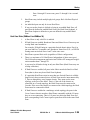
Section 2
Pr
el
im
in
ar
y
SANsurfer Switch Management
Overview
NOTE:
The SANsurfer Switch management application is able to manage a variety of
Switch products (8-port, 16-port, full-featured Switches, Switches which have only
segmented private loop ports, etc.). This section describes the functions of the
application. The application “grays-out” or doesn’t display functions that do not
pertain to the selected Switch chassis.
SANsurfer allows you to:
•
Manage fabrics
•
Select a fabric and set up the connection to the Ethernet port on the Switch
chassis through-which the selected fabric is managed
•
Configure the Switch Management interface with its IP network configuration parameters and SNMP configuration parameters
•
For fabrics which contain multiple Switch chassis, view the topology of the
selected fabric including the T_Port connections between chassis
•
View the fabric Ethernet connection(s)
•
View hardware and firmware version information for the selected chassis
•
View Switch Names and World Wide Names (WWNs) of all chassis
•
View port addresses on the selected chassis
•
View T_Port interconnections and their port addresses
•
Configure chassis parameters such as:
-
Switch Name
-
Fabric ID
-
Chassis Number
-
Stage Type for multi-stage Switch fabrics
-
Administration Mode (Online, Offline, or Test)
-
Chassis Fibre Channel Timeouts (R_T_TOV, E_D_TOV, and
R_A_TOV) NOTE: Changing these settings from the values specified
SANbox-8/16 Switch Management
User’s Manual
59010-06 Rev. A
SANsurfer Switch Management
2-1
Overview
herein will result in the Switch being prevented from being attached to
a fabric.
View dynamic graphs that display performance data for each On Line port on
the selected chassis. The performance data is only recorded during the time
period when an application window that monitors the performance data is
open. When the monitoring window is closed, the recording of performance
data stops. Performance data includes:
Pr
el
im
in
ar
y
•
-
Frames In
-
Frames Out
-
Frames Dropped
-
Errors
•
Record statistics such as data rate and errors and save the data in files that are
compatible with spreadsheet applications.
•
View Name Server data for each device connected to the selected chassis
•
Perform Trace operations to follow selected operations through the selected
chassis
•
Read and write memory locations on the selected chassis
•
Update the Flash memory on the selected chassis
•
Divide the fabric ports into zones for more efficient and secure communication among functionally grouped nodes. There are several types of zones and
a port may be defined in several of them simultaneously.
-
Hard Zones:
(MK II only) follow physical boundaries within a Single-Stage Switch
chassis and limit the communication of a port to only other ports in the
same Hard Zone. There may be as many as four Hard Zones and a
particular port may be in only one of them.
(SANbox only) can be comprised of individual ports from a number of
switches. Communications will only occur between ports in the defined
hard zone. As many as 16 hard zones may be defined in a single fabric.
-
2-2
Broadcast Zones allow the division of the fabric into as many as 16
zones that define the area of Broadcasts. A particular port may be
placed in one or more of these Broadcast Zones. A port will broadcast
to all ports in the same Broadcast Zone (or zones) in-which the port is
defined. If Hard Zones are enabled, Broadcast Zones may not cross the
defined Hard Zone boundaries.
SANsurfer Switch Management
59010-06 Rev. A
SANbox-8/16 Switch Management
User’s Manual
Overview
Name Server zones allow the division of the fabric into as many as 256
zones that define which port or device will receive Name Server information. A particular port or device may be defined in one or more of
these Name Server Zones. If Hard Zones are enabled, Name Server
Zones may not cross the defined Hard Zone boundaries.
Pr
el
im
in
ar
y
-
Name Server Port Zones will receive Name Server information for all
ports in the same Name Server Zone (or zones) in-which the port is
defined.
Name Server WWN Zones provide a means of designating individual
devices as members of a zone. Individual devices can be relocated
anywhere within the same hard zone (if used) and still be accessible to
the other devices within the WWN Zone. Devices can be moved around
to different shelves or racks within the fabric for ease of viewing, but
still remain connected to the same physical port. Physical devices may
be moved from one physical location to another within the fabric
without affecting WWN zoning configuration.
•
•
-
Broadcast Zones and Name Server Zones may overlap.
-
SL_port Zones allow the division of the fabric into as many as 256
zones that define which ports will communicate with each other. SL
Zones can be comprised of individual ports from a number of switches.
Communications will only occur between ports in the defined SL zone.
Configure the Mode of each port on the selected chassis. Port Modes
include:
-
F_Port (Port forced to be an F_Port)
-
Fabric Port (Port allowed to self-configure as a Public Loop port or an
F_Port)
-
SL_Port (Port forced to be a Private Segmented Loop port) (SANbox
only)
-
TL_Port (Port forced to be a Private Translated Loop port) (SANbox
only)
-
F_Ext16, F_Ext24, F_Ext32 (2, 3, or 4 ports configured for extended
credit chaining) (SANbox only)
-
Offline (Port forced off line)
-
Testing (Port forced into test mode)
Tune any port on the selected chassis to the multi-frame-sequence (MFS)
characteristics of the particular host bus adapter (SANbox only)
SANbox-8/16 Switch Management
User’s Manual
59010-06 Rev. A
SANsurfer Switch Management
2-3
Using SANsurfer
View the type of GBIC installed in each port on the selected chassis
•
View statistics for each port on the selected chassis
•
View Address, WWN, FC-4 Type, and Logged-In status of each Loop Device
connected to any port on the selected chassis
•
Configure Loop Devices including:
Pr
el
im
in
ar
y
•
-
Place any NL_Port into Loop Bypass Mode
-
Place any or all NL_Ports back into normal Loop Mode
-
Reset the Loop
-
Re-initializing the Loop
•
Configure the translation entries list for TL_Ports and control the TL_Port
Auto Learning feature (SANbox only)
•
Archive all configurable chassis parameters for all the chassis in a fabric
•
Restore all configurable chassis parameters for all chassis in a fabric by
using the archived configuration
•
Provide Name Server WWN data fabric-wide.
•
Create numerous duplicate user-defined fabrics through use of a template
Using SANsurfer
The SANsurfer application is based on Java 1.1 and operates on Netscape
Navigator 4.5 or newer:
NOTE:
Macintosh equipment does not support Java 1.1.
The SANsurfer application operates on the following platforms (management
stations):
•
Windows NT
•
Solaris 2.7
•
Solaris 2.8
SANsurfer can manage multiple chassis within a fabric through a single Ethernet
connection to any one chassis in the fabric. It can also manage multiple fabrics. All
managed Switch chassis must be in the MKII and SANbox families of Switches.
The SANsurfer application is embedded in each SANbox Switch chassis. No
installation is required for operation on NT-based management stations. However,
2-4
SANsurfer Switch Management
59010-06 Rev. A
SANbox-8/16 Switch Management
User’s Manual
Using SANsurfer
Pr
el
im
in
ar
y
the SANsurfer application must be installed on a Solaris management station. See
the Sun Switch Management Installer’s/User’s Manual, publication 875-1890-10,
provided by Sun Microsystems, for detailed instructions on using a Solaris
management station with your switch.
When managing MKII chassis, the SANsurfer application must be installed on the
management station. For installation instructions, refer to “Installing SANsurfer on
a Management Station” on page 2-6.
The first time a management station runs the SANsurfer application, an access
error message will appear. This is normal because the application has not created
the necessary files on the management station yet. Acknowledge the error and
continue with SANsurfer. Once this management station is running SANsurfer, the
error message will no longer appear when managing other switches.
SANbox-8/16 Switch Management
User’s Manual
59010-06 Rev. A
SANsurfer Switch Management
2-5
Getting Started
Getting Started
Pr
el
im
in
ar
y
To use SANsurfer, connect the management station to the Switches’ Ethernet interface. Refer to the “Ethernet Cabling” on page 1-3 and “Configuring the Ethernet
Port Using SANsurfer” on page 1-5 for detailed procedures.
Installing SANsurfer on a Management Station
Before managing MKII Switches with SANsurfer, you must install the application
on your management station.
Even though the SANsurfer application is embedded in SANbox Switches, you
may also manage SANbox Switches with the SANsurfer application installed on a
management station. Even if not installing the complete application on the
management station, it is necessary to run the admin.htm file to create files on the
management station which are needed during logging into the application.
1.
Move the files from the distribution media (CD, tape, diskette, or Internet) to
your management station. You must place these files on the hard drive in a
directory that your HTTP server can access.
2.
Highlight the admin.htm file and execute it (double-click on it). Executing
this file installs the application.
As the application installs, the system will display the QLogic Corporation
Administration version screen and the SANsurfer/WEBGUI Installation
Utility window.
This will clear all user and super user passwords, but will not
clear the fabric settings.
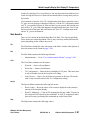
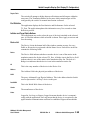
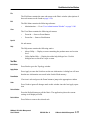
Clear Button
This will clear all user and super user passwords and will also
clear the fabric settings.
Reset Button
This will display all user accounts and passwords that are
currently defined.
View Button
Continue Button
Close Button
2-6
Move to the next screen in the load process.
Cancel the load process without saving.
1.
Click Continue.
2.
When the display indicates “Installation Complete”, click “OK”
3.
Click Close.
4.
Using the Windows tools, create a desktop shortcut to the QLogic.htm file.
5.
The installation is complete.
SANsurfer Switch Management
59010-06 Rev. A
SANbox-8/16 Switch Management
User’s Manual
Getting Started
Starting SANsurfer
In order to use the Switch management application:
Open and start SANsurfer.
Pr
el
im
in
ar
y
1.
For a SANbox switch as the Fabric Management Switch:
a.
Open the web browser and type: http://<switch name or IP address>/
NOTE:
The SANsurfer application is embedded in the SANbox memory. It will not
launch from a chassis that is inoperable, such as a chassis with a Flash
Checksum error. Therefore if SANsurfer was launched prior to the Switch
failure, or if SANsurfer is launched from another chassis that is operable, it is
possible to load new Flash code in a failed switch. If SANsurfer is not
operable, use TFTP to load new Flash code.
The IP Address is either the one configured into the Switch chassis or the
default (10.0.0.1) configured at the factory. If the chassis still contains the
default IP Address, the Management Station must be directly connected to
the chassis with an Ethernet cross-over cable.
b.
Observe that the Login dialog box shown in Figure 2-1 appears.
NOTE: Entry fields are case sensitive
Figure 2-1 Login
SANbox-8/16 Switch Management
User’s Manual
59010-06 Rev. A
SANsurfer Switch Management
2-7
Getting Started
For a MK II switch as the Fabric Management Switch:
Pr
el
im
in
ar
y
NOTE:
When managing Switches in the MKII Switch family, the SANsurfer application must be installed on the management station. For installation instructions refer to “Installing SANsurfer on a Management Station” on page 2-6.
When managing SANbox Switches, it is possible to place the application on a
local management station and run the application from there instead of using
the application that is embedded on the SANbox Switch. In this case follow
the installation instructions to place the SANsurfer application on your
management station and follow these instructions to open the application.
2.
a.
After the SANsurfer application has been loaded on the management
station, start the web browser and open the QLogic.htm file.
b.
Observe that the Login dialog box shown in Table 2-1 appears.
If this is the first time this switch is being logged into, or if no username and
password file has been created by a super user, log in to SANsurfer using the
username and password shown in Table 2-1. Otherwise, use the username
and password assigned during a previous session. The Fabric window opens.
A Super user must set up user names, security levels, and passwords. Refer to
“User Administration Window” on page 2-100 for directions in the creation
and update of the user file.
SANsurfer stores the password file on the management station.
3.
Set up or open a fabric (Set up a fabric if no fabrics have been previously
defined. Open a fabric if one is already defined.).
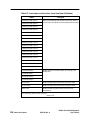
Table 2-1 Default Username and Password
Password File (app.dat)
Default Username
Default Password
su
su
Set- Up or Open a Fabric
NOTE:
The very first time you run the application, you will receive an error when trying to
access the fabric file. This is normal. After a fabric is defined and saved, this error
will no longer appear at login.
2-8
SANsurfer Switch Management
59010-06 Rev. A
SANbox-8/16 Switch Management
User’s Manual
Getting Started
Pr
el
im
in
ar
y
If no fabric has been defined, use the Fabric window to indicate the IP Address of
the chassis which is accessible through an Ethernet port. Refer to “Fabric Window”
on page 2-15 for details on setting up a fabric.
If a fabric has been defined, use the Fabric window to open it. Double click the
fabric icon for the fabric (or select the icon and use the Zoom button) and the
application will display the Topology window for the fabric. The Topology window
is described on page 2-23
Adding a Switch to a Fabric
Successfully adding a switch to an existing fabric depends on:
•
The Switch has the same flash version as the fabric to which it is being
added.
•
The Switch has the same PROM version as the fabric to which it is being
added.
•
The Switch has the same SANsurfer version (or newer) as the fabric to which
it is being added.
•
The Switch has the same Fabric ID as the fabric to which it is being added.
•
The Switch has a Chassis ID that is different from the other switches in the
fabric to which it is being added. The default value of zero should be changed
to a non-zero value after connection to ensure that when another switch is
added to the fabric, a conflict does not arise from a duplicate number.
•
The R_T_TOV, R_A_TOV, E_D_TOV values are equal to all of the switches
in the fabric to which it is being added.
•
The Zoning Backup file on the Switch is cleared.
•
If the fabric to which the the switch is being added is operating in the name
server WWN zoning method, a warning should appear that there is a conflict
with the zoning method. To correct the error, acknowledge the messages and
select the WWN Group zoning method when the selection window appears.
Use the SANsurfer application to verify these conditions on switches which have
previously been connected to other fabrics or as a single switch fabric prior to
connecting them to this fabric. If the switch has never been used, these conditions
have been met by the default states. The switch is ready for installation in the
fabric.
Removing a Switch from a Fabric
To prepare a switch for removal from a fabric, it is necessary to change certain
settings to specific values to ensure that the switch is in a known condition for the
next time it is to be used.
SANbox-8/16 Switch Management
User’s Manual
59010-06 Rev. A
SANsurfer Switch Management
2-9
Getting Started
On the Network Configuration window, if the IP Address, Netmask Address,
and Gateway Address values were changed to reflect the current fabric,
change them back to the default values (unless permanently assigned):
Pr
el
im
in
ar
y
•
IP Address: 10.0.0.1
Netmask Address: 255.0.0.0
Gateway Address: 0.0.0.0
•
On the Faceplate Display window,
•
Ensure that the Fabric ID is set to 1.
•
Ensure that the Chassis ID is set to 0.
•
Ensure that the Stage type is set to FLS- IO/Transfer.
•
If the timeout values have been altered from the default settings, change
them back to the default values:
R_T_TOV: 100
E_D_TOV: 2560
R_A_TOV: 5000
•
•
2-10
Select Special>Clear Zoning Backup to ensure that the WWN Name
Server Zoning Backup table has been cleared.
If the fabric is using the name server WWN zoning method, it will be necessary to remove the switch from the existing fabric, connect a crossover cable
from the management station to the switch, and change the name server
zoning method back to Port Groups (Topology window, Special>Select
Zoning Method).
SANsurfer Switch Management
59010-06 Rev. A
SANbox-8/16 Switch Management
User’s Manual
Understanding Application Windows
Understanding Application Windows
Pr
el
im
in
ar
y
SANsurfer is composed of a set of windows. Each window manages a different
aspect of Switch/rack/fabric configuration.
•
The first window displayed following login is the Fabric window. The Fabric
window allows you to create, name, and choose a fabric.
•
Choose a fabric. The application displays the Topology window. From the
Topology window, choose any icon and, depending on the cursor location on
the icon when clicking, the application displays the window that applies to
that area of the icon. Refer to the paragraphs concerning the Topology
window for further information.
•
The Switch Faceplate display is composed of a Faceplate portion, a Chassis
Parameters/Switch Statistics portion, and a Chassis Management portion (see
Figure 2-2 on page 2-13 to identify these locations). The Faceplate portion
may control any of the following for the selected Switch chassis:
For Switches:
•
•
-
Ethernet connection enters the Network Configuration window
-
Port States (default)
-
Port Modes
-
Port Tuning
The Chassis Parameters/Switch Statistics portion of the Switch Faceplate
display allows assigning or modifying:
-
Fabric ID
-
Chassis Number
-
Stage Type
-
Administrative State (Admin Mode)
-
Fibre Channel timeouts for the selected Switch chassis
The Chassis Management portion of the window may control/view any of the
following for the selected Switch chassis:
-
Performance (default)
-
Name Server
-
Trace
-
Memory Map
SANbox-8/16 Switch Management
User’s Manual
59010-06 Rev. A
SANsurfer Switch Management
2-11
Understanding Application Windows
Pr
el
im
in
ar
y
NOTE:
SANsurfer manages both 8 and 16-port Switch chassis. The faceplates shown
in the following pages may not look the same as your chassis but will have the
same functionality.
•
Unless specified otherwise, the polling of the Switch, performed by any
window will cease when that window is exited. A window is exited when a
different window is opened.
•
Allow grouping devices from various switches into a single point to aid in
zoning.
•
Reduce the quantity of ports/devices listed in the left column of the Topology
window for a specific rack, shelf, or Switch.
•
The rack icon contains the following items:
For Shelves:
For Racks:
A rack name
-
A switch name or fabric address
-
A switch icon
•
Various racks displayed throughout the window can be click-dragged on top
of each other to combine multiple switches into a single rack icon.
•
Racks containing multiple switches can be separated into individual racks
with a single switch in each rack.
•
Rack icons provide access to the Rack Administration window for:
For Faceplates:
•
2-12
-
-
Naming the rack
-
Provide an email address for a contact regarding rack problems
-
Provide a description block that can be used to store additional information about the rack
Tables and lists allow highlighting individual rows to aid in visual separation
from other rows. Clicking in the header row of the table or list clears the
highlighting.
•
Allows changing the displayed information through use of menu selections.
•
Previous and Next buttons allow stepping between individual items of the
selected type without having to backtrack to a previous screen.
SANsurfer Switch Management
59010-06 Rev. A
SANbox-8/16 Switch Management
User’s Manual
SANSurfer Overview
SANSurfer Overview
Pr
el
im
in
ar
y
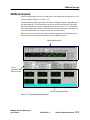
Switch management relies on viewing many switch functions through the use of a
switch faceplate display (see Figure 2-2).
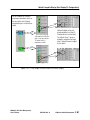
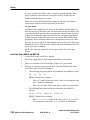
Movement through the application will involve changing displays, depending on
the desired activity. The application records the screens movements. Movement
between different screens is accomplished as shown in Figure 2-3. To determine
where the application will move when the Back button is pressed, retrace the line
from the location that was exited to reach the current location.
Exiting any screen will stop any active tasks being performed within that screen.
The active tasks will resume when that screen is displayed again.
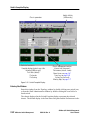
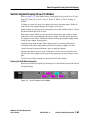
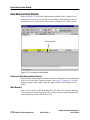
Switch faceplate portion
Chassis
parameters/switch
statistics portion
Chassis management portion
Figure 2-2 Faceplate Display Identification
SANbox-8/16 Switch Management
User’s Manual
59010-06 Rev. A
SANsurfer Switch Management
2-13
SANSurfer Overview
Pr
el
im
in
ar
y
User
Administration
window
See page 2-100
Login
Fabric window
See page 2-15
Rack
Administration
window
See page 2-76
Topology
window
See page 2-23
Shelf
Administration
window
See page 2-79
Switch Faceplate portion of the display
See page 2-41
View>Port States
Faceplate
(default)
See page 2-49
View>Port Modes
Faceplate
See page 2-63
View>Port Tuning
Faceplate
See page 2-64
Chassis Parameters/Switch Statistics portion of the display
Chassis Management portion of the display
View>Performance
window (default)
See page 2-66
View>Name
Server
window
See page 2-67
View>Trace
window
See page 2-69
View>Memory
Map
window
See page 2-71
Network
Configuration
window
See page 2-36
Fabric Zoning
window
See page 2-83
Figure 2-3 SANsurfer Switch Management Application Block Diagram
2-14
SANsurfer Switch Management
59010-06 Rev. A
SANbox-8/16 Switch Management
User’s Manual
Fabric Window
Fabric Window
Pr
el
im
in
ar
y
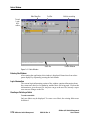
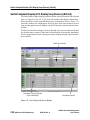
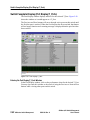
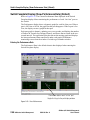
The Fabric window (see Figure 2-4) allows any user to select a fabric for observation and/or management (depending on the authority of the user). A managed
fabric has a name and an Ethernet connection to a Switch chassis through-which
the fabric is managed, hereafter referred to as the Fabric Management Switch.
More than one Switch chassis in a multi-chassis fabric can have an Ethernet
connection for backup purposes, but SANsurfer chooses only one Ethernet
connection at a time to use.
The Fabric window is the first window displayed after entering the application.
The application loads the default.fab file, which contains a list of all managed
fabrics. It allows a Super User or an administrator to create and edit a fabric and
identify the IP address of the Fabric Management Switch.
The application loads the default.fab file (or the file assigned to a user; see “User
Administration Window” on page 2-100 for assigning alternate files), which
contains an entry for the managed fabric if the fabric was saved in a previous
session. If this is the first time the application is being accessed, there is no defined
fabric.
The default.fab file does not contain a fabric unless a fabric has been defined and
saved to the default.fab file by a user. If each user has saved their own user.fab
(where user = a user-defined name) file, and the user administration table lists that
fab file for that user, the fabric shown will be different for each user. For example,
if user “Tom” has saved his defined fabric in the “tom.fab” file, changing the entry
in the user administration window for “Tom” to use the tom.fab file instead of
default.fab will recall Tom’s fabric in the Fabric window when he signs in to the
application.
Use the Network Configuration Window to assign the IP Address to these Switch
chassis. The Fabric window can also be used to record Port, Switch chassis, and
Fabric statistics through the use of the type and mode fields.
SANbox-8/16 Switch Management
User’s Manual
59010-06 Rev. A
SANsurfer Switch Management
2-15
Fabric Window
Main Menu Bar
Tool Bar
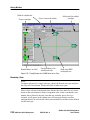
Statistics recording
Pr
el
im
in
ar
y
Current
Login
Information
Status Bar
Console Window
Figure 2-4 Fabric Window
Entering this Window
After starting the application, this window is displayed. Return here from subsequent displays by repeatedly pressing the back button.
Login Information
The current login information portion of the window contains information about
the current user, their level of authority, and the fabric file being used. Click on this
information to go to the user file. Any user can go to the user file, but only a super
user can save changes to the file.
Creating or Deleting a Fabric
To create a new fabric:
Only one fabric may be displayed. To create a new fabric, the existing fabric must
be deleted.
2-16
SANsurfer Switch Management
59010-06 Rev. A
SANbox-8/16 Switch Management
User’s Manual
Fabric Window
Place the cursor in the IP Address(es) field and type the IP Address of the
Switch connected via Ethernet (the Web) to the management station.
•
Place the cursor in (or tab to) the Rate field and type the desired rate of
checking for errors (whole number values of zero, or greater than 19 are
allowed).
•
When the cursor is removed from the Fabric Line after completing the IP
Address(es) a Status Icon will appear.
Pr
el
im
in
ar
y
•
To delete an existing fabric:
•
Select the fabric line on the table.
•
Press Delete to remove the existing entry.
Select and View a Fabric
When selecting a fabric, the application will go to the Topology window.
There are three ways to select and view a fabric on the list:
•
Double click on the Status Icon, Traps field, or Errors field for the fabric.
•
Single click on any field except for the Type field, then press the Zoom
button.
•
Single click on the Status Icon, Traps field, or Errors field for the fabric to
select it, then choose View>Zoom.
SANbox-8/16 Switch Management
User’s Manual
59010-06 Rev. A
SANsurfer Switch Management
2-17
Fabric Window
Fabric Line
Pr
el
im
in
ar
y
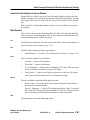
The Fabric Line contains an IP Address and the Fabric Name of the managed
fabric. Fields display status information. These are the Status field, Traps field, and
Errors field. The Type, Mode, and Rate fields are for recording status information.
Status Field
The Status Field may contain either of two icons: A Topology icon or a PROM
icon.
Topology Icon
When the Fabric Line contains a complete entry (an IP Address and Rate
value), the application displays a Topology icon in the Status field. The application uses the background color of the Topology icon to indicate fabric
status:
•
Gray indicates normal operation.
•
Red indicates loss of communication with the fabric.
•
Yellow indicates the occurrence of fabric errors.
If the status icon for the fabric is red, this could be the result of the IP address
not matching the value entered in the list. If the IP address is different, the
entry must be deleted and a new entry created.
NOTE:
If the icon remains red after the IP address is entered, verify that the
following conditions exist:
The switch has power applied and is turned on
The ethernet cable is attached to the switch
The IP address entered in the table is the same as the IP address of the switch
Double click the Topology icon and the application will display the Topology
window for the selected fabric. The Topology window can also be displayed
by single clicking on the Topology Icon to select the fabric and then pressing
the Zoom button or choosing View>Zoom.
PROM Icon
The icon with the word “PROM” displayed in the Status field is not an
indication of normal operation. It is only visible as a result of POST failure
or when the switch has been placed in the force PROM mode.
When a Switch chassis has a Flash Checksum error as a result of a PowerOn-Self-Test diagnostic or if the chassis was placed into Force PROM Mode
via its Test Switch, the Switch chassis goes into PROM Mode and uses its
2-18
SANsurfer Switch Management
59010-06 Rev. A
SANbox-8/16 Switch Management
User’s Manual
Fabric Window
Pr
el
im
in
ar
y
default IP Address to communicate through its Ethernet port. This requires
connection of a Crossover Ethernet cable directly to the faulty Switch chassis
and use of the default IP Address to connect to it. When you create a onechassis fabric to communicate with this Switch, designate an IP Address of
10.0.0.1. SANsurfer must already be launched in order to communicate
with a chassis in PROM mode. When SANsurfer connects to this Switch, it
will find that it is in PROM Mode and display the PROM Icon. When a
Switch is in PROM mode, there is a very limited number of things that can be
done to it. New control code can be loaded into Flash memory or give the
Switch a new IP Address.
IP Address Field
The IP Address field contains the IP Address of one Fabric Management Switch.
Enter an IP Address by placing the cursor in the empty IP Address field and
typing. To change an IP address requires deletion of the defined fabric and creation
of the new one. Press Apply to save the changes.
Fabric Name
The Fabric Name is taken from the SNMP Name field of the Network Configuration window. Edit an existing name by double clicking in the Name Field and being
taken to the Network Configuration window. Change the name as desired from
there. Press Apply to save the changes before returning to this window.
Type, Mode, and Rate Fields
Use these three fields to set up the recording of Data Rate and Error counters.
Following the setup of these fields, use the Statistics recording button or
Special>Start/Stop Recording to start and stop recording.
Type Field
Enable the type of counters you want to record for the selected fabric. Click
the Type field to step through the choices. The choices are:
OFF — Do not enable any counters and clear the Mode field.
Errors — Record total error counts.
Data and Errors — Record Frames In/Frames Out and total error counts.
All — Record all statistics individually.
Mode Field
Enable the application to create one or more spreadsheets. The application
names the spreadsheets based on the Fabric, Switch chassis, or port. Click the
Mode field to step through the choices. The choices are:
Fabric — Sum statistics from all ports and modules in the fabric into one
total.
SANbox-8/16 Switch Management
User’s Manual
59010-06 Rev. A
SANsurfer Switch Management
2-19
Fabric Window
Switch — Sum the traffic of all ports of each module in the fabric.
Pr
el
im
in
ar
y
Port — Display traffic counts for each port individually. Recorded in
EVENT_FRAMES/Second.
Rate Field
Enter the number of seconds between each time the application polls the
chassis in the selected fabric for statistics. The number must be 20 seconds or
greater.
Traps Field
The Traps Field is not in operation at this time.
Errors Field
The application polls each chassis in the fabric at the rate set in the Rate field. It
adds the number of errors it finds to a cumulative count and displays that number
in the Errors field. You may reset this count with a command in the Special menu.
Statistics Recording Button
Press to start recording. Press again to stop recording. Each time you start a
recording session, the application will display a standard dialog box that will ask
where to place the generated files. The application names the files based on the
fabric, Switch chassis, or port.
Main Menu Bar
There are five menus on the Main Menu Bar: File, Edit, View, Special, and Help.
These menus are context-dependent. That is, they each may contain different submenus depending on the window they are in.
File
The File Menu contains the following sub menus:
2-20
•
Open Fabrics — Opens an Open File dialog box. Select the fabric (.fab) file
to open.
•
Save Fabrics — Save the current fabric file.
•
Save Fabrics as — Opens a Save As dialog box. Name the new fabric file that
will contain the currently-defined list of fabrics.
•
Delete Fabrics File — Opens a Delete dialog box. Select one fabric file to
delete. DO NOT delete any xxxxxxx.fab files which are referenced on the
User Administration window. The fabric file which is opened when the
SANSurfer application is started is defined on the User Administration
window for each defined user. If the specified file is not present at the time
of log in, the application will not function.
•
Security Login — Exit from current user and log in as another.
SANsurfer Switch Management
59010-06 Rev. A
SANbox-8/16 Switch Management
User’s Manual
Fabric Window
•
Exit — Exit the SANsurfer application.
Edit
Pr
el
im
in
ar
y
The Edit Menu contains the following sub menu:
•
User Administration — Go to “User Administration Window” on page 2100.
View
The View Menu contains the following sub menus:
•
Zoom In — Same as Zoom Button.
•
Zoom Out — Same as Back button.
Special
The Special menu contains the following sub-menus.
•
Clear Messages — Clears the console window portion of the Fabric window.
•
Clear Counters — Clears the statistics counters in the selected fabric.
•
Start/Stop Recording — Starts recording statistics data as determined by the
settings in the Type and Mode fields in the selected fabric. The data is
gathered at the rate specified in the Rate field in the selected fabric. When
you start recording, the application displays a dialog box that asks for a file
location. The application names the files based on the fabric, Switch chassis,
or port. Use spreadsheet applications to display these files.
Stops recording statistics and writes the file or files to the location specified
when recording started.
Help
The Help menu contains the following entries:
•
About Utility — Display a screen containing the product name and version
level.
•
Utility Online Help — Display the online help dialogue box. Use this
dialogue box to search for a topic or term.
Tool Bar
Four Tool Bar buttons are active in the window: Apply, Zoom, Refresh, and Delete.
Apply Button
Apply is a context-dependent button. That is, its operation changes somewhat
depending on the Window it is in.
Press Apply to cause the Switch to use the new information.
SANbox-8/16 Switch Management
User’s Manual
59010-06 Rev. A
SANsurfer Switch Management
2-21
Fabric Window
Zoom Button
Pr
el
im
in
ar
y
Zoom is a context-dependent button. That is, its operation changes somewhat
depending on the Window it is in.
In the Fabric window, the Zoom button opens the Topology window.
Refresh Button
Refresh is a context-dependent button. That is, its operation changes somewhat
depending on the Window it is in. In the Fabric window it does the following:
•
The Refresh button causes the application to check the fabric to see if its
status has changed. If it has, the application changes the color of the fabric
Status field icon accordingly.
•
The Refresh button scans all Switch chassis to find all ports that are logged
in. Then, if the fabric has a non-zero Rate field setting, the application then
scans all logged-in ports for errors.
Delete Button
The Delete button deletes the selected fabric line from the list of fabrics. If no
fabric line is selected, the button has no effect.
Statistics Recording Button
The statistics recording button on the display is a toggle button that performs the
same function as Start/Stop Recording on the Special menu.
Press to start recording. Press again to stop recording. Each time you start a
recording session, the application will display a standard dialog box that will ask
you where you want to place the generated files. The application names the files
based on the fabric, Switch chassis, or port.
2-22
SANsurfer Switch Management
59010-06 Rev. A
SANbox-8/16 Switch Management
User’s Manual
Topology Window
Topology Window
Pr
el
im
in
ar
y
Refer to Figure 2-5 for an example of Port Group Zoning method and Figure 2-6
for an example of WWN Group Zoning method. Entering the Topology window
polls the fabric and displays its topology. Switch Chassis icons appear in a rack
icon and represent each Switch chassis in the fabric that is powered-on, able to
communicate, and not in PROM mode. The bottom of each rack icon displays the
fabric address or name assigned to that switch. If a chassis name is given (in one of
the Switch Faceplate displays) the name replaces the fabric address line. Lines
between Switch Chassis icons indicate one or more T_Port links between chassis.
Single-click a Switch Chassis icon, the rack or switch name line, the Ethernet
connection, a GBIC (if in port zoning method), or a device (if in WWN zoning
method) to select it. The application displays information for the selected object in
the column at the left side of the window.
Entering this Window
Enter this window from the Fabric window. Return here from subsequent windows
by repeatedly pressing the Back button.
Topology of Selected Fabric
The Topology window displays a diagram of the selected fabric. The display shows
the Ethernet connection next to the Fabric Management Switch. Each Switch
Chassis is shown in a rack with the switch Chassis name or assigned fabric address
and T_Port Links between chassis.
Ethernet Connection(s)
The window shows the active Ethernet connection on the Fabric Management
Switch. If the application loses its ability to communicate with an Ethernet
connection it displays that ethernet connection in Red.
Single-click on the Ethernet connection to select it. The Ethernet Connection turns
Blue when selected. The Ethernet information displays at the left side of the
window for the selected Ethernet connection.
Double-click on the Ethernet Connection to jump to the Network Configuration
window.
Switch Chassis Icon
The Topology window displays an icon for each Switch chassis, its Switch Name,
and to which rack it is assigned. The application uses colors to identify various
states of the Switch chassis. The colors are:
Red The application has lost its ability to communicate with a Switch chassis.
Green The chassis is an IO/T chassis.
Yellow The chassis is a Cross-Connect chassis.
SANbox-8/16 Switch Management
User’s Manual
59010-06 Rev. A
SANsurfer Switch Management
2-23
Topology Window
Blue
The chassis has been selected.
The switch has been selected, but the application is unable to communicate
with it.
Pr
el
im
in
ar
y
Violet
Single-click on the Switch Chassis icon to select it. The Switch Chassis icon
changes to blue, indicating selection. The information display at the left side of the
window contains assigned ports for the selected Switch chassis along with their
GBIC type (if in the port zoning method) or connected devices (if in the WWN
zoning method). Single clicking on a GBIC of device will display information
relating to that item.
Application statistics for
fabric
Ethernet
connector
Rack name
Switch chassis
icon
Graphic representation of the selected
switch and port assignments
Fabric address or
switch name
T_Port link(s)
Figure 2-5 Topology Window for Port Group Zoning Method
2-24
SANsurfer Switch Management
59010-06 Rev. A
SANbox-8/16 Switch Management
User’s Manual
Pr
el
im
in
ar
y
Topology Window
Graphic representation of the selected
switch and available devices
Figure 2-6 Topology Window for WWN Group Zoning Method
Single-click on the rack name or switch name to select rack information. The two
areas change to blue, indicating selection. The information display at the left side
of the window contains all shelves assigned to this rack.
Re-arrange the chassis in the Topology window by click-dragging a chassis icon to
any position in the window. Any T_Port connections to other chassis remain
connected. Dragging switch icons on top of each other will combine the contents
of both switches to reside within a single rack. To separate the icons it is necessary
to perform a security login or to restart the application. The switches contained in
the selected rack will separate into their respective icons.
Double-click on the Switch Chassis icon to jump to the Switch Faceplate window.
Double-click on the rack or switch name to jump to the Rack Administration
window.
Double-click on a shelf of devices to jump to the Shelf Administration window.
SANbox-8/16 Switch Management
User’s Manual
59010-06 Rev. A
SANsurfer Switch Management
2-25
Topology Window
T_Port Link
Pr
el
im
in
ar
y
The window shows a line between chassis to represent at least one T_Port Link
between chassis. If the application loses its ability to find a T_Port Link it displays
that T_Port Link in Red.
Single-click a T_Port Link to select it. The application changes the color of the line
to Blue when selected. The information display at the left side of the window will
show detailed T_Port Link information for the selected link.
Main Menu Bar
There are five menus on the Main Menu Bar: File, Edit, View, Special, and Help.
These menus are context-dependent. That is, they each may contain different submenus depending on the window they are in.
File
The File Menu contains the same sub menus as the Fabric window (descriptions of
these sub menus can be found on page 2-20):
Edit
The Edit Menu contains the following sub menu:
•
User Administration — Go to “User Administration Window” on page 2100.
View
The View Menu contains two sub menus:
•
Zoom In — Same as Zoom Button.
•
Zoom Out — Same as Back button.
Special
The Special Menu contains the following sub menus:
•
2-26
Toggle Beacon — Cause the Heartbeat LED on the selected chassis to blink
at a very rapid rate and the application displays a small blinking beacon icon.
This is useful when you want to make locate a particular physical chassis
installed at a location which contains multiple switches. Toggle the beacon to
On, a small red blinking icon appears to the right side of the switch icon. The
physical Heartbeat LED on the selected chassis changes from the normal
blink rate and blinks at a very fast rate. The Heartbeat LED will continue to
operate in this state until it is changed back. The blink rate is not automatically changed back when the application is exited. When the beacon icon is
blinking, selecting the toggle beacon command removes the small red blinking icon on the topology window and returns the physical LED on the
selected chassis to the normal heartbeat pattern.
SANsurfer Switch Management
59010-06 Rev. A
SANbox-8/16 Switch Management
User’s Manual
Topology Window
Archive Fabric — Allow administrators to save fabric/switch configurations
to a local file. The archive file can then be used via the Restore Fabric option
to reprogram all switches back to a known configuration. Archives can also
be used to program new switches for deploying identical configurations.
Pr
el
im
in
ar
y
•
When saving the archive, a standard file dialog will appear asking for the
name & location to save the archive file. SANsurfer will then retrieve all the
configurable parameters from each switch in the fabric and save that information to the archive. This includes: Operational switch parameters (Fabric
ID, Timeout values, etc.), Port modes (MFS/testing/TL, etc.), Zoning
(excluding descriptions), Network, and SNMP configurations.
For an example of the archive/restore operation, refer to “Performing an
Archive/Restore of a Fabric” on page 2-32.
•
Restore Fabric — Restore from the file created with the Archive Fabric
command. This can be used to restore the configuration of a fabric/switch to
a known state or to program new fabrics/switches to a common configuration. If the fabric was not archived before a switch failure within the fabric, it
will not be possible to restore the fabric with this command.
Restore opens a standard file dialog box for locating the archive file. It then
compares the archive configuration to the current fabric. Any switches that
can't be identified must be manually mapped to the archive. This will determine which configuration will be assigned to each switch. SANsurfer polls
each switch in the fabric and compares it to the stored configuration. If there
are differences, SANsurfer will recommend reprogramming the modified
switches. After the fabric has been reprogrammed, you must manually reset
(or reset through the faceplate menu) each switch in the fabric before the
modifications will take effect.
For an example of the archive/restore operation, refer to “Performing an
Archive/Restore of a Fabric” on page 2-32.
•
Topology Refresh — Perform a manual refresh of the Topology.
•
Select Zoning Method — The zoning method (refer to Figure 2-7) pertains
specifically to Name Server Zoning. This zoning method is assigned to the
entire fabric, based on which method is selected. After the zoning method is
configured, press the Apply button for the zoning to take effect.
The application default is to use Port Groups.
Help
The Help menu contains the following entries:
•
About Utility — Display a screen containing the product name and version
level.
SANbox-8/16 Switch Management
User’s Manual
59010-06 Rev. A
SANsurfer Switch Management
2-27
Topology Window
Utility Online Help — Display the online help dialogue box. Use this
dialogue box to search for a topic or term.
Pr
el
im
in
ar
y
•
Figure 2-7 Name Server Zoning Method Dialog Box
Tool Bar
Back Button
Press Back to go to the window nearer to the start of the application.
Apply Button
Press Apply to cause the Switch to use the new information. A dialog box will state
that the new information has been saved in the Switch Flash memory.
Zoom Button
Press the Zoom button to jump to the Faceplate window when a Switch Chassis
icon is selected.
Press the Zoom button to jump to the Network Configuration window when an
Ethernet connection is selected.
Press the Zoom button to jump to the Rack Administration window when a rack
name or switch name are selected.
Undo
Inactive
Zoning Button
Press the Zoning Button to jump to the Zoning window.
Refresh Button
The application polls the fabric every 10 seconds and whenever you press the
Refresh Button and refreshes the data in this window.
2-28
SANsurfer Switch Management
59010-06 Rev. A
SANbox-8/16 Switch Management
User’s Manual
Topology Window
Delete Button
Pr
el
im
in
ar
y
If you have physically removed a Switch chassis and its T_Port Links from the
selected fabric, the application will not be able to find them and will display them
in Red. To remove them from the Topology window, select the Switch Chassis icon
and press Delete. This removes them from the window.
Previous Button
Inactive
Next Button
Inactive
Using Racks and Shelves to Manage Devices
When the fabric has been placed in the WWN Groups Zoning Method, all devices
attached to the fabric (except for those on SL ports) are listed. Without regrouping,
these devices appear any time the switch to which they are connected, or the rack
on which the switch resides, is selected.
Using racks and shelves, it is possible to:
•
assign names to each device,
•
group devices for ease of zoning, mix devices from several switches together
on a separate shelf,
•
combine racks to reduce the quantity of icons,
•
for other user-defined purposes.
Naming Devices
To name a device, it is necessary to move it to a separate shelf in a new or existing
rack. Once the name has been assigned, the device may be returned to the switch or
left in the shelf where it was named. To name a device:
1.
After the device has been moved from the switch, double-click on the shelf
containing the device to be renamed.
2.
The Shelf Administration window (see Figure 2-30 on page 2-79) opens with
the device listed in the table.
3.
Select the name of the device and enter the desired name.
4.
If the shelf will be used, now is the time to name the shelf in the Shelf Name
box. If the shelf will be deleted after all devices are named, it is not necessary
to name it.
Choosing Device Icons
To select a device icon:
SANbox-8/16 Switch Management
User’s Manual
59010-06 Rev. A
SANsurfer Switch Management
2-29
Topology Window
From the Shelf Administration window (see Figure 2-30 on page 2-79), on
the line that is to have the icon changed, click on the World-Wide-Name field
until the desired icon is displayed.
Pr
el
im
in
ar
y
1.
2.
Repeat step 1 for any other devices displayed in the table.
Add a Shelf to an Existing Rack
When a shelf is added to a rack, it can be added either above or below the switch. A
shelf cannot be placed between existing shelves, but will be added above the top
shelf, or below the bottom shelf.
1.
Click on the rack/shelf to be moved and drag it over the lower edge (or upper
edge, depending on desired location) and when the rack turns blue, release
the mouse button.
2.
The shelf is now added to the rack and the rack on which the shelf resided has
been removed.
Remove a Shelf from a Rack:
A shelf can only be removed by returning all devices to the switches from which
they originated.
1.
Click on the shelf to be removed. The shelf turns blue.
2.
Click on the Delete button on the tool bar. The shelf is removed.
Moving a Device from One Location to Another Within the Application
Moving a device in the application and physically moving a device in the fabric are
independent of each other. A device may be moved in the application without an
impact on the operation of the device and physically moving a device within the
fabric will not require the user to modify the Topology window.
Devices can be moved from a switch to an existing shelf or to a new shelf by
dragging the device icon to the desired location on the fabric display. When the left
mouse button is released, the icon is placed in the shelf the cursor is over when the
button is released, or if the cursor is not over a shelf, a new rack/shelf is created at
the cursor location.
When a shelf containing one or more devices is selected, the shelf turns blue, black
lines appear from each device in the icon to the port with which they are physically
attached (see Figure 2-8), and the left column of the window shows all devices
present on this shelf. When multiple devices are grouped on a shelf, a partition is
created on the shelf icon to represent each device. The partitions are ordered from
left to right to correspond with the top-to-bottom order of the left column of the
window.
To move a device from a switch:
1.
2-30
Click on the switch that contains the device to be moved.
SANsurfer Switch Management
59010-06 Rev. A
SANbox-8/16 Switch Management
User’s Manual
Topology Window
In the left column, click and hold the desired device and drag it out on the
Topology display. Release the mouse button.
3.
Observe that a new rack icon appears and a black line attaches it to the port
on the switch from which it was moved.
Pr
el
im
in
ar
y
2.
To return a device to the switch from which it originated:
1.
2.
If all devices contained on a shelf are to be returned, from the Topology
window, do one of the following:
-
Select the shelf and press the Delete button twice (once to delete the
shelf and a second time to delete the rack).
-
Or, select the rack that the shelf resides on and click the Delete button
to delete the shelf and the rack.
If less than the total number of devices is to be moved back, select the
affected shelf, select a device in the left column and press the Delete button.
Repeat for each additional device. Devices can not be deleted from a switch.
Figure 2-8 Shelves Created For Devices
SANbox-8/16 Switch Management
User’s Manual
59010-06 Rev. A
SANsurfer Switch Management
2-31
Topology Window
Disconnecting Attached Shelves From a Rack
Pr
el
im
in
ar
y
If a shelf was created in a rack and then joined with another rack (as shown in
Figure 2-8), it is not possible to disconnect a shelf and leave it intact. The shelf to
be disconnected is selected and the Delete button pushed to remove it. Then, that
shelf must be recreated. It is not possible to drag the shelves apart.
Disconnecting a Rack When Attached to Another Rack
When two or more racks with switches have been joined by dragging the racks
together, it is necessary to go to the Rack Administration window to remove a
specific rack. The following procedure involves switching between the Topology
window and the Rack Administration window.
1.
2.
3.
In the Topology window:
a.
Position the cursor over the title area of the rack which contains the
shelf with the switch that is to be separated.
b.
Double click the left mouse button. The Rack Administration window
opens.
In the Rack Administration window:
a.
Click on the line of the table that contains the switch to be separated
from this rack. The line will be highlighted, indicating selection.
b.
Click on the Delete button. The line may remain, but has been removed
from the list. Leaving and returning to this screen would verify this.
c.
Click on the Back button.
In the Topology window:
a.
Click the refresh button. If the trunk port lines don’t align properly to
the rack which remained, move it and the lines will be corrected.
b.
The rack will appear somewhere on the screen. Locate the disconnected
rack by moving the visible racks. One of them may overlap the disconnected rack. Position the racks as desired.
Performing an Archive/Restore of a Fabric
For the archive/restore function to modify the replacement switch properly, the
archive file must have been created prior to the switch failure.
This procedure assumes that the failed switch is not the Fabric Management
Switch.
If the failed switch is the Fabric Management Switch, it is desirable to access the
fabric from an alternate ethernet connection within the fabric to reconfigure the
replacement switch.
2-32
SANsurfer Switch Management
59010-06 Rev. A
SANbox-8/16 Switch Management
User’s Manual
Topology Window
Pr
el
im
in
ar
y
If an alternate fabric ethernet entry point is not available, or if this is a single
switch fabric, it will be necessary to connect the management station directly to the
new switch with the crossover ethernet cable (refer to section 1 for information
about connecting a crossover cable). It will also be necessary to configure the
Fabric window to access the switch by the default IP address of 10.0.0.1.
NOTE:
A replacement switch must be an exact replacement of the switch being removed.
A 16_port must replace a 16_port, and an 8_port must replace an 8_port. If a fabric
contains only MKII switches or both MKII and SANbox switches, either an MKII
or a SANbox switch may be used to replace a failed switch. If the fabric contains
only SANbox switches, only a SANbox switch may be used as a replacement.
1.
2.
At the failed switch:
a.
Turn off the power and disconnect the AC cord(s).
b.
Note port locations and remove the interconnection cables and GBICs.
c.
Remove the failed switch.
At the replacement switch:
a.
Mount the switch in the location where the failed switch was removed.
b.
Install the GBICs and cables removed from the failed switch in the
same port locations.
c.
Attach the AC cord(s) and turn on one (if more than one present) power
supply.
3.
Open the Topology window for the fabric. The failed switch and the
replacement switch will both appear on the topology screen (refer to Figure
2-9).
4.
Select the icon for the failed switch. DO NOT select the rack the switch is
located in, or all shelves defined for that rack will be selected.
5.
On the tool bar, press the Delete button. The fabric will now show only
usable switches (refer to Figure 2-10).
6.
Select Special>Restore Fabric.
7.
Select the file which was created with the desired fabric archive. A dialog
box opens (refer to Figure 2-11).
8.
Using the drop-down list of fabric switches for the unassigned switch, select
the switch which was replaced.
SANbox-8/16 Switch Management
User’s Manual
59010-06 Rev. A
SANsurfer Switch Management
2-33
Topology Window
Click OK and when asked, allow reprogramming of the Switch.
10.
Reset the replacement switch.
11.
The replacement switch has now been assigned the parameters which had
been in place for the failed switch.
Pr
el
im
in
ar
y
9.
NOTE:
If the fabric has been configured to use the name server WWN group zoning
method and the replacement switch is in the port group (default value) zoning
method, a dialog box noting a conflict of the selected zoning method between the
replacement switch and the fabric will appear (refer to Figure 2-12). Acknowledge
the warning provided in the dialog box to go to the dialog box for reconfiguring the
zoning method of the replacement switch.
Figure 2-9 Fabric with Failed and Replacement Switches
2-34
SANsurfer Switch Management
59010-06 Rev. A
SANbox-8/16 Switch Management
User’s Manual
Pr
el
im
in
ar
y
Topology Window
Figure 2-10 Failed Switch Removed
NOTE: Switch names will reflect names assigned in
your fabric.
Figure 2-11 Restore Dialog Box
Figure 2-12 Zoning Method Conflict Dialog Box to Zoning Method Dialog Box
SANbox-8/16 Switch Management
User’s Manual
59010-06 Rev. A
SANsurfer Switch Management
2-35
Network Configuration Window
Network Configuration Window
Pr
el
im
in
ar
y
Refer to Figure 2-13. Use the Network Configuration window to configure the
Ethernet Port and SNMP parameters of the selected Switch.
When the application enters the Network Configuration window, it queries the
switch to determine the entries for each network field. If the current switch is
configured with the default IP Address and another switch has been queried and
found to have the default address, the previous switch had an entry made of its
network entries in the ARP table of the management station. If an entry is found in
the ARP table for the current IP Address, the information is not saved for the
current switch. For this reason, it is necessary to clear the entry from the ARP table
before querying another switch with the same IP Address.
Main Menu Bar
Tool Bar
Figure 2-13 Network Configuration Window
Entering this Window
Enter this window from the Topology window by either double-clicking the
Ethernet Connection or by Selecting the Ethernet Connection and pressing Zoom.
2-36
SANsurfer Switch Management
59010-06 Rev. A
SANbox-8/16 Switch Management
User’s Manual
Network Configuration Window
Enter this window from any faceplate display by double-clicking on the ethernet
port icon.
Pr
el
im
in
ar
y
Network Configuration
The Network Configuration area of the window contains fields for configuring the
Ethernet connection to the selected Switch.
Static IP Addr Radio Button
This tells the switch to use the IP Address stored in the Flash Memory.
Set IP Addr via BOOTP Radio Button
This tells the Switch to attempt to use BootP the next time it initializes. If no BootP
server responds, the Switch will use the values in the saved configuration.
Set IP Addr via RARP Radio Button
This tells the Switch to attempt to use RARP the next time it initializes. If an
RARP server responds, the Switch will be accessed using its MAC address.
IP Address
NOTE:
When writing a new IP Address to a switch that is currently configured with the
default IP Address SANsurfer tries to use the MAC address associated with the
entry in the ARP table to determine which switch to write to. If configuring more
than one switch with default IP Addresses, it is necessary to clear the appropriate
entry (10.0.0.1) in the ARP table after each switch IP address is changed or before
the next switch with a default IP Address is accessed.
The IP Address box displays the current IP Address of the Switch Management
port. The, default set at the factory is 10.0.0.1. To modify this field, move the
cursor to the field and type. Write the contents of this field to the Switch Flash
memory by pressing the Apply Button. The application will ask whether to Reset
the Switch. If no is chosen, the Apply will still write the new address to Flash but
will not Reset the Switch. The Switch will start using the new IP Address when it
is Reset. If yes is chosen, the Switch will Reset and start using the new IP Address.
At this point contact with the Switch chassis is lost. Return to the Fabric window
and use the new IP Address to communicate with this chassis.
If other changes are to be made in this window, make them before changing the IP
Address and be sure to write the IP Address down. Then use the Fabric window to
change the IP Address used by the management application.
Netmask
The Netmask field displays the current Subnet Mask of the Switch Management
port. The default set at the factory is 255.0.0.0. To modify this field, move the
SANbox-8/16 Switch Management
User’s Manual
59010-06 Rev. A
SANsurfer Switch Management
2-37
Network Configuration Window
Pr
el
im
in
ar
y
cursor to the field and type the new data. Write the contents of this field to the
Switch Flash memory by pressing the Apply Button. The application will ask
whether to Reset the Switch. If no is chosen, the Apply will still write the new
address to Flash but will not Reset the Switch. The Switch will start using the new
Subnet Mask when it is Reset. If yes is chosen, the Switch will Reset and start
using the new Subnet Mask.
NOTE:
If you misconfigure the entry and lose communication with the Switch, the Switch
must be placed in Force PROM mode. This forces the use of the default IP Address,
Subnet Mask and Gateway Address. Then go back to the Configuring the Switch
Ethernet Port paragraphs near the beginning of this section and start over. Contact
QLogic Customer Support for information about how to place the Switch in Force
PROM Mode.
Gateway
The Gateway box displays the IP Address of the Gateway (if any) used by the
Switch Management port. The default set at the factory is 0.0.0.0. Modify this
field by moving the cursor to the field and typing. Write the contents of this field
to the Switch Flash memory by pressing the Apply Button. The application will
ask if the Switch is to by reset. If no is chosen, the Apply will still write the new
address to Flash but will not Reset the Switch. The Switch will start using the new
Gateway Address when it is Reset. If yes is chosen to the Reset question, the
Switch will Reset and start using the new Gateway Address.
ARP Timeout
This value is in hundredths of a second (.00). The default set at the factory is
30000 (300.00 seconds). To modify this field, move the cursor to the field and type
the new value.Write the contents of this field to the Switch by pressing the Apply
Button.
Ethernet MAC
The Ethernet MAC field is read-only and displays the MAC Address of the
Switch’s Ethernet port.
SNMP Configuration
Use the SNMP Configuration area of this screen to read, modify, or write the
Switch Management SNMP switch name, contact person, and Switch location.
SNMP Trap Authentication Check Box
Check this box to send a trap to the address in the Trap IP Address field in the
event that an attempt is made to access the Switch with the wrong Community
Names.
2-38
SANsurfer Switch Management
59010-06 Rev. A
SANbox-8/16 Switch Management
User’s Manual
Network Configuration Window
Name
Pr
el
im
in
ar
y
The Name field displays the Name of the switch. The default set at the factory is
undefined. To modify this field, move the cursor to the field and type the new data.
Write the contents of this field to the Switch Flash memory by pressing the Apply
Button. The Switch will start using the new information immediately.
Contact
The Contact field contains the Name of the Contact person. The default set at the
factory is undefined. To modify this field, move the cursor to the field and type the
new data. Write the contents of this field to the Switch Flash memory by pressing
the Apply Button. The Switch will start using the new information immediately.
Location
The Location field contains the location of the Switch. The default set at the
factory is undefined. To modify this field, move the cursor to the field and type the
new data. Write the contents of this field to the Switch Flash memory by pressing
the Apply Button. The Switch will start using the new information immediately.
Trap Address
This field contains the address used by Authentication Traps. The default set at the
factory is 127.0.0.1. This is the “Loopback” address (the address that the Switch
uses to send things to itself) therefore, if you don’t modify this address, Authentication Traps will not go anywhere. To modify this field, move the cursor to the
field and type the new address. Write the contents of this field to the Switch by
pressing the Apply Button.
Read Community (Future)
This is a write-only field. The Read Community field allows modification of the
Read Community Name. This is an ASCII string with a maximum of 64 bytes. The
current Read Community is not displayed. The default Read Community Name is
public. To modify this field, move the cursor to the field and type the new data.
Write the contents of this field to the Switch Flash memory by pressing the Apply
Button.The Switch will start using the new information immediately.
Write Community (Future)
This is a write-only field. The Write Community box allows modification of the
Write Community Name. This is an ASCII string with a maximum of 64 bytes.
The current Write Community is not displayed. The default Write Community
Name is private. To modify this field, move the cursor to the field and type the
new data. Write the contents of this field to the Switch Flash memory by pressing
the Apply Button. The Switch will start using the new information immediately.
SANbox-8/16 Switch Management
User’s Manual
59010-06 Rev. A
SANsurfer Switch Management
2-39
Network Configuration Window
Pr
el
im
in
ar
y
Main Menu Bar
There are five menus on the Main Menu Bar: File, Edit, View, Special, and help.
These menus are context-dependent. That is, they each may contain different submenus depending on which window is displayed.
File
The File Menu contains the same sub menus as the Fabric window (descriptions of
these sub menus can be found on page 2-20):
Edit
The Edit Menu contains the following sub menu:
•
User Administration — Go to “User Administration Window” on page 2100.
View
The View Menu contains the following sub menus:
•
Zoom In — Same as Zoom Button.
•
Zoom Out — Same as Back button.
Special
No sub-menus.
Help
The Help menu contains the following entries:
•
About Utility — Display a screen containing the product name and version
level.
•
Utility Online Help — Display the online help dialogue box. Use this
dialogue box to search for a topic or term.
Tool Bar
The Tool Bar buttons that are active in this window are Back, Apply, Undo, and
Refresh.
Back Button
Press Back to go to the Topology Window.
Apply Button
Press Apply to cause the Switch to use the new information. A dialog box will ask
whether to save the new information in the Switch Flash memory. If the information requires a Switch Reset operation in order to take effect, the application will
ask whether to perform it now.
2-40
SANsurfer Switch Management
59010-06 Rev. A
SANbox-8/16 Switch Management
User’s Manual
Switch Faceplate Display
Undo
Pr
el
im
in
ar
y
Press Undo to ignore all changes made to this window since the last Apply operation.
Refresh Button
Press the Refresh button to poll the Switch. The application places the current
settings in all fields.
Switch Faceplate Display
Refer to Figure 2-14. The Switch Faceplate display is composed of three main
parts which represent the selected chassis: Faceplate, Chassis Parameters/Switch
Statistics, and Chassis Management area.
This window is the central point for managing the selected chassis. For example,
Faceplate selections under the View menu allow you to view and control Port
States and Modes and if the chassis is a SANbox, it also allows you to configure
the chassis for Multi-Frame-Sequences (MFS). In the Chassis Parameters area, you
can view and configure chassis parameters such as various Fibre Channel
timeouts, its Stage Type, and the chassis’ Administrative Mode. Using selections in
the View menu allow you to use the Chassis Parameters area to view chassis
performance and Name Server information, set-up and run Traces, and view and
change Switch chassis memory. The Chassis Management area displays activity
graphs for active ports. While the display is visible, the graphs are updated. If the
display is closed, and the updating stops.
Selections in the Special menu allow you to specify zoning, toggle the heartbeat
LED to aid in locating the switch, control configuration, archive or restore the
fabric, zero port counters, start/stop continuous test, and reset the switch.
This document covers the following main areas of the Switch Faceplate display:
•
Main Menu Bar (refer to page 2-43)
•
Tool Bar (refer to page 2-44)
•
Port States Faceplate (refer to page 2-49)
•
Port Modes Faceplate (refer to page 2-63)
•
Port Tuning Faceplate (refer to page 2-64)
•
Chassis Parameters (refer to page 2-45)
•
Performance Data (refer to page 2-66)
•
Name Server Data (refer to page 2-67)
•
Trace Log (refer to page 2-69)
•
Memory Map (refer to page 2-71)
•
Flash Load and Reset (refer to page 2-73)
SANbox-8/16 Switch Management
User’s Manual
59010-06 Rev. A
SANsurfer Switch Management
2-41
Switch Faceplate Display
Pr
el
im
in
ar
y
Chassis parameters
Switch statistics
(SANbox only)
Faceplate displays/controls any of the
following (SANbox only):
Port states (default)
Port modes
Port tuning
Chassis management functions
(choose from View menu)
Performance (default, shown)
Name Server, see page 2-67
Trace Log, see page 2-69
System Log (not used)
Memory Map, see page 2-71
Figure 2-14 Switch Faceplate Display
Entering this Window
Enter this window from the Topology window by double clicking on a switch icon,
or from the Shelf Administration window by double clicking the icon field of a
listed switch.
The chassis displayed in the Switch Faceplate display represents the selected
chassis. The default display is the Port States Faceplate and the Performance infor-
2-42
SANsurfer Switch Management
59010-06 Rev. A
SANbox-8/16 Switch Management
User’s Manual
Switch Faceplate Display
mation in the Chassis Management portion of the window. The application
displays the Chassis Parameters with all Chassis Management selections.
Pr
el
im
in
ar
y
Ethernet Connector Icon
Double click the icon to go to the Network window.
Main Menu Bar
There are five menus on the Main Menu Bar: File, Edit, View, and Special. These
menus are context-dependent. That is, they each may contain different sub-menus
depending on the window they are in. The Main Menu Bar and all its sub-menus
are the same for all Faceplate window combinations.
File
The File Menu has the same sub menus as the Fabric window (descriptions of these
sub menus can be found on page 2-20):
Edit
The Edit Menu has the following sub menu:
•
User Administration — Go to the “User Administration Window” on page 2100.
View
The View Menu contains the following sub menus:
•
Zoom In — Same as Zoom Button.
•
Zoom Out — Same as Back button.
•
Performance (Default) —Displays performance data for each active port on
the selected chassis. Refer to “Switch Faceplate Display (View>Port States)
(Default)” on page 2-49.
•
Name Service — Displays Name Server data for each active port on the
selected chassis. Refer to “Switch Faceplate Display (View>Name Service)”
on page 2-67.
•
Trace Log — Allows you to set-up and run Trace operations on the selected
chassis. Refer to “Switch Faceplate Display (View>Trace Log)” on page 269.
•
System Log — Not currently used
•
Memory Map — Displays the contents of the switch memory. Refer to
“Switch Faceplate Display (View>Memory Map)” on page 2-71.
•
Port States (Default) — Displays the Port States Faceplate. Refer to “Switch
Faceplate Display (View>Port States) (Default)” on page 2-49.
SANbox-8/16 Switch Management
User’s Manual
59010-06 Rev. A
SANsurfer Switch Management
2-43
Switch Faceplate Display
Port Tuning — Allows you to change the characteristics of the individual port
to match the connected host bus adapter. Refer to “Switch Faceplate Display
(View>Port Tuning (SANbox only))” on page 2-64.
Pr
el
im
in
ar
y
•
•
Port Modes — F, FL,SL, TL, F_Ext16, F_Ext24, F_Ext32, Testing, Offline.
Refer to “Switch Faceplate Display (View>Port Modes)” on page 2-63.
Special
The Special Menu has the following sub-menus.
•
Update Flash — Allows loading new code into the Flash memory of the
selected chassis. Refer to “Switch Faceplate Display (Special>Update
Flash)” on page 2-73.
•
Toggle Beacon — Cause the Heartbeat LED on the selected chassis to blink
at a very rapid rate and the application displays a small blinking beacon icon.
This is useful when you want to make sure that a particular physical chassis
installed at a location which contains multiple switches. Toggle the beacon to
On, a small red blinking icon appears over the heartbeat LED dot on the
faceplate icon. The physical Heartbeat LED on the selected chassis changes
from the normal blink rate and blinks at a very fast rate. The Heartbeat LED
will continue to operate in this state until it is changed back. The blink rate is
not automatically changed back when the application is exited. When the
beacon icon is blinking, selecting the toggle beacon command removes the
small red blinking icon on the faceplate window and returns the physical
LED on the selected chassis to the normal heartbeat pattern.
•
Restore Saved Config — Commands the selected Switch chassis to revert
from the current timeout values and modes to the latest values and modes
saved. When you Apply configuration changes to the Switch chassis it does
not save the configuration unless the fabric is archived.
•
Default Config — Commands the selected Switch chassis to revert to the
default configuration settings as set at the factory.
•
Zero Port Counts — Zero Port Counts causes all counters in the Switch
Statistics table (except for the resets field) to be zeroed.
•
Clear Zoning Backup — Erase the WWN name server backup data on this
switch. For additional information regarding WWN name server data
backup, refer to “Credit Chaining” on page 2-99.
•
Reset — Allows you to perform a Reset operation on the selected Switch
chassis. Refer to the Update Flash and Reset paragraphs later in this section.
Help
The Help menu contains the following entries:
2-44
SANsurfer Switch Management
59010-06 Rev. A
SANbox-8/16 Switch Management
User’s Manual
Switch Faceplate Display
About Utility — Display a screen containing the product name and version
level.
•
Utility Online Help — Display the online help dialogue box. Use this
dialogue box to search for a topic or term.
Pr
el
im
in
ar
y
•
Tool Bar
Except for Delete, all Tool Bar buttons are active in this window.
Back Button
Press Back to go to the Topology window or the Shelf Administration window.
Apply Button
Press Apply to cause the Switch to use the new information. A dialog box will ask
whether to save the new information in the Switch Flash memory.
Zoom Button
If a GBIC icon is selected, press the Zoom button to jump to the Port Information
window.
Undo
Press Undo to ignore all changes made to this window since the last Apply operation.
Zoning Button
Press the Zoning Button to jump to the Zoning window.
Refresh Button
Press the Refresh button to poll the Switch. The application places the current
switch settings in all displayed fields.
Previous Button
Press Previous to move to another switch in this fabric (order determined by the
application).
Next Button
Press Next to move to another switch in this fabric (order determined by the application).
Chassis Parameters
The Chassis Parameters area of the Switch Faceplate display allows assigning or
modifying the Fabric ID, the Chassis Number, the Stage Type, the Administrative
State, and Fibre Channel timeouts for the chassis.
Fabric ID
Place the cursor in the Fabric ID field and type a fabric number. It represents bits
20 through 23 of the 24-bit Fibre Channel Address. Fabric IDs may be in the range
of 0 to 15.
SANbox-8/16 Switch Management
User’s Manual
59010-06 Rev. A
SANsurfer Switch Management
2-45
Switch Faceplate Display
Pr
el
im
in
ar
y
NOTE:
It is illegal to have a Chassis ID number of zero in a fabric with an ID of zero. It is
best that Fabric IDs start at one.
The Fabric ID is a number assigned to each switch chassis that identifies which
fabric it is connected with. Each switch in a fabric must have the same Fabric ID
number.
Press the Apply button to apply the Fabric ID to the chassis.
Chassis ID Field
The Chassis number represents bits 19 through 14 of the 24-bit Fibre Channel
Address.
The Chassis number is in the range of 00-63 and identifies a particular chassis
within the IO/T chassis group or a particular chassis within the CC chassis group
in a multi-chassis Switch fabric. IO/T and CC chassis are both numbered beginning with 00. Switches come from the factory with a Chassis ID of zero and must
be assigned a unique value for the fabric in which it will be connected.
NOTE:
If a Chassis ID of a switch has the same value as another switch in the fabric, only
one of the two switches will appear on the Topology window and the Logged-in
LED on the connection port(s) between the switches will blink rapidly.
Press the Apply button to apply the Chassis ID number to the chassis.
Stage Type
Cascade and Mesh Fabrics
In a cascade or mesh fabric, switch chassis are connected together forming a
larger fabric. In these fabrics, all chassis are IO/T chassis. Some ports are
used as Input-Output fabric ports that connect to users, and some ports are
used as T_ports that interconnect the chassis.
Multi-Chassis Fabrics
In a multi-chassis Switch fabric there are three types of chassis, IO/T, CC,
and segmented loop. IO/T and CC stage types can be combined within a
fabric. Private loops dedicate all fabric Switch chassis to exclusive communication between private initiators and targets on the same loop and do not
allow any attached switches to function as an IO/T or CC.
2-46
SANsurfer Switch Management
59010-06 Rev. A
SANbox-8/16 Switch Management
User’s Manual
Switch Faceplate Display
FLS IO Transfer (IO/T) — IO/T chassis provide Input-Output fabric ports
that connect to users and also Transfer ports that connect the switch to other
switches in a fabric.
Pr
el
im
in
ar
y
•
•
FLS Cross-Connect (CC) — A CC chassis provides interconnects between
IO/T chassis. A CC is not connected to any initiators or targets.
•
SL - Private Loop — The Private Loop stage type forces all ports, not used as
T_Ports, to be SL_Ports configured in one SL_Port Zone. That is, all
SL_Ports share the same set of AL_PAs. Private Loop also allows these
SL_Port Switch chassis to be connected together in a Cascade topology. The
maximum number of SL_Ports in this one SL_Port Zone is 32. Make the
appropriate selection and press the Apply button to apply the new Stage Type
to the chassis.
Refer to the fabric descriptions in Section 5 (for multi-chassis fabrics) of the
applicable switch manual for information about the IO/T and CC stage types.
Make the appropriate selection and press the Apply button to apply the new
Stage Type to the chassis.
Admin Mode
The Administration Mode is the state of the chassis as determined by this screen.
Choose one of the following:
•
online — The switch is available for normal operation.
•
offline — The switch is not available.
•
self-test — The switch is not available for normal operation and is being
tested by an external source.
Press the Apply button to apply the mode to the chassis.
R_T_TOV
The R_T_OV field controls the Receiver_Transmitter_Timeout value for all ports
on the chassis. Select the field, type the new value. The number is in ms (2000 = 2
seconds).
The default is 100 and should not be changed without consulting QLogic Customer
Support or your authorized service provider.
Press the Apply button to apply the new timeout value to the chassis.
E_D_TOV
The E_D_TOV field controls the Error_Detect_Timeout value for all ports on the
chassis. Select the box, type the new value. The number is in ms (2000 = 2
seconds).
SANbox-8/16 Switch Management
User’s Manual
59010-06 Rev. A
SANsurfer Switch Management
2-47
Switch Faceplate Display
The default is 2560 and should not be changed without consulting QLogic
Customer Support or your authorized service provider.
Pr
el
im
in
ar
y
Press the Apply button to apply the new timeout value to the chassis.
R_A_TOV
The R_A_TOV field controls the Resource_Allocation_Timeout value for all ports
on the selected chassis. Select the box, type the new value. The number is in ms
(2000 = 2 seconds).
The default is 5000 and should not be changed without consulting QLogic
Customer Support or your authorized service provider.
Press the Apply button to apply the new timeout value to the chassis.
Switch Statistics
The switch statistics change to reflect events that have occurred since the counters
were zeroed. The Switch Resets counter is the total number of times this switch has
been reset since it was manufactured and this value is not cleared when the
counters are zeroed.
2-48
SANsurfer Switch Management
59010-06 Rev. A
SANbox-8/16 Switch Management
User’s Manual
Switch Faceplate Display (View>Port States) (Default)
Switch Faceplate Display (View>Port States) (Default)
Pr
el
im
in
ar
y
The Port States Faceplate is the default faceplate in the Switch Faceplate display. It
displays icons which represent the kind of GBIC installed in each port on the
selected chassis. Figure 2-15 shows the GBIC icons. If no GBIC is installed in a
particular port, the faceplate shows a blank for that port.
DB9/HSS DC passive Copper (Module definition 1)
Black and White
DB9/HSS DC active Copper (Module definition 2)
(Black and White with a Blue border around the White)
Optical LW single mode (Module definition 3 and 6)
(Blue with Black dots)
Optical OFC
(Black)
Optical SW multimode (Module definition 5 and 7)
(Black with Red and Black dots)
Figure 2-15 GBIC Icons
Double-click on a GBIC icon to jump to the Port Display/Loop Devices window
for that port. Single-click to select a GBIC icon and Zoom to the Port Display/
Loop Devices window (or the TL Configuration window if View>TL Configuration has been selected from the port display faceplate) for that port.
Double-click the Ethernet port icon to jump to the Network Configuration window.
GBIC Icon Colors
While connected to a switch, the GBIC icons for the switch will be color-coded to
represent their status. The status colors are:
•
Green — port operation is normal
•
Yellow — port being tested
•
Red — port is offline or an error exists
•
Blue — port is selected for viewing; click zoom button or double click icon
SANbox-8/16 Switch Management
User’s Manual
59010-06 Rev. A
SANsurfer Switch Management
2-49
Switch Faceplate Display (Port Display/Loop Devices) (Default)
Switch Faceplate Display (Port Display/Loop Devices) (Default)
Pr
el
im
in
ar
y
The Port Display window displays statistics for the selected port and, if the selected
port is a “loop port” (FL, SL, or TL_Port), the window also displays information
about each device on the loop and allows you to control these devices. Figure 2-16
shows the window as it would appear for a loop port. If the selected port was not a
loop port the application will display only the Switch port statistics portion of the
window.
The Previous and Next buttons will move through active ports on this switch until
the first/last port is reached. When the first/last port has been reached, that button
will no longer function and a warning message is displayed that the port limit has
been reached.
Switch port statistics
Loop devices (if any) attached
to the selected port
Loop/device controls
Figure 2-16 Port Display/Loop Devices Window
2-50
SANsurfer Switch Management
59010-06 Rev. A
SANbox-8/16 Switch Management
User’s Manual
Switch Faceplate Display (Port Display/Loop Devices) (Default)
Pr
el
im
in
ar
y
Entering the Port Display/Loop Devices Window
Double-click on a GBIC icon in the Switch Faceplate display to jump to the Port
Display for that port or click on the performance chart of the desired port. You may
also single-click to select a GBIC icon and Zoom to this window for the selected
port.
When in the TL Configuration window, choose View>Loop Devices to return to
this window.
Main Menu Bar
There are five menus on the Main Menu Bar: File, Edit, View, Special, and Help.
These menus are context-dependent. That is, they each may contain different submenus depending on the window they are in.
File
The File Menu contains the same sub menus as the Fabric window (descriptions of
these sub menus can be found on page 2-20):
Edit
The Edit Menu contains the following sub menu:
•
Administration — Go to the “User Administration Window” on page 2-100.
View
The View Menu contains two sub menus:
•
Zoom In — Same as Zoom Button.
•
Zoom Out — Same as Back button.
•
TL Configuration — Show the device bridging for TL ports. This menu item
is only selectable when in the Loop Devices setting.
•
Loop Devices — Show a list of the devices present on the loop. This menu
item is only selectable when in the TL Configuration setting.
Special
The Special Menu contains the following sub menus:
•
Reset Counts — Reset the values of all counters displayed on the statistics
portion of the faceplate display.
•
Reset TL Mappings — Clear all TL mapping for this port. Other TL ports on
this switch are not affected by this command. To clear TL mapping on other
ports will require performing this command on each of those ports.
Help
The Help menu contains the following entries:
SANbox-8/16 Switch Management
User’s Manual
59010-06 Rev. A
SANsurfer Switch Management
2-51
Switch Faceplate Display (Port Display/Loop Devices) (Default)
About Utility — Display a screen containing the product name and version
level.
•
Utility Online Help — Display the online help dialogue box. Use this
dialogue box to search for a topic or term.
Pr
el
im
in
ar
y
•
Port Name
The Port Name box is provided to allow naming each port.
Port Statistics
The application displays the Port Statistics and Performance for the selected port
for all types of Switch ports (F, Fabric (FL), SL, TL, or T). The application updates
this information every five seconds or when Refresh is pressed.
Start Tests Button
The Start Tests button opens the window show in Figure 2-17. Enter the desired
values for test duration. If the parameters entered are achieved, the port will have
passed. If errors are encountered, having the Stop on error box checked will cause
the test to terminate. If the Stop on error box is not checked, the test will re-initiate
in an attempt to complete testing within the defined values.
After testing is initiated, the Start Tests button changes to the Stop Tests button.
Pressing the Stop Tests button halts the testing without completing the test.
Figure 2-17 Port Test Parameters Window
Stop on error
When checked, the test will terminate when any error is encountered. If unchecked,
the test will attempt to re-start to perform to the values defined in this window. If
2-52
SANsurfer Switch Management
59010-06 Rev. A
SANbox-8/16 Switch Management
User’s Manual
Switch Faceplate Display (Port Display/Loop Devices) (Default)
checked and no error is encountered, the test will terminate when the entered
values have been reached.
Pr
el
im
in
ar
y
Test Length (sec)
The value is a number in the range of 0 to 264/1000 seconds. Entering a value that
exceeds the allowable range, causes the minimum or maximum allowable value to
be entered.
Frame Size
The frame size is a numeric value in the range of 36 to 2148. Entering a value that
exceeds the allowable range, causes the minimum or maximum allowable value to
be entered.
Data Pattern
The data pattern is the test value to be used for testing the port. The value is an
eight byte hexidecimal value, in the range of 00000000 to FFFFFFFF. Enter the
eight byte value in hexidecimal. Entering a value that exceeds the allowable range,
causes the minimum or maximum allowable value to be entered.
Loop Controls
Press Refresh to observe changes made to any of the control commands. The Loop
Controls are described in Table 2-2.
Loop Devices
The Loop Devices portion of the window has an entry for each device on the loop.
Each entry is described in Table 2-3. Press Refresh to update this portion of the
window.
SANbox-8/16 Switch Management
User’s Manual
59010-06 Rev. A
SANsurfer Switch Management
2-53
Switch Faceplate Display (Port Display/Loop Devices) (Default)
Table 2-2 Loop Controls Field Descriptions
Description
Pr
el
im
in
ar
y
Control
Reset Loop
Pressing this button will cause every device on the displayed loop to be
reset. This will clear all data buffers on this loop, which can cause the
loss of data being moved to/from any active device on this loop. This
button functions for private and public loops.
Send LIP
Press this button send one LIP on a private loop. A LIP will cause all
devices on the loop to perform a log in with the loop.
Enable All
Press this button to enable all the devices on the loop that can be
enabled. Mechanical failures would prevent a loop device from being
enabled.
To use either of the following buttons, it is necessary to click somewhere within the line of
the desired loop device list. When selected, the device line will turn yellow and the Enable
and Disable buttons are active.
2-54
Enable
Select a Bypassed device and press this button to change its displayed
mode to Enabled. The word bypass is removed from the device status
field.
Disable
Select an Enabled device and press this button to change its displayed
mode to Bypassed. The word bypass is added to the device status field.
SANsurfer Switch Management
59010-06 Rev. A
SANbox-8/16 Switch Management
User’s Manual
Switch Faceplate Display (Port Display/Loop Devices) (Default)
Table 2-3 Loop Display Field Descriptions
Description
Pr
el
im
in
ar
y
Field
Device
The Device field displays an icon symbolizing the device on the loop
(Public or Private)
##
The device identifier number for the SANsurfer application. This will help
the user determine when the maximum number of devices for this loop
has been reached.
Address
The Address is the 24-bit Physical Address of the device. Nodes
connected to a Fibre Channel Fabric address each other, and the Switch,
using the Physical Address of the fabric port to-which they are
connected. The Physical Address is composed (left-to-right) of a four-bit
Fabric ID, a six-bit Chassis Number, a six-bit port address within the
chassis, and an eight-bit Arbitrated Loop Port Address (AL_PA).
Arbitrated Loop ports use the AL_PA to describe the physical address of
each port within the loop.
Port &
Node WWN
This field identifies the World Wide Name of the device connected to the
selected port. The Worldwide name is a 64-bit address composed of the
48-bit MAC address and a 16-bit NAA address.
This field identifies the World Wide Name of the host node of the device
connected to the selected port. The Worldwide name is a 64-bit address
composed of the 48-bit MAC address and a 16-bit NAA address.
Vendor
This field contains the name of the manufacturer or the loop device.
Type
This field identifies the FC4 type of the device.
Status
This field indicates whether or not each device on the loop is Logged In,
On Loop, or Bypass.
Logged In indicates that the AL_PA address exists for the device
and the device is logged into the fabric.
On Loop indicates that the AL_PA address exists for the device but
the device is not logged into the fabric.
Bypass indicates that an active AL_PA address does not exist for a
device where one previously existed.
SANbox-8/16 Switch Management
User’s Manual
59010-06 Rev. A
SANsurfer Switch Management
2-55
Switch Faceplate Display (Port Display/TL Configuration)
Switch Faceplate Display (Port Display/TL Configuration)
Pr
el
im
in
ar
y
The Port Display window displays all off-loop devices in the fabric with which the
selected TL_Port is able to communicate. Figure 2-18 shows the window as it
would appear for a TL_Port. If the selected port is not a TL_Port this window is
not available.
Switch port statistics for selected port
A river icon indicates a desire to create a
bridge with the selected device. A bridge
icon indicates that the device is able to
communicate with a bridged device on this
Translation Entries list
Device list of all devices in the fabric
which are registered with the Name Server
Figure 2-18 Port Display/TL Configuration Window
Entering the Port Display/TL Configuration Window
In the Port Display window, choose View>TL Configuration to jump to this
window for the selected TL_Port. Go back to the Port Display/Loop Devices
2-56
SANsurfer Switch Management
59010-06 Rev. A
SANbox-8/16 Switch Management
User’s Manual
Switch Faceplate Display (Port Display/TL Configuration)
Pr
el
im
in
ar
y
window by choosing View>Loop Devices. You may also enter this window as the
result of using the Previous or Next tool bar buttons while viewing other ports on
this switch.
If you attempt to enter the View>TL Configuration mode from a port that is not a
TL_port, an error message is displayed. However, if in the TL Configuration mode
on a TL_port and the Previous or Next tool bar keys are pressed, the selected port
may not be a TL_port. When this happens, the application enters the View>Loop
Devices mode for that port and will return to the View>TL Configuration mode
when a TL_port is encountered.
Main Menu Bar
There are five menus on the Main Menu Bar: File, Edit, View, Special and Help.
These menus are context-dependent. That is, they each may contain different submenus depending on the window they are in.
File
The File Menu contains the same sub menus as the Fabric window (descriptions of
these sub menus can be found on page 2-20):
Edit
The Edit Menu contains the following sub menu:
•
Administration — Go to “User Administration Window” on page 2-100.
View
The View Menu contains two sub menus:
•
Zoom In — Same as Zoom Button.
•
Zoom Out — Same as Back button.
•
TL Configuration — Show the device bridging for TL ports. This menu item
is only selectable when in the Loop Devices setting.
•
Loop Devices — Show a list of the devices present on the loop. This menu
item is only selectable when in the TL Configuration setting.
Special
The Special Menu contains the following sub menus:
•
Reset Counts — Reset the values of all counters displayed on the statistics
portion of the faceplate display.
•
Reset TL Mappings — Clear all TL mapping for this port. Other TL ports on
this switch are not affected by this command. To clear TL mapping on other
ports will require performing this command on each of those ports.
Help
The Help menu contains the following entries:
SANbox-8/16 Switch Management
User’s Manual
59010-06 Rev. A
SANsurfer Switch Management
2-57
Switch Faceplate Display (Port Display/TL Configuration)
About Utility — Display a screen containing the product name and version
level.
•
Utility Online Help — Display the online help dialogue box. Use this
dialogue box to search for a topic or term.
Pr
el
im
in
ar
y
•
Connecting Devices to a Port
When connecting devices (initiators or targets) to a port, it is necessary to view the
port display table in either the Loop Devices or TL Configuration mode to observe
the Status field for the new device. If the device status is not “logged in”, the
device was not registered with the name server. To assist the switch in establishing
communication, it may be necessary to disconnect/reconnect the device, or
perform a power cycle on the device.
Managing the Translation Entries Lists
When a port is connected to devices, either initiators or targets, the switch will
discover what type of device(s) are present through polling and queries. The switch
will enter all devices present on the fabric on the Translation Entries list, but will
limit bridging to devices which reside in the table. The number of initiators to be
bridged must be 31 or fewer. If not limited by the user, the switch will limit the
number of devices, which will cause some devices to be ignored.
When View>TL Configuration is selected, and a TL port is selected, the default
screen will be for initiators. If this port contains targets, click on the Target radio
button and then click the Apply button. The application will now attempt to bridge
to all available initiators on the Translation Entries list.
The proxy ALPA numbers assigned to the bridged devices for the current port can
be re-established by selecting Special>Clear TL Mapping. After clearing the TL
mapping, press the Apply button to re-initiate assignment of proxy ALPA values
for all bridged devices on this port.
Initiator Table
If an initiator is removed from one zone and included in another, it may be necessary to manually attempt to create a bridge between that initiator and all currentlybridged devices. To perform this manual bridging attempt, click on the entry line
of the table for the desired initiator. A river icon without a bridge will appear. Press
the Apply button, and then the Refresh button to observe whether the switch was
able to perform the bridge. If the icon did not become the bridge icon, the switch
was unable to achieve a bridge with that initiator.
Clicking on a bridge or river icon will remove the bridge or bridging attempt with
that device as soon as the Apply button is pressed.
2-58
SANsurfer Switch Management
59010-06 Rev. A
SANbox-8/16 Switch Management
User’s Manual
Switch Faceplate Display (Port Display/TL Configuration)
Targets Table
Pr
el
im
in
ar
y
The switch will attempt to bridge between all initiators and all targets within the
same zone. The Translation Entries list for ports which contain targets will be
configured by the switch. No manual intervention is allowed.
Port Statistics
The application displays the Port Statistics and Performance for the selected
TL_Port. The application updates this information every five seconds or when
Refresh is pressed.
Initiator and Target Radio Buttons
The radio buttons are used to select the type of device(s) attached to the selected
port. A filled dot indicates which selection is chosen. Press Apply to activate and
save the setting.
Device List
The Device List in the bottom half of the window contains an entry for every
Public or Private device registered with the Name Server. Each device in the list
contains the following fields:
Device
The Device field indicates whether or not the device is one of the entries in the
translation entries list for the selected TL_Port. A Bridge icon in the Device field
indicates that it is one of the entries in the translation entry list. The lack of a
Bridge icon indicates that the device is not in the translation entries list.
##
This is the entry number of the device in the Device List.
Address
The Address field is the physical port address of the device.
ALPA
The proxy Arbitrated Loop Physical Address. This is the address that the Switch
uses to represent the “off-loop” device on this port.
Port WWN
This is the World-Wide Name of the device.
Vendor
The manufacturer of the device.
Status
Logged in, On Loop, or Bypass. Logged in means that the device is communicating with the application. On Loop means that the device is recognized by the
application but communication could not be established. Bypass means that the
SANbox-8/16 Switch Management
User’s Manual
59010-06 Rev. A
SANsurfer Switch Management
2-59
Switch Faceplate Display (Port Display/TL Configuration)
device is recognized by the application but no attempt will be made to communicate with it.
Pr
el
im
in
ar
y
Communicating between Public Initiators to Private Targets
Public initiators should be connected to F_ports or Fabric ports. The targets
attached to the TL_ports will be automatically bridged by the switch to the initiators registered with the name server.
Communicating between Private Initiators to Private Targets
The switch will bridge all targets to initiators registered with the name server. Each
TL_port which contains private initiators will require that each initiator be individually bridged to the desired devices listed on the Translation Entries list for that
port. A sample of bridging between private initiators and private targets is shown in
Figure 2-19.
Communicating between Private Initiators to Public Targets
Each TL_port which contains private initiators will require that each initiator be
individually bridged to the desired devices listed on the Translation Entries list for
that port. No action is required for the targets since they should be on fabric ports.
2-60
SANsurfer Switch Management
59010-06 Rev. A
SANbox-8/16 Switch Management
User’s Manual
Switch Faceplate Display (Port Display/TL Configuration)
Pr
el
im
in
ar
y
For this example, all initiators
have been connected to ports on
the top switch, and all targets
connected to ports on the bottom
switch.
Second device on each port
(port 12, top switch to port
15, bottom switch) is
bridged to each other.
Initiator bridged on the port
display window (use View>TL
Configuration to see the table)
The initiator (item 7 above) is
bridged to recognize the target
(item 2 below) that was bridged
by the switch.
Figure 2-19 TL Port Bridges (Private Initiators and Private Targets)
SANbox-8/16 Switch Management
User’s Manual
59010-06 Rev. A
SANsurfer Switch Management
2-61
Switch Faceplate Display (Port Display/T_Ports)
Switch Faceplate Display (Port Display/T_Ports)
Pr
el
im
in
ar
y
The Port Display window displays statistics for the selected T_Port. Figure 2-20
shows the window as it would appear as a T_Port.
The Previous and Next buttons will move through active ports on this switch until
the first/last port is reached. When the first/last port has been reached, that button
will no longer function and a warning message is displayed that the port limit has
been reached.
Figure 2-20 Port Display/T_Port
Entering the Port Display/T_Ports Window
In the Port Display window, click on the performance chart for the desired T_Port.
You may also enter this window as the result of using the Previous or Next tool bar
buttons while viewing other ports on this switch.
2-62
SANsurfer Switch Management
59010-06 Rev. A
SANbox-8/16 Switch Management
User’s Manual
Switch Faceplate Display (View>Port Modes)
Switch Faceplate Display (View>Port Modes)
Pr
el
im
in
ar
y
Refer to Figure 2-21. Port Modes allows configuring of any port to be an F_Port,
fabric (FL_Port), SL_Port, TL_Port, F_Ext16, F_Ext24, F_Ext32, Testing, or
Offline.
Clicking on a port will cause it to change to the next sequential mode. When all
modes have been stepped through, the sequence will repeat.
Right-clicking on a port produces a drop-down list of the available modes. Choose
the desired mode and click to select.
Port modes can be altered on a per-port basis and saved to non-volatile memory
within the switch. After changing any/all port modes, click the Apply button for
the changes to take effect. Exiting the window without pressing the Apply button
results in any changes being ignored.
Applying a port mode change while a data transfer is occurring will result in
corruption of the data being transferred when the change is applied. For this
reason, monitor the port performance prior to applying changes.
Tuning a port that is part of a zone could cause it to be removed from that zone.
Observe the zones assigned to this port before applying any mode changes to this
port.
The Previous and Next buttons are not functional for this display.
Entering the Port Modes Faceplate
Enter the Port Modes faceplate by choosing View>Port Modes while in the Switch
Faceplate display.
Figure 2-21 Switch Faceplate for Port Modes
SANbox-8/16 Switch Management
User’s Manual
59010-06 Rev. A
SANsurfer Switch Management
2-63
Switch Faceplate Display (View>Port Tuning (SANbox only))
Switch Faceplate Display (View>Port Tuning (SANbox only))
Pr
el
im
in
ar
y
Refer to Figure 2-22. Port Tuning allows configuring any fabric port for one of
several modes. Each port can have a different tuning setting. After selecting the
desired setting, click the Apply button to save the settings.
Click the desired port icon to sequentially advance through the port tuning choices.
When all possible tuning modes have been sequenced through, the process repeats.
Entering the Port Tuning Faceplate
Display the Port Tuning faceplate by choosing View>Port Tuning while in the
Switch Faceplate display.
Figure 2-22 Switch Faceplate for Port Tuning
Port Tuning
In most circumstances, tuning of an individual port is not desirable and the default
setting (Normal) should be left unchanged. However, certain Host-Bus-Adapters
(HBAs) perform better with tuning. To support optimum performance with these
HBAs, the Switch allows individual ports to be tuned based on the characteristics
of a particular HBA. Tuning modes supported are:
Non-I - Non-Interleaved
This option prevents sequences from different sources and bound for a single destination from being interleaved. Once a sequence has begun, the Switch will not
transmit frames from any source other than the one which began the sequence.
This mode is recommended only for Tachyon-based adapters being used for IP
traffic. It is not recommended in any other circumstance. If the fabric consists of
multiple Switches, Non-I must also be selected on any Cross Connect port that will
be used as a route to the Tachyon.
Min-I - Minimize-Interleave
This option, while not preventing interleaved sequences, minimizes their extent.
Once a sequence has begun, the Switch will continue to transmit from the same
source as long as frames are available for transmission or end-of-sequence occurs.
If no frames are available for transmission, then a new source will be started and
held until it has no frames to transmit or end-of-sequence occurs. This mode is
recommended for Qlogic 2xxx HBAs.
2-64
SANsurfer Switch Management
59010-06 Rev. A
SANbox-8/16 Switch Management
User’s Manual
Switch Faceplate Display (View>Port Tuning (SANbox only))
Frame-L - Frame Limit
Pr
el
im
in
ar
y
This option limits the number of frames that can be transmitted during a single
loop tenancy to 32. This option is recommended for JNI HBAs based on the
Adaptec ASIC, and Adaptec HBAs.
Normal
No tuning applied. Recommended for all situations not mentioned above.
SANbox-8/16 Switch Management
User’s Manual
59010-06 Rev. A
SANsurfer Switch Management
2-65
Switch Faceplate Display (View>Performance Data) (Default)
Switch Faceplate Display (View>Performance Data) (Default)
Pr
el
im
in
ar
y
Refer to Figure 2-23. The Chassis Performance Data displayed in the Switch
Faceplate display allows monitoring the performance of each “On Line” port on
the Switch.
The Performance display shows a dynamic graph for each On Line port. When a
port is Off Line or in Test, the graph for that port disappears. When a port is On
Line, the display creates a graph for that port.
Each port graph is dynamic, updating every two seconds, and displays the number
of Frames-In, Frames-Out, Dropped Frames, and Errors that occurred in the twosecond interval. The application plots the data on the moving graph and displays
the latest performance data numerically under each graph. Performance
monitoring ceases when the window is exited to go to another window.
Entering the Performance Data
The Performance Data is the default chassis data displayed when entering the
Switch Faceplate display.
Performance data for each “on line” port
Single click to go to the port display window
Figure 2-23 View>Performance
2-66
SANsurfer Switch Management
59010-06 Rev. A
SANbox-8/16 Switch Management
User’s Manual
Switch Faceplate Display (View>Name Service)
Switch Faceplate Display (View>Name Service)
Pr
el
im
in
ar
y
Refer to Figure 2-24 and Figure 2-25. The Name Service data displayed in the
Switch Faceplate display allows viewing the Name Server entry for every device
connected to the selected chassis and registered with the Name Server.
Entering the Name Server Data
Display the Name Service data by choosing View>Name Service while in the
Switch Faceplate display.
Name server data for each device connected to the
chassis and registered with the name server.
Figure 2-24 View>Name Service for Public Loop
SANbox-8/16 Switch Management
User’s Manual
59010-06 Rev. A
SANsurfer Switch Management
2-67
Pr
el
im
in
ar
y
Switch Faceplate Display (View>Name Service)
Only the data table is shown. See previous page to view remainder of window.
Figure 2-25 View>Name Service for Private Loop
Name Service Data File
When a fabric uses the name server WWN zoning method, each switch in a fabric
contains a name server data file that is updated when WWN information is added
or changed within the fabric.
2-68
SANsurfer Switch Management
59010-06 Rev. A
SANbox-8/16 Switch Management
User’s Manual
Switch Faceplate Display (View>Trace Log)
Switch Faceplate Display (View>Trace Log)
Pr
el
im
in
ar
y
Refer to Figure 2-26. Trace allows Qlogic support personnel to follow the progress
of selected operations as they proceed through the Switch. If, at some point, you
are experiencing problems, a QLogic Support engineer may ask you to perform a
Trace operation, read the results, and send them back to the factory. Therefore, use
this window only under the direction of QLogic Customer Support personnel.
Entering the Trace Controls
You display the Trace Controls by choosing View>Trace Log while in the Switch
Faceplate display.
Trace control
Figure 2-26 View>Trace Log
SANbox-8/16 Switch Management
User’s Manual
59010-06 Rev. A
SANsurfer Switch Management
2-69
Switch Faceplate Display (View>Trace Log)
Trace Overview
A typical Trace scenario follows:
The Trace Controls Window shows a list of Trace Enable Flags with a
checkbox for each. When you enter this window the boxes are all unchecked. Click the check-box(es) to select (check) one or more of the Trace
functions.
2.
Press the Clear button to clear the Trace Buffer.
3.
Press the Set Flags button to apply the selected Trace Enables to the Switch.
This activates the selected Trace operations in the Switch. At this point the
Switch is logging the progress of the enabled Trace functions into the Trace
Buffer.
Pr
el
im
in
ar
y
1.
The QLogic support engineer may have you perform a specific operation like
attempt a login from a node connected to the Switch or communicate
between devices interconnected through the Switch.
2-70
4.
Press the Retrieve button to save the Trace Buffer to a file.
5.
To disable all Trace functions in the Switch, press the Set Flags button with
all Trace functions disabled (not checked). This disables all Trace functions
in the Switch. After disabling all the Trace functions in the Switch, you may
press the Get Flags button just to make sure the list comes back from the
Switch with all the Trace functions clear (not checked).
6.
QLogic Customer Support will explain how and where to send the file of the
Diagnostics Trace Buffer.
SANsurfer Switch Management
59010-06 Rev. A
SANbox-8/16 Switch Management
User’s Manual
Switch Faceplate Display (View>Memory Map)
Switch Faceplate Display (View>Memory Map)
Pr
el
im
in
ar
y
Refer to Figure 2-27. View Memory allows Qlogic support personnel to read and
write selected memory locations in the Switch. If you are experiencing problems, a
support engineer may ask you to perform these operations, display the results, and
send them back to the support facility. Therefore, use this window only under the
direction of QLogic Customer Support personnel or your authorized service
provider.
Entering the Memory Map Window
Display the Memory Map window by choosing View>Memory Map while in the
Switch Faceplate displays.
Read/Write Increment
Select
Read/Write Select
Memory Data
(in Hex)
Memory Controls
Figure 2-27 View>Memory Map
SANbox-8/16 Switch Management
User’s Manual
59010-06 Rev. A
SANsurfer Switch Management
2-71
Switch Faceplate Display (View>Memory Map)
Tool Bar
Apply Button
Pr
el
im
in
ar
y
Press the Apply button in the Tool Bar to execute the selected memory operation.
Back Button
Press the Back button to leave this window without saving any changes that have
been made since the last time the Apply button was pressed.
Memory Controls
Refer to Figure 2-27. The Memory controls the quantity and format of the memory
contents on the display.
Read /Write Increment Select
Select the read or write increment. Choices are Bytes, Words (16 bits), or Dwords
(32-bit Double Words). The increment selected will affect how the memory data is
displayed in the memory map.
Read /Write Select
Select the type of operation, Read or Write.
Start Address Field
Place the cursor in the field and type the Start Address.
Length Field
Place the cursor in the field and type the length in terms of Bytes, Words, or
Dwords. This value is a Hex value.
Memory Data Fields
If the selected operation is a memory read, the application will display the selected
data in the Memory Data portion of the window. The data is for display only. There
is no way of saving the data to a file.
If the selected operation is a memory write, make all memory control selections,
place the cursor in the appropriate memory data field, and type the new data. Press
Apply in the Tool Bar to execute the operation.
NOTE:
A write will alter the contents of the changed memory address(es) and may alter the
way the switch operates. Once a memory address has been changed, the only way to
get the original value back is to write the memory with the address content
containing the original value.
2-72
SANsurfer Switch Management
59010-06 Rev. A
SANbox-8/16 Switch Management
User’s Manual
Switch Faceplate Display (Special>Update Flash)
Switch Faceplate Display (Special>Update Flash)
Pr
el
im
in
ar
y
Refer to Figure 2-28. Update Flash enables loading new control code into the Flash
memory of the selected chassis and also to command the selected chassis to
perform a Reset operation. The Reset operation may be separate, or in conjunction
with a Flash load.
You may load new Chassis Control firmware while the Switch is operating under
the old Flash code. The Switch will not use the new Flash code until it is Reset. A
Reset operation performed on the Switch chassis will disrupt the Switch operation.
In the event that your Flash memory requires an update, QLogic Corporation will
supply a binary Flash update file. This file is usually available over the Internet
from the QLogic.com website. Load this file on to the management station before
starting the Flash update.
Figure 2-28 Special>Update Flash
Choosing Update Flash
Update the Flash memory in the selected chassis by choosing Special>Update
Flash while in the Switch Faceplate displays.
Load Flash
1.
Load the file containing the new Flash code on the management station.
2.
Choose Special>Update Flash. The application displays a standard “Open”
dialog box that allows you to browse-to, and open, the Flash update binary
file. When you open the Flash update file, the application checks the file for
a valid checksum, then (if correct) starts the Flash load. If the checksum is
SANbox-8/16 Switch Management
User’s Manual
59010-06 Rev. A
SANsurfer Switch Management
2-73
Switch Faceplate Display (Special>Update Flash)
not correct the application will warn you. The application displays information about the progress of the Flash update. This information includes:
File: The name of the Flash update binary file.
•
Position: The name of the Flash update binary file.
•
Total: The total number of bytes in the file.
•
Complete: The percentage of the file sent to the chassis.
Pr
el
im
in
ar
y
•
NOTE:
On a MKII-16 Switch, if the network is very busy, the Flash Load operation
could time-out before it completes. In this case do not perform any Reset
operations. Make sure that the Flash Load was successful before performing
a Reset. Refer to the Flash Load Fails paragraphs below. A busy network will
have no effect on SANbox Switches.
3.
When the Flash load is complete, the application displays a dialog box that
states that the Flash load is complete and asks whether to Reset Immediately,
No Reset, or Cancel.
Click Reset Immediately to Reset now. Remember, A Reset operation will
disrupt the operation of the Switch.
To delay the Reset operation until traffic is removed from the Switch, click
No Reset or Cancel (Cancel is the same as No Reset). Perform the Reset later
by choosing Special>Reset in any of the Chassis Faceplate windows. Refer to
the Special>Reset paragraphs later in this manual.
If the Flash load fails, refer to the Flash Load Fails paragraphs.
Flash Load Fails
In the event that the Flash load fails, a dialog box asks whether to try again. The
Switch will still remain operable even after a Reset occurs (Assuming, of course,
that the Switch was operating before an attempt to load new Flash code). Trying
multiple times to load new Flash code will not upset operation of the Switch as
long as the switch isn’t reset.
If a Switch Reset occurs, the Switch will try to use the new Flash code and
discovers that it is bad. The Switch will display a Heartbeat error code of three
blinks indicating a Flash Checksum error and resort to the previously utilized flash
code. The Switch is still able to load new Flash code but is not operable with the
new code until the new code is successfully loaded and the Switch is again Reset.
When the Flash load is successful, Reset the Switch to put the new Flash code into
operation.
2-74
SANsurfer Switch Management
59010-06 Rev. A
SANbox-8/16 Switch Management
User’s Manual
Switch Faceplate Display (Special>Reset)
Pr
el
im
in
ar
y
NOTE:
The SANsurfer application is embedded in the SANbox memory. It will not launch
from a chassis that is inoperable such as a chassis with a Flash Checksum error.
Therefore if SANsurfer was launched prior to the Switch failure, or if you have the
capability to launch SANsurfer from another chassis that is operable, you may then
use it to load new Flash code. If SANsurfer is not operable, use TFTP to load new
Flash code.
Switch Faceplate Display (Special>Reset)
Special>Reset allows resetting the selected Switch chassis.
Choosing Reset
Reset the selected Switch chassis by choosing Special>Reset while in the Switch
Faceplate displays. The application resets the selected Switch chassis immediately.
SANbox-8/16 Switch Management
User’s Manual
59010-06 Rev. A
SANsurfer Switch Management
2-75
Rack Administration Window
Rack Administration Window
Pr
el
im
in
ar
y
Refer to Figure 2-29. The Rack Administration window allows a Super User or
administrator to name a rack, specify an email address for sending trap alerts, a
description of the rack’s purpose, and switches configured in the rack selected.
shelf information
Figure 2-29 Rack Administration Window
Entering the Rack Administration Window
Enter the Rack Administration window by double clicking the rack or switch name
area of a rack icon in the Topology window (see Figure 2-5 on page 2-24). After
making changes to this window, press the Apply button for the changes to take
effect.
Main Menu Bar
There are five menus on the Main Menu Bar: File, Edit, View, Special, and Help.
These menus are context-dependent. That is, they each may contain different submenus depending on the window they are in.
2-76
SANsurfer Switch Management
59010-06 Rev. A
SANbox-8/16 Switch Management
User’s Manual
Rack Administration Window
File
Pr
el
im
in
ar
y
The File Menu contains the same sub menus as the Fabric window (descriptions of
these sub menus can be found on page 2-20):
Edit
The Edit Menu contains the following sub menu:
•
Administration — Go to “User Administration Window” on page 2-100.
View
The View Menu contains the following sub menus:
•
Zoom In — Same as Zoom Button.
•
Zoom Out — Same as Back button.
Special
No sub-menus.
Help
The Help menu contains the following entries:
•
About Utility — Display a screen containing the product name and version
level.
•
Utility Online Help — Display the online help dialogue box. Use this
dialogue box to search for a topic or term.
Tool Bar
Back Button
Press Back to go to the Topology window.
Apply Button
Press Apply to cause the Switch to use the new information. A dialog box will state
that the new information was saved in the Switch Flash memory.
Zoom Button
If an icon is selected, press the Zoom button to jump to the appropriate window.
Undo
Press Undo to ignore all changes made to this window since the last Apply operation.
Refresh Button
Press the Refresh button to poll the fabric. The application places the current
settings in all displayed fields.
Delete Button
Press Delete to remove the selected rack.
SANbox-8/16 Switch Management
User’s Manual
59010-06 Rev. A
SANsurfer Switch Management
2-77
Rack Administration Window
Rack Name
Pr
el
im
in
ar
y
Select the text to change and type the desired text. The length of the field is 64
characters, however there is a limit to the amount that will be displayed on the rack
icon in the Topology window.
Email Contact
Enter an email address to contact when an alert message is created. Use the
complete email address (e.g., [email protected]).
Description Field
Enter any information that would be useful for someone who is unsure of the
configuration of the switches grouped in this rack.
Shelf Information
Each switch is assigned to a shelf. If utilizing WWN Groups configuration, shelves
can be used to group one or more devices which can be physically installed in
unconnected mounting units. Switch information lines extract information from
the fields in the Shelf Administration window.
Level
If a switch, double click on this block to go to the Shelf Administration window.
This field has no effect for devices.
Name
For a switch, this field contains the switch name. For a device, this field contains
the shelf name. Double-clicking on this field will take you to the Network Configuration window.
Contact
Enter the email address of the person to contact in case of a switch or device
failure. Double-clicking on this field will take you to the Network Configuration
window.
Alerts
The alerts fields show how many alerts have been issued for this switch or device,
when the last alert occurred, and when the last report of an alert was sent.
2-78
SANsurfer Switch Management
59010-06 Rev. A
SANbox-8/16 Switch Management
User’s Manual
Shelf Administration Window
Shelf Administration Window
Pr
el
im
in
ar
y
Refer to Figure 2-30. The Shelf Administration window contains information
about the devices contained on the shelf. Devices listed can be physically located at
multiple locations, but grouped together on a shelf for a user-defined purpose.
After making changes to this window, press the Apply button for the changes to
take effect.
Figure 2-30 Shelf Administration Window
Entering the Shelf Administration Window
Enter the Shelf Administration window by double clicking the level field area of a
switch in the Rack Administration window or by double clicking a shelf icon in the
Topology window (see Figure 2-5 on page 2-24).
Main Menu Bar
There are five menus on the Main Menu Bar: File, Edit, View, Special, and Help.
These menus are context-dependent. That is, they each may contain different submenus depending on the window they are in.
SANbox-8/16 Switch Management
User’s Manual
59010-06 Rev. A
SANsurfer Switch Management
2-79
Shelf Administration Window
File
Pr
el
im
in
ar
y
The File Menu contains the same sub menus as the Fabric window (descriptions of
these sub menus can be found on page 2-20):
Edit
The Edit Menu contains the following sub menu:
•
Administration — Go to “User Administration Window” on page 2-100.
View
The View Menu contains the following sub menus:
•
Zoom In — Same as Zoom Button.
•
Zoom Out — Same as Back button.
Special
No sub-menus.
Help
The Help menu contains the following entries:
•
About Utility — Display a screen containing the product name and version
level.
•
Utility Online Help — Display the online help dialogue box. Use this
dialogue box to search for a topic or term.
Tool Bar
Back Button
Press Back to go to the Rack Administration window, or the Topology window,
depending on the point of origin.
Apply Button
Press Apply to cause the Switch to use the new information. A dialog box will state
that the new information was saved in the Switch Flash memory.
Zoom Button
If a switch is selected, press the Zoom button to jump to the Switch Faceplate
window. If a device icon is selected, press the Zoom button has no effect.
Undo
Press Undo to ignore all changes made to this window since the last Apply operation.
Refresh Button
Press the Refresh button to poll the Switch. The application places the current
switch settings in all displayed fields.
2-80
SANsurfer Switch Management
59010-06 Rev. A
SANbox-8/16 Switch Management
User’s Manual
Shelf Administration Window
Delete Button
Press Delete to remove the selected switch.
Pr
el
im
in
ar
y
Previous Button
Press to move to the entry located just above the current entry on the list. If nothing
is above the current selection, the button has no effect.
Next Button
Press to move to the entry located just below the current entry on the list. If
nothing is below the current selection, the button has no effect.
Shelf Name
The shelf name is used in alert messages to identify the switch involved. The name
length is limited to 64 characters.
Email Contact
Enter an email address to contact when an alert message is created. Use the
complete email address (e.g., [email protected]).
Alert Information
Date & Time
The date and time of when alert(s) are issued.
Alert Descriptions
A description of each alert that has been generated for this shelf.
Device Information
Each device attached to this switch is displayed.
Icon field
A graphic representation of the switch or device represented in the table entry.
Double click on this box to go to the appropriate window.
##
Line item number for the list of devices. Double-click on this field to go to the
Switch Faceplate Display window.
Name
User defined name for the device. By default, an unnamed device will take the
name of the manufacturer as the device name.
Port
The port number where this device is attached. Double-click on this field to go to
the Switch Faceplate Display window.
Address
The hardware address assigned to the port to which the device is attached. Doubleclick on this field to go to the Switch Faceplate Display window.
SANbox-8/16 Switch Management
User’s Manual
59010-06 Rev. A
SANsurfer Switch Management
2-81
Shelf Administration Window
World-Wide-Name
Pr
el
im
in
ar
y
The WWN for the device attached to this port. Double-click on this field to go to
the Switch Faceplate Display window.
Company
The name of the manufacturer of the device attached to this port. Double-click on
this field to go to the Switch Faceplate Display window.
2-82
SANsurfer Switch Management
59010-06 Rev. A
SANbox-8/16 Switch Management
User’s Manual
Zoning
Zoning
Pr
el
im
in
ar
y
Zoning allows the user to divide the fabric ports into zones for more efficient and
secure communication among functionally grouped nodes. There are several types
of zones and a port may be defined in any or all of them. No port can be in all zone
types simultaneously.
•
Hard Zones
(MKII-8 and MKII-16) Hard Zones follow physical boundaries within a
Single-Stage Switch chassis and limit the communication of a port to only
other ports in the same Hard Zone. There may be as many as four Hard Zones
and a particular port may be in only one of them. Hard Zones are not available in multi-stage fabrics.
(SANbox-8 and SANbox-16) Hard Zones on the SANbox-8 and SANbox-16
allow the division of the fabric (one or more Switch chassis) into as many as
16 fabric-wide zones that define the ports that may communicate with each
other. A particular port may be placed in only one Hard Zone (no overlapping
Hard Zones). If Hard Zones are enabled, Broadcast Zones and Name Server
zones may not cross the defined Hard Zone boundaries.
•
Broadcast Zones
(All Models) Broadcast Zones allow the division of the fabric (one or more
Switch chassis) into as many as 16 fabric-wide zones that define the area of
Broadcasts. A particular port may be placed in one or more of these Broadcast Zones. A port will broadcast to all ports in the same Broadcast Zone (or
zones) in-which the port is defined. If Hard Zones are enabled, Broadcast
Zones may not cross the defined Hard Zone boundaries.
•
Name Server Zones
(All Models) Name Server Zones allow the division of the fabric (one or
more Switch chassis) into as many as 256 fabric-wide zones that define
which ports or devices receive Name Server information. A particular port or
device WWN may be defined in one or more of these Name Server Zones. If
Hard Zones are enabled, Name Server Zones may not cross the defined Hard
Zone boundaries.
Name Server Zones are definable in one of two types, Port or WWN. The
chosen type is selected from the Topology window and applies to the entire
fabric.
If a zone is defined by port number, a port will receive Name Server information for all ports in the same Name Server Zone (or zones) in-which the port
is defined.
SANbox-8/16 Switch Management
User’s Manual
59010-06 Rev. A
SANsurfer Switch Management
2-83
Zoning
Pr
el
im
in
ar
y
If a zone is defined by WWN, a device may be relocated anywhere in the
fabric (within the same hard zone) and still be seen by all other devices
defined within that name server zone.
Name Server Zone WWN information about every device in the fabric is
stored in non-volatile RAM on each switch in the fabric.
•
SL_Port Zones
(SANbox-8 and SANbox-16) SL Zones on the SANbox-8 and SANbox-16
allow the division of the fabric (one or more Switch chassis) into fabric-wide
zones that define the ports that may communicate with each other. A particular port may be placed in only one Hard Zone (no overlapping Hard Zones).
If Hard Zones are enabled, SL zones may not cross the defined Hard Zone
boundaries. In the event that a hard zone is defined that causes ports within
the same SL zone to appear in different hard zones, the SL zone will be split.
When the SL zone is split, the zones will have the same identifying values for
the SL zone name or number.
An SL zone may only contain 32 or fewer ports with 126 or fewer total
devices.
Hard Zone Rules (MKII-8 and MKII-16)
1.
A Hard Zone is only valid if it is enabled.
2.
Hard Zones apply only to single stage switch fabrics (one chassis).
3.
There is a maximum of four Hard Zones (8-port or 16-port switch).
4.
All ports in a physical group must be in the same Hard Zone. Hard Zones
must follow physical group-boundaries.
•
The following port-groups define the boundaries for a MKII-8 Switch:
1,2
3,4
5,6
7,8
MKII-8 Switch Zone examples:
•
-
Ports 1,2,3, and 4 in one zone, ports 5 and 6 in a second zone, and
ports 7 and 8 in a third zone.
-
Ports 1,2,5,6,7 and 8 in one zone, ports 3 and 4 in a second zone.
The following port-groups define the boundaries for a MKII-16
Switch:
1,2,3,4
5,6,7,8
9,10,11,12
13,14,15,16
MKII-16 Switch Zone examples:
-
2-84
Ports 1, 2, 3, 4, 5, 6, 7, and 8 in one zone, ports 9, 10, 11, and 12
in a second zone, and ports 13, 14, 15, and 16 in a third zone.
SANsurfer Switch Management
59010-06 Rev. A
SANbox-8/16 Switch Management
User’s Manual
Zoning
-
Ports 1 through 12 in one zone, ports 13 through 16 in a second
zone.
Hard Zones may include multiple physical groups. Rule 4 defines Physical
groups.
6.
An individual port can only be in one Hard Zone.
7.
If any port on the chassis is defined as being in an enabled Hard Zone, all
ports must be defined in enabled Hard Zones (No Hard Zone Orphans). A
Hard Zone Orphan is defined as a port not defined in any enabled Hard
Zone.
Pr
el
im
in
ar
y
5.
Hard Zone Rules (SANbox-8 and SANbox-16)
1.
A Hard Zone is only valid if it is enabled.
2.
If Hard Zones are enabled, Broadcast Zones and Name Server Zones may not
overlap Hard zone boundaries.
For example: If Hard Zoning in a particular Switch chassis places Port 6 in
one zone and Port 7 in another zone, Broadcast, Name Server, SL, or WWPN
Zoning must not include Ports 6 and 7 in the same zone.
3.
Hard Zones operate fabric-wide (regardless of fabric configuration).
4.
There is a maximum of 16 Hard Zones (independent of other zone types).
The SANsurfer management application and Utilities NT management application number them 1 through 16.
5.
A port may be defined as being in only one Hard Zone (Hard Zones may not
overlap each other).
6.
If Hard Zones are enabled, all ports in the fabric must be defined in a Hard
Zone (that is, there may be no Hard Zone Orphans).
7.
If a particular Hard Zone exists in more than one Switch Chassis in a MultiStage Switch, these scattered pieces of Hard Zone must be interconnected by
T_Ports as though they were separate chassis. They must use the same
topology as the rest of the fabric. That is, if the rest of the chassis are
connected in a Cascade topology, the Hard Zones must be connected in
Cascade. If the rest of the chassis are connected in a Mesh topology, the Hard
Zones must be connected in Mesh.
8.
If Hard Zones are enabled in a multistage switch topology, the ports in the
Cross-Connect chassis must have Hard Zones compatible with the I/O ports
they are cross-connecting. That is, I/O ports in a particular Hard Zone and
their corresponding Cross-Connect port or ports must all be in the same Hard
Zone.
SANbox-8/16 Switch Management
User’s Manual
59010-06 Rev. A
SANsurfer Switch Management
2-85
Zoning
9.
All SL_Ports for a particular segmented loop must be in the same Hard Zone.
Pr
el
im
in
ar
y
Broadcast Zone Rules
1.
A Broadcast Zone is only valid if it is enabled.
2.
If Broadcast Zones are used on a Single Stage Switch in-which Hard Zones
are defined, the Broadcast Zones must not overlap Hard Zone boundaries.
3.
For example: If Hard Zoning in an 16-port Single Stage Switch places Port 4
in one zone and Port 5 in another zone, Broadcast Zoning must not include
Ports 4 and 5 in the same zone.
4.
Broadcast Zones operate fabric-wide (regardless of fabric configuration).
5.
There is a maximum of 16 Broadcast Zones.
6.
A port may be defined as being in one or more Broadcast Zones (Broadcast
Zones may overlap).
7.
When a port sends a broadcast, the broadcast goes to all ports in the
Broadcast Zone (or zones) that the port is defined in.
8.
All ports not defined as being part of any enabled Broadcast Zone are
Broadcast Zone Orphans. Broadcast Zone Orphans are all placed in the same
Broadcast Orphan zone.
9.
All SL_Ports for a particular segmented loop must be in the same Broadcast
Zone.
Name Server Zone Rules (Port Zoning Method)
Refer to page 2-27 for a description of name server zoning method.
1.
A Name Server Zone is only valid if it is enabled.
2.
Name Server Zones are defined using the Name Server Zoning Method
selected from the Special menu of the Topology window.
3.
If Name Server Zones are used on a Switch in-which Hard Zones are defined,
the Name Server Zones must not overlap Hard Zone boundaries.
For example: If Hard Zoning in a Switch places Port 4 in one zone and Port 5
in another zone, Name Server Zoning must not include Ports 4 and 5 in the
same zone.
2-86
4.
Name Server Zones operate fabric-wide (regardless of fabric configuration,
but within hard zone boundaries).
5.
There is a maximum of 256 Name Server Zones (independent of Broadcast
Zones).
SANsurfer Switch Management
59010-06 Rev. A
SANbox-8/16 Switch Management
User’s Manual
Zoning
A port or device may be defined as being in one or more Name Server Zones
(Name Server Zones may overlap).
7.
When a port receives Name Server information, it will receive information
about all ports in the Name Server Zone (or zones) in which the port is
assigned.
8.
All ports (or devices) not defined as being part of any enabled Name Server
Zone are Name Server Zone Orphans. Name Server Zone Orphans are all
placed in the same Name Server Orphan zone.
Pr
el
im
in
ar
y
6.
Name Server Zone Rules (WWN Zoning Method) (SANbox-8 and SANbox-16)
Refer to page 2-27 for a description of name server zoning method.
1.
A WWN Zone is only valid if it is enabled.
2.
If WWN Zones are used on a Single Stage Switch in-which Hard Zones are
defined, the Name Server WWN Zones must not overlap Hard Zone boundaries.
For example: If Hard Zoning in a 16-port Single Stage Switch places devices
from Port 4 in one Hard Zone and other devices from Port 4 in another Hard
Zone, Name Server WWN Zoning must not include all Port 4 devices in the
same zone.
3.
Name Server WWN Zones operate fabric-wide (regardless of fabric configuration, but within hard zone boundaries).
4.
There is a maximum of 256 Name Server WWN Zones (independent of
Broadcast Zones).
5.
A device may be defined as being in one or more Name Server WWN Zones
(Name Server WWN Zones may overlap).
6.
When a device receives WWN information, it will receive information about
all devices in the Name Server WWN Zone (or zones) in which the device is
assigned.
7.
All devices not defined as being part of any enabled Name Server WWN
Zone are Name Server WWN Zone Orphans. Name Server WWN Zone
Orphans are all placed in the same Name Server WWN zone.
SL Zone Rules (SANbox-8 and SANbox-16)
1.
An SL Zone is only valid if it is enabled.
2.
If SL Zones are enabled, Hard Zones may not overlap SL zone boundaries.
For example: If SL Zoning in a particular Switch chassis places Port 6 in one
zone and Port 7 in another zone, a Hard Zone should not include Ports 6 and
SANbox-8/16 Switch Management
User’s Manual
59010-06 Rev. A
SANsurfer Switch Management
2-87
Zoning Window
7 in the same zone or it will split the SL ports from their respective SL
Zones.
SL Zones operate fabric-wide (regardless of fabric configuration).
4.
A port may be defined as being in only one SL Zone (SL Zones may not
overlap each other).
Pr
el
im
in
ar
y
3.
Zoning Window
Refer to Figure 2-31. The Zoning window allows configuring ports in the selected
fabric into zones for more efficient and secure communication among functionally
grouped nodes.
Entering the Zoning Window
Press the Zoning button in the Tool Bar on the topology window.
Delete the selected zone
Choose a zone type
Devices are listed
Choose a zone index number
Zone description for the
selected zone index
Add a zone to the selected
zone type
Press to clear all zones
of the selected zone type
Figure 2-31 WWN Zoning Window
2-88
SANsurfer Switch Management
59010-06 Rev. A
SANbox-8/16 Switch Management
User’s Manual
Zoning Window
Pr
el
im
in
ar
y
Main Menu Bar
There are five menus on the Main Menu Bar: File, Edit, View, Special, and Help.
These menus are context-dependent. That is, they each may contain different submenus depending on the window they are in.
File
The File Menu contains the same sub menus as the Fabric window (descriptions of
these sub menus can be found on page 2-20):
Edit
The Edit Menu contains the following sub menu:
•
Administration — Go to “User Administration Window” on page 2-100.
View
The View Menu contains the following sub menus:
•
Zoom In — Same as Zoom Button.
•
Zoom Out — Same as Back button.
•
Fabric Zoning — (default) Display the Fabric Zoning window with port type
(or device) icons in the left column. The port type icons correspond with the
defined port mode settings from the Port Mode faceplate display.
•
Load Balance — Display the Fabric Zoning window with performance
graphs in the left column. The graphs represent ports that are defined for the
selected zone type and Zone Index.
Special
The Special Menu contains the following sub menus:
•
Save Template to File — save the currently-defined fabric zones to a file
•
Load Template from File — load a saved fabric zone definition
•
Delete Template File — delete a saved zone definition file
•
Backup WWN Zoning — perform a manual backup of name server WWN
data to all switches within the fabric
Help
The Help menu contains the following entries:
•
About Utility — Display a screen containing the product name and version
level.
•
Utility Online Help — Display the online help dialogue box. Use this
dialogue box to search for a topic or term.
SANbox-8/16 Switch Management
User’s Manual
59010-06 Rev. A
SANsurfer Switch Management
2-89
Zoning Window
Tool Bar
Back Button
Pr
el
im
in
ar
y
Press Back to go to the Topology window.
Apply Button
Press Apply to cause the Switch to use the new information.
Refresh Button
Press the Refresh button to poll the Switch. The application updates the current
conditions.
Delete Button
Press Delete to remove the selected zone.
Previous Button
Press to move to the previous zone number in the available zone numbers for the
selected zone type. If nothing is before the current selection, the button has no
effect.
Next Button
Press to move to the next zone number in the available zone numbers for the
selected zone type. If nothing is after the current selection, the button has no effect.
Criteria for Displaying a Port
The application polls each switch to determine the ports that have a device
attached to them. If a port is configured and has a GBIC installed, it will not be
displayed unless the GBIC has a cable attaching it to an external device and that
device responds to contact made with it.
Special Condition for Fabrics using the WWN Zoning Method
When the WWN zoning method is used, a condition may arise from communication failure of a switch in a fabric. As long as the failed switch can not communicate with the fabric, all devices attached to that switch will be shown in the left
column of the zoning window as being attached to the switch with the lowest
chassis ID number. The device names will appear in all name server zones, but no
communication with them can be performed until they are connected to a working
switch, or their switch resumes communication.
The devices attached to the non-communicating switch may be moved to other
ports on other switches without interference in their operation until the switch
problem is corrected.
When the switch is replaced, or communication with the switch is restored, the
devices attached to it will once again appear attached to that switch in the left
column of the zoning window and be removed from the switch with the lowest
chassis ID number.
2-90
SANsurfer Switch Management
59010-06 Rev. A
SANbox-8/16 Switch Management
User’s Manual
Zoning Window
Pr
el
im
in
ar
y
If the devices attached to the non-communicating switch are to be removed from
the fabric, it is necessary to select each of the devices (when the name of an
inactive device is selected, it will change color to a dark red and the word ‘delete’
will appear after the name) and press the Apply button. The device name will then
be removed from the left column of the zoning window.
Adding a Zone (Port Group Zoning Method)
For information about Port Groups Zoning Method, refer to page 2-27.
NOTE:
The zoning method can only be selected from the Topology window.
Refer to Figure 2-31 on page 2-88.
1.
Choose a Zone Type. Zone Types are:
•
Hard Zones
•
Broadcast Zones
•
NameServer Zones
•
Segmented Loop
2.
Choose a Zone Index number. The application starts with one zone of each
type. The zone does not include any ports or devices in the zone. A zone of
the selected Zone Type is added by pressing the Add Zone button. To view
existing Zones of the type selected, press the Left or Right Arrow buttons in
the Tool Bar.
3.
(Note: If configuring a Hard Zone, proceed to the next step.) Choose a Hard
Zone View. The Hard Zone View will determine which ports (or devices) are
visible in the left column of the zoning window. If hard zones are defined,
select the hard zone that the desired ports (devices) reside in. If no hard zones
are defined, select the Orphan value.
4.
In the left column, select/deselect ports for the zone:
a.
To select the desired port(s) to add, click either on, or to the left of, the
port type icon. To select more than one port, hold the Ctrl key and left
click the additional ports. When a port is selected, the port number will
change to yellow and the word “add” is placed behind the port number.
b.
To deselect any/all of the ports, click to the right of the port number to
be deselected. Hold the Ctrl key to only deselect the current choice. If
the Ctrl key is not held, clicking to the right of any port will deselect all
selected ports.
SANbox-8/16 Switch Management
User’s Manual
59010-06 Rev. A
SANsurfer Switch Management
2-91
Zoning Window
After all desired ports have been selected, press the Apply button. Observe a
message about the settings being saved to disk. Click on OK.
6.
After saving the zoning change, the selected port names change from yellow
to green and the word “add” is removed. An additional message asking
whether to save the zone is displayed. Click on Yes to save this defined zone,
or No to erase the zone when the SANsurfer application is exited.
7.
If desired, the zone description displayed along the left side of the window
with the rack and switch icons can be modified to contain information that
will assist others in determining how this zone has been defined.
Pr
el
im
in
ar
y
5.
a.
Click on the Edit Description button. The currently-defined description
will appear in the left column of the zoning window.
b.
Modify the description. Press the Return key to force a new line.
c.
When finished, click on the Done button at the bottom of the column.
d.
Press the Apply button to save the changes.
Adding a Zone (WWN Group Zoning Method)
For information about WWN Groups Zoning Method, refer to page 2-27.
NOTE:
The zoning method can only be selected from the Topology window.
Refer to Figure 2-32.
1.
2-92
Choose a Zone Type. Zone Types are:
•
Hard Zones
•
Broadcast Zones
•
NameServer Zones
•
Segmented Loop
2.
Choose a Zone Index number. The application starts with one zone of each
type. The zone does not include any ports or devices in the zone. A zone of
the selected Zone Type is added by pressing the Add Zone button. To view
existing Zones of the type selected, press the Left or Right Arrow buttons in
the Tool Bar.
3.
Choose a Hard Zone View. The Hard Zone View will determine which ports
are visible in the left column of the zoning window. If hard zones are defined,
select the hard zone that the desired ports reside in. If no hard zones are
defined, select the All value.
SANsurfer Switch Management
59010-06 Rev. A
SANbox-8/16 Switch Management
User’s Manual
Zoning Window
If defining a Name Server Zone, in the left column, select/deselect devices
for the zone:
a.
To select the desired device(s) to add, click either on, or to the left of,
the device icon. To select more than one device, hold the Ctrl key and
left click the additional ports. When a device is selected, the device
name will change to yellow.
b.
To deselect any/all of the devices, click to the right of the device icon to
be deselected. Hold the Ctrl key to only deselect the current choice. If
the Ctrl key is not held, clicking to the right of any device will deselect
all selected devices.
Pr
el
im
in
ar
y
4.
5.
If defining any zone other than a Name Server Zone, in the left column,
select/deselect ports for the zone:
a.
To select the desired port(s) to add, click either on, or to the left of, the
port type icon. To select more than one port, hold the Ctrl key and left
click the additional ports. When a port is selected, the port number will
change to yellow and the word “add” is placed behind the port number.
b.
To deselect any/all of the ports, click to the right of the port number to
be deselected. Hold the Ctrl key to only deselect the current choice. If
the Ctrl key is not held, clicking to the right of any port will deselect all
selected ports.
6.
After all desired ports or devices have been selected, press the Apply button.
Observe a message about the possibility that modifying switch zoning may
disrupt traffic on an active zone. Click on Yes to continue, or No to cancel the
operation.
7.
After saving the zoning change, the selected device names change from
yellow to green. An additional message asking whether to save the zone is
displayed. Click on Yes to save this defined zone, or No to erase the zone
when the SANsurfer application is exited.
8.
If desired, the zone description displayed along the left side of the window
with the rack and switch icons can be modified to contain information that
will assist others in determining how this zone has been defined.
a.
Click on the Edit Description button. The currently-defined description
will appear in the left column of the zoning window.
b.
Modify the description. Press the Return key to force a new line.
c.
When finished, click on the Done button at the bottom of the column.
d.
Press the Apply button to save the changes.
SANbox-8/16 Switch Management
User’s Manual
59010-06 Rev. A
SANsurfer Switch Management
2-93
Zoning Window
Delete the selected zone
Pr
el
im
in
ar
y
Choose a zone type
Add a zone to the selected
zone type
Choose a zone index number
Attached devices are listed
Zone description for the
selected zone index
Name server WWN
backup data icon
Figure 2-32 Zoning Window for a WWN Name Server Zone
Removing a Zone
NOTE:
To remove all zones of a single zone type, choose the desired zone type and press
the Clear All Zones button. This has no effect on other zone types.
When a zone is deleted, subsequent zones listed in the Zone Index list are renumbered so that zone numbers remain in sequential order. In the event that the zone
number that is deleted is the only zone that any particular port or device is
assigned, it will appear in the orphan zone (for zone types that do not allow
unassigned ports) or will remain visible (and available) for all other zones defined
for this zone type.
2-94
SANsurfer Switch Management
59010-06 Rev. A
SANbox-8/16 Switch Management
User’s Manual
Zoning Window
Choose a zone type.
2.
Choose the desired Zone Index number.
3.
Press the Delete button. Acknowledge that the zone is to be deleted.
Pr
el
im
in
ar
y
1.
Removing a Port from a Zone
1.
Choose a zone type.
2.
Choose a Zone Index number.
3.
Choose the port(s) to delete from the left column:
a.
To select the desired port(s) to remove, click either on, or to the left of,
the port type with the circle around it. To select more than one port,
hold the Ctrl key and click each additional port. When a port is
selected, the port number will change to violet and the word “remove”
is placed behind the port number.
b.
To deselect any/all of the ports, click to the right of the port number to
be deselected. Hold the Ctrl key to only deselect the current choice. If
the Ctrl key is not held, clicking to the right of any port will deselect all
selected ports.
4.
After all desired ports have been selected, press the Apply button. Observe a
message about the possibility that modifying switch zoning may disrupt
traffic on an active zone. Click on Yes to continue, or No to cancel the
operation.
5.
After saving the zoning change, the selected port names change from violet
to black and the word “remove” is removed. An additional message asking
whether to save the zone is displayed. Click on Yes to save this defined zone,
or No to erase the zone when the SANsurfer application is exited.
Removing a Device from a Zone
1.
Choose a zone type.
2.
Choose a Zone Index number.
3.
Choose the device(s) to delete from the left column:
a.
To select the desired device(s) to remove, click either on, or to the left
of, the device icon. To select more than one port, hold the Ctrl key and
click each additional device. When a device is selected, the device
name will change to violet.
b.
To deselect any/all of the devices, click to the right of the device icon to
be deselected. Hold the Ctrl key to only deselect the current choice. If
the Ctrl key is not held, clicking to the right of any device will deselect
all selected devices.
SANbox-8/16 Switch Management
User’s Manual
59010-06 Rev. A
SANsurfer Switch Management
2-95
Zoning Window
After all desired devices have been selected, press the Apply button. Observe
a message about the possibility that modifying switch zoning may disrupt
traffic on an active zone. Click on Yes to continue, or No to cancel the
operation.
Pr
el
im
in
ar
y
4.
5.
After saving the zoning change, the selected device names change from
violet to black. An additional message asking whether to save the zone is
displayed. Click on Yes to save this defined zone, or No to erase the zone
when the SANsurfer application is exited.
Adding a Zone (No Hard Zones Used)
1.
Choose a zone type.
2.
Click on the Add Zone button.
3.
Refer to the left column of the window. Available port type icons are colored
(background not gray). Select the port(s) desired:
4.
5.
2-96
a.
To select the desired port(s) to add, click either on, or to the left of, the
port type icon. To select more than one port, hold the Ctrl key and click
each additional port. When a port is selected, the port number will
change to yellow and the word “add” is placed behind the port number.
b.
To deselect any/all of the ports, click to the right of the port number to
be deselected. Hold the Ctrl key to only deselect the current choice. If
the Ctrl key is not held, clicking to the right of any port will deselect all
selected ports.
Observe the zone description on the display (refer to Figure 2-31 on page 288). To enter a new description, or to modify the existing:
a.
Click on the Edit Description button.
b.
Select the text to be deleted/changed.
c.
Type the desired text. It will be necessary to press the Return key at the
desired locations to present the text in a certain width (no automatic
line wrap).
d.
After all desired text has been entered, press the Done button at the
bottom of the description box. The new description now appears in the
zone window.
After all desired ports have been selected, press the Apply button. Observe a
message about the possibility that modifying switch zoning may disrupt
traffic on an active zone. Click on Yes to continue, or No to cancel the
operation.
SANsurfer Switch Management
59010-06 Rev. A
SANbox-8/16 Switch Management
User’s Manual
Zoning Window
After saving the zoning change, the selected port names change from yellow
to green and the word “add” is removed. An additional message asking
whether to save the zone is displayed. Click on Yes to save this defined zone,
or No to erase the zone when the SANsurfer application is exited.
Pr
el
im
in
ar
y
6.
NOTE:
If the port number doesn’t change to green or the word “add” is not removed, click
to the right of the port number. Another method is to press the Back button, press
the Refresh button, and return to the zoning window to verify that the port numbers
are now green for designated ports.
Adding a Zone (Hard Zones Used)
1.
Choose a zone type.
2.
Select the Hard Zone View selection that contains the desired port(s).
3.
Click on the Add Zone button.
4.
Refer to the left column of the window. Available port type icons are colored
(background not gray). Select the port(s) desired:
5.
6.
a.
To select the desired port(s) to add, click either on, or to the left of, the
port type icon. To select more than one port, hold the Ctrl key and left
click each additional port. When a port is selected, the port number will
change to yellow and the word “add” is placed behind the port number.
b.
To deselect any/all of the ports, click to the right of the port number to
be deselected. Hold the Ctrl key to only deselect the current choice. If
the Ctrl key is not held, clicking to the right of any port will deselect all
selected ports.
Observe the zone description on the display (refer to Figure 2-31 on page 288). To enter a new description, or to modify the existing:
a.
Click on the Edit Description button.
b.
Select the text to be deleted/changed.
c.
Type the desired text. It will be necessary to press the Return key at the
desired locations to present the text in a certain width (no automatic
line wrap).
d.
After all desired text has been entered, press the Done button at the
bottom of the description box. The new description now appears in the
zone window.
After all desired ports have been selected, press the Apply button. Observe a
message about the possibility that modifying switch zoning may disrupt
SANbox-8/16 Switch Management
User’s Manual
59010-06 Rev. A
SANsurfer Switch Management
2-97
Zoning Window
traffic on an active zone. Click on Yes to continue, or No to cancel the
operation.
After saving the zoning change, the selected port names change from yellow
to green and the word “add” is removed. An additional message asking
whether to save the zone is displayed. Click on Yes to save this defined zone,
or No to erase the zone when the SANsurfer application is exited.
Pr
el
im
in
ar
y
7.
NOTE:
If the port number doesn’t change to green or the word “add” is not removed, click
to the right of the port number. Another method is to press the Back button, press
the Refresh button, and return to the zoning window to verify that the port numbers
are now green for designated ports.
Combining Fabrics with Zones Defined
There may be an occasion when two fabrics are to be connected and both fabrics
have zones defined. When the fabrics are connected, zones with the same name
will become a single zone with that name. If the devices within the zones with the
same name should not be zoned together:
•
Define the zone in one fabric as a new zone that doesn’t exist in the other
fabric
•
Remove the ports zoned to the previous zone but don’t remove the zone
itself. When a zone is deleted, the subsequent zones will be renumbered so
they remain in sequential order.
For example, if fabric A is using zones 1 and 2, and fabric B is using zones 1, 2,
and 3, connecting the two fabrics will result in zones 1, 2, and 3. Assuming that
combining zone 1 from each fabric is acceptable but combining zone 2 is not, the
following steps would be necessary:
2-98
1.
Go to the Fabric Zoning window for the fabric with the most defined zones
(in this example it is fabric B). Select the zone type to be changed.
2.
Select the Zone Index for zone 2 (the zone that can’t be combined with zone
2 of fabric A).
3.
Record the ports attached to this zone.
4.
Remove all assigned ports.
5.
Click on the Add Zone button. Observe that zone 4 is created.
6.
Add the ports that were designated as part of zone 2.
7.
Click the Apply button to save the changes.
SANsurfer Switch Management
59010-06 Rev. A
SANbox-8/16 Switch Management
User’s Manual
Credit Chaining
Pr
el
im
in
ar
y
The new fabric will contain four zones for this zone type. When the two fabrics are
connected, the result will have zone 1 from both fabrics combined in zone 1, zone
2 will have the ports defined for the original fabric A, zone 3 will contain the
original ports defined for zone 3 of fabric B, and zone 4 will contain the ports
defined in the original zone 2 of fabric B.
Credit Chaining
Credit chaining is performed internally on a switch. The only ports that can
provide credit chaining are main credit chain ports 1 & 5 (8-port switch), and ports
1, 5, 9, and 13 (16-port switch).
To perform credit chaining, additional port(s) must be designated as donors to the
main credit chain port.
Donor Ports
Each of the three ports that follow a main credit chain port (in sequential port
number order) can be designated as a donor port. The donor ports are defined in
sequential order as the number of extended credits are requested. For an additional
8-credit value to add to the current port, select the F_Ext16 selection. For 16
additional credits, select F_Ext24. For an additional 24 credits, select F_Ext32. For
each additional 8 credits added to the main credit chain port, an additional sequential port is rendered unusable by another type of port connection.
Ports designated as donor ports are no longer able to communicate with external
devices physically attached to that port. These devices must be moved to another
non-donor port.
Selecting a Main Credit Chain Port for Extended Credits
Either right click on the desired main credit chain port in any faceplate and select
the desired extended credit selection (F_Ext), or, from the View>Port Modes
faceplate screen, click through the port types for the desired main credit chain port
until the desired extended credit selection is displayed.
After specifying the desired number of credits, press the Apply button. The
Logged-In LED for each donor port will light on the switch. When viewing the
port mode faceplate display, the main credit chain port changed to an F_Port and
each donor port displays the appropriate F_Ext label for their level of chained
credits.
SANbox-8/16 Switch Management
User’s Manual
59010-06 Rev. A
SANsurfer Switch Management
2-99
User Administration Window
User Administration Window
Pr
el
im
in
ar
y
Refer to Figure 2-33. The User Administration window allows a Super User to
manage access to fabric management and also to set the screen resolution that the
application will use to communicate with the management station monitor screen.
Any user can open this window, but only the Super User can save changes to it.
Entering the Administration Window
Enter the User Administration window by clicking on the current login information area on the Fabric window.
User list
Figure 2-33 Edit User Accounts
Main Menu Bar
There are five menus on the Main Menu Bar: File, Edit, View, Special, and Help.
These menus are context-dependent. That is, they each may contain different submenus depending on the window they are in.
2-100
SANsurfer Switch Management
59010-06 Rev. A
SANbox-8/16 Switch Management
User’s Manual
User Administration Window
File
Pr
el
im
in
ar
y
The File Menu contains the same sub menus as the Fabric window (descriptions of
these sub menus can be found on page 2-20):
Edit
The Edit Menu contains the following sub menu:
•
Administration — Go to this window.
View
The View Menu contains the following sub menus:
•
Zoom In — Same as Zoom Button.
•
Zoom Out — Same as Back button.
Special
No sub-menus.
Help
The Help menu contains the following entries:
•
About Utility — Display a screen containing the product name and version
level.
•
Utility Online Help — Display the online help dialogue box. Use this
dialogue box to search for a topic or term.
Tool Bar
Back Button
Press Back to go to the Fabric window (if managing a single-switch fabric) or the
Topology window (if managing a multi-switch fabric).
Apply Button
Press Apply to cause the Switch to use the new information. A dialog box will ask
whether to save the new information in the Switch Flash memory.
Undo
Press Undo to ignore all changes made to this window since the last Apply operation.
Refresh Button
Press the Refresh button to poll the Switch. The application places the current
switch settings in all displayed fields.
Delete Button
Press Delete to remove the selected rack.
SANbox-8/16 Switch Management
User’s Manual
59010-06 Rev. A
SANsurfer Switch Management
2-101
User Administration Window
User List
Pr
el
im
in
ar
y
Each line (entry) in the User List defines a user. Initially, the User List defines the
default user, a Super User. The Super User has total authority. Refer to the Security
Level description later in this text. The User List also always contains a blank line
for creating a new user.
You may modify any entry by selecting the information in a field in the entry and
typing new information. Press Apply when your changes are complete. You may
create a new user by the blank line.
The first Super User is encouraged to modify these defaults to reflect real users.
After all changes are made to this window, press the Apply button to implement
the changes.
The following describes each field in a Users List entry.
Name
This field is case sensitive. The Name field contains the User Name. The default is
su. Modify this field by selecting the field content and typing new information.
Press the tab key to move to the password field.
Password
This field is case sensitive. The Password field contains the user password. The
default is su. Modify this field by selecting the field content and typing new information. The maximum password length is 64 characters. The password is visible as
long as you remain in this field. After typing the password, ensure that what you
want has been typed correctly. The password will change to asterisks as soon as
you move to any other field in the window. If a non-super user password is
forgotten, the super user may enter this window, highlight the affected password
and enter a new password. If the super user password is forgotten, it will not be
possible run the SANsurfer application from this switch. However, if another
switch has been accessed and the SANsurfer application is currently running, it is
possible to access this switch.
To ensure that security is in place, it is recommended that any switch with Ethernet
access be given user names and passwords.
Fabric Name
The Fabric Name field contains the name of the file, or files, that the application
uses to store user list data. You may have more than one file. The default file name
is default.fab. You may use any name you want. Modify this field by selecting the
field content and typing new information.
Security Level
The Security Level field contains the user authority. The defaults are Guest and
SuperUser.
2-102
SANsurfer Switch Management
59010-06 Rev. A
SANbox-8/16 Switch Management
User’s Manual
User Administration Window
There are three levels of authority;
A Guest user may view any fabric but may not apply (save) any changes.
Admin
An Administrative user may do anything but modify user list information.
Pr
el
im
in
ar
y
Guest
SuperUser
A Super User may do anything.
Modify this field by selecting the field content and typing new information.
Created
The Created field is read-only and displays the date that the entry was created.
Modified
The Modified field is read-only and displays the date that the entry was modified.
PW Expire
The Password Expire field contains the date that the user password expires.
Modify this field by selecting the field content and typing new information. The
dates must be in the form month#/day#/four-character year.
Acnt Expire
The Account Expire field contains the date that the user account expires. The user
will not be able to log in after that date. Modify this field by selecting the field
content and typing new information. The dates must be in the form month#/day#/
four-character year.
NOTE:
When selecting the width and height settings for the management station,
remember that higher pixel counts will result in smaller letters and icons, but
column headings, counter names, and other fields will not be truncated as severely
as with lower pixel counts.
Wd
The Screen Width field contains the width in pixels of the work station monitor.
Modify this field by selecting the field content and typing new information.
The value assigned to each user can vary, depending on the information being
viewed. The assigned value becomes active at user login.
Ht
The Screen Height field contains the height in pixels of the work station monitor.
Modify this field by selecting the field content and typing new information.
The value assigned to each user can vary, depending on the information being
viewed. The assigned value becomes active at user login.
SANbox-8/16 Switch Management
User’s Manual
59010-06 Rev. A
SANsurfer Switch Management
2-103
Installing a New Version of SANsurfer on a SANbox Switch
Installing a New Version of SANsurfer on a SANbox Switch
Pr
el
im
in
ar
y
NOTE:
TFTP is required to upgrade SANsurfer on a Switch,
Using a DOS Workstation to Install a New Version
1.
Move the files containing the new version of SANsurfer from the distribution
media (CD, tape, diskette, or Internet) to the directory C:\QLOGIC on your
management station.
2.
Go to the directory "C:\QLOGIC" and run the "setgui_qlogic" batch file. You
must supply the IP Address of the Switch you wish to install SANsurfer on.
For example if your Switch is at IP Address of 10.0.0.1, at the DOS
command prompt, type in "setgui_qlogic 10.0.0.1".
This batch file will execute TFTP commands that transfer each SANsurfer
file to the Switch.
3.
To verify that the installation was successful, point your Web browser to the
Switch (Enter the IP Address of the Switch on the Address line of your Web
browser and press Enter). If any Java security dialog boxes appear, click on
the Grant button. You may verify that the Login dialog box contains the
newer version of SANsurfer.
Using a Unix Workstation to Install a New Version
Move the files containing the new version of SANsurfer from the distribution
media (CD, tape, diskette, or Internet) to the directory C:\QLOGIC on your
management station.
Use TFTP to put the following files on the Switch. Be sure to select Binary when
transferring the files.
put Sun.htm webgui/Sun.htm
put Sun.htm webgui/index.htm
put SunNoplugin.htm webgui/SunNoplugin.htm
put Sun.jar webgui/Sun.jar
Contact QLogic Customer Support for details.
2-104
SANsurfer Switch Management
59010-06 Rev. A
SANbox-8/16 Switch Management
User’s Manual
Section 3
Pr
el
im
in
ar
y
Telnet
Overview
Telnet is available in the SANbox Switch family only.
Each SANbox Switch chassis contains a Telnet server. This server allows a Telnet
client to establish a Telnet session with the switch in order to retrieve information
from the Switch or to configure parameters on the Switch. A command set is
supported which allows the user to perform a variety of management, diagnostics,
utility, or general functions through an Ethernet connection to a Switch.
Command Overview
The Telnet Commands for the SANbox are based on a three-level keyword syntax.
The general syntax is as follows: Note: All text is case insensitive.
Prompt> Command Command Type Field Data…
The first word on the command line is the “command”, This must be one of the
following key-words or the command will be rejected. Some commands require a
command type, some do not. Some commands require field data and some do not.
Refer to the paragraphs for each command to determine the exact requirement.
delete
exit
help
login
logout
passwd
reset switch
send
set
show
whoami
Depending on the command, the second word in the syntax is usually the
“command-type”. The command types can be broken down into the following
categories:
•
General and Internal/Debugging,
•
Chassis, Port, and Fabric Management
•
Network Interface Management/Configuration, and
•
Test/Self-Test/Diagnostics.
SANbox-8/16 Switch Management
User’s Manual
59010-06 Rev. A
Telnet
3-1
Creating Security for Telnet Access
Creating Security for Telnet Access
Pr
el
im
in
ar
y
The telnet application comes with a default user name and password. If other users
are to have access to your switches, you must determine what level of authority
each user should have. The levels of authority will regulate which operations that
user is able to perform. The authority levels and rights given are:
user
Able to view settings using the show commands.
admin
Able to do all operations except creating/deleting user accounts.
superuser
Able to perform all operations shown in this section.
Using the default user name (root) and password (qlogic), you need to sign in to
the switch and create the new account information. You will need to define another
user account and password before you can delete the root user name.
Create a New User Account
1.
Sign into a telnet session with Superuser authority.
2.
Using the desired user name, type:
login <username> <Enter>
NOTE:
When entering a password, the letters are not displayed. Ensure that you type
carefully to prevent misspelling the password. If the user can not enter a telnet
session using the password because of misspelling, the user will need to be deleted
and recreated by a Super User.
3.
The application will ask for a password. Type the desired password, followed
by the Enter key. As the characters are typed, they are replaced by asterisks.
4.
Enter a user level (1=User, 2= Admin, 3=Superuser) for the new user name.
5.
The user name has been created and is now logged in as the active user. If
additional users are to be defined, unless the current user has superuser privileges, it will be necessary to use the logout command and repeat this process
for each additional user account.
Delete an Existing User Account
1.
Sign into a telnet session with superuser privileges.
2.
To obtain a listing of defined user accounts, type:
delete <Enter>
The application returns a list similar to the following:
rootUserlevel = 3
tomUserlevel = 2
3-2
Telnet
59010-06 Rev. A
SANbox-8/16 Switch Management
User’s Manual
General Commands
billUserlevel = 1
cindyUserlevel = 1
To remove the tom user account, type:
Pr
el
im
in
ar
y
3.
delete tom <Enter>
General Commands
delete <user>
This command will only function for a user account with superuser authority. This
command will delete the specified user from the access list. If no user name is
entered, a listing of all defined users is displayed. If attempting to delete another
super user account, you must be logged in with a different user name. You do not
need to know the password of a user to delete that user.
exit
This will exit the telnet session.
help
The help command provides a listing of available general commands. To obtain a
listing of command types available for general commands,
type: help <command> (e.g., help show would provide a list of command types
available for use with the show command.)
login <login_name>
Log in as a different user or create new user accounts. A user account consists of a
user name, authority, and a password. User accounts with Superuser privileges can
create new user accounts. The default user account is as follows:
User name: root
Authority: Superuser
Password: qlogic.
Use the passwd command to change to a different password. If you forget the
password, you must contact QLogic Customer Support for instructions on how to
obtain access to the switch.
If you login with Superuser authority, you can create a new user account, such
“jeff ”, for example:
login jeff
You will then be prompted to enter a password and a user level (1=User, 2= Admin,
3=Superuser) for the new user name. When completed, the new user will be the
active logged in user. This is the way that new user accounts are added to the Telnet
server.
SANbox-8/16 Switch Management
User’s Manual
59010-06 Rev. A
Telnet
3-3
set <command type>
logout
Logout the current user. The Login: prompt will be displayed.
Pr
el
im
in
ar
y
passwd
Use this command to change the password (maximum length = 8 characters). You
will be prompted for the current password, and then a new password. When
entering a new password, asterisks are shown instead of the values entered, and
confirmation of the new password is requested. After verifying the new password,
the password is saved on the switch.
reset switch
Reset the switch and the Ethernet port. When the switch resets, the telnet session is
terminated, requiring you to establish a new session to perform additional tasks.
send LIP <port #>
Send a LIP on the specified port to re-initialize all NL_ports on the loop attached
to the specified port.
set <command type>
Enter new values into the switch for the command type selected. Refer to page 3-4.
show <command type>
Display switch settings for the command type selected. Refer to page 3-9.
whoami
Obtain the login_name of the current user and their level of authority.
set <command type>
The set command provides a means for altering the values of parameters as they
currently exist within the switch.
The available command types for the set command are (in alphabetical order):
addr
config
loop
memory
monitor
network
pagebreak
portrscn
It can be difficult to know what existing values are while making changes. One
method of knowing which values you are changing and which ones are having their
current value entered again, is to have two telnet sessions open at the same time.
By resizing each window, it is possible to display both windows concurrently. If
you do a show command that contains the settings desired in one window, and the
set command in the other window, it is possible to ensure that the desired settings
are be set correctly.
3-4
Telnet
59010-06 Rev. A
SANbox-8/16 Switch Management
User’s Manual
set <command type>
addr <24-bit fiber channel chassis address>
Direct telnet commands to a specific switch in the fabric.
Pr
el
im
in
ar
y
config [field]
Any changes made to the config screens will not take effect until the enter key
(with no entry) is pressed and the current command line is the telnet prompt.
If the field is included with the command, one of the following field entries must
be used, in combination with the values described later in this command description for the field specified:
Field:
lock
admin
port_admin
rttov
ratov
edtob
arb_loop
mfs
Allowable entries
1, 2
online, offline, test
online, offline, test
RT timeout value in ms
RA timeout value in ms
ED timeout value in ms
enable, disable
normal, non-interleaved, minimize interleave, frame limit
If no field entry is included in the command, the command returns a display
similar to the following:
[1] - Lock Chassis Number Flag (choose not locked (1) of locked (2))
[2] - Admin Chassis Mode (choose Online, Offline, or In Test)
[3] - RTTOV (DO NOT change this unless instructed by QLogic Customer Service)
[4] - RATOV (in ms)
[5] - EDTOV (in ms)
[6] - Port Admin States (see below)
[7] - Arbitrated Loop Disable (see below)
[8] - MFS Mode (see below)
[<enter>] - To exit this menu, press the enter key
Please enter the configuration parameter to set
After selecting item 6, 7, or 8 from the list above, the following is displayed:
[1] - Port 01
[2] - Port 02
[3] - Port 03
[4] - Port 04
[5] - Port 05
[6] - Port 06
[7] - Port 07
[8] - Port 08
[<enter>] - To exit this menu, press the enter key
Please enter the port number you would like to set:
If selecting a port for the Port Admin States entry, the following menu appears:
SANbox-8/16 Switch Management
User’s Manual
59010-06 Rev. A
Telnet
3-5
set <command type>
[1] - Offline
[2] - Online
[3] - In Test
Pr
el
im
in
ar
y
Making a selection or pressing the enter key to exit this menu results in
returning to the main set config menu.
If selecting a port for the Arbitrated Loop Disable entry, the following menu
appears:
[1] - Disable
[2] - Enable
[<enter>] - To exit this menu, press the enter key
Please enter the desired value for port 0x:
(Where the x indicates the actual port selected)
Making a selection or pressing the enter key to exit this menu results in
returning to the main set config menu.
If selecting a port for the MFS Mode entry, the following menu appears:
[1] - Normal
[2] - Non - Interleaved
[3] - Minimize Interleave
[4] - Frame Limit - 8
[5] - Frame Limit - 16
[6] - Frame Limit - 32
[<enter>] - To exit this menu, press the enter key
Please enter the desired value for port 0x:
(Where the x indicates the actual port selected)
Making a selection or pressing the enter key to exit this menu results in
returning to the main set config menu.
config <timeout setting> <timeout value>
The Set Config command can be entered specifying a specific timeout setting and
a specific timeout value. Each of the allowable timeout settings and values are
shown below:
Ratov R_A_TOV controls the Resource_Allocation_Timeout value for all
ports on the selected chassis. The number is in ms (2000 = 2 seconds).
The default is 5000 and should not be changed without consulting
QLogic Customer Support or your authorized service provider.
Rttov
R_T_TOV controls the Receiver_Transmitter_Timeout value for all
ports on the chassis. The number is in ms (2000 = 2 seconds).
The default is 100 and should not be changed without consulting
QLogic Customer Support or your authorized service provider.
Edtov
3-6
Telnet
E_D_TOV controls the Error_Detect_Timeout value for all ports on
the chassis. The number is in ms (2000 = 2 seconds)
59010-06 Rev. A
SANbox-8/16 Switch Management
User’s Manual
set <command type>
The default is 2560 and should not be changed without consulting
QLogic Customer Support or your authorized service provider.
Pr
el
im
in
ar
y
loop nl-port <enable | bypass > <nl_port_addr>
Enable or Disable (put into bypass mode) an NL-Port on an arbitrated loop.
loop status <port_num> <enable | disable>
Enable or Disable arbitrated loop on a port. This can be done with the above
command, or through the ’set config’ command.
memory <address> <value> [byte | word | long]
Writes memory location <address> with value <value>. The entered value must
match the default entry length parameter, or the specified length parameter.
<Address> is from zero to FFFFFFFF16
<Value> is dependent on the [byte | word | long] parameter
For byte sets, value is from 0016 to FF16
For word sets, value is from 0016 to FFFF16
For long sets, value is from 0016 to FFFFFFFF16
If the length parameter [byte | word | long] is not specified, the default is byte.
Chassis ID
Worldwide Name
Sys Config Reg
Mac Address
Reserved
Long HW Version
: 00100000
: 100000C0 DD004175
: 400000
: 00C0DD004174
: 0000
: 73000a
network
The command returns a display similar to the following:
[1] - Network IP Address
[2] - Network Mask
[3] - Broadcast IP Address
[4] - Gateway IP Address
[5] - Enable Bootp
[6] - ARP Timeout
[<enter>] - To exit this menu, press the enter key
Please enter the configuration parameter to set:
Selecting items 1 through 4 require entering an IP address in the xxx.xxx.xxx.xxx
format. Selecting item 5 requires selecting to enable or disable the use of a Bootp
server. If selected, and no Bootp server responds during switch startup, the switch
will use the saved value. If item 6 is selected, the ARP timeout value must be
entered (in milliseconds).
SANbox-8/16 Switch Management
User’s Manual
59010-06 Rev. A
Telnet
3-7
set <command type>
Pr
el
im
in
ar
y
pagebreak <lines>
Enter a number of lines to be displayed. If the number of lines exceeds the capacity
of the viewable window, the text will scroll until the specified number of lines is
reached. If the number is smaller than the total number of lines in the viewable
window, the specified number of lines will be displayed and a statement will
appear at the bottom of the display stating how to view additional lines of information.
portrscn <port_num> <setting>
Enables or disables the transmission of Registered State Change Notices (RSCN)
to initiators for the specified port given by <port_num>. For <setting>, enter one
of the following:
1 - Enable the transmission of RSCNs
2 - Suppress the transmission of RSCNs
100000C0 DD009031>set portrscn 4 1
RSCN table for port 4 successfully set
3-8
Telnet
59010-06 Rev. A
SANbox-8/16 Switch Management
User’s Manual
show <command type>
show <command type>
Pr
el
im
in
ar
y
The show command provides a means for viewing the values of parameters as they
currently exist within the switch.
The available command types for the show command are (in alphabetical order):
chassis
chassis_mode
config
counts
ecounts
events
fcport
links
loop
memory
monitor
nameserver
network
pagebreak
portrscn
portstate
scounts
snmp
steering
unit
version
chassis
The command returns a display similar to the following:
first_port_addr
num_of_ports
power supply
in_order_delivery
board_heat_status
board_temp
Fan 1 Status
Fan 2 Status
Port Information
01 GBIC = 07,
02 GBIC = 00,
03 GBIC = 07,
04 GBIC = 05,
05 GBIC = 07,
06 GBIC = 02,
07 GBIC = 07
08 GBIC = 05
:0010C000
:8
:OK
:ON
:OK
:30.0 c
:Absent; OK
:Absent; OK
FC Address = 0010C000
FC Address = 0010C100
FC Address = 0010C200
FC Address = 0010C300
FC Address = 0010C400
FC Address = 0010C500
FC Address = 0010C600
FC Address = 0010C700
Where:
first_port addr = the beginning address assigned by the switch
num_of_ports = the total number of ports on this switch
powersupply = status of the power supply
in_order_delivery = ON (frames delivered in order)
OFF (frame interleaving allowed)
board_heat_status = internal temperature of the switch within limits
SANbox-8/16 Switch Management
User’s Manual
59010-06 Rev. A
Telnet
3-9
show <command type>
Pr
el
im
in
ar
y
board_temp = actual measured temperature
Fan 1 status = operation of fan 1
Fan 2 status = operation of fan 2
Port Information = port type definition and fibre channel address
chassis_mode
The command returns a display similar to the following:
Active Admin Chassis Mode:
:NOT USED
config
The command returns a display similar to the following:
SANbox 8
Chassis Num Locked
Stage Type
Fabric ID
Admin Mode
MFS_TOV
R_T_TOV
E_D_TOV
R_A_TOV
:YES
:I/O Transfer
:01
:online
:0
:100
:2560
:5000
Switch Resets
:5000
Port
1
2
3
4
5
6
7
8
Admin State
Online
Online
Online
Online
Online
Online
Online
Online
AL Enabled
True
False
True
True
True
True
True
True
MFS_MODE
Normal
Normal
Normal
Normal
Normal
Normal
Normal
Normal
Where:
Chassis Num Locked:
YES = chassis number assigned manually
NO = chassis number assigned by fabric
Stage Type: I/O Transfer, Cross-Connect, or Hub Emulation
Fabric ID: fabric this switch is attached to
Admin Mode: online, offline, or self-test
MFS_TOV: MFS_Timeout value (in ms)
R_T_TOV: Receiver_Transmitter_Timeout value (in ms)
E_D_TOV: Error_Detect_Timeout value (in ms)
R_A_TOV: Resource_Allocation_Timeout value (in ms)
Switch Resets: number of switch resets since the switch was built
Ports: Admin State: Online, Offline,
AL Enabled: True, False
MFS_MODE: Normal,
3-10
Telnet
59010-06 Rev. A
SANbox-8/16 Switch Management
User’s Manual
show <command type>
Pr
el
im
in
ar
y
Non-I (non-interleaved),
Min-I (minimize-interleave),
Frame-L (frame limit)
counts <port #>
The description of the counters displayed by this command are described in Refer
to Appendix B, .The command returns a display similar to the following:
port_num = 0000000x
fcFPortC23InFrames
:00000000
fcFPortC23OutFrames
:00000000
fcFPortC23Discards
:00000000
fcFPortC23FbsyFrames :00000000
fcFPortC2FrjtFrames
:00000000
fcFPortLinkFailures
:00000000
fcFPortSyncLosses
:00000000
fcFPortPrimSeqProtoErrors :00000000
fcFPortFPortInvalidTxWords :00000000
fcFPortInvalidCrcs
:00000000
fcFPortDelimiterErrors
:00000000
fcFPortAddressIdErrors
:00000000
fcFPortLinkResetIns
:00000000
fcFPortLinkResetOuts
:00000000
fcFPortOlsIns
:00000000
fcFPortOlsOuts
:00000000
total_lip_rcvd_cnt
:00000000
lip_nrml_no_al_pa_cnt :00000000
lip_err_no_al_pa_cnt
:00000000
lip_nrml_has_al_pa_cnt :00000000
lip_err_has_al_pa_cnt
:00000000
lip_reset__cnt
:00000000
al_init_err_cnt
:00000000
ecounts
This command returns a display similar to the following:
RX Overrun Errors
TX Fatal Errors
Get Packet Calls
Send Packet Calls
Packets Received
Packets Transmit
Receive Packet Fails
Transmit Packet Fails
TX Allocate Complete
TX Allocate Timeout
TX Allocate Retries
MMU Resets
Invalid Tx
SANbox-8/16 Switch Management
User’s Manual
:00000000
:00000000
:0001D345
:00002995
:0001D344
:00002995
:00000000
:00000000
:00002995
:00000000
:00000000
:00000000
:00000000
59010-06 Rev. A
Telnet
3-11
show <command type>
Restart Lost
enet_rs_errors
enet_out_of_buffers
:00000000
:00000000
:00000000
Pr
el
im
in
ar
y
events
This command is used for debugging. It displays the SNMP event information.
This command returns a display similar to the following:
Events:
0000003D 0000000A 00000080
0000003E 0000000A 00000080
0000003F 0000000A 00000080
00000040 0000000A 00000080
00000041 0000000A 00000080
00000042 0000000A 00000080
00000043 0000000A 00000080
00000044 0000000B 0000008E
00000045 00000002 0000047A
00000046 0000000B 00099E31
00000047 00000002 00099E40
0000002A 0000000A 00000080
0000002B 0000000A 00000080
0000002C 0000000A 00000080
0000002D 0000000A 00000080
0000002E 0000000A 00000080
0000002F 0000000A 00000080
00000030 0000000A 00000080
00000031 0000000A 00000080
00000032 0000000A 00000080
00000033 0000000A 00000080
00000034 0000000A 00000080
00000035 0000000A 00000080
00000036 0000000A 00000080
00000037 0000000A 00000080
00000038 0000000A 00000080
00000039 0000000A 00000080
0000003A 0000000A 00000080
0000003B 0000000A 00000080
0000003C 0000000A 00000080
fcport <port_num>
When specifying the port number, the allowed values range from 1 to the
maximum number of ports on the switch (8 or 16 port switches only).
The command returns a display similar to the following:
port_num
PortAdr
LinkState
PortState
3-12
Telnet
:00000001
:0010C000
:00000008
:00000000
59010-06 Rev. A
SANbox-8/16 Switch Management
User’s Manual
show <command type>
Pr
el
im
in
ar
y
PortType
:00000005
CnctState
:00000000
PortLink
:00000000
High_FC_Version
:00000000
Low_FC_Version
:00000000
BB_Credit
:00000000
Common Features
:00000000
BB_Data_Size
:00000000
RA_TOV[0]
:00000000
RA_TOV[1]
:00000000
ED_TOV[0]
:00000000
ED_TOV[1]
:00000000
Port_WW_Name
:00000000 00000000
Node_WW_Name
:00000000 00000000
Class1_param.Initiator_ctl
:00000000
Class1_param.Recipient_ctl
:00000000
Class1_param.Rcv_Data_Size
:00000000
Class1_param.Concurrent_Seq
:00000000
Class1_param.Credit
:00000000
Class1_param.Open_Seq
:00000000
Class1_param.reserved
:00000000
Class2_param.Initiator_ctl
:00000000
Class2_param.Recipient_ctl
:00000000
Class2_param.Rcv_Data_Size
:00000000
Class2_param.Concurrent_Seq
:00000000
Class2_param.Credit
:00000000
Class2_param.Open_Seq
:00000000
Class2_param.reserved
:00000000
Class3_param.Initiator_ctl
:00000000
Class3_param.Recipient_ctl
:00000000
Class3_param.Rcv_Data_Size
:00000000
Class3_param.Concurrent_Seq
:00000000
Class3_param.Credit
:00000000
Class3_param.Open_Seq
:00000000
Class3_param.reserved
:00000000
Class4_param.Initiator_ctl
:00000000
Class4_param.Recipient_ctl
:00000000
Class4_param.Rcv_Data_Size
:00000000
Class4_param.Concurrent_Seq
:00000000
Class4_param.Credit
:00000000
Class4_param.Open_Seq
:00000000
Class4_param.reserved
:00000000
Vendor Vers = 0 0
00
Services_Available
=00
SANbox-8/16 Switch Management
User’s Manual
59010-06 Rev. A
Telnet
3-13
show <command type>
links
This command is used for debugging. It displays the SNMP link information.
Pr
el
im
in
ar
y
This command returns a display similar to the following:
Links:
00000002 00000006
00000001 0000000A9
loop <port #> [-v]
If a port number is used, the status of all AL_PAs for that loop is given. If a port
number is not used, the AL_PA status of all ports is given. If used, the -v will cause
the status of each AL_PA to also be displayed.
memory <start_address> [count] [byte | word | long]
Displays memory. The maximum length of the display is 480 bytes. If no word size
is specified, then the word size specified in the last show memory request is used.
If no show memory commands have been received, and the word size is not specified, then the default size is ‘byte’.
<start_address>- The hexadecimal address to read memory from. The range is from
0 < start_address < FFFFFFFF16
zero (0) to FFFFFFFF16
The count is the number of bytes to display, the range is from one to 480.
(Decimal). If the count parameter is not supplied, the default count is 40
bytes.
[count]-
monitor
The command returns a display similar to the following:
MON_R_TEMP_1
MON_3_3_V
MON_5_V
MON_12_V
MON_R_TEMP_2
MON_TEMP
MON_FAN_1
MON_FAN_2
MON_3_3_V_HI (0x2F)
MON_3_3_V_LO (0x30)
MON_5_V_HI (0x31)
MON_5_V_LO (0x32)
MON_12_V_HI (0x33)
MON_12_V_LO (0x34)
MON_R_TEMP_1_HI (0x2D)
MON_R_TEMP_1_LO (0x2E)
MON_R_TEMP_2_HI (0x35)
MON_R_TEMP_2_LO (0x36)
MON_TEMP_HI (0x39)
3-14
Telnet
:00000037
:000000C1
:000000C1
:000000C0
:00000039
:0000001C
:00000090
:00000093
:000000D0
:000000B0
:000000D0
:000000B0
:000000D0
:000000B0
:00000060
:00000020
:00000060
:00000020
:00000050
59010-06 Rev. A
SANbox-8/16 Switch Management
User’s Manual
show <command type>
MON_TEMP_LO (0x3B)
MON_FAN_1_LIM (0x3B)
MON_FAN_2_LIM (0x3C)
:000000FB
:000000F7
:000000F7
Pr
el
im
in
ar
y
nameserver
This command displays a list of all devices logged in with the nameserver.
network <field>
This command can show all or individual network parameters. Available field
values are:
NetAddress
NetMask
Broadcast
Gateway
UseBootp
ArpTimeout
(in milliseconds)
When no field value is used, the command returns a display similar to the
following:
IP Address
Netmask
Broadcast
Gateway
Bootp Enabled
ARP Timeout (ms)
:10.0.1.1
:255.0.0.0
:0.0.0.0
:0.0.0.0
:NO
30000
pagebreak
Displays the current setting of the number of lines displayed before requesting the
user to respond for additional lines of information.
portrscn [port_num]
Displays the RSCN transmission status for one or all ports. To display RSCN
transmission status for all ports, omit the port number [port_num].
100000C0 DD009031>show portrscn 1
Port #
Send RSCN
=========
1
===========
NO
100000C0 DD009031>show portrscn
Port #
Send RSCN
=========
1
NO
2
YES
===========
SANbox-8/16 Switch Management
User’s Manual
59010-06 Rev. A
Telnet
3-15
show <command type>
YES
4
NO
5
YES
6
YES
7
YES
8
YES
9
YES
10
YES
11
YES
12
YES
13
YES
14
YES
15
YES
16
YES
Pr
el
im
in
ar
y
3
portstate [port #]
Display the port state for the port specified. If no port number is specified, the
command returns a display similar to the following:
Returning all ports
num_of_ports = 8
PORT
01
02
03
04
05
06
07
08
STATUS
Offline
Offline
Offline
Offline
Offline
Offline
Offline
Offline
MODE
TL_Port
F_Port
F_Port
TL_Port
F_Port
F_Port
F_Port
F_Port
LOGIN-STATUS
Not logged in
Not logged in
Not logged in
Not logged in
Not logged in
Not logged in
Not logged in
Not logged in
AL-ENABLED
YES
NO
YES
YES
YES
YES
YES
YES
scounts
The command returns the number of resets the switch has performed since it was
built. This value is not cleared by any command.
snmp
Retrieve SNMP configuration data. The command returns a display similar to the
following:
Name
Contact
Location
Location
3-16
Telnet
:<sysName undefined>
:<sysContact undefined>
:sysLocation undefined>
:sysLocation undefined>
59010-06 Rev. A
SANbox-8/16 Switch Management
User’s Manual
show <command type>
Authorize Trap
Trap Address
:NO
:0
Pr
el
im
in
ar
y
steering <port_num>
Display the contents of the steering register for the specified port. The command
returns a display similar to the following:
Source—Port
Route—Port
Dest—Chassis
unit
Display manufacturing information stored in flash memory. The command returns
a display similar to the following:
SYSOBJECTID: 1.3.6.1.4.1.1663.1.1.1.1.7
SYSDESCR: HP A5666A
S/N: 11223344
version
Displays version information. The command returns a display similar to the
following:
Msg Version
Flash SW Type
Flash SW Version
Prom SW Version
Hardware Version
Quadrants
Chassis Type
Chassis Number
Stage Type
Fabric ID
Module Addr
Worldwide Name
Sys ConFig Reg
MAC Address
Reserved
Long HW Version
SANbox-8/16 Switch Management
User’s Manual
:00000001
(Utility message version)
:80000A08
:00030224
:00030300
:00000F03
(in format HHAA; HH=PCB version; AA=ASIC version)
:00000001
(1 to 4; always 1 for A16)
:00000002
(0 = A16, 1 = A64, 2 = A8)
:00000003
:00000000
(0 = IO/T, 1 = cross-connect)
:00000001
:0010C000
(lowest port number for this switch)
:100000C0 DD0062CD
:400000
:00C0DD0062CD
:0000
:73030F
(32 bit PROM H/W version)
59010-06 Rev. A
Telnet
3-17
show <command type>
Notes
Telnet
59010-06 Rev. A
SANbox-8/16 Switch Management
User’s Manual
Section 4
Pr
el
im
in
ar
y
TFTP
Trivial File Transfer Protocol (TFTP)
TFTP allows you to:
•
Load new Switch firmware (8- and 16-port Switches)
•
Load new management control firmware into the MKII 16-port Switch. (not
necessary for MKII 8-port or any of the SANbox Switches)
•
Retrieve and modify the current management configuration of the Switch
management processes, including the IP network configuration parameters,
and the SNMP configuration parameters. Use the instructions in the Retrieving the Current Switch Management Configuration File (config) to read the
Switch’s configuration file. Use a text editor to modify the parameters in the
file. Transfer the config file to the Switch. Reset the Switch.
Using TFTP
NOTE:
Before you use TFTP you must connect the Switch’s Ethernet interface to an
Ethernet network and configure its IP network address, its IP subnetwork mask, and
its IP gateway address. Refer to the Ethernet Cabling and Configuring the
Switch Ethernet Port paragraphs in Section 1.
The firmware in the Switch can be upgraded using TFTP. This is a standard utility
included in most Unix and Windows NT workstations. Versions for other platforms
can be purchased from other vendors.
Because TFTP has no passwords, user authentication, or other security, only
trusted users should have access to the Switch through the Ethernet port.
Using a Windows Management Station:
To use TFTP from a Windows operating system, it is necessary to open a DOS
window. Change the prompt to the temp directory on the management station hard
drive. After receiving a response (shown in bold), enter the data specified (follows
the prompt) and press the Return key <R>.
Using a Unix Management Station:
For Unix, TFTP is performed from a shell prompt. You must initiate the tftp
sequence. After receiving a response (shown in bold), enter the data specified
(follows the prompt) and press the Return key <R>.
SANbox-8/16 Switch Management
User’s Manual
59010-06 Rev. A
TFTP
4-1
Sequence of Events for Replacing Switch Configuration
Sequence of Events for Replacing Switch Configuration
The steps necessary to replace the switch configuration using TFTP are as follows:
Retrieve (get) a copy of the index file from the switch. See page 4-3.
2.
Retrieve (get) a copy of the config file. See page 4-4.
3.
Modify the copy of the config file. See page 4-5.
4.
Transfer (put) the copy of the config file on the switch. See page 4-6.
5.
Reset the switch to use the new configuration. See page 4-8.
Pr
el
im
in
ar
y
1.
4-2
TFTP
59010-06 Rev. A
SANbox-8/16 Switch Management
User’s Manual
Getting the Index File
Getting the Index File
Pr
el
im
in
ar
y
The index file lists the firmware version and the files available through the use of
TFTP. The files are laid out by title, description, file type (read/write), and format
(text or binary).
The firmware version number can be interpreted to mean the following:
•
3. = major release version
•
02. = minor release version
•
10 = version level
Windows:
Perform the following sequence of events:
d:\temp>tftp <IP address> get index <R>
TFTP Session closed
d:\temp>type index <R>
F/W Version 3.02.10
config mgmt. CPU configuration
index
this list of files
load
I/O CPU load module
reset
reset switch
(Where: <IP address> = the actual
address of the switch being
accessed)
rw
r-w
rw
text
text
binary
either
d:\temp>
Unix:
Perform the following sequence of events:
#tftp <R>
tftp>connect <IP address> <R>
(Where: <IP address> = the actual address
of the switch being accessed)
(Enter the text mode)
tftp>text <R>
text mode
tftp>get index <R>
(retrieve the index file)
transferred xxx bytes in x.x seconds
tftp>quit <R>
(exit tftp)
#cat index <R>
(look at the contents of the index file)
F/W Version 3.02.10
config
mgmt. CPU configuration
index
this list of files
load
I/O CPU load module
reset
reset switch
#
SANbox-8/16 Switch Management
User’s Manual
59010-06 Rev. A
rw
r-w
rw
text
text
binary
either
TFTP
4-3
Retrieving the Current Switch Configuration File (config)
Retrieving the Current Switch Configuration File (config)
Pr
el
im
in
ar
y
The Switch file named config contains the current configuration of the Switch
management processes, including the IP network configuration parameters, and
the SNMP configuration parameters.
To retrieve the Switch configuration file:
Windows
Perform the following sequence of events:
d:\temp>tftp <IP address> get config <R>
TFTP Session closed
(Where: <IP address> = the actual
address of the switch being
accessed)
d:\temp>type config <R>
netAddress=10.0.0.1
•
•
(These lines omitted for brevity)
•
snmpTrapAddress=127.0.0.1
Unix
Perform the following sequence of events:
#tftp <R>
tftp>connect <IP address> <R>
(Where: <IP address> = the actual address
of the switch being accessed)
tftp>text <R>
(Enter the text mode)
text mode
tftp>get config <R>
(retrieve the config file)
transferred xxx bytes in x.x seconds
tftp>quit <R>
(exit tftp)
#cat config <R>
(look at the contents of the config file)
netAddress=10.0.0.1
•
•
(These lines omitted for brevity)
•
snmpTrapAddress=127.0.0.1
#
4-4
TFTP
59010-06 Rev. A
SANbox-8/16 Switch Management
User’s Manual
Editing the Configuration File (config)
Editing the Configuration File (config)
Pr
el
im
in
ar
y
The config file must be edited using an ASCII editor. On the Windows platform,
this can be a program such as Notepad or Wordpad. On the Unix platform, this can
be a program such as VI. After making all desired changes, save the file on the
management station hard drive, overwriting the existing file.
The Switch Management Configuration File
The parameters of the Switch management configuration file (config) are:
•
netAddress The IP network address. By default this is 10.0.0.1.
•
netMask
•
broadcast The IP broadcast address. By default this is 10.255.255.255. If
this parameter is omitted from the configuration, the Switch will compute the
correct broadcast address from netAddress and netMask.
•
gateway The IP address of the network gateway. If this parameter is set to
0.0.0.0, the Switch will assume that no gateway is available.
•
arpTimeout The time in seconds to expire entries in the arp cache. By
default this is set to 30000 (about 8 hours).
•
snmpReadCommunity The SNMP community name to be recognized for
SNMP Get and GetNext requests. By default this is the string “public”.
•
snmpWriteCommunity The SNMP community name to be recognized for
SNMP Set requests. By default this is the string “private”.
•
snmpTrapCommunity The SNMP community name to be used in SNMP
trap messages. By default this is the string “public”.
•
snmpName The value of the SNMP Systems Group SysName variable. This
is usually identical to the host name, for example, “switch001”. The default
value for this parameter is the empty string, “”.
•
snmpContact The value of the SNMP Systems Group SysContact variable.
This is usually set to identify the person or organization responsible for
maintaining the host, for example, “Joe Cable, x1234”. The default value for
this parameter is the empty string, “”.
•
snmpLocation The value of the SNMP Systems Group SysName variable.
This is usually set to identify the physical location of the Switch, for
example, “Wiring Closet B, 3rd floor, East”. The default value for this
parameter is the empty string, “”.
•
snmpDoAuthTrap Whether the Switch SNMP agent should send SNMP
authentication traps. By default, traps are not sent.
•
snmpTrapAddress The IP address of the management station to which
SNMP traps should be sent. By default, this is the local host address,
127.0.0.1.
SANbox-8/16 Switch Management
User’s Manual
The IP subnetwork mask. By default this is 255.0.0.0.
59010-06 Rev. A
TFTP
4-5
Transfer a New Management Configuration File to the Switch
Transfer a New Management Configuration File to the Switch
Pr
el
im
in
ar
y
NOTE:
If any of these management configuration parameters are changed using SNMP
after the config file has been written by TFTP, but before the Switch is reset, the
SNMP process will save its now-current configuration into the config file, overwriting and deleting the config file sent using TFTP. To avoid this problem, a step is
provided in the instructions to reset the Switch immediately after the TFTP transfer.
If the file transfer succeeds, the new configuration file has been saved in the
management processor, and will be loaded next time the Switch is reset.
Windows:
Perform the following sequence of events:
d:\temp>tftp <IP address> put config<R>
TFTP Session closed
(Where: <IP address> = the actual
address of the switch being
accessed)
d:\temp>tftp <IP address> get reset <R>
TFTP Session closed
(reset the switch)
d:\temp>
Unix
Perform the following sequence of events:
#tftp <R>
tftp> connect <IP address> <R>
tftp> text <R>
(Where: <IP address> = the actual address
of the switch being accessed)
(Enter the text mode)
text mode
tftp> put config.new config <R>
(transfer the config file)
transferred xxx bytes in x.x seconds
tftp> put reset <R>
(reset the switch)
tftp> quit <R>
(exit tftp)
#
4-6
TFTP
59010-06 Rev. A
SANbox-8/16 Switch Management
User’s Manual
Loading New Switch Control Code into Flash
Loading New Switch Control Code into Flash
Pr
el
im
in
ar
y
Load new flash code only under the direction of QLogic Customer Support.
QLogic will make this code available over the Internet. Move this executable
module into your local management station.
If the file transfer succeeds, the new Switch control code is saved in the Switch
flash, and will be executed the next time the Switch is reset. A reset operation takes
place when the Switch power is cycled, or when reset using TFTP. Refer to the
reset paragraph on the next page.
If the Switch load process fails for any reason, the Switch control code saved in the
Switch flash is not valid and must be reloaded. If the Switch is reset with an invalid
control code in the Switch flash, it will automatically enter PROM mode. In
PROM mode, the Switch will not switch data traffic through the Fibre Channel
ports until a valid executable module is downloaded.
Windows
Perform the following sequence of events:
Where: IP address = the actual IP address of the Switch
file.fls = the file name with a .fls extension, provided by QLogic
d:\temp>tftp -i <IP address> put <file.fls> load <R>
TFTP Session closed
d:\temp>tftp <IP address> get reset <R>
(reset the switch)
TFTP Session closed
d:\temp>
Unix
Perform the following sequence of events:
Where: IP address = the actual IP address of the Switch
file.fls = the file name with a .fls extension, provided by QLogic
#tftp <R>
tftp> connect <IP address> <R>
tftp> binary<R>
binary mode
tftp> put <file.fls> load<R>
transferred xxx bytes in x.x seconds
tftp> put reset <R>
tftp> quit <R>
#
SANbox-8/16 Switch Management
User’s Manual
(Where: <IP address> = the actual address
of the switch being accessed)
(Enter the binary mode)
(transfer the file)
(reset the switch)
(exit tftp)
59010-06 Rev. A
TFTP
4-7
Reset the Switch Using TFTP
Reset the Switch Using TFTP
Pr
el
im
in
ar
y
Reset the Switch via TFTP by attempting to read or write a file named reset. This
is not a valid file name on the Switch, but any request from a TFTP client to store
or retrieve a file named reset will cause the Switch to reset itself.
To reset the Switch using TFTP:
1.
Connect to the Switch using TFTP.
2.
Select either binary or text file transfer mode (Unix only).
3.
Attempt either to upload (put) or to download (get) a file named reset.
The Switch will return the error message, “MKII RESET” before resetting.
NOTE:
Since resetting the Switch disrupts service on the Fibre Channel ports, this feature
allows a possible denial-of-service attack on the Switch. Only trusted users should
have access to the management port on the Switch.
4-8
TFTP
59010-06 Rev. A
SANbox-8/16 Switch Management
User’s Manual
Section 5
Pr
el
im
in
ar
y
SNMP
Simple Network Management Protocol (SNMP)
SNMP allows you to read management information from the Switch using SNMP
as the transport protocol.
Managing the Switch Using the SNMP
NOTE:
Before you use SNMP, you must connect the Switch’s Ethernet interface to an
Ethernet network and configure its IP network address, its IP subnetwork mask, and
its IP gateway address. Refer to the Ethernet Cabling and Configuring the
Switch Ethernet Port paragraphs in Section 1.
Management Information Base (MIB)
Switch MIB objects consist of 8 functional groups. These groups are:
•
system MIB II SystemsGroup
•
interface
•
snmp MIB II SNMP Group
•
fcFeConfig
•
fcFeOp Operation
•
fcFeError Error
•
fcFeCap
•
sbAccounting Accounting
MIB II Interfaces Group
Configuration
Capabilities
Each group has one or more tables associated with it.
The Switch does not support the Accounting Group of the draft standard Fibre
Channel MIB. Instead, it supports the QLogic enterprise accounting MIB.
The Fibre Channel Fabric Element MIB defines the fcFeConfig, fcFeOp,
fcFeError, and fcFeCap groups.
All MIBs are available on the Internet through the QLogic Technical Support link
in the QLogic Web-site (www.QLogicswitchnet.com under the download code
subdirectory).
SANbox-8/16 Switch Management
User’s Manual
59010-06 Rev. A
SNMP
5-1
Managing the Switch Using the SNMP
MIB II (RFC 1213) Groups
•
system
Pr
el
im
in
ar
y
high-level host information
•
interface
configuration information, and traffic and error statistics for the Ethernet
interface
•
SNMP
configuration information, and traffic and error statistics for the SNMP agent
Configuration Group Tables
•
fcFabricName
Fabric Name: a universally unique name for the Fibre Channel Fabric, including all nodes and switch elements
•
fcElementName
Element Name: a fabric-unique name for this switch element
•
fcFeModuleCapacity
Module Capacity: the number of modules in this switch element
•
fcFeModuleTable
Module Table: a table of information about each module in the switch
element
•
fcFPortConfigTable
Port Configuration Table: a table of the current configuration parameters for
each port in the switch element
Operation Group Tables
•
fcFPortOperTable
F_Port Operations Table: a table of the operational values of each port in the
switch element
•
fcFPortFlogiTable
F_Port Login Table: a table of the service parameters defined during the last
login
•
fcFPortPhysTable
F_Port Physical Level Table: a table giving the physical status of each port in
the switch element
5-2
SNMP
59010-06 Rev. A
SANbox-8/16 Switch Management
User’s Manual
Configuring SNMP
Error Group Tables
•
fcFPortErrorTable
Pr
el
im
in
ar
y
F_Port Error Table: a table of error counts for each port in the switch element
Account Group Table
•
anMkiiAccounting
a table of traffic statistics for each Fibre Channel port
Capability Group Tables
•
Port CapabilitiesTable
a table of configuration parameters supported by each pot in the switch
element
Configuring SNMP
SNMP configuration parameters are specified in Refer to Editing the
Configuration File (config) in Section 5, TFTP.
The Switch management configuration file can be retrieved using TFTP, modified
using any text editor, and stored using TFTP onto the switch again.
The MIB II Systems Group objects, sysName, sysContact, and sysLocation can
also be modified using SNMP.
SANbox-8/16 Switch Management
User’s Manual
59010-06 Rev. A
SNMP
5-3
Configuring SNMP
Notes
SNMP
59010-06 Rev. A
SANbox-8/16 Switch Management
User’s Manual
Appendix A
Pr
el
im
in
ar
y
Technical Support
Customers should contact their authorized maintenance provider for technical
support of their QLogic switch products. QLogic-direct customers may contact
QLogic Technical Support; others will be redirected to their authorized maintenance provider. Visit the QLogic switch support Web site listed in “Contact Information” for the latest firmware and software updates.
Availability
QLogic Technical Support is available from 7:00 AM to 7:00 PM Central Standard
Time, Monday through Friday, excluding QLogic-observed holidays.
Training
QLogic offers the following technical training courses:
•
Switch Certification
•
Director Certification
•
HBA Certification
Each course is available at the training facility in Eden Prairie, MN or at your local
facility. All courses include a Fibre Channel overview and sections on installation,
maintenance, and topology solutions. Each student receives a set of manuals and a
CD-ROM containing course training materials. Upon successful completion of the
training, Qlogic awards a certificate identifying the student as a Certified
SANbox™ or SANblade™ Professional.
Contact Information
Address:
QLogic Switch Products Inc.
6321 Bury Drive
Eden Prairie, Minnesota 55346
USA
Telephone:
+1 952-932-4040
Fax:
+1 952-932-4018
Email:
Technical Service
Technical Training
[email protected]
[email protected]
Switch Support Web Site:
www.qlogicswitchnet.com
SANbox-8/16 Switch Management
User’s Manual
59010-06 Rev. A
Technical Support
A-1
Pr
el
im
in
ar
y
A-2
Technical Support
59010-06 Rev. A
SANbox-8/16 Switch Management
User’s Manual
Appendix B
Pr
el
im
in
ar
y
Counter Descriptions
Each switch contains numerous counters that keep track of various properties. The
counters may appear in different locations with different names or with a name that
may not be self-explanatory as to its function. This appendix defines the counter
names and their functions. Table B-1 describes the counters that appear in the
statistics on the port display window, and on the Show Counts command in telnet.
Table B-2 describes the counters that appear in the statistics on the faceplate
window.
Table B-1 Counter Names and Descriptions (port display window and telnet)
Counter Name
(in port display)
Counter Name
(in telnet)
Description
Address ID
errors
fcFPortAddressIdErrors
Number of address identifiers (S_ID, D_ID) found to be in
error.
AL Init Attempts
N/A
Number of times the port entered the initialization state.
AL Init Errors
N/A
Number of times the port entered initialization and the
initialization failed.
Busy frames
fcFPortC23FbsyFrames
Number of class 2 and class 3 fabric busy (F_BSY) frames
generated by this port in response to incoming frames. This
usually indicates a busy condition on the fabric or N_port
that is preventing delivery of this frame.
Counter reset at
N/A
Show the time and date of the last time the switch was
reset.
CRC errors
fcFPortInvalidCrcs
Number of invalid Cyclic Redundancy Check (CRC) frames
detected.
Delimiter errors
fcFPortDelimiterErrors
Number of delimiter errors detected. Delimiters, such as
SOFc3 (start of frame, class 3), EOFn (end of frame), or
others, are improper or invalid.
Discarded
frames
fcFPortC23Discards
Number of class 2 and class 3 sequences that were
discarded by this port. A sequence can be discarded
because of detection of a missing frame (based on
SEQ_CNT), detection of an E_D_TOV timeout, receiving a
reject frame, receiving frames for a stopped sequence, or
other causes.
Elapsed since
counter reset
N/A
Length of time that has elapsed since the last switch reset
was performed.
(Sheet 1 of 4)
SANbox-8/16 Switch Management
User’s Manual
59010-06 Rev. A
Counter Descriptions
B-1
Table B-1 Counter Names and Descriptions (port display window and telnet) (Continued)
Counter Name
(in telnet)
Description
Pr
el
im
in
ar
y
Counter Name
(in port display)
In frames
fcFPortC23InFrames
Number of class 2 and class 3 frames received by this port.
Invalid tx words
recv
fcFPortFPortInvalidTxWords
Number of invalid transmission words detected during
decoding. Decoding is from the 10-bit characters and
special K characters.
Laser Faults
N/A
Number of times a laser fault was detected.
LIF Flow Cntrl
Errors
N/A
This is a switch internal error condition (for factory use
only).
Link failures
fcFPortLinkFailures
Number of optical link failures detected by this port. A link
failure is a loss of synchronization for a period of time
greater than the value of R_T_TOV or by loss of signal while
not in the offline state. A loss of signal causes the switch to
attempt to re-establish the link. If the link is not reestablished by the time specified by R_T_TOV, a link failure
is counted. A link reset is performed after a link failure.
Link reset in
fcFPortLinkResetIns
Number of link reset primatives received from an attached
device.
Link reset out
fcFPortLinkResetOuts
Number of link reset primatives sent from this port to an
attached port.
LIP AL_PD
AL_PS
N/A
Number of F7, AL_PS LIPs, or AL_PD (vendor specific)
resets, performed.
LIP during Init
N/A
Number of times the switch received a LIP while it was
already in the initialization state.
LIP F7 AL_PS
N/A
This LIP is used to reinitialize the loop. An L_port, identified
by AL_PS, may have noticed a performane degradation and
is trying to restore the loop.
LIP F7F7
N/A
A loop initialization primative frame used to acquire an
AL_PA.
LIP F8 AL_PS
N/A
This LIP denotes a loop failure detected by the L_port
identified by AL_PS.
LIP F8F7
N/A
Currently not used
LIP Total
Received
total_lip_rcvd_cnt
Number of loop initialization primative frames received.
(Sheet 2 of 4)
B-2
Counter Descriptions
59010-06 Rev. A
SANbox-8/16 Switch Management
User’s Manual
Table B-1 Counter Names and Descriptions (port display window and telnet) (Continued)
Counter Name
(in telnet)
Description
Pr
el
im
in
ar
y
Counter Name
(in port display)
LISM Failed
N/A
The LISM primative is used to select a temporary loop
master for initialization. This counter shows the number of
times the switch was unable to establish itself as the loop
master.
LOF Timeout
ELS
N/A
Currently undefined
LOF Timeouts
N/A
Number of times the switch was unable to transmit a frame
within the R_T_TOV value.
Long Frame
Errors
N/A
Number of times a frame longer than the maximum frame
size was received.
Loss of Signal
N/A
Number of signal losses detected for this port.
OLS in
fcFPortOlsIns
Number of offline sequences received. An OLS is issued for
link initialization, a Receive & Recognize Not_Operational
(NOS) state, or to enter the offline state.
OLS Out
fcFPortOlsOuts
Number of offline sequences issued by this port. An OLS is
issued for link initialization, a Receive & Recognize
Not_Operational (NOS) state, or to enter the offline state.
The switch may issue an OLS to perform offline diagnostics
or to power down.
OPN Returns
N/A
Number of times that a device on the loop didn’t accept an
open primative. This usually indicates a device error.
Out frames
fcFPortC23OutFrames
Number of class 2 and class 3 frames transmitted by this
port.
Protocol errors
fcFPortPrimSeqProtErrors
Number of primitive sequence protocol errors. An error
indicates that a sequence protocol violates the FC-2
signaling protocol.
Reject frames
fcFPortC2FrjtFrames
Number of frames, from devices, that have been rejected.
Frames can be rejected for any of a large number of
reasons.
Reserved
N/A
N/A
Retry LIPs
N/A
Currently not used
Short Frame
Errors
N/A
Number of times a frame shorter than 36 bytes was
received.
(Sheet 3 of 4)
SANbox-8/16 Switch Management
User’s Manual
59010-06 Rev. A
Counter Descriptions
B-3
Table B-1 Counter Names and Descriptions (port display window and telnet) (Continued)
Counter Name
(in telnet)
Description
Pr
el
im
in
ar
y
Counter Name
(in port display)
Smoothing
Overflow Errors
N/A
Number of times that a violation of FC rules on the incoming
signal were detected. An example of a violation would be an
insufficient number of idles were received between frames.
Sync Loss
N/A
Number of synchronization losses. Loss of sy\nchronization
is detected through reception of invalid transmission words
on the port.
Sync losses 100
ms
fcFPortSyncLosses
Number of synchronization losses (>100 ms) detected by
this port. A loss of synchronization is detected by receipt of
an invalid transmission word.
(Sheet 4 of 4)
B-4
Counter Descriptions
59010-06 Rev. A
SANbox-8/16 Switch Management
User’s Manual
Table B-2 Counter Names and Descriptions (Faceplate window)
Description
Pr
el
im
in
ar
y
Counter
COF CRC ASIC 0
COF CRC ASIC 1
Internal switch counter that tracks errors during frame outputs
from the specified ASIC. A non-zero value may indicate an
internal problem with the switch.
COF CRC ASIC 2*
COF CRC ASIC 3*
COF Parity ASIC 0
COF Parity ASIC 1
Parity error detected during reading of the frame in the CPORT
Out FIFO (COF) for the specified ASIC. A non-zero value may
indicate an internal problem with the switch.
COF Parity ASIC 2*
COF Parity ASIC 3*
Frame bus Errs ASIC 0 Port 1
Frame bus Errs ASIC 0 Port 2
Errors detected in the data being sent over the frame bus between
ASICs. A non-zero value may indicate an internal problem with
the switch.
Frame bus Errs ASIC 0 Port 3
Frame bus Errs ASIC 0 Port 4
Frame bus Errs ASIC 1 Port 1
Frame bus Errs ASIC 1 Port 2
Frame bus Errs ASIC 1 Port 3
Frame bus Errs ASIC 1 Port 4
Frame bus Errs ASIC 2 Port 1*
Frame bus Errs ASIC 2 Port 2*
Frame bus Errs ASIC 2 Port 3*
Frame bus Errs ASIC 2 Port 4*
Frame bus Errs ASIC 3 Port 1*
Frame bus Errs ASIC 3 Port 2*
Frame bus Errs ASIC 3 Port 3*
Frame bus Errs ASIC 3 Port 4*
* Only available for switches with more than 8 ports.
(Sheet 1 of 2)
SANbox-8/16 Switch Management
User’s Manual
59010-06 Rev. A
Counter Descriptions
B-5
Table B-2 Counter Names and Descriptions (Faceplate window) (Continued)
Description
Pr
el
im
in
ar
y
Counter
Internal Parity ASIC 0 Port 1
Parity error detected with data transfer internal to the switch. A
non-zero value may indicate an internal probliem with the switch.
Internal Parity ASIC 0 Port 2
Internal Parity ASIC 0 Port 3
Internal Parity ASIC 0 Port 4
Internal Parity ASIC 1 Port 1
Internal Parity ASIC 1 Port 2
Internal Parity ASIC 1 Port 3
Internal Parity ASIC 1 Port 4
Internal Parity ASIC 2 Port 1*
Internal Parity ASIC 2 Port 2*
Internal Parity ASIC 2 Port 3*
Internal Parity ASIC 2 Port 4*
Internal Parity ASIC 3 Port 1*
Internal Parity ASIC 3 Port 2*
Internal Parity ASIC 3 Port 3*
Internal Parity ASIC 3 Port 4*
Intr low Bufs ASIC 0
Number of times a low buffer condition has occurred on the
specific ASIC.
Intr low Bufs ASIC 1
Intr low Bufs ASIC 2*
Intr low Bufs ASIC 3*
Out of buffers
Number of large frames that have been sent by this switch.
Out of s-buffers
Number of small frames that have been sent by this switch.
Switch resets
Number of times the switch has been reset since it was
manufactured.
* Only available for switches with more than 8 ports.
(Sheet 2 of 2)
B-6
Counter Descriptions
59010-06 Rev. A
SANbox-8/16 Switch Management
User’s Manual
Pr
el
im
in
ar
y
Glossary
Administrator
Class 3 Service
A user of the switch management program who can
define switch parameters, but not user access.
A service which multiplexes frames at frame boundaries to or from one or more N_Ports without
acknowledgment.
Address Resolution Protocol
A protocol that enables systems to query the
network to identify devices by internet address.
AL_PA
COF
CPORT Out FIFO
CPORT Out FIFO (COF)
Arbitrated Loop Physical Address
A switch output buffer.
Arbitrated Loop
CRC
A Fibre Channel topology where ports use arbitration
to establish a point-to-point circuit.
Cyclic Redundancy Check
Cyclic Redundancy Check (CRC)
Arbitrated Loop Physical Address (AL_PA)
A unique one-byte valid value assigned during Loop
Initialization to each NL_Port on a Loop.
A method of detecting small changes in blocks of
data.
Cross-Connect
ARP
A switch stage type that defines all ports as T_Ports
Address Resolution Protocol
Ethernet Activity LED
ASIC
A switch management connector LED that indicates
when data is being transmitted to and from the
Management Workstation.
Application Specific Integrated Circuit
BootP
Ethernet Link Status LED
A type of network server.
A switch management connector LED that indicates
an active link with the Management Workstation.
Buffer Credit
A measure of port buffer capacity.
Fabric Management Switch
CC
The switch through which the fabric is managed.
Cross-Connect
Fabric Name
Class 2 Service
A service which multiplexes frames at frame boundaries to or from one or more N_Ports with acknowledgment provided.
User defined name associated with the file that
contains user list data for the fabric.
Fan Fail LED
An LED that indicates that a cooling fan in the switch
is operating below standard.
SANbox-8/16 Switch Management
User’s Manual
59010-06 Rev. A
Glossary
1
Glossary
FC-PLDA
Input-Output Transfer
Fibre Channel Private Loop Direct Attach
A switch stage type that enables the switch ports to
connect to devices or other switches.
Pr
el
im
in
ar
y
Flash Memory
Memory on the switch that contains the chassis
control firmware.
Frame
IO/T
Input-output transfer
IP
Data unit consisting of a start-of-frame (SOF) delimiter, header, data payload, CRC, and an end-of-frame
(EOF) delimiter.
Internet Protocol
LIP
Loop Initialization Primitive Sequence
FPGA
Field Programmable Gate Array
Logged-In LED
A port LED that indicates device login or loop initialization status.
FRU
Field Replaceable Unit
Loop Initialization Primitive Sequence
GBIC
A series of commands that initializes a loop of
devices connected to a fabric.
GigaBit Interface Converter
GigaBit Interface Converter (GBIC)
Management Information Base
A device, inserted into the switch chassis port,
containing the transmitters and receivers that
connect to the interconnection media.
A set of guidelines and definitions for the Fibre
Channel functions.
Management Workstation
Guest
A user of the switch management program who can
view switch operations, but has no authority to
define switch parameters or user access.
PC or Unix workstation that manages the fabric
through the fabric management switch.
MIB
Management Information Base
Heartbeat LED
An LED that uses blink patterns to indicate the status
of the internal switch processor and the results of
the Power-On-Self-Test.
Initiator
NL_Port
Node Loop Port. A fibre channel device port that
supports arbitrated loop protocol.
Non-Volatile Random Access Memory
The device that initiates a data exchange with a
target device.
In-Order-Delivery
Memory on the switch where configuration information is stored.
N_Port
A feature that requires that frames be received in the
same order in which they were sent.
Node Port. A fibre channel device port in a point-topoint or fabric connection.
NVRAM
Non-Volatile Random Access Memory
2
Glossary
59010-06 Rev. A
SANbox-8/16 Switch Management
User’s Manual
Glossary
Over Temperature LED
SNMP
An LED that indicates that air temperature inside the
switch has exceeded a preset limit.
Simple Network Management Protocol
Pr
el
im
in
ar
y
Stage Type
POST
A parameter that determines how the ports of a
switch are configured.
Power-On-Self-Test
Power-On-Self-Test (POST)
Switch Logic Power Good LED
Diagnostics that the switch chassis performs at start
up.
Private Device
An LED that indicates when power is being supplied
to the switch.
Switch Management Connector
A device that can communicate only with other
devices on the same loop.
Private Loop
A connector port on the switch that provides
Ethernet access for the Management Workstation.
Switch Name
A loop of private devices connected to a single
switch port.
User defined name for a switch
Super User
RARP
A user of the switch management program who has
authority to define switch parameters and user
access.
Reverse Address Resolution Protocol
Reverse Address Resolution Protocol
A protocol that enables systems to query the
network to identify devices by their MAC address
SANsurfer
Target
A storage device that responds to an initiator device.
TFTP
Web-based switch management application.
Trivial File Transfer Protocol
Segmented Loop
T_Port
A set of private loops that behave as one private
loop.
SL_Port
Trunk port. A switch port that connects to another
switch.
Traffic LED
Segmented Loop Port. A port connected to a loop of
private devices.
SL_Port Zone
A port LED that indicates when frames are entering
or leaving the port.
Trunk Port
A set of SL_Ports and their connected devices that
behave as a single private loop.
See T_Port.
VCCI
SL Private Loop
Voluntary Control Council for Interference
A stage type that defines all ports on a switch as
SL_Ports and groups them together in a segmented
loop zone.
SANbox-8/16 Switch Management
User’s Manual
World Wide Name (WWN)
A unique 64-bit address assigned to a device by the
device manufacturer.
59010-06 Rev. A
Glossary
3
Glossary
WWN
World Wide Name
Pr
el
im
in
ar
y
Zone
A set of ports or devices that have been grouped
together to control the exchange of information.
4
Glossary
59010-06 Rev. A
SANbox-8/16 Switch Management
User’s Manual
Pr
el
im
in
ar
y
Index
A
access, to switch, security 3-2
account expires, users 2-103
address field, memory 2-72
address, IP 2-37
assigning to a fabric 2-16
broadcast 4-5
default value 2-7, 2-10, 2-37
for a fabric 2-19
gateway 2-38, 4-5
netmask 2-37
network 4-5
snmpTrapAddress 4-5
subnetwork 4-5
using Bootp 2-37
using flash 2-37
using RARP 2-37
viewing 2-36
address, loop devices 2-55
admin, security level 2-103
administration 2-100
rack 2-76
shelf 2-79
AL_PA, loop devices 2-55
alert information, for switch 2-81
alerts, shelf information 2-78
archiving
configuration 2-27, 2-32
ARP table 1-6, 2-36
and MAC address 2-37
ARP timeout 2-38, 4-5
arpTimeout value 4-5
audience, intended, of manual 1-2
authentication trap, SNMP 4-5
B
Back button 2-13
backup, zoning 2-9
beacon
toggling 2-26, 2-44
blink rate, heartbeat LED 2-26, 2-44
BootP, for IP address 2-37
bridge icon, loop devices 2-56
broadcast address 4-5
broadcast zones
orphans 2-86
SANbox-8/16 Switch Management
User’s Manual
rules 2-86
selecting type 2-27
browser versions supported 2-4
C
cascade fabric 2-46
chaining, credits 2-99
chassis
beacon 2-26, 2-44
configuration parameters 2-45
control firmware 2-73
icon colors 2-23
management window 2-41
number, configure 2-9, 2-46
security, with telnet 3-2
show, telnet 3-9
view performance data 2-66
chassis mode
show, telnet 3-10
checksum, during flash update 2-73
code, control, obtaining 2-73
colors, chassis icon 2-23
combining fabrics 2-98
commands, telnet 3-1
command-types, telnet 3-1
community name, SNMP 4-5
config timeouts, setting 3-6
config, using telnet
set 3-5
show 3-10
configuration
chassis parameters 2-45
E_D_TOV 2-47
fabric
archiving 2-27, 2-32
restoring 2-27, 2-32
fabric ID 2-45
R_A_TOV 2-48
R_T_TOV 2-47
saved, restoring 2-44
SNMP 2-38
stage type 2-46
configuration file
editing 4-5
reading 4-4
writing 4-6
59010-06 Rev. A
Index
1
Index
Enable button, loop devices 2-54
equipment, as management station 2-4
error counters, fabric, recording 2-19
error message, access, during sign-on 2-5
errors, monitoring 2-20
Ethernet
cabling 1-3
configure 1-4
configure using telnet 1-6
configure using TFTP 1-6
configure using Web mgmt. 1-5
connection 2-15
color 2-23
status 2-23
MAC address 2-38
port configuration 2-36
events
showing 3-12
exit command, telnet 3-3
expiration, user
account 2-103
passwords 2-103
Pr
el
im
in
ar
y
connection color, Ethernet 2-23
connection status, Ethernet 2-23
connection, Ethernet 2-15
contact
email 2-78, 2-81
shelf information 2-78
contact person 2-39
contents, memory 2-72
continuous test 2-41
control code
in flash memory 2-73
loading 2-73
obtaining 2-73
controls, memory 2-72
counters, port 2-41
counts
port, zeroing 2-44
show 3-11
credit chaining 2-99
cross-connect chassis, icon color 2-23
current user, using telnet 3-4
D
data pattern, port testing 2-53
data rate, recording 2-19
data, memory 2-72
delete command, telnet 3-3
device
address 2-55
delete from shelf 2-31
disable selected loop devices 2-54
enable all loop devices 2-54
enable loop devices 2-54
icon 2-29
loop devices 2-55
information 2-81
list, TL_port 2-59
loop 2-53
management 2-29
moving 2-30
naming 2-29
status 2-55
type 2-55
view port statistics/loop devices 2-50, 2-56
Disable button, loop devices 2-54
donor port 2-99
E
E_D_TOV, configure 2-47, 3-6
ecounts
show 3-11
email, address, for alerts 2-78, 2-81
Enable All button, loop devices 2-54
2
Index
F
fabric
add switch 2-9
combining, effect on zones 2-98
combining, effects on zones 2-98
configuration
archive 2-27, 2-32
restore 2-27, 2-32
creating or editing 2-16
data rate, recording 2-19
error types, selecting 2-19
Ethernet connection 2-15
ID, configure 2-9, 2-45
line in fabric table 2-18
mode types, selecting 2-19
name 2-19
name file, assigned user access 2-102
name server type, selecting 2-27
rate field 2-20
remove switch 2-9
selection 2-17
table
discussed 2-18
status field 2-18
topology 2-23
window 2-15
zoning template 2-89
Fabric Name field 2-19
fabric name, SNMP 2-39
FC4 type, loop devices, identifying 2-55
59010-06 Rev. A
SANbox-8/16 Switch Management
User’s Manual
Index
default address 1-5
IP address 2-37
assigning to a fabric 2-16
broadcast 4-5
for fabrics 2-19
gateway 2-10, 2-38, 4-5
in ARP table 2-36
netmask 2-10, 2-37
network 4-5
subnetwork mask 4-5
using Bootp 2-37
using flash 2-37
using RARP 2-37
viewing 2-36
IP address(es) field 2-19
IP address, default
broadcast 4-5
network address 4-5
snmpTrapAddress 4-5
subnetwork mask 4-5
Pr
el
im
in
ar
y
fcport, show 3-12
Fibre Channel timeout
E_D_TOV 2-47, 3-6
R_A_TOV 2-48, 3-6
R_T_TOV 2-47, 3-6
file
index, on TFTP 4-3
firmware, control 2-73
flash
availability 2-73
load 2-73
fails 2-74
MKii switch 2-74
timeout on MKii switches 2-74
using TFTP 4-7
update 2-73
format
memory controls 2-72
user account 2-103
user passwords 2-103
frame limit tuning 2-65
frame size, port testing 2-53
J
Java 1-1
G
gateway address 2-10, 2-38, 4-5
GBIC 2-49
Get request, SNMP 4-5
GetNext request, SNMP 4-5
getting started, SANsurfer application 2-6
GigaBit Interface Converter. See GBIC
graph, activity 2-41
graph, of port performance 2-66
guest, security level 2-103
H
hard zone
orphans 2-85
rules 2-84
HBA. See Host-Bus-Adapters
heartbeat LED 2-26, 2-41, 2-44
height, monitor screen, defining 2-103
help command, telnet 3-3
Host-Bus-Adapters, tuning 2-64
I
icon colors, topology window 2-23
icon types, fabric window 2-18
icon, device 2-29
index file, on switch, getting 4-3
Internet Explorer, running SANsurfer 2-4
IO/T chassis, icon color 2-23
IP
configure address 1-5
SANbox-8/16 Switch Management
User’s Manual
L
Length Field, memory map 2-72
length, data in memory map 2-72
level, shelf information 2-78
links
showing 3-14
links, between chassis 2-26
LIP
loop devices 2-54
sending 3-4
location, SNMP 2-39, 4-5
login, telnet 3-3
logout, current user, telnet 3-4
loop devices 2-53
address 2-55
manufacturer 2-55
on TL_port 2-56
loop, show 3-14
M
MAC address 2-37, 2-38
management station, equipment usable as 2-4
manual, intended audience 1-2
manufacturer name, loop devices 2-55
map, memory 2-71
memory
controls 2-72
data 2-72
set, using telnet 3-7
59010-06 Rev. A
Index
3
Index
O
orphans
broadcast zone 2-86
hard zone 2-85
Pr
el
im
in
ar
y
show, using telnet 3-14
view 2-71
memory map 2-71
data length 2-72
length field 2-72
memory operation, type 2-72
mesh fabric 2-46
MFS 2-41, 2-64
MIB 5-1
account group table 5-3
capability group tables 5-3
configuration group tables 5-2
error group tables 5-3
operation group tables 5-2
MIB II (RFC 1213) Groups 5-2
minimize-interleave tuning 2-64
mode field 2-19
mode, port, changing 2-63
monitor screen
height, defining 2-103
width, defining 2-103
multi-chassis fabric 2-46
multi-frame-sequences. See MFS
N
name
shelf 2-81
SNMP 4-5
switch 1-5
user 2-102
name server
data backup table 2-10
registered loop devices 2-56
zone rules 2-86
name server zoning, data backup 2-9
name service, view 2-67
name, rack 2-78
name, shelf information 2-78
nameserver listing
showing 3-15
netAddress 4-5
netMask 4-5
netmask 2-10, 2-37
Netscape, running SANsurfer 2-4
network
showing 3-15
network address, IP 4-5
network configuration 2-37
window 2-36
network, setting 3-7
non-interleaved tuning 2-64
4
Index
P
pagebreak
set, using telnet 3-8
showing 3-15
password expires 2-103
password, changing, telnet 3-4
passwords 1-6
user, for SANsurfer 2-102
performance display, view 2-66
polling 2-12
statistics 2-20
port
activity, graph updating 2-41
assigning to a zone 2-89
counters, zeroing 2-41
counts, zeroing 2-44
donor 2-99
in zones 2-89
mode, effects on zones 2-63
performance, viewing 2-66
port&node WWN 2-55
removing from a zone 2-89
state, show 3-16
statistics 2-50
tuning 2-64
view modes 2-63
view port states 2-49
view port statistics 2-52, 2-59
port group zoning method 2-23
port testing
data pattern 2-53
frame size 2-53
test length 2-53
port testing, stop on error 2-52
port testing, stopping 2-52
R
R_A_TOV, configure 2-48, 3-6
R_T_TOV, configure 2-47, 3-6
rack
adding shelf 2-30
administration 2-76
as management tool 2-29
name 2-78
remove shelf 2-30
racks, combining 2-25
RARP, for IP address 2-37
59010-06 Rev. A
SANbox-8/16 Switch Management
User’s Manual
Index
show command 3-9
show command, telnet 3-4
show config 3-10
show counts 3-11
show ecounts 3-11
show events 3-12
show fcport 3-12
show links 3-14
show loop 3-14
show memory 3-14
show monitor 3-14
show nameserver 3-15
show network 3-15
show pagebreak 3-15
show portrscn 3-15
show portstate 3-16
show scounts 3-16
show snmp 3-16
show steering 3-17
show unit 3-17
show version 3-17
Simple Network Management Protocol. See SNMP
SL zone rules 2-87
SNMP 1-1, 5-1
authentication traps 4-5
configuration 2-38
contact 2-39, 4-5
fabric name 2-39
Get request 4-5
GetNext request 4-5
location 2-39, 4-5
name 4-5
read community 2-39, 4-5
set request 4-5
trap address 2-38, 4-5
trap community 4-5
traps 2-39
write community 2-39, 4-5
snmp, show 3-16
snmpContact 4-5
snmpDoAuthTrap 4-5
snmpLocation 4-5
snmpName 4-5
snmpReadCommunity 4-5
snmpTrapAddress 4-5
snmpTrapCommunity 4-5
snmpWriteCommunity 4-5
stage type 2-41
configure 2-46
Start Address Field, memory 2-72
Start Tests button 2-52
Static IP Addr radio button 2-37
statistics
port 2-50
Pr
el
im
in
ar
y
read community name 2-39
Read/write Increment Select 2-72
Read/Write Select 2-72
refresh button 2-45
related materials 1-2
reset 2-44, 2-75
using telnet 3-4
using TFTP 4-8
Reset Loop button, loop devices 2-54
restoring
configuration 2-27, 2-32
rules
broadcast zones 2-86
hard zones 2-84
name server zones 2-86
SL zones 2-87
WWN zones 2-87
S
SANsurfer 1-1, 2-4
block diagram 2-14
getting started 2-6
installing a new version 2-104
overview 2-13
starting application 2-7
Web-based switch management 2-4
scounts, show 3-16
screen height, defining 2-103
screen width, monitor, defining 2-103
security
,telnet 3-2
security level, assigned users 2-102
Send LIP button 2-54
send LIP command, telnet 3-4
set addr 3-5
set command 3-4
set command, telnet 3-4
set config 3-5
set config timeouts 3-6
set memory 3-7
set network 3-7
set pagebreak 3-8
set portrscn 3-8
set request, SNMP 4-5
shelf
adding to rack 2-30
as management tool 2-29
delete device 2-31
remove from rack 2-30
shelf administration 2-79
shelf information 2-78
shelf name 2-81
show chassis 3-9
show chassis mode 3-10
SANbox-8/16 Switch Management
User’s Manual
59010-06 Rev. A
Index
5
Index
delete 3-3
exit 3-3
help 3-3
login 3-3
logout 3-4
passwd 3-4
reset switch 3-4
send LIP 3-4
set 3-4
set addr 3-5
set config 3-5
set config timeouts 3-6
set memory 3-7
set network 3-7
set pagebreak 3-8
set portrscn 3-8
show 3-4, 3-9
show chassis 3-9
show chassis mode 3-10
show config 3-10
show counts 3-11
show ecounts 3-11
show events 3-12
show fcport 3-12
show links 3-14
show loop 3-14
show memory 3-14
show monitor 3-14
show nameserver 3-15
show network 3-15
show pagebreak 3-15
show port state 3-16
show portrscn 3-15
show scounts 3-16
show snmp 3-16
show steering 3-17
show unit 3-17
show version 3-17
whoami 3-4
template file 2-89
test
continuous 2-41
test length, port testing 2-53
TFTP 1-1, 4-1
load flash 4-7
timeout 2-41
ARP 2-38, 4-5
E_D_TOV 2-47, 3-6
R_A_TOV 2-48, 3-6
R_T_TOV 2-47, 3-6
TL_Port 2-56
topology
fabric 2-23
icon management 2-25
Pr
el
im
in
ar
y
recording button 2-20
TL_port, viewing 2-59
status, loop devices 2-55
steering, show 3-17
Stop on error, during port testing 2-52
Stop Tests button 2-52
subnetwork mask, IP 4-5
super user 2-102
security level 2-103
starting SANsurfer 2-8
switch
add to fabric 2-9
alert information 2-81
configuration file, editing 4-5
configuration, writing file 4-6
failure, replacement 2-33
move device 2-30
name 1-5
name, configure 2-81
polling 2-12
remove from fabric 2-9
replacement of 2-33
reset 2-44, 3-4, 4-8
switch management
configuration file 4-4
configure parameters 1-4
connector 1-3
SysContact 4-5
SysName 4-5
T
T_Port link 2-26
telnet 1-1
access list, deleting users 3-3
changing password 3-4
commands 3-1
command-types 3-1
configuring switch 1-6
exit command 3-3
help command 3-3
login 3-3
logout current user 3-4
overview 3-1
screen length 3-8
security 3-2
send LIP command 3-4
set command 3-4
show command 3-4, 3-9
switch reset 3-4
user
creating 3-2
whoami 3-4
telnet commands
6
Index
59010-06 Rev. A
SANbox-8/16 Switch Management
User’s Manual
Index
selecting port or WWN 2-27
effects of port mode changes 2-63
hard 2-84
orphans 2-85
name server 2-86
SL 2-87
template file 2-89
types, described 2-83
when combining fabrics 2-98
WWN 2-87
zoning
button 2-45
group method 2-23
window 2-88
zoning backup
name server data 2-10
zoning backup, name server data 2-9
zoning method
selecting 2-27
Pr
el
im
in
ar
y
trace controls 2-69
trace log, view 2-69
trap
address, SNMP 2-38, 2-39, 4-5
community, SNMP 4-5
traps field 2-20
Trivial File Transfer Protocol. See TFTP
tuning
for host-bus-adapters 2-64
frame limit 2-65
minimize-interleave 2-64
non-interleaved 2-64
port 2-64
type field 2-19
U
unit, show 3-17
user
account expires 2-103
administrative 2-103, 3-2
deleting, from telnet 3-3
guest 2-103
list 2-100
name 2-102
password 2-102
passwords, expiration date 2-103
security level 2-102, 3-2
super user 2-103, 3-2
using this manual 1-1
V
version, show 3-17
W
warning, checksum error, during flash update 2-73
Web-based switch management 2-4
whoami 3-4
width, monitor 2-103
write community
name 2-39
SNMP 4-5
WWN 1-5
group zoning method 2-23
loop devices, viewing 2-55
zone rules 2-87
Z
zone, adding 2-96
zones 2-98
assigning and removing 2-89
broadcast 2-86
orphans 2-86
SANbox-8/16 Switch Management
User’s Manual
59010-06 Rev. A
Index
7
Notes
Index
59010-06 Rev. A
SANbox-8/16 Switch Management
User’s Manual