1
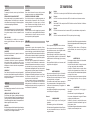
Creating copies using clone mode
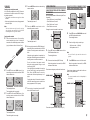
All of the codes programmed to the RC101 remote
controller can be copied to another RC101 using a
few simple operations.
• The remote controller can copy the entire
contents.
• When copying the entire contents, all programmed
codes are copied.
Note:
The clone function can only be used for copying
when using the same model (RC101) for both the
transmitting and receiving remote controller.
Press the ENTER cursor button on the receiving
remote controller.
CHANGE THE MULTI ROOM CONTROL COMMANDS
FOR EACH ZONE
Then back lights tune off.
5.
Press the ENTER cursor button on the
transmitting remote controller.
(When operating Marantz AV Receiver by Multi Zone
connected)
• Zone A: Multi room A control (Default)
• Zone B: Multi room B control
• Zone C: Multi room C control
• Zone D: Main room control
2.
1.
Then backlights tune off.
6.
EM
ST
SY
hes
Do not touch either of the remote controls
during the copying operation. Doing so could
cause copying to fail.
ST
SY
EM
TE
MO
RE
LLE
RO
NT
CO
R
2.
When copying is started, the SEND indicator of
transmitting remote controller and the LEARN
indicator of receiving remote controller start to
blink.
When the copying operation is completed, the
back lights of transmitting remote controller and
receiving remote controller are turned on.
c
2 in
3.
2.
1.
1.
TE
MO
RE
LLE
RO
NT
CO
R
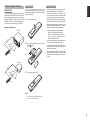
Place the receiver sensor of the receiving
remote controller (top) so that it is facing the
transmitter of the transmitting remote controller
(top) at a distance of about 2 inches (5 cm).
1.
Change the control commands for each zone.
Copying entire contents
1.
CHANGE THE CONTROL COMMANDS OF MULTI
SPEAKER FUNCTION FROM MULTI ROOM.
OTHER OPERATIONS
ENGLISH
4.
CLONE MODE
If the copying fails in the middle of the copying
process, back light of receiving remote are
flush. Press the SET button to return the
normal mode. Check and perform steps 1 to 5
again.
Press SET button and PLAY button of the
transmitting remote controller until the SEND
indicator blinks twice.
Press SET button and POWER ON button until
the SEND indicator blinks twice.
Then backlight flushes.
2.
Press the 1-digit code by numeric keys.
• Multi room mode: 1 (Default)
• Multi speaker mode: 2
1.
Press SET button and ZONE button until the
SEND indicator blinks twice.
Then backlight flushes.
2.
Press each zone button(A/B/C/D button)
When the procedure is successful, the SEND
indicator will blink twice.
These buttons change a special code of each zone.
Note
In case of Zone D, only control for main room is
possible.
3.
Press ENTER button once to lock in the code.
When the procedure is successful, the SEND
indicator will blink twice.
These buttons change a special code of multi room
mode or multi speaker mode.
Note
The control commands can be set independently in
ZONE A/B/C.
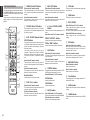
POWER ON/OFF
Copying takes about 30 seconds to complete
when the transmitting remote controller has
been programmed to 100% capacity.
POWER ON/OFF
SOURCE
Then backlight flushes
The transmitting side is now ready.
3.
7.
Once copying is completed, press the SET
button on both remote controls.
VOL +/–
Press SET button and STOP button of the
receiving remote controller until the LEARN
indicator blinks twice.
MUTE
VOL +/–
INFO
SLEEP
MUTE
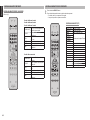
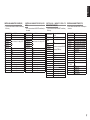
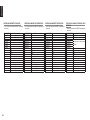
Tuner mode operation remote code (Refer to p.5)
Then backlight flushes.
The receiving side is now ready.
9