1
250-SHEET PAPER FEED UNIT (AR-D16)
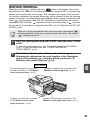
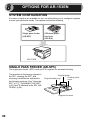
The paper feed unit provide the convenience of increased paper capacity for the unit
and a greater choice of paper size readily available for copying.
The procedures for loading paper in the
paper tray of paper feed unit, changing
the paper size, and selecting the paper
tray are same as for the paper tray in the
unit. See "LOADING THE PAPER TRAY"
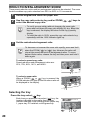
(p.8) and "Selecting the tray" (p.20).
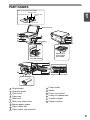
Tray
Lower side cover
Using the paper feed unit
with the printer function
(when the AL-12PKM is installed)
When the printer/scanner expansion kit is installed on the unit, the AR-D16 can also
be used with the printer function. To use the AR-D16 with the printer function, follow
these steps to adjust the settings in the printer driver.
The printer driver cannot be set for use with the AR-D16 when opened
from the application.
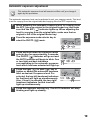
1
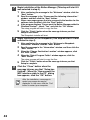
Click the "start" button.
2
Click "Control Panel", select "Printer and Other Hardware", and
then click "Printer and Faxes".
On Windows 95/98/Me/NT 4.0/2000, select "Setting" and click "Printers".
3
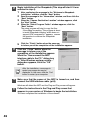
Click the "SHARP AR-153EN" printer driver icon and from the
"File" menu select "Properties".
On Windows 95/98/Me, click the "SHARP AR-153EN" printer driver icon,
select "Properties" from the "File" menu, and then click the "Setup" tab.
4
Click the "Utility" tab.
5
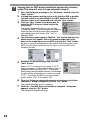
Select "Two trays" for "Input tray
option", and click "OK".
8
The printer driver closes. This completes the
settings needed to use the AR-D16.
67