1
iv
Table of Contents
1
Introduction
2
Assembly
and
Connections
Using This Manual .......................................................................................................1
Finding Information .......................................................................................................1
Test Sheet Procedures (for USA only) ............................................................................. 1
About Fax Machines ........................................................................................................2
Fax Tones and Handshake .............................................................................................. 2
ECM (Error Correction Mode) ........................................................................................ 3
FAX 1170 Control Panel Overview ..................................................................... 4
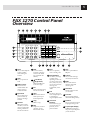
FAX 1270 Control Panel Overview ..................................................................... 5
MFC 1770/1780 Control Panel Overview ....................................................... 6
Caution .............................................................................................................................. 7
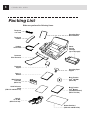
Packing List ..................................................................................................................... 8
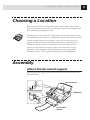
Choosing a Location .................................................................................................. 9
Assembly ........................................................................................................................... 9
Attach the document support ......................................................................................... 9
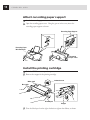
Attach recording paper support .................................................................................... 10
Install the printing cartridge ........................................................................................ 10
Install recording paper ..................................................................................................11
Connect the handset ......................................................................................................12
Connect the power cord .................................................................................................12
Connect the telephone line ........................................................................................... 13
Special Line Considerations.......................................................................................... 13
Roll Over Phone Lines ............................................................................................ 13
Two-Line Phone System ......................................................................................... 13
Converting Telephone Wall Outlets ........................................................................ 14
Installing Fax Machine, External Two-Line TAD,
and Two-Line Telephone ..................................................................................... 14
Multi-Line Connections (PBX) ..................................................................................... 15
If you are installing the machine to work with a PBX: .................................... 16
Custom Features on Your Phone Line .......................................................................... 16
Connecting an External Telephone Answering Device (TAD) ..................................... 16
Sequence.................................................................................................................. 16
Connections .............................................................................................................17
Outgoing Message (OGM)...................................................................................... 18
Connecting an External Telephone .............................................................................. 18