1
NAMES AND FUNCTIONS
ENGLISH
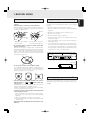
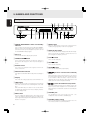
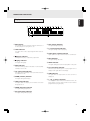
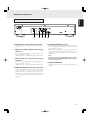
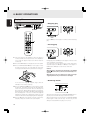
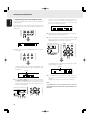
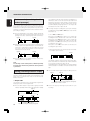
i 1, ¡ (search) buttons
Remote control unit
1 : This button is used to search backward when it is
held down during play.
¡ : This button is used to search forward when it is held
down during play.
DISPLAY
POWER
q
w
!2
1
2
3
4
5
6
7
8
PROGRAM
r
t
y
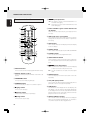
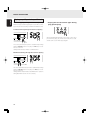
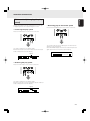
These are used to adjust the play speed (pitch) with a
± 12 step.
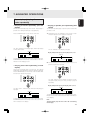
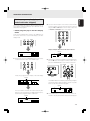
!0 AMS (auto music scan) button
9
CANCEL
e
!3
0
QUICK REPLAY
RANDOM
o PITCH -/RESET/+ (pitch control down/reset/
up) buttons
!4
This is used to play the intros of all the tracks in sequence
starting from the first track for the duration equivalent to
the setting.
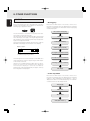
!1 TEXT button
!5
u
This is used to switch the main display from the time display
to the text display.
i
!2 POWER button
PITCH
RESET
o
!0
!1
AMS
A-B
REPEAT
TEXT
SCROLL/
RECALL
TIME
!6
!7
!8
!9
This is used to switch the player’s power ON and STANDBY.
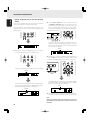
!3 CANCEL button
This is used to cancel the programmed tracks.
!4 QUICK REPLAY button
REMOTE CONTROLLER
RC5400CD
Press the button to return to the position 10 seconds before
the current playback position and restarts playback from
there.
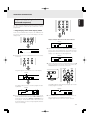
!5 4, ¢ (track skip) buttons
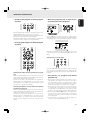
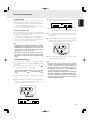
q DISPLAY button
This is used to turn off the display (DISPLAY OFF mode).
w Numeric buttons (0 to 9)
These are used to specify the numbers of the tracks to be
played.
4 : Use this to return to the start of the track now playing
or return to the start of the previous track.
¢ : Use this to advance to the start of the subsequent
track.
!6 REPEAT button
This is used to play one track or all the tracks on the disc
repeatedly.
e PROGRAM button
This is pressed to initiate program play.
r RANDOM button
!7 A-B (A-B repeat) button
This is used to set start point (A) and end point (B) when a
particular section is to be played repeatedly.
This is used to play the tracks in a random sequence.
t 3 (play) button
This is used to start play.
y 8 (pause) button
This is used to temporarily suspend play.
u 7 (stop) button
This is used to stop the play.
10
!8 TIME button
This switches the main display from the text display to the
time display. It can also switch the time display during play.
It can display how much time has elapsed and how much
play time remains for the current track as well as how much
play time remains for the whole disc.
!9 SCROLL/RECALL button
This is used to scroll the text display when text is displayed.
When it is pressed during program play, it is possible to
check which tracks have been programmed.