1
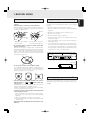
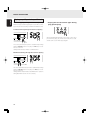
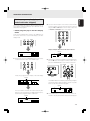
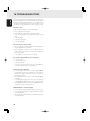
Program play (playing tracks in the
preferred sequence)
The order in which the CD tracks are played can be rearranged
into the sequence desired. Up to 30 tracks can be
programmed.
1
2
3
4
5
6
7
8
PROGRAM
ENGLISH
ADVANCED OPERATIONS
9
CANCEL
0
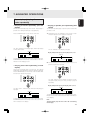
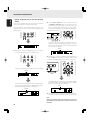
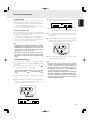
• Program play in the time display mode
In the case of a CD-TEXT disc, first press the TIME button on
the remote control unit to set the main display to the time
display mode.
AMS
A-B
REPEAT
TEXT
SCROLL/
RECALL
TIME
Display example: When track 2 has been selected
Flashes
TEXT
1.
1 2
TTL
3 4
5 6
7 8
TIME
3.
9 10 11 12 13 14 15 16 17 18
5
Flashes
9
TEXT
2
555
PROG
5
TRK
4
6
TTL
5
8
TIME
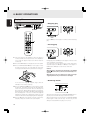
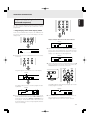
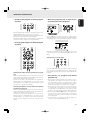
Repeat step 2 to program the desired tracks in sequence.
At each step of the programming, the number of tracks
programmed and their total time appear on the main
display. Up to 30 tracks can be programmed.
TTL
7
TTL
2
During stop, press the PROGRAM button on the remote
control unit.
PROGRAM
PROG
555
TTL
555
555
TEXT
TRK
5
TTL
8
TIME
10
CANCEL
0
4.
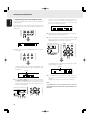
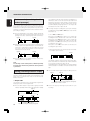
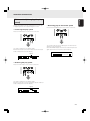
Once all the tracks have been programmed, press the 7
button on the player or remote control unit or press the
PROGRAM button on the remote control unit.
PROGRAM
CANCEL
0
“Program” appears for an instant on the main display.
QUICK REPLAY
RANDOM
Flashes
5
PROG
5
555
555
TEXT
The PROG indicator stops flashing and lights up instead,
and the program is entered.
The PROG indicator flashes, and the program mode is
established.
Flashes
5
PROG
5
555
TTL
555
Light up
TTL
TIME
TTL
TEXT
2.
Press the numeric buttons on the remote control unit the
tracks can also be selected using the 4 and ¢ buttons
on the remote control unit or 4/1 and ¡/¢ buttons
on the player. To select track number 10 or above, use
the numeric buttons to select the higher digit first and then
select the lower digit.
TEXT
5.
2
PROG
4
6
8
TTL
TIME
10
Press the 3 button on the player or remote control unit.
Play now starts in the programmed sequence.
Program play will start even when step 4 is omitted.
17