1
4.8
Tool menu
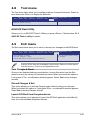
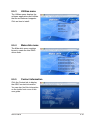
The Tool menu items allow you to configure options for special functions. Select an
item then press <Enter> to display the submenu.
Main
Aptio Setup Utility - Copyright (C) 2010 American Megatrends, Inc.
Event Logs Advanced Monitor Boot Tool Exit
ASUS EZ Flash Utility
Be used to update BIOS
ASUS EZ Flash Utility
Allows you to run ASUS EZ Flash 2. When you press <Enter>. Check section 4.1.2
ASUS EZ Flash 2 utility for details.
4.9
Exit menu
The Exit menu items allow you to save or discard your changes to the BIOS items.
Main
Aptio Setup Utility - Copyright (C) 2010 American Megatrends, Inc.
Event Logs Advanced Monitor Boot Tool Exit
Save Changes & Reset
Discard Changes & Exit
Reset the system after saving
the changes.
Launch EFI Shell from filesystem device
Pressing <Esc> does not immediately exit this menu. Select one of the options
from this menu or <F10> from the legend bar to exit.
Save Changes & Reset
Once you are finished making your selections, choose this option from the Exit
menu to ensure the values you selected are saved. When you select this option or
if you press <F10>, a confirmation window appears. Select Yes to save changes
and exit.
Discard Changes & Exit
This option allows you to exit the Setup program without saving your changes.
When you select this option or if you press <Esc>, a confirmation window appears.
Select Yes to discard changes and exit.
Launch EFI Shell from filesystem device
This option allows you to attempt to launch the EFI Shell application (shellx64.efi)
from one of the available filesystem devices.
ASUS P8B-X
4-29