1
INTRODUCTION
PR O G R A M : T H R Z ON E ( P 7)
IMPORTANT
PRECAUTIONS
Automatically adjusts incline to maintain your Target Heart Rate. Perfect for simulating the intensity of your
favorite sport or everyday activity. Time-based goal.
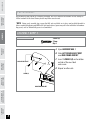
1. Once the THR ZONE program has been chosen, press enter.
2. Choose the desired time using the arrow keys and press enter.
3. Choose a target heart rate using the arrow keys on the programming button and press enter.
ASSEMBLY
Note: Use the chart provided in this guide, to determine your target heart rate.
4. Press Start to begin your program.
In this program, the large LED dot matrix window displays your heart rate during exercise. The middle row
represents your target heart rate (THR) and the other rows equal +/-2 heart beats. If you are working out
beneath your THR, the LEDs below the middle row will illuminate. If you are over, the LEDs above the middle
row will illuminate. Your current heart rate is represented by the flashing column and the window will refresh
every 5 seconds.
BEFORE
YOU BEGIN
NOTE: If no heart rate is detected, the large LED window will display the incline profile.
After the 4 minute warm-up period, the incline level will increase gradually until the user reaches the entered
target heart rate zone. Once the user reaches the target heart rate zone (plus or minus 5 beats per
minute) the incline level will remain. The incline will increase or decrease to match your target heart rate. The
last 4 minutes of the program will begin the cool down period. At this time, the program will gradually decrease
the resistance level to give the user a smooth cool down.
TREADMILL
OPERATION
CONDITIONING
GUIDELINES
TROUBLESHOOTING
& MAINTENANCE
LIMITED
WARRANTY
24