1
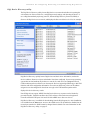
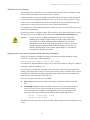
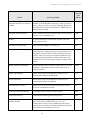
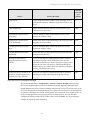
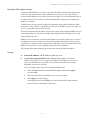
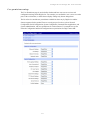
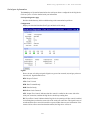
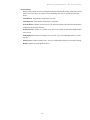
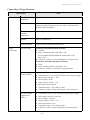
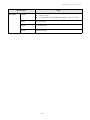
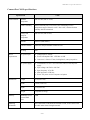
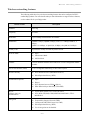
Configuration through the web interface DHCP server configuration settings Here are the configuration settings for the DHCP server. Typically, these settings can be modified without having to restart the DHCP server for the changes to become effective in the running server. Enable Dynamic Host Configuration Protocol (DHCP) Server: Enables the DHCP server feature on this Digi device. Note that for the DHCP server to operate, the Digi device must be configured to use a static IP address. For information on how to configure static IP settings, see "Ethernet IP settings" on page 55. – Scope Name: The name of the physical network interface associated with the subnet being served by the DHCP Server. Most Digi device models have a single network interface, so there is no choice for the scope name. For models that have multiple network interfaces, such as an Ethernet interface and a Wi-Fi (802.11) interface, this DHCP Server may be configured to provide services on either of those interfaces. – IP Addresses: The starting and ending IP addresses for the scope being served by this DHCP server. These addresses must be in the same subnet as the Digi device itself. – Lease Duration: The length of the leases for the scope being served by this DHCP server. The default lease duration is 24 hours. A DHCP client may request a lease duration other than this setting, and the DHCP server will grant that request if possible. Wait specified delay before sending DHCP offer reply: The interval of time in milliseconds to delay before offering a lease to a new client. The default delay is 500ms, and the range is 0 to 5000ms. Use of this delay permits this Digi device to reside on a network with other DHCP servers, yet not offer leases to new clients unless the other DHCP servers do not make such an offer. This provides a measure of protection against inadvertently connecting a Digi device to a network that is running its own DHCP server(s), and offering leases to clients in a manner inconsistent with that network. Check that an IP address is not in use before offering it: When a DHCP client requests a new IP address lease, before offering an IP address to that client, use “ping” to test whether that IP address is already in use by another host on the network but is unknown to the DHCP server. If an IP address is determined to be in use, it is marked as Unavailable for a period of time, and it will not be offered to any client while in this state. Enabling this test adds approximately one second of delay before the IP address is offered to the client, since the “ping” test must not receive a valid reply for that test to successfully determine that the IP address is not already in use. This option is off (disabled) by default. This option does not apply to Static Lease Reservations, since the “ping” test is not used for them. 62