1
Safety Statements
Safety Statements
WARNING! The following safety precautions will increase the life of the Notebook
PC. Follow all precautions and instructions. Except as described in this manual, refer
all servicing to qualified personnel. Do not use damaged power cords, accessories,
or other peripherals. Do not use strong solvents such as thinners, benzene, or other
chemicals on or near the surface.
Disconnect the AC power and remove the battery pack(s) before cleaning. Wipe the Notebook PC using
a clean cellulose sponge or chamois cloth dampened with a solution of nonabrasive detergent and a few
drops of warm water and remove any extra moisture with a dry cloth.
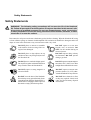
DO NOT place on uneven or unstable
work surfaces. Seek servicing if the casing has been damaged.
DO NOT expose to or use near
liquids, rain, or moisture. DO
NOT use the modem during an
electrical storm.
DO NOT place or drop objects on top
and do not shove any foreign objects into
the Notebook PC.
DO NOT expose to dirty or dusty
environments. DO NOT operate
during a gas leak.
DO NOT press or touch the display panel.
Do not place together with small items that
may scratch or enter the Notebook PC.
DO NOT expose to extreme temperatures above 50˚C (122˚F) or to direct
sunlight. Do not block the fan vents!
DO NOT expose to strong magnetic or
electrical fields.
DO NOT expose to extreme temperatures (below 0˚C (32˚F), otherwise the Notebook PC may not boot.
DO NOT leave the base of the Notebook
PC on the lap or any part of the body for an
extended period while the Notebook PC is
turned ON or is charging in order to prevent
discomfort or injury from heat exposure.
DO NOT throw batteries in fires
as they may explode. Check local
codes for special battery disposal
instructions.