1
Miscellaneous Technical Information
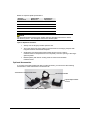
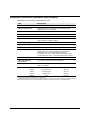
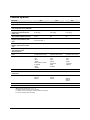
System Requirements for USB Connection
Below are the software and firmware versions required to successfully connect a Datacolor
instrument to a USB port.
Operating Systems
Windows 2000, Windows XP Pro
USB Firmware
1.1 or higher
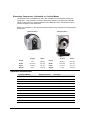
RS-232C Connector Pin Assignments
Pin #
Purpose
Direction
2
Transmit data
Out (to host)
3
Receive data
In (from host)
7
Signal ground
CAUTION
(1) DO NOT WIRE to pins other than 2, 3, and 7.
(2) For all unused inputs, the default is active high.
Compliance Statements
FCC Compliance Statement
WARNING
Changes or modifications to this unit not expressly approved by the party responsible for
compliance could void the user’s authority to operate the equipment.
This equipment has been tested and found to comply with the limits for a Class A digital
device, pursuant to Part 15 of the FCC Rules. These limits are designed to provide
reasonable protection against harmful interference when the equipment is operated in a
commercial environment. This equipment generates, uses and can radiate radio frequency
energy and, if not installed and used in accordance with this User’s manual, may cause
harmful interference to radio communications.
Operation of this equipment in a residential area is likely to cause harmful interference in
which case the user will be required to correct the interference at his/her own expense.
This device complies with Part 15 of the FCC Rules. Operation is subject to the following
conditions: (1) this device may not cause harmful interference, and (2) this device must
accept any interference received, including interference that may cause undesired
operation.
Datacolor 650/600/400 User's Guide
Miscellaneous Technical Information • 47