1
Interpreting LED Activity
3
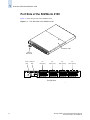
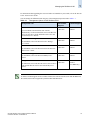
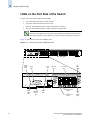
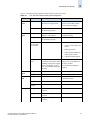
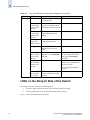
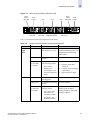
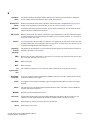
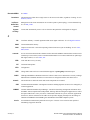
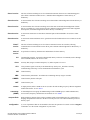
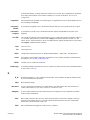
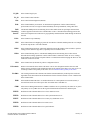
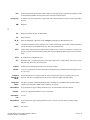
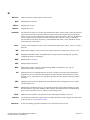
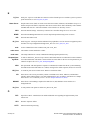
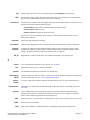
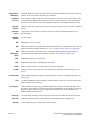
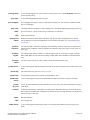
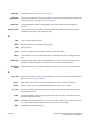
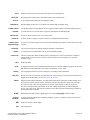
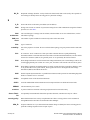
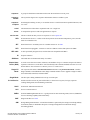
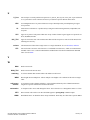
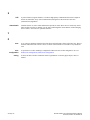
Table 3-1 describes the LEDs and their actions on the port side of the switch.
Table 3-1
Port Side LED Patterns During Normal Operation
LED Name
LED Color
Status of Hardware
Recommended Action
Power
Status
No light
System is off or there is an
internal power supply failure.
Verify that system is on. If the
system is on, the unit is faulty.
Contact Technical Support.
System
Status
Steady green
System is on and power supplies
are functioning properly.
No action required.
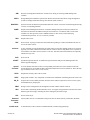
No light
System is off, boot is not
complete, or boot failed.
Verify that system is on and has
completed booting.
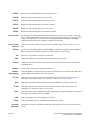
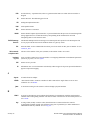
Steady green
System is on and power supplies
are functioning properly.
No action required.
Steady amber
(for more than
five seconds)
Boot failed, the system is faulty.
Perform the following steps:
Flashing amber/
green
1.
Connect a serial cable to the
system.
2.
Reboot the system.
3.
Check the failure indicated
on the system console.
4.
Contact Technical Support.
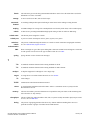
Attention is required. A number
of variables can cause this status
including a single power supply
failure, a fan failure, or one or
more environmental ranges has
exceeded.
Check the management interface
and the error log for details on
the cause of status.
Contact Technical Support if
required.
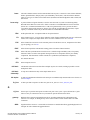
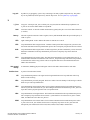
Ethernet
Speed
No light
Port speed is 10 Mb/sec.
No action required.
Steady green
Port speed is 100 Mb/sec.
No action required.
Ethernet
Link
No light
There is no link.
Verify that the Ethernet cable is
connected correctly.
Steady amber
There is a link.
No action required.
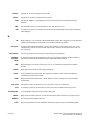
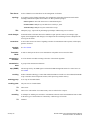
Flashing amber/
no light
There is link activity (traffic).
No action required.
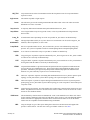
No light
Port is transmitting/receiving at
1 Gbit/sec.
No action required.
Steady green
Port is transmitting/receiving at
2 Gbit/sec.
No action required.
Steady amber
Port is transmitting/receiving at
4 Gbit/sec.
No action required.
Port Speed
Brocade SilkWorm 4100 Hardware Reference Manual
Publication Number: 53-0000563-02
3-3