1
EPSON PowerLite 5300/7200/7300 Projector
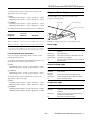
To determine the projection distance when you know the
diagonal size of the screen image:
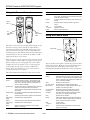
Projector Status Lights
❏ Inches:
Maximum projection distance = (2.1949 × diagonal size) − 2.5044
Minimum projection distance = (1.6328 × diagonal size) − 2.4923
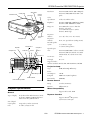
The status lights on top of the projector tell you the
projector’s operating status.
❏ Centimeters:
Maximum projection distance = (2.1949 × diagonal size) − 6.3612
Minimum projection distance = (1.6328 × diagonal size) − 6.3304
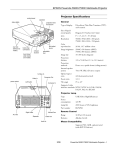
power light
temperature light
projection lamp light
For example, here are the measurements for three installations:
Image size
(diagonal)
Horizontal distance from projector
to screen
Minimum
Maximum
300 inches* (762 cm) 487.3 inches (12.4 m) 656.0 inches (16.7 m)
200 inches (508 cm)
324.1 inches (8.2 m) 436.5 inches (11.1 m)
Caution: A red light warns you if a serious problem occurs.
100 inches (254 cm)
160.8 inches (4.1 m) 217.1 inches (5.5 m)
Power Light
* For an image size of 300 inches, the projector may be up to 54 feet
away from the screen, depending on the setting of the zoom ring.
Light status
Meaning
Steady orange
Sleep mode. (The projector is plugged in, but not
projecting.)
Long Throw Zoom Lens Calculations
Steady green
Power and lamp are on.
If you are using the optional long throw zoom lens, use the
following formulas instead:
Flashing green
The projector is warming up. Allow about 30 seconds.
Flashing orange
The projector is cooling down.
To determine the minimum and maximum diagonal size of an
image when you know the projection distance:
Off
The power cord is not plugged in or there is an internal
projector problem.
❏ Inches:
Maximum diagonal size = (0.4742 × projection distance) + 3.2489
Minimum diagonal size = (0.2849 × projection distance) + 1.8968
Projection Lamp Light
Light status
Meaning
❏ Centimeters:
Maximum diagonal size = (1.2045 × projection distance) + 8.2521
Minimum diagonal size = (0.7236 × projection distance) + 4.8179
Orange and
red flashing
alternately
Lamp timer has exceeded 1900 hours. Projection lamp
needs replacing.
Steady red
Projection lamp has burned out. Replace lamp.
To determine the projection distance when you know the
diagonal size of the screen image:
Flashing red
Problem with projection lamp or lamp power supply.
Off
Lamp is functioning normally.
❏ Inches:
Maximum projection distance = (3.5094 × diagonal size) − 6.6568
Minimum projection distance = (2.1090 × diagonal size) − 6.8519
Temperature Light
❏ Centimeters:
Maximum projection distance = (8.9139 × diagonal size) − 16.9083
Minimum projection distance = (5.3569 × diagonal size) − 17.4038
1/99
Light status
Meaning
Flashing orange
Projector is too hot.
Steady red
Projector has turned off automatically because of
overheating.
Flashing red
Problem with the cooling fan or temperature sensor,
generating an overheat condition.
Off
The projector is functioning normally.
EPSON PowerLite 5300/7200/7300 Projector - 3