1
to uniquely identify the unit within the system. For example, it could be the room number.
The default name is MLA-VC10-PLUS.
NOTES: • Only letters (A-Z), numbers (0-9), and the hyphen (minus sign) are valid.
• No blank or space characters are permitted.
• No distinction is made between upper and lower case letters.
• The first character must be a letter.
• The final character cannot be a hyphen (minus sign).
X( — Soft start delay in milliseconds per volume step (40 ms to 200 ms). Default is 40,
which is equivalent to 40 ms.
Error Messages
When the MLA receives a valid SIS command, it executes the command and sends a
response to the host device. If the MLA is unable to execute the command because the
command contains invalid parameters, it returns the following error response to the host:
E10 = Invalid command
E14 = Not valid for this config.
E13 = Invalid parameter
If the MLA VC10 Plus does not support or recognize the entered commands, nothing will
happen and no response is issued.
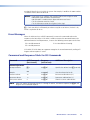
Command and Response Table for SIS Commands
Command
ASCII Command
(host to unit)
Response
(unit to host)
Additional Description
Set output volume
X! V
VolX!]
Specifies the volume level (X! 0 to 100).
Example:
82V
Vol082]
Sets the volume level to 82
Increment volume
+V
VolX!]
Increment audio volume (+1).
Decrement volume
-V
VolX!]
Decrement audio volume (-1).
View current volume
V
VolX!]
Show the current audio volume.
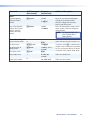
Volume Adjustment
NOTE: Whenever another SIS command results in a change in volume, the Volume response (VolX!]) will
be given as an unsolicited response.
MLA VC10 Plus • SIS Commands
33