1
DIFFICULTY
SUGGESTIONS
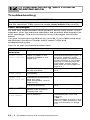
Dialling does not
work
Check all line cord connections.
Check the power cord connection.
Send a manual fax by lifting the handset and dialling
the number. Wait to hear fax receiving tones before
pressing Fax Start.
Change the Tone/Pulse setting. (See Setting Tone or
Pulse dialling mode (Not available for New Zealand) on
page 4-5.)
Vertical black lines Use the fax machine to make a copy. If the copy shows
when sending.
the same problem, the scanner area is dirty. Lift the top
cover and check the document path. Clean the white
film and the scanner’s glass strip using isopropyl
alcohol and a lint-free cloth. (See Cleaning the scanner
on page 12-9.)
Transmission
Verification Report
prints “RESULT
ERROR”
There is probably temporary noise or static on the
phone line. Try sending the fax again.
Try setting the Compatibility to BASIC.
(See Compatibility on page 12-4.)
If the problem continues, call the telephone company
to check your phone line.
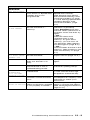
Handling Incoming Calls
Double-ring in
FAX/TEL mode
The fax machine knows the incoming call is not a fax
so it is signaling you to answer the telephone call. Pick
up the fax machine’s handset or answer from an
extension phone, and then press the fax machine’s
Telephone Answer Code (default setting is #51 or #91
for New Zealand).
(See For FAX/TEL mode only on page 5-5.)
Transferring a call If you have answered at the fax machine’s handset,
to the fax machine press Fax Start and hang up immediately.
If you answered at an extension phone, press your
three-digit Fax Receive Code (default setting is 51 or
91 for New Zealand). When the fax machine
answers, hang up.
The fax machine
“hears” voice as
fax tone
If the fax machine is set to Fax Detect ON, it is more
sensitive to sounds. The fax machine may mistakenly
interpret certain voices or music on the line as a calling
fax machine and respond with fax receiving tones.
Deactivate the fax by pressing #51 or #91 for New
Zealand if you are at an extension phone or press
Stop/Exit if you are at the fax machine or an external
phone.
Try avoiding this problem by turning Fax Detect to OFF.
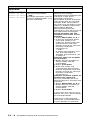
Custom features
on a single line
If you have Call Waiting, Voice Mail, an alarm system
or any other custom feature on a single phone line with
the fax machine, it may create a problem sending or
receiving fax data.
For example: If you are sending or receiving a fax
message while a custom feature signal comes through
on the line, the signal can temporarily interrupt or
disrupt the fax data. Your fax machine’s ECM feature
should help overcome this problem. This condition is
related to the telephone system industry and is
common to all devices that send and receive data on a
single, shared line with custom features. If avoiding a
slight interruption is crucial to your business, we
recommend a separate phone line with no custom
features.
12 - 7 Troubleshooting and routine maintenance