1
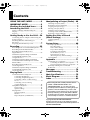
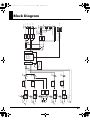
4AGAPGYDQQMࡍࠫ㧞㧜㧜㧤ᐕ㧡㧝㧡ᣣᦐᧁޓᣣޓඦᓟ㧠ᤨ㧡㧟ಽ Contents USING THE UNIT SAFELY...............3 IMPORTANT NOTES ......................5 Checking the Included Items.........8 Introducing the R-44 ....................9 Names of Things and What They Do................ 9 Display................................................................. 18 Projects................................................................. 22 Getting Ready to Use the R-44 ...24 Connecting the AC Adaptor and Turning the Power On/Off .................................................... 24 Installing Batteries and Turning on the Power............................................................. 25 Preparing the SD Memory Card ...................... 28 Manipulating a Project (Finder) .. 48 Selecting a Project (Select) ................................ 48 Renaming a Project (Rename) .......................... 49 Copying a Project (Copy) ................................. 50 Moving a Project (Move) .................................. 51 Deleting a Project (Delete) ................................ 52 Creating a New Folder (Make Folder)............ 53 Repairing a Project (Repair) ............................. 54 Setting the Color of Sound (Effects Settings) ........................ 55 Applying Effects ................................................ 56 Effects .................................................................. 58 System Setup ............................ 60 Example Operations .......................................... 61 Recording ..................................29 Recording from a Connected Microphone ..... 29 Recording from the Internal Mics.................... 32 Recording Digital Audio from a Digital Device ..................................................... 33 Simultaneously Recording Sound from Connected Microphones and a Digital Device .................................................. 34 Simultaneously Recording Sound from Connected External Microphones and the Internal Mics ....................................................... 36 Recording Digital Audio from an Analog Device ............................................... 38 Simultaneously Recording Sound from Connected Microphones and an Analog Device ............................................... 39 Playing Back .............................41 Connections Before Playback ........................... 41 Connecting Headphones .................................41 Connecting Amplified Speakers.....................41 Connecting a Mixer or Other Analog Device .................................................................41 Connecting a Device Having a Digital Input Port...........................................42 Setup Before Playback ....................................... 43 Player Setup.......................................................43 Speaker Settings ................................................44 Playing Back........................................................ 45 Normal Playback ..............................................45 Markers ..............................................................46 Repeat Playback (A-B REPEAT) .....................47 Recording Setup................................................61 Date & Time Settings........................................62 Project Name Settings ......................................63 Formatting and Checking the SD Memory Card .......................................64 Executing Factory Reset (Restoring Factory Default Settings) ..............65 System Menu ...................................................... 66 Appendix .................................. 71 Connecting to a Computer ............................... 71 Connecting the R-44 to Your Computer........71 Disconnecting the R-44 from a Computer.....72 Remotely Linking Two Connected R-44 Units............................................................ 73 Messages .................................. 74 Troubleshooting ........................ 75 Main Specifications.................... 79 Block Diagram .......................... 81 Index ........................................ 82 01 Before using this unit, carefully read the sections entitled: “USING THE UNIT SAFELY” and “IMPORTANT NOTES” (p. 3–6). These sections provide important information concerning the proper operation of the unit. Additionally, in order to feel assured that you have gained a good grasp of every feature provided by your new unit, Owner’s Manual should be read in its entirety. The manual should be saved and kept on hand as a convenient reference. 202 Copyright © 2008 ROLAND CORPORATION All rights reserved. No part of this publication may be reproduced in any form without the written permission of ROLAND CORPORATION. 7