1
Sensus Infotainment - introduction
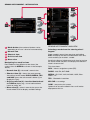
Sensus Infotainment provides a coordinated interface
for operating a number of functions that can be
reached through the buttons on the centre console.
1 SOUND – press to access the menu for sound
settings (bass, treble, etc.). Press repeatedly to
come to the setting of your choice.
2 VOL – turn to raise or lower the volume.
3
(On/Off)
- Press briefly to start Sensus Infotainment.
- Press and hold (until the screen turns black) to
switch the system off.
- Press briefly to mute the system’s sound and
press briefly again to return the sound.
The entire Sensus Infotainment system, including the navigation* and telephone* functions, is
switched on/off at the same time by using this
button.
4 Mode buttons - Select a mode (e.g., RADIO,
MEDIA , TEL*, etc.) by pressing its button on
the centre console. The most recent source in
the selected mode (e.g., FM1) will be displayed.
The location of these buttons on the centre console may vary slightly from model to model.
5 OK/MENU – confirm a menu selection. This
leads to the selected mode’s (RADIO or
MEDIA) menu view. Arrows at the right of the
screen indicate submenus.
6 TUNE – turn to scroll amongst tracks/folders,
radio and TV* stations, phone contacts or to
navigate amongst the alternatives shown on the
screen.
7 EXIT – go upwards in the menu system, cancel
a current function, reject an incoming phone call
or erase characters that have been entered on
the screen. From a mode’s main view, press and
hold to come to the Sensus Infotainment main
menu.
8 # INFO - If more information is available than is
currently displayed on the screen, press # INFO
to display the remaining information.
Keypad - for storing presets or entering numbers/letters.
* FAV - used to store frequently used functions,
making it possible to start the stored function
by simply pressing this button. See the example under Sensus Infotainment - navigation mode.
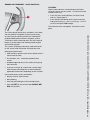
Steering wheel keypad (with a thumb
wheel*)
The buttons on the right-hand steering wheel keypad
can be used in the same way as some of the controls
on the centre console.
5 Thumb wheel (press): functions in the same
way as OK/MENU on the centre console.
6 Thumb wheel (turn): functions in the same
way as TUNE on the centre console.
7 EXIT: functions in the same way as EXIT on the
centre console.
note
• In the remainder of this supplement, the thumb
wheel (on certain steering wheel keypads only)
will be referred to as “the thumb wheel” and the
OK/MENU button on the centre console will be
referred to as “OK.”
• For more detailed information about the various
Sensus Infotainment features, please consult
your owner’s manual.