1
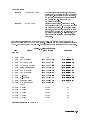
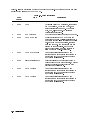
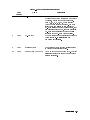
State 1.
No Observed Power. The Front-Panel Power Indicator is O.
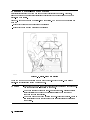
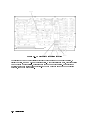
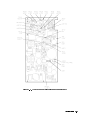
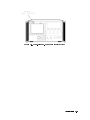
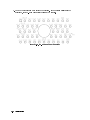
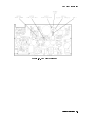
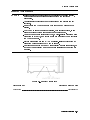
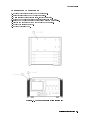
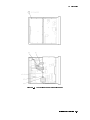
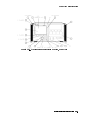
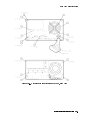
If the input voltage is 230 Vac, but the voltage selector switch is set for 115 Vac
Note
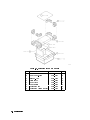
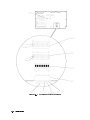
(see to Figure 4-6), the input fuse is blown at turn on, protecting the display.
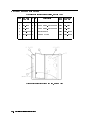
Figure 4-6. Voltage Selector Switch
Use a line cord that is known to be good. Verify that the input line voltage is within limits and
that the display voltage selector switch setting agrees with the input line-voltage.
Note
After troubleshooting the display, always set the voltage selector switch to
match the user's input line-voltage. An incorrect voltage selector switch setting
will result either in too high an input voltage (blowing the ac line fuse) or too
low an input voltage (causing automatic shut-down with the internal FAULT
light on).
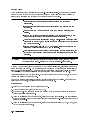
1. Check the ac line fuse, located on the rear panel. If the fuse is blown (open), replace it.
Then, verify the voltage selector switch is set correctly and turn on the display .
a. If the display starts working (the fan is turning, the green front panel line indicator light
is lit, and all fault indicator lights are o), the problem has been xed. If not, continue
with step 1b.
b. If the green front panel line indicator light is still o after checking or replacing the ac
line fuse, then turn o the display. Set the voltage selector switch to 115 Vac. Open the
instrument and access the A4 power supply.
DANGER
These procedures require access to the interior of the color display,
only qualied service personnel should perform the servicing
procedures.
Use electrostatic discharge (ESD) precautions when performing any
servicing.
Do not touch the A4 power supply with your hands while power is
applied.
The A4 power supply has lethal voltages, with lethal currents, in all
areas for at least three minutes after power is turned o.
4-20 Troubleshooting