1
TROUBLESHOOTING
■ Before calling for repair service, check the following items for possible remedies to
the encountered symptoms.
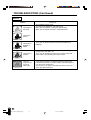
TV set
Problem
Sound
Picture
Picture
Check item
There is no
picture or
sound.
There is no
picture.
There is no
picture from
AV-IN 1.
There is no
sound.
There is no
picture or
sound, just
noise.
• Make sure the AC adapter is properly inserted in the
power outlet.
• Reception other than those of broadcasting stations
can be considered.
• Make sure the input mode is set to TV.
• Make sure the main power switch of the main unit is
on.
• Make sure the BLACK LEVEL is properly adjusted.
• Fluorescent lamp may have reached the end of
service life.
• Make sure the S-Video terminal is free of connections.
Reference
Pages
18
14
14
20, 21
–
29
• Make sure the volume is not set to minimum.
• Make sure the sound is not set to mute.
• Make sure the headphone is not connected.
15
15
27
• Make sure the antenna cable is properly connected.
• Bad reception can be considered.
9
–
• Make sure the antenna cable is properly connected.
• Bad reception can be considered.
9
–
Picture is not
clear.
Picture is light
or improperly
tinted.
The picture is
too dark.
Remote control does not work.
• Check color adjustment.
• Check color system setting.
20, 21
• Press the Brightness button.
• Check PICTURE and BLACK LEVEL adjustment.
• Fluorescent lamp may have reached the end of
service life.
• Check to see if batteries in the remote control have
sufficient power.
• Make sure the remote sensor window is not under
strong fluorescent lighting.
20, 21
33
8
8
31
99148_LC10A2U(18-34)Eng.pm65
31
00.7.23, 10:18 AM