1
EZ SETUP DURING FIRST POWER ON
■ When you turn on the LCD TV for the first time, it will automatically memorize the broadcasting
channels.
Please perform the following instructions before you press the power button.
(1) Insert the batteries into the remote control. (See page 8)
(2) Connect the antenna cable to the TV set. (See page 9 ~ 10)
(3) Plug in the AC adapter to the wall outlet.
Control section of main unit
VOL
CH
TV/VIDEO
1
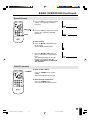
Slide the MAIN POWER button on
the LCD TV set or on the Remote
Control to turn on the LCD TV. The
SELECT LANGUAGE mode will be
displayed.
MAIN POWER
(SELECT LANGUAGE mode)
Power/Standby indicator
2
Press CH (])/([) to select
“ENGLISH”, “SPANISH
(ESPAÑOL)” or “FRENCH
(FRANÇAIS)”.
3
Press VOL (+)/(–) to display EZ
SETUP mode.
4
Press VOL (+).
POWER
MENU
POWER
MENU
CH
CH
FLASHBACK
1
2
3
4
5
6
7
8
9
(EZ SETUP mode)
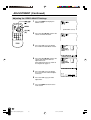
The tuner will automatically search
for the broadcasting and cable TV
channels. (The CH No. will automatically increase when it appears.)
TV/VIDEO
CH (])/
([)
DISPLAY
If you want to stop the EZ SETUP
process once it has started, press
VOL (–) and it will be canceled.
MUTE
0
If you want to SETUP again,
please refer to page 22 on SETUP.
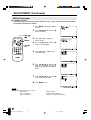
Press VOL (–) to cancel EZ
SETUP.
LCDTV
5
Once EZ SETUP is completed, the
smallest channel number memorized will be displayed.
Notes:
■
■
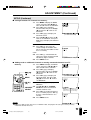
If EZ SETUP does not memorize all the channels in your region, please refer to page 23 for more information on
manual memorizing the channels using CHANNEL SETTING.
It may be difficult to PRESET when the broadcasting signals are weak, the channel cycle frequency is incorrect or
the frequency jamming is occuring around the area. Please refer to pages 23 ~ 24 for more information on manual
memorizing the channels using CHANNEL SETTING.
18
99148_LC10A2U(18-34)Eng.pm65
18
00.7.23, 10:18 AM