1
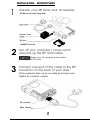
This guide shows how to install the parallel port model of the ZIP
Drive using your PC’s printer connection. If you encounter any
problems while installing your ZIP Drive, refer to “Troubleshooting”
in the “Using Your ZIP Drive” section.
This model of the ZIP Drive cannot be used on Macintosh computers.
To connect to a Macintosh (including the PowerBook), use the SCSI
model of the ZIP Drive.
Using Your Printer With ZIP
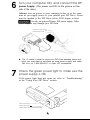
Your ZIP Drive lets you use a printer and your ZIP Drive at the same
time, even if your computer has only one parallel port. Step 5 of
this guide shows you how to connect a printer to the ZIP Drive.
The README.TXT file on the Install disk and the “Using Your ZIP
Drive” section of the manual have additional information on using
a printer with your ZIP Drive.
Enhancing ZIP Drive Transfer Speed
The parallel port model of the ZIP Drive supports three data
transfer modes which have different transfer speeds. To ensure
the broadest base of compatibility for the ZIP Drive, the Ersox
Installation software automatically uses the most compatible
mode; however, this may not be the fastest mode available on your
computer. If your computer has a bi-directional parallel port or an
EPP chip set, you may be able to use a faster mode of data transfer
which will significantly improve the performance of you ZIP Drive.
For detailed instructions on changing the data transfer speed for
your ZIP Drive, refer to ZIP Tools Help in your EPSON ZIP Tools
Window group or to the section on “Speed Options for the Parallel
Port ZIP Drive” in the README.TXT file on the Install disk.
OS/2 support
If you want to use your ZIP Drive in an OS/2 operating
environment, you need to purchase Ersox driver software
for OS/2. Call Erso~ at 1-800-922-8911 to order driver
software, ($9.95 for shipping and handling), or use the EPSON
Download Service at (310) 782-4531 to download a driver.