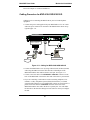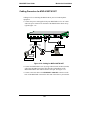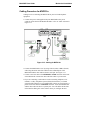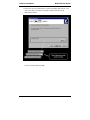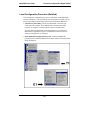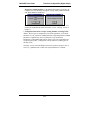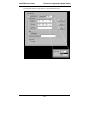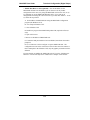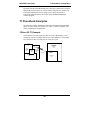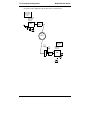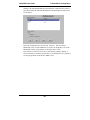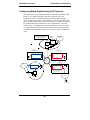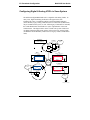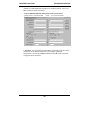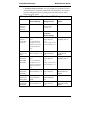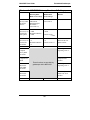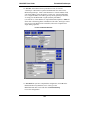
1
Voice / Fax over IP Networks User Guide for Voice/IP Gateways Digital Models (T1, E1, ISDN-PRI): MVP-2400/2410/3010 Analog/BRI Models: MVP-130/210/410/810 MVP-210G/410G/810G MVP-410ST/810ST User Guide S000249H Analog MultiVOIP Units (Models MVP130, MVP210, MVP410, MVP810, MVP210G, MVP410G, and MVP810G) ISDN-BRI MultiVOIP Units (Models MVP410ST, and MVP810ST) Digital MultiVOIP Units (Models MVP2400, MVP2410, & MVP3010) Upgrade Units (MVP24-48 and MVP30-60) This publication may not be reproduced, in whole or in part, without prior expressed written permission from Multi-Tech Systems, Inc. All rights reserved. Copyright © 2003, by Multi-Tech Systems, Inc. Multi-Tech Systems, Inc. makes no representations or warranties with respect to the contents hereof and specifically disclaims any implied warranties of merchantability or fitness for any particular purpose. Furthermore, Multi-Tech Systems, Inc. reserves the right to revise this publication and to make changes from time to time in the content hereof without obligation of Multi-Tech Systems, Inc. to notify any person or organization of such revisions or changes. Record of Revisions Revision Description A B C D E F G H Initial Release. (05/10/02) Index added. (05/24/02) Updated for 4.03/6.03 software. (10/11/02) Updated for 4.04/6.04/8.04/9.04 software. (03/20/03) embedded gatekeeper models, ISDN-BRI models, MultiVantage Apx., SPP protocol, & Call State Apx. Remove MultiVantage. (04/18/03) Update ISDN-BRI info in SW version 5.02c. (06/04/03) Add MVP130 information. (06/30/03) Revisions to ISDN-BRI & MVP130 content. (08/15/03) Add Patents This Product is covered by one or more of the following U.S. Patent Numbers: 6151333, 5757801, 5682386, 5.301.274; 5.309.562; 5.355.365; 5.355.653; 5.452.289; 5.453.986. Other Patents Pending. Trademark Trademark of Multi-Tech Systems, Inc. is the Multi-Tech logo. Windows and NetMeeting are registered trademarks of Microsoft. Multi-Tech Systems, Inc. 2205 Woodale Drive Mounds View, Minnesota 55112 (763) 785-3500 or (800) 328-9717 U.S. Fax: 763-785-9874 Technical Support: (800) 972-2439 http://www.multitech.com 2 CONTENTS CHAPTER 1: OVERVIEW.......................................................................................8 ABOUT THIS MANUAL ...............................................................................................9 INTRODUCTION TO TI MULTIVOIPS (MVP2400, MVP2410, & MVP24-48) .........12 T1 Front Panel LEDs..........................................................................................17 INTRODUCTION TO EI MULTIVOIPS (MVP3010 & MVP30-60)............................19 E1 Front Panel LEDs .........................................................................................24 E1 LED Descriptions ..........................................................................................25 INTRODUCTION TO ANALOG MULTIVOIPS (MVP130, MVP-210/410/810 & MVP428) ................................................................................................................................26 Analog MultiVOIP Front Panel LEDs................................................................31 INTRODUCTION TO ISDN-BRI MULTIVOIPS (MVP410ST & MVP810ST) ..........35 ISDN BRI MultiVOIP Front Panel LEDs ...........................................................39 ISDN-BRI MultiVOIP LED Descriptions ...........................................................40 COMPUTER REQUIREMENTS ....................................................................................41 SPECIFICATIONS ......................................................................................................42 Specs for Digital T1 MultiVOIP Units................................................................42 Specs for Digital E1 MultiVOIP Units................................................................43 Specs for Analog/BRI MultiVOIP Units..............................................................44 INSTALLATION AT A GLANCE ..................................................................................45 RELATED DOCUMENTATION ....................................................................................45 CHAPTER 2: QUICK START INSTRUCTIONS ................................................46 INTRODUCTION ........................................................................................................47 MULTIVOIP STARTUP TASKS .................................................................................47 Phone/IP Details *Absolutely Needed* Before Starting the Installation............48 Gather IP Information...................................................................................................48 Gather Telephone Information (T1) .............................................................................48 Gather Telephone Information (E1) .............................................................................49 Gather Telephone Information (Analog) ......................................................................49 Gather Telephone Information (ISDN BRI) .................................................................50 Obtain Email Address for VOIP (for email call log reporting).....................................51 Identify Remote VOIP Site to Call ...............................................................................51 Identify VOIP Protocol to be Used...............................................................................51 Placement ...........................................................................................................52 The Command/Control Computer (Specs & Settings) ........................................52 Quick Hookups....................................................................................................53 Load MultiVOIP Control Software onto PC.......................................................58 Phone/IP Starter Configuration..........................................................................59 Phonebook Starter Configuration (with remote voip).........................................66 Outbound Phonebook ...................................................................................................66 Inbound Phonebook......................................................................................................70 Phonebook Tips ..................................................................................................73 Phonebook Example ...........................................................................................76 Connectivity Test ................................................................................................81 Troubleshooting..................................................................................................85 3 Contents MultiVOIP User Guide CHAPTER 3: MECHANICAL INSTALLATION AND CABLING...................87 INTRODUCTION ........................................................................................................88 SAFETY WARNINGS .................................................................................................88 Lithium Battery Caution .....................................................................................88 Safety Warnings Telecom....................................................................................88 UNPACKING YOUR MULTIVOIP..............................................................................89 Unpacking the MVP2410/3010...........................................................................89 Unpacking the MVP2400....................................................................................90 Unpacking the MVP-410x/810x..........................................................................91 Unpacking the MVP210x ....................................................................................92 Unpacking the MVP130......................................................................................93 RACK MOUNTING INSTRUCTIONS FOR MVP-2410/3010 & MVP-410X/810X ........94 Safety Recommendations for Rack Installations .................................................95 19-Inch Rack Enclosure Mounting Procedure....................................................96 CABLING .................................................................................................................97 Cabling Procedure for MVP2410/3010..............................................................97 Cabling Procedure for MVP2400.......................................................................98 Cabling Procedure for MVP-410/410G/810/810G.............................................99 Cabling Procedure for MVP-410ST/810ST ...................................................... 101 Cabling Procedure for MVP210x ..................................................................... 105 Cabling Procedure for MVP130....................................................................... 107 CHAPTER 4: SOFTWARE INSTALLATION ................................................... 108 INTRODUCTION ...................................................................................................... 109 LOADING MULTIVOIP SOFTWARE ONTO THE PC.................................................. 109 UN-INSTALLING THE MULTIVOIP CONFIGURATION SOFTWARE ........................... 116 CHAPTER 5: TECHNICAL CONFIGURATION FOR DIGITAL T1/E1 MULTIVOIPS (MVP2400, MVP2410, MVP3010) .............................................. 119 CONFIGURING THE DIGITAL T1/E1 MULTIVOIP................................................... 120 LOCAL CONFIGURATION ........................................................................................ 122 Pre-Requisites................................................................................................... 122 IP Parameters..............................................................................................................122 T1 Telephony Parameters (for MVP2400 & MVP2410)............................................123 E1 Telephony Parameters (for MVP3010) .................................................................124 SMTP Parameters (for email call log reporting).........................................................125 Local Configuration Procedure (Summary) ..................................................... 126 Local Configuration Procedure (Detailed)....................................................... 127 Modem Relay .................................................................................................... 144 CHAPTER 6: TECHNICAL CONFIGURATION FOR ANALOG/BRI MULTIVOIPS (MVP130, MVP-210/210G, MVP-410/410G, MVP-810/810G & MVP-410ST/810ST)................................................................................................ 195 CONFIGURING THE ANALOG/BRI MULTIVOIP ..................................................... 196 LOCAL CONFIGURATION ........................................................................................ 199 Pre-Requisites................................................................................................... 199 IP Parameters..............................................................................................................199 4 MultiVOIP User Guide Contents MultiMVP3 Analog Telephony Interface Parameters (for MVP130/210/410/810) .......................200 ISDN-BRI Telephony Parameters (for MVP-410ST/810ST) .....................................201 SMTP Parameters (for email call log reporting).........................................................202 Local Configuration Procedure (Summary) ..................................................... 203 Local Configuration Procedure (Detailed)....................................................... 204 Modem Relay .................................................................................................... 221 CHAPTER 7: T1 PHONEBOOK CONFIGURATION ...................................... 277 CONFIGURING THE MVP2400/2410 MULTIVOIP PHONEBOOKS .......................... 278 T1 PHONEBOOK EXAMPLES ................................................................................... 301 3 Sites, All-T1 Example..................................................................................... 301 Configuring Mixed Digital/Analog VOIP Systems ........................................... 307 Call Completion Summaries ............................................................................. 316 Variations in PBX Characteristics.................................................................... 319 CHAPTER 8: E1 PHONEBOOK CONFIGURATION ...................................... 320 MVP3010 INBOUND AND OUTBOUND MULTIVOIP PHONEBOOKS ....................... 321 Free Calls: One VOIP Site to Another............................................................. 322 Local Rate Calls: Within Local Calling Area of Remote VOIP ....................... 323 National Rate Calls: Within Nation of Remote VOIP Site ............................... 325 Inbound versus Outbound Phonebooks............................................................. 326 PHONEBOOK CONFIGURATION PROCEDURE........................................................... 330 E1 PHONEBOOK EXAMPLES ................................................................................... 349 3 Sites, All-E1 Example .................................................................................... 349 Configuring Digital & Analog VOIPs in Same System..................................... 356 Call Completion Summaries.......................................................................................365 Variations in PBX Characteristics.................................................................... 368 International Telephony Numbering Plan Resources ....................................... 369 CHAPTER 9: ANALOG/BRI PHONEBOOK CONFIGURATION ................. 371 CHAPTER 10: OPERATION AND MAINTENANCE ...................................... 373 OPERATION AND MAINTENANCE ........................................................................... 374 System Information screen................................................................................ 374 Statistics Screens .............................................................................................. 376 About Call Progress.......................................................................................... 376 About Logs ........................................................................................................ 382 About Reports ................................................................................................... 385 About IP Statistics............................................................................................. 386 About Packetization Time ................................................................................. 390 About T1/E1 and BRI Statistics......................................................................... 393 About Registered Gateway Details ................................................................... 405 MULTIVOIP PROGRAM MENU ITEMS ..................................................................... 407 Date and Time Setup......................................................................................... 409 Obtaining Updated Firmware........................................................................... 409 Implementing a Software Upgrade ................................................................... 413 Identifying Current Firmware Version .......................................................................413 Downloading Firmware..............................................................................................414 Downloading CAS Protocols......................................................................................417 5 Contents MultiVOIP User Guide Downloading Factory Defaults...................................................................................419 Setting and Downloading User Defaults .......................................................... 421 Downloading IFM Firmware............................................................................ 423 Setting a Password (Windows GUI) ................................................................. 424 Setting a Password (Web Browser GUI) .......................................................... 427 Un-Installing the MultiVOIP Software ............................................................. 428 Upgrading Software.......................................................................................... 430 FTP SERVER FILE TRANSFERS (“DOWNLOADS”) .................................................. 431 WEB BROWSER INTERFACE ................................................................................... 441 SYSLOG SERVER FUNCTIONS ................................................................................ 446 CHAPTER 11: EMBEDDED GATEKEEPER (FOR MVP-210G/410G/810G) .................................................................................................................................. 449 INTRODUCTION TO EMBEDDED GATEKEEPER ........................................................ 450 GETTING STARTED WITH THE GATEKEEPER-EQUIPPED MULTIVOIP .................... 451 EMBEDDED GATEKEEPER SYSTEM EXAMPLE ........................................................ 454 GATEKEEPER BASICS ............................................................................................. 481 Introduction ...................................................................................................... 481 Mandatory Gatekeeper Functions .................................................................... 481 Address Translation....................................................................................................481 Admission Control......................................................................................................481 Bandwidth Control .....................................................................................................481 Zone Management ......................................................................................................482 Optional Gatekeeper Functions........................................................................ 482 Call Control Signaling................................................................................................482 Call Authorization ......................................................................................................482 Bandwidth Management.............................................................................................482 Call Management .......................................................................................................483 FEATURES .............................................................................................................. 483 THE GATEKEEPER PROTOCOLS .............................................................................. 484 MULTIVOIP GATEKEEPER SOFTWARE SCREENS................................................... 487 GK DEFINED SERVICE TYPES ................................................................................ 516 Example of a Gatekeeper Service ..................................................................... 516 Built-in Gatekeeper-Defined Services............................................................... 517 Service Types: Zone Prefixes (1 and 2)......................................................................517 Service Types: Forward..............................................................................................519 GATEKEEPER LOG DATA DATA FILES ................................................................... 520 GATEKEEPER SOFTWARE USER LICENSE AGREEMENT ......................................... 521 CHAPTER 12 WARRANTY, SERVICE, AND TECH SUPPORT ................... 523 LIMITED WARRANTY ............................................................................................. 524 REPAIR PROCEDURES FOR U.S. AND CANADIAN CUSTOMERS ............................... 524 TECHNICAL SUPPORT ............................................................................................ 526 Contacting Technical Support .......................................................................... 526 CHAPTER 13: REGULATORY INFORMATION ............................................ 527 EMC, Safety, and R&TTE Directive Compliance............................................. 528 FCC DECLARATION .............................................................................................. 528 Industry Canada ............................................................................................... 529 6 MultiVOIP User Guide Contents MultiMVP3 FCC Part 68 Telecom ....................................................................................... 529 Canadian Limitations Notice ............................................................................ 530 APPENDIX A: EXPANSION CARD INSTALLATION (MVP24-48 & MVP3060)............................................................................................................................. 531 INSTALLATION ....................................................................................................... 532 OPERATION............................................................................................................ 534 APPENDIX B: CABLE PINOUTS ...................................................................... 535 APPENDIX B: CABLE PINOUTS .............................................................................. 536 Command Cable ............................................................................................... 536 Ethernet Connector........................................................................................... 536 T1/E1 Connector............................................................................................... 537 Voice/Fax Channel Connectors ........................................................................ 537 ISDN BRI RJ-45 Pinout Information ................................................................ 539 ISDN Interfaces: “ST” and “U” ..................................................................... 540 APPENDIX C: TCP/UDP PORT ASSIGNMENTS ........................................... 541 WELL KNOWN PORT NUMBERS ............................................................................. 542 PORT NUMBER ASSIGNMENT LIST ......................................................................... 542 APPENDIX D: INSTALLATION INSTRUCTIONS FOR MVP428 UPGRADE CARD....................................................................................................................... 543 INSTALLATION INSTRUCTIONS FOR MVP428 UPGRADE CARD .............................. 544 APPENDIX E: CALL STATES & REASONS FOR EMBEDDED GATEKEEPERS .................................................................................................... 548 CALL STATES AND CALL REASONS ....................................................................... 549 Possible Call States of which the Embedded Gatekeeper Software can be notified .......................................................................................................................... 549 Call Reasons sent to Embedded Gatekeeper Software with respect to a Call State. ................................................................................................................. 552 INDEX ..................................................................................................................... 556 7 Chapter 1: Overview 8 MultiVOIP User Guide Overview About This Manual This manual is about Voice-over-IP products made by Multi-Tech Systems, Inc. It describes four product groups. 1. T1 Digital MultiVOIP units, models MVP2400, MVP2410, and the capacity-doubling add-on expansion card, model MVP24-48 (which fits the MVP2410 only). 2. E1 Digital MultiVOIP units, models, MVP3010 and the capacitydoubling add-on expansion card, model MVP30-60. 3. Analog MultiVOIP units, models MVP810, MVP410, MVP210, & MVP130 and models MVP810G, MVP410G, & MVP210G with embedded gatekeeper function. 4. ISDN-BRI MultiVOIP units, models MVP410ST & MVP810ST. The table below describes the vital characteristics of these various models. 9 Overview MultiVOIP User Guide MultiVOIP Product Family Description Model MVP 2400 MVP2410 MVP 24-48 Function T1 digital VOIP unit Capacity 24 24 24 channels channels added channels Chassis/ Mounting Table top Description Model Function Capacity Chassis/ Mounting T1 digital VOIP unit 19” 1U rack mount T1 digital VOIP add-on card circuit card only MVP 3010 E1 digital VOIP unit 30 added channels 19” 1U rack mount circuit card only MVP MVP MVP MVP 810 (G) 428 (G) 410 (G) 210 (G) MVP 130 analog voip Analog voip add-on card analog voip Analog voip 8 4 added 4 2 channels channels channels channels 19” 1U rack mount circuit card only 19” 1U rack mount Table top MVP410ST Function Capacity ISDN-BRI voip 4 ISDN lines (8 B-channels) ISDN-BRI voip 2 ISDN lines (4 B-channels) Chassis/ Mounting 19” 1U rack mount 19” 1U rack mount Model E1 digital VOIP add-on card 30 channels MVP810ST Description MVP 30-60 1 channel table top 1. “G” models have embedded Gatekeeper. 2. “BRI” means Basic Rate Interface. 10 MultiVOIP User Guide Overview How to Use This Manual. In short, use the index and the examples. When our readers crack open this large manual, they generally need one of two things: information on a very specific software setting or technical parameter (about telephony or IP) or they need help when setting up phonebooks for their voip systems. The index gives quick access to voip settings and parameters. It’s detailed. Use it. The best way to learn about phonebooks is to wade through examples like those in our chapters on T1 (North American standard) Phonebooks and E1 (Euro standard) Phonebooks. Also, the quick setup info of the printed Quick Start Guide is replicated in this manual for your convenience. Finally, this manual is meant to be comprehensive. If you notice that something important is lacking, please let us know. Additional Resources. The MultiTech web site (www.multitech.com) offers both a list of Frequently Asked Questions (the MultiVOIP FAQ) and a collection of resolutions of issues that MultiVOIP users have encountered (these are Troubleshooting Resolutions in the searchable Knowledge Base). Variable Model/Version Icon and Typography. The MultiVOIP product family is a coordinated set of products that can operate with each other in a seamless fashion. For example, both the digital and analog MultiVOIP units use the same graphic user interface (GUI) in the MultiVOIP configuration software and both operate under a single GUI in the MultiVoipManager remote management software. Because this is the case, the various model numbers and version numbers of MultiVOIP family products will each appear in various dialog boxes and commands. But instead of showing these dialog boxes once for each model in this manual, we substitute the following icon. Figure 1-1: Variable Model/Version Icon It indicates that, whatever MultiVOIP model you are using, all details except the very model and version numbers themselves will be the same regardless of the MultiVOIP model used. Also, in some cases, we will use other typographic devices, like blank underlining (“MultiVOIP ____”) to denote information that applies to any and all of the products in this product family. 11 Overview MultiVOIP User Guide Introduction to TI MultiVOIPs (MVP2400, MVP2410, & MVP24-48) We proudly present MultiTech’s T1 Digital Multi-VOIP products. The MVP2400 is a tabletop model; the MVP2410 is a rack-mount model; and the MVP24-48 is an add-on expansion card that doubles the capacity of the MVP2410 without adding another chassis. All of these voice-over-IP products have fax capabilities. All of these models adhere to the North American standard of T1 trunk telephony using digital 24-channel time-division multiplexing, which allows 24 phone conversations to occur on the T1 line simultaneously. All can also accommodate T1 lines of the ISDN Primary Rate Interface type (ISDN-PRI). Scale-ability. The MVP2400 and MVP2410 are tailored to companies needing more than a few voice-over-IP lines, but not needing carrier-class equipment. When expansion is needed, the MVP2410 can be field-upgraded into a dual T1 unit by installing the MVP24-48 kit, which is essentially a second MultiVOIP motherboard that fits in an open expansion-card slot in the MVP2410. The upgraded dual unit then accommodates two T1 lines. T1 VOIP Traffic. The MVP-2400/2410 accepts its outbound traffic from a T1 trunk that’s connected to either a PBX or to a telco/carrier. The MVP2400/2410 transforms the telephony signals into IP packets for transmission on LANs, WANs, or the Internet. Inbound IP data traffic is converted to telephony data and signaling. When connected to PBX. When connected to a PBX, the MVP-2400/2410 creates a network node served by 10/100-Base T connections. Local PBX phone extensions gain toll-free access to all phone stations directly connected to the VOIP network. Phone extensions at any VOIP location also gain tollfree access to the entire local public-switched telephone network (PSTN) at every other VOIP location in the system. When connected to PSTN. When the T1 line(s) connected to the MVP2400/2410 are connected directly to the PSTN, the unit becomes a Point-ofPresence server dedicated to local calls off-net. 12 MultiVOIP User Guide Overview H.323, SIP & SPP. Being H.323 compatible, the MVP-2400/2410 can place calls to telephone equipment at remote IP network locations that also contain H.323 compatible voice-over-IP gateways. It will interface with H.323 software and H.323 gatekeeper units. H.323 specifications also bring to voip telephony many special features common to conventional telephony. H.323 features of this kind that have been implemented into the MultiVOIP include Call Hold, Call Waiting, Call Name Identification, Call Forwarding (from the H.450 standard), and Call Transfer (H.450.2 from H.323 Version 2). The fourth version of the H.323 standard improves system resource usage (esp. logical port or socket usage) by handling call signaling more compactly and allowing use of the low-overhead UDP protocol instead of the error-correcting TCP protocol where possible. The MultiVOIP is also SIP-compatible. (“SIP” means Session Initiation Protocol.) However, H.450 Supplementary Services features can be used under H.323 only and not under SIP. SPP (Single-Port Protocol) is a non-standard protocol developed by MultiTech. SPP is not compatible with the “Proprietary” protocol used in MultiTech’s earlier generation of voip gateways. SPP offers advantages in certain situations, especially when firewalls are used and when dynamic IP address assignment is needed. However, when SPP is used, certain features of SIP and H.323 will not be available and SPP will not inter-operate with voip systems using H.323 or SIP. Data Compression & Quality of Service. The MultiVOIP2400/2410 comes equipped with a variety of data compression capabilities, including G.723, G.729, and G.711 and features DiffServ quality-of-service (QoS) capabilities. VOIP Functions. The MultiVOIP MVP-2400/2410 gateway performs four basic functions: (a) it converts a dialed number into an IP address, (b) it sends voice over the data network, (c) it establishes a connection with another VOIP gateway at a remote site, and (d) it receives voice over the data network. Voice is handled as IP packets with a variety of compression options. Each T1 connection to the MultiVOIP provides 24 time-slot channels to connect to the telco or to serve phone or fax stations connected to a PBX. Ports. The MVP2400 and MVP2410 each have one 10/100 Mbps Ethernet LAN interface and one Command port for configuration. An MVP2410 upgraded with the MVP24-48 kit will have two Ethernet LAN interfaces and two Command ports. PSTN Failover Feature. The MultiVOIP can be programmed to divert calls to the PSTN temporarily in case the IP network fails. Gatekeeper. T1 voip systems can have gatekeeper functionality either by adding, as an endpoint, either a Multi-Tech standalone gatekeeper (special software residing in separate hardware), or an analog gateway with embedded gatekeeper functionality (MVP210G, MVP410G, or MVP810G). Gatekeepers are optional but useful within voip systems. The gatekeeper acts as the 13 Overview MultiVOIP User Guide ‘clearinghouse’ for all calls within its zone. MultiTech’s embedded and standalone gatekeeper software packages both perform all of the standard gatekeepers functions (address translation, admission control, bandwidth control, and zone management) and also support many valuable optional functions (call control signaling, call authorization, bandwidth management, and call management). The stand-alone gatekeeper is, however, slightly more feature-rich than the embedded gatekeeper. For more details, see the “Embedded Gatekeeper” chapter of this manual and the manual on MultiTech’s stand-alone gatekeeper. Management. Configuration and system management can be done locally with the MultiVOIP configuration software. After an IP address has been assigned locally, other configuration can be done remotely using the MultiVOIP web browser GUI. Remote system management can be done with the MultiVoipManager SNMP software or via the MultiVOIP web browser GUI. All of these control software packages are included on the Product CD. 14 MultiVOIP User Guide Overview While the web GUI’s appearance differs slightly, its content and organization are essentially the same as that of the Windows GUI (except for logging). The primary advantage of the web GUI is remote access for control and configuration. The controller PC and the MultiVOIP unit itself must both be connected to the same IP network and their IP addresses must be known. Once you’ve begun using the web browser GUI, you can go back to the MultiVOIP Windows GUI at any time. However, you must log out of the web browser GUI before using the MultiVOIP Windows GUI. 15 Overview MultiVOIP User Guide Logging of System Events. MultiTech has built SysLog Server functionality into the software of the MultiVOIP units. SysLog is a de facto standard for logging events in network communication systems. The SysLog Server resides in the MultiVOIP unit itself. To implement this functionality, you will need a SysLog client program (sometimes referred to as a “daemon”). SysLog client programs, both paid and freeware, can be obtained from Kiwi Enterprises, among other firms. See www.kiwisyslog.com. SysLog client programs essentially give you a means of structuring console messages for convenience and ease of use. MultiTech Systems does not endorse any particular SysLog client program. SysLog client programs by any qualified provider should suffice for use with MultiVOIP units. Kiwi’s brief description of their SysLog program indicates the typical scope of such programs. “Kiwi Syslog Daemon is a freeware Syslog Daemon for the Windows platform. It receives, logs, displays and forwards Syslog messages from hosts such as routers, switches, Unix hosts and any other syslog enabled device. There are many customizable options available.” 16 MultiVOIP User Guide Overview Supplementary Telephony Services. The H.450 standard (an addition to H.323) brings to voip telephony more of the premium features found in PSTN and PBX telephony. MultiVOIP units offer five of these H.450 features: Call Transfer, Call Hold, Call Waiting, Call Name Identification (not the same as Caller ID), and Call Forwarding. (The first four features are found in the “Supplementary Services” window; the fifth, Call Forwarding, appears in the Add/Edit Inbound phonebook screen.) Note that the first three features are closely related. All of these H.450 features are supported for H.323 operation only; they are not supported for SIP or SPP. T1 Front Panel LEDs The MVP2400, MVP2410, and MVP24-48 all use a common main circuit board or motherboard. Consequently the LED indicators are the same for all. Figure 1-2. MultiVOIP MVP2400 Front Panel Active LEDs. The MVP2410 front panel has two sets of identical LEDs. In the MVP2410 as shipped (that is, without an expansion card), the left-hand set of LEDs is functional whereas the right-hand set is not. When the MVP2410 has been upgraded with an MVP24-48 kit, the right-hand set of LEDs will also become active. Figure 1-3. MultiVOIP MVP2410x Chassis T1 LED Descriptions The descriptions below apply to all digital T1 MultiVOIP units. The MVP2410 has four sets of LEDs plus a lone LED at its far right end. As viewed from the front of the MVP2410, it is the two left groups that are active and present feedback about the operation of the unit. If an MVP24-48 expansion card is added to the MVP2410, the two LED groups on the right become operational with respect to the second T1 connection. 17 Overview MultiVOIP User Guide MVP2400/2410 Front Panel LED Definitions LED NAME DESCRIPTION Power Indicates presence of power. Boot After power up, the Boot LED will be on for about 10 seconds while the MVP2400/2410 is booting. RCV Receive. Lights when receiving data on Ethernet port. XMT Transmit. Lights when transmitting data on Ethernet port. LNK Link. When lit, VOIP “sees” the hub or network via the Ethernet connection. COL Collision. Lit when data collisions occur. T1 When lit, indicates presence of T1 connection. E1 E1. Not supported. PRI PRI. On if T1 line is of ISDN-Primary-Rate type. ONL Online. This LED is on when frame synchroni-zation has been established on the T1/E1 link. IC IC LED is on when Internal Clocking is selected in T1/E1 configuration. LC Indicates Loss of Carrier. LS Indicates Loss of Signal. Test For testing purposes only. 18 MultiVOIP User Guide Overview Introduction to EI MultiVOIPs (MVP3010 & MVP30-60) We proudly present MultiTech’s E1 Digital Multi-VOIP products. The MVP3010 is a rack-mount model and the MVP30-60 is an add-on expansion card that doubles the capacity of the MVP3010 without adding another chassis. All of these voice-over-IP products have fax capabilities. All adhere to the European standard of E1 trunk telephony using digital 30-channel timedivision multiplexing, which allows 30 phone conversations to occur on the E1 line simultaneously. All can also accommodate E1 lines of the ISDN Primary Rate Interface type (ISDN-PRI). Scale-ability. The MVP3010 is tailored to companies needing more than a few voice-over-IP lines, but not needing carrier-class equipment. When expansion is needed, the MVP3010 can be field-upgraded into a dual E1 unit by installing the MVP30-60 kit, which is essentially a second MultiVOIP motherboard that fits into an open expansion-card slot in the MVP3010. The upgraded dual unit then accommodates two E1 lines. E1 VOIP Traffic. The MVP3010 accepts its outbound traffic from an E1 trunk that’s connected to either a PBX or to a telco/carrier. The MVP3010 transforms the telephony signals into IP packets for transmission on LANs, WANs, or the Internet. Inbound IP data traffic is converted to telephony data and signaling. When connected to PBX. When connected to a PBX, the MVP3010 creates a network node served by 10/100-Base T connections. Local PBX phone extensions gain toll-free access to all phone stations directly connected to the VOIP network. Phone extensions at any VOIP location also gain local-rate access to the entire local public-switched telephone network (PSTN) at every other VOIP location in the system. When connected to PSTN. When the E1 line(s) connected to the MVP3010 are connected directly to the PSTN, the unit becomes a Point-of-Presence server dedicated to local calls off-net. 19 Overview MultiVOIP User Guide H. 323, SIP, & SPP. Being H.323 compatible, the MVP3010 can place calls to telephone equipment at remote IP network locations that also contain H.323 compatible voice-over-IP gateways. It will interface with H.323 software and H.323 gatekeeper units. H.323 specifications also bring to voip telephony many special features common to conventional telephony. H.323 features of this kind that have been implemented into the MultiVOIP include Call Hold, Call Waiting, Call Identification, Call Forwarding (from the H.450 standard), and Call Transfer (H.450.2 from H.323 Version 2). The fourth version of the H.323 standard improves system resource usage (esp. logical port or socket usage) by handling call signaling more compactly and allowing use of the lowoverhead UDP protocol instead of the error-correcting TCP protocol where possible. The MultiVOIP is also SIP-compatible. (“SIP” means Session Initiation Protocol.) However, H.450 Supplementary Services features can be used under H.323 only and not under SIP. SPP (Single-Port Protocol) is a non-standard protocol developed by MultiTech. SPP is not compatible with the “Proprietary” protocol used in MultiTech’s earlier generation of voip gateways. SPP offers advantages in certain situations, especially when firewalls are used and when dynamic IP address assignment is needed. However, when SPP is used, certain features of SIP and H.323 will not be available and SPP will not inter-operate with voip systems using H.323 or SIP. Data Compression & Quality of Service. The MultiVOIP3010 comes equipped with a variety of data compression capabilities, including G.723, G.729, and G.711 and features DiffServ quality-of-service (QoS) capabilities. VOIP Functions. The MultiVOIP MVP3010 gateway performs four basic functions: (a) it converts a dialed number into an IP address, (b) it sends voice over the data network, (c) it establishes a connection with another VOIP gateway at a remote site, and (d) it receives voice over the data network. Voice is handled as IP packets with a variety of compression options. Each E1 connection to the MultiVOIP provides 30 time-slot channels to connect to the telco or to serve phone or fax stations connected to a PBX. Ports. The MVP3010 also has a 10/100 Mbps Ethernet LAN interface, and a Command port for configuration. An MVP3010 upgraded with the MVP30-60 kit will have two Ethernet LAN interfaces and two Command ports. PSTN Failover Feature. The MultiVOIP can be programmed to divert calls to the PSTN temporarily in case the IP network fails. 20 MultiVOIP User Guide Overview Gatekeeper. E1 voip systems can have gatekeeper functionality either by adding, as an endpoint, either a Multi-Tech standalone gatekeeper (special software residing in separate hardware) or an analog gateway with embedded gatekeeper functionality (MVP210G, MVP410G, or MVP810G). Gatekeepers are optional but useful within voip systems. The gatekeeper acts as the ‘clearinghouse’ for all calls within its zone. MultiTech’s embedded and standalone gatekeeper software packages both perform all of the standard gatekeepers functions (address translation, admission control, bandwidth control, and zone management) and also support many valuable optional functions (call control signaling, call authorization, bandwidth management, and call management). The stand-alone gatekeeper is, however, slightly more feature-rich than the embedded gatekeeper. For more details, see the “Embedded Gatekeeper” chapter of this manual and the manual on MultiTech’s stand-alone gatekeeper. Management. Configuration and system management can be done locally with the MultiVOIP configuration software. After an IP address has been assigned locally, other configuration can be done remotely using the MultiVOIP web browser GUI. Remote system management can be done with the MultiVoipManager SNMP software or via the MultiVOIP web browser GUI. All of these control software packages are included on the Product CD. 21 Overview MultiVOIP User Guide While the web GUI’s appearance differs slightly, its content and organization are essentially the same as that of the Windows GUI (except for logging). The primary advantage of the web GUI is remote access for control and configuration. The controller PC and the MultiVOIP unit itself must both be connected to the same IP network and their IP addresses must be known. Once you’ve begun using the web browser GUI, you can go back to the MultiVOIP Windows GUI at any time. However, you must log out of the web browser GUI before using the MultiVOIP Windows GUI. 22 MultiVOIP User Guide Overview Logging of System Events. MultiTech has built SysLog Server functionality into the software of the MultiVOIP units. SysLog is a de facto standard for logging events in network communication systems. The SysLog Server resides in the MultiVOIP unit itself. To implement this functionality, you will need a SysLog client program (sometimes referred to as a “daemon”). SysLog client programs, both paid and freeware, can be obtained from Kiwi Enterprises, among other firms. See www.kiwisyslog.com. SysLog client programs essentially give you a means of structuring console messages for convenience and ease of use. MultiTech Systems does not endorse any particular SysLog client program. SysLog client programs by any qualified provider should suffice for use with MultiVOIP units. Kiwi’s brief description of their SysLog program indicates the typical scope of such programs. “Kiwi Syslog Daemon is a freeware Syslog Daemon for the Windows platform. It receives, logs, displays and forwards Syslog messages from hosts such as routers, switches, Unix hosts and any other syslog enabled device. There are many customizable options available.” 23 Overview MultiVOIP User Guide Supplementary Telephony Services. The H.450 standard (an addition to H.323) brings to voip telephony more of the premium features found in PSTN and PBX telephony. MultiVOIP units offer five of these H.450 features: Call Transfer, Call Hold, Call Waiting, Call Name Identification (not the same as Caller ID), and Call Forwarding. (The first four features are found in the “Supplementary Services” window; the fifth, Call Forwarding, appears in the Add/Edit Inbound phonebook screen.) Note that the first three features are closely related. All of these H.450 features are supported for H.323 operation only; they are not supported for SIP or SPP. E1 Front Panel LEDs Because the MVP3010 and MVP30-60 both use a common main circuit card or motherboard, the LED indicators are the same for both. Figure 1-4. MultiVOIP MVP3010 Chassis Active LEDs. The MVP3010 front panel has two sets of identical LEDs. In the MVP3010 as shipped (that is, without an expansion card), the left-hand set of LEDs is functional whereas the right-hand set is not. When the MVP3010 has been upgraded with an MVP30-60 kit, the right-hand set of LEDs will also become active. 24 MultiVOIP User Guide Overview E1 LED Descriptions MVP3010 Front Panel LED Definitions LED NAME DESCRIPTION Power Indicates presence of power. Boot After power up, the Boot LED will be on for about 10 seconds while the MVP3010 is booting. Receive. Lights when receiving data on Ethernet port. RCV XMT Transmit. Lights when transmitting data on Ethernet port. LNK Link. When lit, VOIP “sees” the hub or network via the Ethernet connection. COL Collision. Lit when data collisions occur. T1 T1. Not supported. E1 E1. When lit, indicates presence of E1 connection. PRI PRI. On if E1 line is of ISDN-Primary-Rate type. ONL Online. This LED is on when frame synchronization has been established on the T1/E1 link. IC IC LED is on when Internal Clocking is selected in T1/E1 configuration. LC Indicates Loss of Carrier. LS Indicates Loss of Signal. Test For testing purposes only. For testing purposes only. 25 Overview MultiVOIP User Guide Introduction to Analog MultiVOIPs (MVP130, MVP-210/410/810 & MVP428) VOIP: The Free Ride. We proudly present Multi-Tech's MVP130, MVP210/410/810 generation of MultiVOIP Voice-over-IP Gateways and models MVP-210G/410G/810G equipped with embedded gatekeeper functionality . All of these models allow voice/fax communication to be transmitted at no additional expense over your existing IP network, which has ordinarily been data only. To access this free voice and fax communication, you simply connect the MultiVOIP to your telephone equipment and your existing Internet connection. These analog MultiVOIPs inter-operate readily with T1 or E1 MultiVOIP units. Capacity. MultiVOIP models MVP810 and MVP810G are eight-channel units, models MVP410 and MVP410G are four-channel units, and models MVP210 and MVP210G are two-channel units. The MVP130 is a singlechannel unit. All of these MultiVOIP units have a 10/100Mbps Ethernet interface and a command port for configuration. The MVP428 is an expansion circuit card for the four-channel MVP410 that turns it into an eight-channel voip. Mounting. Mechanically, the MVP410 and MVP810 MultiVOIPs are designed for a one-high industry-standard EIA 19-inch rack enclosure. By contrast, MVP130 and the MVP210 are tabletop units. The product must be installed by qualified service personnel in a restricted-access area, in accordance with Articles 110-16, 10-17, and 110-18 of the National Electrical Code, ANSI/NFPA 70. Phone System Transparency. These MultiVOIPs inter-operate with a telephone switch or PBX, acting as a switching device that directs voice and fax calls over an IP network. The MultiVOIPs have “phonebooks,” directories that determine to who calls may be made and the sequences that must be used to complete calls through the MultiVOIP. The phonebooks allow the phone user to interact with the VOIP system just as they would with an ordinary PBX or telco switch. When the phonebooks are set, special dialing sequences are minimized or eliminated altogether. Once the call destination is determined, the phonebook settings determine whether the destination VOIP unit must strip off or add dialing digits to make the call appear at its destination to be a local call. H. 323, SIP, & SPP. Being H.323 compatible, the analog MultiVOIP unit can place calls to telephone equipment at remote IP network locations that also contain H.323 compatible voice-over-IP gateways. It will interface with H.323 software and H.323 gatekeeper units. H.323 specifications also bring to voip telephony many special features common to conventional telephony. H.323 features of this kind that have been implemented into the MultiVOIP include Call Hold, Call Waiting, Call Identification, Call Forwarding (from the H.450 26 MultiVOIP User Guide Overview standard), and Call Transfer (H.450.2 from H.323 Version 2). The fourth version of the H.323 standard improves system resource usage (esp. logical port or socket usage) by handling call signaling more compactly and allowing use of the low-overhead UDP protocol instead of the error-correcting TCP protocol where possible. The MultiVOIP is also SIP-compatible. (“SIP” means Session Initiation Protocol.) However, H.450 Supplementary Services features can be used under H.323 only and not under SIP. SPP (Single-Port Protocol) is a non-standard protocol developed by MultiTech. SPP is not compatible with the “Proprietary” protocol used in MultiTech’s earlier generation of voip gateways. SPP offers advantages in certain situations, especially when firewalls are used and when dynamic IP address assignment is needed. However, when SPP is used, certain features of SIP and H.323 will not be available and SPP will not inter-operate with voip systems using H.323 or SIP. Data Compression & Quality of Service. The analog MultiVOIP unit comes equipped with a variety of data compression capabilities, including G.723, G.729, and G.711 and features DiffServ quality-of-service (QoS) capabilities. PSTN Failover Feature. The MultiVOIP can be programmed to divert calls to the PSTN temporarily in case the IP network fails. Gatekeepers. For voip systems built with MultiTech’s analog gateway units, users can have either an embedded gatekeeper (built into an MVP210G, MVP410G, or MVP810G) or a stand-alone gatekeeper (gatekeeper software residing in separate hardware). Gatekeepers are optional but useful within voip systems. The gatekeeper acts as the ‘clearinghouse’ for all calls within its zone. MultiTech’s embedded and stand-alone gatekeeper software packages both perform all of the standard gatekeepers functions (address translation, admission control, bandwidth control, and zone management) and also support many valuable optional functions (call control signaling, call authorization, bandwidth management, and call management). The stand-alone gatekeeper is, however, slightly more feature-rich than the embedded gatekeeper. For more details, see the “Embedded Gatekeeper” chapter of this manual and the manual on MultiTech’s stand-alone gatekeeper. 27 Overview MultiVOIP User Guide Management. Configuration and system management can be done locally with the MultiVOIP configuration software. After an IP address has been assigned locally, other configuration can be done remotely using the MultiVOIP web browser GUI. Remote system management can be done with the MultiVoipManager SNMP software or via the MultiVOIP web browser GUI. All of these control software packages are included on the Product CD. While the web GUI’s appearance differs slightly, its content and organization are essentially the same as that of the Windows GUI (except for logging). The primary advantage of the web GUI is remote access for control and configuration. The controller PC and the MultiVOIP unit itself must both be connected to the same IP network and their IP addresses must be known. 28 MultiVOIP User Guide Overview Once you’ve begun using the web browser GUI, you can go back to the MultiVOIP Windows GUI at any time. However, you must log out of the web browser GUI before using the MultiVOIP Windows GUI. Logging of System Events. MultiTech has built SysLog Server functionality into the software of the MultiVOIP units. SysLog is a de facto standard for logging events in network communication systems. The SysLog Server resides in the MultiVOIP unit itself. To implement this functionality, you will need a SysLog client program (sometimes referred to as a “daemon”). SysLog client programs, both paid and freeware, can be obtained from Kiwi Enterprises, among other firms. See www.kiwisyslog.com. SysLog client programs essentially give you a means of structuring console messages for convenience and ease of use. MultiTech Systems does not endorse any particular SysLog client program. SysLog client programs by any qualified provider should suffice for use with MultiVOIP units. Kiwi’s brief description of their SysLog program indicates the typical scope of such programs. “Kiwi Syslog Daemon is a freeware Syslog Daemon for the Windows platform. It receives, logs, displays and forwards Syslog messages from hosts such as routers, switches, Unix hosts and any other syslog enabled device. There are many customizable options available.” 29 Overview MultiVOIP User Guide Supplementary Telephony Services. The H.450 standard (an addition to H.323) brings to voip telephony more of the premium features found in PSTN and PBX telephony. MultiVOIP units offer five of these H.450 features: Call Transfer, Call Hold, Call Waiting, Call Name Identification (not the same as Caller ID), and Call Forwarding. (The first four features are found in the “Supplementary Services” window; the fifth, Call Forwarding, appears in the Add/Edit Inbound phonebook screen.) Note that the first three features are closely related. All of these H.450 features are supported for H.323 operation only; they are not supported for SIP or SPP. X MT Power Boot Ether net R C V X MT C LO Vo i ce/Fax5 R V C S X G R S G X TM R S G X TM Voice/Fax1 LN K X MT R V C S X G Voice/ Fax6 C R V X S G R G S X MT Voice/ Fax2 C R V X S G R G S Voice/Fax7 R C V X G S R S G X TM Voice/Fax 3 MT X R C V X G S R S G Voi ce/ Fax8 C V R X S G R G S Voi ce/ Fax4 X TM C V R X S G R G S Figure 1-5: MVP-410/810 Chassis Figure 1-6: MVP-210 Chassis 30 MultiVOIP User Guide Overview Figure 1-7. MultiVOIP MVP130Chassis Analog MultiVOIP Front Panel LEDs LED Types. The MultiVOIPs have two types of LEDs on their front panels: (1) general operation LED indicators (for power, booting, and ethernet functions), and (2) channel operation LED indicators that describe the data traffic and performance in each VOIP data channel. Active LEDs. On both the MVP410 and MVP810, there are eight sets of channel-operation LEDs. However, on the MVP410, only the lower four sets of channel-operation LEDs are functional. On the MVP810, all eight sets are functional. Voice/Fax 5 XMT Power Ethernet Boot RCV XMT COL RCV XSG Voice/Fax 6 RSG XMT Voice/Fax 1 LNK XMT RCV XSG RCV XSG Voice/Fax 7 RSG XMT Voice/Fax 2 RSG XMT RCV XSG RCV XSG Voice/Fax 8 RSG XMT RSG XMT RSG XMT RCV XSG RCV RCV Figure 1-8. MVP410/810 Front Panel 31 XSG RSG Voice/Fax 4 Voice/Fax 3 XSG RSG Overview MultiVOIP User Guide Similarly, the MVP210 has the general-operation indicator LEDs and two sets of channel-operation LEDs, one for each channel. Figure 1-9. MVP210 Front Panel Finally, the MVP130 has the general-operation indicator LEDs and a set of channel-operation LEDs for its single voip channel. Figure 1-10. MVP130 Front Panel 32 MultiVOIP User Guide Overview Analog MultiVOIP LED Descriptions MVP210/410/810 Front Panel LED Definitions LED NAME DESCRIPTION General Operation LEDs (one set on each MultiVOIP model) Power Indicates presence of power. Boot After power up, the Boot LED will be on briefly while the MultiVOIP is booting. It lights whenever the MultiVOIP is booting or downloading a setup configuration data set. RCV. Receive. Lights (blinks) when receiving data on Ethernet port. Ethernet XMT. Transmit. Lights (blinks) when transmitting data on Ethernet port. .. LNK. Link. When lit, VOIP “sees” the hub or network via the Ethernet connection. .. COL. Collision. Lit when data collisions occur. .. Channel-Operation LEDs (one set for each channel) XMT Transmit. This indicator blinks when voice packets are being transmitted to the local area network. RCV Receive. This indicator blinks when voice packets are being received from the local area network. XSG Transmit Signal. This indicator lights when the FXSconfigured channel is off-hook, the FXO-configured channel is receiving a ring from the Telco, or the M lead is active on the E&M configured channel. That is, it lights when the MultiVOIP is receiving a ring from the PBX. RSG Receive Signal. This indicator lights when the FXSconfigured channel is ringing, the FXO-configured channel has taken the line off-hook, or the E lead is active on the E&M-configured channel. 33 Overview MultiVOIP User Guide MVP130 Front Panel LED Definitions LED NAME DESCRIPTION General Operation LEDs Power Indicates presence of power. Boot After power up, the Boot LED will be on briefly while the MultiVOIP is booting. It lights whenever the MultiVOIP is booting or downloading a setup configuration data set. SP. During normal operation, the SP LED lights to indicate 100Mbps is selected. AC. During normal operation, the AC LED lights when transmitting or receiving. It will flash at a rate of 50ms high and 50ms low when active. CL. During normal operation, the CL LED lights to indicate a collision. It will flash at a rate of 50ms high and 50ms low when active. LK. During normal operation, the LK LED lights to indicate a good link is detected. Ethernet Channel-Operation LEDs TX Transmit. This indicator blinks when voice packets are being transmitted to the local area network. RX Receive. This indicator blinks when voice packets are being received from the local area network. XS Transmit Signal. This indicator lights when the FXS-configured channel is off-hook or the FXOconfigured channel is receiving a ring from the Telco or PBX. Receive Signal. This indicator lights when the FXSconfigured channel is ringing or the FXO-configured channel has taken the line off-hook. RS 34 MultiVOIP User Guide Overview Introduction to ISDN-BRI MultiVOIPs (MVP410ST & MVP810ST) VOIP: The Free Ride. We proudly present Multi-Tech's MVP-410ST/810ST generation of MultiVOIP Voice-over-IP Gateways. All of these models allow voice/fax communication to be transmitted at no additional expense over your existing IP network, which has ordinarily been data only. To access this free voice and fax communication, you simply connect the MultiVOIP to your telephone equipment and your existing Internet connection. These ISDN Basic Rate Interface (ISDN-BRI) MultiVOIPs inter-operate readily with T1 or E1 MultiVOIP units (T1 and E1 MultiVOIP units can operate in ISDN Primary Rate Mode, ISDN-PRI, as well). Capacity. MultiVOIP model MVP810ST accommodates four ISDN-BRI lines (eight B-channels) and model MVP410ST accommodates two ISDN-BRI channels (four B-channels). Both of these MultiVOIP units have a 10/100Mbps Ethernet interface and a command port for configuration. Mounting. Mechanically, the MVP410ST and MVP810ST MultiVOIPs are designed for a one-high industry-standard EIA 19-inch rack enclosure. The product must be installed by qualified service personnel in a restricted-access area, in accordance with Articles 110-16, 10-17, and 110-18 of the National Electrical Code, ANSI/NFPA 70. Phone System Transparency. These MultiVOIPs inter-operate with a telephone switch or PBX, acting as a switching device that directs voice and fax calls over an IP network. The MultiVOIPs have “phonebooks,” directories that determine to who calls may be made and the sequences that must be used to complete calls through the MultiVOIP. The phonebooks allow the phone user to interact with the VOIP system just as they would with an ordinary PBX or telco switch. When the phonebooks are set, special dialing sequences are minimized or eliminated altogether. Once the call destination is determined, the phonebook settings determine whether the destination VOIP unit must strip off or add dialing digits to make the call appear at its destination to be a local call. 35 Overview MultiVOIP User Guide H. 323, SIP, & SPP. Being H.323 compatible, the BRI MultiVOIP unit can place calls to telephone equipment at remote IP network locations that also contain H.323 compatible voice-over-IP gateways. It will interface with H.323 software and H.323 gatekeeper units. H.323 specifications also bring to voip telephony many special features common to conventional telephony. H.323 features of this kind that have been implemented into the MultiVOIP include Call Hold, Call Waiting, Call Identification, Call Forwarding (from the H.450 standard), and Call Transfer (H.450.2 from H.323 Version 2). The fourth version of the H.323 standard improves system resource usage (esp. logical port or socket usage) by handling call signaling more compactly and allowing use of the low-overhead UDP protocol instead of the error-correcting TCP protocol where possible. The MultiVOIP is also SIP-compatible. (“SIP” means Session Initiation Protocol.) However, H.450 Supplementary Services features can be used under H.323 only and not under SIP. SPP (Single-Port Protocol) is a non-standard protocol developed by MultiTech. SPP is not compatible with the “Proprietary” protocol used in MultiTech’s earlier generation of voip gateways. SPP offers advantages in certain situations, especially when firewalls are used and when dynamic IP address assignment is needed. However, when SPP is used, certain features of SIP and H.323 will not be available and SPP will not inter-operate with voip systems using H.323 or SIP. Data Compression & Quality of Service. The BRI MultiVOIP unit comes equipped with a variety of data compression capabilities, including G.723, G.729, and G.711 and features DiffServ quality-of-service (QoS) capabilities. PSTN Failover Feature. The MultiVOIP can be programmed to divert calls to the PSTN temporarily in case the IP network fails. Gatekeeper. At this writing, ISDN-BRI MultiVOIP systems can have gatekeeper functionality only by adding, as an endpoint, a standalone gatekeeper (special software residing in separate hardware). Gatekeepers are optional but useful within voip systems. The gatekeeper acts as the ‘clearinghouse’ for all calls within its zone. MultiTech’s embedded and standalone gatekeeper software packages both perform all of the standard gatekeepers functions (address translation, admission control, bandwidth control, and zone management) and also support many valuable optional functions (call control signaling, call authorization, bandwidth management, and call management). The stand-alone gatekeeper is, however, slightly more feature-rich than the embedded gatekeeper. For more details, see the “Embedded Gatekeeper” chapter of this manual and the manual on MultiTech’s stand-alone gatekeeper. 36 MultiVOIP User Guide Overview Management. Configuration and system management can be done locally with the MultiVOIP configuration software. After an IP address has been assigned locally, other configuration can be done remotely using the MultiVOIP web browser GUI. Remote system management can be done with the MultiVOIP web browser GUI. Neither of these is available yet. The web GUI will be in release 5.04, however. All of these control software packages are included on the Product CD. While the web GUI’s appearance differs slightly, its content and organization are essentially the same as that of the Windows GUI (except for logging). The primary advantage of the web GUI is remote access for control and configuration. The controller PC and the MultiVOIP unit itself must both be connected to the same IP network and their IP addresses must be known. 37 Overview MultiVOIP User Guide Once you’ve begun using the web browser GUI, you can go back to the MultiVOIP Windows GUI at any time. However, you must log out of the web browser GUI before using the MultiVOIP Windows GUI. Logging of System Events. MultiTech has built SysLog Server functionality into the software of the MultiVOIP units. SysLog is a de facto standard for logging events in network communication systems. The SysLog Server resides in the MultiVOIP unit itself. To implement this functionality, you will need a SysLog client program (sometimes referred to as a “daemon”). SysLog client programs, both paid and freeware, can be obtained from Kiwi Enterprises, among other firms. See www.kiwisyslog.com. SysLog client programs essentially give you a means of structuring console messages for convenience and ease of use. MultiTech Systems does not endorse any particular SysLog client program. SysLog client programs by any qualified provider should suffice for use with MultiVOIP units. Kiwi’s brief description of their SysLog program indicates the typical scope of such programs. “Kiwi Syslog Daemon is a freeware Syslog Daemon for the Windows platform. It receives, logs, displays and forwards Syslog messages from hosts such as routers, switches, Unix hosts and any other syslog enabled device. There are many customizable options available.” 38 MultiVOIP User Guide Overview Supplementary Telephony Services. This is available in 5.04 but not 5.02c. The H.450 standard (an addition to H.323) brings to voip telephony more of the premium features found in PSTN and PBX telephony. MultiVOIP units offer five of these H.450 features: Call Transfer, Call Hold, Call Waiting, Call Name Identification (not the same as Caller ID), and Call Forwarding. (The first four features are found in the “Supplementary Services” window; the fifth, Call Forwarding, appears in the Add/Edit Inbound phonebook screen.) Note that the first three features are closely related. All of these H.450 features are supported for H.323 operation only; they are not supported for SIP or SPP. Power Ethernet Boot RCV XMT COL ISDN 1 LNK D Ch 1 XMT RCV Ch 2 XMT RCV ISDN 2 D Ch 3 XMT RCV Ch 4 XMT RCV ISDN 3 D Ch 5 XMT RCV Ch 6 XMT ISDN 4 Ch 7 RCV D XMT RCV Ch 8 XMT RCV Figure 1-11: MVP-410ST/810ST Chassis ISDN BRI MultiVOIP Front Panel LEDs LED Types. The MultiVOIPs have two types of LEDs on their front panels: (1) general operation LED indicators (for power, booting, and ethernet functions), and (2) channel operation LED indicators that describe the data traffic and performance in each VOIP data channel. Active LEDs. On the MVP810ST, there are four sets of ISDN-operation LEDs. On the MVP410ST, there are two sets of ISDN-operation LEDs. Each set contains one “D” LED and two sets of channel operation LEDs (XMT and RCV). Figure 1-12. MVP-410ST/810ST Front Panel 39 Overview MultiVOIP User Guide ISDN-BRI MultiVOIP LED Descriptions MVP-410ST/810ST Front Panel LED Definitions LED NAME DESCRIPTION General Operation LEDs (one set on each MultiVOIP model) Power Indicates presence of power. Boot After power up, the Boot LED will be on briefly while the MultiVOIP is booting. It lights whenever the MultiVOIP is booting or downloading a setup configuration data set. RCV. Receive. Lights (blinks) when receiving data on Ethernet port. Ethernet XMT. Transmit. Lights (blinks) when transmitting data on Ethernet port. .. LNK. Link. When lit, VOIP “sees” the hub or network via the Ethernet connection. .. COL. Collision. Lit when data collisions occur. .. D-Channel Operation LEDs (one for each ISDN line) D ISDN D-channel & physical layer indicator. One “D” LED for each ISDN-BRI connection. The “D” LED is off when the BRI physical layer is de-activated.* It flashes when a connection is being established on the physical layer. It is on when the physical layer has been activated. It flickers to indicate D-channel traffic. *If the voip is running in terminal mode and its BRI line is unplugged, the D LED goes off. However, if the voip is running in network mode and its BRI line is unplugged, its LED will flash at regular interval. B-Channel Operation LEDs (one for each B-channel) XMT Transmit. This indicator blinks when voice packets are being transmitted onto the B-channel. RCV Receive. This indicator blinks when voice packets are being received on the B-channel. 40 MultiVOIP User Guide Overview Computer Requirements The computer on which the MultiVOIP’s configuration program is installed must meet these requirements: • must be IBM-compatible PC with MS Windows operating system; • must have an available COM port for connection to the MultiVOIP. However, this PC does not need to be connected to the MultiVOIP permanently. It only needs to be connected when local configuration and monitoring are done. Nearly all configuration and monitoring functions can be done remotely via the IP network. 41 Overview MultiVOIP User Guide Specifications Specs for Digital T1 MultiVOIP Units Digital T1 MultiVOIP Specifications Parameter ……/Model Operating Voltage/Current MVP-2400 MVP-2410 MVP-2410g External transformer: 100-240 VAC 1.2 - 0.6 A MVP-2410 w/ MVP24-48 Expansion Card 100-240 VAC 1.2 - 0.6 A 50/60 Hz 50/60 Hz 50/60 Hz 13 watts 17 watts 27 watts 6.2” W x 9” D x 1.4” H 1.75”H x 17.4”W x 8.75”D 1.75”H x 17.4”W x 8.75”D 15.8cm W x 22.9cm D x 3.6cm H 1.8lbs (.82kg) 2.2lbs (.98kg) with transformer 4.5cm H x 44.2 cm W x 22.2 cm D 7.1 lbs. (3.2 kg) 4.5cm H x 44.2 cm W x 22.2 cm D 7.5 lbs. (3.4 kg) 1.6A@5v Mains Frequencies Power Consumption Mechanical Dimensions Weight 42 MultiVOIP User Guide Overview Specs for Digital E1 MultiVOIP Units Digital E1 MultiVOIP Specifications Parameter ……/Model MVP-3010 Operating Voltage/Current Mains Frequencies Power Consumption Mechanical Dimensions 100-240 VAC 1.2 - 0.6 A 50/60 Hz MVP-3010 w/ MVP30-60 Expansion Card 100-240 VAC 1.2 - 0.6 A 50/60 Hz 17 watts 27 watts 1.75”H x 17.4”W x 8.75”D 1.75”H x 17.4”W x 8.75”D 4.5cm H x 44.2 cm W x 22.2 cm D 7.1 lbs. (3.2 kg) 4.5cm H x 44.2 cm W x 22.2 cm D 7.5 lbs. (3.4 kg) Weight 43 Overview MultiVOIP User Guide Specs for Analog/BRI MultiVOIP Units Parameter /Model Operating Voltage/ Current Mains Frequencies Power Consumption Mechanical Dimensions Weight Parameter ……/Model Operating Voltage/ Current Mains Frequencies Power Consumption Mechanical Dimensions Weight MVP210 MVP210G External transformer: 3A @5V 50/60 Hz 100-240 VAC 1.2 - 0.6 A MVP810or MVP410 + 428 MVP810G 100-240 VAC 1.2 - 0.6 A 50/60 Hz 50/60 Hz 19 watts 29 watts 46 watts 6.2” W x 9” D x 1.4” H 1.75” H x 17.4” W x 8.5” D 1.75” H x 17.4” W x 8.5” D 15.8cm W x 22.9cm D x 3.6cm H 1.8lbs (.82kg) 2.6lbs (1.17kg) with transformer 4.5cm H x 44.2 cm W x 21.6 cm D 7.1 lbs. (3.2 kg) 4.5cm H x 44.2 cm W x 21.6 cm D 7.7 lbs. (3.5 kg) MVP410ST MVP410 MVP410G 100-240VAC 1.2-0.6 A MVP410 MVP410G MVP410ST 100-240VAC 1.2-0.6 A 100-240VAC 1.0 A 50/60 Hz 50/60 Hz 50/60 Hz 12 watts 18 watts Same as MVP410 Same as MVP810 9.7 watts (with phone off hook) 4.3" W x 5.6" D 1.0" H 6.61 lbs. (3.00 kg) 6.75 lbs. (3.06 kg) 44 MVP130 10.8 cm W X 14.2 cm D X 2.95 cm H 8 oz. (23 g) MultiVOIP User Guide Overview Installation at a Glance The basic steps of installing your MultiVOIP network involve unpacking the units, connecting the cables, and configuring the units using management software (MultiVOIP Configuration software) and confirming connectivity with another voip site. This process results in a fully functional Voice-Over-IP network. Related Documentation The MultiVOIP User Guide (the document you are now reading) comes in electronic form and is included on your system CD. It presents in-depth information on the features and functionality of Multi-Tech’s MultiVOIP Product Family. The CD media is produced using Adobe AcrobatTM for viewing and printing the user guide. To view or print your copy of a user guide, load Acrobat ReaderTM on your system. The Acrobat Reader is included on the MultiVOIP CD and is also a free download from Adobe’s Web Site: www.adobe.com/prodindex/acrobat/readstep.html This MultiVOIP User Guide is also available on Multi-Tech’s Web site at: http://www.multitech.com Viewing and printing a user guide from the Web also requires that you have the Acrobat Reader loaded on your system. To select the MultiVOIP User Guide from the Multi-Tech Systems home page, click Documents and then click MultiVOIP Family in the product list drop-down window. All documents for this MultiVOIP Product Family will be displayed. You can then choose User Guide (MultiVOIP Product Family) to view or download the .pdf file. Entries (organized by model number) in the “knowledge base” and ‘troubleshooting resolutions’ sections of the MultiTech web site (found under “Support”) constitute another source of help for problems encountered in the field. 45 Chapter 2: Quick Start Instructions 46 MultiVOIP User Guide Quick Start Instructions Introduction This chapter gets the MultiVOIP up and running quickly. The details we’ve skipped to make this brief can be found elsewhere in the manual (see Table of Contents and Index). MultiVOIP Startup Tasks Task Summary ● Collecting Phone/IP Details (vital!) The MultiVOIP must be configured to interface with your particular phone system and IP network. To do so, certain details must be known about those phone and IP systems. ● Placement Decide where you’ll mount the voip. ● Command/Control Computer Setup: Some modest minimum specifications must be met. A COM port must be set up. ● Hookup Connect power, phone, and data cables per diagram. ● Software Installation This is the configuration program. It’s a standard Windows software installation. ● Phone/IP Starter Configuration You will enter phone numbers and IP addresses. You’ll use default parameter values where possible to get the system running quickly. ● Phonebook Starter Configuration The phonebook is where you specify how calls will be routed. To get the system running quickly, you’ll make phonebooks for just two voip sites. ● Connectivity Test You’ll find out if your voip system can carry phone calls between two sites. That means you’re up and running! ● Troubleshooting Detect and remedy any problems that might have prevented connectivity. Specs & Settings 47 Quick Start Instructions MultiVOIP User Guide Phone/IP Details *Absolutely Needed* Before Starting the Installation Gather IP Information ➼ Ask your computer network administrator. # Info needed to operate: all MultiVOIP models. IP Network Parameters: Record for each VOIP Site in System • IP Address • IP Mask • Gateway • Domain Name Server (DNS) Info (not implemented; for future use) Gather Telephone Information (T1) ➼ T1 Phone Parameters Info needed to operate: MVP2400 MVP2410 Ask phone company or PBX maintainer. # T1 Telephony Parameters: Record for this VOIP Site • Which frame format is used? ESF___ or D4___ • Which CAS or PRI protocol is used? ______________ • Clocking: Does the PBX or telco switch use internal or external clocking? _________________ Note that the setting used in the voip unit will be the opposite of the setting used by the telco/PBX. • Which line coding is used? AMI___ or B8ZS___ • Pulse shape level?: (most commonly 0 to 40 meters) 48 MultiVOIP User Guide Quick Start Instructions Phone/IP Details *Absolutely Needed* (cont’d) Gather Telephone Information (E1) ➼ E1 Phone Parameters Ask phone company or PBX maintainer. # Info needed to operate: MVP3010 E1 Telephony Parameters: Record for this VOIP Site • Which frame format is used? Double Frame_____ MultiFrame w/ CRC4_____ MultiFrame w/ CRC4 modified_____ • Which CAS or PRI protocol is used? ______________ • Clocking: Does the PBX or telco switch use internal or external clocking? _________________ Note that the setting used in the voip unit will be the opposite of the setting used by the telco/PBX. • Which line coding is used? AMI___ or HDB3___ • Pulse shape level?: (most commonly 0 to 40 meters) Gather Telephone Information (Analog) ➼ Analog Phone Parameters Ask phone company or telecom manager. # Needed for: MVP810 MVP410 MVP210 MVP130 Analog Telephony Interface Parameters: Record for this VOIP Site • Which interface type (or “signaling”) is used? E&M_____ FXS/FXO_____ • If FXS, determine whether the line will be used for a phone, fax, or KTS (key telephone system) • If FXO, determine if line will be an analog PBX extension or an analog line from a telco central office • If E&M, determine these aspects of the E&M trunk line from the PBX: • What is its Type (1, 2, 3, 4, or 5)? • Is it 2-wire or 4-wire? • Is it Dial-Tone or Wink? 49 Quick Start Instructions MultiVOIP User Guide Gather Telephone Information (ISDN BRI) ➼ ISDN-BRI Phone Parameters Ask phone company or telecom manager. # Needed for: MVP810ST MVP410ST ISDN-BRI Telephony Interface Parameters: Record them for this VOIP Site • In which country is this voip installed? • Which operator (switch type) is used? • What type of line coding use required, A-law or u-law? • Determine which BRI ports will be network side and which BRI ports will be terminal side. • If you are connecting the MultiVOIP to network equipment with a “U” interface, an NT1 device must be connected between them. 50 MultiVOIP User Guide Quick Start Instructions Phone/IP Details Often Needed/Wanted Obtain Email Address for VOIP (for email call log reporting) required if log reports of VOIP call traffic are to be sent by email Optional SMTP Parameters Preparation Task: Ask Mail Server administrator to set up email account (with password) for the MultiVOIP unit itself. Be sure to give a unique identifier to each individual MultiVOIP unit. T o : I .T . D e p a r t m r e : e m e n t a il a c c o u n t f o r V O IP [email protected] Get the IP address of the mail server computer, as well. Identify Remote VOIP Site to Call When you’re done installing the MultiVOIP, you’ll want to confirm that it is configured and operating properly. To do so, it’s good to have another voip that you can call for testing purposes. You’ll want to confirm end-to-end connectivity. You’ll need IP and telephone information about that remote site. If this is the very first voip in the system, you’ll want to coordinate the installation of this MultiVOIP with an installation of another unit at a remote site. Identify VOIP Protocol to be Used Will you use H.323, SIP, or SPP? Each has advantages and disadvantages. Although it is possible to mix protocols in a single VOIP system, it is highly desirable to use the same VOIP protocol for all VOIP units in the system. SPP is a non-standard protocol developed by Multi-Tech. SPP is not compatible with the “Proprietary” protocol used in Multi-Tech’s earlier generation of voip gateways. 51 Quick Start Instructions MultiVOIP User Guide Placement Mount your MultiVOIP in a safe and convenient location where cables for your network and phone system are accessible. Rack-mounting instructions are in Chapter 3: Mechanical Installation & Cabling. The Command/Control Computer (Specs & Settings) The computer used for command and control of the MultiVOIP (a) must be an IBM-compatible PC, (b) must use a Microsoft operating system, (c) must be connected to your local network (Ethernet) system, and (d) must have an available serial COM port. The configuration tasks and control tasks the PC will have to do with the MultiVOIP are not especially demanding. Still, we recommend using a reasonably new computer. The computer that you use to configure your MultiVOIP need not be dedicated to the MultiVOIP after installation is complete. COM port on controller PC. You’ll need an available COM port on the controller PC. You’ll need to know which COM port is available for use with the MultiVOIP (COM1, COM2, etc.). 52 MultiVOIP User Guide Quick Start Instructions Quick Hookups Hookup for MVP2410 & MVP3010 T1/E1 MultiVOIP Hookup (MVP-2410/3010) Cabling to your IP network. RJ-45 connector. T1/E1/PRI cabling to your PBX, and/or to the PSTN. RJ-45 connector. Digital Voice Trunk Grounding Screw Cabling to computer running MultiVOIP software. RJ-45 to serial connector (DB9). Ethernet Command l 10 /100 On/Off Switch 53 RS-232 O Power Cable Receptacle Quick Start Instructions MultiVOIP User Guide Hookup for MVP-410/410G & MVP-810/810G Analog MultiVOIP Hookup MVP-410/810 (G) MVP810 has 8 connector pairs. MVP410 has 4 connector pairs. Only 1 connector of any pair is used at a time. E&M FXS/FXO E&M FXS/FXO E&M FXS/FXO E&M FXS/FXO Cabling to computer running MultiVOIP software. Connector at MultiVOIP: DB-25. Connector at computer: DB-9. E&M FXS/FXO E&M FXS/FXO E&M FXS/FXO Command Grounding Screw: Connect to Earth Ground Ethernet E&M FXS/FXO On/Off Switch Cabling to phone equipment. E&M (RJ-45 connector): connects to E&M trunk line from PBX or telco office. FXS (RJ-11 connector): connects to phone, fax, or key phone system. Power Cable Receptacle Cabling to your IP network. RJ-45 connector. FXO (RJ-11 connector): connects to analog phone line or analog PBX extension. 54 MultiVOIP User Guide Quick Start Instructions Hookup for MVP410ST & MVP810ST ISDN MultiVOIP Hookup MVP-410ST/810ST Cabling to computer running MultiVOIP software. MVP810ST has 4 ISDN connectors. Connector at MultiVOIP: DB-25. MVP410ST has 2 ISDN connectors. Connector at computer: DB-9. ISDN1 ISDN2 ISDN3 ISDN4 Cabling to phone equipment. ISDNn (RJ-45 connector): connects to ISDN BRI line from PBX or telco office. Or connects to ISDN phone or terminal adapter. NT1 Device required between voip interface (ports ISDN1 - ISDN4) and network equipment with “U” interface. Not needed for connection to network equipment with “S/T” interface. 55 Command Power Cable Receptacle Grounding Screw: Connect to Earth Ground Ethernet On/Off Switch Cabling to your IP network. RJ-45 connector. Quick Start Instructions MultiVOIP User Guide Hookup for MVP2400 DIGITAL VOICE ETHERNET COMMAND 1 TRUNK 10/100 POWER RS232 0 Power Connection T1 PBX PSTN Telephony Connection Command Port Connection Network Connection Hub Hookup for MVP210x CH1 CH2 E&M FXS/FXO E&M FXS/FXO ETHERNET RS232 10/100 COMMAND POWER 10BASET COMMAND PORT POWER Voice/Fax Channel 1 - 2 Connections E&M FXO/FXS GND Power Connection FXS E&M FXO Command Port Connection PSTN Ethernet Connection 56 MultiVOIP User Guide Quick Start Instructions Hookup for MVP130 Power Ethernet Command FXS/FXO Power Connection Command Port Connection Hub Network Connection 57 FXS FXO PBX Telephony Connection PSTN Quick Start Instructions MultiVOIP User Guide Load MultiVOIP Control Software onto PC For more details, see Chapter 4: Software Installation. 1. MultiVOIP must be properly cabled. Power must be turned on. 2. Insert MultiVOIP CD into drive. Allow 10-20 seconds for Autorun to start. If Autorun fails, go to My Computer | CD ROM drive | Open. Click Autorun icon. 3. At first dialog box, click Install Software. 4. At ‘welcome’ screen, click Next. 5. Follow on-screen instructions. Accept default program folder location and click Next. 6. Accept default icon folder location. Click Next. Files will be copied. 7. Select available COM port on command/control computer. 8. At completion screen, click Finish. 9. At the prompt “Do you want to run MultiVOIP Configuration?,” click No. Software installation is complete. 58 MultiVOIP User Guide Quick Start Instructions Phone/IP Starter Configuration Full details here: MVP2400 MVP2410x MVP3010 MVP130 MVP210x MVP410x MVP810x Chapter 5: Technical Configuration for Digital T1/E1 MultiVOIPs in User Guide. Chapter 6: Technical Configuration for Analog/BRI MultiVOIPs in User Guide 1. Open MultiVOIP program: Start | MultiVOIP xxx | Configuration. 2. Go to Configuration | IP. Enter the IP parameters for your voip site. 3. Do you want to configure and operate the MultiVOIP unit using the web browser GUI? (It has the same functionality as the local Windows GUI, but offers remote access.) If NO, skip to step 5. If YES, continue with step 4. 4. Enable Web Browser GUI (Optional). To do configuration and operation procedures using the web browser GUI, you must first enable it. To do so, follow these steps. (The browser used must be Internet Explorer 6.0 or above; or Netscape 6.0 or above.) A. Be sure an IP address has been assigned to the MultiVOIP unit (this must be done in the MultiVOIP Windows GUI). E. Open web browser. B. Save Setup in Windows GUI. F. Browse to IP address of MultiVOIP unit. G. If username and password have been established, enter them when prompted by voip. H. Use web browser GUI to configure or operate voip. C. Close the MultiVOIP Windows GUI. D. Install Java program from MultiVOIP product CD. (Note: The PC being used must be connected to and have an IP address on the same IP network that the voip is on.) (Must be Java Runtime Environment 1.4.0_01 or above.) NOTE: Required on first use of Web Browser GUI only. Need more info? See “Web Browser Interface” in Operation & Maintenance chapter of User Guide (on CD). 59 Quick Start Instructions MultiVOIP User Guide Once you’ve begun using the web browser GUI, you can go back to the MultiVOIP Windows GUI at any time. However, you must log out of the web browser GUI before using the MultiVOIP Windows GUI. 5. Go to Configuration | Voice/Fax. Select Coder | “Automatic.” At the right-hand side of the dialog box, click Default. If you know any specific parameter values that will apply to your system, enter them. Click Copy Channel. Select Copy to All. Click Copy. At main Voice/Fax Parameters screen, click OK to exit from the dialog box. 6. Enter telephone system information. Analog MultiVOIPs MVP130, MVP-210/410/810 MVP-210G/410G/810G Go to Configuration | Interface. Enter parameters obtained from phone company or PBX administrator. Digital MultiVOIPs MVP-2400/2410x/3010 Go to Configuration | T1/E1/ISDN. Enter parameters obtained from phone company or PBX administrator. ISDN-BRI MultiVOIPs MVP-410ST/810ST Go to Configuration | ISDN BRI. Enter parameters obtained from phone company or PBX administrator. If the voip is connected to BRI extensions of a PBX or a phone company, then select "Terminal" in the ISDN BRI Parameters screen. If the voip is connected to ISDN terminal adapters and/or ISDN phones, then select "Network" in the ISDN BRI Parameters screen. 7. Go to Configuration | Regional Parameters. Select the Country/Region that fits your situation. Click Default and confirm. Click OK to exit from the dialog box. 8. Do you want the phone-call logs produced by the MultiVOIP to be sent out by email (to your Voip Administrator or someone else)? If NO, skip to step 10. If YES, continue with step 9. 60 MultiVOIP User Guide Quick Start Instructions 9. Go to Configuration | SMTP. SMTP lets you send phone-call log records to the Voip Administrator by email. Select Enable SMTP. You should have already obtained an email address for the MultiVOIP itself (this serves as the origination email account for email logs that the MultiVOIP can email out automatically). Enter this email address in the “Login Name” field. Type the password for this email account. Enter the IP address of the email server where the MultiVOIP’s email account is located in the “Mail Server IP Address” field. Typically the email log reports are sent to the Voip Administrator but they can be sent to any email address. Decide where you want the email logs sent and enter that email address in the “Recipient Address” field. Whenever email log messages are sent out, they must have a standard Subject line. Something like “Phone Logs for Voip N” is useful. If you have more than one MultiVoip unit in the building, you’ll need a unique identifier for each one (select a useful name or number for “N”). In this “Subject” field, enter a useful subject title for the log messages. In the “Reply-To Address” field, enter the email address of your Voip Administrator. 10. Go to Configuration | Logs. Select “Enable Console Messages.” (Not applicable if using Web GUI.) To allow log reports by email (if desired), click SMTP. Click OK. To do logging with a SysLog client program, click on “SysLog Server – Enable” in the Logs screen. To implement this function, you must install a SysLog client program. For more info, see the “SysLog Server Functions” section of the Operation & Maintenance chapter of the User Guide. 61 Quick Start Instructions MultiVOIP User Guide Phone/IP Starter Configuration (continued) 11. Enable premium (H.450) telephony features. (Not supported in BRI 502c software.) Go to Supplementary Services. Select any features to be used. For Call Hold, Call Transfer, & Call Waiting, specify the key sequence that the phone user will press to invoke the feature. For Call Name Identification, specify the allowed name types to be used and a caller-id descriptor. If Call Forwarding is to be used, enable this feature in the Add/Edit Inbound Phone Book screen. After making changes, click on OK in the current configuration screen before moving on to the next configuration screen. 12. (For analog gatekeeper-equipped models only. These have model numbers with a “G” suffix. For MVP2410G, skip to step 13 and see User Guide for embedded gatekeeper info. For units without embedded gatekeeper, skip to step 13.) For quick-start purposes, we will arrange for the gatekeeper-equipped voip unit to register itself as a client of its own gatekeeper capability. Then we will set up a gatekeeper-controlled call from one channel to another of that selfsame gatekeeper-equipped voip unit to demonstrate that the gatekeeper functionality is active. Thereafter, you can register additional voip units (and other endpoints) with the gatekeeper-equipped voip per instructions in the User Guide. 62 MultiVOIP User Guide Quick Start Instructions 12A. For the "G" voip unit, set the gatekeeper IP address to be the same as the IP address used for its gateway function. To do so, go to the PhoneBook Configuration screen. Click on "Register with Gatekeeper." In the "Gatekeeper IP Address" field, enter the same IP address as entered in Step 2 (of this procedure). In the “Gatekeeper Name” field, enter the default name for gatekeeper-equipped units, which is MVP_IGK. Click OK. 63 Quick Start Instructions MultiVOIP User Guide 12B. In the "Destination Pattern" field of the Add/Edit Outbound Phonebook screen, enter 65. Click on "Use Gatekeeper." In the "Gateway Prefix" field, enter 65. Click OK. 12C. In the "Remove Prefix" field of the Add/Edit Inbound Phonebook screen, enter 65. Click OK. 64 MultiVOIP User Guide Quick Start Instructions 12D. To enable a call between two analog phones on the same voip, we will set up two channels for FXS Loop Start telephony. To do so, go to the Interface screen. Click on "FXS Loop Start" for Channel 1. Click on "Copy Channel" and select Channel 2. Click Copy. Click OK to acknowledge the copy. Click OK again when the main Interface screen returns. 13. Go to Save Setup | Save and Reboot. Click OK. This will save the parameter values that you have just entered. The MultiVOIP’s “BOOT” LED will light up while the configuration file is being saved and loaded into the MultiVOIP. Don’t do anything to the MultiVOIP until the “BOOT “LED is off (a loss of power at this point could cause the MultiVOIP unit to lose the configuration settings you have made). 14. (For analog gatekeeper-equipped models only. These have model numbers with a “G” suffix. For non-gatekeeper units and for MVP2410G, skip this step.) Connect two standard analog telephone sets to the Channel 1 and Channel 2 FXS/FXO ports on the back of the "G" voip unit. At either phone, dial 65. The completion of the call to the other phone confirms that the embedded gatekeeper of the “G” voip unit is mediating calls. For more information, see the “Embedded Gatekeeper” chapter of the User Guide. END OF PROCEDURE. 65 Quick Start Instructions MultiVOIP User Guide Phonebook Starter Configuration (with remote voip) If the topic of voip phone books is new to you, it may be helpful to read the PhoneBook Tips section (page 31) before starting this procedure. To do this part of the quick setup, you need to know of another voip that you can call to conduct a test. It should be at a remote location, typically somewhere outside of your building. You must know the phone number and IP address for that site. We are assuming here that the MultiVOIP will operate in conjunction with a PBX. You must configure both the Outbound Phonebook and the Inbound Phonebook. A starter configuration only means that two voip locations will be set up to begin the system and establish voip communication. Outbound Phonebook 1. Open the MultiVOIP program (Start | MultiVOIP xxx | Configuration 2. Go to Phone Book | PhoneBook Modify | Outbound Phonebook | Add Entry. 3. On a sheet of paper, write down the calling code of the remote voip (area code, country code, city code, etc.) that you’ll be calling. Follow the example that best fits your situation. North America, Long-Distance Example Technician in Seattle (area 206) must set up one voip there, another in Chicago (area 312, downtown). Answer: Write down 312. Euro, National Call Example Technician in central London (area 0207) to set up voip there, another in Birmingham (area 0121). Answer: write down 0121. Euro, International Call Example Technician in Rotterdam (country 31; city 010) to set up one voip there, another in Bordeaux (country 33; area 05). Answer: write down 3305. 66 MultiVOIP User Guide Quick Start Instructions 4. Suppose you want to call a phone number outside of your building using a phone station that is an extension from your PBX system (if present). What digits must you dial? Often a “9” or “8” must be dialed to “get an outside line” through the PBX (i.e., to connect to the PSTN). Generally, “1 “or “11” or “0” must be dialed as a prefix for calls outside of the calling code area (long-distance calls, national calls, or international calls). On a sheet of paper, write down the digits that you must dial before you can dial a remote area code. North America, Long-Distance Example Seattle-Chicago system. Euro, National Call Example London/Birming. system. Seattle voip works with PBX that uses “8” for all voip calls. “1” must immediately precede area code of dialed number. London voip works with PBX that uses “9” for all outof-building calls whether by voip or by PSTN. “0” must immediately precede area code of dialed number. Answer: write down 81. Answer: write down 90. Euro, International Call Example Rotterdam/Bordeaux system. Rotterdam voip works with PBX where “9” is used for all out-of-building calls. “0” must precede all international calls. Answer: write down 90. 67 Quick Start Instructions MultiVOIP User Guide 5. In the “Destination Pattern” field of the Add/Edit Outbound Phonebook screen, enter the digits from step 4 followed by the digits from step 3. North America, Long-Distance Example Seattle-Chicago system. Answer: enter 81312 as Destination Pat-tern in Outbound Phone book of Seattle voip. Euro, National Call Example London/Birming. system. Leading zero of Birmingham area code is dropped when combined with nationaldialing access code. (Such practices vary by country.) Answer: enter 90121 as Destination Pat-tern in Outbound Phonebook of London voip. Not 900121. Euro, International Call Example Rotterdam/Bordeaux system. enter 903305 as Destination Pattern in Outbound Phonebook of Rotterdam voip. Answer: 68 MultiVOIP User Guide Quick Start Instructions 6. Tally up the number of digits that must be dialed to reach the remote voip site (including prefix digits of all types). Enter this number in the “Total Digits” field. North America, Long-Distance Example Euro, National Call Example Seattle-Chicago system. London/Birming. system. To complete Seattle-to-Chicago call, 81312 must be followed by the 7-digit local phone number in Chicago. To complete London-toBirmingham call, 90121 must be followed by the 7-digit local phone number in Birmingham. Answer: enter 12 as number of Answer: enter 12 as number of Total Digits in Outbound Phone book of Seattle voip. Total Digits in Outbound Phone book of London voip. Euro, International Call Example Rotterdam/Bordeaux system. To complete Rotterdam-to-Bordeaux call, 903305 must be followed by 8-digit local phone number in Bordeaux. Answer: enter 14 as number of Total Digits in Outbound Phonebook of Rotterdam voip. 7. In the “Remove Prefix” field, enter the initial PBX access digit (“8” or “9”). North America, Long-Distance Example Euro, National Call Example Seattle-Chicago system. London/Birming. system. Answer: enter 8 in “Remove Answer: enter 9 in “Remove Prefix” field of Seattle Outbound Phonebook. Prefix” field of London Outbound Phonebook. Euro, International Call Example Rotterdam/Bordeaux system. Answer: enter 9 in “Remove Prefix” field of Outbound Phonebook for Rotterdam voip. Some PBXs will not ‘hand off’ the “8” or “9” to the voip. But for those PBX units that do, it’s important to enter the “8” or “9” in the “Remove Prefix” field in the Outbound Phonebook. This precludes the problem of having to make two inbound 69 Quick Start Instructions MultiVOIP User Guide phonebook entries at remote voips, one to account for situations where “8” is used as the PBX access digit, and another for when “9” is used. 8. Select the voip protocol that you will use (H.323 or SIP). 9. Click OK to exit from the Add/Edit Outbound Phonebook screen. Inbound Phonebook 1. Open the MultiVOIP program. (Start | MultiVOIP xxx | Configuration 2. Go to Phone Book | PhoneBook Modify | Inbound Phonebook | Add Entry. 3. In the “Remove Prefix” field, enter your local calling code (area code, country code, city code, etc.) preceded by any other “access digits” that are required to reach your local site from the remote voip location (think of it as though the call were being made through the PSTN – even though it will not be). North America, Long-Distance Example Euro, National Call Example Seattle-Chicago system. London/Birming. system. Seattle is area 206. Chicago employees must dial 81 before dialing any Seattle number on the voip system. Inner London is 0207 area. Birmingham employees must dial 9 before dialing any London number on the voip system. Answer: 1206 is prefix to be removed by local (Seattle) voip. Answer: 0207 is prefix to be removed by local (London) voip. Euro, International Call Example Rotterdam/Bordeaux system. Rotterdam is country code 31, city code 010. Bordeaux employees must dial 903110 before dialing any Rotterdam number on the voip system. Answer: 03110 is prefix to be removed by local (Rotterdam) voip. 70 MultiVOIP User Guide Quick Start Instructions 4. In the “Add Prefix” field, enter any digits that must be dialed from your local voip to gain access to the PSTN. North America, Long-Distance Example Euro, National Call Example Seattle-Chicago system. London/Birming. system. On Seattle PBX, “8” is used to get an outside line. On London PBX, “9” is used to get an outside line. Answer: 8 is the prefix to be added by local (Seattle) voip. Answer: 9 is the prefix to be added by local (London) voip. Euro, International Call Example Rotterdam/Bordeaux system. On Rotterdam PBX, “9” is used to get an outside line. Answer: 9 is prefix to be added by local (Rotterdam) voip. 5. In the “Channel Number” field, enter “0.” A zero value means the voip unit will assign the call to an available channel. If desired, specific channels can be assigned to specific incoming calls (i.e., to any set of calls received with a particular incoming dialing pattern). 71 Quick Start Instructions MultiVOIP User Guide 6. In the “Description” field, it is useful to describe the ultimate destination of the calls. For example, in a New York City voip system, “incoming calls to Manhattan office,” might describe a phonebook entry, as might the descriptor “incoming calls to NYC local calling area.” The description should make the routing of calls easy to understand. (40 characters max.) North America, Long-Distance Example Euro, National Call Example Seattle-Chicago system. London/Birming. system. Possible Description:. Free Seattle access, all employees Possible Description:. Local-rate London access, all employees Euro, International Call Example Rotterdam/Bordeaux system. Possible Description:. Local-rate Rotterdam access, all employees 7. Repeat steps 2-6 for each inbound phonebook entry. When all entries are complete, go to step 8. 8. Click OK to exit the inbound phonebook screen. 9. Click on Save Setup. Highlight Save and Reboot. Click OK. Your starter inbound phonebook configuration is complete. 72 MultiVOIP User Guide Quick Start Instructions Phonebook Tips Preparing the phonebook for your voip system is a complex task that, at first, seems quite daunting. These tips may make the task easier. 1. Use Dialing Patterns, Not Complete Phone Numbers. You will not generally enter complete phone numbers in the voip phonebook. Instead, you’ll enter “destination patterns” that involve area codes and other digits. If the destination pattern is a whole area code, you’ll be assigning all calls to that area code to go to a particular voip that has a unique IP address. If your destination pattern includes an area code plus a particular local phone exchange number, then the scope of calls sent through your voip system will be narrowed (only calls within that local exchange will be handled by the designated voip, not all calls in that whole area code). In general, when there are fewer digits in your destination pattern, you are asking the voip to handle calls to more destinations. 2. The Four Types of Phonebook Digits Used. Important! “Destination patterns” to be entered in your phonebook will generally consist of: (a) calling area codes, (b) access codes, (c) local exchange numbers, and (d) specialized codes. Although voip phonebook entries may look confusing at first, it’s useful to remember that all the digits in any phonebook entry must be of one of these four types. (a) calling area codes. There are different names for these around the world: “area codes,” “city codes,” “country codes,” etc. These codes, are used when making non-local calls. They always precede the phone number that would be dialed when making a local call. 73 Quick Start Instructions MultiVOIP User Guide (b) access codes. There are digits (PSTN access codes) that must be dialed to gain access to an operator, to access the publicly switched ‘long-distance’ calling system(North America), to access the publicly switched ‘national’ calling system (Europe and elsewhere), or to access the publicly switched ‘international’ calling system (worldwide). There are digits (PBX access codes) that must be dialed by phones connected to PBX systems or key systems. Often a “9” must be dialed on a PBX phone to gain access to the PSTN (‘to get an outside line’). Sometimes “8” must be dialed on a PBX phone to divert calls onto a leased line or to a voip system. However, sometimes PBX systems are ‘smart’ enough to route calls to a voip system without a special access code (so that “9” might still be used for all calls outside of the building). There are also digits (special access codes) that must be dialed to gain access to a particular discount long-distance carrier or to some other closed or proprietary telephone system. (c) local exchange numbers. Within any calling area there will be many local exchange numbers. A single exchange may be used for an entire small town. In cities, an exchange may be used for a particular neighborhood (although exchanges in cities do not always cover easily discernible areas). Organizations like businesses, governments, schools, and universities are also commonly assigned exchange numbers for their exclusive use. In some cases, these organizational-assigned exchanges can become non-localized because the exchange is assigned to one facility and linked, by the organization’s private network, to other sometimes distant locations. (d) specialized codes. Some proprietary voip units assign, to sites and phone stations, numbers that are not compatible with PSTN numbering. This can also occur in PBX or key systems. These specialized numbers must be handled on a case-by-case basis. 3. Knowing When to Drop Digits. Example When calling area codes and access codes are used in combination, a leading “1” or “0” must sometimes be dropped. Area code for Inner London is listed as “0207.” However, in international calls the leading “0” is dropped. U.K. Country Code Phonebook Entry ➠ International Access Code 74 Leading Zero Dropped from Area Code MultiVOIP User Guide Quick Start Instructions 4. Using a Comma. Commas are used in telephone dialing strings to indicate a pause to allow a dial tone to appear (common on PBX and key systems). Commas may be used only in the “Add Prefix” field of the Inbound Phonebook. , Detail = 1-second pause In many PBX systems (not needed in all) 5. Ease of Use. The phonebook setup determines how easy the voip system is to use. Generally, you’ll want to make it so dialing a voip call is very similar to dialing any other number (on the PSTN or through the PBX). 6. Avoid Unintentional Calls to Official/Emergency Numbers. Dialing a voip call will typically be somewhat different than ordinary dialing. Because of this, it’s possible to set up situations, quite unwittingly, where phone users may be predisposed to call official numbers without intending to do so. Conversely, a voip/PBX system might also make it difficult to place an official/emergency call when one intends to do so. Study your phonebook setup and do some dialing on the system to avoid these pitfalls. 7. Inbound/Outbound Pattern Matching. In general, the Inbound Phonebook entries of the local voip unit will match the Outbound Phonebook entries of the remote voip unit. Similarly, the Outbound Phonebook entries of the local voip unit will match the Inbound Phonebook entries of the remote voip unit. There will often be non-matching entries, but it’s nonetheless useful to notice the matching between the phonebooks. 8. Simulating Network in-lab/on-benchtop. One common method of configuring a voip network is to set up a local IP network in a lab, connect voip units to it, and perhaps have phones connected on channel banks to make test calls. 75 Quick Start Instructions MultiVOIP User Guide Phonebook Example One Common Situation Boise Office PBX System. Main Number: 333-2700 Area: 208 PSTN 90 extensions 204.16.49.73 24-Channel Digital VoIP (MVP2410) V oip Example. This company has offices in three different cities. The PBX units all operate alike. N otably, they all give access to outside lines using “ 9.” They all are ‘smart’ enough to identify voip calls w ithout using a special access digit (“ 8” is used in some systems). Finally, the system operates so that employees in any office can dial employees in any other office using only three digits. H ere are the phonebooks needed for that system. Inbound Phonebook Each Inbound Phonebook contains tw o entries. The first entry (4 digits) specifies how incoming calls from the other voip sites w ill be handled if they go out onto the local PSTN . Essentially, all those calls come to the receiving voip w ith a pattern beginning w ith 1+area code. The local voip removes those four digits because they aren’t needed w hen dialing locally. The local voip attaches a “ 9” at the beginning of the number to get an outside line. The PBX then completes the call to the PSTN . Santa Fe Office Area: 505 204.16.49.74 8-Channel Analog VoIP (MVP810) IP Network PBX System. Main Number: 444-3200 40 extensions The second Inbound Phonebook entry (8 digits) is for receiving calls from company employees in the other tw o cities. The out-of-tow n employee simply dials 3 digits. The first of the three digits is uniquely used at each site and so acts as a destination pattern (Boise extensions are 7xx, Santa Fe extensions 2xx, Flagstaff extensions 6xx). PSTN Each Outbound Phonebook contains tw o pairs of entries, tw o entries for each remote site. Whenever an out-of-tow n employee dials a 12-digit number beginning w ith the listed 5-digit destination pattern (9+1+area code) of another company location, the PBX hands the call to the voip system. The local voip strips off the “ 9” and directs the call to the IP address of the remote voip. The remote voip receives the call and hands it to its PBX. The PBX then completes the call to the PSTN . A s the remote voip sends out the call, it automatically attaches all of the foregoing digits that w ould normally have to be dialed using the PSTN . The local (receiving) voip sees the extended pattern in its Inbound Phonebook and so strips off the long telltale pattern of digits needed for 3digit calling. It must finally add back the last digit before handing the call to the PBX, w hich completes the call to a specific extension. Flagstaff Office Area: 520 The one-digit Outbound destination patterns pertain to 3-digit calling betw een company employees. 204.16.49.75 8-Channel Analog VoIP (MVP810) PBX System. Main Number: 777-5600 PSTN 30 extensions 76 MultiVOIP User Guide Quick Start Instructions Boise Office PBX System. Main Number: 333-2700 Area: 208 Boise Voip Boise Voip Inbound Phonebook PSTN Outbound Phonebook Prefix to Remove 1208 Prefix to Add Description Incoming Calls 9 12083332 2 Incoming calls to PSTN, Boise Area Incoming calls to extensions of company’s PBX system in Boise 90 extensions 204.16.49.73 24-Channel Digital VoIP (MVP2410) Destin. Pattern 91505 Total Digits Prefix to Remove Prefix to Add IP Addr Description Outgoing Calls 12 9 none 204.16 .49.74 2 3 none 1505 444 3 204.16 .49.74 Outgoing calls to Santa Fe area 3-digit calls to Santa Fe employees 91520 12 9 none 6 3 none 1520 777 5 204.1 6.49.7 5 204.1 6.49.7 5 Outgoing calls to Flagstaff area 3-digit calls to Flagstaff employees IP Network Santa Fe Office Area: 505 Santa Fe Voip Santa Fe Voip Inbound Phonebook Prefix to Remove 1505 150544432 Prefix to Add Description Incoming Calls 9, Incoming calls to PSTN, Santa Fe local calls Incoming calls to extensions of company’s PBX system in Santa Fe 2 204.16.49.74 Outbound Phonebook Destin. Pattern 91208 Total Digits Prefix to Remove Prefix to Add IP Addr Description Outgoing Calls 12 9 none 204. 16.49. 73 Outgoing calls to Boise area 7 3 none 1208 333 2 204.1 6.49. 73 91520 12 9 none 6 3 none 1520 777 5 204. 16.49. 75 204. 16.49. 75 Outgoing calls to extensions of company’s Boise PBX (3digit dialing) Outgoing calls to Flagstaff area 3-digit calls to Flagstaff employees 8-Channel Analog VoIP (MVP810) PBX System. Main Number: 444-3200 40 extensions PSTN Flagstaff Office Area: 520 Flagstaff Voip 204.16.49.75 PBX System. Main Number: 777-5600 Flagstaff Voip Inbound Phonebook 8-Channel Analog VoIP (MVP810) Prefix to Remove 1520 Prefix to Add Description Incoming Calls 9 15207775 5 Incoming calls to PSTN, Flagstaff local calls Incoming calls to extensions of company’s PBX system in Flagstaff PSTN 30 extensions 77 Outbound Phonebook Destin. Pattern 91505 Total Digits Prefix to Remove Prefix to Add IP Addr Description Outgoing Calls 12 9 none 204.16 .49.74 Outgoing calls to Santa Fe area 2 3 none 1505 444 3 204.16 .49.74 3-digit calls to Santa Fe employees 91208 12 9 none 204.16 .49.73 7 3 none 1208 333 2 204.16 .49.73 Outgoing calls to Boise area 3-digit calls to Boise employees Quick Start Instructions MultiVOIP User Guide Sample Phonebooks Enlarged Boise Voip Boise Voip Inbound Phonebook Outbound Phonebook Prefix to Remove 1208 Prefix to Add Description Incoming Calls 9, 120833327 7 Incoming calls to PSTN, Boise Area Incoming calls to extensions of company’s PBX system in Boise Destin. Pattern 91505 Total Digits Prefix to Remove Prefix to Add IP Addr Description Outgoing Calls 12 9 none 204. 16.49. 74 2 3 none 1505 444 3 204. 16.49. 74 91520 12 9 none 6 3 none 1520 777 5 204. 16.49. 75 204. 16.49. 75 Outgoing calls to Santa Fe area 3-digit calls to Santa Fe employees (extensions 200 to 240) Outgoing calls to Flagstaff area 3-digit calls to Flagstaff employees (extensions 600-630) Santa Fe Voip Santa Fe Voip Inbound Phonebook Outbound Phonebook Prefix to Remove 1505 Prefix to Add Description Incoming Calls 9, 150544432 2 Incoming calls to PSTN, Santa Fe local calls Incoming calls to extensions of company’s PBX system in Santa Fe Destin. Pattern 91208 Total Digits Prefix to Remove Prefix to Add IP Addr Description Outgoing Calls 12 9 none 204. 16.49. 73 Outgoing calls to Boise area 7 3 none 1208 333 2 204. 16.49. 73 91520 12 9 none 6 3 none 1520 777 5 204. 16.49. 75 204. 16.49. 75 3-digit calls to Boise employees (extensions 700-790) Outgoing calls to Flagstaff area 3-digit calls to Flagstaff employees (extensions 600-630) Flagstaff Voip Flagstaff Voip Inbound Phonebook Outbound Phonebook Prefix to Remove 1520 Prefix to Add Description Incoming Calls 9, 152077756 6 Incoming calls to PSTN, Flagstaff local calls Incoming calls to extensions of company’s PBX system in Flagstaff Destin. Pattern 91505 Total Digits Prefix to Remove Prefix to Add IP Addr Description Outgoing Calls 12 9 none 204.16 .49.74 Outgoing calls to Santa Fe area 2 3 none 1505 444 3 204.16 .49.74 91208 12 9 none 204.16 .49.73 7 3 none 1208 333 2 204.16 .49.73 3-digit calls to Santa Fe employees (extensions 200-240) Outgoing calls to Boise area 3-digit calls to Boise employees (extensions 700-790) 78 MultiVOIP User Guide Quick Start Instructions Phonebook Worksheet Voip Location/ID:____________________________ Inbound Phonebook Prefix to Remove Prefix to Add Outbound Phonebook Description Incoming Calls Destin. Pattern Total Digits Prefix to Remove Prefix to Add IP Addr Description Outgoing Calls Other Details: Voip Location/ID:____________________________ Inbound Phonebook Prefix to Remove Prefix to Add Description Incoming Calls Outbound Phonebook Destin. Pattern Total Digits Prefix to Remove Prefix to Add IP Addr Description Outgoing Calls Other Details: Voip Location/ID:____________________________ Inbound Phonebook Prefix to Remove Prefix to Add Description Incoming Calls Outbound Phonebook Destin. Pattern Total Digits Other Details: 79 Prefix to Remove Prefix to Add IP Addr Description Outgoing Calls Quick Start Instructions MultiVOIP User Guide Enlarged Phonebook Worksheet 80 MultiVOIP User Guide Quick Start Instructions Connectivity Test The procedures “Phone/IP Starter Configuration” and “Phonebook Starter Configuration” must be completed before you can do this procedure. 1. These connections must be made: for digital MultiVOIPs (MVP-2400/2410/3010 Connections for analog MultiVOIPs (MVP-130/210/410/810, MVP-210G/410G/810G) MultiVOIP to local PBX MultiVOIP to local phone station –OR-MultiVOIP to extension of key phone system MultiVOIP to command PC MultiVOIP to command PC MultiVOIP to Internet MultiVOIP to Internet 2. Inbound Phonebook and Outbound Phonebook must both be set up with at least one entry in each. These entries must allow for connection between two voip units. 3. Console messages must be enabled. (If this has not been done already, go, in the MultiVOIP GUI, to Configuration | Logs and select the “Console Messages” checkbox. 4. You now need to free up the COM port connection (currently being used by the MultiVOIP program) so that the HyperTerminal program can use it. To do this, you can either (a) click on Connection in the sidebar and select “Disconnect” from the drop-down box, or (b) close down the MultiVOIP program altogether. 81 Quick Start Instructions MultiVOIP User Guide 5. Open the HyperTerminal program. 6. Use HyperTerminal to receive and record console messages from the MultiVOIP unit. To do so, set up HyperTerminal as follows (setup shown is for Windows NT4; details will differ slightly in other MS operating systems): In the upper toolbar of the HyperTerminal screen, click on the Properties button. In the “Connect To” tab of the Connection Properties dialog box, click on the Configure button. In the next dialog box, on the “General” tab, set “Maximum Speed” to 115200 bps. On the “Connection” tab, set connection preferences to: Data bits: 8 Parity: none Stop bits: 1 Click OK twice to exit settings dialog boxes. 7. Make VOIP call. for digital MultiVOIPs (MVP-2400/2410/3010 for analog MultiVOIPs (MVP-130/210/410/810) Make call from an extension of the local PBX. Make call on a local phone line accessing PSTN directly or through key system 82 MultiVOIP User Guide Quick Start Instructions 8. Read console messages recorded on HyperTerminal. Console Messages from Originating VOIP. The voip unit that originates the call will send back messages like that shown below. [00026975] CAS[0] : RX : ABCD = 1, 1, 1, 1,Pstn State[1] TimeStamp : 26975 [00027190] CAS[0] : TX : ABCD = 1, 1, 1, 1 [00027190] PSTN: cas seizure detected on 0 [00027440] CAS[0] : TX : ABCD = 0, 0, 0, 0 [00033290] PSTN:call detected on 0 num=17637175662* [00033290] H323IF[0]:destAddr = TA:200.2.10.5:1720,NAME:Mounds View,TEL:17637175662,17637175662 [00033290] H323IF[0]:srcAddr = NAME:New York,TA:200.2.9.20 [00033440] H323IF [0]:cmCallStateProceeding [00033500] H323[0]: Remote Information (Q931): MultiVOIP - T1 [00033565] CAS[0] : TX : ABCD = 1, 1, 1, 1 [00033675] H323IF [0]: MasterSlaveStatus=Slave [00033675] H323IF[0]:FastStart Setup Not Used [00033690] CAS[0] : TX : ABCD = 1, 1, 1, 1 [00033755] H323IF[0]: Coder used 'g7231' [00033810] PSTN:pstn call connected on 0 83 Quick Start Instructions MultiVOIP User Guide Console Messages from Terminating VOIP. The voip unit connected to the phone where the call is answered will send back messages like that shown below. [00170860] H323[0]: New incoming call [00170860] PSTNIF : Placing call on channel 0 Outbound digit 7175662 [00170885] CAS[0] : TX : ABCD = 1, 1, 1, 1 [00171095] H323IF [0]: MasterSlaveStatus=Master [00171105] CAS[0] : RX : ABCD = 1, 1, 1, 1,Pstn State[7] TimeStamp : 171105 [00171105] H323IF[0]: Coder used 'g7231' [00171110] H323IF[0]:FastStart Setup Not Used [00171110] H323IF[0]: Already opened the outgoing logical channel [00171110] H323IF[0]: Coder used 'g7231' [00171315] CAS[0] : RX : ABCD = 0, 0, 0, 0,Pstn State[9] TimeStamp : 171315 [00172275] PSTN: dialing digit ended on 0 [00172285] PSTN: pstn proceeding indication on 0 [00172995] CAS[0] : RX : ABCD = 1, 1, 1, 1,Pstn State[12] TimeStamp : 172995 [00173660] CAS[0] : TX : ABCD = 1, 1, 1, 1 [00173760] PSTN:pstn call connected on 0 9. When you see the following message, end-to-end voip connectivity has been achieved. “PSTN: pstn call connected on X” where x is the number of the voip channel carrying the call 10. If the HyperTerminal messages do not confirm connectivity, go to the Troubleshooting procedure below. 84 MultiVOIP User Guide Quick Start Instructions Troubleshooting If you cannot establish connectivity between two voips in the system, follow the steps below to determine the problem. 1. Ping both MultiVOIP units to confirm connectivity to the network. 2. Verify the telephone connections. A. For MVP2400, MVP2410, or MVP3010. Check cabling. Are connections well seated? To correct receptacle? Is the ONL LED on? (If on, ONL indicates that the MultiVOIP is online on the network.) Are T1/E1/PRI Parameter settings correct? B. For MVP130, MVP210, MVP410, or MVP810. Check cabling. Are connections well seated? To correct receptacle? Are telephone Interface Parameter settings correct? C. For MVP410ST or MVP810ST. Check cabling. Are connections well seated? To correct receptacle? If terminal equipment is connected to the voip, then "Network" should be selected for that BRI interface in the ISDN BRI Parameters screen. Note: Each BRI interface is separately configurable. If network equipment such as an ISDN BRI PBX or an ISDN BRI line from a phone company is connected to the voip, then "Terminal" should be selected for that BRI interface in the ISDN BRI Parameters screen. Was the proper country and operator chosen? Was the proper type of line coding (A-law or u-law) chosen? 85 Quick Start Instructions MultiVOIP User Guide 3. Verify phonebook configuration. 4. Observe console messages while placing a call. Look for error messages indicating phonebook problems, network problems, voice-coder mismatches, etc. 86 Chapter 3: Mechanical Installation and Cabling 87 Mechanical Installation MultiVOIP User Guide Introduction The MultiVOIP models MVP130, MVP210, and MVP2400 are tabletop units and can be handled easily by one person. However, the MVP410, MVP810, MVP2410, and MVP3010 are somewhat heavier units. When these units are to be installed into a rack, two able-bodied persons should participate. Please read the safety notices before beginning installation. Safety Warnings Lithium Battery Caution A lithium battery on the voice/fax channel board provides backup power for the timekeeping capability. The battery has an estimated life expectancy of ten years. When the battery starts to weaken, the date and time may be incorrect. If the battery fails, the board must be sent back to Multi-Tech Systems for battery replacement. Warning: There is danger of explosion if the battery is incorrectly replaced. Safety Warnings Telecom 1. Never install telephone wiring during a lightning storm. 2. Never install a telephone jack in wet locations unless the jack is specifically designed for wet locations. 3. This product is to be used with UL and UL listed computers. 4. Never touch uninsulated telephone wires or terminals unless the telephone line has been disconnected at the network interface. 5. Use caution when installing or modifying telephone lines. 6. Avoid using a telephone (other than a cordless type) during an electrical storm. There may be a remote risk of electrical shock from lightning. 7. Do not use a telephone in the vicinity of a gas leak. 8. To reduce the risk of fire, use only a UL-listed 26 AWG or larger telecommunication line cord. 88 MultiVOIP User Guide Mechanical Installation Unpacking Your MultiVOIP When unpacking your MultiVOIP, check to see that all of the items shown are included in the box. For the various MultiVOIP models, the contents of the box will be different. Study the particular illustration below that is appropriate to the model you have purchased. If any box contents are missing, contact MultiTech Tech Support at 1-800-972-2439. Unpacking the MVP2410/3010 Figure 3-1: Unpacking the MVP2410/3010 89 Mechanical Installation MultiVOIP User Guide Unpacking the MVP2400 200 Voice/Fax over IP Networks Quick Start Guide Figure 3-2: Unpacking the MVP2400 90 MultiVOIP User Guide Mechanical Installation Unpacking the MVP-410x/810x Quick Start Guide Voice/Fax over IP Networks Voice/Fax 5 XMT Power Ethernet Boot RCV XM T COL RCV XSG Voice/Fax 6 RSG XMT RSG XMT Voice/Fax 1 LNK XMT RCV XSG RCV XSG Voice/Fax 7 RSG XMT RSG XMT Voice/Fax 2 RCV XSG RCV XSG Voice/Fax 8 RSG XMT RSG XMT RCV XSG RCV XSG RSG Voice/Fax 4 Voice/Fax 3 RCV XSG RSG Figure 3-3: Unpacking the MVP-410x/810x 91 Mechanical Installation MultiVOIP User Guide Unpacking the MVP210x 200 Voice/Fax over IP Networks Quick Start Guide Figure 3-4: Unpacking the MVP210x 92 MultiVOIP User Guide Mechanical Installation Unpacking the MVP130 Figure 3-5: Unpacking the MVP130 93 Mechanical Installation MultiVOIP User Guide Rack Mounting Instructions for MVP-2410/3010 & MVP-410x/810x The MultiVOIPs can be mounted in an industry-standard EIA 19-inch rack enclosure, as shown in Figure 3-6. Figure 3-6: Rack-Mounting (MVP2410/3010 or MVP410x/810x) 94 MultiVOIP User Guide Mechanical Installation Safety Recommendations for Rack Installations Ensure proper installation of the unit in a closed or multi-unit enclosure by following the recommended installation as defined by the enclosure manufacturer. Do not place the unit directly on top of other equipment or place other equipment directly on top of the unit. If installing the unit in a closed or multi-unit enclosure, ensure adequate airflow within the rack so that the maximum recommended ambient temperature is not exceeded. Ensure that the unit is properly connected to earth ground by verifying that it is reliably grounded when mounted within a rack. If a power strip is used, ensure that the power strip provides adequate grounding of the attached apparatus. When mounting the equipment in the rack, make sure mechanical loading is even to avoid a hazardous condition, such as loading heavy equipment in rack unevenly. The rack used should safely support the combined weight of all the equipment it supports. Ensure that the mains supply circuit is capable of handling the load of the equipment. See the power label on the equipment for load requirements (full specifications for MultiVOIP models are presented in chapter 1 of this manual). Maximum ambient temperature for the unit is 40 degrees Celsius (104 degrees Fahrenheit). This equipment should only be installed by properly qualified service personnel. Only connect like circuits. In other words, connect SELV (Secondary Extra Low Voltage) circuits to SELV circuits and TN (Telecommunications Network) circuits to TN circuits. 95 Mechanical Installation MultiVOIP User Guide 19-Inch Rack Enclosure Mounting Procedure Attaching the MultiVOIP to a rack-rail of an EIA 19-inch rack enclosure will certainly require two persons. Essentially, the technicians must attach the brackets to the MultiVOIP chassis with the screws provided, as shown in Figure 3-7, and then secure unit to rack rails by the brackets, as shown in Figure 3-8. Because equipment racks vary, screws for rack-rail mounting are not provided. Follow the instructions of the rack manufacturer and use screws that fit. 1. Position the right rack-mounting bracket on the MultiVOIP using the two vertical mounting screw holes. 2. Secure the bracket to the MultiVOIP using the two screws provided. 3. Position the left rack-mounting bracket on the MultiVOIP using the two vertical mounting screw holes. 4. Secure the bracket to the MultiVOIP using the two screws provided. 5. Remove feet (4) from the MultiVOIP unit. 6. Mount the MultiVOIP in the rack enclosure per the rack manufacture’s mounting procedure. x x Figure 3-7: Bracket Attachment for Rack Mounting (MVP-2410/3010 & MVP-410x/810x) Figure 3-8: Attaching MultiVOIP to Rack Rail (MVP-2410/3010 & MVP-410x/810x) 96 MultiVOIP User Guide Mechanical Installation Cabling Cabling Procedure for MVP2410/3010 Cabling your MultiVOIP entails making the proper connections for power, command port, phone system (T1/E1 line connected to PBX or telco office), and Ethernet network. Figure 3-9 shows the back panel connectors and the associated cable connections. The following procedure details the steps necessary for cabling your MultiVOIP. 1. Connect the power cord to a live AC outlet, then connect it to the MultiVOIP’s power receptacle shown at top right in Figure 3-9. DIGITAL VOICE TRUNK DIGITAL VOICE ETHERNET COMMAND 10 BASET RS232 ETHERNET COMMAND T1 Command Port Connection PBX Hub PSTN Network Connection Telephony Connection Figure 3-9. Cabling for MVP2410/3010 2. Connect the MultiVOIP to the PC (the computer that will hold the MultiVOIP software) using the RJ-45 to DB9 (female) cable provided with your unit. Plug the RJ-45 end of the cable into the Command port of the MultiVOIP and connect the other end (the DB9 connector) to the PC serial port you are using (typically COM1 or COM2). See Figure 3-9. 3. Connect a network cable to the Ethernet connector on the back of the MultiVOIP. Connect the other end of the cable to your network. 97 Mechanical Installation MultiVOIP User Guide 4. Turn on power to the MultiVOIP by setting the power switch on the right side panel to the ON position. Wait for the Boot LED on the MultiVOIP to go off before proceeding. This may take a couple of minutes. Proceed to Chapter 4 “Software Installation.” Cabling Procedure for MVP2400 Cabling your MultiVOIP entails making the proper connections for power, command port, phone system (T1 line connected to PBX or telco office), and Ethernet network. Figure 3-10 shows the back panel connectors and the associated cable connections. The following procedure details the steps necessary for cabling your MultiVOIP. 1. Connect the power supply to a live AC outlet, then connect it to the MultiVOIP as shown in Figure 3-10. DIGITAL VOICE ETHERNET COMMAND 1 TRUNK 10/100 RS232 POWER 0 Power Connection T1 PBX PSTN Telephony Connection Command Port Connection Network Connection Hub Figure 3-10: Cabling for MVP2400 2. Connect the MultiVOIP to the PC (the computer that will hold the MultiVOIP software) using the RJ-45 to DB9 (female) cable provided with your unit. Plug the RJ-45 end of the cable into the Command port of the MultiVOIP and connect the other end (the DB9 connector) to the PC serial port you are using (typically COM1 or COM2). See Figure 3-10. 3. Connect a network cable to the Ethernet connector on the back of the MultiVOIP. Connect the other end of the cable to your network. 4. Turn on power to the MultiVOIP by setting the power switch on the right side panel to the ON position. Wait for the Boot LED on the MultiVOIP to go off before proceeding. This may take a couple of minutes. 98 MultiVOIP User Guide Mechanical Installation Proceed to Chapter 4 “Software Installation.” Cabling Procedure for MVP-410/410G/810/810G Cabling involves connecting the MultiVOIP to your LAN and telephone equipment. 1. Connect the power cord supplied with your MultiVOIP to a live AC outlet and to the power connector on the back of the MultiVOIP as shown at top right in Figure 3-11. E&M FXS/FXO E&M FXS/FXO E&M FXS/FXO E&M FXS/FXO E&M FXS/FXO E&M FXS/FXO E&M FXS/FXO E&M FXS/FXO COMMAND ETHERNET 10 BASET Voice/Fax Channel Connections Channels 1-4 Bottom MVP410/810 Channels 5-8 Top MVP810 Only E&M FXS/FXO Ethernet Connection FXS E&M FXO Command Port Connection PSTN Figure 3-11: Cabling for MVP-410/410G/810/810G 2. Connect the MultiVOIP to a PC by using a DB-25 (male) to DB-9 (female) cable. Plug the DB-25 end of the cable into the Command port of the MultiVOIP and the other end into the PC serial port. See Figure 3-11. 3. Connect a network cable to the ETHERNET 10BASET connector on the back of the MultiVOIP. Connect the other end of the cable to your network. 4. If you are connecting a station device such as an analog telephone, a fax machine, or a Key Telephone System (KTS) (FXS interface), or a PBX extension (FXO interface) to your MultiVOIP, connect one end of an RJ-11 phone cord to the Channel 1 FXS/FXO connector on the back of the MultiVOIP and the other end to the device or phone jack. You will define the interface in the Interface dialog box in the software when you configure the unit. 99 Mechanical Installation MultiVOIP User Guide If you are connecting an E&M trunk from a telephone switch to your MultiVOIP, connect one end of an RJ-45 phone cord to the Channel 1 E&M connector on the back of the MultiVOIP and the other end to the trunk. Verify that the E&M Type in the E&M Options group of the Interface dialog box is the same as the E&M trunk type support by the telephone switch. See Appendix B for an E&M cabling pinout. 5. Repeat the above step to connect the remaining telephone equipment to each channel on your MultiVOIP. 6. Ensure that the unit is properly connected to earth ground by verifying that it is reliably grounded when mounted within a rack. This can be accomplished by connecting a grounding wire between the chassis and a metallic object that will provide an electrical ground. 7. Turn on power to the MultiVOIP by placing the ON/OFF switch on the back panel to the ON position. Wait for the Boot LED on the MultiVOIP to go off before proceeding. This may take a few minutes. Proceed to Chapter 4 to load the MultiVOIP software. 100 MultiVOIP User Guide Mechanical Installation Cabling Procedure for MVP-410ST/810ST Cabling involves connecting the MultiVOIP to your LAN and telephone equipment. 1. Connect the power cord supplied with your MultiVOIP to a live AC outlet and to the power connector on the back of the MultiVOIP as shown at top right in Figure 3-12. IS DN 1 ISD N2 IS DN 3 ISD N4 COMMAND ETHERNET 10 BASET ISDN-B RI Conne ctions ISDN1 & ISDN 2 : MVP41 0ST/8 10ST ISDN3 & ISDN 4: MVP81 0ST only TERMINAL MODE ? NET WORK MODE Ethernet Connection * NT1 Device ISDN TA Command Port Connection PSTN PBX * NT1 Device is needed if PBX has “U” interface. Figure 3-12: Cabling for MVP-410ST/810ST 2. Connect the MultiVOIP to a PC by using a DB-25 (male) to DB-9 (female) cable. Plug the DB-25 end of the cable into the Command port of the MultiVOIP and the other end into the PC serial port. See Figure 3-12. 3. Connect a network cable to the ETHERNET 10BASET connector on the back of the MultiVOIP. Connect the other end of the cable to your network. 101 Mechanical Installation MultiVOIP User Guide 4. Terminal Mode. When a voip ISDN connector is to be connected to a PBX extension line or to a telco line, select “Terminal” as the “Layer 1 Interface” in the ISDN Parameters screen. When making cable connections, an NT1 device will be needed between the MultiVOIP and the PSTN or between the MultiVOIP and any PBX with a “U” interface. (For more information, see Appendix B: Cable Pinouts in this manual.) Connect cables between voip ISDN connectors and network equipment. NOTE: In order to operate in Terminal mode, the network equipment to which you will be connecting (e.g., PBX) must support D-channel signaling in its ISDN-S/T interface. 102 MultiVOIP User Guide Mechanical Installation Network Mode. When a voip ISDN connector is to be connected to an ISDN phone station or to an ISDN terminal adapter (TA), select “Network” as the “Layer 1 Interface” in the ISDN Parameters screen of the MultiVOIP software. Connect cables between voip ISDN connectors and phone or TA. NOTE. Any ISDN phone stations connected to the MVP- 410ST/810ST must provide their own operating power. That is, the MVP-410ST/810ST does not supply power for ISDN phone stations. 103 Mechanical Installation MultiVOIP User Guide 5. Repeat the above step to connect the remaining ISDN telephone equipment to each ISDN connector on your MultiVOIP. Be aware that you can assign each ISDN line separately and independently to either Network mode or Terminal mode. That is, all ISDN lines do not have to be assigned in to the same operating mode. 6. Ensure that the unit is properly connected to earth ground by verifying that it is reliably grounded when mounted within a rack. This can be accomplished by connecting a grounding wire between the chassis and a metallic object that will provide an electrical ground. 7. Turn on power to the MultiVOIP by placing the ON/OFF switch on the back panel to the ON position. Wait for the Boot LED on the MultiVOIP to go off before proceeding. This may take a few minutes. Proceed to Chapter 4 to load the MultiVOIP software. 104 MultiVOIP User Guide Mechanical Installation Cabling Procedure for MVP210x Cabling involves connecting the MultiVOIP to your LAN and telephone equipment. 1. Connect the power cord supplied with your MultiVOIP to the power connector on the back of the MultiVOIP and to a live AC outlet as shown in Figure 3-13. Figure 3-13: Cabling for MVP210x 2. Connect the MultiVOIP to a PC by using a RJ-45 (male) to DB-9 (female) cable. Plug the RJ-45 end of the cable into the Command port of the MultiVOIP and the other end into the PC serial port. See Figure 3-13. 3. Connect a network cable to the ETHERNET 10/100 connector on the back of the MultiVOIP. Connect the other end of the cable to your network. 4. If you are connecting a station device such as an analog telephone, a fax machine, or a Key Telephone System (KTS) (FXS interface), or a PBX extension (FXO interface) to your MultiVOIP, connect one end of an RJ-11 phone cord to the Channel 1 FXS/FXO connector on the back MultiVOIP and the other end to the device or phone jack. You will define the interface in the Interface dialog box in the software when you configure the unit. 105 Mechanical Installation MultiVOIP User Guide If you are connecting an E&M trunk from a telephone switch to your MultiVOIP, connect one end of an RJ-45 phone cord to the Channel 1 E&M connector on the back of the MultiVOIP and the other end to the trunk. Verify that the E&M Type in the E&M Options group of the Interface dialog box is the same as the E&M trunk type support by the telephone switch. See Appendix B for an E&M cabling pinout. 5. Repeat the above step to connect the remaining telephone equipment to the second channel on your MultiVOIP. 6. Ensure that the unit is properly connected to earth ground by verifying that it is reliably grounded when mounted within a rack. This can be accomplished by connecting a grounding wire between the chassis and a metallic object that will provide an electrical ground. 7. Turn on power to the MultiVOIP by placing the ON/OFF switch on the back panel to the ON position. Wait for the BOOT LED on the MultiVOIP to go off before proceeding. This may take a few minutes. Proceed to Chapter 4 to load the MultiVOIP software. 106 MultiVOIP User Guide Mechanical Installation Cabling Procedure for MVP130 Power Ethernet Command FXS/FXO Power Connection Command Port Connection FXS FXO PBX Telephony Connection PSTN Hub Network Connection Figure 3-14: Cabling for MVP130 Cabling involves connecting the MultiVOIP to your LAN and telephone equipment. 1. Connect the power cord supplied with your MultiVOIP to the power connector on the back of the MultiVOIP and to a live AC outlet as shown in Figure 3-14. 2. Connect the MultiVOIP to a PC by using a RJ-45 (male) to DB-9 (female) cable. Plug the RJ-45 end of the cable into the Command port of the MultiVOIP and the other end into the PC serial port. See Figure 3-14. 3. Connect a network cable to the ETHERNET 10/100 connector on the back of the MultiVOIP. Connect the other end of the cable to your network. 4. If you are connecting a station device such as an analog telephone, a fax machine, or a Key Telephone System (KTS) (FXS interface), or a PBX extension (FXO interface) to your MultiVOIP, connect one end of an RJ-11 phone cord to the Channel 1 FXS/FXO connector on the back MultiVOIP and the other end to the device or phone jack. You will define the interface in the Interface dialog box in the software when you configure the unit. Proceed to Chapter 4 to load the MultiVOIP software. 107 Chapter 4: Software Installation 108 MultiVOIP User Guide Software Installation Introduction Configuring software for your MultiVOIP entails three tasks: (1) loading the software onto the PC (this is “Software Installation and is discussed in this chapter), (2) setting values for telephony and IP parameters that will fit your system (this is “Technical Configuration” and it is discussed in Chapter 5 for T1/E1 MultiVOIP units and in Chapter 6 for analog MultiVOIP units), and (3) establishing “phonebooks” that contain the various dialing patterns for VOIP calls made to different locations (this is “Phonebook Configuration” and it is discussed in Chapters 7, 8, and 9 for T1, E1, and analog MultiVOIP units respectively). Loading MultiVOIP Software onto the PC The software loading procedure does not present every screen or option in the loading process. It is assumed that someone with a thorough knowledge of Windows and the software loading process is performing the installation. The MultiVOIP software and User Guide are contained on the MultiVOIP product CD. Because the CD is auto-detectable, it will start up automatically when you insert it into your CD-ROM drive. When you have finished loading your MultiVOIP software, you can view and print the User Guide by clicking on the View Manuals icon. 1. Be sure that your MultiVOIP has been properly cabled and that the power is turned on. 109 Software Installation MultiVOIP User Guide 2. Insert the MultiVOIP CD into your CD-ROM drive. The CD should start automatically. It may take 10 to 20 seconds for the Multi-Tech CD installation window to display. If the Multi-Tech Installation CD window does not display automatically, click My Computer, then right click the CD ROM drive icon, click Open, and then click the Autorun icon. 3. When the Multi-Tech Installation CD dialog box appears, click the Install Software icon. 110 MultiVOIP User Guide Software Installation 4. A ‘welcome’ screen appears. Press Enter or click Next to continue. 111 Software Installation MultiVOIP User Guide 5. Follow the on-screen instructions to install your MultiVOIP software. The first screen asks you to choose the folder location of the files of the MultiVOIP software. Choose a location and click Next. 112 MultiVOIP User Guide Software Installation 6. At the next screen, you must select a program folder location for the MultiVOIP software program icon. Click Next. Transient progress screens will appear while files are being copied. 113 Software Installation MultiVOIP User Guide 7. On the next screen you can select the COM port that the command PC will use when communicating with the MultiVoip unit. After software installation, the COM port can be re-set in the MultiVOIP Software (from the sidebar menu, select Connection | Settings to access the COM Port Setup screen or use the keyboard shortcut Ctrl + G). NOTE: If the COM port setting made here conflicts with the actual COM port resources available in the command PC, this error message will appear when the MultiVOIP program is launched. If this occurs, you must reset the COM port. 114 MultiVOIP User Guide Software Installation 8. A completion screen will appear. Click Finish. 9. When setup of the MultiVOIP software is complete, you will be prompted to run the MultiVOIP software to configure the VOIP. Software installation is complete at this point. You may proceed with Technical Configuration now or not, at your convenience. Technical Configuration instructions are in the next two chapters of this manual: Chapter 5 for T1/E1 MultiVOIP units and Chapter 6 for Analog MultiVOIP units. 115 Software Installation MultiVOIP User Guide Un-Installing the MultiVOIP Configuration Software 1. To un-install the MultiVOIP configuration software, go to Start | Programs and locate the entry for the MultiVOIP program. Select Uninstall. 116 MultiVOIP User Guide Software Installation 2. Two confirmation screens will appear. Click Yes and OK when you are certain you want to continue with the uninstallation process. 3. A special warning message similar to that shown below may appear concerning the MultiVOIP software’s “.bin” file. Click Yes. 117 Software Installation MultiVOIP User Guide 4. A completion screen will appear. Click Finish. 118 Chapter 5: Technical Configuration for Digital T1/E1 MultiVOIPs (MVP2400, MVP2410, MVP3010) 119 Technical Configuration (Digital Voips) MultiVOIP User Guide Configuring the Digital T1/E1 MultiVOIP There are two ways in which the MultiVOIP must be configured before operation: technical configuration and phonebook configuration. Technical Configuration. First, the MultiVOIP must be configured to operate with technical parameter settings that will match the equipment with which it interfaces. There are seven types of technical parameters that must be set. These technical parameters pertain to (1) its operation in an IP network, (2) its operation with T1/E1 telephony equipment, (3) its transmission of voice and fax messages, (4) its interaction with SNMP (Simple Network Management Protocol) network management software (MultiVoipManager), (5) certain telephony attributes that are common to particular nations or regions, (6) its operation with a mail server on the same IP network (per SMTP parameters) such that log reports about VoIP telephone call traffic can be sent to the administrator by email, (7) implementing some common premium telephony features (Call Transfer, Call Hold, Call Waiting, Call ID – “Supplementary Services”), and (8) selecting the method by which log reports will be made accessible. The process of specifying values for the various parameters in these seven categories is what we call “technical configuration” and it is described in this chapter. Phonebook Configuration. The second type of configuration that is required for the MultiVOIP pertains to the phone number dialing sequences that it will receive and transmit when handling calls. Both the PBX/telephony equipment and the other VOIP devices that the MultiVOIP unit interacts with will affect dialing patterns. We call this “Phonebook Configuration,” and it is described in Chapter 7: T1 Phonebook Configuration and Chapter 8: E1 Phonebook Configuration of this manual. Chapter 2, the Quick Start Instructions, presents additional examples relevant to the T1/E1 voips. Local/Remote Configuration. The MultiVOIP must be configured locally at first (to establish an IP address for the MultiVOIP unit). But changes to this initial configuration can be done either locally or remotely. Local configuration is done through a connection between the “Command” port of the MultiVOIP and the COM port of the computer; the MultiVOIP configuration program is used. Remote configuration is done through a connection between the MultiVOIP’s Ethernet (network) port and a computer connected to the same network. The computer could be miles or continents away from the MultiVOIP itself. There are two ways of doing remote configuration and operation of the MultiVOIP 120 MultiVOIP User Guide Technical Configuration (Digital Voips) unit: (1) using the MultiVoipManager SNMP program, or (2) using the MultiVOIP web browser interface program. MultiVoipManager. MultiVoipManager is an SNMP agent program (Simple Network Management Protocol) that extends the capabilities of the MultiVOIP configuration program: MultiVoipManager allows the user to manage any number of VOIPs on a network, whereas the MultiVOIP configuration program can manage only the VOIP to which it is directly/locally connected. The MultiVoipManager can configure multiple VOIPs simultaneously, whereas the MultiVOIP configuration program can configure only one at a time. MultiVoipManager may (but does not need to) reside on the same PC as the MultiVOIP configuration program. The MultiVoipManager program is on the MultiVOIP Product CD. Updates, when applicable, may be posted at on the MultiTech FTP site. To download, go to ftp://ftp.multitech.com/MultiVoip/. Web Browser Interface. The MultiVOIP web browser GUI gives access to the same commands and configuration parameters as are available in the MultiVOIP Windows GUI except for logging functions. When using the web browser GUI, logging can be done by email (the SMTP option). Functional Equivalence of Interfaces. The MultiVOIP configuration program is required to do the initial configuration (that is, setting an IP address for the MultiVOIP unit) so that the VOIP unit can communicate with the MultiVoipManager program or with the web browser GUI. Management of the VOIP after that point can be done from any of these three programs since they all offer essentially the same functionality. Functionally, either the MultiVoipManager program or the web browser GUI can replace the MultiVOIP configuration program after the initial configuration is complete (with minor exceptions, as noted). WARNING: Do not attempt to interface the MultiVOIP unit with two control programs simultaneously (that is, by accessing the MultiVOIP configuration program via the Command Port and either the MultiVoipManager program or the web browser interface via the Ethernet Port). The results of using two programs to control a single VOIP simultaneously would be unpredictable. 121 Technical Configuration (Digital Voips) MultiVOIP User Guide Local Configuration This manual primarily describes local configuration with the Windows GUI. After IP addresses have been set locally using the Windows GUI, however, most aspects of configuration (logging functions are an exception) can be handled through the web browser GUI, as well (see the Operation and Maintenance chapter of this manual). In most aspects of configuration, the Windows GUI and web-browser GUI differ only graphically, not functionally. For information on SNMP remote configuration and management, see the MultiVoipManager documentation. Pre-Requisites To complete the configuration of the MultiVOIP unit, you must know several things about the overall system. Before configuring your MultiVOIP Gateway unit, you must know the values for several IP and T1/E1 parameters that describe the IP network system and telephony system (PBX or telco central office equipment) with which the digital MultiVOIP will interact. If you plan to receive log reports on phone traffic by email (SMTP), you must arrange to have an email address assigned to the VOIP unit on the email server on your IP network. IP Parameters The following parameters must be known about the network (LAN, WAN, Internet, etc.) to which the MultiVOIP will connect: ➼ Ask your computer network administrator. # Info needed to operate: all MultiVOIP models. IP Network Parameters: Record for each VOIP Site in System • IP Address • IP Mask • Gateway • Domain Name Server (DNS) Info (not implemented; for future use) 122 MultiVOIP User Guide Technical Configuration (Digital Voips) Write down the values for these IP parameters. You will need to enter these values in the “IP Parameters” screen in the Configuration section of the MultiVOIP software. You must have this IP information about every VOIP in the system. T1 Telephony Parameters (for MVP2400 & MVP2410) The following parameters must be known about the PBX or telco central office equipment to which the T1 MultiVOIP will connect: ➼ T1 Phone Parameters Ask phone company or PBX maintainer. # Info needed to operate: MVP2400 MVP2410 T1 Telephony Parameters: Record for this VOIP Site • Which frame format is used? ESF___ or D4___ • Which CAS or PRI protocol is used? ______________ • Clocking: Does the PBX or telco switch use internal or external clocking? _________________ Note that the setting used in the voip unit will be the opposite of the setting used by the telco/PBX. • Which line coding is used? AMI___ or B8ZS___ Write down the values for these T1 parameters. You will need to enter these values in the “T1/E1 Parameters” screen in the Configuration section of the MultiVOIP software. 123 Technical Configuration (Digital Voips) MultiVOIP User Guide E1 Telephony Parameters (for MVP3010) The following parameters must be known about the PBX or telco central office equipment to which the E1 MultiVOIP will connect: ➼ E1 Phone Parameters Ask phone company or PBX maintainer. # Info needed to operate: MVP3010 E1 Telephony Parameters: Record for this VOIP Site • Which frame format is used? Double Frame_____ MultiFrame w/ CRC4_____ MultiFrame w/ CRC4 modified_____ • Which CAS or PRI protocol is used? ______________ • Clocking: Does the PBX or telco switch use internal or external clocking? _________________ Note that the setting used in the voip unit will be the opposite of the setting used by the telco/PBX. • Which line coding is used? AMI___ or HDB3___ • Pulse shape level?: (most commonly 0 to 40 meters) Write down the values for these E1 parameters. You will need to enter these values in the “T1/E1 Parameters” screen in the Configuration section of the MultiVOIP software. 124 MultiVOIP User Guide Technical Configuration (Digital Voips) SMTP Parameters (for email call log reporting) required if log reports of VOIP call traffic are to be sent by email Optional SMTP Parameters Preparation Task: Ask Mail Server administrator to set up email account (with password) for the MultiVOIP unit itself. Be sure to give a unique identifier to each individual MultiVOIP unit. . T o : I .T . D e p a r t m r e : e m e n t a il a c c o u n t f o r V O IP [email protected] Get the IP address of the mail server computer, as well. 125 Technical Configuration (Digital Voips) MultiVOIP User Guide Local Configuration Procedure (Summary) After the MultiVOIP configuration software has been installed in the ‘Command’ PC (which is connected to the MultiVOIP unit), several steps must be taken to configure the MultiVOIP to function in its specific setting. Although the summary below includes all of these steps, some are optional. 1. Check Power and Cabling. 2. Start MultiVOIP Configuration Program. 3. Confirm Connection. 4. Solve Common Connection Problems. A. Fixing a COM Port Problem. B. Fixing a Cabling Problem. 5. Familiarize yourself with configuration parameter screens and how to access them. 6. Set IP Parameters. 7. Enable web browser GUI (optional). 8. Set Voice/Fax Parameters. 9. Set T1/E1 Parameters. 10. Set ISDN Parameters (if applicable). 11. Set SNMP Parameters (applicable if MultiVoipManager remote management software is used). 12. Set Regional Parameters (Phone Signaling Tones and Cadences). 13. Set Custom Tones and Cadences (optional). 14. Set SMTP Parameters (applicable if Log Reports are via Email). 15. Set Log Reporting Method (GUI, locally in MultiVOIP Configuration program; SNMP, remotely in MultiVoipManager program; or SMTP, via email). 16. Set Supplementary Services Parameters. The Supplementary Services screen allows voip deployment of features that are normally found in PBX or PSTN systems (e.g., call transfer and call waiting). 17. Set Baud Rate (of COM port connection to ‘Command’ PC). 18. View System Information and set updating interval (optional). 19. Save the MultiVOIP configuration. 20. Create a User Default Configuration (optional). 126 MultiVOIP User Guide Technical Configuration (Digital Voips) Local Configuration Procedure (Detailed) You can begin the configuration process as a continuation of the MultiVOIP software installation. You can establish your configuration or modify it at any time by launching the MultiVOIP program from the Windows Start menu. 1. Check Power and Cabling. Be sure the MultiVOIP is turned on and connected to the computer via the MultiVOIP’s Command Port (DB9 connector at computer’s COM port; RJ45 connector at MultiVOIP). You must allow the MultiVOIP to finish booting before you launch the MultiVOIP Configuration Program. The RED boot LED turns itself off when the booting process is completed. 2. Start MultiVOIP Configuration Program. Launch the MultiVOIP program from the Windows Start menu (from the folder location determined during installation). 127 Technical Configuration (Digital Voips) MultiVOIP User Guide 3. Confirm Connection. If the MultiVOIP is set for an available COM port and is correctly cabled to the PC, the MultiVOIP main screen will appear. (If the main screen appears grayed out and seems inaccessible, go to step 4.) 128 MultiVOIP User Guide Technical Configuration (Digital Voips) In the lower left corner of the screen, the connection status of the MultiVOIP will be displayed. The messages in the lower left corner will change as detection occurs. The message “MultiVOIP Found” confirms that the MultiVOIP is in contact with the MultiVOIP configuration program. Skip to step 5. 129 Technical Configuration (Digital Voips) MultiVOIP User Guide 4. Solving Common Connection Problems. A. Fixing a COM Port Problem. If the MultiVOIP main screen appears but is grayed out and seems inaccessible, the COM port that was specified for its communication with the PC is unavailable and must be changed. An error message will appear. To change the COM port setting, use the COM Port Setup dialog box, which is accessible via the keyboard shortcut Ctrl + G or by going to the Connection pull-down menu and choosing “Settings.” In the “Select Port” field, select a COM port that is available on the PC. (If no COM ports are currently available, re-allocate COM port resources in the computer’s MS Windows operating system to make one available.) Ctrl + G 130 MultiVOIP User Guide Technical Configuration (Digital Voips) 4B. Fixing a Cabling Problem. If the MultiVOIP cannot be located by the computer, two error messages will appear (saying “Multi-VOIP Not Found” and “Phone Database Not Read”). In this case, the MultiVOIP is simply disconnected from the network. For instructions on MultiVOIP cable connections, see the “Cabling” section of Chapter 3. 5. Configuration Parameter Groups: Getting Familiar, Learning About Access. The first part of configuration concerns IP parameters, Voice/FAX parameters, T1/E1 parameters, SNMP parameters, Regional parameters, SMTP parameters, Supplementary Services parameters, Logs, and System Information. In the MultiVOIP software, these seven types of parameters are grouped together under “Configuration” and each has its own dialog box for entering values. Generally, you can reach the dialog box for these parameter groups in one of four ways: pulldown menu, toolbar icon, keyboard shortcut, or sidebar.. 131 Technical Configuration (Digital Voips) MultiVOIP User Guide 6. Set IP Parameters. This dialog box can be reached by pulldown menu, toolbar icon, keyboard shortcut, or sidebar. Accessing “IP Parameters” Pulldown Icon Shortcut Sidebar Ctrl + Alt + I 132 MultiVOIP User Guide Technical Configuration (Digital Voips) In each field, enter the values that fit your particular network. 133 Technical Configuration (Digital Voips) MultiVOIP User Guide The IP Parameters fields are described in the table below. IP Parameter Definitions Field Name Values Description Enable Diffserv Y/N Diffserv is used for QoS (quality of service). When enabled, the TOS (Type of Service) bits in the IP header are configured so that routers supporting Diffserv can give priority to the VOIP’s IP packets. Disabled by default. Frame Type Type II, SNAP Must be set to match network’s frame type. Default is Type II. IP Address 4-places, 0-255 The unique LAN IP address IP Mask 4-places, 0-255 Subnetwork address that allows for sharing of IP addresses within a LAN. Gateway 4-places, 0-255 The IP address of the device assigned to the MultiVOIP. that connects your MultiVOIP to the Internet. Enable DNS Y/N (feature not yet implemented; for future use) Enables Domain Name Space/System function where computer names are resolved using a worldwide distributed database. DNS Server IP Address 4-places, 0-255. (feature not yet implemented; for future use) IP address of specific DNS server to be used to resolve Internet computer names. FTP Server Enable Y/N See “FTP Server File Transfers” in Operation & Maintenance chapter. MultiVOIP unit has an FTP Server function so that firmware and other important operating software files can be transferred to the voip via the network. 134 MultiVOIP User Guide Technical Configuration (Digital Voips) 7. Enable Web Browser GUI (Optional). After an IP address for the MultiVOIP unit has been established, you can choose to do any further configuration of the unit (a) by using the MultiVOIP web browser GUI, or (b) by continuing to use the MultiVOIP Windows GUI. If you want to do configuration work using the web browser GUI, you must first enable it. To do so, follow the steps below. A. Set IP address of MultiVOIP unit using the MultiVOIP Configuration program (the Windows GUI). B. Save Setup in Windows GUI. C. Close Windows GUI. D. Install Java program from MultiVOIP product CD (required on first use only). E. Open web browser. F. Browse to IP address of MultiVOIP unit. G. If username and password have been established, enter them when when prompted. H. Use web browser GUI to configure or operate MultiVOIP unit. The configuration screens in the web browser GUI will have the same content as their counterparts in the Windows GUI; only the graphic presentation will be different. For more details on enabling the MultiVOIP web GUI, see the “Web Browser Interface” section of the Operation & Maintenance chapter of this manual. 135 Technical Configuration (Digital Voips) MultiVOIP User Guide 8. Set Voice/FAX Parameters. This dialog box can be reached by pulldown menu, toolbar icon, keyboard shortcut, or sidebar. Accessing “Voice/FAX Parameters” Pulldown Icon Shortcut Sidebar Ctrl + H 136 MultiVOIP User Guide Technical Configuration (Digital Voips) In each field, enter the values that fit your particular network. 137 Technical Configuration (Digital Voips) MultiVOIP User Guide Note that Voice/FAX parameters are applied on a channel-by-channel basis. However, once you have established a set of Voice/FAX parameters for a particular channel, you can apply this entire set of Voice/FAX parameters to another channel by using the Copy Channel button and its dialog box. To copy a set of Voice/FAX parameters to all channels, select “Copy to All” and click Copy. 138 MultiVOIP User Guide Technical Configuration (Digital Voips) The Voice/FAX Parameters fields are described in the tables below. Field Name Default Voice/Fax Parameter Definitions Values Description -When this button is clicked, all Voice/FAX parameters are set to their default values. Select Channel 1-24 (T1) 1-30 (E1) Channel to be configured is selected here. Copy Channel -- Copies the Voice/FAX attributes of one channel to another channel. Attributes can be copied to multiple channels or all channels at once. Voice Gain -- Signal amplification (or attenuation) in dB. Input Gain +31dB to –31dB Modifies audio level entering voice channel before it is sent over the network to the remote VOIP. The default & recommended value is 0 dB. Output Gain +31dB to –31dB Modifies audio level being output to the device attached to the voice channel. The default and recommended value is 0 dB. DTMF Parameters DTMF Gain -- The DTMF Gain (Dual Tone MultiFrequency) controls the volume level of the digital tones sent out for Touch-Tone dialing. DTMF Gain, High Tones +3dB to -31dB & “mute” Default value: -4 dB. Not to be changed except under supervision of MultiTech’s Technical Support. DTMF Gain, Low Tones +3dB to -31dB & “mute” Default value: -7 dB. Not to be changed except under supervision of MultiTech’s Technical Support. 139 Technical Configuration (Digital Voips) MultiVOIP User Guide Voice/Fax Parameter Definitions (cont’d) Field Name Values Description DTMF Parameters Duration 60 – 3000 (DTMF) ms DTMF In/Out of Band When DTMF: Out of Band is selected, this setting determines how long each DTMF digit ‘sounds’ or is held. Default = 100 ms. Out of Band, or Inband When DTMF Out of Band is selected (checked), the MultiVOIP detects DTMF tones at its input and regenerates them at its output. When DTMF Inband is selected, the DTMF digits are passed through the MultiVOIP unit as they are received. FAX Parameters Fax Enable Y/N Enables or disables fax capability for a particular channel. Max Baud Rate (Fax, bps) Fax Volume Default = -9.5 dB Jitter Value (Fax) 2400, 4800, 7200, 9600, Set to match baud rate of fax machine connected to channel (see Fax machine’s user manual). Default = 14400 bps. Mode (Fax) 12000, 14400 -18.5 dB to –3.5 dB Controls output level of fax tones. To be changed only under the direction of MultiTech’s Technical Support. Default = 400 ms Defines the inter-arrival packet deviation (in milliseconds) for the fax transmission. A higher value will increase the delay, allowing a higher percentage of packets to be reassembled. A lower value will decrease the delay allowing fewer packets to be reassembled. FRF11 is frame-relay FAX standard using these coders: G.711, G.728, G.729, and G.723.1. T.38 is an ITU-T standard for storing and forwarding Faxes via email using X.25 packets. It uses T.30 fax standards and includes special provisions to preclude FAX timeouts during IP transmissions. FRF 11; T.38 (T.38 not currently sup-ported) 140 MultiVOIP User Guide Technical Configuration (Digital Voips) Voice/Fax Parameter Definitions (cont’d) Coder Parameters Coder Manual or Determines whether selection of coder Auto-matic is manual or automatic. When Automatic is selected, the local and remote voice channels will negotiate the voice coder to be used by selecting the highest bandwidth coder supported by both sides without exceeding the Max Bandwidth setting. G.723, G.729, or G.711 are negotiated. Select from a range of coders with Selected G.711 a/u specific bandwidths. The higher the bps Coder law 64 rate, the more bandwidth is used. The kbps; channel that you are calling must have G.726, @ the same voice coder selected. 16/24/32/4 0 kbps; Default = G.723.1 @ 6.3 kbps, as G.727, @ required for H.323. Here 64K of digital nine bps voice are compressed to 6.3K, allowing rates; G.723.1 @ several simultaneous conversations over the same bandwidth that would 5.3 kbps, otherwise carry only one. 6.3 kbps; G.729, To make selections from the Selected 8kbps; Net Coder Coder drop-down list, the Manual option must be enabled. @ 6.4, 7.2, 8, 8.8, 9.6 kbps Max bandwidth (coder) 11 – 128 kbps This drop-down list enables you to select the maximum bandwidth allowed for this channel. The Max Bandwidth drop-down list is enabled only if the Coder is set to Automatic. If coder selected automatically, then enter a value for maximum bandwidth, as directed by VOIP administrator. 141 Technical Configuration (Digital Voips) MultiVOIP User Guide Voice/Fax Parameter Definitions (cont’d) Field Name Values Description Advanced Features Silence Y/N Determines whether silence compression is enabled (checked) for this voice channel. Compression With Silence Compression enabled, the MultiVOIP will not transmit voice packets when silence is detected, thereby reducing the amount of network bandwidth that is being used by the voice channel. Default = off. Echo Cancellation Y/N Determines whether echo cancellation is enabled (checked) for this voice channel. Echo Cancellation removes echo and improves sound quality. Default = on. Forward Error Correction Y/N Determines whether forward error correction is enabled (checked) for this voice channel. Forward Error Correction enables some of the voice packets that were corrupted or lost to be recovered. FEC adds an additional 50% overhead to the total network bandwidth consumed by the voice channel. Default = Off Auto Call Enable Y/N The Auto Call option enables the local MultiVOIP to call a remote MultiVOIP without the user having to dial a Phone Directory Database number. As soon as you access the local MultiVOIP voice/fax channel, the MultiVOIP immediately connects to the remote MultiVOIP identified in the Phone Number box of this option. Phone No. (Auto Call) -- Phone number used for Auto Call function. A corresponding phone number must be listed in the Outbound Phonebook. 142 MultiVOIP User Guide Technical Configuration (Digital Voips) Voice/Fax Parameter Definitions (cont’d) Field Name Values Description Dynamic Jitter Dynamic Jitter Buffer Dynamic Jitter defines a minimum and a maximum jitter value for voice communications. When receiving voice packets from a remote MultiVOIP, varying delays between packets may occur due to network traffic problems. This is called Jitter. To compensate, the MultiVOIP uses a Dynamic Jitter Buffer. The Jitter Buffer enables the MultiVOIP to wait for delayed voice packets by automatically adjusting the length of the Jitter Buffer between configurable minimum and maximum values. An Optimization Factor adjustment controls how quickly the length of the Jitter Buffer is increased when jitter increases on the network. The length of the jitter buffer directly effects the voice delay between MultiVOIP gateways. The default minimum dynamic jitter buffer of 60 milliseconds is the minimum delay that would be acceptable over a low jitter network. The default maximum dynamic jitter buffer of 300 milliseconds is the maximum delay tolerable over a high jitter network. Minimum Jitter Value 60 to 400 ms The default minimum dynamic jitter buffer of 60 milliseconds is the minimum delay that would be acceptable over a low jitter network. Default = 60 msec 143 Technical Configuration (Digital Voips) MultiVOIP User Guide Voice/Fax Parameter Definitions (cont’d) Field Name Values Description Dynamic Jitter Maximum Jitter Value 60 to 400 ms The default maximum dynamic jitter buffer of 300 milliseconds is the maximum delay tolerable over a high jitter network. Default = 300 msec Optimizat-ion Factor 0 to 12 The Optimization Factor determines how quickly the length of the Dynamic Jitter Buffer is changed based on actual jitter encountered on the network. Selecting the minimum value of 0 means low voice delay is desired, but increases the possibility of jitterinduced voice quality problems. Selecting the maximum value of 12 means highest voice quality under jitter conditions is desired at the cost of increased voice delay. Default = 7. Modem Relay To place modem traffic onto the voip network (an application called “modem relay”), use Coder G.711 mu-law at 64kbps. 144 MultiVOIP User Guide Technical Configuration (Digital Voips) Voice/Fax Parameter Definitions (cont’d) ) Field Name Values Description Auto Disconnect Automatic Disconnection -- The Automatic Disconnection group provides four options which can be used singly or in any combination. Jitter Value 1-65535 milliseconds The Jitter Value defines the average inter-arrival packet deviation (in milliseconds) before the call is automatically disconnected. The default is 150 milliseconds. A higher value means voice transmission will be more accepting of jitter. A lower value is less tolerant of jitter. Inactive by default. When active, default = 150 ms. However, value must equal or exceed Dynamic Minimum Jitter Value. Call Duration 1-65535 seconds Call Duration defines the maximum length of time (in seconds) that a call remains connected before the call is automatically disconnected. Inactive by default. When active, default = 180 sec. This may be too short for most configurations requiring upward adjustment. Consecutive Packets Lost 1-65535 Consecutive Packets Lost defines the number of consecutive packets that are lost after which the call is automatically disconnected. Inactive by default. When active, default = 30 Network Disconnection 1 to 65535 seconds; Default = 300 sec. Specifies how long to wait before disconnecting the call when IP network connectivity with the remote site has been lost. 145 Technical Configuration (Digital Voips) MultiVOIP User Guide 9. Set T1/E1/ISDN Parameters. This dialog box can be reached by pulldown menu, toolbar icon, keyboard shortcut, or sidebar. Accessing “T1/E1/ISDN Parameters” Pulldown Icon Shortcut Sidebar Ctrl + T 146 MultiVOIP User Guide Technical Configuration (Digital Voips) In each field, enter the values that fit your particular network. 147 Technical Configuration (Digital Voips) MultiVOIP User Guide T1 Parameters. The parameters applicable to T1 and their values are shown in the figure below. These T1 Parameter fields are described in the tables that follow. 148 MultiVOIP User Guide Technical Configuration (Digital Voips) T1 Parameter Definitions Field Name Values Description T1/E1/ISDN T1 North American standard. Long-Haul Mode Y/N In Long-Haul Mode, the MultiVOIP automatically recovers received signals as low as –36 dB. The maximum reachable length with 22 AWG cable is 2000 meters. When Long-Haul Mode is disabled, signals as low as –10 dB can be received. Default: disabled. CRC Check Y/N When enabled, allows generation and checking of CRC bits. If not enabled, all check bits in the transmit direction are set. Only applies to ESF frame format. Default: enabled. F4, D4, ESF, SLC96 Frame Format of MultiVOIP should match that used by PBX or telco. ESF and D4 are commonly used. (Cyclic Redundancy Check) Frame Format 149 Technical Configuration (Digital Voips) MultiVOIP User Guide T1 Parameter Definitions (cont’d) Field Name Values Description CAS Protocol E&M Immed Strt E&M Wink Start Channel Associated Signaling (CAS) is a method of incorporating telephony signaling info into a T1 voice/data stream. In CAS, the signaling bits (the A, B, C, and D bits) are multiplexed into the signal stream of each T1 channel. (By contrast, in Common Channel Signaling (CCS), one channel handles signaling for all other channels.) Each CAS protocol defines the states of the signaling bits during the various stages of a call (IDLE, SEIZED, ANSWER, RING-ON, RING-OFF). E&M Wink with dial tone FXO Ground Strt FXO Loop Start FXS Ground Strt FXS Loop Start The CAS protocol code allows the VOIP to interact properly with the PBX or central-office switch that it serves. The need to download CAS protocols arises for only a small minority of VOIP users, and only when PBX/switch is found to be incompatible with standard protocols. Match this parameter to the setting of PBX or central-office switch. 150 MultiVOIP User Guide Technical Configuration (Digital Voips) T1 Parameter Definitions (cont’d) ISDN Parameters Field Name Values Description Enable ISDN-PRI Y/N If digital connection is ISDN-PRI type, this box should be checked. When ISDN is enabled, the “CAS Protocols” field is grayed out (ISDN has its own signaling method). Terminal/ Network either “Terminal” or “Network” When “Terminal” is selected, it indicates that the MultiVOIP should emulate the subscriber (terminal) side of the digital connection. When “Network” is selected, it indicates that the MultiVOIP should emulate the central office (network) side of the digital connection. Setting used for MultiVOIP must be opposite to the setting used in the PBX. For example, if the PBX is set to “Terminal,” then the MultiVOIP must be set to “Network.” Country see table, later this chapter Country in which MultiVOIP is operating with ISDN. Operator see table, later this chapter Indicates phone switch manufacturer/model or refers to telco so as to specify the switching system in question. ISDN is implemented somewhat differently in different switches. Note on Country & Operator options. __ [ISDN implementation options are shown, arranged by country, in a table below – soon after E1 Parameter Definitions.] 151 Technical Configuration (Digital Voips) MultiVOIP User Guide T1 Parameter Definitions (cont’d) Field Name Values Description Line Build Out 0 dB, -7.5 dB, -15 dB, -22.5 dB To reduce the crosstalk on received signals, a transmit attenuator can be placed in the data path. Transmit attenuation is selectable. Default: O dB Pulse Shape Level 0 to 40 Meters 40 to 81 m 81 to 122 m 122 to 162 m 162 to 200 m Refers to length of cable between MultiVOIP and PBX/telco in meters. Most common will be 0 to 40m. Clocking External/Internal Set opposite to telco/PBX setting. Example: if telco clocking internal, set VOIP clocking as external. Line Coding AMI / B8ZS Match to PBX or telco. PCM Law A-Law/Mu-Law Match to PBX or telco. “ Mu-law” is analog-to-digital compression/expansion standard used in North America. “A-law” is European standard. Yellow Alarm Format Bit 2 / 1111… Depending on the Frame Format used, there are choices of Yellow Alarm format, as follows: D4: -Bit2 = 0 in every speech channel -FS bit of frame 12 is forced to one. ESF: -Bit2 = 0 in every speech channel –1111111100000000 pattern in data link channel. Check with your PBX/telco administrator for the correct setting or use the default value (1111 … ). 152 MultiVOIP User Guide Technical Configuration (Digital Voips) E1 Parameters. The parameters applicable to E1 and their values are shown in the figure below. These E1 Parameter fields are described in the tables that follow. 153 Technical Configuration (Digital Voips) MultiVOIP User Guide E1 Parameter Definitions Field Name Values Description T1/E1/ISDN E1 European standard. Long-Haul Mode Y/N In Long-Haul Mode, the MultiVOIP automatically recovers received signals as low as –36 dB. The maximum reachable length with 22 AWG cable is 2000 meters. When Long-Haul Mode is disabled, signals as low as –10 dB can be received. Default: disabled. CRC Check -- Not applicable to E1. (Cyclic Redundancy Check) Frame Format Double Frame; MultiFrame (with CRC4); MultiFrame (w/CRC4, modified) 154 Frame Format of MultiVOIP should match that used by PBX or telco. MultiVOIP User Guide Technical Configuration (Digital Voips) E1 Parameter Definitions (cont’d) Field Name Values Description CAS Protocol E&M Immed Strt E&M Wink Start Channel Associated Signaling (CAS) is a method of incorporating telephony signaling info into an E1 voice/data stream. In CAS, the signaling bits (the A, B, C, and D bits) are multiplexed into the signal stream of each E1 channel. (By contrast, in Common Channel Signaling (CCS), one channel handles signaling for all other channels.) Each CAS protocol defines the states of the signaling bits during the various stages of a call (IDLE, SEIZED, ANSWER, RING-ON, RING-OFF). E&M Wink with dial tone FXO Ground Strt FXO Loop Start FXS Ground Strt FXS Loop Start MFR2ITU MFR2 China MFR2 ANI The CAS protocol code allows the VOIP to interact properly with the PBX or central-office switch that it serves. The need to download CAS protocols arises for only a small minority of VOIP users, and only when PBX/switch is found to be incompatible with standard protocols. Match this parameter to the setting of PBX or central-office switch. 155 Technical Configuration (Digital Voips) MultiVOIP User Guide E1 Parameter Definitions (cont’d) ISDN Parameters Field Name Values Description Enable ISDN-PRI Y/N If digital connection is ISDN-PRI type, this box should be checked. When ISDN is enabled, the “CAS Protocols” field is grayed out (ISDN has its own signaling method). Terminal/ Network either “Terminal” or “Network” When “Terminal” is selected, it indicates that the MultiVOIP should emulate the subscriber (terminal) side of the digital connection. When “Network” is selected, it indicates that the MultiVOIP should emulate the central office (network) side of the digital connection. Setting used for MultiVOIP must be opposite to the setting used in the PBX. For example, if the PBX is set to “Terminal,” then the MultiVOIP must be set to “Network.” Country see table, later this chapter Country in which MultiVOIP is operating with ISDN. Operator see table, later this chapter Indicates phone switch manufacturer/model or refers to telco so as to specify the switching system in question. ISDN is implemented somewhat differently in different switches. Note on Country & Operator options. __ [ISDN implementation options are shown, arranged by country, in a table below – soon after E1 Parameter Definitions.] 156 MultiVOIP User Guide Technical Configuration (Digital Voips) E1 Parameter Definitions (cont’d) Field Name Values Description Line Build Out 0 dB, -7.5 dB, -15 dB, -22.5 dB To reduce the crosstalk on received signals, a transmit attenuator can be placed in the data path. Transmit attenuation is selectable. Default: O dB Pulse Shape Level 0 to 40 Meters 40 to 81 m 81 to 122 m 122 to 162 m 162 to 200 m Refers to length of cable between MultiVOIP and PBX/telco in meters. Most common will be 0 to 40m. Clocking External/Internal Set opposite to telco/PBX setting. Example: if telco clocking internal, set VOIP clocking as external. Line Coding AMI / HDB3 Match to PBX or telco. PCM Law A-Law/Mu-Law Match to PBX or telco. “A-law” is analog-to-digital compression/expansion standard used in Europe. “Mu-law” is North American standard. 157 Technical Configuration (Digital Voips) MultiVOIP User Guide 10. Set ISDN Parameters (if applicable). These parameters are acces-sible in the T1/E1/ISDN Parameters screen. If your T1 or E1 phone line is a Primary Rate Interface ISDN line, enable ISDN-PRI and set it for the particular implementation of ISDN that your telco uses. The ISDN types supported by the digital MultiVOIP units (at press time) are listed below, organized by country. 158 MultiVOIP User Guide Technical Configuration (Digital Voips) 11. Set SNMP Parameters (Remote Voip Management). This dialog box can be reached by pulldown menu, keyboard shortcut, or sidebar. To make the MultiVOIP controllable by a remote PC running the MultiVoipManager software, check the “Enable SNMP Agent” box on the SNMP Parameters screen. Accessing “SNMP Parameters” Pulldown Icon Shortcut Sidebar Ctrl + M 159 Technical Configuration (Digital Voips) MultiVOIP User Guide In each field, enter the values that fit your particular system. 160 MultiVOIP User Guide Technical Configuration (Digital Voips) The SNMP Parameter fields are described in the table below. SNMP Parameter Definitions Field Name Values Description Enable SNMP Agent Y/N Enables the SNMP code in the firmware of the MultiVOIP. This must be enabled for the MultiVOIP to communicate with and be controllable by the MultiVoipManager software. Default: disabled Trap Manager Parameters Address 4 places; n.n.n.n n = 0-255 Community Name IP address of MultiVoipManager PC. -- A “community” is a group of VOIP endpoints that can communicate with each other. Often “public” is used to designate a grouping where all end users have access to entire VOIP network. However, calling permissions can be configured to restrict access as needed. Port Number 162 Community Name 1 Length = 19 characters (max.) Case sensitive. Permissions Read-Only, The default port number of the SNMP manager receiving the traps is the standard port 162. First community grouping. If this community needs to change MultiVOIP settings, select Read/Write. Otherwise, select Read-Only to view settings. Read/Write Community Name 2 Length = 19 characters (max.) Case sensitive. Second community grouping Permissions Read-Only, If this community needs to change MultiVOIP settings, select Read/Write. Otherwise, select Read-Only to view settings. Read/Write 161 Technical Configuration (Digital Voips) MultiVOIP User Guide 12. Set Regional Parameters (Phone Signaling Tones & Cadences). This dialog box can be reached by pulldown menu, keyboard shortcut, or sidebar. Accessing “Regional Parameters” Pulldown Icon Shortcut Sidebar Ctrl + R 162 MultiVOIP User Guide Technical Configuration (Digital Voips) The Regional Parameters screen will appear. For the country selected, the standard set of frequency pairs will be listed for dial tone, busy tone, ‘unobtainable’ tone (fast busy or trunk busy), and ring tone. In each field, enter the values that fit your particular system. 163 Technical Configuration (Digital Voips) MultiVOIP User Guide The Regional Parameters fields are described in the table below. “Regional Parameter” Definitions Field Name Values Description Country/ Region USA, Japan, UK, Custom Name of a country or region that uses a certain set of tone pairs for dial tone, ring tone, busy tone, ‘unobtainable’ tone (fast busy tone) and re-order tone (a tone pattern indicating the need for the user to hang up the phone). In some cases, the tone-pair scheme denoted by a country name may also be used outside of that country. The “Custom” option (button) assures that any tone-pairing scheme worldwide can be accommodated. Type column dial tone, ring tone, busy tone, unobtainable tone (fast busy), & re-order tone Type of telephony tone-pair for which frequency, gain, and cadence are being presented. Frequency 1 frequency in Hertz Frequency 2 frequency in Hertz Lower frequency of pair. Higher frequency of pair. Gain 1 gain in dB +3dB to –31dB and “mute” setting Amplification factor of lower frequency of pair. This figure describes amplification that the MultiVOIP applies to outbound tones entering the MultiVOIP at the T1 port. Default: -16dB Gain 2 gain in dB +3dB to –31dB and “mute” setting Amplification factor of higher frequency of pair. This figure describes amplification that the MultiVOIP applies to outbound tones entering the MultiVOIP at the T1 port. Default: -16dB 164 MultiVOIP User Guide Technical Configuration (Digital Voips) “Regional Parameter” Definitions (cont’d) Field Name Values Description Cadence (msec) On/Off n/n/n/n four integer time values in milli-seconds; zero value for dial-tone indicates continuous tone On/off pattern of tone durations used to denote phone ringing, phone busy, connection unobtainable (fast busy), and dial tone (continuous and described as “0“). Default values differ for different countries/regions. Although most cadences have only two parts (an “on” duration and an “off” duration), some telephony cadences have four parts. Most cadences, then, are expressed as two iterations of a two-part sequence. Although this is redundant, it is necessary to allow for expression of 4-part cadences. -- Click on the “Custom” button to bring up the Custom Tone Pair Settings screen. This screen allows the user to specify tone pair attributes that are not found in any of the standard national/regional telephony toning schemes. Custom (button) 165 Technical Configuration (Digital Voips) MultiVOIP User Guide 13. Set Custom Tones and Cadences (optional) . The Regional Parameters dialog box has a secondary dialog box that allows you to customize DTMF tone pairs to create unique ring-tones, dial tones, busy-tones “unobtainable” tones (fast busy signal) or “re-order” tones (telling the user that they must hang up an off-hook phone) for your system. This screen allows the user to specify tone-pair attributes that are not found in any of the standard national/regional telephony toning schemes. To access this customization feature, click on the Custom button on the Regional Parameters screen. 166 MultiVOIP User Guide Technical Configuration (Digital Voips) The Custom Tone-Pair Settings fields are described in the table below. Custom Tone-Pair Settings Definitions Field Name Values Description Tone Pair dial tone busy tone ring tone, ‘unobtainable’ & re-order tones Identifies the type of telephony signaling tone for which frequencies are being specified. TONE PAIR VALUES About Defaults: US telephony values are used as defaults on this screen. However, since this dialog box is provided to allow custom tone-pair settings, default values are essentially irrelevant. Frequency 1 frequency in Hertz Frequency of lower tone of pair. This outbound tone pair enters the MultiVOIP at the T1/E1 port. Frequency 2 frequency in Hertz Gain 1 gain in dB +3dB to –31dB and “mute” setting Gain 2 gain in dB +3dB to –31dB and “mute” setting Frequency of higher tone of pair. This outbound tone pair enters the MultiVOIP at the T1/E1 port. Amplification factor of lower frequency of pair. This figure describes amplification that the MultiVOIP applies to outbound tones entering the MultiVOIP at the T1 port. Default = -16dB Amplification factor of higher frequency of pair. This figure describes amplification that the MultiVOIP applies to outbound tones entering the MultiVOIP at the T1 port. Default = -16dB 167 Technical Configuration (Digital Voips) MultiVOIP User Guide Custom Tone-Pair Settings Definitions Field Name Values Description Cadence 1 integer time value in milli-seconds; zero value for dial-tone indicates continuous tone On/off pattern of tone durations used to denote phone ringing, phone busy, connection unobtainable tone (fast busy), dial tone (which is continuous and described as “0“) & re-order tone. Cadence 1 is duration of first period of tone being “on” in the cadence of the telephony signal (which could be ring-tone, busytone, unobtainable tone, dial tone, or re-order tone). Cadence 2 duration in milliseconds Cadence 2 is duration of first “off” period in signaling cadence. Cadence 3 duration in milliseconds Cadence 3 is duration of second “on” period in signaling cadence. Cadence 4 duration in milliseconds Cadence 4 is duration of second “off” period in the signaling cadence, after which the 4-part cadence pattern of the telephony signal repeats. 168 MultiVOIP User Guide Technical Configuration (Digital Voips) 14. Set SMTP Parameters (Log Reports by Email). The SMTP Parameters screen is applicable when the VOIP administrator has chosen to receive log reports by email (this is done by selecting the “SMTP” checkbox in the Others screen and selecting “Enable SMTP” in the SMTP Parameters screen.). The SMTP Parameters screen can be reached by pulldown menu, keyboard shortcut, or sidebar. Accessing “SMTP Parameters” Pulldown Icon Shortcut Sidebar Ctrl + Alt + S MultiVOIP as Email Sender. When SMTP is used, the MultiVOIP will actually be given its own email account (with Login Name and Password) on some mail server connected to the IP network. Using this account, the MultiVOIP will then send out email messages containing log report information. The “Recipient” of the log report email is ordinarily the VoIP administrator. Because the MultiVOIP cannot receive email, a “Reply-To” address must also be set up. Ordinarily, the “Reply-To” address is that of a technician who has access to the mail server or MultiVOIP or both, and the VoIP administrator might also be designated as the “Reply-To” party. The main function of the Reply-To address is to receive error or failure messages regarding the emailed reports. 169 Technical Configuration (Digital Voips) MultiVOIP User Guide The SMTP Parameters screen is shown below. “SMTP Parameters” Definitions Field Name Values Description Enable SMTP Y/N In order to send log reports by email, this box must be checked. However, to enable SMTP functionality, you must also select “SMTP” in the Logs screen. Login Name alpha-numeric, per email domain This is the User Name for the MultiVOIP unit’s email account. Password alpha-numeric Login password for MultiVOIP unit’s email account. Mail Server IP Address n.n.n.n for n= 0 to 255 Port Number 25 This mail server must be accessible on the IP network to which the MultiVOIP is connected. 25 is a standard port number for SMTP. 170 MultiVOIP User Guide Technical Configuration (Digital Voips) ...... “SMTP Parameters” Definitions (cont’d) Field Name Values Description Mail Type text or html Mail type in which log reports will be sent. Subject text User specified. Subject line that will appear for all emailed log reports for this MultiVOIP unit. Reply-To Address email address Recipient Address email address Mail Criteria Number of Records integer Number of Days integer 171 User specified. This email address functions as a source email identifier for the MultiVOIP, which, of course, cannot usefully receive email messages. The Reply-To address provides a destination for returned messages indicating the status of messages sent by the MultiVOIP (esp. to indicate when log report email was undeliverable or when an error has occurred). User specified. Email address at which VOIP administrator will receive log reports. Criteria for sending log summary by email. The log summary email will be sent out either when the user-specified number of log messages has accumulated, or once every day or multiple days, which ever comes first. This is the number of log records that must accumulate to trigger the sending of a log-summary email. This is the number of days that must pass before triggering the sending of a log-summary email. Technical Configuration (Digital Voips) MultiVOIP User Guide The SMTP Parameters dialog box has a secondary dialog box, Custom Fields, that allows you to customize email log messages for the MultiVOIP. The MultiVOIP software logs data about many aspects of the call traffic going through the MultiVOIP. The Custom Fields screen lets you pick which aspects will be included in the email log reports. “Custom Fields” Definitions Field Description Select All Log report to include all fields shown. Data channel carrying call. Length of call. Total packets sent in call. Total bytes sent in call. Packets lost in call. Channel Number Duration Packets Sent Bytes Sent Packets Lost 172 Field Description Start Date, Time Call Mode Packets Received Bytes Received Date and time the phone call began. Voice or fax. Total packets received in call. Coder Total bytes received in call. Voice Coder /Compression Rate used for call will be listed in log. MultiVOIP User Guide Technical Configuration (Digital Voips) “Custom Fields” Definitions (cont’d) Field Description Field Description Outbound Digits put out by MultiVOIP onto the T1 or E1 line. Prefix Matched When selected, the phonebook prefix matched in processing call will be listed in log. Digits Call Status Successful or unsuccessful. From Details Gateway Originating gateway Number IP Addr IP address where call originated. Gatew N. Descript Descript Options Identifier of site where call originated. When selected, log will not use/non-use of Silence Compression and Forward Error Correction by call originator. 173 IP Addr Options To Details Completing or terminating gateway IP address where call was completed or terminated. Identifier of site where call was completed or terminated. When selected, log will not use/non-use of Silence Compression and Forward Error Correction by call terminator. Technical Configuration (Digital Voips) 174 MultiVOIP User Guide MultiVOIP User Guide Technical Configuration (Digital Voips) 15. Set Log Reporting Method. The Logs screen lets you choose how the VoIP administrator will receive log reports about the MultiVOIP’s performance and the phone call traffic that is passing through it. Log reports can be received in one of three ways: A. in the MultiVOIP program (GUI), B. via email (SMTP), or C. at the MultiVoipManager remote voip system management program (SNMP). Accessing “Logs” Screen Pulldown Icon Shortcut Sidebar Ctrl + Alt + O If you enable console messages, you can customize the types of messages to be included/excluded in log reports by clicking on the “Filters” button and using the Console Messages Filter Settings screen (see subsequent page). If you use the logging function, select the logging option that applies to your 175 Technical Configuration (Digital Voips) MultiVOIP User Guide VoIP system design. If you intend to use a SysLog Server program for logging, click in that Enable check box. The common SysLog logical port number is 514. If you intend to use the MultiVOIP web browser GUI for configuration and control of MultiVOIP units, be aware that the web browser GUI does not support logs directly. However, when the web browser GUI is used, log files can still be sent to the voip administrator via email (which requires activating the SMTP logging option in this screen). Field Name Enable Console Messages “Logs” Screen Definitions Values Description Y/N Allows MultiVOIP debugging messages to be read via a basic tele-communications program like HyperTerminal ™ or similar application. Normally, this should be disabled because it consumers MultiVOIP pro-cessing resources. Console messages are meant for use by tech support personnel. 176 MultiVOIP User Guide Technical Configuration (Digital Voips) “Logs” Screen Definitions (cont’d) Field Name Values Description Filters (button) Turn Off Logs Click to access secondary screen on where console messages can be included/excluded by category and on a per-channel basis. (See the Console Messages Filter Settings screen on subsequent page.) Y/N Disables log reporting function. Only one of these three log reporting methods, GUI, SMTP, or SNMP, may be chosen. Logs Buttons GUI Y/N User must view logs at the MultiVOIP configuration program. SNMP Y/N Log messages will be delivered to the MultiVoipManager application program. SMTP Y/N Log messages will be sent to user-specified email address. SysLog Server Enable Y/N This box must be checked if logging is to be done in conjunction with a SysLog Server program. For more on SysLog Server, see Operation & Maintenance chapter. IP Address n.n.n.n for n= 0-255 IP address of computer, connected to voip network, on which SysLog Server program is running. Port 514 Logical port for SysLog Server. 514 is commonly used. Online Statistics Updation Interval integer Set the interval (in seconds) at which logging information will be updated. 177 Technical Configuration (Digital Voips) MultiVOIP User Guide To customize console messages by category and/or by channel, click on “Filters” and use the Console Messages Filters Settings screen. 178 MultiVOIP User Guide Technical Configuration (Digital Voips) 16. Set Supplementary Services Parameters. This dialog box can be reached by pulldown menu, keyboard shortcut, or sidebar. Accessing “Supplementary Services Parameters” Pulldown Icon Shortcut Sidebar Ctrl + Alt +H Supplementary Services features derive from the H.450 standard, which brings to voip telephony functionality once only available with PSTN or PBX telephony. Supplementary Services features can be used under H.323 only and not under SIP. 179 Technical Configuration (Digital Voips) MultiVOIP User Guide In each field, enter the values that fit your particular network. Of the features implemented under Supplementary Services, three are very closely related: Call Transfer, Call Hold, and Call Waiting. Call Name Identification is similar but not identical to the premium PSTN feature commonly known as Caller ID. Call Transfer. Call Transfer allows one party to re-connect the party with whom they have been speaking to a third party. The first party is disconnected when the third party becomes connected. Feature is invoked by a programmable phone keypad sequence (for example, #7). Call Hold. Call Hold allows one party to maintain an idle (non-talking) connection with another party while receiving another call (Call Waiting), while initiating another call (Call Transfer), or while performing some other call management function. Invoked by keypad sequence. Call Waiting. Call Waiting notifies an engaged caller of an incoming call and allows them to receive a call from a third party while the party with whom they have been speaking is put on hold. Invoked by keypad sequence. Call Name Identification. When enabled for a given voip unit (the ‘home’ voip), this feature gives notice to remote voips involved in calls. Notification goes to the remote voip administrator, not to individual phone stations. When the home voip is the caller, a plain English descriptor will be sent to the remote (callee) voip identifying 180 MultiVOIP User Guide Technical Configuration (Digital Voips) the channel over which the call is being originated (for example, “Calling Party - Omaha Sales Office Line 2”). If that voip channel is dedicated to a certain individual, the descriptor could say that, as well (for example “Calling Party - Harold Smith in Omaha”). When the home voip receives a call from any remote voip, the home voip sends a status message back to that caller. This message confirms that the home voip’s phone channel is either busy or ringing or that a connection has been made (for example, “Busy Party - Omaha Sales Office Line ”). These messages appear in the Statistics – Call Progress screen of the remote voip. Note that Supplementary Services parameters are applied on a channel-bychannel basis. However, once you have established a set of supplementary parameters for a particular channel, you can apply this entire set of parameters to another channel by using the Copy Channel button and its dialog box. To copy a set of Supplementary Services parameters to all channels, select “Copy to All” and click Copy. 181 Technical Configuration (Digital Voips) MultiVOIP User Guide The Supplementary Services fields are described in the tables below. Supplementary Services Parameter Definitions Field Name Values Description Select Channel 1-2 (210); 1-4 (410); 1-8 (810) The channel to be configured is selected here. Call Transfer Enable Y/N Select to enable the Call Transfer function in the voip unit. This is a “blind” transfer and the sequence of events is as follows: Callers A and B are having a conversation. Caller A wants to put B into contact with C. Caller A dials call transfer sequence. Caller A hears dial tone and dials number for caller C. Caller A gets disconnected while Caller B gets connected to caller C. Transfer Sequence any phone keypad character The numbers and/or symbols that the caller must press on the phone keypad to initiate a call transfer. The call-transfer sequence can be 1 to 4 characters in length using any combination of digits or characters (* or #). The sequences for call transfer, call hold, and call waiting can be from 1 to 4 digits in length consisting of any combination of digits 1234567890*#. 182 MultiVOIP User Guide Technical Configuration (Digital Voips) Supplementary Services Definitions (cont’d) Field Name Values Description Call Hold Enable Y/N Select to enable Call Hold function in voip unit. Call Hold allows one party to maintain an idle (non-talking) connection with another party while receiving another call (Call Waiting), while initiating another call (Call Transfer), or while performing some other call management function. Hold Sequence phone keypad The numbers and/or symbols that the caller must press on the phone keypad to initiate a call hold. The call-hold sequence can be 1 to 4 characters in length using any combination of digits or characters (* or #). characters Call Waiting Enable Y/N Select to enable Call Waiting function in voip unit. Retrieve Sequence phone keypad The numbers and/or symbols that the caller must press on the phone keypad to initiate retrieval of a waiting call. The call-waiting retrieval sequence can be 1 to 4 characters in length using any combination of digits or characters (* or #). This is the phone keypad sequence that a user must press to retrieve a waiting call. Customize-able. Sequence should be distinct from sequence that might be used to retrieve a waiting call via the PBX or PSTN. characters, two characters in length 183 Technical Configuration (Digital Voips) MultiVOIP User Guide Supplementary Services Definitions (cont’d) Field Name Call Name Identification Enable Values Description Enables CNI function. Call Name Identification is not the same as Caller ID. When enabled on a given voip unit currently being controlled by the MultiVOIP GUI (the ‘home voip’), Call Name Identification sends an identifier and status information to the administrator of the remote voip involved in the call. The feature operates on a channel-by-channel basis (each channel can have a separate identifier). If the home voip is originating the call, only the Calling Party field is applicable. If the home voip is receiving the call, then the Alerting Party, Busy Party, and Connected Party fields are the only applicable fields (and any or all of these could be enabled for a given voip channel). The status information confirms back to the originator that the callee (the home voip) is either busy, or ringing, or that the intended call has been completed and is currently connected. The identifier and status information are made available to the remote voip unit and appear in the Caller ID field of its Statistics – Call Progress screen. (This is how MultiVOIP units handle CNI messages; in other voip brands, H.450 may be implemented differently and then the message presentation may vary.) 184 MultiVOIP User Guide Technical Configuration (Digital Voips) Supplementary Services Definitions (cont’d) Field Name Calling Party, Allowed Name Type (CNI) Values Description If the ‘home’ voip unit is originating the call and Calling Party is selected, then the identifier (from the Caller Id field) will be sent to the remote voip unit being called. The Caller Id field gives the remote voip administrator a plainlanguage identifier of the party that is originating the call occurring on a specific channel. This field is applicable only when the ‘home’ voip unit is originating the call. Example. Suppose a voip system has offices in both Denver and Omaha. In the Omaha voip unit (the ‘home’ voip in this example), Call Name Identification has been enabled, Calling Party has been enabled as an Allowed Name Type, and “Omaha Sales Office Voipchannel 2” has been entered in the Caller Id field. When channel 2 of the Omaha voip is used to make a call to any other voip phone station (for example, the Denver office), the message “Calling Party - Omaha Sales Office Voipchannel 2” will appear in the “Caller Id” field of the Statistics - Call Progress screen of the Denver voip. 185 Technical Configuration (Digital Voips) MultiVOIP User Guide Supplementary Services Definitions (cont’d) Field Name Alerting Party, Allowed Name Type (CNI) Values Description If the ‘home’ voip unit is receiving the call and Alerting Party is selected, then the identifier (from the Caller Id field) will tell the originating remote voip unit that the call is ringing. This field is applicable only when the ‘home’ voip unit is receiving the call. Example. Suppose a voip system has offices in both Denver and Omaha. In the Omaha voip unit (the ‘home’ voip unit in this example), Call Name Identification has been enabled, Alerting Party has been enabled as an Allowed Name Type, and “Omaha Sales Office Voipchannel 2” has been entered in the Caller Id field of the Supplementary Services screen. When channel 2 of the Omaha voip receives a call from any other voip phone station (for example, the Denver office), the message “Alerting Party - Omaha Sales Office Voipchannel 2” will be sent back and will appear in the Caller Id field of the Statistics – Call Progress screen of the Denver voip. This confirms to the Denver voip that the phone is ringing in Omaha. 186 MultiVOIP User Guide Technical Configuration (Digital Voips) Supplementary Services Definitions (cont’d) Field Name Busy Party, Allowed Name Type (CNI) Values Description If the ‘home’ voip unit is receiving a call directed toward an already engaged channel or phone station and Busy Party is selected, then the identifier (from the Caller Id field) will tell the originating remote voip unit that the channel or called party is busy. This field is applicable only when the ‘home’ voip unit is receiving the call. Example. Suppose a voip system has offices in both Denver and Omaha. In the Omaha voip unit (the ‘home’ voip unit in this example), Call Name Identification has been enabled, Busy Party has been enabled as an Allowed Name Type, and “Omaha Sales Office Voipchannel 2” has been entered in the Caller Id field of the Supplementary Services screen. When channel 2 of the Omaha voip is busy but still receives a call attempt from any other voip phone station (for example, the Denver office), the message “Busy Party - Omaha Sales Office Voipchannel 2” will be sent back and will appear in the Caller Id field of the Statistics – Call Progress screen of the Denver voip. This confirms to the Denver voip that the channel or phone station is busy in Omaha. 187 Technical Configuration (Digital Voips) MultiVOIP User Guide Supplementary Services Definitions (cont’d) Field Name Connected Party, Allowed Name Type (CNI) Values Description If the ‘home’ voip unit is receiving a call and Connected Party is selected, then the identifier (from the Caller Id field) will tell the originating remote voip unit that the attempted call has been completed and the connection is made. This field is applicable only when the ‘home’ voip unit is receiving the call. Example. Suppose a voip system has offices in both Denver and Omaha. In the Omaha voip unit (the ‘home’ voip unit in this example), Call Name Identification has been enabled, Connected Party has been enabled as an Allowed Name Type, and “Omaha Sales Office Voipchannel 2” has been entered in the Caller Id field of the Supplementary Services screen. When channel 2 of the Omaha voip completes an attempted call from any other voip phone station (for example, the Denver office), the message “Connected Party - Omaha Sales Office Voipchannel 2” will be sent back and will appear in the Caller Id field of the Statistics – Call Progress screen of the Denver voip. This confirms to the Denver voip that the call has been completed to Omaha. 188 MultiVOIP User Guide Technical Configuration (Digital Voips) Supplementary Services Definitions (cont’d) Field Name Values Caller ID Description This is the identifier of a specific channel of the ‘home’ voip unit. The Caller Id field typically describes a person, office, or location, for example, “Harry Smith,” or “Bursar’s Office,” or “Barnesville Factory.” Default -- When this button is clicked, all Supplementary Service parameters are set to their default values. Copy Channel -- Copies the Supplementary Service attributes of one channel to another channel. Attributes can be copied to multiple channels or all channels at once. 189 Technical Configuration (Digital Voips) MultiVOIP User Guide 17. Set Baud Rate. The Connection option in the sidebar menu has a “Settings” item that includes the baud-rate setting for the COM port of the computer running the MultiVOIP software. First, it is important to note that the default COM port established by the MultiVOIP program is COM1. Do not accept the default value until you have checked the COM port allocation on your PC. To do this, check for COM port assignments in the system resource dialog box(es) of your Windows operating system. If COM1 is not available, you must change the COM port setting to COM2 or some other COM port that you have confirmed as being available on your PC. The default baud rate is 115,200 bps. 190 MultiVOIP User Guide Technical Configuration (Digital Voips) 18. View System Information screen and set updating interval (optional). This dialog box can be reached by pulldown menu, keyboard shortcut, or sidebar. Accessing the “System Information” Screen Pulldown Icon Shortcut Sidebar Ctrl + Alt +Y 191 Technical Configuration (Digital Voips) MultiVOIP User Guide This screen presents vital system information at a glance. Its primary use is in troubleshooting. System Information Parameter Definitions Field Name Values Description Boot Version nn.nn Indicates the version of the code that is used at the startup (booting) of the voip. The boot code version is independent of the software version. Mac Address alphanumeric Denotes the number assigned as the voip unit’s unique Ethernet address. Up Time days: hours: mm:ss Indicates how long the voip has been running since its last booting. Firmware Version alphanumeric Indicates version of MultiVOIP firmware. 192 MultiVOIP User Guide Technical Configuration (Digital Voips) The frequency with which the System Information screen is updated is determined by a setting in the Logs screen 19. Saving the MultiVOIP Configuration. When values have been set for all of the MultiVOIP’s various operating parameters, click on Save Setup in the sidebar. 193 Technical Configuration (Digital Voips) MultiVOIP User Guide 20. Creating a User Default Configuration. When a “Setup” (complete grouping of parameters) is being saved, you will be prompted about designating that setup as a “User Default” setup. A User Default setup may be useful as a baseline of site-specific values to which you can easily revert. Establishing a User Default Setup is optional. 194 Chapter 6: Technical Configuration for Analog/BRI MultiVOIPs (MVP130, MVP-210/210G, MVP-410/410G, MVP-810/810G & MVP-410ST/810ST) 195 Technical Configuration (Analog/BRI) MultiVOIP User Guide Configuring the Analog/BRI MultiVOIP There are two ways in which the MultiVOIP must be configured before operation: technical configuration and phonebook configuration. Technical Configuration. First, the MultiVOIP must be configured to operate with technical parameter settings that will match the equipment with which it interfaces. There are eight types of technical parameters that must be set. These technical parameters pertain to (1) its operation in an IP network, (2) its operation with telephony equipment, (3) its transmission of voice and fax messages, (4) its interaction with SNMP (Simple Network Management Protocol) network management software (MultiVoipManager), (5) certain telephony attributes that are common to particular nations or regions, (6) its operation with a mail server on the same IP network (per SMTP parameters) such that log reports about VoIP telephone call traffic can be sent to the administrator by email, (7) implementing some common premium telephony features (Call Transfer, Call Hold, Call Waiting, Call ID – “Supplementary Services”), and (8) selecting the method by which log reports will be made accessible. The process of specifying values for the various parameters in these seven categories is what we call “technical configuration” and it is described in this chapter. Phonebook Configuration. The second type of configuration that is required for the MultiVOIP pertains to the phone number dialing sequences that it will receive and transmit when handling calls. Dialing patterns will be affected by both the PBX/telephony equipment and the other VOIP devices that the MultiVOIP unit interacts with. We call this “Phonebook Configuration,” and, for analog MultiVOIP units, it is described nominally in Chapter 9: Analog Phonebook Configuration of this manual. But, in fact, nearly all of the descriptions and examples for analog phonebook configuration are to be found in Chapter 7 if the analog voip is operating under the North American telephony scheme, or in Chapter 8 if the analog voip is operating under a European telephony scheme. Chapter 2, the Quick Start Instructions, presents additional examples relevant to the analog voips. Local/Remote Configuration. The MultiVOIP must be configured locally at first (to establish an IP address for the MultiVOIP unit). But changes to this initial configuration can be done either locally or remotely. 196 MultiVOIP User Guide Technical Configuration (Analog/BRI) Local configuration is done through a connection between the “Command” port of the MultiVOIP and the COM port of the computer; the MultiVOIP configuration program is used. Remote configuration is done through a connection between the MultiVOIP’s Ethernet (network) port and a computer connected to the same network. The computer could be miles or continents away from the MultiVOIP itself. There are two ways of doing remote configuration and operation of the MultiVOIP unit: (1) using the MultiVoipManager SNMP program, or (2) using the MultiVOIP web browser interface program. MultiVoipManager. MultiVoipManager is an SNMP agent program (Simple Network Management Protocol) that extends the capabilities of the MultiVOIP configuration program: MultiVoipManager allows the user to manage any number of VOIPs on a network, whereas the MultiVOIP configuration program can manage only the VOIP to which it is directly/locally connected. The MultiVoipManager can configure multiple VOIPs simultaneously, whereas the MultiVOIP configuration program can configure only one at a time. MultiVoipManager may (but does not need to) reside on the same PC as the MultiVOIP configuration program. The MultiVoipManager program is on the MultiVOIP Product CD. Updates, when applicable, may be posted at on the MultiTech FTP site. To download, go to ftp://ftp.multitech.com/MultiVoip/. Web Browser Interface. The MultiVOIP web browser GUI gives access to the same commands and configuration parameters as are available in the MultiVOIP Windows GUI except for logging functions. When using the web browser GUI, logging can be done by email (the SMTP option). 197 Technical Configuration (Analog/BRI) MultiVOIP User Guide Functional Equivalence of Interfaces. The MultiVOIP configuration program is required to do the initial configuration (that is, setting an IP address for the MultiVOIP unit) so that the VOIP unit can communicate with the MultiVoipManager program or with the web browser GUI. Management of the VOIP after that point can be done from any of these three programs since they all offer essentially the same functionality. Functionally, either the MultiVoipManager program or the web browser GUI can replace the MultiVOIP configuration program after the initial configuration is complete (with minor exceptions, as noted). WARNING: Do not attempt to interface the MultiVOIP unit with two control programs simultaneously (that is, by accessing the MultiVOIP configuration program via the Command Port and either the MultiVoipManager program or the web browser interface via the Ethernet Port). The results of using two programs to control a single VOIP simultaneously would be unpredictable. 198 MultiVOIP User Guide Technical Configuration (Analog/BRI) Local Configuration This manual primarily describes local configuration with the Windows GUI. After IP addresses have been set locally using the Windows GUI, most aspects of configuration (logging functions are an exception) can be handled through the web browser GUI, as well (see the Operation and Maintenance chapter of this manual). In most aspects of configuration, the Windows GUI and webbrowser GUI differ only graphically, not functionally. For information on SNMP remote configuration and management, see the MultiVoipManager documentation. Pre-Requisites To complete the configuration of the MultiVOIP unit, you must know several things about the overall system. Before configuring your MultiVOIP Gateway unit, you must know the values for several IP and telephone parameters that describe the IP network system and telephony system (PBX or telco central office equipment) with which the digital MultiVOIP will interact. If you plan to receive log reports on phone traffic by email (SMTP), you must arrange to have an email address assigned to the VOIP unit on the email server on your IP network. IP Parameters The following parameters must be known about the network (LAN, WAN, Internet, etc.) to which the MultiVOIP will connect: ➼ Ask your computer network administrator. # Info needed to operate: all MultiVOIP models. IP Network Parameters: Record for each VOIP Site in System • IP Address • IP Mask • Gateway • Domain Name Server (DNS) Info (not implemented; for future use) 199 Technical Configuration (Analog/BRI) MultiVOIP User Guide Write down the values for these IP parameters. You will need to enter these values in the “IP Parameters” screen in the Configuration section of the MultiVOIP software. You must have this IP information about every VOIP in the system. Analog Telephony Interface Parameters (for MVP130/210/410/810) The following parameters must be known about the PBX or telco central office equipment to which the analog MultiVOIP will connect: ➼ Analog Phone Parameters Ask phone company or telecom manager. # Needed for: MVP810 MVP410 MVP210 MVP130 Analog Telephony Interface Parameters: Record for this VOIP Site • Which interface type (or “signaling”) is used? E&M_____ FXS/FXO_____ • If FXS, determine whether the line will be used for a phone, fax, or KTS (key telephone system) • If FXO, determine if line will be an analog PBX extension or an analog line from a telco central office • If E&M, determine these aspects of the E&M trunk line from the PBX: • What is its Type (1, 2, 3, 4, or 5)? • Is it 2-wire or 4-wire? • Is it Dial Tone or Wink? 200 MultiVOIP User Guide Technical Configuration (Analog/BRI) ISDN-BRI Telephony Parameters (for MVP-410ST/810ST) The following parameters must be known about the PBX or telco central office equipment to which the analog MultiVOIP will connect: ➼ ISDN-BRI Phone Parameters Ask phone company or telecom manager. # Needed for: MVP810ST MVP410ST ISDN-BRI Telephony Interface Parameters: Record them for this VOIP Site • In which country is this voip installed? • Which operator (switch type) is used? • What type of line coding use required, A-law or u-law? • Determine which BRI ports will be network side and which BRI ports will be terminal side. Write down the values for these telephony parameters (whether analog or ISDN-BRI). You will need to enter these values in the “Interface” screen (analog) or “ISDN Parameters” screen (ISDN-BRI) in the Configuration section of the MultiVOIP software. 201 Technical Configuration (Analog/BRI) MultiVOIP User Guide SMTP Parameters (for email call log reporting) required if log reports of VOIP call traffic are to be sent by email Optional SMTP Parameters Preparation Task: Ask Mail Server administrator to set up email account (with password) for the MultiVOIP unit itself. Be sure to give a unique identifier to each individual MultiVOIP unit. . T o : I .T . D e p a r t m r e : e m e n t a il a c c o u n t f o r V O IP [email protected] Get the IP address of the mail server computer, as well. 202 MultiVOIP User Guide Technical Configuration (Analog/BRI) Local Configuration Procedure (Summary) After the MultiVOIP configuration software has been installed in the ‘Command’ PC (which is connected to the MultiVOIP unit), several steps must be taken to configure the MultiVOIP to function in its specific setting. Although the summary below includes all of these steps, some are optional. 1. Check Power and Cabling. 2. Start MultiVOIP Configuration Program. 3. Confirm Connection. 4. Solve Common Connection Problems. A. Fixing a COM Port Problem. B. Fixing a Cabling Problem. 5. Familiarize yourself with configuration parameter screens and how to access them. 6. Set IP Parameters. 7. Enable web browser GUI (optional). 8. Set Voice/Fax Parameters. 9. Set Telephony Interface Parameters (analog) or ISDN Parameters (ISDN/BRI). 10. Set SNMP Parameters (applicable if MultiVoipManager remote management software is used). 11. Set Regional Parameters (Phone Signaling Tones and Cadences). 12. Set Custom Tones and Cadences (optional). 13. Set SMTP Parameters (applicable if Log Reports are via Email). 14. Set Log Reporting Method (GUI, locally in MultiVOIP Configuration program; SNMP, remotely in MultiVoipManager program; or SMTP, via email). 15. Set Supplementary Services Parameters. The Supplementary Services screen allows voip deployment of features that are normally found in PBX or PSTN systems (e.g., call transfer and call waiting). 16. Set Baud Rate (of COM port connection to ‘Command’ PC). 17. View System Info screen and set updating interval (optional). 18. Save the MultiVOIP configuration. 19. Create a User Default Configuration (optional). 203 Technical Configuration (Analog/BRI) MultiVOIP User Guide When technical configuration is complete, you will need to configure the MultiVOIP’s phonebooks (for all models) and its embedded gatekeeper functionality, if present (for MVP-210G, -410G, and 810G only). This manual has separate chapters describing T1 Phonebook Configuration for NorthAmerican-influenced telephony settings and E1 Phonebook Configuration for Euro-influenced telephony settings, as well as a separate Embedded Gatekeeper chapter. Local Configuration Procedure (Detailed) You can begin the configuration process as a continuation of the MultiVOIP software installation. You can establish your configuration or modify it at any time by launching the MultiVOIP program from the Windows Start menu. 1. Check Power and Cabling. Be sure the MultiVOIP is turned on and connected to the computer via the MultiVOIP’s Command Port (DB9 connector at computer’s COM port; RJ45 connector at MultiVOIP). 2. Start MultiVOIP Configuration Program. Launch the MultiVOIP program from the Windows Start menu (from the folder location determined during installation). 204 MultiVOIP User Guide Technical Configuration (Analog/BRI) 3. Confirm Connection. If the MultiVOIP is set for an available COM port and is correctly cabled to the PC, the MultiVOIP main screen will appear. (If the main screen appears grayed out and seems inaccessible, go to step 4.) 205 Technical Configuration (Analog/BRI) MultiVOIP User Guide In the lower left corner of the screen, the connection status of the MultiVOIP will be displayed. The messages in the lower left corner will change as detection occurs. The message “MultiVOIP Found” confirms that the MultiVOIP is in contact with the MultiVOIP configuration program. Skip to step 5. 206 MultiVOIP User Guide Technical Configuration (Analog/BRI) 4. Solving Common Connection Problems. . A. Fixing a COM Port Problem. If the MultiVOIP main screen appears but is grayed out and seems inaccessible, the COM port that was specified for its communication with the PC is unavailable and must be changed. An error message will appear. To change the COM port setting, use the COM Port Setup dialog box, which is accessible via the keyboard shortcut Ctrl + G or by going to the Connection pull-down menu and choosing “Settings.” In the “Select Port” field, select a COM port that is available on the PC. (If no COM ports are currently available, re-allocate COM port resources in the computer’s MS Windows operating system to make one available.) Ctrl + G 207 Technical Configuration (Analog/BRI) MultiVOIP User Guide 4B. Fixing a Cabling Problem. If the MultiVOIP cannot be located by the computer, two error messages will appear (saying “Multi-VOIP Not Found” and “Phone Database Not Read”). In this case, the MultiVOIP is simply disconnected from the network. For instructions on MultiVOIP cable connections, see the Cabling section of Chapter 3. 5. Configuration Parameter Groups: Getting Familiar, Learning About Access. The first part of configuration concerns IP parameters, Voice/FAX parameters, Telephony Interface parameters, SNMP parameters, Regional parameters, SMTP parameters, Supplementary Services parameters, Logs, and System Information. In the MultiVOIP software, these seven types of parameters are grouped together under “Configuration” and each has its own dialog box for entering values. Generally, you can reach the dialog box for these parameter groups in one of four ways: pulldown menu, toolbar icon, keyboard shortcut, or sidebar. .. 208 MultiVOIP User Guide Technical Configuration (Analog/BRI) 6. Set IP Parameters. This dialog box can be reached by pulldown menu, toolbar icon, keyboard shortcut, or sidebar. Accessing “IP Parameters” Pulldown Icon Shortcut Sidebar Ctrl + Alt + I 209 Technical Configuration (Analog/BRI) MultiVOIP User Guide In each field, enter the values that fit your particular network. 210 MultiVOIP User Guide Technical Configuration (Analog/BRI) The IP Parameters fields are described in the table below. Field Name IP Parameter Definitions Values Description Enable Diffserv Y/N Diffserv is used for QoS (quality of service). When enabled, the TOS (Type of Service) bits in the IP header are configured so that routers supporting Diffserv can give priority to the VOIP’s IP packets. Disabled by default. Frame Type Type II, SNAP Must be set to match network’s frame type. Default is Type II. IP Address 4-places, 0-255 The unique LAN IP address assigned to the MultiVOIP. IP Mask 4-places, 0-255 Subnetwork address that allows for sharing of IP addresses within a LAN. Gateway 4-places, 0-255. Enable DNS Y/N. (feature not yet implemented; for future use) The IP address of the device that connects your MultiVOIP to the Internet. Enables Domain Name Space/System function where computer names are resolved using a worldwide distributed database. DNS Server IP Address 4-places, 0-255 (feature not yet implemented; for future use) IP address of specific DNS server to be used to resolve Internet computer names. FTP Server Enable Y/N See “FTP Server File Transfers” in Operation & Maintenance chapter. MultiVOIP unit has an FTP Server function so that firmware and other important operating software files can be transferred to the voip via the network. 211 Technical Configuration (Analog/BRI) MultiVOIP User Guide 7. Enable Web Browser GUI (Optional). After an IP address for the MultiVOIP unit has been established, you can choose to do any further configuration of the unit (a) by using the MultiVOIP web browser GUI, or (b) by continuing to use the MultiVOIP Windows GUI. If you want to do configuration work using the web browser GUI, you must first enable it. To do so, follow the steps below. A. Set IP address of MultiVOIP unit using the MultiVOIP Configuration program (the Windows GUI). B. Save Setup in Windows GUI. C. Close Windows GUI. D. Install Java program from MultiVOIP product CD (on first use only). E. Open web browser. F. Browse to IP address of MultiVOIP unit. G. If username and password have been established, enter them when when prompted. H. Use web browser GUI to configure or operate MultiVOIP unit. The configuration screens in the web browser GUI will have the same content as their counterparts in the Windows GUI; only the graphic presentation will be different. For more details on enabling the MultiVOIP web GUI, see the “Web Browser Interface” section of the Operation & Maintenance chapter of this manual. 212 MultiVOIP User Guide Technical Configuration (Analog/BRI) 8. Set Voice/FAX Parameters. This dialog box can be reached by pulldown menu, toolbar icon, keyboard shortcut, or sidebar. Accessing “Voice/FAX Parameters” Pulldown Icon Shortcut Sidebar Ctrl + H 213 Technical Configuration (Analog/BRI) MultiVOIP User Guide In each field, enter the values that fit your particular network. 214 MultiVOIP User Guide Technical Configuration (Analog/BRI) Note that Voice/FAX parameters are applied on a channel-by-channel basis. However, once you have established a set of Voice/FAX parameters for a particular channel, you can apply this entire set of Voice/FAX parameters to another channel by using the Copy Channel button and its dialog box. To copy a set of Voice/FAX parameters to all channels, select “Copy to All” and click Copy. 215 Technical Configuration (Analog/BRI) MultiVOIP User Guide The Voice/FAX Parameters fields are described in the tables below. Field Name Default Select Channel Voice/Fax Parameter Definitions Values Description -When this button is clicked, all Voice/FAX parameters are set to their default values. 1-2 (210) Channel to be configured is selected here. 1-4 (410) 1-8 (810) Copy Channel -- Voice Gain -- Input Gain +31dB to –31dB Output Gain +31dB to –31dB Copies the Voice/FAX attributes of one channel to another channel. Attributes can be copied to multiple channels or all channels at once. Signal amplification (or attenuation) in dB. Modifies audio level entering voice channel before it is sent over the network to the remote VOIP. The default & recommended value is 0 dB. Modifies audio level being output to the device attached to the voice channel. The default and recommended value is 0 dB. DTMF Parameters DTMF Gain -- DTMF Gain, High Tones +3dB to -31dB & “mute” +3dB to -31dB & “mute” DTMF Gain, Low Tones The DTMF Gain (Dual Tone MultiFrequency) controls the volume level of the digital tones sent out for Touch-Tone dialing. Default value: -4 dB. Not to be changed except under supervision of MultiTech’s Technical Support. Default value: -7 dB. Not to be changed except under supervision of MultiTech’s Technical Support. 216 MultiVOIP User Guide Technical Configuration (Analog/BRI) Voice/Fax Parameter Definitions (cont’d) Field Name Values Description DTMF Parameters Duration 60 – 3000 (DTMF) ms DTMF In/Out of Band When DTMF: Out of Band is selected, this setting determines how long each DTMF digit ‘sounds’ or is held. Default = 100 ms. Not supported in 5.02c BRI software. Out of Band, or Inband When DTMF Out of Band is selected, the MultiVOIP detects DTMF tones at its input and regenerates them at its output. When DTMF Inband is selected, the DTMF digits are passed through the MultiVOIP unit as they are received. In 502c BRI software, “DTMF Out of Band” can be checked or unchecked. FAX Parameters Fax Enable Y/N Enables or disables fax capability for a particular channel. Max Baud Rate (Fax) 2400, 4800, 7200, 9600, 12000, 14400 bps Set to match baud rate of fax machine connected to channel (see Fax machine’s user manual). Default = 14400 bps. Fax Volume (Default = -9.5 dB ) Jitter Value (Fax) -18.5 dB to –3.5 dB Controls output level of fax tones. To be changed only under the direction of MultiTech’s Technical Support. Default = 400 ms Defines the inter-arrival packet deviation (in milliseconds) for the fax transmission. A higher value will increase the delay, allowing a higher percentage of packets to be reassembled. A lower value will decrease the delay allowing fewer packets to be reassembled. FRF 11; T.38 (T.38 not currently sup-ported) FRF11 is frame-relay FAX standard using these Mode (Fax) 217 coders: G.711, G.728, G.729, G.723.1. T.38 is an ITU-T standard for storing and forwarding FAXes via email using X.25 packets. It uses T.30 fax standards and includes special provisions to preclude FAX timeouts during IP transmissions. Technical Configuration (Analog/BRI) MultiVOIP User Guide Voice/Fax Parameter Definitions (cont’d) Coder Parameters Coder Manual or Determines whether selection of coder Auto-matic is manual or automatic. When Automatic is selected, the local and remote voice channels will negotiate the voice coder to be used by selecting the highest bandwidth coder supported by both sides without exceeding the Max Bandwidth setting. G.723, G.729, or G.711 are negotiated. Select from a range of coders with Selected G.711 a/u specific bandwidths. The higher the bps Coder law 64 rate, the more bandwidth is used. The kbps; channel that you are calling must have G.726, @ the same voice coder selected. 16/24/32/4 0 kbps; Default = G.723.1 @ 6.3 kbps, as G.727, @ required for H.323. Here 64K of nine bps digital voice are compressed to 6.3K, rates; G.723.1 @ allowing several simultaneous conversations over the same bandwidth 5.3 kbps, that would otherwise carry only one. 6.3 kbps; G.729, To make selections from the Selected 8kbps; Net Coder Coder drop-down list, the Manual option must be enabled. @ 6.4, 7.2, 8, 8.8, 9.6 kbps Max 11 – 128 This drop-down list enables you to bandwidth kbps select the maximum bandwidth allowed (coder) for this channel. The Max Bandwidth drop-down list is enabled only if the Coder is set to Automatic. If coder is to be selected automatically (“Auto” setting), then enter a value for maximum bandwidth. 218 MultiVOIP User Guide Technical Configuration (Analog/BRI) Voice/Fax Parameter Definitions (cont’d) Field Name Values Description Advanced Features Silence Y/N Determines whether silence compression is enabled (checked) for this voice channel. Compression With Silence Compression enabled, the MultiVOIP will not transmit voice packets when silence is detected, thereby reducing the amount of network bandwidth that is being used by the voice channel. Default = on. Echo Cancellation Y/N Determines whether echo cancellation is enabled (checked) for this voice channel. Echo Cancellation removes echo and improves sound quality. Default = on. Forward Error Correction Y/N Determines whether forward error correction is enabled (checked) for this voice channel. Forward Error Correction enables some of the voice packets that were corrupted or lost to be recovered. FEC adds an additional 50% overhead to the total network bandwidth consumed by the voice channel. Default = Off Auto Call Enable Y/N The Auto Call option enables the local MultiVOIP to call a remote MultiVOIP without the user having to dial a Phone Directory Database number. As soon as you access the local MultiVOIP voice/fax channel, the MultiVOIP immediately connects to the remote MultiVOIP identified in the Phone Number box of this option. Phone No. (Auto Call) -- Phone number used for Auto Call function. A corresponding phone number must be listed in the Outbound Phonebook. 219 Technical Configuration (Analog/BRI) MultiVOIP User Guide Voice/Fax Parameter Definitions (cont’d) ) Field Name Values Description Dynamic Jitter Dynamic Dynamic Jitter defines a minimum and Jitter Buffer a maximum jitter value for voice communications. When receiving voice packets from a remote MultiVOIP, varying delays between packets may occur due to network traffic problems. This is called Jitter. To compensate, the MultiVOIP uses a Dynamic Jitter Buffer. The Jitter Buffer enables the MultiVOIP to wait for delayed voice packets by automatically adjusting the length of the Jitter Buffer between configurable minimum and maximum values. An Optimization Factor adjustment controls how quickly the length of the Jitter Buffer is increased when jitter increases on the network. The length of the jitter buffer directly effects the voice delay between MultiVOIP gateways. Minimum Jitter Value 60 to 400 ms The minimum dynamic jitter buffer of 60 milliseconds is the minimum delay that would be acceptable over a low jitter network. Default = 150 msec 220 MultiVOIP User Guide Technical Configuration (Analog/BRI) Voice/Fax Parameter Definitions (cont’d) Field Name Values Description Dynamic Jitter Maximum Jitter Value 60 to 400 ms The maximum dynamic jitter buffer of 400 milliseconds is the maximum delay tolerable over a high jitter network. Default = 300 msec Optimizat-ion Factor 0 to 12 The Optimization Factor determines how quickly the length of the Dynamic Jitter Buffer is changed based on actual jitter encountered on the network. Selecting the minimum value of 0 means low voice delay is desired, but increases the possibility of jitterinduced voice quality problems. Selecting the maximum value of 12 means highest voice quality under jitter conditions is desired at the cost of increased voice delay. Default = 7. Modem Relay To place modem traffic onto the voip network (an application called “modem relay”), use Coder G.711 mu-law at 64kbps. 221 Technical Configuration (Analog/BRI) MultiVOIP User Guide Voice/Fax Parameter Definitions (cont’d) ) Field Name Values Description Auto Disconnect Automatic Disconnection -- The Automatic Disconnection group provides four options which can be used singly or in any combination. Jitter Value 1-65535 milliseconds The Jitter Value defines the average inter-arrival packet deviation (in milliseconds) before the call is automatically disconnected. The default is 300 milliseconds. A higher value means voice transmission will be more accepting of jitter. A lower value is less tolerant of jitter. Inactive by default. When active, default = 300 ms. However, value must equal or exceed Dynamic Minimum Jitter Value. Call Duration 1-65535 seconds Call Duration defines the maximum length of time (in seconds) that a call remains connected before the call is automatically disconnected. Inactive by default. When active, default = 180 sec. This may be too short for most configurations, requiring upward adjustment. Consecutive Packets Lost 1-65535 Consecutive Packets Lost defines the number of consecutive packets that are lost after which the call is automatically disconnected. Inactive by default. When active, default = 30 Network Disconnection 1 to 65535 seconds; Default = 30 sec. Specifies how long to wait before disconnecting the call when IP network connectivity with the remote site has been lost. 222 MultiVOIP User Guide Technical Configuration (Analog/BRI) 9a. (Analog VOIPs). Set Telephony Interface Parameters. This dialog box can be reached by pulldown menu, toolbar icon, keyboard shortcut, or sidebar. Accessing Telephony Interface Parameters Pulldown Icon Shortcut Sidebar Ctrl + I 223 Technical Configuration (Analog/BRI) MultiVOIP User Guide In each field, enter the values that fit your particular network. The kinds of parameters for which values must be chosen depend on the type of telephony supervisory signaling or interface used (FXO, E&M, etc.). We present here the various parameters grouped and organized by interface type. Interface: Disabled. If the “Disabled” option is selected, the voip channel itself will be disabled, i.e., non-operational. 224 MultiVOIP User Guide Technical Configuration (Analog/BRI) FXS Loop Start Parameters. The parameters applicable to FXS Loop Start are shown in the figure below and described in the table that follows. FXS Loop Start Interface: Parameter Definitions Field Name Values Description FXS Loop Start Y/N Enables FXS Loop Start interface type. Inter Digit Timer integer values in seconds This is the length of time that the MultiVOIP will wait between digits. When the time expires, the MultiVOIP will look in the phonebook for the number entered. Default = 2. 225 Technical Configuration (Analog/BRI) MultiVOIP User Guide FXS Loop Start Interface: Parameter Definitions Field Name Values Description Message Waiting Light Y/N Ring Count, FXS integer values FXS Options, Current Loss Y/N 226 Applicable only when MultiVOIP is used with Avaya Magix PBX units equipped with Merlin Messaging Centralized mail. When enabled, the Message Waiting Light feature allows the PBX to send mode-codes and message-waiting indications to another Avaya Magix PBX, which in turn will turn on the message waiting light on a phone station. It also allows Direct Inward Dialing, such that no additional dial tone is needed on voip call. Maximum number of rings that the MultiVOIP will issue before giving up the attempted call. When enabled, the MultiVOIP will interrupt loop current in the FXS circuit to initiate a disconnection. This tells the device connected to the FXS port to hang up. The Multi-VOIP cannot drop the call; the FXS device must go on hook. MultiVOIP User Guide Technical Configuration (Analog/BRI) FXS Ground Start Parameters (not supported). The parameters applicable to FXS Ground Start are shown in the figure below and described in the table that follows. FXS Ground Start Interface: Parameter Definitions Field Name Values Description FXS Ground Start Y/N Enables FXS Loop Start interface type. Inter Digit Timer integer values in seconds This is the length of time that the MultiVOIP will wait between digits. When the time expires, the MultiVOIP will look in the phonebook for the number entered. Default = 2. 227 Technical Configuration (Analog/BRI) MultiVOIP User Guide FXS Ground Start Interface: Parameter Definitions (continued) Field Name Values Description Message Waiting Light Y/N Ring Count, FXS integer values FXS Options, Current Loss Y/N 228 Applicable only when MultiVOIP is used with Avaya Magix PBX units equipped with Merlin Messaging Centralized mail. When enabled, the Message Waiting Light feature allows the PBX to send mode-codes and message-waiting indications to another Avaya Magix PBX, which in turn will turn on the message waiting light on a phone station. It also allows Direct Inward Dialing, such that no additional dial tone is needed on voip call. Maximum number of rings that the MultiVOIP will issue before giving up the attempted call. When enabled, the MultiVOIP will interrupt loop current in the FXS circuit to initiate a disconnection. This tells the device connected to the FXS port to hang up. The Multi-VOIP cannot drop the call; the FXS device must go on hook. MultiVOIP User Guide Technical Configuration (Analog/BRI) FXO Parameters. The parameters applicable to the FXO telephony interface type are shown in the figure below and described in the table that follows. 229 Technical Configuration (Analog/BRI) MultiVOIP User Guide FXO Interface: Parameter Definitions Field Name Values Description Interface, FXO Y/N Enables FXO functionality Dialing Options Regeneration Pulse, DTMF Determines whether digits generated and sent out will be pulse tones or DTMF. Inter Digit Timer integer values, in seconds This is the length of time that the MultiVOIP will wait between digits. When the time expires, the MultiVOIP will look in the phonebook for the number entered. Default = 2. Flash Hook Timer integer values, in milliseconds Length of flash hook that will be generated and sent out when the remote end initiates a flash hook and it is regenerated locally. Default = 600 ms. Message Waiting Light Y/N Applicable only when MultiVOIP is used with Avaya Magix PBX units equipped with Merlin Messaging Centralized mail. When enabled, the Message Waiting Light feature allows the PBX to send mode-codes and message-waiting indications to another Avaya Magix PBX, which in turn will turn on the message waiting light on a phone station. It also allows Direct Inward Dialing, such that no additional dial tone is needed on voip call. 230 MultiVOIP User Guide Technical Configuration (Analog/BRI) FXO Interface: Parameter Definitions (cont’d) Field Name Values Description Dialing Options (cont’d) Inter Digit Regeneration Time milliseconds FXO Disconnect On The length of time between the outputting of DTMF digits. Default = 100 ms. There are three possible criteria for disconnection under FXO: current loss, tone detection, and silence detection. Disconnection can be triggered by more than one of the three criteria. Current Loss Y/N Disconnection to be triggered by loss of current. That is, when Current Loss is enabled (“Y”), the MultiVOIP will hang up the call when it detects a loss of current initiated by the attached device. FXO Current Detect Timer integer values (in milliseconds ) The minimum time required for detecting the current loss signal on the FXO interface. In other words, this is the minimum length of time the current must be absent to validate ‘current loss’ as a disconnection criterion. Default = 500 ms. Tone Detection Y/N Disconnection to be triggered by a tone sequence. 231 Technical Configuration (Analog/BRI) MultiVOIP User Guide FXO Interface: Parameter Definitions (cont’d) Field Name Values Description FXO Disconnect On (cont’d) Disconnect Tone Sequence 1st tone pair + 2nd tone pair These are DTMF tone pairs. Values for first tone pair are: *, #, 0, 1-9, and A-D. Values for second tone pair are: none, 0, 1-9, A-D, *, and #. The tone pairs 1-9, 0, *, and # are the standard DTMF pairs found on phone sets. The tone pairs A-D are “extended DTMF” tones, which are used for various PBX functions. DTMF Tone Pairs 2 3 A 1 5 6 B 4 8 9 C 7 0 # D * High Tones 1209Hz 1336Hz 1447Hz 1633Hz Low Tones 697Hz 770Hz 852Hz 941Hz Silence Detection One-Way or Two-Way Disconnection to be triggered by silence in one direction only or in both directions simultaneously. Silence Timer in seconds integer value Duration of silence required to trigger disconnection. Disconnect on Call Progress Tone Y/N Allows call on FXO port to be disconnected when a PBX issues a call-progress tone denoting that the phone station on the PBX that has been involved in the call has been hung up. Ring Count, FXO integer value Number of rings required before the MultiVOIP answers the incoming call. 232 MultiVOIP User Guide Technical Configuration (Analog/BRI) E&M Parameters. The parameters applicable to the E&M telephony interface type are shown in the figure below and described in the table that follows. 233 Technical Configuration (Analog/BRI) MultiVOIP User Guide E&M Interface Parameter Definitions Field Name Values Description Interface E&M enables E&M functionality Type Types 1-5. Each type can be 2-wire or 4-wire. Refers to the type of E&M interface being used. Signal Dial Tone or Wink When Dial Tone is selected, no wink is required on the E lead or M lead in the call initiation or setup. When Wink is selected, a wink is required during call setup. Wink Timer (in ms) integer values, in milliseconds This is the length of the wink for wink signaling. Applicable only when Signal parameter is set to “Wink.” Pass Through When enabled (“Y”), this feature is used to create an open audio path for 2- or 4-wire. The E&M leads are passed through the voip transparently. Y/N Applicable only for E&M Signaling with Dial Tone. 234 MultiVOIP User Guide Technical Configuration (Analog/BRI) 9b. (for ISDN-BRI MultiVOIP units). Set ISDN Parameters. This dialog box can be reached by pulldown menu, toolbar icon, keyboard shortcut, or sidebar. Accessing ISDN (BRI) Parameters Pulldown Icon Shortcut Sidebar Ctrl + T 235 Technical Configuration (Analog/BRI) MultiVOIP User Guide In the ISDN BRI Parameters screen, select one of the BRI interfaces and configure it for the particular implementation of ISDN that you will use. Configure each BRI interface per the requirements of your voip system. The MVP410ST has two ISDN-BRI interfaces and four channels; the MVP810ST has four ISDN-BRI interfaces and eight channels. 236 MultiVOIP User Guide Technical Configuration (Analog/BRI) Note that ISDN BRI parameters are applied on an interface-by-interface basis. However, once you have established a set of ISDN BRI parameters for a particular interface, you can apply this entire set of parameters to another interface by using the Copy Interface button and its dialog box. To copy a set of ISDN BRI parameters to all interfaces, select “Copy to All” and click Copy. 237 Technical Configuration (Analog/BRI) Field Name Select BRI Interface ISDN-BRI Parameter Definitions Values Description ISDNn for n= 1-2 (410ST) for n=1-4 (810ST) Layer 1 Interface MultiVOIP User Guide either “Terminal” or “Network” In this field, you will choose which ISDN port you are configuring. The 410ST has two ISDN –BRI ports (or “interfaces”); the 810ST has four ISDN-BRI ports (or “interfaces”). Each port has two channels. When “Terminal” is selected, it indicates that the MultiVOIP should emulate the subscriber (terminal) side of the digital connection. When “Network” is selected, it indicates that the MultiVOIP should emulate the central office (network) side of the digital connection. If connecting to a telco or PBX then choose “Terminal.” If connecting to an ISDN phone or terminal adapter, then choose “Network.” Default = Terminal. Dialing Options Inter Digit Timer (value in milliseconds) Dialing options are relevant when the MultiVOIP provides dial tone either during an overlap receiving mode or providing a second dial tone. Default is 2000, which is 2 seconds. Range 250 ms to 10000 ms (1/4 sec to 10 sec). Switch Information Country see table below Operator see table below 238 Country in which MultiVOIP is operating with ISDN. Indicates phone switch manufacturer/model or refers to telco so as to specify the switching system in question. ISDN is implemented somewhat differently in different switches (different software stacks are used). MultiVOIP User Guide Technical Configuration (Analog/BRI) ISDN-BRI Parameter Definitions (continued) Field Name Values Description Switch Information PCM Law a-law or mu-law TEI n Assignment Automatic or Point-to-Point (for n= 0-7) SPID 0 SPID 1 “A-law” is an analog-to-digital compression/expansion standard used in Europe. “Mu-law” is the North American standard. See the table below of PCM-Law defaults based on country and operator. numeric, 3 to 20 digits numeric, 3 to 20 digits Copies the ISDN-BRI attributes of one interface to another interface. Attributes can be copied to multiple interfaces or to all interfaces at once. “Copy Interface” button 239 Technical Configuration (Analog/BRI) MultiVOIP User Guide Country and Operator options for the MVP-410ST/810ST voip units are listed below. Australia ETSI--A-law AUSTEL_1--A-law Europe ETSI--A-law ECMA_QSIG--A-law FT_VN6--A-law France FT_VN6--A-law Hong Kong HK_TEL A/mu, switch depndnt default = mu-law Italy ETSI--A-law Japan NTT--mu-law KDD--mu-law Korea KOREAN_OP A/mu, switch depndnt default = mu-law USA N_ISDN1--mu-law N_ISDN2--mu-law ATT_5E10--mu-law NT_DMS100--mu-law 240 MultiVOIP User Guide Technical Configuration (Analog/BRI) 10. Set SNMP Parameters (Remote Voip Management). This dialog box can be reached by pulldown menu, keyboard shortcut, or sidebar. To make the MultiVOIP controllable by a remote PC running the MultiVoipManager software, check the “Enable SNMP Agent” box on the SNMP Parameters screen. Accessing “SNMP Parameters” Pulldown Icon Shortcut Sidebar Ctrl + M 241 Technical Configuration (Analog/BRI) MultiVOIP User Guide In each field, enter the values that fit your particular system. 242 MultiVOIP User Guide Technical Configuration (Analog/BRI) The SNMP Parameter fields are described in the table below. SNMP Parameter Definitions Field Name Values Description Enable SNMP Agent Y/N Enables the SNMP code in the firmware of the MultiVOIP. This must be enabled for the MultiVOIP to communicate with and be controllable by the MultiVoipManager software. Default: disabled Trap Manager Parameters Address 4 places; n.n.n.n n = 0-255 Community Name IP address of MultiVoipManager PC. -- A “community” is a group of VOIP endpoints that can communicate with each other. Often “public” is used to designate a grouping where all end users have access to entire VOIP network. However, calling permissions can be configured to restrict access as needed. Port Number 162 Community Name 1 Length = 19 characters (max.) Case sensitive. Permissions Read-Only, The default port number of the SNMP manager receiving the traps is the standard port 162. First community grouping. If this community needs to change MultiVOIP settings, select Read/Write. Otherwise, select Read-Only to view settings. Read/Write Community Name 2 Length = 19 characters (max.) Case sensitive. Second community grouping Permissions Read-Only, If this community needs to change MultiVOIP settings, select Read/Write. Otherwise, select Read-Only to view settings. Read/Write 243 Technical Configuration (Analog/BRI) MultiVOIP User Guide 11. Set Regional Parameters (Phone Signaling Tones & Cadences). ). This dialog box can be reached by pulldown menu, keyboard shortcut, or sidebar. Accessing “Regional Parameters” Pulldown Icon Shortcut Sidebar Ctrl + R 244 MultiVOIP User Guide Technical Configuration (Analog/BRI) The Regional Parameters screen will appear. For the country selected, the standard set of frequency pairs will be listed for dial tone, busy tone, ‘unobtainable’ tone (fast busy or trunk busy), and ring tone. In each field, enter the values that fit your particular system. 245 Technical Configuration (Analog/BRI) MultiVOIP User Guide The Regional Parameters fields are described in the table below. Field Name “Regional Parameter” Definitions Values Description Country/ Region USA, Japan, UK, Custom Note: “Survivability” tone indicates a special type of call-routing redundancy & applies to MultiVantage voip units only. Name of a country or region that uses a certain set of tone pairs for dial tone, ring tone, busy tone, and ‘unobtainable’ tone (fast busy tone), survivability tone (tone heard briefly, 2 seconds, after going offhook denoting survivable mode of voip unit) and reorder tone (a tone pattern indicating the need for the user to hang up the phone). In some cases, the tone-pair scheme denoted by a country name may also be used outside of that country. The “Custom” option (button) assures that any tone-pairing scheme worldwide can be accommodated. Type column dial tone, ring tone, busy tone, unobtainable tone (fast busy), survivability tone, re-order tone Type of telephony tone-pair for which frequency, gain, and cadence are being presented. Frequency 1 Frequency 2 Gain 1 freq. in Hertz freq. in Hertz Lower frequency of pair. Higher frequency of pair. gain in dB +3dB to –31dB and “mute” setting Amplification factor of lower frequency of pair. This applies to the dial, ring, busy and ‘unobtainable’ tones that the MultiVOIP outputs as audio to the FXS, FXS, or E&M port. Default: 16dB gain in dB +3dB to –31dB and “mute” setting Amplification factor of higher frequency of pair. This applies to the dial, ring, busy, and ‘unobtainable’ (fast busy) tones that the MultiVOIP outputs as audio to the FXS, FXO, or E&M port. Default: 16dB Gain 2 246 MultiVOIP User Guide Technical Configuration (Analog/BRI) “Regional Parameter” Definitions (cont’d) Field Name Values Description Cadence (msec) On/Off Custom (button) n/n/n/n four integer time values in milli-seconds; zero value for dial-tone indicates continuous tone -- 247 On/off pattern of tone durations used to denote phone ringing, phone busy, connection unobtainable (fast busy), dial tone (“0” indicates continuous tone), survivability, and re-order. Default values differ for different countries/regions. Although most cadences have only two parts (an “on” duration and an “off” duration), some telephony cadences have four parts. Most cadences, then, are expressed as two iterations of a two-part sequence. Although this is redundant, it is necessary to allow for expression of 4part cadences. Click on the “Custom” button to bring up the Custom Tone Pair Settings screen. (The “Custom” button is active only when “Custom” is selected in the Country/Region field.) This screen allows the user to specify tone pair attributes that are not found in any of the standard national/regional telephony toning schemes. Technical Configuration (Analog/BRI) MultiVOIP User Guide 12. Set Custom Tones and Cadences (optional). The Regional Parameters dialog box has a secondary dialog box that allows you to customize DTMF tone pairs to create unique ring-tonesdial-tones, busy-tones or “unobtainable” tones (fast busy signal) or “re-order” tones (telling the user that she must hang up an off-hook phone) or “survivability” tones (an indication of call-routing redundancy in MultiVantage systems only) for your system. This screen allows the user to specify tone-pair attributes that are not found in any of the standard national/regional telephony toning schemes. To access this customization feature, click on the Custom button on the Regional Parameters screen. (The “Custom” button is active only when “Custom” is selected in the Country/Region field.) 248 MultiVOIP User Guide Technical Configuration (Analog/BRI) The Custom Tone-Pair Settings fields are described in the table below. Custom Tone-Pair Settings Definitions Field Name Values Description Tone Pair dial tone, busy tone, ring tone, ‘unobtainable’ tone, survivability tone, re-order tone Identifies the type of telephony signaling tone for which frequencies are being specified. TONE PAIR VALUES About Defaults: US telephony values are used as defaults on this screen. However, since this dialog box is provided to allow custom tone-pair settings, default values are essentially irrelevant. Frequency 1 frequency in Hertz Frequency of lower tone of pair. This outbound tone pair enters the MultiVOIP at the input port. Frequency 2 frequency in Hertz Frequency of higher tone of pair. This outbound tone pair enters the MultiVOIP at the input port. Gain 1 gain in dB +3dB to –31dB and “mute” setting Gain 2 gain in dB +3dB to –31dB and “mute” setting Amplification factor of lower frequency of pair. This figure describes amplification that the MultiVOIP applies to outbound tones entering the MultiVOIP at the input port. Default = -16dB Amplification factor of higher frequency of pair. This figure describes amplification that the MultiVOIP applies to outbound tones entering the MultiVOIP at the input port. Default = -16dB 249 Technical Configuration (Analog/BRI) MultiVOIP User Guide Custom Tone-Pair Settings Definitions Field Name Values Description Cadence 1 integer time value in milli-seconds; zero value for dial-tone indicates continuous tone On/off pattern of tone durations used to denote phone ringing, phone busy, dial tone (“0” indicates continuous tone) survivability and re-order. Cadence 1 is duration of first period of tone being “on” in the cadence of the telephony signal (which could be ring-tone, busytone, unobtainable-tone, or dial tone). Cadence 2 duration in milliseconds Cadence 2 is duration of first “off” period in signaling cadence. Cadence 3 duration in milliseconds Cadence 3 is duration of second “on” period in signaling cadence. Cadence 4 duration in milliseconds Cadence 4 is duration of second “off” period in the signaling cadence, after which the 4-part cadence pattern of the telephony signal repeats. 250 MultiVOIP User Guide Technical Configuration (Analog/BRI) 13. Set SMTP Parameters (Log Reports by Email). The SMTP Parameters screen is applicable when the VOIP administrator has chosen to receive log reports by email (this is done by selecting the “SMTP” checkbox in the Others screen and selecting “Enable SMTP” in the SMTP Parameters screen.). The SMTP Parameters screen can be reached by pulldown menu, keyboard shortcut, or sidebar. Accessing “SMTP Parameters” Pulldown Icon Shortcut Sidebar Ctrl + Alt + S MultiVOIP as Email Sender. When SMTP is used, the MultiVOIP will actually be given its own email account (with Login Name and Password) on some mail server connected to the IP network. Using this account, the MultiVOIP will then send out email messages containing log report information. The “Recipient” of the log report email is ordinarily the VoIP administrator. Because the MultiVOIP cannot receive email, a “Reply-To” address must also be set up. Ordinarily, the “Reply-To” address is that of a technician who has access to the mail server or MultiVOIP or both, and the VoIP administrator might also be designated as the “Reply-To” party. The main function of the Reply-To address is to receive error or failure messages regarding the emailed reports. 251 Technical Configuration (Analog/BRI) MultiVOIP User Guide The SMTP Parameters screen is shown below. Field Name “SMTP Parameters” Definitions Values Description Enable SMTP Y/N In order to send log reports by email, this box must be checked. However, to enable SMTP functionality, you must also select “SMTP” in the Logs screen. Login Name alpha-numeric, per email domain This is the User Name for the MultiVOIP unit’s email account. Password alpha-numeric Login password for MultiVOIP unit’s email account. Mail Server IP Address n.n.n.n for n= 0 to 255 This is the mail server’s IP address. This mail server must be accessible on the IP network to which the MultiVOIP is connected. Port Number 25 25 is a standard port number for SMTP. 252 MultiVOIP User Guide Technical Configuration (Analog/BRI) ...... “SMTP Parameters” Definitions (cont’d) Field Name Values Description Mail Type text or html Mail type in which log reports will be sent. Subject text User specified. Subject line that will appear for all emailed log reports for this MultiVOIP unit. Reply-To Address email address Recipient Address email address Mail Criteria Number of Records integer Number of Days integer 253 User specified. This email address functions as a source email identifier for the MultiVOIP, which, of course, cannot usefully receive email messages. The Reply-To address provides a destination for returned messages indicating the status of messages sent by the MultiVOIP (esp. to indicate when log report email was undeliverable or when an error has occurred). User specified. Email address at which VOIP administrator will receive log reports. Criteria for sending log summary by email. The log summary email will be sent out either when the user-specified number of log messages has accumulated, or once every day or multiple days, which ever comes first. This is the number of log records that must accumulate to trigger the sending of a log-summary email. This is the number of days that must pass before triggering the sending of a log-summary email. Technical Configuration (Analog/BRI) MultiVOIP User Guide The SMTP Parameters dialog box has a secondary dialog box, Custom Fields, that allows you to customize email log messages for the MultiVOIP. The MultiVOIP software logs data about many aspects of the call traffic going through the MultiVOIP. The Custom Fields screen lets you pick which aspects will be included in the email log reports. “Custom Fields” Definitions Field Description Select All Log report to include all fields shown. Data channel carrying call. Length of call. Total packets sent in call. Total bytes sent in call. Packets lost in call. Channel Number Duration Packets Sent Bytes Sent Packets Lost 254 Field Description Start Date, Time Call Mode Packets Received Bytes Received Date and time the phone call began. Voice or fax. Total packets received in call. Coder Total bytes received in call. Voice Coder /Compression Rate used for call will be listed in log. MultiVOIP User Guide Technical Configuration (Analog/BRI) “Custom Fields” Definitions (cont’d) Field Description Field Description Outbound Digits put out by MultiVOIP onto the phone line. Prefix Matched When selected, the phonebook prefix matched in processing the call will be listed in log. Digits Call Status Successful or unsuccessful. From Details Gateway Originating gateway Number IP Addr IP address where call originated. Gatew N. Descript Descript Options Identifier of site where call originated. When selected, log will not use/non-use of Silence Compression and Forward Error Correction by call originator. 255 IP Addr Options To Details Completing or answering gateway IP address where call was completed or answered. Identifier of site where call was completed or answered. When selected, log will not use/non-use of Silence Compression and Forward Error Correction by party answering call. Technical Configuration (Analog/BRI) 256 MultiVOIP User Guide MultiVOIP User Guide Technical Configuration (Analog/BRI) 14. Set Log Reporting Method. The Logs screen lets you choose how the VoIP administrator will receive log reports about the MultiVOIP’s performance and the phone call traffic that is passing through it. Log reports can be received in one of three ways: A. in the MultiVOIP program (GUI), B. via email (SMTP), or C. at the MultiVoipManager remote voip system management program (SNMP). Accessing “Logs” Screen Pulldown Icon Shortcut Sidebar Ctrl + Alt + O 257 Technical Configuration (Analog/BRI) MultiVOIP User Guide If you enable console messages, you can customize the types of messages to be included/excluded in log reports by clicking on the “Filters” button and using the Console Messages Filter Settings screen (see subsequent page). If you use the logging function, select the logging option that applies to your VoIP system design. If you intend to use a SysLog Server program for logging, click in that Enable check box. The common SysLog logical port number is 514. If you intend to use the MultiVOIP web browser GUI for configuration and control of MultiVOIP units, be aware that the web browser GUI does not support logs directly. However, when the web browser GUI is used, log files can still be sent to the voip administrator via email (which requires activating the SMTP logging option in this screen). 258 MultiVOIP User Guide Field Name Enable Console Messages Technical Configuration (Analog/BRI) “Logs” Screen Definitions Values Description Y/N Allows MultiVOIP debugging messages to be read via a basic terminal program like HyperTerminal ™ or equivalent. Normally, this should be disabled because it uses MultiVOIP processing resources. Console messages are meant for tech support personnel. Filters (button) Click to access secondary screen on where console messages can be included/excluded by category and on a per-channel basis. (See the Console Messages Filter Settings screen on subsequent page.) Not supported in BRI 5.02c software. Turn Off Logs Y/N Check to disable log-reporting function. Not supported in BRI 5.02c software. Logs Buttons Only one of these three log reporting methods, GUI, SMTP, or SNMP, may be chosen. GUI Y/N SNMP Y/N User must view logs at the MultiVOIP configuration program. Log messages will be delivered to the MultiVoipManager application program. SMTP Y/N SysLog Server Enable Y/N Log messages will be sent to user-specified email address. This box must be checked if logging is to be done in conjunction with a SysLog Server program. For more on SysLog Server, see Operation & Maintenance chapter. Not supported in BRI 5.02c software. IP Address Port n.n.n.n for n= 0-255 IP address of computer, connected to voip 514 Logical port for SysLog Server. 514 is commonly network, on which SysLog Server program is running. Not supported in BRI 5.02c software. used. Not supported in BRI 5.02c software. Online Statistics Updation Interval integer Set the interval (in seconds) at which logging information will be updated. Not supported in BRI 5.02c software. 259 Technical Configuration (Analog/BRI) MultiVOIP User Guide To customize console messages by category and/or by channel, click on “Filters” and use the Console Messages Filters Settings screen. 260 MultiVOIP User Guide Technical Configuration (Analog/BRI) 15. Set Supplementary Services Parameters. This dialog box can be reached by pulldown menu, keyboard shortcut, or sidebar. This screen is not supported in BRI 5.02c software. Accessing “Supplementary Services” Parameters Pulldown Icon Shortcut Sidebar Ctrl + Alt +H Supplementary Services features derive from the H.450 standard, which brings to voip telephony functionality once only available with PSTN or PBX telephony. Supplementary Services features can be used under H.323 only and not under SIP. 261 Technical Configuration (Analog/BRI) MultiVOIP User Guide In each field, enter the values that fit your particular network. Of the features implemented under Supplementary Services, three are very closely related: Call Transfer, Call Hold, and Call Waiting. Call Name Identification is similar but not identical to the premium PSTN feature commonly known as Caller ID. Call Transfer. Call Transfer allows one party to re-connect the party with whom they have been speaking to a third party. The first party is disconnected when the third party becomes connected. Feature is invoked by a programmable phone keypad sequence (for example, #7). Call Hold. Call Hold allows one party to maintain an idle (non-talking) connection with another party while receiving another call (Call Waiting), while initiating another call (Call Transfer), or while performing some other call management function. Invoked by keypad sequence. Call Waiting. Call Waiting notifies an engaged caller of an incoming call and allows them to receive a call from a third party while the party with whom they have been speaking is put on hold. Invoked by keypad sequence. Call Name Identification. When enabled for a given voip unit (the ‘home’ voip), this feature gives notice to remote voips involved in calls. Notification goes to the remote voip administrator, not to individual phone stations. When the home voip is the caller, a plain English descriptor will be sent to the remote (callee) voip identifying 262 MultiVOIP User Guide Technical Configuration (Analog/BRI) the channel over which the call is being originated (for example, “Calling Party - Omaha Sales Office Line 2”). If that voip channel is dedicated to a certain individual, the descriptor could say that, as well (for example “Calling Party - Harold Smith in Omaha”). When the home voip receives a call from any remote voip, the home voip sends a status message back to that caller. This message confirms that the home voip’s phone channel is either busy or ringing or that a connection has been made (for example, “Busy Party - Omaha Sales Office Line 2”). These messages appear in the Statistics – Call Progress screen of the remote voip. Note that Supplementary Services parameters are applied on a channel-bychannel basis. However, once you have established a set of supplementary parameters for a particular channel, you can apply this entire set of parameters to another channel by using the Copy Channel button and its dialog box. To copy a set of Supplementary Services parameters to all channels, select “Copy to All” and click Copy. 263 Technical Configuration (Analog/BRI) MultiVOIP User Guide The Supplementary Services fields are described in the tables below. Supplementary Services Parameter Definitions (Not supported in BRI 5.02c software.) Field Name Values Description Select Channel 1-2 (210); 1-4 (410); 1-8 (810) The channel to be configured is selected here. Call Transfer Enable Y/N Select to enable the Call Transfer function in the voip unit. This is a “blind” transfer and the sequence of events is as follows: Callers A and B are having a conversation. Caller A wants to put B into contact with C. Caller A dials call transfer sequence. Caller A hears dial tone and dials number for caller C. Caller A gets disconnected while Caller B gets connected to caller C. Transfer Sequence any phone keypad character The numbers and/or symbols that the caller must press on the phone keypad to initiate a call transfer. The call-transfer sequence can be 1 to 4 characters in length using any combination of digits or characters (* or #). The sequences for call transfer, call hold, and call waiting can be from 1 to 4 digits in length consisting of any combination of digits 1234567890*#. 264 MultiVOIP User Guide Technical Configuration (Analog/BRI) Supplementary Services Definitions (cont’d) Field Name Values Description Call Hold Enable Y/N Select to enable Call Hold function in voip unit. Call Hold allows one party to maintain an idle (non-talking) connection with another party while receiving another call (Call Waiting), while initiating another call (Call Transfer), or while performing some other call management function. Hold Sequence phone keypad The numbers and/or symbols that the caller must press on the phone keypad to initiate a call hold. The call-hold sequence can be 1 to 4 characters in length using any combination of digits or characters (* or #). characters Call Waiting Enable Y/N Select to enable Call Waiting function in voip unit. Retrieve Sequence phone keypad The numbers and/or symbols that the caller must press on the phone keypad to initiate retrieval of a waiting call. The call-waiting retrieval sequence can be 1 to 4 characters in length using any combination of digits or characters (* or #). This is the phone keypad sequence that a user must press to retrieve a waiting call. Customize-able. Sequence should be distinct from sequence that might be used to retrieve a waiting call via the PBX or PSTN. characters, two characters in length 265 Technical Configuration (Analog/BRI) MultiVOIP User Guide Supplementary Services Definitions (cont’d) Field Name Call Name Identification Enable Values Description Enables CNI function. Call Name Identification is not the same as Caller ID. When enabled on a given voip unit currently being controlled by the MultiVOIP GUI (the ‘home voip’), Call Name Identification sends an identifier and status information to the administrator of the remote voip involved in the call. The feature operates on a channel-by-channel basis (each channel can have a separate identifier). If the home voip is originating the call, only the Calling Party field is applicable. If the home voip is receiving the call, then the Alerting Party, Busy Party, and Connected Party fields are the only applicable fields (and any or all of these could be enabled for a given voip channel). The status information confirms back to the originator that the callee (the home voip) is either busy, or ringing, or that the intended call has been completed and is currently connected. The identifier and status information are made available to the remote voip unit and appear in the Caller ID field of its Statistics – Call Progress screen. (This is how MultiVOIP units handle CNI messages; in other voip brands, H.450 may be implemented differently and then the message presentation may vary.) 266 MultiVOIP User Guide Technical Configuration (Analog/BRI) Supplementary Services Definitions (cont’d) Field Name Calling Party, Allowed Name Type (CNI) Values Description If the ‘home’ voip unit is originating the call and Calling Party is selected, then the identifier (from the Caller Id field) will be sent to the remote voip unit being called. The Caller Id field gives the remote voip administrator a plainlanguage identifier of the party that is originating the call occurring on a specific channel. This field is applicable only when the ‘home’ voip unit is originating the call. Example. Suppose a voip system has offices in both Denver and Omaha. In the Omaha voip unit (the ‘home’ voip in this example), Call Name Identification has been enabled, Calling Party has been enabled as an Allowed Name Type, and “Omaha Sales Office Voipchannel 2” has been entered in the Caller Id field. When channel 2 of the Omaha voip is used to make a call to any other voip phone station (for example, the Denver office), the message “Calling Party - Omaha Sales Office Voipchannel 2” will appear in the “Caller Id” field of the Statistics - Call Progress screen of the Denver voip. 267 Technical Configuration (Analog/BRI) MultiVOIP User Guide Supplementary Services Definitions (cont’d) Field Name Alerting Party, Allowed Name Type (CNI) Values Description If the ‘home’ voip unit is receiving the call and Alerting Party is selected, then the identifier (from the Caller Id field) will tell the originating remote voip unit that the call is ringing. This field is applicable only when the ‘home’ voip unit is receiving the call. Example. Suppose a voip system has offices in both Denver and Omaha. In the Omaha voip unit (the ‘home’ voip unit in this example), Call Name Identification has been enabled, Alerting Party has been enabled as an Allowed Name Type, and “Omaha Sales Office Voipchannel 2” has been entered in the Caller Id field of the Supplementary Services screen. When channel 2 of the Omaha voip receives a call from any other voip phone station (for example, the Denver office), the message “Alerting Party - Omaha Sales Office Voipchannel 2” will be sent back and will appear in the Caller Id field of the Statistics – Call Progress screen of the Denver voip. This confirms to the Denver voip that the phone is ringing in Omaha. 268 MultiVOIP User Guide Technical Configuration (Analog/BRI) Supplementary Services Definitions (cont’d) Field Name Busy Party, Allowed Name Type (CNI) Values Description If the ‘home’ voip unit is receiving a call directed toward an already engaged channel or phone station and Busy Party is selected, then the identifier (from the Caller Id field) will tell the originating remote voip unit that the channel or called party is busy. This field is applicable only when the ‘home’ voip unit is receiving the call. Example. Suppose a voip system has offices in both Denver and Omaha. In the Omaha voip unit (the ‘home’ voip unit in this example), Call Name Identification has been enabled, Busy Party has been enabled as an Allowed Name Type, and “Omaha Sales Office Voipchannel 2” has been entered in the Caller Id field of the Supplementary Services screen. When channel 2 of the Omaha voip is busy but still receives a call attempt from any other voip phone station (for example, the Denver office), the message “Busy Party - Omaha Sales Office Voipchannel 2” will be sent back and will appear in the Caller Id field of the Statistics – Call Progress screen of the Denver voip. This confirms to the Denver voip that the channel or phone station is busy in Omaha. 269 Technical Configuration (Analog/BRI) MultiVOIP User Guide Supplementary Services Definitions (cont’d) Field Name Connected Party, Allowed Name Type (CNI) Values Description If the ‘home’ voip unit is receiving a call and Connected Party is selected, then the identifier (from the Caller Id field) will tell the originating remote voip unit that the attempted call has been completed and the connection is made. This field is applicable only when the ‘home’ voip unit is receiving the call. Example. Suppose a voip system has offices in both Denver and Omaha. In the Omaha voip unit (the ‘home’ voip unit in this example), Call Name Identification has been enabled, Connected Party has been enabled as an Allowed Name Type, and “Omaha Sales Office Voipchannel 2” has been entered in the Caller Id field of the Supplementary Services screen. When channel 2 of the Omaha voip completes an attempted call from any other voip phone station (for example, the Denver office), the message “Connect Party - Omaha Sales Office Voipchannel 2” will be sent back and will appear in the Caller Id field of the Statistics – Call Progress screen of the Denver voip. This confirms to the Denver voip that the call has been completed to Omaha. 270 MultiVOIP User Guide Technical Configuration (Analog/BRI) Supplementary Services Definitions (cont’d) Field Name Values Caller ID Description This is the identifier of a specific channel of the ‘home’ voip unit. The Caller Id field typically describes a person, office, or location, for example, “Harry Smith,” or “Bursar’s Office,” or “Barnesville Factory.” Default -- When this button is clicked, all Supplementary Service parameters are set to their default values. Copy Channel -- Copies the Supplementary Service attributes of one channel to another channel. Attributes can be copied to multiple channels or all channels at once. 271 Technical Configuration (Analog/BRI) MultiVOIP User Guide 16. Set Baud Rate. The Connection option in the sidebar menu has a “Settings” item that includes the baud-rate setting for the COM port of the computer running the MultiVOIP software. First, it is important to note that the default COM port established by the MultiVOIP program is COM1. Do not accept the default value until you have checked the COM port allocation on your PC. To do this, check for COM port assignments in the system resource dialog box(es) of your Windows operating system. If COM1 is not available, you must change the COM port setting to COM2 or some other COM port that you have confirmed as being available on your PC. The default baud rate is 115,200 bps. 272 MultiVOIP User Guide Technical Configuration (Analog/BRI) 17. View System Information screen and set updating interval (optional). The System Information screen is not supported in BRI 5.02c software. This dialog box can be reached by pulldown menu, keyboard shortcut, or sidebar. Accessing “System Information” Screen Pulldown Icon Shortcut Sidebar Ctrl + Alt +Y 273 Technical Configuration (Analog/BRI) MultiVOIP User Guide This screen presents vital system information at a glance. Its primary use is in troubleshooting. System Information Parameter Definitions Field Name Values Description Boot Code Version nn.nn Indicates the version of the code that is used at the startup (booting) of the voip. The boot code version is independent of the software version. Mac Address alphanumeric Denotes the number assigned as the voip unit’s unique Ethernet address. Up Time days: hours: mm:ss Indicates how long the voip has been running since its last booting. Firmware Version alphanumeric Indicates the version of the MultiVOIP firmware. 274 MultiVOIP User Guide Technical Configuration (Analog/BRI) The frequency with which the System Information screen is updated is determined by a setting in the Logs screen 18. Saving the MultiVOIP Configuration. When values have been set for all of the MultiVOIP’s various operating parameters, click on Save Setup in the sidebar. 275 Technical Configuration (Analog/BRI) MultiVOIP User Guide 19. Creating a User Default Configuration. When a “Setup” (complete grouping of parameters) is being saved, you will be prompted about designating that setup as a “User Default” setup. A User Default setup may be useful as a baseline of site-specific values to which you can easily revert. Establishing a User Default Setup is optional. 276 Chapter 7: T1 Phonebook Configuration (North American Telephony Standards) 277 T1 Phonebook Configuration MultiVOIP User Guide Configuring the MVP2400/2410 MultiVOIP Phonebooks When a VoIP serves a PBX system, it’s important that the operation of the VoIP be transparent to the telephone end user. That is, the VoIP should not entail the dialing of extra digits to reach users elsewhere on the network that the VoIP serves. On the contrary, VOIP service more commonly reduces dialed digits by allowing users (served by PBXs in facilities in distant cities) to dial their co-workers with 3-, 4-, or 5-digit extensions as if they were in the same facility. Furthermore, the setup of the VoIP generally should allow users to make calls on a non-toll basis to any numbers accessible without toll by users at all other locations on the VoIP system. Consider, for example, a company with VOIPequipped offices in New York, Miami, and Los Angeles, each served by its own PBX. When the VOIP phone books are set correctly, personnel in the Miami office should be able to make calls without toll not only to the company’s offices in New York and Los Angeles, but also to any number that’s local in those two cities. To achieve transparency of the VoIP telephony system and to give full access to all types of non-toll calls made possible by the VOIP system, the VoIP administrator must properly configure the “Outbound” and “Inbound” phonebooks of each VoIP in the system. The “Outbound” phonebook for a particular VoIP unit describes the dialing sequences required for a call to originate locally (typically in a PBX in a particular facility) and reach any of its possible destinations at remote VoIP sites, including non-toll calls completed in the PSTN at the remote site. The “Inbound” phonebook for a particular VoIP unit describes the dialing sequences required for a call to originate remotely from any other VOIP sites in the system, and to terminate on that particular VOIP. Briefly stated, the MultiVOIP’s Outbound phonebook lists the phone stations it can call; its Inbound phonebook describes the dialing sequences that can be used to call that MultiVOIP and how those calls will be directed. (Of course, the phone numbers are not literally “listed” individually, but are, instead, described by rule.) Consider two types of calls in the three-city system described above: (1) calls originating from the Miami office and terminating in the New York (Manhattan) office, and (2) calls originating from the Miami office and terminating in New York City but off the company’s premises in an adjacent area code, an area code different than the company’s office but still a local call from that office (e.g., Staten Island). 278 MultiVOIP User Guide T1 PhoneBook Configuration The first type of call requires an entry in the Outbound PhoneBook of the Miami VOIP and a coordinated entry in the Inbound phonebook of the New York VOIP. These entries would allow the Miami caller to dial the New York office as if its phones were extensions on the Miami PBX. The second type of call similarly requires an entry in the Outbound PhoneBook of the Miami VOIP and a coordinated entry in the Inbound Phonebook of the New York VOIP. However, these entries will be longer and more complicated. Any Miami call to New York City local numbers will be sent through the VOIP system rather than through the regular toll public phone system (PSTN). But the phonebook entries can be arranged so that the VOIP system is transparent to the Miami user, such that even though that Miami user dials the New York City local number just as they would through the public phone system, that call will still be completed through the VOIP system. This PhoneBook Configuration procedure is brief, but it is followed by an example case. For many people, the example case may be easier to grasp than the procedure steps. Configuration is not difficult, but all phone number sequences and other information must be entered exactly; otherwise connections will not be made. 279 T1 Phonebook Configuration MultiVOIP User Guide Phonebook configuration screens can be accessed using icons or the sidebar menu. Phonebook Icons Description Phonebook Configuration Inbound Phonebook Entries List Add Inbound Phonebook Entry Edit selected Inbound Phonebook Entry Outbound Phonebook Entries List Add Outbound Phonebook Entry Edit selected Outbound Phonebook Entry 280 MultiVOIP User Guide T1 PhoneBook Configuration Phonebook Sidebar Menu 281 T1 Phonebook Configuration MultiVOIP User Guide 1. Go to the PhoneBook Configuration screen (using either the sidebar or drop-down menu). 282 MultiVOIP User Guide T1 PhoneBook Configuration In consultation with your VOIP administrator, enter the Gateway Name and values for Q.931 parameters and Gatekeeper RAS parameters. Determine whether your voip system will operate with a proxy server. Determine which H.323 version 4 functions you will implement. (They are not always applicable. See field description for each parameter.) If the SPP protocol is used, values for another group of parameters must be specified, as well. 283 T1 Phonebook Configuration MultiVOIP User Guide The table below describes all fields in the general PhoneBook Configuration screen. PhoneBook Configuration Parameter Definitions Field Name Values Description Gateway Name Y/N This field allows you to specify a name for this MultiVOIP. When placing a call, this name is sent to the remote MultiVOIP for display in Call Progress listings, Logs, etc. Q.931 Parameters Use Fast Start Y/N Enables the H.323 Fast Start procedure. May need to be enabled/disabled for compatibility with third-party VOIP gateways. Call Signaling Port port number Default: 1720 (H.323) Gatekeeper / Clear Channel IP Address GateKeeper RAS Parameters IP address of the GateKeeper. Port Number Well-known port number for GateKeepers. Must match port number of GateKeeper, 1719. Gateway Prefix This number becomes registered with the GateKeeper. Call requests sent to the gatekeeper and preceded by this prefix will be routed to the VOIP gateway. Gatekeeper Name Gateway H.323 ID alphanumeric string Optional. The name of the GateKeeper with which this MultiVOIP is trying to register. The H.323 ID is used to register this particular MultiVOIP with the GateKeeper. 284 MultiVOIP User Guide T1 PhoneBook Configuration PhoneBook Configuration Parameter Definitions (cont’d) Field Name Values Description SIP Proxy Parameters Enable Proxy Y/N Allows the MultiVOIP to work in conjunction with a proxy server. Proxy Server IP Address n.n.n.n where n=0-255 Network address of the proxy server that the voip is using. Port Number User Name Logical port number for proxy communications. Values: alphnumeric Description: Identifier used when proxy server is used in network. If a proxy server is used in a SIP voip network, all clients must enter both a User Name and a Password before being allowed to make a call. Password Values: alphanumeric Description: Password for proxy server function. See “User Name” description above. 285 T1 Phonebook Configuration MultiVOIP User Guide PhoneBook Configuration Parameter Definitions (cont’d) Field Name Values Description H.323 Version 4 Parameters Q.931 Multiplexing (Mux) Y/N H.245 Tunneling (Tun) Values: Y/N Signaling for multiple phone calls can be carried on a single port rather than opening a separate signaling port for each call. This conserves bandwidth resources. Description: H.245 messages are encapsulated within the Q.931 call-signaling channel. Among other things, the H.245 messages let the two endpoints tell each other what their technical capabilities are and determine who, during the call, will be the client and who the server. Tunneling is the process of transmitting these H.245 messages through the Q.931 channel. The same TCP/IP socket (or logical port) already being used for the Call Signaling Channel is then also used by the H.245 Control Channel. This encapsulation reduces the number of logical ports (sockets) needed and reduces call setup time. 286 MultiVOIP User Guide T1 PhoneBook Configuration PhoneBook Configuration Parameter Definitions (cont’d) Field Name Values Description H.323 Version 4 Parameters Parallel H.245 (FS + Tun) Annex –E (AE) Values: Y/N Description: FS (Fast Start or Fast Connect) is a Q.931 feature of H.323v2 to hasten call setup as well as ‘pre-opening’ the media channel before the CONNECT message is sent. This pre-opening is a requirement for certain billing activities. Under Parallel H.245 FS + Tun, this Fast Connect feature can operate simultaneously with H.245 Tunneling (see description above). Values: Y/N Description: Multiplexed UDP call signaling transport. Annex E is helpful for high-volume voip system endpoints. Gateways with lesser volume can afford to use TCP to establish calls. However, for larger volume endpoints, the call setup times and system resource usage under TCP can become problematic. Annex E allows endpoints to perform call-signaling functions under the UDP protocol, which involves substantially streamlined overhead. (This feature should not be used on the public Internet because of potential problems with security and bandwidth usage.) 287 T1 Phonebook Configuration MultiVOIP User Guide PhoneBook Configuration Parameter Definitions (cont’d) Field Name Values Description Single Port Protocol (SPP) Mode Direct, Client, or Registrar SPP voip systems can operate in two modes: in the direct mode, where all voip gateways have static IP addresses assigned to them; or in the registrar/client mode, where one voip gateway serves as registrar and all other gateways, being its clients, point to that registrar. The registrar assigns IP addresses dynamically. General Options Port Re-transmission (in ms) Max Re-transmission The UDP port on which data transmission will occur. Each client voip has its own port. If two client voips are both behind the same firewall, then they must have different ports assigned to them. If there are two clients and each is behind a different firewall, then the clients could have different port numbers or the same port number. (Default port number = 10000.) If packets are lost (as indicated by absence of an acknowledgment) then the endpoint will retransmit the lost packets after this designated time duration has elapsed. (Default value = 2000 milliseconds.) Number of times the voip will retransmit a lost packet (if no acknowledgment has been received). (Default value = 3) 288 MultiVOIP User Guide T1 PhoneBook Configuration PhoneBook Configuration Parameter Definitions (cont’d) Field Name Values Description Single Port Protocol (SPP) [continued] Client Options Registrar IP Address Registrar Port Registrar Options Keep Alive (in sec.) Client Option fields are active only in registrar/client mode and only for client voip units. This is the IP address of the registrar voip to which this client is assigned. (Default value = 0.0.0.0; effectively, there is no useful default value.) This is the port number of the registrar voip to which this client is assigned. (Default port number = 10000.) Registrar Option fields are active only in registrar/client mode and only for registrar voip units. Time-out duration before a registrar will unregister a client that does not send its “I’m here” signal. Client normally sends its “I’m here” signal every 20 seconds. Timeout default = 60 seconds. 289 T1 Phonebook Configuration MultiVOIP User Guide 2. Select PhoneBook Modify and then select Outbound Phone Book/List Entries. Click Add. 290 MultiVOIP User Guide T1 PhoneBook Configuration 3. The Add/Edit Outbound PhoneBook screen appears. Enter Outbound PhoneBook data for your MVP2400/2410. Note that the Advanced button gives access to the Alternate IP Routing feature, if needed. Alternate IP Routing can be implemented in a secondary screen (as described after the primary screen field definitions below). 291 T1 Phonebook Configuration MultiVOIP User Guide The fields of the Add/Edit Outbound Phone Book screen are described in the table below. Add/Edit Outbound Phone Book: Field Definitions Field Name Values Description Destination Pattern prefixes, area codes, exchanges, line numbers, extensions Defines the beginning of dialing sequences for calls that will be connected to another VOIP in the system. Numbers beginning with these sequences are diverted from the PTSN and carried on Internet or other IP network. Total Digits as needed number of digits the phone user must dial to reach specified destination Remove Prefix dialed digits portion of dialed number to be removed before completing call to destination Add Prefix dialed digits digits to be added before completing call to destination IP Address n.n.n.n for n = 0-255 the IP address to which the call will be directed if it begins with the destination pattern given Description alpha-numeric Describes the facility or geographical location at which the call will be completed. Protocol Type SIP or H.323 or SPP Indicates protocol to be used in outbound transmission. Single Port Protocol (SPP) is a nonstandard protocol designed by Multi-Tech. 292 MultiVOIP User Guide T1 PhoneBook Configuration Add/Edit Outbound Phone Book: Field Definitions (cont’d) Field Name Values Description Y/N Indicates whether or not gatekeeper is used. H.323 fields Use Gatekeepr H.323 ID The H.323 ID assigned to the destination MultiVOIP. Only valid if “Use Gatekeeper” is enabled for this entry. Gateway Prefix This number becomes registered with the GateKeeper. Call requests sent to the gatekeeper and preceded by this prefix will be routed to the VOIP gateway. Q.931 Port Number 1720 Q.931 is the call signaling protocol for setup and termination of calls (aka ITU-T Recommendation I.451). H.323 employs only one “well-known” port (1720) for Q.931 signaling. If Q.931 message-oriented signaling protocol is used, the port number 1720 must be chosen. 293 T1 Phonebook Configuration MultiVOIP User Guide Add/Edit Outbound Phone Book: Field Definitions (cont’d) Field Name Values Description SIP Fields Use Proxy Transport Protocol Y/N Select if proxy server is used. TCP or Voip administrator must choose UDP between UDP and TCP transmission protocols. UDP is a high-speed, low-overhead connectionless protocol where data is transmitted without acknowledgment, guaranteed delivery, or guaranteed packet sequence integrity. TCP is slower connection-oriented protocol with greater overhead, but having acknowledgment and guarantees delivery and packet sequence integrity. SIP Port Number 5060 or other *See RFC3087 (“Control of Service Context using SIP Request-URI,” by the Network Working Group). SIP URL sip.userphone @ hostserver, where “userphone” is the telephone number and “hostserver”is the domain name or an address on the The SIP Port Number is a UDP logical port number. The voip will “listen” for SIP messages at this logical port. If SIP is used, 5060 is the default, standard, or “well known” port number to be used. If 5060 is not used, then the port number used is that specified in the SIP Request URI (Universal Resource Identifier). Looking similar to an email address, a SIP URL identifies a user's address. In SIP communications, each caller or callee is identified by a SIP url: sip:user_name@host_name. The format of a sip url is very similar to an email address, except that the “sip:“ prefix is used. network 294 MultiVOIP User Guide T1 PhoneBook Configuration Add/Edit Outbound Phone Book: Field Def’ns (cont’d) Field Name Values Description SPP Fields Use Registrar Values: Y/N Description: Select this checkbox to use registrar when voip system is operating in the “Registrar/Client” SPP mode. In this mode, one voip (the registrar, as set in Phonebook Configuration screen) has a static IP address and all other voips (clients) point to the registar’s IP address as functionally their own. However, if your voip system overall is operating in “Registrar/Client” mode but you want to make an exception and use Direct mode for the destination pattern of this particular Add/Edit Phonebook entry, leave this checkbox unselected. Leave this checkbox unselected if your overall voip system is operating in the “Direct" SPP mode. In this mode, all voips in system are peers and each has its own static IP address. Port Number Values: numeric Description: When operating in “Registrar/Client” mode, this is the port by which the gateway receives all SPP data and control messages from the registrar gateway. (This ability to receive all data and messages via one port allows the voip to operate behind a firewall with only one port open.) When operating in “Direct” mode, this is the Port by which peer voips receive data and messages. Alternate Phone Number numeric MultiVOIP 110/120/200/40 0/800 Values: Y/N Advanced button Phone number associated with alternate IP routing. Description: Select if any gateways of these model types are included in voip system and are operating in H.323 mode. Values: N/A Description: Gives access to secondary screen where an Alternate IP Route can be specified for backup or redundancy of signal paths. See discussion on next page. For SIP & H.323 operation only. 295 T1 Phonebook Configuration MultiVOIP User Guide Clicking on the Advanced button brings up the Alternate Routing secondary screen. This feature provides an alternate path for calls if the primary IP network cannot carry the traffic. Often in cases of failure, call traffic is temporarily diverted into the PSTN. However, this feature could also be used to divert traffic to a redundant (backup) unit in case one voip unit fails. The user must specify the IP address of the alternate route for each destination pattern entry in the Outbound Phonebook. 296 MultiVOIP User Guide T1 PhoneBook Configuration Alternate Routing Field Definitions Field Name Values Description Alternate IP Address n.n.n.n where n= 0-255 Alternate destination for outbound data traffic in case of excessive delay in data transmission. Round Trip Delay milliseconds The Round Trip Delay is the criterion for judging when a data pathway is considered blocked. When the delay exceeds the threshold specified here, the data stream will be diverted to the alternate destination specified as the Alternate IP Address. The Alternate Routing function facilitates PSTN Failover protection, that is, it allows you to re-route voip calls automatically over the PSTN if the voip system fails. The MultiVOIP can be programmed to respond to excessive delays in the transmission of voice packets, which the MultiVOIP interprets as a failure of the IP network. Upon detecting an excessive delay in transmission of voice packets (overly high “latency” in the network) the MultiVOIP diverts the call to another IP address, which itself is connected to the PSTN (for example, via an FXO port on the self-same MultiVOIP could be connected to the PSTN). 3. Call diverts to Alt IP address in voip accessing PSTN line. 4. Call completed via PSTN. PSTN Line FXO VOIP FXS IP NETWORK 2. IP network fails. VOIP PBX 1. Call originates. PSTN Failover Feature. The MultiVOIP can be programmed to divert calls to the PSTN temporarily in case the IP network fails. 297 T1 Phonebook Configuration MultiVOIP User Guide 4. Select PhoneBook Modify and then select Inbound PhoneBook | List Entries. 298 MultiVOIP User Guide T1 PhoneBook Configuration 5. The Add/Edit Inbound PhoneBook screen appears. Enter Inbound PhoneBook data for your MultiVOIP. The fields of the Add/Edit Inbound PhoneBook screen are described in the table below. Add/Edit Inbound Phone Book: Field Definitions Field Name Values Description Remove Prefix dialed digits portion of dialed number to be removed before completing call to destination (often a local PBX) Add Prefix dialed digits digits to be added before completing call to destination (often a local PBX) Channel Number 1-24, or “Hunting” T1 channel number to which the call will be assigned as it enters the local telephony equipment (often a local PBX). “Hunting” directs the call to any available channel. 299 T1 Phonebook Configuration MultiVOIP User Guide Add/Edit Inbound Phone Book: Field Definitions (cont’d) Field Name Values Description Description -- Describes the facility or geographical location at which the call originated. Call Forward Parameters Enable Y/N Click the check-box to enable the call-forwarding feature. Forward Condition Uncondit.; Busy No Resp. Unconditional. When Forward Address/ Number IP addr. or phone number Phone number or IP address to which calls will be directed. Ring Count integer When No Response is condition for forwarding calls, this determines how many unanswered rings are needed to trigger the forwarding. selected, all calls received will be forwarded. Busy. When selected, calls will be forwarded when station is busy. No Response. When selected, calls will be forwarded if called party does not answer after a specified number of rings, as specified in Ring Count field. 6. When your Outbound and Inbound PhoneBook entries are completed, click on Save Setup in the sidebar menu to save your configuration. You can change your configuration at any time as needed for your system. 300 MultiVOIP User Guide T1 PhoneBook Configuration Remember that the initial MVP2400/2410 setup must be done locally using the MultiVOIP program. However, after the initial configuration is complete, all of the MVP2400/2410 units in the VOIP system can be configured, reconfigured, and updated from one location using the MultiVoipManager software program. T1 Phonebook Examples The following example demonstrates how Outbound and Inbound PhoneBook entries work in a situation of multiple area codes. Consider a company with offices in Minneapolis and Baltimore. 3 Sites, All-T1 Example Notice first the area code situation in those two cities: Minneapolis’s local calling area consists of multiple adjacent area codes; Baltimore’s local calling area consists of a base area code plus an overlay area code. Company VOIP/PBX SIte NW Suburbs 763 5 Mpls 612 St. Paul & Suburbs 651 ... SW Suburbs 952 Baltimore/ Outstate MD Overlay 443 5 Company VOIP/PBX SIte Baltimore 410 301 T1 Phonebook Configuration MultiVOIP User Guide An outline of the equipment setup in both offices is shown below. Local-Call Area Codes: 612, 651, 952 Company HQ. Minneapolis North Sub. area 763 PBX T1 -5174 Digital VoIP 200.2.10.3 -5173 -5172 -5171 717-5170 IP Network R o u t e r Overlay Area Code: 443 Digital T1 VoIP Baltimore Sales Ofc. area 410 PBX -7003 200.2.9.7 -7002 325-7001 302 MultiVOIP User Guide T1 PhoneBook Configuration The screen below shows Outbound PhoneBook entries for the VOIP located in the company’s Baltimore facility. The entries in the Minneapolis VOIP’s Inbound PhoneBook match the Outbound PhoneBook entries of the Baltimore VOIP, as shown below. 303 T1 Phonebook Configuration MultiVOIP User Guide To call the Minneapolis/St. Paul area, a Baltimore employee must dial eleven digits. (In this case, we are assuming that the Baltimore PBX does not require an “8” or “9” to seize an outside phone line.) If a Baltimore employee dials any phone number in the 612 area code, the call will automatically be handled by the company’s voip system. Upon receiving such a call, the Minneapolis voip will remove the digits “1612”. But before the suburban-Minneapolis voip can complete the call to the PSTN of the Minneapolis local calling area, it must dial “9” (to get an outside line from the PBX) and then a comma (which denotes a pause to get a PSTN dial tone) and then the 10-digit phone number which includes the area code (612 for the city of Minneapolis; which is different than the area code of the suburb where the PBX is actually located -- 763). A similar sequence of events occurs when the Baltimore employee calls number in the 651 and 952 area codes because number in both of these area codes are local calls in the Minneapolis/St. Paul area. The simplest case is a cal from Baltimore to a phone within the Minneapolis/St. Paul area code where the company’s voip and PBX are located, namely 763. In that case, that local voip removes 1763 and dials 9 to direct the call to its local 7-digit PSTN. Finally, consider the longest entry in the Minneapolis Inbound Phonebook, “17637175. Note that the main phone number of the Minneapolis PBX is 763717-5170. The destination pattern 17637175 means that all calls to Minneapolis employees will stay within the suburban Minneapolis PBX and will not reach or be carried on the local PSTN. 304 MultiVOIP User Guide T1 PhoneBook Configuration Similarly, the Inbound PhoneBook for the Baltimore VOIP (shown first below) generally matches the Outbound PhoneBook of the Minneapolis VOIP (shown second below). Notice the extended prefix to be removed: 14103257. This entry allows Minneapolis users to contact Baltimore co-workers as though they were in the Minneapolis facility, using numbers in the range 7000 to 7999. Note also that a comma (as in the entry 9,443) denotes a delay in dialing. A one-second delay is commonly used to allow a second dial tone to be generated for calls going outside of the facility’s PBX system. 305 T1 Phonebook Configuration MultiVOIP User Guide The Outbound PhoneBook for the Minneapolis VOIP is shown below. The third destination pattern, “7” facilitates reception of co-worker calls using local-appearing-extensions only. In this case, the “Add Prefix” field value for this phonebook entry would be “1410325” . 306 MultiVOIP User Guide T1 PhoneBook Configuration Configuring Mixed Digital/Analog VOIP Systems The MVP2400/2410 digital MultiVOIP unit is compatible with analog VOIPs. In many cases, digital and analog VOIP units will appear in the same telephony/IP system. In addition to MVP-210/410/810 MultiVOIP units (Series II units), legacy analog VOIP units (Series I units made by MultiTech) may be included in the system, as well. When legacy VOIP units are included, the VOIP administrator must handle two styles of phonebooks in the same VOIP network. The diagram below shows a small-scale system of this kind: one digital VOIP (the MVP2400) operates with two Series II analog VOIPs (an MVP210 and an MVP410), and two Series I legacy VOIPs (two MVP200 units). EXAMPLE: Digital & Analog VOIPs in Same System Site D: Pierre, SD Area Code 615 200.2.9.9 PSTN PBX Digital T1 VoIP MVP2400 Other extensions x3101 - x3199 Router Site E: 615-492-3100 Site A: Cheyenne, WY Area Code 307 Bismarck, ND Area Code 701 200.2.9.6 Series #1 Analog MultiVOIP (Server/Client Phonebook) MVP200 Unit FXS #200 CH1 Series #2 Analog MultiVOIP MVP210 FXS CH1 421 Site F: Site B: Lincoln, NE Area Code 402 PSTN 201 200.2.9.7 Client IP Network Rochester, MN Area Code 507 200.2.9.5 FXO Series #1 Analog MultiVOIP (Server/Client Phonebook) MVP200 CH2 FXS Unit CH1 #100 Port #4 Series #2 Analog MultiVOIP MVP410 FXS Port FXS Ports CO Port CO Ports 200.2.9.8 Host (Holds phonebook for both Series #1 analog VOIPs.) Key System Other extensions x7401 - x7429 FXO 102 717-5000 PSTN 402-263-7400 507-717-5662 Site C: Suburban Rochester 307 T1 Phonebook Configuration MultiVOIP User Guide The Series I analog VOIP phone book resides in the “Host” VOIP unit at Site B. It applies to both of the Series I analog VOIP units. Each of the Series II analog MultiVOIPs (the MVP210 and the MVP410) requires its own inbound and outbound phonebooks. The MVP2410 digital MultiVOIP requires its own inbound and outbound phonebooks, as well. 308 MultiVOIP User Guide T1 PhoneBook Configuration These seven phone books are shown below. Phone Book for Series I Analog VOIP Host Unit (Site B) VOIP Dir # -ORDestination Pattern IP Address Channel Comments 102 200.2.9.8 2 Site B, FXS channel. 101 200.2.9.8 1 Site B, FXO channel. 421 200.2.9.6 0 Site E FXS channel. 201 200.2.9.7 1 Site A, FXS channel. 1615 xxx xxxx 200.2.9.9 0 (Note 2.) Gives remote voip users access to local PSTN of Site D (Pierre, SD, area code 615). 3xxx 200.2.9.9 0 Allows remote voip users to call all PBX extensions at Site D (Pierre, SD) using only four digits. 1402 200.2.9.5 0 Gives remote voip users access to local PSTN of Site F (Lincoln, NE; area code 402). 140226374 (Note 1) (Note 3) 200.2.9.5 0 Gives remote voip users access to key phone system extensions at Site F (Lincoln). (Note 1.) 309 T1 Phonebook Configuration MultiVOIP User Guide Note 1. The “x” is a wildcard character. Note 2. By specifying “Channel 0,” we instruct the MVP2400/2410 to choose any available data channel to carry the call. Note 3. Note that Site F key system has only 30 extensions (x7400-7429). This destination pattern (140226374) actually directs calls to 402-263-7430 through 402-263-7499 into the key system, as well. This means that such calls, which belong on the PSTN, cannot be completed. In some cases, this might be inconsequential because an entire exchange (fully used or not) might have been reserved for the company or it might be unnecessary to reach those numbers. However, to specify only the 30 lines actually used by the key system, the destination pattern 140226374 would have to be replaced by three other destination patterns, namely 1402263740, 1402263741, and 1402263742. In this way, calls to 402-263-7430 through 402-263-7499 would be properly directed to the PSTN. In the Site D outbound phonebook, the 30 lines are defined exactly, that is, without making any adjacent phone numbers unreachable through the voip system. 310 MultiVOIP User Guide T1 PhoneBook Configuration Outbound Phone Book for MVP2400 Digital VOIP (Site D) Destin. Pattern Remove Prefix Add Prefix 201 1507 1507 101# IP Address Comment 200.2.9.7 To originate calls to Site A (Bismarck). 200.2.9.8 To originate calls to Rochester local PSTN using the FXO channel (channel #1) of the Site B VOIP. To originate calls to phone connected to FXS port (channel #2) of the Site B VOIP. Calls to Site E (Cheyenne). Calls to Lincoln area local PSTN (via FXO channel, CH4, of the Site F VOIP). Calls to extensions (thirty) of key system at Site F (Lincoln). Human operator or autoattendant is needed to complete these calls. Note 3. 102 200.2.9.8 421 200.2.9.6 1402 200.2.9.5 1402 200.2.9.5 263 740 1402 200.2.9.5 263 741 1402 200.2.9.5 263 742 Note 3. The pound sign (“#”) is a delimiter separating the VOIP number from the standard telephony phone number. 311 T1 Phonebook Configuration MultiVOIP User Guide Inbound Phonebook for MVP2400/2410 Digital VOIP (Site D) Remove Prefix 1615 1615 49231 Add Prefix 9, Note 4. Note 5. Channel Number Comment 0 31 0 Allows phone users at remote voip sites to call non-toll numbers within the Site D area code (615; Pierre, SD) over the VOIP network. Allows voip calls directly to employees at Site D (at extensions x3101 to x3199). Note 4. “9” gives PBX station users access to outside line. Note 5. The comma represents a one-second pause, the time required for the user to receive a dial tone on the outside line (PSTN). The comma is only allowed in the Inbound phonebook. 312 MultiVOIP User Guide T1 PhoneBook Configuration Outbound Phone Book for MVP410 Analog VOIP (Site F) Destin. Pattern 201 Remove Prefix Add Prefix IP Address 200.2.9.7 Comment To originate calls to Site A (Bismarck). 1507 1507 101# 200.2.9.8 To originate calls to any PSTN phone in Note 3. Rochester area using the FXO channel (channel #1) of the Site B VOIP. 102 200.2.9.8 To originate calls to phone connected to FXS port (channel #2) of the Site B VOIP (Rochester). 421 200.2.9.6 Calls to Site E (Cheyenne). 1615 200.2.9.9 Calls to Pierre area PSTN via Site D PBX. 31 1615 200.2.9.9 Calls to Pierre PBX 492 extensions with four digits. Note 3. The pound sign (“#”) is a delimiter separating the VOIP number from the standard telephony phone number. 313 T1 Phonebook Configuration MultiVOIP User Guide Inbound Phonebook for MVP410 Analog VOIP (Site F) Remove Prefix Add Prefix 1402 1402 263740 1402 263741 1402 263742 Channel Number Comment 4 Access to Lincoln local PSTN by users at remote VOIP locations via FXO port at Site F. Gives remote voip users access to extension of key phone system at Site F (Lincoln). Because call is completed at key system, abbreviated dialing (4 digits) is not workable. Human operator or 740 0 741 0 742 0 auto-attendant is needed to complete these calls. 314 MultiVOIP User Guide T1 PhoneBook Configuration Outbound Phone Book for MVP210 Analog VOIP (Site E) Destin. Pattern 201 Remove Prefix Add Prefix IP Address 200.2.9.7 Comment To originate calls to Site A. 1507 1507 101# 200.2.9.8 To originate calls to any PSTN phone in Note 3. Rochester area using the FXO channel (channel #1) of the Site B VOIP. 102 200.2.9.8 To originate calls to phone connected to FXS port (channel #2) of the Site B VOIP. 1402 200.2.9.5 Calls to Lincoln area PSTN (via FXO channel, CH4, of the Site F VOIP). 7 1402 200.2.9.5 Calls to Lincoln key 263 extensions with four digits. 1615 200.2.9.9 Calls to Pierre area PSTN via Site D PBX. 31 1615 200.2.9.9 Calls to Pierre PBX 492 extensions with four digits. Note 3. The pound sign (“#”) is a delimiter separating the VOIP number from the standard telephony phone number. 315 T1 Phonebook Configuration MultiVOIP User Guide Inbound Phonebook for MVP210 Analog VOIP (Site E) Remove Prefix Add Prefix 421 Channel Number Comment 1 Call Completion Summaries Site A calling Site C, Method 1 1. Dial 101. 2. Hear dial tone from Site B. 3. Dial 7175662. 4. Await completion. Talk. Site A calling Site C, Method 2 1. Dial 101#7175662 2. Await completion. Talk. Note: Some analog VOIP gateways will allow completion by Method 2. Others will not. Site C calling Site A 1. Dial 7175000. 2. Hear dial tone from Site B VOIP. 3. Dial 201. 4. Await completion. Talk. 316 MultiVOIP User Guide T1 PhoneBook Configuration Site D calling Site C 1. Dial 9,15077175662. 2. “9” gets outside line. On some PBXs, an “8” may be used to direct calls to the VOIP, while “9” directs calls to the PSTN. However, some PBX units can be programmed to identify the destination patterns of all calls to be directed to the VOIP. 3. PBX at Site D is programmed to divert all calls made to the 507 area code and exchange 717 into the VOIP network. (It would also be possible to divert all calls to all phones in area code 507 into the VOIP network, but it may not be desirable to do so.) 4. The MVP2400/2410 removes the prefix “1507” and adds the prefix “101#” for compatibility with the analog MultiVOIP’s phonebook scheme. The “#” is a delimiter separating the analog VOIP’s phone number from the digits that the analog VOIP must dial onto its local PSTN to complete the call. The digits “101#7175662” are forwarded to the Site B analog VOIP. 5. The call passes through the IP network (in this case, the Internet). 6. The call arrives at the Site B VOIP. This analog VOIP receives this dialing string from the MVP2400/2410: 101#7175662. The analog VOIP, seeing the “101” prefix, uses its own channel #1 (an FXO port) to connect the call to the PSTN. Then the analog VOIP dials its local phone number 7175662 to complete the call. 317 T1 Phonebook Configuration MultiVOIP User Guide Site D calling Site F A voip call from Pierre PBX to extension 7424 on the key telephone system in Lincoln, Nebraska. A. The required entry in the Pierre Outbound Phonebook to facilitate origination of the call, would be 1402263742. The call would be directed to the Lincoln voip’s IP address, 200.2.9.5. (Generally on such a call, the caller would have to dial an initial “9.” But typically the PBX would not pass the initial “9” to the voip. If the PBX did pass along that “9” however, its removal would have to be specified in the local Outbound Phonebook.) B. The corresponding entry in the Lincoln Inbound Phonebook to facilitate completion of the call would be 1402263742 for calls within the office at Lincoln 1402 for calls to the Lincoln local calling area (PSTN). Call Event Sequence 1. Caller at Pierre dials 914022637424. 2. Pierre PBX removes “9” and passes 14022637424 to voip. 3. Pierre voip passes remaining string, 14022637424 on to the Lincoln voip at IP address 200.2.9.5. 4. The dialed string matches an inbound phonebook entry at the Lincoln voip, namely 1402263742. 5. The Lincoln voip rings one of the three FXS ports connected to the Lincoln key phone system. 6. The call will be routed to extension 7424 either by a human receptionist/ operator or to an auto-attendant (which allows the caller to specify the extension to which they wish to be connected). 318 MultiVOIP User Guide T1 PhoneBook Configuration Site F calling Site D A voip call from a Lincoln key extension to extension 3117 on the PBX in Pierre, South Dakota. A. The required entry in the Lincoln Outbound Phonebook to facilitate origination of the call, would be “31”. The string “1615492” would have to be added as a prefix. The call would be directed to the Pierre voip’s IP address, 200.2.9.9. B. The corresponding entry in the Pierre Inbound Phonebook to facilitate completion of the call would be 1615492. 1. Caller at Lincoln picks up phone receiver, presses button on key phone set. This button has been assigned to a particular voip channel (any one of the three FXS ports). 2. The caller at Lincoln hears dial tone from the Lincoln voip. 3. The caller at Lincoln dials 3117. 4. The Lincoln voip adds the prefix 1615492 and sends the entire dialing string, 16154923117, to the Pierre voip at IP address 200.2.9.9. 5. The Pierre voip matches the called digits 16154923117 to its Inbound Phonebook entry “1615492” . 6. The Pierre PBX dials extension 3117 in the office at Pierre. Variations in PBX Characteristics The exact dialing strings needed in the Outbound and Inbound Phonebooks of the MVP2400/2410 will depend on the capabilities of the PBX. Some PBXs require trunk access codes (like an “8” or “9” to access an outside line or to access the VOIP network). Other PBXs can automatically distinguish between intra-PBX calls, PSTN calls, and VOIP calls. Some PBX units can also insert digits automatically when they receive certain dialing strings from a phone station. For example, a PBX may be programmable to insert automatically the three-digit VOIP identifier strings into calls to be directed to analog VOIPs. The MVP2400/2410 offers complete flexibility for inter-operation with PBX units so that a coherent dialing scheme can be established to connect a company’s multiple sites together in a way that is convenient and intuitive for phone users. When working together with modern PBX units, the presence of the MVP2400/2410 can be completely transparent to phone users within the company. 319 Chapter 8: E1 Phonebook Configuration (European Telephony Standards) 320 MultiVOIP User Guide E1 PhoneBook Configuration MVP3010 Inbound and Outbound MultiVOIP Phonebooks Important Definition: The MultiVOIP’s Outbound phonebook lists the phone stations it can call; its Inbound phonebook describes the dialing sequences that can be used to call that MultiVOIP and how those calls will be directed. When a VOIP serves a PBX system, the operation of the VOIP should be transparent to the telephone end user and savings in long-distance calling charges should be enjoyed. Use of the VOIP should not require the dialing of extra digits to reach users elsewhere on the VOIP network. On the contrary, VOIP service more commonly reduces dialed digits by allowing users (served by PBXs in facilities in distant cities) to dial their co-workers with 3-, 4-, or 5digit extensions -- as if they were in the same facility. More importantly, the VOIP system should be configured to maximize savings in long-distance calling charges. To achieve both of these objectives, ease of use and maximized savings, the VOIP phonebooks must be set correctly. NOTE: VOIPs are commonly used for another reason, as well: VOIPs allow an organization to integrate phone and data traffic onto a single network. Typically these are private networks. 321 E1 Phonebook Configuration MultiVOIP User Guide Free Calls: One VOIP Site to Another The most direct use of the VOIP system is making calls between the offices where the VOIPs are located. Consider, for example, the Wren Clothing Company. This company has VOIP-equipped offices in London, Paris, and Amsterdam, each served by its own PBX. VOIP calls between the three offices completely avoid international long-distance charges. These calls are free. The phonebooks can be set up to allow all Wren Clothing employees to contact each other using 3-, 4-, or 5-digit numbers, as though they were all in the same building. United Kingdom Wren Clothing Co. VOIP/PBX Site London 5 5 Wren Clothing Co. VOIP/PBX Site Amsterdam The Netherlands Wren Clothing Co. VOIP/PBX Site Paris 5 Free VOIP Calls France 322 MultiVOIP User Guide E1 PhoneBook Configuration Local Rate Calls: Within Local Calling Area of Remote VOIP In the second use of the VOIP system, the local calling area of each VOIP location becomes accessible to all of the VOIP system’s users. As a result, international calls can be made at local calling rates. For example, suppose that Wren Clothing buys its zippers from The Bluebird Zipper Company in the western part of metropolitan London. In that case, Wren Clothing personnel in both Paris and Amsterdam could call the Bluebird Zipper Company without paying international long-distance rates. Only London local phone rates would be charged. This applies to calls completed anywhere in London’s local calling area (which includes both Inner London and Outer London). Generally, local calling rates apply only within a single area code, and, for all calls outside that area code, national rates apply. There are, however, some European cases where local calling rates extend beyond a single area code. Local rates between Inner and Outer London are one example of this. (It is also possible, in some locations, that calls within an area code may be national calls. But this is rare.) United Kingdom Bluebird Zipper Co. London Wren Clothing Co. VOIP/PBX Site London Wren Clothing Co. VOIP/PBX Site Amsterdam 5 5 The Netherlands Wren Clothing Co. VOIP/PBX Site Paris 5 Calls at London local rates Local Calling Area France 323 E1 Phonebook Configuration MultiVOIP User Guide Similarly, the VOIP system allows Wren Clothing employees in London and Amsterdam to call anywhere in Paris at local rates; it allows Wren Clothing employees in Paris and London to call anywhere in Amsterdam at local rates. United Kingdom Wren Clothing Co. VOIP/PBX Site London Wren Clothing Co. VOIP/PBX Site Amsterdam 5 5 The Netherlands Wren Clothing Co. VOIP/PBX Site Paris 5 Calls at Amsterdam local rates Calls at Paris local rates Local Calling Areas France 324 MultiVOIP User Guide E1 PhoneBook Configuration National Rate Calls: Within Nation of Remote VOIP Site In the third use of the VOIP system, the national calling area of each VOIP location becomes accessible to all of the VOIP system’s users. As a result, international calls can be made at national calling rates. Again, significant savings are possible. For example, suppose that the Wren Clothing Company buys its buttons from the Chickadee Button Company in the Dutch city of Rotterdam. In that case, Wren Clothing personnel in both London and Paris could call the Chickadee Button Company without paying international longdistance rates; only Dutch national calling rates would be charged. This applies to calls completed anywhere in The Netherlands. United Kingdom The Netherlands Wren Clothing Co. VOIP/PBX Site London Clothing Co. 5 Wren VOIP/PBX Site 5 Amsterdam Chickadee Button Co. Rotterdam Wren Clothing Co. VOIP/PBX Site Paris 5 Calls at Dutch National Rates France 325 E1 Phonebook Configuration MultiVOIP User Guide Similarly, the VOIP system allows Wren Clothing employees in London and Amsterdam to call anywhere in France at French national rates; it allows Wren Clothing employees in Paris and Amsterdam to call anywhere in the United Kingdom at its national rates. United Kingdom Wren Clothing Co. VOIP/PBX Site London 5 5 Wren Clothing Co. VOIP/PBX Site Amsterdam The Netherlands Wren Clothing Co. VOIP/PBX Site Paris 5 Calls at French National Rates Calls at UK National Rates France Inbound versus Outbound Phonebooks To make the VOIP system transparent to phone users and to allow all possible free and reduced-rate calls, the VOIP administrator must configure the “Outbound” and “Inbound” phone-books of each VoIP in the system. The “Outbound” phonebook for a particular VOIP unit describes the dialing sequences required for a call to originate locally (typically in a PBX in a particular facility) and reach any of its possible destinations at remote VOIP sites, including calls terminating at points beyond the remote VOIP site. The “Inbound” phonebook for a particular VOIP unit describes the dialing sequences required for a call to originate remotely from any other VOIP sites in the system, and to terminate on that particular VOIP. Briefly stated, the MultiVOIP’s Outbound phonebook lists the phone stations it can call; its Inbound phonebook lists the dialing sequences that can be used to call that MultiVOIP. (Of course, the phone numbers are not literally “listed” individually.) The phone stations that can originate or complete calls over the VOIP system are described by numerical rules called “destination patterns.” These destination patterns generally consist of country codes, area codes or city codes, and local phone exchange numbers. In order for any VOIP phone call to be made, there must be both an Inbound Phonebook entry and an Outbound Phonebook entry that describe the end-toend connection. The phone station originating the call must be connected to 326 MultiVOIP User Guide E1 PhoneBook Configuration the VOIP system. The Outbound Phonebook for that VOIP unit must have a destination pattern entry that includes the ‘called’ phone (that is, the phone completing the call). The Inbound Phonebook of the VOIP where the call is completed must have a destination pattern entry that includes the digit sequence dialed by the originating phone station. The PhoneBook Configuration procedure below is brief, but it is followed by an example case. For many people, the example case may be easier to grasp than the procedure steps. Configuration is not difficult, but all phone number sequences, destination patterns, and other information must be entered exactly; otherwise connections will not be made. 327 E1 Phonebook Configuration MultiVOIP User Guide Phonebook configuration screens can be accessed using icons or the sidebar menu. Phonebook Icons Description Phonebook Configuration Inbound Phonebook Entries List Add Inbound Phonebook Entry Edit selected Inbound Phonebook Entry Outbound Phonebook Entries List Add Outbound Phonebook Entry Edit selected Outbound Phonebook Entry 328 MultiVOIP User Guide E1 PhoneBook Configuration Phonebook Sidebar Menu 329 E1 Phonebook Configuration MultiVOIP User Guide Phonebook Configuration Procedure 1. Go to the PhoneBook Configuration screen (using either the sidebar menu, drop-down menu, or icon). 330 MultiVOIP User Guide E1 PhoneBook Configuration 331 E1 Phonebook Configuration MultiVOIP User Guide In consultation with your VOIP administrator, enter the Gateway Name and values for Q.931 parameters and Gatekeeper RAS parameters. Determine whether your voip system will operate with a proxy server. Determine which H.323 version 4 functions you will implement. (They are not always applicable. See field description for each parameter.) If the SPP protocol is used, values for another group of parameters must be specified, as well. 332 MultiVOIP User Guide E1 PhoneBook Configuration The table below describes all fields in the PhoneBook Configuration screen. PhoneBook Configuration Parameter Definitions Field Name Values Description Gateway Name Y/N This field allows you to specify a name for this MultiVOIP. When placing a call, this name is sent to the remote MVP3000 for display in Call Progress listings, Logs, etc. Q.931 Parameters Use Fast Start Y/N Call Signaling Port port number Enables the H.323 Fast Start procedure. May need to be enabled/disabled for compatibility with third-party VOIP gateways. Default: 1720 (H.323) GateKeeper RAS Parameters IP address of the GateKeeper. Gatekeeper / Clear Channel IP Address Port Number Gateway Prefix Gatekeeper Name Gateway H.323 ID alphanumeric string Well-known port number for GateKeepers. Must match port number of GateKeeper, 1719. This number becomes registered with the GateKeeper. Call requests sent to the gatekeeper and preceded by this prefix will be routed to the VOIP gateway. Optional. The name of the GateKeeper with which this MultiVOIP is trying to register. The H.323 ID is used to register this particular MultiVOIP with the GateKeeper. H.323 ID is an alias entry sent to the GateKeeper, made of alphanumeric characters. For NetMeeting endpoints, numbers are preferred over letters. The H.323 ID identifies the IP calling sequence that the GateKeeper must ‘dial’ to contact the remote VOIP. 333 E1 Phonebook Configuration MultiVOIP User Guide PhoneBook Configuration Parameter Definitions (cont’d) Field Name Values Description SIP Proxy Parameters Enable Proxy Y/N Proxy Server IP Address n.n.n.n where n=0-255 Network address of the proxy server that the voip is using. Port Number Logical port number for proxy communications. User Name Identifier used when proxy server is used in network. If a proxy server is used in a SIP voip network, all clients must enter both a User Name and a Password before being allowed to make a call. Password Password for proxy server function. Password for proxy server function. See “User Name” description above. 334 MultiVOIP User Guide E1 PhoneBook Configuration PhoneBook Configuration Parameter Definitions (cont’d) Field Name Values Description H.323 Version 4 Parameters Q.931 Multiplexing (Mux) Y/N Signaling for multiple phone calls can be carried on a single port rather than opening a separate signaling port for each call. This conserves bandwidth resources. H.245 Tunneling (Tun) Y/N H.245 messages are encapsulated within the Q.931 call-signaling channel. Among other things, the H.245 messages let the two endpoints tell each other what their technical capabilities are and determine who, during the call, will be the client and who the server. Tunneling is the process of transmitting these H.245 messages through the Q.931 channel. The same TCP/IP socket (or logical port) already being used for the Call Signaling Channel is then also used by the H.245 Control Channel. This encapsulation reduces the number of logical ports (sockets) needed and reduces call setup time. 335 E1 Phonebook Configuration MultiVOIP User Guide PhoneBook Configuration Parameter Definitions (cont’d) Field Name Values Description H.323 Version 4 Parameters Parallel H.245 (FS + Tun) Y/N Annex –E (AE) Y/N FS (Fast Start or Fast Connect) is a Q.931 feature of H.323v2 to hasten call setup as well as ‘preopening’ the media channel before the CONNECT message is sent. This pre-opening is a requirement for certain billing activities. Under Parallel H.245 FS + Tun, this Fast Connect feature can operate simultaneously with H.245 Tunneling (see description above). Multiplexed UDP call signaling transport. Annex E is helpful for high-volume voip system endpoints. Gateways with lesser volume can afford to use TCP to establish calls. However, for larger volume endpoints, the call setup times and system resource usage under TCP can become problematic. Annex E allows endpoints to perform callsignaling functions under the UDP protocol, which involves substantially streamlined overhead. (This feature should not be used on the public Internet because of potential problems with security and bandwidth usage.) 336 MultiVOIP User Guide E1 PhoneBook Configuration PhoneBook Configuration Parameter Definitions (cont’d) Field Name Values Description Single Port Protocol (SPP) Mode Direct, Client, or Registrar SPP voip systems can operate in two modes: in the direct mode, where all voip gateways have static IP addresses assigned to them; or in the registrar/client mode, where one voip gateway serves as registrar and all other gateways, being its clients, point to that registrar. The registrar assigns IP addresses dynamically. General Options Port Re-transmission (in ms) Max Re-transmission The UDP port on which data transmission will occur. Each client voip has its own port. If two client voips are both behind the same firewall, then they must have different ports assigned to them. If there are two clients and each is behind a different firewall, then the clients could have different port numbers or the same port number. (Default port number = 10000.) If packets are lost (as indicated by absence of an acknowledgment) then the endpoint will retransmit the lost packets after this designated time duration has elapsed. (Default value = 2000 milliseconds.) Number of times the voip will retransmit a lost packet (if no acknowledgment has been received). (Default value = 3) 337 E1 Phonebook Configuration MultiVOIP User Guide PhoneBook Configuration Parameter Definitions (cont’d) Field Name Values Description Single Port Protocol (SPP) [cont’d] Client Options Registrar IP Address Registrar Port Registrar Options Keep Alive (in sec.) Client Option fields are active only in registrar/client mode and only for client voip units. This is the IP address of the registrar voip to which this client is assigned. (Default value = 0.0.0.0; effectively, there is no useful default value.) This is the port number of the registrar voip to which this client is assigned. (Default port number = 10000.) Registrar Option fields are active only in registrar/client mode and only for registrar voip units. Time-out duration before a registrar will unregister a client that does not send its “I’m here” signal. Client normally sends its “I’m here” signal every 20 seconds. Timeout default = 60 seconds. 338 MultiVOIP User Guide E1 PhoneBook Configuration 2. Select PhoneBook Modify and then select Outbound Phone Book/List Entries. Click Add. 339 E1 Phonebook Configuration MultiVOIP User Guide 3. The Add/Edit Outbound PhoneBook screen appears. Enter Outbound PhoneBook data for your MVP3010. Note that the Advanced button gives access to the Alternate IP Routing feature, if needed. Alternate IP Routing can be implemented in a secondary screen (as described after the primary screen field definitions below). 340 MultiVOIP User Guide E1 PhoneBook Configuration The fields of the Add/Edit Outbound Phone Book screen are described in the table below. Add/Edit Outbound Phone Book: Field Definitions Field Name Values Description Destination Pattern prefixes, area codes, exchanges, line numbers, extensions Defines the beginning of dialing sequences for calls that will be connected to another VOIP in the system. Numbers beginning with these sequences are diverted from the PTSN and carried on Internet or other IP network. Total Digits as needed number of digits the phone user must dial to reach specified destination Remove Prefix dialed digits portion of dialed number to be removed before completing call to destination Add Prefix dialed digits digits to be added before completing call to destination IP Address n.n.n.n for = 0-255 the IP address to which the call will be directed if it begins with the destination pattern given Description alpha-numeric Describes the facility or geographical location at which the call will be completed. Protocol Type SIP, H.323, or SPP Indicates protocol to be used in outbound transmission. 341 E1 Phonebook Configuration MultiVOIP User Guide Add/Edit Outbound Phone Book: Field Definitions (cont’d) Field Name Values Description Y/N Indicates whether or not gatekeeper is used. H.323 fields Use Gatekeepr H.323 ID The H.323 ID assigned to the destination MultiVOIP. Only valid if “Use Gatekeeper” is enabled for this entry. Gateway Prefix This number becomes registered with the GateKeeper. Call requests sent to the gatekeeper and preceded by this prefix will be routed to the VOIP gateway. Q.931 Port Number Q.931 Port Number 1720 Q.931 is the call signaling protocol for setup and termination of calls (aka ITU-T Recommendation I.451). H.323 employs only one “well-known” port (1720) for Q.931 signaling. If Q.931 message-oriented signaling protocol is used, the port number 1720 must be chosen. 342 MultiVOIP User Guide E1 PhoneBook Configuration Add/Edit Outbound Phone Book: Field Definitions (cont’d) Field Name Values Description SIP Fields Use Proxy Transport Protocol Y/N Select if proxy server is used. TCP or Voip administrator must choose UDP between UDP and TCP transmission protocols. UDP is a high-speed, low-overhead connectionless protocol where data is transmitted without acknowledgment, guaranteed delivery, or guaranteed packet sequence integrity. TCP is slower connection-oriented protocol with greater overhead, but having acknowledgment and guarantees delivery and packet sequence integrity. SIP Port Number 5060 or other *See RFC3087 (“Control of Service Context using SIP Request-URI,” by the Network Working Group). SIP URL sip.userphone @ hostserver, where “userphone” is the telephone number and “hostserver” is the domain name or an address on the The SIP Port Number is a UDP logical port number. The voip will “listen” for SIP messages at this logical port. If SIP is used, 5060 is the default, standard, or “well known” port number to be used. If 5060 is not used, then the port number used is that specified in the SIP Request URI (Universal Resource Identifier). Looking similar to an email address, a SIP URL identifies a user's address. In SIP communications, each caller or callee is identified by a SIP url: sip:user_name@host_name. The format of a sip url is very similar to an email address, except that the “sip:“ prefix is used. network 343 E1 Phonebook Configuration MultiVOIP User Guide Add/Edit Outbound Phone Book: Field Def’ns (cont’d) Field Name Values Description SPP Fields Use Registrar Values: Y/N Description: Select this checkbox to use registrar when voip system is operating in the “Registrar/Client” SPP mode. In this mode, one voip (the registrar, as set in Phonebook Configuration screen) has a static IP address and all other voips (clients) point to the registar’s IP address as functionally their own. However, if your voip system overall is operating in “Registrar/Client” mode but you want to make an exception and use Direct mode for the destination pattern of this particular Add/Edit Phonebook entry, leave this checkbox unselected. Leave this checkbox unselected if your overall voip system is operating in the “Direct" SPP mode. In this mode, all voips in system are peers and each has its own static IP address. Port Number Values: numeric Description: When operating in “Registrar/Client” mode, this is the port by which the gateway receives all SPP data and control messages from the registrar gateway. (This ability to receive all data and messages via one port allows the voip to operate behind a firewall with only one port open.) When operating in “Direct” mode, this is the Port by which peer voips receive data and messages. Alternate Phone Number numeric MultiVOIP 110/120/200/40 0/800 Values: Y/N Advanced button Phone number associated with alternate IP routing. Description: Select if any gateways of these model types are included in voip system and are operating in H.323 mode. Values: N/A Description: Gives access to secondary screen where an Alternate IP Route can be specified for backup or redundancy of signal paths. See discussion on next page. For SIP & H.323 operation only. 344 MultiVOIP User Guide E1 PhoneBook Configuration Clicking on the Advanced button brings up the Alternate Routing secondary screen. This feature provides an alternate path for calls if the primary IP network cannot carry the traffic. Often in cases of failure, call traffic is temporarily diverted into the PSTN. However, this feature could also be used to divert traffic to a redundant (backup) unit in case one voip unit fails. The user must specify the IP address of the alternate route for each destination pattern entry in the Outbound Phonebook. 345 E1 Phonebook Configuration MultiVOIP User Guide Alternate Routing Field Definitions Field Name Values Description Alternate IP Address n.n.n.n where n= 0-255 Alternate destination for outbound data traffic in case of excessive delay in data transmission. Round Trip Delay milliseconds The Round Trip Delay is the criterion for judging when a data pathway is considered blocked. When the delay exceeds the threshold specified here, the data stream will be diverted to the alternate destination specified as the Alternate IP Address. 4. Select PhoneBook Modify and then select Inbound PhoneBook/List Entries. 346 MultiVOIP User Guide E1 PhoneBook Configuration 5. The Add/Edit Inbound PhoneBook screen appears. Enter Inbound PhoneBook data for your MVP3010. The fields of the Add/Edit Inbound PhoneBook screen are described in the table below. Add/Edit Inbound Phone Book: Field Definitions Field Name Values Description Remove Prefix dialed digits portion of dialed number to be removed before completing call to destination (often a local PBX) Add Prefix dialed digits digits to be added before completing call to destination (often a local PBX) Channel Number 1-30, or “Hunting” E1 channel number to which the call will be assigned as it enters the local telephony equipment (often a local PBX). “Hunting” directs the call to any available channel. 347 E1 Phonebook Configuration MultiVOIP User Guide Add/Edit Inbound Phone Book: Field Definitions (cont’d) Field Name Values Description Description -- Describes the facility or geographical location at which the call originated. Call Forward Parameters Enable Y/N Click the check-box to enable the call-forwarding feature. Forward Condition Uncondit.; Busy No Resp. Unconditional. When Forward Address/ Number IP addr. or phone number Phone number or IP address to which calls will be directed. Ring Count integer When No Response is condition for forwarding calls, this determines how many unanswered rings are needed to trigger the forwarding. selected, all calls received will be forwarded. Busy. When selected, calls will be forwarded when station is busy. No Response. When selected, calls will be forwarded if called party does not answer after a specified number of rings, as specified in Ring Count field. 348 MultiVOIP User Guide E1 PhoneBook Configuration 6. When your Outbound and Inbound PhoneBook entries are completed, click on Save Setup in the sidebar menu to save your configuration. You can change your configuration at any time as needed for your system. Remember that the initial MVP3010 setup must be done locally using the MultiVOIP program. However, after the initial configuration is complete, all of the MVP3010 units in the VOIP system can be configured, re-configured, and updated from one location using the MultiVoipManager software program. E1 Phonebook Examples To demonstrate how Outbound and Inbound PhoneBook entries work in an international VOIP system, we will re-visit our previous example in greater detail. It’s an international company with offices in London, Paris, and Amsterdam. In each office, a MVP3010 has been connected to the PBX system. 3 Sites, All-E1 Example The VOIP system will have the following features: 1. Employees in all cities will be able to call each other over the VOIP system using 4-digit extensions. 2. Calls to Outer London and Inner London, greater Amsterdam, and greater Paris will be accessible to all company offices as local calls. 3. Vendors in Guildford, Lyon, and Rotterdam can be contacted as national calls by all company offices. Note that the phonebook entries for Series II analog MultiVOIP used in Eurotype telephony settings will be the same in format as entries for the MVP3010. 349 E1 Phonebook Configuration MultiVOIP User Guide France Country Code: 33 Lille Paris: Area 01 Reims Rouen Strasbourg Nantes Bordeaux Lyon Toulouse Marseille 350 MultiVOIP User Guide E1 PhoneBook Configuration The Netherlands Country Code: 31 058 Leeuwarden Texel 0222 050 Groningen Den Helder 0223 038 Zwolle Beverwijk 0251 0299 Purmerend Haarlem 023 Aalsmeer0297 070 The Hague 020 Amsterdam 053 Enschede 0294 Weesp 010 Rotterdam 0118 Middelburg 026 Arnhem 040 Eindhoven 043 Maastricht 351 E1 Phonebook Configuration MultiVOIP User Guide An outline of the equipment setup in these three offices is shown below. Wren Clothing Co. London Office Country Code: +44 Area Code: 0208 E1 PBX -5174 Digital VoIP 200.2.10.3 -5173 -5172 IP Network -5171 979-5170 Wren Clothing Co. Paris Office Country Code: +33 Area Code: 01 PBX -29 83 E1 Digital VoIP 200.2.9.7 R o u t e r Digital VoIP Wren Clothing Co. Amsterdam Office Country Code: +31 Area/City Code: 020 200.2.8.5 -29 82 E1 74 71 29 81 PBX -4804 -4803 -4802 -4801 688-4800 352 MultiVOIP User Guide E1 PhoneBook Configuration The screen below shows Outbound PhoneBook entries for the VOIP located in the company’s London facility The Inbound PhoneBook for the London VOIP is shown below. NOTE: Commas are allowed in the Inbound Phonebook, but not in the Outbound Phonebook. Commas denote a brief pause for a dial tone, allowing time for the PBX to get an outside line. 353 E1 Phonebook Configuration MultiVOIP User Guide The screen below shows Outbound PhoneBook entries for the VOIP located in the company’s Paris facility. The Inbound PhoneBook for the Paris VOIP is shown below. 354 MultiVOIP User Guide E1 PhoneBook Configuration The screen below shows Outbound PhoneBook entries for the VOIP in the company’s Amsterdam facility. The Inbound PhoneBook for the Amsterdam VOIP is shown below. 355 E1 Phonebook Configuration MultiVOIP User Guide Configuring Digital & Analog VOIPs in Same System The MVP3010 digital MultiVOIP unit is compatible with analog VOIPs. In many cases, digital and analog VOIP units will appear in the same telephony/IP system. In addition to MVP-210/410/810 MultiVOIP units (Series II units), legacy analog VOIP units (Series I units made by MultiTech) may be included in the system, as well. When legacy VOIP units are included, the VOIP administrator must handle two styles of phonebooks in the same VOIP network. The diagram below shows a small-scale system of this kind: one digital VOIP (the MVP3010) operates with two Series II analog VOIPs (an MVP210 and an MVP410), and two Series I legacy VOIPs (two MVP200 units). EXAMPLE: Digital & Analog VOIPs in Same System Site D: Inner London, UK Area Code 0207 PSTN PBX 200.2.9.9 Digital E1 VoIP MVP3010 Other extensions x8301 - x8399 Router 020-7398-8300 Site E: Site A: Carlisle, UK Area Code 0122 8 Birmingham, W. Midlands, UK Area Code 0121 200.2.9.6 Series #1 Analog MultiVOIP (Server/Client Phonebook) MVP200 Series #2 Analog MultiVOIP MVP210 FXS Unit #200 CH1 421 FXS 201 IP Network Site F: Site B: Tavistock, UK Area Code 0182 PSTN CH1 200.2.9.7 Client Reading, Berkshire, UK Area Code 0118 200.2.9.5 FXO Series #1 Analog MultiVOIP (Server/Client Phonebook) MVP200 CH2 FXS Unit CH1 #100 Port #4 Series #2 Analog MultiVOIP MVP410 FXS Port FXS Ports CO Port CO Ports 200.2.9.8 Host (Holds phonebook for both Series #1 analog VOIPs.) Key System Other extensions x7401 - x7429 FXO 102 943-6161 PSTN 263-7400 118-943-5632 Site C: Reading Area Residential 356 MultiVOIP User Guide E1 PhoneBook Configuration The Series I analog VOIP phone book resides in the “Host” VOIP unit at Site B. It applies to both of the Series I analog VOIP units. Each of the Series II analog MultiVOIPs (the MVP210 and the MVP410) requires its own inbound and outbound phonebooks. The MVP3010 digital MultiVOIP requires its own inbound and outbound phonebooks, as well. 357 E1 Phonebook Configuration MultiVOIP User Guide These seven phone books are shown below. Phone Book for Analog VOIP Host Unit (Site B) VOIP Dir # IP Address Channel Comments -ORDestination Pattern 102 200.2.9.8 2 Site B, FXS channel. (Reading, UK) 101 200.2.9.8 1 Site B, FXO channel. (Reading, UK) 201 200.2.9.7 1 Site A, FXS channel. (Birmingham) 421 200.2.9.6 0 Site E, FXS channel. (Carlisle, UK) 018226374 200.2.9.5 0 Gives remote voip users access to key phone system extensions at Tavistock office (Site F). The key system might be arranged either so that calls go through a human operator or through an auto-attendant (which prompts user to dial the desired extension). 0182 200.2.9.5 4 Gives remote voip users access to Tavistock PSTN via FXO port (#4) at Site F. 3xx 200.2.9.9 0 (Note 1.) Allows remote voip users to call all PBX extensions at Site D (Inner London) using only three digits. Note 3. 358 MultiVOIP User Guide E1 PhoneBook Configuration Phone Book for Analog VOIP Host Unit (Site B) (continued) VOIP Dir # IP Address Channel Comments -ORDestination Pattern 0207 200.2.9.9 0 Gives remote voip users xxx (Note 2.) access to phone numbers in xxxx 0207 area code (Inner London) in which Site D is located. 0208 xxx xxxx 200.2.9.9 0 (Note 2.) Gives remote voip users access to phone numbers in 0208 area code (Outer London) for which calls are local from Site D (Inner London). Note 1. The “x” is a wildcard character. Note 2. By specifying “Channel 0,” we instruct the MVP3010 to choose any available data channel to carry the call. Note 3. Note that Site F key system has only 30 extensions (x74007429). This destination pattern (018226374) actually directs calls to 402-263-7430 through 402-263-7499 into the key system, as well. This means that such calls, which belong on the PSTN, cannot be completed. In some cases, this might be inconsequential because an entire exchange (fully used or not) might have been reserved for the company or it might be unnecessary to reach those numbers. However, to specify only the 30 lines actually used by the key system, the destination pattern 018226374 would have to be replaced by three other destination patterns, namely 0182263740, 0182263741, and 0182263742. In this way, calls to 0182-263-7430 through 0182-2637499 would be properly directed to the PSTN. In the Site D outbound phonebook, the 30 lines are defined exactly, that is, without making any adjacent phone numbers unreachable through the voip system. 359 E1 Phonebook Configuration MultiVOIP User Guide The Outbound PhoneBook of the MVP3010 is shown below. Outbound Phone Book for MVP3010 Digital VOIP (Site D) Destin. Pattern Remov e Prefix Add Prefix 201 901189 901189 101# IP Address Comment 200.2.9.7 To originate calls to Site A (Birmingham). To originate calls to any PSTN phone in Reading area using the FXO channel (channel #1) of the Site B VOIP (Reading, UK). Calls to Site E (Carlisle). Calls to Tavistock local PSTN (Site F) could be arranged by operator or possibly by autoattendant. Calls to extensions of key phone system at Tavistock office. 200.2.9.8 Note 3. 421 90182 -- -- 200.2.9.6 90182 263 740 90182 263 741 90182 263 742 102 9 -- 200.2.9.5 9 -- 200.2.9.5 9 -- 200.2.9.5 200.2.9.8 To originate calls to phone connected to FXS port (channel #2) of the Site B VOIP (Reading). Note 3. The pound sign (“#”) is a delimiter separating the VOIP number from the standard telephony phone number. 360 MultiVOIP User Guide E1 PhoneBook Configuration The Inbound PhoneBook of the MVP3010 is shown below. Inbound Phone Book for MVP3010 Digital VOIP (Site D) Remove Prefix Add Prefix Channel Number Comments 0207 9,7 Note 4. Note 5. 0 0208 9,8 Note 4. Note 5. 3 0 Allows phone users at remote voip sites to call local numbers (those within the Site D area code, 0207, Inner London) over the VOIP network. Allows phone users at remote voip sites to call local numbers (those in Outer London) over the VOIP network. Allows phone users at remote voip sites to call extensions of the Site D PBX using three digits, beginning with “3” . 0207 39883 0 Note 4. “9” gives PBX station users access to outside line. Note 5. The comma represents a one-second pause, the time required for the user to receive a dial tone on the outside line (PSTN). Commas can be used in the Inbound Phonebook, but not in the Outbound Phonebook. 361 E1 Phonebook Configuration MultiVOIP User Guide Outbound Phone Book for MVP410 Analog VOIP (Site F) Destin. Pattern 201 Remove Prefix Add Prefix IP Address 200.2.9.7 Comment To originate calls to Site A (Birmingham). 01189 0118 101# 200.2.9.8 To originate calls to any PSTN phone in Note 3. Reading area using the FXO channel (channel #1) of the Site B VOIP. 102 200.2.9.8 To originate calls to phone connected to FXS port (channel #2) of the Site B VOIP (Reading). 421 200.2.9.6 Calls to Site E (Carlisle). 0207 200.2.9.9 Calls to Inner London area PSTN via Site D PBX. 0208 200.2.9.9 Calls to Inner London area PSTN via Site D PBX. 3 -0207 200.2.9.9 Calls to Inner 398 London PBX 8 extensions with three digits. Note 3. The pound sign (“#”) is a delimiter separating the VOIP number from the standard telephony phone number. 362 MultiVOIP User Guide E1 PhoneBook Configuration Inbound Phonebook for MVP410 Analog VOIP (Site F) Remove Prefix 01822 0182 263 740 0182 263 741 0182 263 742 Add Prefix 2 Channel Number Comment 4 Calls to Tavistock local PSTN through FXO port (Port #4) at Site F. 740. 0 741. 0 Gives remote voip users, access to extensions of key phone system atTavistock office. Because call is completed at key system, abbreviated dialing (3digits) is not workable. 742 0 Human operator or autoattendant is needed to complete these calls. 363 E1 Phonebook Configuration MultiVOIP User Guide Outbound Phone Book for MVP210 Analog VOIP (Site E) Destin. Pattern 201 Remove Prefix Add Prefix IP Address 200.2.9.7 Comment To originate calls to Site A (Birmingham). 01189 0118 101# 200.2.9.8 To originate calls to any PSTN phone in Note 3. Reading area using the FXO channel (channel #1) of the Site B VOIP. 102 200.2.9.8 To originate calls to phone connected to FXS port (channel #2) of the Site B VOIP (Reading). 01822 01822 -200.2.9.5 Calls to Tavistock area PSTN (via FXO channel of the Site F VOIP). 0182 200.2.9.5 Calls to Tavistock 26374 key system operator or auto-attendant. 0207 0207 200.2.9.9 Calls to London area PSTN via Site D PBX. 8 0207 200.2.9.9 Calls to London 398 PBX extensions with four digits. Note 3. The pound sign (“#”) is a delimiter separating the VOIP number from the standard telephony phone number. 364 MultiVOIP User Guide E1 PhoneBook Configuration Inbound Phonebook for MVP210 Analog VOIP (Site E) Remove Prefix 421 Add Prefix Channel Number Comment 1 Call Completion Summaries Site A calling Site C, Method 1 1. 2. 3. 4. Dial 101. Hear dial tone from Site B. Dial 9435632. Await completion. Talk. Site A calling Site C, Method 2 5. 6. Dial 101#9435632 Await completion. Talk. Note: Some analog VOIP gateways will allow completion by Method 2. Others will not. Site C calling Site A 1. 2. 3. 4. Dial 9436161. Hear dial tone from Site B VOIP. Dial 201. Await completion. Talk. 365 E1 Phonebook Configuration MultiVOIP User Guide Site D calling Site C 1. Dial 901189435632. 2. “9” gets outside line. On some PBXs, an “8” may be used to direct calls to the VOIP, while “9” directs calls to the PSTN. However, some PBX units can be programmed to identify the destination patterns of all calls to be directed to the VOIP. 3. PBX at Site D is programmed to divert all calls made to the 118 area code and exchange 943 into the VOIP network. (It would also be possible to divert all calls to all phones in area code 118 into the VOIP network, but it may not be desirable to do so.) 4. The MVP3010 removes the prefix “0118” and adds the prefix “101#” for compatibility with the analog MultiVOIP’s phonebook scheme. The “#” is a delimiter separating the analog VOIP’s phone number from the digits that the analog VOIP must dial onto its local PSTN to complete the call. The digits “101#9435632” are forwarded to the Site B analog VOIP. 5. The call passes through the IP network (in this case, the Internet). 6. The call arrives at the Site B VOIP. This analog VOIP receives this dialing string from the MVP3010: 101#9435632. The analog VOIP, seeing the “101” prefix, uses its own channel #1 (an FXO port) to connect the call to the PSTN. Then the analog VOIP dials its local phone number 9435632 to complete the call. NOTE: In the case of Reading, Berkshire,, England, both “1189” and “1183” are considered local area codes. This is, in a sense however, a matter of terminology. It simply means that numbers of the form 9xx-xxxx and 3xx-xxxx are both local calls for users at other sites in the VOIP network. 366 MultiVOIP User Guide E1 PhoneBook Configuration Site D calling Site F A voip call from Inner London PBX to extension 7424 on the key telephone system in Tavistock, UK. A. The required entry in the London Outbound Phonebook to facilitate origination of the call, would be 90182263742. The call would be directed to the Tavistock voip’s IP address, 200.2.9.5. (Generally on such a call, the caller would have to dial an initial “9”. But typically the PBX would not pass the initial “9” dialed to the voip. If the PBX did pass along that “9” however, its removal would have to be specified in the local Outbound Phonebook.) B. The corresponding entry in the Tavistock Inbound Phonebook to facilitate completion of the call would be 0182263742 for calls within the office at Tavistock 01822 for calls to the Tavistock local calling area (PSTN). Call Event Sequence 1. Caller in Inner London dials 901822637424. 2. Inner London voip removes “9” . 3. Inner London voip passes remaining string, 01822637424on to the Tavistock voip at IP address 200.2.9.5. 4. The dialed string matches an inbound phonebook entry at the Tavistock voip, namely 0182263742. 5. The Tavistock voip rings one of the three FXS ports connected to the Tavistock key phone system. 6. The call will be routed to extension 7424 either by a human receptionist/ operator or to an auto-attendant (which allows the caller to specify the extension to which they wish to be connected). 367 E1 Phonebook Configuration MultiVOIP User Guide Site F calling Site D A voip call from a Tavistock key extension to extension 3117 on the PBX in Inner London. A. The required entry in the Tavistock Outbound Phonebook to facilitate origination of the call, would be “3”. The string 02073988 is added, preceding the “3”. The call would be directed to the Inner London voip’s IP address, 200.2.9.9. B. The corresponding entry in the Inner-London Inbound Phonebook to facilitate completion of the call would be 020739883. 1. The caller in Tavistock picks up the phone receiver, presses a button on the key phone set. This button has been assigned to a particular voip channel. 2. The caller in Tavistock hears dial tone from the Tavistock voip. 3. The caller in Tavistock dials 02073983117. 4. The Tavistock voip sends the entire dialed string to the Inner-London voip at IP address 200.2.9.9. 5. The Inner-London voip matches the called digits 02073983117to its Inbound Phonebook entry “020739883, ” which it removes. Then it adds back the “3” as a prefix. 6. The Inner-London PBX dials extension 3117 in the office in Inner London. Variations in PBX Characteristics The exact dialing strings needed in the Outbound and Inbound Phonebooks of the MVP3010 will depend on the capabilities of the PBX. Some PBXs require trunk access codes (like an “8” or “9” to access an outside line or to access the VOIP network). Other PBXs can automatically distinguish between intra-PBX calls, PSTN calls, and VOIP calls. Some PBX units can also insert digits automatically when they receive certain dialing strings from a phone station. For example, a PBX may be programmable to insert automatically the three-digit VOIP identifier strings into calls to be directed to analog VOIPs. The MVP3010 offers complete flexibility for inter-operation with PBX units so that a coherent dialing scheme can be established to connect a company’s multiple sites together in a way that is convenient and intuitive for phone users. When working together with modern PBX units, the presence of the MVP3010 can be completely transparent to phone users within the company. 368 MultiVOIP User Guide E1 PhoneBook Configuration International Telephony Numbering Plan Resources Due to the expansion of telephone number capacity to accommodate pagers, fax machines, wireless telephony, and other new phone technologies, numbering plans have been changing worldwide. Many new area codes have been established; new service categories have been established (for example, to accommodate GSM, personal numbering, corporate numbering, etc.). Below we list several web sites that present up-to-date information on the telephony numbering plans used around the world. While we find these to be generally good resources, we would note that URLs may change or become nonfunctional, and we cannot guarantee the quality of information on these sites. URL Description http://phonebooth.interocitor.net /wtng The World Telephone Numbering Guide presents excellent international numbering info that is both broad and detailed. This includes info on renumbering plans carried out worldwide in recent years to accommodate new technologies. http://www.oftel.gov.uk/numbers /number.htm UK numbering plan from the Office of Telecommunications, the UK telephony authority. http://www.itu.int/home/index.html The International Telecommunications Union is an excellent source and authority on international telecom regulations and standards. National and international number plans are listed on this site. URL Description http://kropla.com/phones.htm Guide to international 369 E1 Phonebook Configuration MultiVOIP User Guide use of modems. http://www.numberplan.org/ National and international numbering plans based on direct input from regulators worldwide. Includes lists of telecom carriers per country. http://www.eto.dk/ European Telecommunications Office. Primarily concerned with mobile/wireless radiotelephony, GSM, etc. http://www.eto.dk/ETNS.htm European Telephony Numbering Space. Resources for panEuropean telephony services, standards, etc. Part of ETO site. http://www.regtp.de/en/reg_tele/start/fs_05.h tml List of European telecom regulatory agencies by country (from German telecom authority). 370 Chapter 9: Analog/BRI Phonebook Configuration 371 Analog Phonebook MultiVOIP User Guide Phonebooks for Series II analog MultiVOIP units (MVP130, MVP210, MVP210G, MVP410, MVP410G, MVP810, and MVP810G) and BRI MultiVOIP units (MVP410ST/810ST) are, in principle, configured the same as phonebooks for digital MultiVOIP products that would operate in the same environment (under either North American or European telephony standards, T1 or E1). Therefore, if you are operating an analog MultiVOIP unit in a North American telephony environment, you will find useful phonebook instructions and examples in Chapter 7: T1 Phonebook Configuration. If you are operating an analog MultiVOIP unit in a European telephony environment, you will find useful phonebook instructions and examples in Chapter 8: E1 Phonebook Configuration. Most of the examples in Chapters 7 and 8 describe systems containing both digital and analog MultiVOIP units. You will also find useful information in Chapter 2: Quick Start Guide. See especially these sections: Phonebook Starter Configuration Phonebook Tips Phonebook Example (One Common Situation) Chapter 2 also contains a “Phonebook Worksheet” section. You may want to print out several worksheet copies. Paper copies can be very helpful in comparing phonebooks at multiple sites at a glance. This will assist you in making the phonebooks clear and consistent and will reduce ‘surfing’ between screens on the configuration program. 372 Chapter 10: Operation and Maintenance 373 Operation & Maintenance MultiVOIP User Guide Operation and Maintenance Although most Operation and Maintenance functions of the software are in the Statistics group of screens, an important summary appears in the System Information of the Configuration screen group. System Information screen This screen presents vital system information at a glance. Its primary use is in troubleshooting. This screen is accessible via the Configuration pulldown menu, the Configuration sidebar menu, or by the keyboard shortcut Ctrl + Alt + Y. However, the System Information screen is not supported in the BRI 5.02c software. System Information Parameter Definitions (not supported in BRI 5.02c software) Field Name Values Description Boot Version nn.nn Indicates the version of the code that is used at the startup (booting) of the voip. The boot code version is independent of the software version. Mac Address alphanumeric Denotes the number assigned as the voip unit’s unique Ethernet address. Up Time days: hours: mm:ss Indicates how long the voip has been running since its last booting. Firmware Version alphanumeric Indicates the version of the MultiVOIP firmware. 374 MultiVOIP User Guide Operation & Maintenance The frequency with which the System Information screen is updated is determined by a setting in the Logs screen 375 Operation & Maintenance MultiVOIP User Guide Statistics Screens Ongoing operation of the MultiVOIP, whether it is in a MultiVOIP/PBX setting or MultiVOIP/telco-office setting, can be monitored for performance using the Statistics functions of the MultiVOIP software. About Call Progress Accessing Call-Progress Statistics Channel Icons (Main Screen Lower Left) Channel icons are green when data traffic is present, red when idle. In the web GUI, call progress details can be viewed by clicking on an icon (one for each channel) arranged similarly on the web-browser screen. Pulldown Icon Shortcut Sidebar Alt + A 376 MultiVOIP User Guide Operation & Maintenance The Call Progress Details Screen 377 Operation & Maintenance MultiVOIP User Guide Call Progress Details: Field Definitions Field Name Values Description Channel 1-n Number of data channel or time slot on which the call is carried. This is the channel for which call-progress details are being viewed. Call Details Duration Hours: Minutes: Seconds The length of the call in hours, minutes, and seconds (hh:mm:ss). Mode Voice or FAX Indicates whether the call being described was a voice call or a FAX call. Voice Coder G.723, G.729, G.711, etc. The voice coder being used on this call. Packets Sent integer value The number of data packets sent over the IP network in the course of this call. Packets Rcvd integer value The number of data packets received over the IP network in the course of this call. Bytes Sent integer value The number of bytes of data sent over the IP network in the course of this call. Bytes Rcvd integer value The number of bytes of data received over the IP network in the course of this call. Packets Lost integer value The number of voice packets from this call that were lost after being received from the IP network. Outbound Digits 0-9, #, * The digits transmitted by the MultiVOIP to the PBX/telco for this call. Prefix Matched Displays the dialed digits that were matched to a phonebook entry. 378 MultiVOIP User Guide Operation & Maintenance Call Progress Details: Field Definitions (cont’d) From – To Details Description Gateway Name alphanumeric string Identifier for the VOIP gateway that handled this call. IP Address x.x.x.x, where x has a range of 0 to 255 IP address from which the call was received. Options SC, FEC Displays VOIP transmission options in use on the current call. These may include Forward Error Correction or Silence Compression. Silence Compression SC “SC” stands for Silence Compression. With Silence Compression enabled, the MultiVOIP will not transmit voice packets when silence is detected, thereby reducing the amount of network bandwidth that is being used by the voice channel. Forward Error Correction FEC “FEC” stands for Forward Error Correction. Forward Error Correction enables some of the voice packets that were corrupted or lost to be recovered. FEC adds an additional 50% overhead to the total network bandwidth consumed by the voice channel. Default = Off 379 Operation & Maintenance MultiVOIP User Guide Call Progress Details: Field Definitions (cont’d) Field Name Values Description Supplementary Services Status Call on Hold alphanumeric Describes held call by its IP address source, location/gateway identifier, and hold duration. Location/gateway identifiers comes from Gateway Name field in Phone Book Configuration screen of remote voip. Call Waiting alphanumeric Describes waiting call by its IP address source, location/gateway identifier, and hold duration. Location/gateway identifiers comes from Gateway Name field in Phone Book Configuration screen of remote voip. 380 MultiVOIP User Guide Operation & Maintenance Call Progress Details: Field Definitions (cont’d) Field Name Values Description Supplementary Services Status Caller ID There are four values: “Calling Party + identifier”; “Alerting Party + identifier”; “Busy Party + identifier”; and “Connected Party + identifier” This field shows the identifier and status of a remote voip (which has Call Name Identification enabled) with which this voip unit is currently engaged in some voip transmission. The status of the engagement (Connected, Alerting, Busy, or Calling) is followed by the identifier of a specific channel of a remote voip unit. This identifier comes from the “Caller Id” field in the Supplementary Services screen of the remote voip unit. Status hangup, active Shows condition of current call. Call Control Status Tun, FS + Tun, AE, Mux Displays the H.323 version 4 features in use for the selected call. These include tunneling (Tun), Fast Start with tunneling (FS + Tun), Annex E multiplexed UDP call signaling transport (AE), and Q.931 Multiplexing (Mux). See Phonebook Configuration Parameters (in T1 or E1 chapters) for more on H.323v4 features. 381 Operation & Maintenance MultiVOIP User Guide About Logs The Logs Accessing “Statistics: Logs” Pulldown Icon Shortcut Sidebar Alt + L The Logs Screen 382 MultiVOIP User Guide Operation & Maintenance Logs Screen Details: Field Definitions Field Name Values Description Event # column 1 or higher Start Date,Time column dd:mm:yyyy hh:mm:ss Duration column hh:mm:ss Status column success or failure Mode column voice or FAX From column gateway name To column gateway name All calls are assigned an event number in chronological order, with the most recent call having the highest event number. The starting time of the call (event). The date is presented as a day expression of one or two digits, a month expression of one or two digits, and a four-digit year. This is followed by a time-of-day expression presented as a two-digit hour, a two-digit minute, and a twodigit seconds value. (statistics, logs) field This describes how long the call (event) lasted in hours, minutes, and seconds. Displays the status of the call, i.e., whether the call was completed successfully or not. Indicates whether the (event) being described was a voice call or a FAX call. Displays the name of the voice gateway that originates the call. Displays the name of the voice gateway that completes the call. Special Buttons Last Delete File Displays last log entry. Deletes selected log file. Call Details Packets sent integer value Bytes sent integer value 383 The number of data packets sent over the IP network in the course of this call. The number of bytes of data sent over the IP network in the course of this call. Operation & Maintenance MultiVOIP User Guide Logs Screen Details: Field Definitions (cont’d) Field Name Values Description Call Details (cont’d) Packets loss (lost) integer value Voice coder Packets received G.723, G.729, G.711, etc. integer value Bytes received integer value Outbound digits 0-9, #, * The number of voice packets from this call that were lost after being received from the IP network. The voice coder being used on this call. The number of data packets received over the IP network in the course of this call. The number of bytes of data received over the IP network in the course of this call. The digits transmitted by the MultiVOIP to the PBX/telco for this call. FROM Details Gateway Name IP Address Options alphanumeric string x.x.x.x, where x has a range of 0 to 255 FEC, SC Identifier for the VOIP gateway that originated this call. IP address of the VOIP gateway from which the call was received. Displays VOIP transmission options used by the VOIP gateway originating the call. These may include Forward Error Correction or Silence Compression. TO Details Gateway Name alphanumeric string IP Address x.x.x.x, where x has a range of 0 to 255 Options 384 Identifier for the VOIP gateway that completed (terminated) this call. IP address of the VOIP gateway at which the call was completed (terminated). Displays VOIP transmission options used by the VOIP gateway terminating the call. These may include Forward Error Correction or Silence Compression. MultiVOIP User Guide Operation & Maintenance Logs Screen Details: Field Definitions (cont’d) Supplementary Services Info (Not supported in BRI 502c software.) Call Transferred To Call Forwarded To CT Ph# phone number string phone number string phone number string Number of party called in transfer. Number of party called in forwarding. Call Transfer phone number. About Reports This feature not implemented as of this writing. 385 Operation & Maintenance MultiVOIP User Guide About IP Statistics Accessing IP Statistics Pulldown Icon Shortcut Sidebar Alt + I IP Statistics Screen 386 MultiVOIP User Guide Operation & Maintenance IP Statistics: Field Definitions Field Name Values Description UDP versus TCP. (User Datagram “Clear” button -- Total Packets Transmitt ed integer value Received integer value Protocol versus Transmission Control Protocol). UDP provides unguaranteed, connectionless transmission of data across an IP network. By contrast, TCP provides reliable, connection-oriented transmission of data. Both TCP and UDP split data into packets called “datagrams.” However, TCP includes extra headers in the datagram to enable retransmission of lost packets and reassembly of packets into their correct order if they arrive out of order. UDP does not provide this. Lost UDP packets are unretrievable; that is, out-of-order UDP packets cannot be reconstituted in their proper order.. Despite these obvious disadvantages, UDP packets can be transmitted much faster than TCP packets -- as much as three times faster. In certain applications, like audio and video data transmission, the need for high speed outweighs the need for verified data integrity. Sound or pictures often remain intelligible despite a certain amount of lost or disordered data packets (which appear as static). Clears packet tallies from memory. Sum of data packets of all types. Total number of packets transmitted by this VOIP gateway since the last “clearing” or resetting of the counter within the MultiVOIP software. Total number of packets received by this VOIP gateway since the last “clearing” or resetting of the counter within the MultiVOIP software. 387 Operation & Maintenance MultiVOIP User Guide IP Statistics: Field Definitions (cont’d) Field Name Values Total Packets (cont’d) Received with Errors integer value UDP Packets Description Sum of data packets of all types. Total number of error-laden packets received by this VOIP gateway since the last “clearing” or resetting of the counter within the MultiVOIP software. User Datagram Protocol packets. Transmitt ed integer value Number of UDP packets transmitted by this VOIP gateway since the last “clearing” or resetting of the counter within the MultiVOIP software. Received integer value Received with Errors integer value Number of UDP packets received by this VOIP gateway since the last “clearing” or resetting of the counter within the MultiVOIP software. Number of error-laden UDP packets received by this VOIP gateway since the last “clearing” or resetting of the counter within the MultiVOIP software. TCP Packets Transmission Control Protocol packets. Transmitt ed integer value Number of TCP packets transmitted by this VOIP gateway since the last “clearing” or resetting of the counter within the MultiVOIP software. Received integer value Received with Errors integer value Number of TCP packets received by this VOIP gateway since the last “clearing” or resetting of the counter within the MultiVOIP software. Number of error-laden TCP packets received by this VOIP gateway since the last “clearing” or resetting of the counter within the MultiVOIP software. 388 MultiVOIP User Guide Operation & Maintenance IP Statistics: Field Definitions (cont’d) RTP Packets Voice signals are transmitted in Realtime Transport Protocol packets. RTP packets are a type or subset of UDP packets. Transmitt ed integer value Number of RTP packets transmitted by this VOIP gateway since the last “clearing” or resetting of the counter within the MultiVOIP software. Received integer value Received with Errors integer value Number of RTP packets received by this VOIP gateway since the last “clearing” or resetting of the counter within the MultiVOIP software. Number of error-laden RTP packets received by this VOIP gateway since the last “clearing” or resetting of the counter within the MultiVOIP software. RTCP Packets Realtime Transport Control Protocol packets convey control information to assist in the transmission of RTP (voice) packets. RTCP packets are a type or subset of UDP packets. Transmitt ed integer value Number of RTCP packets transmitted by this VOIP gateway since the last “clearing” or resetting of the counter within the MultiVOIP software. Received integer value Received with Errors integer value Number of RTCP packets received by this VOIP gateway since the last “clearing” or resetting of the counter within the MultiVOIP software. Number of error-laden RTCP packets received by this VOIP gateway since the last “clearing” or resetting of the counter within the MultiVOIP software. 389 Operation & Maintenance MultiVOIP User Guide About Packetization Time You can use the Packetization Time screen to specify definite packetization rates for coders selected in the Voice/FAX Parameters screen (in the “Coder Options” group of fields). The Packetization Time screen is accessible under the “Advanced” options entry in the sidebar list of the main voip software screen. In dealing with RTP parameters, the Packetization Time screen is closely related to both Voice/FAX Parameters and to IP Statistics. It is located in the “Advanced” group for ease of use. Accessing Packetization Time Pulldown Shortcut/Icon Sidebar none/none 390 MultiVOIP User Guide Operation & Maintenance Packetization Time Screen Packetization rates can be set separately for each channel. The table below presents the ranges and increments for packetization rates. Packetization Ranges and Increments Coder Types Range (in Kbps); {default value} G711, G726, G727 G723 G729 Netcoder 5-120 30-120 10-120 20-120 Increments (in Kbps) {5} {30} {10} {20} 391 5 30 10 20 Operation & Maintenance MultiVOIP User Guide Once the packetization rate has been set for one channel, it can be copied into other channels. 392 MultiVOIP User Guide Operation & Maintenance About T1/E1 and BRI Statistics Accessing T1 Statistics Pulldown Icon Shortcut Sidebar Alt + T The T1 and E1 Statistics screens are only accessible and applicable for the MVP2400, MVP2410, and MVP3010. The BRI statistics screens are only accessible and applicable for the MVP410ST and MVP810ST . 393 Operation & Maintenance MultiVOIP User Guide T1 Statistics Screen 394 MultiVOIP User Guide Operation & Maintenance T1 Statistics: Field Definitions Field Name Values Description Red Alarm Integer tally of alarms counted since last reset. The alarm condition declared when a device receives no signal or cannot synchronize to the signal being received. A Red Alarm is generated if the incoming data stream has no transitions for 176 consecutive pulse positions. Blue Alarm Tally since last reset. Alarm signal consisting of all 1’s (including framing bit positions) which indicates disconnection or failure of attached equipment. Loss of Frame Alignment Tally since last reset. Loss of data frame synchronization. Excessive Zeroes Tally since last reset. Displayed value will increment if consecutive zeroes beyond a set threshold are detected. I.e., tally increments if more than 7 consecutive zeroes in the received data stream are detected under B8ZS line coding, or if 15 consecutive zeroes are detected under AMI line coding. Status Freeze Signaling Active Line Loopback Deactivation Signal Signaling has been frozen at the most recent values due to loss of frame alignment, loss of multiframe alignment or due to a receive slip. Line loopback deactivation signal has been detected in the receive bit stream. Transmit Line Short A short exists between the transmit pair for at least 32 consecutive pulses. Transmit Data Overflow For use by MTS Technical Support personnel. Transmit Slip Positive The frequency of the transmit clock is less than the frequency of the transmit system interface working clock. A frame is repeated. 395 Operation & Maintenance MultiVOIP User Guide T1 Statistics: Field Definitions (cont’d) Field Name Values Description Yellow Alarm Tally since last reset. The alarm signal sent by a remote T1/E1 device to indicate that it sees no receive signal or cannot synchronize on the receive signal. [To be supplied.] Frame Search Restart Flag Loss of MultiFrame Alignment Tally since last reset. In D4 or ESF mode, displayed value will increment if multiframe alignment has been lost or if loss of frame alignment has been detected. Transmit Slip Tally since last reset. Slip in transmitted data stream. Slips indicate a clocking mismatch (or lack of synchronization) between T1/E1 devices. When slips occur, data may be lost or repeated. Pulse Density Violation The pulse density of the received data stream is below the requirement defined by ANSI T1.403 or more than 15 consecutive zeros are detected. Line Loopback Activation Signal The line loopback activation signal has been detected in the received bit stream. Transmit Line Open At least 32 consecutive zeros were transmitted. Transmit Data Underrun For use by MTS Technical Support Personnel. Transmit Slip Negative The frequency of the transmit clock is greater than the frequency of the transmit system interface working clock. A frame is skipped. 396 MultiVOIP User Guide Operation & Maintenance T1 Statistics: Field Definitions (cont’d) Field Name Values Description Bipolar Violation Integer tally of violation count since last reset. Receive Slip Tally since last reset. Two successive pulses of the same polarity have been received and these pulses are not part of zero substitution. On an AMI-encoded line, this represents a line error. On a B8ZS line, this may represent the substitution for a string of 8 zeroes. A receive slip (positive or negative) has occurred. Slips indicate a clocking mismatch (or lack of synchronization) between T1/E1 devices. When slips occur, data may be lost or repeated. 397 Operation & Maintenance MultiVOIP User Guide E1 Statistics Screen E1 Statistics: Field Definitions Field Name Values Description Red Alarm Integer tally of alarms counted since last reset. The alarm condition declared when a device receives no signal or cannot synchronize to the signal being received. A Red Alarm is generated if the incoming data stream has no transitions for 176 consecutive pulse positions. Blue Alarm Tally since last reset. Alarm signal consisting of all 1’s (including framing bit positions) which indicates disconnection or failure of attached equipment. Loss of Frame Alignment Tally since last reset. Loss of data frame synchronization. 398 MultiVOIP User Guide Operation & Maintenance E1 Statistics: Field Definitions (cont’d) Field Name Values Description Receive Timeslot 16 Alarm Indication Signal Detected alarm indication signal in timeslot 16 according to ITU-T G.775. Indicates the incoming time slot 16 contains less than 4 zeros in each of two consecutive time slot 16 multiframe periods. Transmit Line Short A short exists between the transmit pair for at least 32 consecutive pulses. Transmit Data Overflow For use by MTS personnel. Transmit Slip Positive The frequency of the transmit clock is less than the frequency of the transmit system interface working clock. A frame is repeated. Yellow Alarm Tally since last reset. Signaling has been frozen at the most recent values due to loss of frame alignment, loss of multiframe alignment or due to a receive slip. Status Freeze Signaling Active Loss of MultiFrame Alignment Receive Timeslot 16 Loss of Signal The alarm signal sent by a remote T1/E1 device to indicate that it sees no receive signal or cannot synchronize on the receive signal. Tally since last reset. In D4 or ESF mode, displayed value will increment if multiframe alignment has been lost or if loss of frame alignment has been detected. The time slot 16 data stream contains all zeros for at least 16 contiguously received time slots. 399 Operation & Maintenance MultiVOIP User Guide E1 Statistics: Field Definitions (cont’d) Field Name Values Description Receive Timeslot 16 Loss of MultiFrame Alignment The framing pattern '0000' in 2 consecutive CAS multiframes were not found or in all time slot 16 of the previous multiframe all bits were reset. Transmit Line Open At least 32 consecutive zeroes were transmitted. Transmit Data Underrun For use by MTS Technical Support Personnel. Transmit Slip Negative The frequency of the transmit clock is greater than the frequency of the transmit system interface working clock. A frame is skipped. Bipolar Violation (or BPV) refers to two successive pulses of the same polarity on the E1 line. On an AMI-encoded line, this represents a line error. On a B8ZS line, this may represent the substitution for a string of 8 zeroes. Displayed value will increment if consecutive zeroes beyond a set threshold are detected. I.e., tally increments if more than 7 consecutive zeroes in the received data stream are detected under B8ZS line coding, or if 15 consecutive zeroes are detected under AMI line coding. Bipolar Violation Integer tally of violation count since last reset. Excessive Zeroes Tally since last reset. Transmit Slip Tally since last reset. Slip in transmitted data stream. Slips indicate a clocking mismatch (or lack of synchronization) between T1/E1 devices. When slips occur, data may be lost or repeated. Receive Slip Tally since last reset. Slip in received data stream. Slips indicate a clocking mismatch (or lack of synchronization) between T1/E1 devices. When slips occur, data may be lost or repeated. 400 MultiVOIP User Guide Operation & Maintenance ISDN BRI Statistics Screen 401 Operation & Maintenance MultiVOIP User Guide ISDN BRI Statistics: Field Definitions Field Name Values Description Select BRI Interface ISDNn In this field, you can choose the ISDN port for which you want to view the status. The 410ST has two ISDN –BRI ports (or “interfaces”); the 810ST has four ISDNBRI ports (or “interfaces”). Each interface has two channels. For n=1-2 (410ST) For n-1-4 (810ST) Layer 1 Interface Status Shows the current Layer 1 status of the ISDN connection. Each status description (inactive, sensing, etc.) corresponds to a particular “state” label (F1-F8 and G1-G4). inactive (F1), sensing (F2), deactivated (F3), awaiting signal (F4), identifying input (F5), synchronized (F6), activated (F7), lost framing (F8), deactive (G1), pending activation (G2), active (G3), pending deactivation (G4) State F1-F8 (for Terminal Shows the I.430 state name for Layer 1. An “F” state name indicates this port is in Terminal mode (F1-F8), as set in the ISDN BRI Parameters screen. mode ports), G1-G4 (for Network mode ports) Loss Of Framing integer Loss of Sync integer A “G” state name indicates that this port is in Network mode (G1-G4), as set in the ISDN BRI Parameters screen. Shows the number of lost-framing events on the ISDN physical layer. Shows the number of lost-synchronization events on the ISDN physical layer. 402 MultiVOIP User Guide Operation & Maintenance ISDN BRI Statistics: Field Definitions (continued) Field Name Values Description Switch Information: TEI Assignment TEI 0 through TEI 7 0-63 (point-to-point Displays the value for each TEI assigned to the BRI port. The TEI (Terminal Endpoint Identifier) uniquely identifies each device connected to the ISDN physical layer. assignments) 64-126 (automatic assignments) Switch Information: D-Channel Information Tx Packets 0 to 4294967295 Rx Packets 0 to 4294967295 Shows the number of packets transmitted on the channel. When the value exceeds 4294967295 packets, it will reset to zero and continue counting. Shows the number of packets received on the channel. When the value exceeds 4294967295 packets, it will reset to zero and continue counting. Switch Information: SPID 0 (SPID 0 number) numeric, 3 to 20 digits Status Not Checked, Correct, Incorrect A SPID (Service Profile Identifier) is assigned by the ISDN provider and pertains to one channel of the BRI interface (port), in this case channel 0. The SPID identifies an ISDN terminal uniquely. The SPID associates a set of services (features) with the terminal. (In Terminal mode the provider is a telco or PBX. In Network mode MultiVOIP is the provider.) A SPID is only used when the “Country” field is set to “USA” in the ISDN BRI Parameters screen. Indicates whether SPID0 is correct, incorrect, or not being checked. 403 Operation & Maintenance MultiVOIP User Guide ISDN BRI Statistics: Field Definitions (continued) Field Name Values Description Switch Information: SPID 1 (SPID 1 number) numeric Status Not Checked, Correct, Incorrect SPID for channel 1 of the BRI interface. Otherwise, same as SPID0 description above. Indicates whether SPID1 is correct, incorrect, or not being checked. “Clear” button Clears (sets to zero) all ISDN BRI Statistics fields with numeric tally values (these are Loss of Framing, Loss of Sync, Tx Packets, Rx Packets). 404 MultiVOIP User Guide Operation & Maintenance About Registered Gateway Details The Registered Gateway Details screen presents a real-time display of the special operating parameters of the Single Port Protocol (SPP). These are configured in the PhoneBook Configuration screen and in the Add/Edit Outbound PhoneBook screen. Accessing Registered Gateway Details Pulldown Icon Shortcut Sidebar 405 Operation & Maintenance MultiVOIP User Guide Registered Gateway Details: Field Definitions Field Name Values Description Column Headings Description alphanumeric This is a descriptor for a particular voip gateway unit. This descriptor should generally identify the physical location of the unit (e.g., city, building, etc.) and perhaps even its location in an equipment rack. IP Address n.n.n.n, The RAS address for the gateway. for n = 0-255 Port Port by which the gateway exchanges H.225 RAS messages with the gatekeeper. . Register Duration The time remaining in seconds before the TimeToLive timer expires. If the gateway fails to reregister within this time, the endpoint is unregistered. Status The current status of the gateway, either registered or unregistered. No. of Entries The number of gateways currently registered to the Registrar. This includes all SPP clients registered and the Registrar itself. Details Count of Registered Numbers If a registered gateway is selected (by clicking on it in the screen), The "Count of Registered Numbers" will indicate the number of registered phone numbers for the selected gateway. When a client registers, all of its inbound phonebook's phone numbers become registered. List of Registered Numbers Lists all of the registered phone numbers for the selected gateway. 406 MultiVOIP User Guide Operation & Maintenance MultiVoip Program Menu Items After the MultiVoip program is installed on the PC, it can be launched from the Programs group of the Windows Start menu ( Start | Programs | MultiVOIP ____ | … ). In this section, we describe the software functions available on this menu. Several basic software functions are accessible from the MultiVoip software menu, as shown below. MultiVOIP Program Menu Menu Selection Description Configuration Select this to enter the Configuration program where values for IP, telephony, and other parameters are set. Date and Time Setup Select this for access to set calendar/clock used for data logging. Download CAS Protocol Telephony CAS files are for Channel Associated Signaling. There are many CAS files, some labeled for specific functionality, others for countries or regions where certain telephony attributes are standard. 407 Operation & Maintenance MultiVOIP User Guide MultiVOIP Program Menu (cont’d) Menu Selection Description Download Factory Defaults Select this to return the configuration parameters to the original factory values. Download Firmware Select this to download new versions of firmware as enhancements become available. Download User Defaults To be used after a full set of parameter values, values specified by the user, have been saved (using Save Setup). This command loads the saved user defaults into the MultiVOIP. Set Password Select this to create a password for access to the MultiVOIP software programs (Program group commands, Windows GUI, web browser GUI, & FTP server). Only the FTP Server function requires a password for access. The FTP Server function also requires that a username be established along with the password. Uninstall Select this to uninstall the MultiVOIP software (most, but not all components are removed from computer when this command is invoked). Upgrade Software Loads firmware (including H.323 stack) and factory default settings from the controller PC to the MultiVOIP unit. “Downloading” here refers to transferring program files from the PC to the nonvolatile “flash” memory of the MultiVOIP. Such transfers are made via the PC’s serial port. This can be understood as a “download” from the perspective of the MultiVOIP unit. When new versions of the MultiVoip software become available, they will be posted on MultiTech’s web or FTP sites. Although transferring updated program files from the MultiTech web/FTP site to the user’s PC can generally be considered a download (from the perspective of the PC), this type of download cannot be initiated from the MultiVoip software’s Program menu command set. Generally, updated firmware must be downloaded from the MultiTech web/FTP site to the PC before it can be loaded from the PC to the MultiVOIP. 408 MultiVOIP User Guide Operation & Maintenance Date and Time Setup The dialog box below allows you to set the time and date indicators of the MultiVOIP system. Obtaining Updated Firmware Generally, updated firmware must be downloaded from the MultiTech web/FTP site to the user’s PC before it can be downloaded from that PC to the MultiVOIP. Note that the structure of the MultiTech web/FTP site may change without notice. However, firmware updates can generally be found using standard web techniques. For example, you can access updated firmware by doing a search or by clicking on Support. 409 Operation & Maintenance MultiVOIP User Guide If you conduct a search, for example, on the word “MultiVoip,” you will be directed to a list of firmware that can be downloaded. If you choose Support, you can select “MultiVoip” in the Product Support menu and then click on Firmware to find MultiVOIP resources. 410 MultiVOIP User Guide Operation & Maintenance Once the updated firmware has been located, it can be downloaded from the web/ftp site using normal PC/Windows procedures. While the next 3 screens below pertain to the MVP3010, similar screens will appear for any MultiVOIP model described in this manual. MVP3000x.EXE from ftp.multitech.com Saving: MVP3000x.EXE from ftp.multitech.com Estimated time left: Not known (Opened so far 781 KB) Download to: C:\VoipSystem\MVP3000\...\MVP301f.EXE Transfer rate: 260 KB/sec 411 Operation & Maintenance MultiVOIP User Guide Generally, the firmware file will be a self-extracting compressed file (with .zip extension), which must be expanded (decompressed, or “unzipped”) on the user’s PC in a user-specified directory. C:\Acme-Inc\MVP3000-firm 412 MultiVOIP User Guide Operation & Maintenance Implementing a Software Upgrade Beginning with the 4.03/6.03 software release, MultiVOIP software can be upgraded locally using a single command at the MultiVOIP Windows GUI, namely Upgrade Software. This command downloads firmware (including the H.323 stack), and factory default settings from the controller PC to the MultiVOIP unit. When using the MultiVOIP Windows GUI, firmware and factory default settings can also be transferred from controller PC to MultiVOIP piecemeal using separate commands. When using the MultiVOIP web browser GUI to control/configure the voip remotely, upgrading of software must be done on a piecemeal basis using the FTP Server function of the MultiVOIP unit. When performing a piecemeal software upgrade (whether from the Windows GUI or web browser GUI), follow these steps in order: 1. Identify Current Firmware Version 2. Download Firmware 3. Download Factory Defaults When upgrading firmware, the software commands “Download Firmware,” and “Download Factory Defaults” must be implemented in order, else the upgrade is incomplete. Identifying Current Firmware Version Before implementing a MultiVOIP firmware upgrade, be sure to verify the firmware version currently loaded on it. The firmware version appears in the MultiVoip Program menu. Go to Start | Programs | MultiVOIP ____ x.xx. The final expression, x.xx, is the firmware version number. In the illustration below, the firmware version is 4.00a, made for the E1 MultiVOIP (MVP3010). When a new firmware version is installed, the MultiVOIP software can be upgraded in one step using the Upgrade Software command, or piecemeal using the Download Firmware command and the Download Factory Defaults command. 413 Operation & Maintenance MultiVOIP User Guide Download Firmware transfers the firmware (including the H.323 protocol stack) in the PC’s MultiVOIP directory into the nonvolatile flash memory of the MultiVOIP. Download Factory Defaults sets all configuration parameters to the standard default values that are loaded at the MultiTech factory. Upgrade Software implements both the Download Firmware command and the Download Factory Defaults command. Downloading Firmware 1. The MultiVoip Configuration program must be off when invoking the Download Firmware command. If it is on, the command will not work. 2. To invoke the Download Factory Defaults command, go to Start | Programs | MVP____ x.xx | Download Firmware. 414 MultiVOIP User Guide Operation & Maintenance 3. If a password has been established, the Password Verification screen will appear. Type in the password and click OK. 4. The MultiVOIP ___- Firmware screen appears saying “MultiVOIP [model number] is up. Reboot to Download Firmware?” Click OK to download the firmware. The “Boot” LED on the MultiVOIP will light up and remain lit during the file transfer process. 415 Operation & Maintenance MultiVOIP User Guide 5. The program will locate the firmware “.bin” file in the MultiVOIP directory. Highlight the correct (newest) “.bin” file and click Open. 6. Progress bars will appear at the bottom of the screen during the file transfer. The MultiVOIP’s “Boot” LED will turn off at the end of the transfer. 7. The Download Firmware procedure is complete. 416 MultiVOIP User Guide Operation & Maintenance Downloading CAS Protocols 1. The MultiVoip Configuration program must be off when invoking the Download CAS Protocol command. If it is on, the command will not work. 2. To invoke the Download H.323 PDL command, go to Start | Programs | MVP____ x.xx | Download H.323 PDL. 417 Operation & Maintenance MultiVOIP User Guide 3. If a password has been established, the Password Verification screen will appear. Type in password and click OK. 4. The MultiVOIP ____- Firmware screen appears saying “MultiVOIP [model number] is up. Reboot to Download Firmware?” Click OK to download the CAS Protocol file(s) to the MultiVOIP. The “Boot” LED on the MultiVOIP will light up and remain lit during the file transfer process. 418 MultiVOIP User Guide Operation & Maintenance 5. The program will locate the CAS protocol file in the MultiVOIP directory. Highlight the correct (newest) file and click Open. 6. Progress bars will appear at the bottom of the screen during the file transfer. The MultiVOIP’s “Boot” LED will turn off at the end of the transfer. 7. The Download CAS Protocol procedure is complete. Downloading Factory Defaults 1. The MultiVoip Configuration program must be off when invoking the Download Factory Defaults command. If it is on, the command will not work. 2.To invoke the Download Factory Defaults command, go to Start | Programs | MVP____ x.xx | Download Factory Defaults. 419 Operation & Maintenance MultiVOIP User Guide 3. If a password has been established, the Password Verification screen will appear. Type in the password and click OK. 4. The MVP____- Firmware screen appears saying “MultiVOIP [model number] is up. Reboot to Download Firmware?” Click OK to download the factory defaults. The “Boot” LED on the MultiVOIP will light up and remain lit during the file transfer process. 420 MultiVOIP User Guide Operation & Maintenance 5. After the PC gets a response from the MultiVOIP, the Dialog – IP Parameters screen will appear. The user should verify that the correct IP parameter values are listed on the screen and revise them if necessary. Then click OK. 6. Progress bars will appear at the bottom of the screen during the data transfer. The MultiVOIP’s “Boot” LED will turn off at the end of the transfer. 7. The Download Factory Defaults procedure is complete. Setting and Downloading User Defaults The Download User Defaults command allows you to maintain a known working configuration that is specific to your VOIP system. You can then experiment with alterations or improvements to the configurations confident that a working configuration can be restored if necessary. 1. Before you can invoke the Download User Defaults command, you must first save a set of configuration parameters by using the Save Setup command in the sidebar menu of the MultiVOIP software. 421 Operation & Maintenance MultiVOIP User Guide 2. Before the setup configuration is saved, you will be prompted to save the setup as the User Default Configuration. Select the checkbox and click OK. Save Current Setup as User Default Configuration MultiVOIP _____ will be brought down. OK Cancel Help A user default file will be created. 3. The MVP____- Firmware screen appears saying “MultiVOIP [model number] is up. Reboot to Download Firmware?” Click OK to download the factory defaults. The “Boot” LED on the MultiVOIP will light up and remain lit during the file transfer process. 4. Progress bars will appear during the file transfer process. 422 MultiVOIP User Guide Operation & Maintenance 5. When the file transfer process is complete, the Dialog-- IP Parameters screen will appear. 6. Set the IP values per your particular VOIP system. Click OK. Progress bars will appear as the MultiVOIP reboots itself. Downloading IFM Firmware The Download IFM Firmware command applies only to the MVP210/410/810 and MVP210G/410G/810G models. This command transfers firmware to the telephony interface modules of each voice channel. These firmware modules handle the physical interface (FXS, FXO and E&M) to the attached analog telephony equipment. 423 Operation & Maintenance MultiVOIP User Guide Setting a Password (Windows GUI) After a user name has been designated and a password has been set, that password is required to gain access to any functionality of the MultiVOIP software. Only one user name and password can be assigned to a voip unit. The user name will be required when communicating with the MultiVOIP via the web browser GUI. NOTE: Record your user name and password in a safe place. If the password is lost, forgotten, or unretrievable, the user must contact MultiTech Tech Support in order to resume use of the MultiVOIP unit. 1. The MultiVoip configuration program must be off when invoking the Set Password command. If it is on, the command will not work. 2. To invoke the Set Password command, go to Start | Programs | MVP____ x.xx | Set Password. 3. You will be prompted to confirm that you want to establish a password, which will entail rebooting the MultiVOIP (which is done automatically). Click OK to proceed with establishing a password. 424 MultiVOIP User Guide Operation & Maintenance 4. The Password screen will appear. If you intend to use the FTP Server function that is built into the MultiVOIP, enter a user name. (A User Name is not needed to access the local Windows GUI, the web browser GUI, or the commands in the Program group.) Type your password in the Password field of the Password screen. Type this same password again in the Confirm Password field to verify the password you have chosen. NOTE: Be sure to write down your password in a convenient but secure place. If the password is forgotten, contact MultiTech Technical Support for advice. Click OK. 5. A message will appear indicating that a password has been set successfully. After the password has been set successfully, the MultiVOIP will re-boot itself and, in so doing, its BOOT LED will light up. 425 Operation & Maintenance MultiVOIP User Guide 6. After the password has been set, the user will be required to enter the password to gain access to the web browser GUI and any part of the MultiVOIP software listed in the Program group menu. User Name and Password are both needed for access to the FTP Server residing in the MultiVOIP. When MultiVOIP program asks for password at launch of program, the program will simply shut down if CANCEL is selected. The MultiVOIP program will produce an error message if an invalid password is entered. 426 MultiVOIP User Guide Operation & Maintenance Setting a Password (Web Browser GUI) Setting a password is optional when using the MultiVOIP web browser GUI. Only one password can be assigned and it works for all MultiVOIP software functions (Windows GUI, web browser GUI, FTP server, and all Program menu commands, e.g., Upgrade Software – only the FTP Server function requires a User Name in addition to the password). After a password has been set, that password is required to access the MultiVOIP web browser GUI. NOTE: Record your user name and password in a safe place. If the password is lost, forgotten, or unretrievable, the user must contact MultiTech Tech Support in order to resume use of the MultiVOIP web browser GUI. 427 Operation & Maintenance MultiVOIP User Guide Un-Installing the MultiVOIP Software 1. To un-install the MultiVOIP configuration software, go to Start | Programs and locate the MultiVOIP entry. Select Uninstall MVP____ vx.xx (versions may vary). 2. Two confirmation screens will appear. Click Yes and OK when you are certain you want to continue with the uninstallation process. 428 MultiVOIP User Guide Operation & Maintenance 3. A special warning message similar to that shown below may appear for the MultiVOIP software’s “.bin” file. Click Yes. An option that you selected requires that files be installed to your system, or files be uninstalled from your system, or both. A read-only file, C:\ProgramFiles\MVP3000\v4.00a\mvpt1.bin was found while performing the needed file operations on your system. To perform the file operation, click the Yes button; otherwise, click No. 4. A completion screen will appear. Click Finish. 429 Operation & Maintenance MultiVOIP User Guide Upgrading Software As noted earlier (see the section Implementing a Software Upgrade above), the Upgrade Software command transfers, from the controller PC to the MultiVOIP unit, firmware (including the H323 stack) and factory default configuration settings. As such, Upgrade Software implements the functions of both Download Firmware and Download Factory Defaults in a single command. 430 MultiVOIP User Guide Operation & Maintenance FTP Server File Transfers (“Downloads”) With the 4.03/6.03 software release, MultiTech has built an FTP server into the MultiVOIP unit. Therefore, file transfers from the controller PC to the voip unit can be done using an FTP client program or even using a browser (e.g., Internet Explorer or Netscape, used in conjunction with Windows Explorer). The terminology of “downloads” and “uploads” gets a bit confusing in this context. File transfers from a client to a server are typically considered “uploads.” File transfers from a large repository of data to machines with less data capacity are considered “downloads.” In this case, these metaphors are contradictory: the FTP server is actually housed in the MultiVOIP unit, and the controller PC, which is actually the repository of the info to be transferred, uses an FTP client program. In this situation, we have chosen to call the transfer of files from the PC to the voip “downloads.” (Be aware that some FTP client programs may use the opposite terminology, i.e., they may refer to the file transfer as an “upload “) You can download firmware, CAS telephony protocols, default configuration parameters, and phonebook data for the MultiVOIP unit with this FTP functionality. These downloads are done over a network, not by a local serial port connection. Consequently, voips at distant locations can be updated from a central control point. The phonebook downloading feature greatly reduces the data-entry required to establish inbound and outbound phonebooks for the voip units within a system. Although each MultiVOIP unit will require some unique phonebook entries, most will be common to the entire voip system. After the phonebooks for the first few voip units have been compiled, phonebooks for additional voips become much simpler: you copy the common material by downloading and then do data entry for the few phonebook items that are unique to that particular voip unit or voip site. 431 Operation & Maintenance MultiVOIP User Guide To transfer files using the FTP server functionality in the MultiVOIP, follow these directions. 1. Establish Network Connection and IP Addresses. Both the controller PC and the MultiVOIP unit(s) must be connected to the same IP network. An IP address must be assigned for each. IP Address of Control PC ____ . ____ . ____ . ____ IP Address of voip unit #1 ____ . ____ . ____ . ____ : : : : ____ . ____ . ____ . ____ : . . IP address of voip unit #n . . . 2. Establish User Name and Password. You must establish a user name and (optionally) a password for contacting the voip over the IP network. (When connection is made via a local serial connection between the PC and the voip unit, no user name is needed.) As shown above, the username and password can be set in the web GUI as well as in the Windows GUI. 432 MultiVOIP User Guide Operation & Maintenance 3. Install FTP Client Program or Use Substitute. You should install an FTP client program on the controller PC. FTP file transfers can be done using a web browser (e.g., Netscape or Internet Explorer) in conjunction with a local Windows browser a (e.g., Windows Explorer), but this approach is somewhat clumsy (it requires use of two application programs rather than one) and it limits downloading to only one VOIP unit at a time. With an FTP client program, multiple voips can receive FTP file transmissions in response to a single command (the transfers may occur serially however). Although MultiTech does not provide an FTP client program with the MultiVOIP software or endorse any particular FTP client program, we remind our readers that adequate FTP programs are readily available under retail, shareware and freeware licenses. (Read and observe any End-User License Agreement carefully.) Two examples of this are the “WSFTP” client and the “SmartFTP” client, with the former having an essentially text-based interface and the latter having a more graphically oriented interface, as of this writing. User preferences will vary. Examples here show use of both programs. 4. Enable FTP Functionality. Go to the IP Parameters screen and click on the “FTP Server: Enable” box. 433 Operation & Maintenance MultiVOIP User Guide 5. Identify Files to be Updated. Determine which files you want to update. Six types of files can be updated using the FTP feature. In some cases, the file to be transferred will have “Ftp” as the part of its filename just before the suffix (or extension). So, for example, the file “mvpt1Ftp.bin” can be transferred to update the bin file (firmware) residing in the MultiVOIP. Similarly, the file “fxo_loopFtp.cas” could be transferred to enable use of the FXO Loop Start telephony interface in one of the analog voip units and the file “r2_brazilFtp.cas” could be transferred to enable a particular telephony protocol used in Brazil. File Type File Names Description firmware “bin” file mvpt1Ftp.bin This is the MultiVOIP firmware file. Only one file of this type will be in the directory. factory defaults fdefFtp.cnf This file contains factory default settings for userchangeable configuration parameters. Only one file of this type will be in the directory. CAS file fxo_loopFtp.cas, em_winkFtp.cas, r2_brazilFtp.cas r2_chinaFtp.cas These telephony files are for Channel Associated Signaling. The directory contains many CAS files, some labeled for specific functionality, others for countries or regions where certain attributes are standard. H323 PDL file This file is specific to the particular version of the H.323 standard being used. This file rarely needs to be updated. inbound phonebook InPhBk.tmr This file updates the inbound phonebook in the MultiVOIP unit. outbound phonebook OutPhBk.tmr This file updates the outbound phonebook in the MultiVOIP unit. 434 MultiVOIP User Guide Operation & Maintenance 6. Contact MultiVOIP FTP Server. You must make contact with the FTP Server in the voip using either a web browser or FTP client program. Enter the IP address of the MultiVOIP’s FTP Server. If you are using a browser, the address must be preceded by “ftp://” (otherwise you’ll reach the web GUI within the MultiVOIP unit). 435 Operation & Maintenance MultiVOIP User Guide 7. Log In. Use the User Name and password established in item #2 above. The login screens will differ depending on whether the FTP file transfer is to be done with a web browser (see first screen below) or with an FTP client program (see second screen below). 436 MultiVOIP User Guide Operation & Maintenance 8. Invoke Download. Downloading can be done with a web browser or with an FTP client program. 8A. Download with Web Browser. 8A1. In the local Windows browser, locate the directory holding the MultiVOIP program files. The default location will be C:\Program Files \Multi-Tech Systems \MultiVOIP xxxx yyyy (where x and y represent MultiVOIP model numbers and software version numbers). 8A2. Drag-and-drop files from the local Windows browser (e.g., Windows Explorer) to the web browser. 437 Operation & Maintenance MultiVOIP User Guide You may be asked to confirm the overwriting of files on the MultiVOIP. Do so. File transfer between PC and voip will look like transfer within voip directories. 438 MultiVOIP User Guide Operation & Maintenance 8B. Download with FTP Client Program. 8B1. In the local directory browser of the FTP client program, locate the directory holding the MultiVOIP program files. The default location will be C:\Program Files \Multi-Tech Systems \MultiVOIP xxxx yyyy (where x and y represent MultiVOIP model numbers and software version numbers). 8B2. In the FTP client program window, drag-and-drop files from the local browser pane to the pane for the MultiVOIP FTP server. FTP client GUI operations vary. In some cases, you can choose between immediate and queued transfer. In some cases, there may be automated capabilities to transfer to multiple destinations with a single command. 439 Operation & Maintenance MultiVOIP User Guide Some FTP client programs are more graphically oriented (see previous screen), while others (like the “WS-FTP” client) are more text oriented. 9. Verify Transfer. The files transferred will appear in the directory of the MultiVOIP. 10. Log Out of FTP Session. Whether the file transfer was done with a web browser or with an FTP client program, you must log out of the FTP session before opening the MultiVOIP Windows GUI. 440 MultiVOIP User Guide Operation & Maintenance Web Browser Interface Beginning with the 4.03/6.03 software release, you can control the MultiVOIP unit with a graphic user interface (GUI) based on the common web browser platform. Qualifying browsers are InternetExplorer6 and Netscape6. MultiVOIP Web Browser GUI Overview Function Remote configuration and control of MultiVOIP units. Configuration Prerequisite Local Windows GUI must be used to assign IP address to MultiVOIP. Browser Version Requirement Internet Explorer 6.0 or higher; or Netscape 6.0 or higher Java Requirement Java Runtime Environment version 1.4.0_01 or higher (this application program is included with MultiVOIP) Video Usability large video monitor recommended 441 Operation & Maintenance MultiVOIP User Guide The initial configuration step of assigning the voip unit an IP address must still be done locally using the Windows GUI. However, all additional configuration can be done via the web GUI. The content and organization of the web GUI is directly parallel to the Windows GUI. For each screen in the Windows GUI, there is a corresponding screen in the web GUI. The fields on each screen are the same, as well. The Windows GUI gives access to commands via icons and pulldown menus whereas the web GUI does not. The web GUI, however, cannot perform logging in the same direct mode done in the Windows GUI. However, when the web GUI is used, logging can be done by email (SMTP). 442 MultiVOIP User Guide Operation & Maintenance The graphic layout of the web GUI is also somewhat larger-scale than that of the Windows GUI. For that reason, it’s helpful to use as large of a video monitor as possible. The primary advantage of the web GUI is remote access for control and configuration. The controller PC and the MultiVOIP unit itself must both be connected to the same IP network and their IP addresses must be known. In order to use the web GUI, you must also install a Java application program on the controller PC. This Java program is included on the MultiVOIP product CD. ). Java is needed to support drop-down menus and multiple windows in the web GUI. To install the Java program, go to the Java directory on the MultiVOIP product CD. Double-click on the EXE file to begin the installation. Follow the instructions on the Install Shield screens. 443 Operation & Maintenance MultiVOIP User Guide During the installation, you must specify which browser you’ll use in the Select Browsers screen. When installation is complete, the Java program becomes accessible in your Start | Programs menu (Java resources are readily available via the web). However, the Java program runs automatically in the background as a plug-in supporting the MultiVOIP web GUI. No overt user actions are required. 444 MultiVOIP User Guide Operation & Maintenance After the Java program has been installed, you can access the MultiVOIP using the web browser GUI. Close the MultiVOIP Windows GUI. Start the web browser. Enter the IP address of the MultiVOIP unit. Enter a password when prompted. (A password is needed here only if password has been set for the local Windows GUI or for the MultiVOIP’s FTP Server function. See “Setting a Password -- Web Browser GUI” earlier in this chapter.) The web browser GUI offers essentially the same control over the voip as can be achieved using the Windows GUI. As noted earlier, logging functions cannot be handled via the web GUI. And, because network communications will be slower than direct communications over a serial PC cable, command execution will be somewhat slower over the web browser GUI than with the Windows GUI. 445 Operation & Maintenance MultiVOIP User Guide SysLog Server Functions Beginning with the 4.03/6.03 software release, we have built SysLog server functionality into the software of the MultiVOIP units. SysLog is a de facto standard for logging events in network communication systems. The SysLog Server resides in the MultiVOIP unit itself. To implement this functionality, you will need a SysLog client program (sometimes referred to as a “daemon”). SysLog client programs, both paid and freeware, can be obtained from Kiwi Enterprises, among other firms. Read the End-User License Agreement carefully and observe license requirements. See www.kiwisyslog.com. SysLog client programs essentially give you a means of structuring console messages for convenience and ease of use. MultiTech Systems does not endorse any particular SysLog client program. SysLog client programs by qualified providers should suffice for use with MultiVOIP units. Kiwi’s brief description of their SysLog program is as follows: “Kiwi Syslog Daemon is a freeware Syslog Daemon for the Windows platform. It receives, logs, displays and forwards Syslog messages from hosts such as routers, switches, Unix hosts and any other syslog enabled device. There are many customizable options available.” 446 MultiVOIP User Guide Operation & Maintenance Before a SysLog client program is used, the SysLog functionality must be enabled within the MultiVOIP in the Logs menu under Configuration. The IP Address used will be that of the MultiVOIP itself. In the Port field, entered by default, is the standard (‘well-known’) logical port, 514. 447 Operation & Maintenance MultiVOIP User Guide Configuring the SysLog Client Program. Configure the SysLog client program for your own needs. In various SysLog client programs, you can define where log messages will be saved/archived, opt for interaction with an SNMP system (like MultiVoipManager), set the content and format of log messages, determine disk space allocation limits for log messages, and establish a hierarchy for the seriousness of messages (normal, alert, critical, emergency, etc.). A sample presentation of SysLog info in the Kiwi daemon is shown below. SysLog programs will vary in features and presentation. 448 Chapter 11: Embedded Gatekeeper (for MVP-210G/410G/810G) 449 Embedded Gatekeeper MultiVOIP User Guide Introduction to Embedded Gatekeeper This chapter describes how to configure and manage the MultiVOIP Gatekeeper software. The software comes pre-installed on the specially-equipped analog MultiVOIP units, MVP210G, MVP410G, and MVP810G. With gatekeeper functionality, network managers can define and control the flow of H.323 voice traffic across the IP network. In this chapter, we will present both a general description of how gatekeepers work and very specific information on how MultiTech’s embedded gatekeeper units operate. In cases where the actual gatekeeper functionality implemented in the current software release differs from theoretically possible gatekeeper functionality, the differences will be noted (i.e., we describe some gatekeeper functionality that will only become available in a later software release and note all such cases). A gatekeeper unit controls a “zone” on the IP network. (In fact, that is how a H.323 zone is defined; as the set of endpoints controlled by a gatekeeper.) One gatekeeper unit is needed to control a single zone. Therefore, when gatekeeper control is used, it’s not necessary that all voip gateways within the system should be gatekeeper equipped – only one per zone is needed. Network managers can configure, monitor, and manage the activity of registered network endpoints (including voip gateway units like the MVP210G/410G/810G). They can set policies and control bandwidth usage, thus customizing their network for better advantage. Gatekeeper facilitates interoperability between PBX dial plans and IP-based terminals. With it, call centers can route calls on the basis of need and implement other automatic call distribution features, as well. 450 MultiVOIP User Guide Embedded Gatekeeper Getting Started with the GatekeeperEquipped MultiVOIP MultiVOIP units equipped with embedded gatekeeper functionality (MVP210G, MVP410G, or MVP810G) require configuration of their gatekeeper parameters before they can control a group of voip gateways. (This configuration is in addition to setting the technical parameters and phonebook parameters that are needed for the gateway functionality of these MultiVOIP units.) Gatekeepers can be configured to enact a wide range of functionality, but they are primarily node points that direct and manage traffic to other endpoints. The essential question of “whose messages go where?” can be answered either by a gatekeeper that acts as a coordinating node or clearinghouse for the system or by phonebooks coordinated among the set of peer endpoints (gateways) that make up the system. In its role as a node point, the gatekeeper directs call traffic between pairs of endpoints engaged in the call. To facilitate this node-point control, all endpoints (voip gateways) must be registered with the gatekeeper. This registration is done in the Gatekeeper | Existing Endpoints screen. 451 Embedded Gatekeeper MultiVOIP User Guide The basic function of directing calls to specified endpoints is done differently in gatekeeper-controlled systems than in systems controlled only by phonebooks. Phonebooks use “destination patterns” like area codes and local prefixes to route calls to specific endpoints. When gatekeepers perform this directive function, they do so by using “services,” which one configures in the Gatekeeper | Services screen. Suppose a voip system consists of three endpoints in three different cities all having different area codes. If this voip system were controlled only by phonebooks, three different destination patterns (at least) would be needed; if controlled by a gatekeeper, three different services (at least) would be needed. Matched Settings in Gatekeeper, Phonebook, & Tech Config Screens. Generally, gatekeeper-equipped MultiVOIP units should be configured in this order: 1. Technical Configuration (setup for IP, voice/fax, telephony, etc.) 2. Phonebook Configuration (destination patterns, RAS settings, etc.) 3. Gatekeeper Configuration (listing endpoints, setting up services) Also, generally, it’s best to configure the gatekeeper-equipped MultiVOIP as fully as possible before configuring other gateways in the system. This is so because certain parameters that describe the gatekeeper unit must be entered the configuration screens of the ordinary voip gateway units. Furthermore and very importantly, several settings needed in the Gatekeeper | Existing Endpoints screen and in the 452 MultiVOIP User Guide Embedded Gatekeeper Gatekeeper | Services screen must also be set in the Phonebook Configuration screen. In fact, if the ordered sequence above is followed (tech config, phonebook config, gatekeeper config), the software will automatically transfer several needed phonebook RAS parameters into the fields where they are required in the gatekeeper screens. Full details on all of the gatekeeper configuration screens are presented in the “MultVOIP Gatekeeper Software Screens” section later in this chapter. Saving the Gatekeeper Configuration. Just as you must save the technical configuration parameters and the phonebook configuration parameters, so also gatekeeper parameters must be saved in a separate step. In the sidebar menu, go to Save Setup | Save GK Parameters. A dialog box will appear to confirm that you want to invoke the ‘save’ function. A second dialog box will appear to confirm that the save has been executed successfully. 453 Embedded Gatekeeper MultiVOIP User Guide Embedded Gatekeeper System Example The present example shows a voip system with three gateways, one of whose embedded gatekeeper functionality directs voip traffic in the system. The system design will give phone users at each office toll-free access to both the company employee phones (most are on PBXs) at the remote sites as well as the local PSTNs surrounding the remote sites. The gatekeeper equipped MultiVOIP is an analog model (MVP410G) whose four channels are all connected (via FXO interface) to a PBX at a company’s factory site in “Compton.” The second gateway is a T1 digital voip gateway (MVP2410) connected to a PBX at the company’s headquarters in “Mucksville.” The third gateway, located in one of the company’s small sales offices in “Rootersville,” is a first-generation MultiTech gateway with two analog channels (MVP200), one serving an analog phone (via FXS interface) and the other giving access to its local area PSTN (via FXO interface). To implement this configuration, we start with the gatekeeper-equipped MultiVOIP at the Compton site. 1. MVP410G. For the MVP410G at Compton, we need first to configure its phonebook with the gatekeeper configuration in mind. (We’ll presume that its technical configuration has already been completed. Its IP address would have been set in the Configuration | IP Parameters screen and its four channels would have been set to “FXO” in its Configuration | Interface screen. ) 454 MultiVOIP User Guide Embedded Gatekeeper Mucksville -- company headquarters 9, xxx-xxx-xxxx Mucksville area PSTN PBX T1 Channels 1-24 extensions 7000 – 7300 H.323 ID = 79 (access to Mucksville PSTN) MVP2410 GW Prefix = 7 (access to Gateway PBX extensions) IP = 192.168.80.143 IP NETWORK Rootersville -- sales office IP = 192.168.80.8 Ch1 H.323 ID = 6 (access to Rootersville PSTN) MVP200 Ch2 H.323 ID = 6000 (access Gateway to analog phone) CH1 CH2 FXO FXS 6000 analog phone Rootersville area PSTN Compton -- factory MVP410G Gateway Gatekeeper Channels 1-4 FXO IP = 192.168.80.12 GW Prefix = 5 (access to PBX extensions) H.323 ID = 59 (access to Compton PSTN) PBX extensions 5000 – 5600 9, xxx-xxx-xxxx Compton area PSTN 455 Embedded Gatekeeper MultiVOIP User Guide The required MVP410G phonebook configuration is shown below. “Compton” MVP410G Gateway Functions and Settings Function PhBk Config Scn Settings 1 Inbound PhoneBook Screen Settings Put MVP410G gateway under gatekeeper control Gatekeeper IP Address = 192.168.80.12 Give remote users access to Compton factory PBX extensions Gateway Prefix = 5 Remove Prefix = 5; Add Prefix = 5 Dial 4 digits beginning with “5” Give remote users access to Compton area PSTN Gateway H.323 ID = 59 Remove Prefix = 59; Add Prefix= 9 Dial “59” plus Compton local number -- Phone User’s Actions -- Outbound PhoneBook Screen Settings Get access to Mucksville office PBX extensions -- Destination Pattern = 7 RemovePrefix = 7 Select “Use GateKeeper” Gateway H.323ID = none Gateway Prefix = 7 Dial 4 digits beginning with “7” Get access to Mucksville area PSTN -- Destination Pattern = 79 RemovePrefix = none Select “Use GateKeeper” Gateway H.323ID = 79 Gateway Prefix = none Dial “79” plus Mucksville local number Get access to Rootersville office phone -- Destination Pattern = 6000 RemovePrefix = none Select “Use GateKeeper” Gateway H.323ID = 6000 Gateway Prefix = none Dial 6000. Get access to Rootersville area PSTN -- Destination Pattern = 6 RemovePrefix = none Select “Use GateKeeper” Gateway H.323ID = 6 Dial “6”; get second dial tone. Dial Hoot #. 1. “PhoneBook Configuration screen settings” Gateway Prefix = none 456 MultiVOIP User Guide Embedded Gatekeeper 2. MVP410G. We begin with the PhoneBook Configuration screen. Because the MVP410G serves as a gatekeeper for its own gateway, the Gatekeeper IP Address is the same as the gateway’s regular IP address, as set in the IP Parameters screen. Compton MVP410G MultiVOIP We have set the Gateway Prefix to 5 to give voip system phone users access to Compton office PBX extensions (this value will appear in the Gateway | Services | V2 GW Prefixes screen; see step 8). Because we have set the Gateway Prefix (to “5”) in the PhoneBook Configuration screen during the Phonebook Configuration process, it will automatically appear in the Gatekeeper GUI. We have set the Gateway H.323 ID to 59 to give voip system users access to the Compton area PSTN. The Gateway H.323 ID of 59 will need to be added manually to the GateKeeper | Services screen under “GK Defined Services.” The Gatekeeper Name can be customized for your needs. “MVP_IGK” is the default value. 457 Embedded Gatekeeper MultiVOIP User Guide 3. MVP410G. The Inbound Phonebook of the MVP410G requires two entries, one for access to Compton PBX extensions, another for access to the Compton area PSTN. Compton MVP410G MultiVOIP To create each of these entries, you must click on “Add” at the Inbound PhoneBook screen and enter the details for each entry in a separate Add/Edit Inbound PhoneBook screen, as shown below. Compton MVP410G MultiVOIP: Adding Inbound Phonebook Entries giving remote users access to local PBX … and … 458 to the local area PSTN MultiVOIP User Guide Embedded Gatekeeper 4. MVP410G. The Outbound Phonebook of the MVP410G requires four entries. Compton MVP410G MultiVOIP 459 Embedded Gatekeeper MultiVOIP User Guide Two outbound phonebook entries are for Rootersville, one describing access to its local PSTN and the other describing access to its office phone. To create each of these entries, you must click on “Add” at the Outbound PhoneBook screen and enter the details for each entry in a separate Add/Edit Outbound PhoneBook screen. Compton MVP410G MultiVOIP: Adding Outbound Phonebook Entries gaining access to a remote area PSTN … and … 460 to a remote office phone MultiVOIP User Guide Embedded Gatekeeper Another two outbound phonebook entries are for Mucksville for access to its PBX extensions and its local PSTN. Compton MVP410G MultiVOIP: Adding Outbound Phonebook Entries gaining access to a remote site PBX … and … to a remote area PSTN 5. MVP410G. Save the MVP410G PhoneBook Configuration (the Save Setup command is in the sidebar menu) before proceeding to gatekeeper configuration. Click on Save & Reboot and then click OK on the screen that will appear directly thereafter. 461 Embedded Gatekeeper MultiVOIP User Guide 6. MVP140G Gatekeeper Function. We will configure the gatekeeper function of the MVP410G at Compton as summarized in the table below. It is useful to begin the configuration process by listing the functionality that you want to implement in your system. “Compton” Gatekeeper Functions & Settings Function GK Services Screen Settings -- Activate gatekeeper function of MVP410G Access to Compton factory PBX extensions GK General Settings Screen Phone User’s Actions -- Reg Pol. = All Endpts Accepts Calls Y GK Active Y TEL:5 GK Service Properties Screen Settings “Allow as default to online endpoints” As set in PhoneBook =Y Configuration screen, “Allow as public for Out- Gateway Prefix field of of-Zone Endpoints” = V2 GW Prefix = Dial 4 digits beginning with “5” Y Compton MVP410G voip. Access to Compton area PSTN GK Defined Services Prefix = 59 Access to Mucksville office PBX extensions V2 GW Prefix = “Allow as default to online endpoints” =Y TEL:7 “Allow as default to online endpoints” As set in PhoneBook =Y Configuration screen, “Allow as public for Out- Gateway Prefix field of of-Zone Endpoints” = Dial “59” plus Compton local number Dial 4 digits beginning with “7” Y Mucksville MVP2410 voip. Access to Mucksville area PSTN Access to Rootersville office phone Access to Rootersville area PSTN GK Defined Services Prefix = 79 “Allow as default to online endpoints” =Y GK Defined Services Prefix = 6000 GK Defined Services Prefix = 6 “Allow as default to online endpoints” Dial “79” plus Mucksville local number Dial 6000. =Y “Allow as default to online endpoints” =Y 462 Dial “6”. Dial local R’ville number. MultiVOIP User Guide Embedded Gatekeeper 7. MVP410G. Begin at the GK General Settings screen. The required settings are default values. Compton MVP410G MultiVOIP Gatekeeper 463 Embedded Gatekeeper MultiVOIP User Guide 8. MVP410G. Adding “services” and “prefixes” in the gatekeeper Services screen fulfills the same role as setting “destination patterns” in outbound phonebook screens. Even though they serve a function similar to destination patterns, the “service” and “prefix” gatekeeper entries do not eliminate the need for phonebook destination patterns; nor do phonebook destination patterns eliminate the need for gatekeeper services and prefixes. They all work together and all must be present for proper operation. (Note also that “Services” constitutes a wider category than we are discussing here. Generally, services can also be, essentially, features, like call forwarding.) Compton MVP410G MultiVOIP Gatekeeper 464 MultiVOIP User Guide Embedded Gatekeeper To create each of the four required ‘GK-Defined-Services’, you must click on “Add” in the Gatekeeper Services screen and enter the details for each entry in a separate Service Properties screen, as shown below. Compton MVP410G MultiVOIP Gatekeeper 465 Embedded Gatekeeper MultiVOIP User Guide To give network-wide access to the Compton factory PBX extensions, the Gateway Prefix field of the MVP410G’s PhoneBook Configuration screen has already been set to 5 (in step 2 above) and this setting appears automatically in the V2 GW Prefix screen. (There is no need to add this item manually in the V2 GW Prefixes screen.) Similarly, to give network-wide access to the Mucksville office PBX extensions, the Gateway Prefix of the Mucksville MVP2410’s PhoneBook Configuration screen must be set to 7. When this setting has been made, and when that voip contacts the MVP410G gatekeeper unit, the setting will appear automatically in the V2 GW Prefix screen of the Compton MVP410G gatekeeper/gateway unit. (Again, there is no need to add this item manually in the Services |V2 GW Prefixes screen pane.) The Service Properties screens for these two V2 GW Prefixes are shown below. Compton MVP410G MultiVOIP Gatekeeper 9. MVP410G. Save the MVP410G gatekeeper configuration before configuring the other gateways in the system (the Save Setup | Save GK Parameters command is in the sidebar menu). 10. MVP200. A summary of the required MVP200 phonebook configuration is shown below. (We are presuming that the MVP200’s IP address has been duly set in the IP Parameters screen and that its channels have been set in the Voice Channels screen as follows: Ch1 = FXO; CH2 = FXS.) Again, it is useful to begin the configuration process by listing the system functionality that this particular voip unit will have to perform. 466 MultiVOIP User Guide Embedded Gatekeeper “Rootersville” MVP200 Gateway Functions & Settings Function Phonebook Directory DataBase screen settings Add/Edit PhoneBook Entries Put MVP200 gateway under gatekeeper control Select “GateKeeper” radio button. RAS Parameters IP Address = 192.168.80.12; IP Address = 192.168.80.8 Allow remote users access to Rootersville office phone Phone Number = 6000 Destination Details = 6000 Phone Number = 6000 Allow remote users access to Rootersville area PSTN Phone Number =6 Destination Details =6 Phone Number =6 Ch1 H.323 ID = 6 Phone User’s Actions screen settings -- Dial “6000” Ch2 H.323 ID = 6000 Dial “6”. Dial local R’ville phone number. Get access to Compton factory PBX extensions Dial 4 digits beginning with “5” Get access to Compton area PSTN Dial “59” plus Compton local number Get access to Mucksville office PBX extensions These functions are provided by gatekeeper within MVP410G. Get access to Mucksville area PSTN Dial 4 digits beginning with “7” Dial “79” plus Mucksville local number 467 Embedded Gatekeeper MultiVOIP User Guide 11. MVP200. From the main MultiVOIP200 screen, select Phone Book. Rootersville MVP200 MultiVOIP 468 MultiVOIP User Guide Embedded Gatekeeper 12. MVP200. In the Phone Directory Database screen, click on the “Gatekeeper” radio button to put the MVP200 under the control of the MVP410G gatekeeper. Under “RAS Parameters” in the IP Address field, enter the IP address of the gatekeeeper. In this case, since the MVP410G uses a single IP address for both its gateway and its gatekeeper functions, we simply use the MVP410G’s regular (and only) IP address (192.168.80.12). Then add the two required destination patterns: 6000 will direct calls to the analog phone in the Rootersville office; 6 will give remote users access to the Rootersville area PSTN (calls can be completed in a single dialing sequence). Rootersville MVP200 MultiVOIP 13. MVP200.When you have completed the configuration, click OK on the Phonebook Directory Database screen. Then go to the MultiVOIP 200 main screen and click on Download Setup to save the configuration. 469 Embedded Gatekeeper MultiVOIP User Guide 14. MVP2410. The required MVP2410 phonebook configuration is shown below. We are presuming here that technical configuration is already complete so that the MVP2410’s IP address and other technical configuration parameters have already been duly set. “Mucksville” MVP2410 Gateway Functions and Settings Function PhBk Config Scn Settings 1 Put MVP2410 under control of gatekeeper Gatekeeper IP Address = 192.168.80.12 Gateway Prefix = 7 Give remote users access to Mucksville office PBX extensions Give remote users access to Mucksville area PSTN Gateway H.323 ID = 79 Inbound PhoneBook Screen Settings -- Phone User’s Actions -- Remove Prefix = 7; Add Prefix = 7 Dial 4 digits beginning with “7” Remove Prefix = 79; Add Prefix= 9 Dial “79” plus Mucksville local number Outbound PhoneBook Screen Settings 3 Get access to Compton factory PBX extensions Destination Pattern = 5 RemovePrefix = 5 Select “Use GateKeeper” Gateway H.323ID = none Gateway Prefix = 5 Dial 4 digits beginning with “5” Get access to Compton area PSTN Destination Pattern = 59 RemovePrefix = none Select “Use GateKeeper” Gateway H.323ID = 59 Gateway Prefix = none Dial “59” plus Compton local number Get access to Rootersville office phone -- Destination Pattern = 6000 RemovePrefix = none Select “Use GateKeeper” Gateway H.323ID = 6000 Gateway Prefix = none Dial 6000. Get access to Rootersville area PSTN -- Destination Pattern = 6 RemovePrefix = none Select “Use GateKeeper” Gateway H.323ID = 6 Dial “6”. Dial R’ville local phone number. 1. “PhoneBook Configuration screen settings” Gateway Prefix = none 470 MultiVOIP User Guide Embedded Gatekeeper 15. MVP2410. For the MVP2410 at Mucksville, we begin again with the PhoneBook Configuration screen. Because the MVP410G serves as a gatekeeper for the MVP2410, the MVP410G’s IP address is the Gatekeeper IP Address for the MVP2410. Mucksville MVP2410 MultiVOIP We have set the Gateway Prefix to 7 to give voip system phone users access to Mucksville office PBX extensions. Because we have set the Gateway Prefix (to “7”) in the PhoneBook Configuration screen during the Phonebook Configuration process, it will automatically appear in the Gatekeeper GUI. We have set the Gateway H.323 ID to 79 to give voip system users access to the Mucksville area PSTN. The Gateway H.323 ID of 79 will need to be added manually to the GateKeeper | Services screen under “GK Defined Services.” The Gatekeeper Name can be customized for your needs. “MVP_IGK” is the default value. 471 Embedded Gatekeeper MultiVOIP User Guide 16. MVP2410. The Inbound Phonebook of the MVP2410 requires two entries, one for access to Mucksville PBX extensions, another for access to the Mucksville area PSTN. Mucksville MVP2410 MultiVOIP To create each of these entries, you must click on “Add” at the Inbound PhoneBook screen and enter the details for each entry in a separate Add/Edit Inbound PhoneBook screen, as shown below. Mucksville MVP2410 MultiVOIP: Adding Inbound Phonebook Entries giving remote users access to local PBX … and … 472 to the local area PSTN MultiVOIP User Guide Embedded Gatekeeper 17. MVP2410. The Outbound Phonebook of the MVP2410 requires four entries. Mucksville MVP2410 MultiVOIP 473 Embedded Gatekeeper MultiVOIP User Guide Two outbound phonebook entries are to gain access to Compton’s PBX extensions and its local PSTN. To create each of these entries, you must click on “Add” at the Outbound PhoneBook screen and enter the details for each entry in a separate Add/Edit Outbound PhoneBook screen. Mucksville MVP2410G MultiVOIP: Adding Outbound Phonebook Entries gaining access to a remote site PBX … and … to a remote area PSTN 474 MultiVOIP User Guide Embedded Gatekeeper Another two outbound phonebook entries are for Rootersville, one describing access to its local PSTN and the other describing access to its office phone. Mucksville MVP2410 MultiVOIP: Adding Outbound Phonebook Entries gaining access to a remote area PSTN … and … 475 to a remote office phone Embedded Gatekeeper MultiVOIP User Guide 18. MVP2410. Save the MVP2410 PhoneBook Configuration (the Save Setup command is in the sidebar menu). 19. MVP410G. The gatekeeper Online Parameters screen (go to Gatekeeper | Endpoints and click the “Online Parameters” button) for the Mucksville MVP2410 shows a useful summary of system capabilities and denotes those that have been enabled for the MVP2410 in particular. Mucksville MVP2410 MultiVOIP: its gatekeeper Online Parameters (as seen in the Compton MVP410G’s MultiVOIP software display) “allowed” services are system-wide … whereas … “supported” services are those that are active in that particular voip endpoint The gatekeeper will route calls to an endpoint only if the service (dialing pattern) is supported by that endpoint. (Services may be “allowed” in the system but not “supported” by an endpoint.) “GK Allowed Services” are the set of all services (roughly the equivalent of destination patterns in phonebooks) used in the voip system that the embedded gatekeeper is overseeing. “GK Supported Services” are all services (destination patterns) that direct calls to the MVP2410 gateway. 20. Calls. We will now consider examples of different types of voip calls that can be made within the system. We dial a sequence, complete the call, and then look at the Call Progress screen of the voip unit at which the call is completed. 476 MultiVOIP User Guide Embedded Gatekeeper 21. MVP200. A call from the Rootersville office to its local PSTN can be dialed 67637175592. Rootersville MVP200 MultiVOIP 477 Embedded Gatekeeper MultiVOIP User Guide 22. MVP410G. A call from the Rootersville analog phone to a PBX extension at the Compton office can be dialed 5592. Compton MVP410G MultiVOIP 478 MultiVOIP User Guide Embedded Gatekeeper 23. MVP410G. A call from the Rootersville analog phone to a Compton area PSTN number can be dialed 59 7637172522. Compton MVP410G MultiVOIP 479 Embedded Gatekeeper MultiVOIP User Guide 24. MVP2410. A call from a Compton PBX user to a Mucksville area PSTN number can be dialed 796515551212. Mucksville MVP2410 MultiVOIP End of Example. 480 MultiVOIP User Guide Embedded Gatekeeper Gatekeeper Basics Introduction Gatekeepers are optional within H.323 networks. However, when they are present, gateways (voip units) and other network endpoint devices (like terminals and Multipoint Control Units used in conferences) must use gatekeeper services. There are four functions that H.323 gatekeepers must provide to the network and many other functions, both standard and proprietary, that the gatekeeper may offer to network participants. Mandatory Gatekeeper Functions The mandatory gatekeeper functions are address translation, admission control, bandwidth control, and zone management. Address Translation The gatekeeper supports aliases, such as conventional E.164 phone numbers, for each endpoint registered within the zone. Users call each other within a zone by simply dialing a number or string of characters instead of an IP address. This function is particularly important when a phone on the circuitswitched network tries to call a phone connected to a gateway on an IP network. Admission Control The gatekeeper determines which network participants can and cannot make calls, according to established network permissions and rules. The gatekeeper controls admission using H.225 “RAS” messages (Registration, Admission, Status). Bandwidth Control With the MultiVOIP Gatekeeper, the network administrator can specify bandwidth limitations within a gatekeeper’s zone and can specify a bandwidth limit for gateway endpoints. The gatekeeper controls bandwidth using H.225 RAS messages. A gatekeeper may determine there is no bandwidth available for a call or no additional bandwidth available for an ongoing call requesting an increase. Dynamic (situation-dependent) changes in bandwidth allocation are typically called “bandwidth management,” which is considered an optional gatekeeper function. 481 Embedded Gatekeeper MultiVOIP User Guide Zone Management Note. Zone Management and neighboring gatekeeper functionality are not included in the current software release. The discussion of this paragraph pertains primarily to the general theory of gatekeeper functionality. These functions are included in plans for subsequent software releases. The gatekeeper allows or disallows call traffic between neighboring zones, depending upon established permissions. The zones themselves might be defined geographically (a company may have facilities in different cities, each being a separate network zone), by physical network connections (a range of IP addresses may comprise a zone, as may a subnet on a particular floor of a building), or by an organizational criterion (e.g., a large company might define separate network zones for engineering, manufacturing, marketing, and administration). Optional Gatekeeper Functions The MultiVOIP Gatekeeper supports the four main optional gatekeeper functions: call control signaling, call authorization, bandwidth management, and call management. Call Control Signaling The gatekeeper can, in “routed” mode, act as an intermediary for H.225 callcontrol signals between two endpoints participating in a call. In “direct” mode, this function is turned off and the endpoints exchange H.225 call-control messages directly. Call Authorization The gatekeeper can be programmed to restrict access (admission and registration) according to criteria set by the user. Bandwidth Management This is essentially dynamic bandwidth control (see “Bandwidth Control” section above). 482 MultiVOIP User Guide Embedded Gatekeeper Call Management Note. Call Management functionality for re-routing calls is not included in the current software release. The discussion of this paragraph pertains primarily to the general theory of gatekeeper functionality. This function is included in plans for subsequent software releases. The gatekeeper can keep a list of ongoing H.323 calls. This information allows the gatekeeper to re-route calls (where possible) to balance the traffic load on the networks. Features Ease of Use. The MultiVOIP Gatekeeper manages a zone, which is a collection of MultiVOIP gateways or other H.323 devices. Multiple gatekeepers can be configured to support several zones. For ease of use, the MultiVOIP Gatekeeper employs an intuitive graphical user interface. Endusers can communicate using aliases (phone numbers). There’s no need to remember complicated network addresses. Simple prefixes are used to access gatekeeper services such as call forwarding and out-of-zone dialing. Capacities & Capabilities by Model. Within each zone, the MultiVOIP Gatekeeper supports a certain number of concurrent calls and registered endpoints. The capacities and capabilities of the various embedded gatekeeper voip units are described in the table below. Number of Simultaneous Calls Supported Number of Registered Endpoints Supported Protocols Supported MVP210G 10 250 H.323 v4 MVP410G 20 250 H.323 v4 MVP810G 20 or 30 250 H.323 v4 Model •Ease of Control With the MultiVOIP Gatekeeper, the network manager can determine the following settings: •Network parameters Maximum number of calls or registrations; maximum total bandwidth; upper bandwidth used per call; and frequency of sending information request (IRR) “keep alive” messages. •Gatekeeper parameters Gatekeeper registration policies; routing options; alias resolution policies; and endpoint permissions. 483 Embedded Gatekeeper MultiVOIP User Guide •Gatekeeper services Built-in services such as call forward, zones and exit zone; and custom services. The Gatekeeper Protocols H.323 is an umbrella standard that consists of many subordinate protocols. Three protocols, Q.931, H.225, and H.245, are particularly relevant to gatekeepers. The Q.931 protocol pertains to the setup and teardown of call connections between network endpoints. The H.225 Call Signaling Protocol pertains to Registration, Admission, and Status (RAS). (Note that RAS in H.323 has nothing to do with the Remote Access Service that is used in ordinary TCP/IP networks.) H.323 RAS messages are concerned with general participation on the network (registration), specific involvement in particular calls between endpoints within and perhaps outside of the network zone (admission), and the status of endpoints (e.g., are they still “alive” or participating?). H.245 is the conference control protocol. It pertains to negotiation between endpoints to establish a compatible set of media capabilities. Because many user-settable parameters of the MultiTech gatekeeper software refer directly or indirectly to the H.225 protocol, we present a summary of common H.225 messages below. 484 MultiVOIP User Guide Embedded Gatekeeper Summary of H.323 RAS* Messages (Registration, Admission, & Status) of the H.225 Call Signaling Protocol In a gatekeeper-controlled H.323 network, when call is made, the RAS channel between gatekeeper and endpoint is the first logical channel opened. Admission Control Messages With an ARQ, an endpoint asks to participate in a phone call. The gatekeeper can either grant the request (by sending an ACF message ) or deny the request (by sending an ARJ message). When admission is granted, the endpoints participating in the call can exchange (H.225) call signaling messages directly between themselves. When the call is done, each endpoint, in turn, requests disengagement (DRQ) and is granted disengagement (DCF) by the gatekeeper. ARQ Admission Request. ACF Admission Confirmation. ARJ Admission Rejection. DRQ Disengagement Request. DCF Disengagement Confirmation. Bandwidth Control Messages With a BRQ, an endpoint requests a certain amount of digital bandwidth for a call. If the gatekeeper grants the request, it returns a BCF message. If the gatekeeper denies the request, it returns a BRJ message, typically because all allocated data channels are in use. If a bandwidth request is rejected, it is possible for a call to be conducted BRQ Bandwidth Request BCF Bandwidth Confirmation BRJ Bandwidth Rejection * RAS in H.323 has nothing to do with the Remote Access Service that is used in ordinary TCP/IP networks. 485 Embedded Gatekeeper MultiVOIP User Guide Summary of H.225 RAS Messages (cont’d) Address Translation Messages for Out-of-Zone Calling An LRQ is a request message between two H.323 gatekeepers to find the address of an H.323 endpoint. One gatekeeper is requesting the address translation services of the other. If the request is granted, an LCF message is returned. If the request is denied, an LRJ message is returned. LRQ Location Request. LCF Location Confirmation. LRJ Location Request Rejection. Registration Control Messages With an RRQ, an endpoint asks to be a participant in the network zone controlled by the gatekeeper. The gatekeeper can either grant the request (by sending an RCF message ) or deny the request (by sending an RRJ message). If an endpoint’s registration with the gatekeeper is temporary, its duration is specified in a TimeToLive field in the RCF message sent by the gatekeeper. After the registration duration has elapsed, the gatekeeper will send two IRQ messages (see “IRQ Interval” field in the Network Parameters screen) to see if the endpoint is still “alive.” If the endpoint responds with an IRR, the registration will be extended. If not, the gatekeeper will send a URQ message to terminate the endpoint’s registration. Thereafter, the endpoint must re-register with a full RRQ. RRQ Registration Request. RCF Registration Confirmation. RRJ Registration Rejection. 486 MultiVOIP User Guide Embedded Gatekeeper Summary of H.225 RAS Messages (cont’d) IRQ Information Request IRR Extend Registration Request. (aka “keep-alive” request) URQ Unregister Request. App URQ When registration has timed out, the user application must decide how to respond. MultiVOIP Gatekeeper Software Screens Use the sidebar menu to access gatekeeper screens. Accessing “Gatekeeper” Functions Pulldown Icon Sidebar Sidebar with Submenus 487 Embedded Gatekeeper MultiVOIP User Guide The fields in the main gatekeeper screen, the GK General Settings screen, are described in the table below. GK General Settings Definitions Field Name Values Description Registration Policy No Endpoints Y/N When selected, sets a policy whereby the Gatekeeper accepts no registrations. Predefined Endpoints Y/N When selected, sets a strict zone policy, in which the Gatekeeper accepts only registrations that arrive from predefined endpoints. A strict zone policy controls network resources and services more tightly than an open zone policy. All Endpoints Y/N When selected, sets an open zone policy, in which the Gatekeeper accepts any legal registration. Under this policy, the Gatekeeper can operate in “plug-andplay” mode. 488 MultiVOIP User Guide Embedded Gatekeeper GK General Settings Definitions (cont’d) Field Name Values Activity Configuration Description Accepts Calls Y/N When checked, the voip unit will accept calls. GK Active Y/N When checked, the voip unit’s gatekeeper function is active. Debug Level 0-100 The higher the value, the greater the details in Syslog or Console reports. Buttons Memory Settings Launches secondary screen on Memory issues. (See next table.) 489 Embedded Gatekeeper MultiVOIP User Guide Click on the Memory Setting button to access the Memory screen. GK General Settings Definitions (cont’d) Field Name Values Description GK Memory Values Maximum Calls 10, 20, 30 The maximum number of concurrent calls. MVP210G support 10 calls; MVP410G supports 20 calls; MVP810G supports 30 calls. Maximum 2 - 250 Maximum number of endpoints that can be registered on the gatekeeper-controlled network. Registrations 490 MultiVOIP User Guide Embedded Gatekeeper GK General Settings Definitions (cont’d) Field Name Values RAS Parameters Description In H.323, RAS parameters pertain to Registration, Admission, and Status in the H.225 Call Signaling Protocol. Response TO The timeout (in seconds) before retransmission of a RAS message that had previously fetched no response. RAS Port The RAS port for gatekeeper communication with endpoints. Default value = 1719 Q.931 Parameters In H.323, Q.931 parameters are those that pertain to the set-up and tear- down of connections between H.323 endpoints. Response TO (sec) The timeout (in seconds) waiting for the TCP reply. Connect TO (sec) The timeout (in seconds) waiting for the Connect message of a call. Q.931 Signaling Port Logical port through which Q.931 protocol messages are handled. Default value = 1721 Buttons Default Invokes default values for all parameters on the GK General Settings screen. 491 Embedded Gatekeeper MultiVOIP User Guide The fields of the Existing Endpoints screen are described in the table below. About Registration. When an endpoint registers with the gatekeeper, the endpoint is activated. That is, it becomes an acknowledged participant on the network (or on a particular zone of a network). Registration tells the gatekeeper that the endpoint is active and ready to receive calls. An endpoint’s registration can be static (essentially permanent) or dynamic (timed or conditional). 492 MultiVOIP User Guide Embedded Gatekeeper Existing Endpoints Parameter Definitions Field Name Values Description Type Gatekeeper, The endpoint type . When an endpoint Gateway, MCU, Terminal, or Undefined. Online + or attempts to register with the Gatekeeper, the Gatekeeper compares the endpoint type with the predefined value. If the Gatekeeper detects a discrepancy, the registration is not accepted. If you are not sure of the endpoint type, select Undefined, which allows any endpoint of any type to register with the Gatekeeper. (Multipoint Control Units, MCUs, are used to facilitate conference calls.) When “+” appears, the endpoint’s registration is dynamic or “online.” [blank] PreDef + or When “+” appears, the endpoint’s registration is static or “predefined.” [blank] Registration IP n.n.n.n 0-255 The RAS address and RAS port of the endpoint. Name The H.323 ID alias of the endpoint. Phone The e164 alias number (conventional PSTN phone number)of the endpoint. Other Aliases Additional aliases for the endpoint: URL, e-mail address, transport address, party.address, or private network number (per ISO/IEC 11571). Alias addresses must be unique within a zone. Gatekeepers themselves cannot have aliases. Msg LRQ, RRQ, URQ, or AppURQ TTL seconds The type of message sent by the endpoint when the mode for processing registration is manual. This can be an LRQ, RRQ, URQ, or AppURQ (which is a URQ sent by the Gatekeeper).).). The time remaining in seconds before the TimeToLive timer expires. If the endpoint fails to reregister within this time, the endpoint is unregistered. 493 Embedded Gatekeeper MultiVOIP User Guide Existing Endpoints Parameter Definitions (cont’d) Field Name Values Command Buttons Description Add -- Opens an empty Predefined Properties dialog box where you can predefine a new registration. Unregister -- Sends a URQ message to the selected endpoint, deleting the online (or dynamic) registration properties and unregistering the endpoint. Unregister All -- Sends a URQ to all the online endpoints in order to unregister them. Disconnect Endpoint -- Disconnects all calls with which the endpoint is involved. Delete -- Deletes the endpoint from the Gatekeeper database. A URQ will not be sent to the endpoint. Del Pre-def -- Deletes the predefined (static) properties of the endpoint. Online Properties -- Opens the Online properties screen or the selected endpoint whereupon are shown details of that endpoint’s configuration. 494 MultiVOIP User Guide Embedded Gatekeeper The fields of the Current Calls screen are described in the table below. The Calls window displays a list of all the calls currently taking place and the basic details of the calls: 495 Embedded Gatekeeper Field Name No MultiVOIP User Guide Current Calls Field Definitions Values Description numeric Number. A sequential number for identification in the list. ORIG IP n.n.n.n 0-255 Originating IP Address. IP Address of endpoint originating the call. ORIG ALIAS ??? Originating Alias. The first alias given by the call’s origin. The H.323 ID alias of the endpoint originating the call. DEST IP n.n.n.n 0-255 Destination IP Address. The IP Address of the endpoint completing the call. Disconnect Call (button) Disconnects the selected call. Disconnect All (button) Causes all current calls to disconnect. Call Details Launches Call Details screen that presents technical particulars of an ongoing call. A Call Details screen for a call in progress can be launched either by clicking on the “Call Details” button for a selected call in the Current Calls screen, or by double-clicking on a selected call listed in the Current Calls screen. The Call Details screen contains general information about the call, as well as details about the call’s source endpoint and destination endpoint. Clicking on an in-progress call, or using the “Call Details” button, yields full details about the call 496 MultiVOIP User Guide Embedded Gatekeeper The Call Details screen consists of three panes: Call General Info, Destination Info, and Source Info. We describe the fields for each of these panes in a separate table below. 497 Embedded Gatekeeper Field Name MultiVOIP User Guide Call Details Field Definitions Values Description Call General Info Call No. Cid Sum Call ID Sum Call Model direct OR routed Call Number. Accession number identifying a call in progress. The conference ID number (CID) is a unique non-zero value created by the calling endpoint and passed in various H.225.0 messages. The CID identifies the conference with which the message is associated. Therefore, messages from all endpoints participating in the same conference will have the same CID. The call ID number is a globally unique non-zero value created by the calling endpoint and passed in various H.225.0 messages. The Call ID identifies the call with which the message is associated. Indicates whether the call is direct or routed. . For direct-mode calls, the gatekeeper gives each endpoint involved in the call the destination address of the other and establishes a common call-signaling channel for them to use during the call. Then the two endpoints conduct the call without further gatekeeper involvement. For routed-mode calls, the gatekeeper establishes a connection between the two endpoints but keeps itself involved in call signaling for the duration of the call. In routed mode, the gatekeeper keeps a call-signaling channel open for the entire duration of the call. As a call-management service, the gatekeeper can change the routing of the call (by line hunting) while the calls is in progress. If the gatekeeper is to implement supplementary (H.450) services, it must operate in routed mode. 498 MultiVOIP User Guide Field Name Embedded Gatekeeper Call Details Field Definitions Values Description Call General Info (cont’d) Total BW Conf. Goal State Reason The total amount of bandwidth used by the call. The type of conference request: create, invite or join. The last reported state of the call. The reason associated with the last state of the call. 499 Embedded Gatekeeper Field Name MultiVOIP User Guide Call Details Field Definitions Values Description Source Info fields Names Phone Numbers Other Aliases: Email OtherAliases: Trans. Name Other Aliases: URL Call Signaling IP Req. Bandwidth App. Bandwidth The H.323 alias name(s) for the originating endpoint. The e164 alias phone number(s) of the originating endpoint. An e-mail address of the originating endpoint. Transport Name. An alias of the originating endpoint consisting of an IP address and port number. A Internet-type address of the originating endpoint. The call signaling transport address of the originating endpoint. Requested Bandwidth. The bandwidth requested by the calling endpoint for this call. Approved Bandwidth. The bandwidth the Gatekeeper made available to the calling endpoint. 500 MultiVOIP User Guide Embedded Gatekeeper Call Details Field Definitions Field Name Values Description Destination Info fields Names The H.323 alias name used to make the call. Phone Numbers The e164 alias phone number used to make the call. Other Aliases: Email An e-mail address used to make the call. OtherAliases: Trans. Name A transport name alias used to make the call, consisting of an IP address and port number. Other Aliases: URL A URL alias used to make the call. Call Signaling IP The call signaling transport address of the called endpoint. 501 Embedded Gatekeeper MultiVOIP User Guide Call Details Field Definitions (cont’d) Field Name Values Description Destination Info fields Reg. Bandwidth Requested Bandwidth. The bandwidth the called endpoint requested for the call, as it appears in the ARQ/BRQ messages. App. Bandwidth Approved Bandwidth. The bandwidth the Gatekeeper made available to the called endpoint for the call. Additional Phone Numbers These allow calling with more than one B-channel. Remote Extension Phone This is the phone number of the called endpoint on the remote LAN. It is used for calls between multiple gateways. Remote Extension Name This is the identifier (name) of the called endpoint on the remote LAN. It is used for calls between multiple gateways. 502 MultiVOIP User Guide Embedded Gatekeeper The fields of the Network Parameters screen are described in the table below. Network Parameter Definitions Field Name Values Description Status Information Use Update button to refresh the Status Information fields. Ongoing Calls number The number of current calls with the Gatekeeper. Currently Registered number The number of endpoints registered with the Gatekeeper. Current BW Usage number The current bandwidth usage of the ongoing calls in Kbps. 503 Embedded Gatekeeper MultiVOIP User Guide Network Parameter Definitions (cont’d) Field Name Values Configuration Options Description Alias Giving When an endpoint sends an RRQ message, the Gatekeeper uses the additional aliases that were predefined for the endpoint as online aliases. This enables the Gatekeeper to assign terminal alias names through which the terminal can be accessed by others. The following are two examples of how this option can be used: • Example of Alias Giving for a Terminal. To make a terminal accessible by dialing 100, add the alias 100 to the terminal’s predefined information, and select the Alias Giving option. When the terminal sends an RRQ message, the 100 alias becomes a dynamic (online) alias, and all calls to 100 will be directed to the terminal. • Example of Alias Giving for Gateways. To make all Gateways supply Service 80, add Service 80 to the Service Table, add the 80 alias as predefined information to all registered gateways, and select the Alias Giving option. When the gateways register, they will support Service 80. Y/N Pre-Granted ARQ PreGrant Y/N ALL Select to cause the Gatekeeper to send a pregrantedARQ permission in the RCF message for each endpoint that wishes to register. The pregranted ARQ permission is given to both makeCall and answerCall with routed mode. When an endpoint receives the permission, it may start the call with a Setup message or directly answer the call with a Connect message. 504 MultiVOIP User Guide Embedded Gatekeeper Network Parameter Definitions (cont’d) Field Name Values Line Hunting Information Description Call to Outof-Service Supplier Y/N “Y” enables the sending of RAI messages. In a normal scenario, the gatekeeper will hunt among all the available endpoints that have been registered using the same tech-prefix. Each endpoint can inform the gatekeeper about its resource availability using an RAI (Resource Available Indication) message. Upon receiving an RAI message from an endpoint, the gatekeeper would consider that endpoint as an Outof-Service Supplier. The ‘Almost Out of Resources’ configuration would allow the gatekeeper to hunt such Out-of-Service Supplier endpoints for routing the calls. Remove H.245 Addr in Call Hunt Y/N When selected, the gatekeeper will not convey in its outgoing setup message the H.245 address received in an incoming setup message. This prevents H.323 terminals from establishing a channel for a call only to refuse the call later. Service Y/N When “Y” is selected, the gatekeeper will perform a Priority Based Line Hunting among those destinations registered using the same tech-prefix. Configurable Properties 505 Embedded Gatekeeper MultiVOIP User Guide Network Parameter Definitions (cont’d) Field Name Values Call Proceeding Description This parameter group pertains to the gatekeeper’s handling of Q.931 “callproceeding” messages. Send Immediately Y/N Immediate return of call-proceeding message to originating endpoint. When selected, the gatekeeper will send the Q.931 call –proceeding message to the originating endpoint immediately after receiving that endpoint’s call setup request. With H.245 Addr Y/N When enabled, gatekeeper supplementary services will remove the H.245 address from the outgoing setup in order to prevent early H.245 establishment to the call’s destination. This destination can be changed during Forward on Busy or during Forward on No Response (CFNR). After Overlapped Sending Y/N Delayed return of call-proceeding message to originating endpoint. When selected (in routed mode), the gatekeeper will send a Q.931 call-proceeding message to the originating endpoint after it receives a return call-proceeding message back from the destination endpoint. 506 MultiVOIP User Guide Embedded Gatekeeper Network Parameter Definitions (cont’d) Field Name Values Call Mode Description Direct Mode Sets the call mode to direct. In this mode, terminals send ARQ messages to the Gatekeeper, but pass the call signaling and media control signaling directly between them. Routed Mode Sets the call mode to routed. In this mode, terminals pass admission requests and call signaling through the Gatekeeper. Media control information is sent directly between the terminals. Note: Though direct calls consume fewer Gatekeeper resources, call control is better for indirect (or routed) calls. Configuration Parameters Max Number of Calls The maximum number of concurrent calls allowed in the zone. This number can be increased up to 100, in increments of 20, by purchasing additional concurrent call licenses. Max Total BW (KBps) The amount of bandwidth in Kbps that call traffic can consume at any given time. 507 Embedded Gatekeeper MultiVOIP User Guide Network Parameter Definitions (cont’d) Field Name Values Configuration Parameters Description Registration TO (hrs) Registration Timeout. Sets the number of hours of inactivity after which the dynamic registration of a terminal expires. Only the dynamic (online) properties will be unregistered. If the endpoint is also static (predefined), the static properties remain valid. IRQ Interval (sec) The interval, in seconds, between IRQ messages sent by the Gatekeeper. IRQ messages are sent to all online endpoints registered as dynamic in order to verify that the endpoints are online. The number you set determines the delay between two IRQ messages to the same endpoint. Choosing the desired delay should take into account the following factors: • IRQ messages add to the traffic already present over the network, and the shorter the delay, the more IRQ messages are sent. However, the longer the delay, the longer it takes for the Gatekeeper to detect dynamic registrations that have ceased to be online. • The delay parameter relates to the interval between two IRQ messages per one endpoint, so the actual number of the IRQ messages the Gatekeeper creates during this interval should be multiplied by the number of endpoints registered dynamically. • To disable the IRQ polling, set this value to zero. • The effective IRQ interval cannot fall below three times the RAS timeout. • IRQ messages will not be sent at a rate exceeding 20 per second. 508 MultiVOIP User Guide Embedded Gatekeeper Network Parameter Definitions (cont’d) Field Name Values Configuration Parameters Description Call IRQ Interval The interval, in seconds, between IRQ messages sent by the Gatekeeper to query the status of calls. IRQ messages are sent to all online endpoints registered as dynamic and having ongoing calls in order to verify that the calls are still ongoing. The number you set determines the delay between two IRQ messages to the same endpoint regarding the same call. Choosing the desired delay should take into account the following factors: IRQ messages add to the traffic already present over the network, and the shorter the delay, the more IRQ messages are sent. However, the longer the delay, the longer it takes for the Gatekeeper to detect calls that are stale. The delay parameter relates to the interval between two IRQ messages per one call, so the actual number of the IRQ messages the Gatekeeper creates during this interval should be multiplied by the number of ongoing calls registered dynamically. To disable the IRQ polling, set this value to zero. The effective IRQ interval cannot fall below three times the RAS timeout. IRQ messages will not be sent at a rate exceeding 20 per second. 509 Embedded Gatekeeper MultiVOIP User Guide Network Parameter Definitions (cont’d) Field Name Values Configuration Parameters Description Default Distance The “distance” (number device-to-device hops that a call must traverse between endpoints) allowed for endpoints which are only dynamically registered, such as an endpoint with no predefined values. This distance is compared to the distances of the neighbor gatekeepers and to the multicast distance in order to determine if an LRQ can be sent on behalf of the requesting endpoint. NOTE: The neighboring gatekeeper feature is not supported in the current software version. Out-of-Zone Distance The “distance” (number device-to-device hops that a call must traverse between endpoints) allowed for an out-of-zone endpoint that is making a call through the Gatekeeper. This distance is compared to the distances of the neighbor gatekeepers and to the multicast distance in order to see if an LRQ can be sent on behalf of the requesting endpoint. NOTE: The neighboring gatekeeper feature is not supported in the current software version. 510 MultiVOIP User Guide Embedded Gatekeeper Network Parameter Definitions (cont’d) Field Name Values Configuration Parameters Description Multicast Distance The “distance” (number device-to-device hops that a call must traverse between endpoints) associated with sending an LRQ by multicast. NOTE: The neighboring gatekeeper feature is not supported in the current software version. GK-ID Update (button) The name of the Gatekeeper. The terminals identify the Gatekeeper by this name during the discovery process. The Gatekeeper responds only to Discovery requests that either contain a matching Gatekeeper identifier or have no Gatekeeper identifier. -- Click to update information in the “Status Information” fields of the Network Parameters screen. 511 Embedded Gatekeeper MultiVOIP User Guide The fields of the Services screen are described in the table below. 512 MultiVOIP User Guide Embedded Gatekeeper Services Screen Definitions Field Name Values Description GK Defined Services Prefix Description Default A prefix that identifies the service. A description of the service that is accessible by dialing the prefix. See “GK Defined Service Types” section on following pages. For any GK-defined service being used, the user must select either “Default” or “Public.” When Default is selected, the service is accessible to all endpoints that are not predefined in the zone. 513 Embedded Gatekeeper MultiVOIP User Guide Services Screen Definitions (cont’d) Field Name Values Description GK Defined Services Public For any GK-defined service being used, the user must select either “Default” or “Public.” When Public is selected, the service is accessible to all endpoints that are not part of the zone. V2 GW Prefixes H.323 Version 2 enables the gateway to specify prefixes that the user should dial before the WAN number in order to make a call using a certain medium. E.g., the user could dial the prefix 3 for voice calls or 77 for H.320 video calls. The prefixes are defined in the RRQ message at registration. Prefix can be any H.323 alias, including an H.323 ID & mail address. When a terminal places a LAN to WAN call, it should add one of the prefixes to the dialed number. The Gatekeeper identifies the prefix & routes the call to the appropriate gateway. If more than one gateway supplies the same prefix, line hunting is possible between the gateways. Prefix Identifies the service. The prefix can be a numeric code, alphanumeric string, name, or phone number that the user dials. Per H.323 Vers. 2, prefixes can also be of URL and email type. Also for H.323 Vers. 2, the type must precede the prefix. For example, TEL: 3 or NAME: John. Description A description of the service that is accessible by dialing the prefix. Select to make the service accessible to all endpoints that are not predefined in the zone. Select to make the service accessible to all endpoints that are not part of the zone. Default Public 514 MultiVOIP User Guide Embedded Gatekeeper Services Screen Definitions (cont’d) Field Name Values Description V2 GW Prefixes Dynamic Y/N Indicates whether the service is static (essentially permanent) or timed & conditional (dynamic). This field indicates whether the service has been added manually (nondynamically; field value =N) or dynamically (field value = Y) as part of registration from endpoints. Buttons These buttons allow you add, edit, or delete a selected service or prefix. 515 Embedded Gatekeeper MultiVOIP User Guide GK Defined Service Types You can either define your own Gatekeeper services, or use any of the built-in services, which are predefined internally and supported by the Gatekeeper. Example of a Gatekeeper Service You can define a service named TECHSUPP and register five different terminals that provide technical support. Any call directed to TECHSUPP can connect to one of the five terminals. To do so: 1. Add a service with a prefix TECHSUPP. 2. Make sure the terminals register with the additional alias TECHSUPP. 3. When a call for TECHSUPP arrives, the Gatekeeper automatically routes the call to one of terminals that provides the TECHSUPP Service. Endpoints must be registered with the service name to receive calls for the service. This is achieved using one of the following methods: • The endpoint is pre-configured using its own configuration. Then, using RAS messages, the endpoint is registered with a name or a phone number identical to the service prefix. • The service prefix is predefined for the endpoint, using the configuration application of the Gatekeeper as an ID or phone number, and the Alias Giving option is activated. See the description of the Alias Giving option in the Network Parameters window section. 516 MultiVOIP User Guide Embedded Gatekeeper Built-in Gatekeeper-Defined Services The current version of the Gatekeeper software supports the following services: • Zone Prefix 1 • Zone Prefix 2 • Forward Service Types: Zone Prefixes (1 and 2) Note: This feature is for future use. Zone Prefix functionality is implemented in the current software release but it operates only in a context of neighboring gatekeeper functionality, which is not implemented in the current release. The discussion of this section pertains to a context in which neighboring gatekeeper functionality is implemented. Such functionality is included in plans for subsequent software releases. MultiVOIP gatekeeper can operate in multiple zones. You can define one or two prefixes for a zone by entering the prefix for the services. The zone prefix functions in the same way as a telephone area code. 517 Embedded Gatekeeper MultiVOIP User Guide When one of the zone prefixes is defined, no calls from other zones can reach this zone, unless preceded by the prefix. If an endpoint in a zone dials a zone prefix before its number, and the Gatekeeper cannot resolve it in its zone, the Gatekeeper attempts to locate and route the call to a Neighbor Gatekeeper with the same prefix. For such calls, the Gatekeeper strips the zone prefix and then applies the destination location mechanism to route the call to its final destination. You can use the zone prefix to devise a dialing plan in a multi-zone environment. If zone prefixes are not defined, the zone accepts the following calls: • Calls prefixed to a service defined in the zone and allowed as default. • Calls to on-line terminals in the zone. • Calls to terminals marked as Forward in the zone. Example of comparing Zone prefix use when using Zone prefixes • Zone A has a 01 prefix. In this zone, the phone number of user A1 is 123 and the phone number of user A2 is 456. The Gateway service has a prefix of 8. • Zone B has a 02 prefix. In this zone, the phone number of user B1 is 123 and the phone number of user B2 is 456. The Gateway number is 555444 and the Gateway service has a prefix of 9. • A1 calls A2 by dialing 456. • A1 calls using zone A Gateway 8555444. • A1 calls B1 by dialing 02123. Note: The call is completed only if the Gateway service is allowed as default in Zone B. 518 MultiVOIP User Guide Embedded Gatekeeper Service Types: Forward This call-forwarding feature is non-contingent, i.e., it forwards all calls for a selected station to another destination. 519 Embedded Gatekeeper MultiVOIP User Guide Gatekeeper Log Data Data Files The embedded gatekeeper does not create files for its log data. For debugging or other purposes, such log data can be viewed/printed using a SysLog application program or HyperTerminal. 520 MultiVOIP User Guide Embedded Gatekeeper Gatekeeper Software User License Agreement The MultiVOIP Gatekeeper software is licensed by Multi-Tech Systems, Inc., to the original end-user purchaser of the product, hereafter referred to as “Licensee.” The License includes the distribution disc, other accompanying programs, and the documentation. The MultiVOIP Gatekeeper software, hereafter referred to as “Software,” consists of the computer program files included on the original distribution disc. Licensee agrees that by purchase and/or use of the Software, he hereby accepts and agrees to the terms of this License Agreement. In consideration of mutual covenants contained herein, and other good and valuable considerations, the receipt and sufficiency of which is acknowledged, Multi-Tech Systems, Inc. does hereby grant to the Licensee a non-transferable and non-exclusive license to use the Software and accompanying documentation on the following conditions and terms: The software is furnished to the Licensee for execution and use on a single computer system only and may be copied (with the inclusion of the Multi-Tech Systems, Inc. copyright notice) only for use on that computer system. The Licensee hereby agrees not to provide or otherwise make available any portion of this software in any form to any third party without the prior express written approval of Multi-Tech Systems, Inc. Licensee is hereby informed that this Software contains confidential proprietary and valuable trade secrets developed by or licensed to Multi-Tech Systems, Inc. and agrees that sole ownership shall remain with Multi-Tech Systems, Inc. The Software is copyrighted. Except as provided herein, the Software and documentation supplied under this agreement may not be copied, reproduced, published, licensed, sub-licensed, distributed, transferred, or made available in any form, in whole or in part, to others, without expressed written permission of MultiTech Systems, Inc. Copies of the Software may be made to replace worn or deteriorated copies for archival or backup procedures. Licensee agrees to implement sufficient security measures to protect Multi-Tech Systems, Inc. proprietary interests and not to allow the use, copying or transfer by any means, other than in accordance with this agreement. Licensee agrees that any breach of this agreement will be damaging to Multi-Tech Systems, Inc. Licensee agrees that all warranties, implied or otherwise, with regard to this Software, including all warranties of merchantability and fitness for any particular purpose are expressly waived, and no liability shall extend to any damages, including consequential damages, whether known to Multi-Tech Systems, Inc. It is hereby expressly agreed that Licensee’s remedy is limited to replacement or refund of the license fee, at the option of Multi-Tech Systems, Inc., for defective distribution media. There is no warranty for misused materials. This package contains a compact disc. Neither this software nor the accompanying documentation may be modified or translated without the written permission of Multi-Tech Systems, Inc. 521 Embedded Gatekeeper MultiVOIP User Guide This agreement shall be governed by the laws of the State of Minnesota. The terms and conditions of this agreement shall prevail regardless of the terms of any other submitted by the Licensee. This agreement supersedes any proposal or prior agreement. Licensee further agrees that this License Agreement is the complete and exclusive statement of Agreement, oral, written, or any other communications between Multi-Tech Systems, Inc. and Licensee relating to the subject matter of this agreement. This agreement is not assignable without written permission of an authorized agent of Multi-Tech Systems, Inc. 522 Chapter 12 Warranty, Service, and Tech Support 523 Warranty, Service, & Tech Support MultiVOIP User Guide Limited Warranty Multi-Tech Systems, Inc. (“MTS”) warrants that its products will be free from defects in material or workmanship for a period of two years from the date of purchase, or if proof of purchase is not provided, two years from date of shipment. MTS MAKES NO OTHER WARRANTY, EXPRESSED OR IMPLIED, AND ALL IMPLIED WARRANTIES OF MERCHANTABILITY AND FITNESS FOR A PARTICULAR PURPOSE ARE HEREBY DISCLAIMED. This warranty does not apply to any products which have been damaged by lightning storms, water, or power surges or which have been neglected, altered, abused, used for a purpose other than the one for which they were manufactured, repaired by the customer or any party without MTS’s written authorization, or used in any manner inconsistent with MTS’s instructions. MTS’s entire obligation under this warranty shall be limited (at MTS’s option) to repair or replacement of any products which prove to be defective within the warranty period, or, at MTS’s option, issuance of a refund of the purchase price. Defective products must be returned by Customer to MTS’s factory— transportation prepaid. MTS WILL NOT BE LIABLE FOR CONSEQUENTIAL DAMAGES AND UNDER NO CIRCUMSTANCES WILL ITS LIABILITY EXCEED THE PURCHASE PRICE FOR DEFECTIVE PRODUCTS. Repair Procedures for U.S. and Canadian Customers In the event that service is required, products may be shipped, freight prepaid, to our Mounds View, Minnesota factory: Multi-Tech Systems, Inc. 2205 Woodale Drive Mounds View, MN 55112 Attn: Repairs, Serial # ________________ A Returned Materials Authorization (RMA) is not required. Return shipping charges (surface) will be paid by MTS. Please include, inside the shipping box, a description of the problem, a return shipping address (it must be a street address, not a P.O. Box number), your telephone number, and if the product is out of warranty, a check or purchase order for repair charges. 524 MultiVOIP User Guide Warranty, Service, & Tech Support For out-of-warranty repair charges, go to www. multitech.com/documents/warranties Extended two-year overnight replacement service agreements are available for selected products. Please call MTS at (888) 288-5470, extension 5308, or visit our web site at www.multitech.com/programs/orc for details on rates and coverages. Please direct your questions regarding technical matters, product configuration, verification that the product is defective, etc., to our Technical Support department at (800) 972-2439 or email [email protected]. Please direct your questions regarding repair expediting, receiving, shipping, billing, etc., to our Repair Accounting department at (800) 328-9717 or (763) 717-5631, or email [email protected]. Repairs for damages caused by lightning storms, water, power surges, incorrect installation, physical abuse, or used-caused damages are billed on a time-plusmaterials basis. 525 Warranty, Service, & Tech Support MultiVOIP User Guide Technical Support Multi-Tech Systems has an excellent staff of technical support personnel available to help you get the most out of your Multi-Tech product. If you have any questions about the operation of this unit, or experience difficulty during installation you can contact Tech Support via the following: Contacting Technical Support Country By E-mail By telephone France [email protected] (33) 1-64 61 09 81 India support@ multitechindia.com (91) 124-340778 U.K. support@ multitech.co.uk (44) 118 959 7774 U.S. & Canada tsupport@ multitech.com (800) 972-2439 Rest of World support@ multitech.com (763) 785-3500 Internet: http://www.multitech.com/ _forms/email_tech_support.htm Please have your product information available, including model and serial number. 526 Chapter 13: Regulatory Information 527 Regulatory Information MultiVOIP User Guide EMC, Safety, and R&TTE Directive Compliance The CE mark is affixed to this product to confirm compliance with the following European Community Directives: Council Directive 89/336/EEC of 3 May 1989 on the approximation of the laws of Member States relating to electromagnetic compatibility, and Council Directive 73/23/EEC of 19 February 1973 on the harmonization of the laws of Member States relating to electrical equipment designed for use within certain voltage limits, and Council Directive 1999/5/EC of 9 March 1999 on radio equipment and telecommunications terminal equipment and the mutual recognition of their conformity. FCC Declaration NOTE: This equipment has been tested and found to comply with the limits for a Class A digital device, pursuant to Part 15 of the FCC Rules. These limits are designed to provide reasonable protection against harmful interference when the equipment is operated in a commercial environment. This equipment generates, uses and can radiate radio frequency energy, and if not installed and used in accordance with the instructions, may cause harmful interference to radio communications. Operation of this equipment in a residential area is likely to cause harmful interference in which case the user will be required to correct the interference at his own expense. This device complies with Part 15 of the FCC rules. Operation is subject to the following two conditions: (1) This device may not cause harmful interference. (2) This device must accept any interference that may cause undesired operation. Warning: Changes or modifications to this unit not expressly approved by the party responsible for compliance could void the user’s authority to operate the equipment. 528 MultiVOIP User Guide Regulatory Information Industry Canada This Class A digital apparatus meets all requirements of the Canadian Interference-Causing Equipment Regulations. Cet appareil numérique de la classe A respecte toutes les exigences du Reglement Canadien sur le matériel brouilleur. FCC Part 68 Telecom 1. This equipment complies with part 68 of the Federal Communications Commission Rules. On the outside surface of this equipment is a label that contains, among other information, the FCC registration number. This information must be provided to the telephone company. 2. As indicated below, the suitable jack (Universal Service Order Code connecting arrangement) for this equipment is shown. If applicable, the facility interface codes (FIC) and service order codes (SOC) are shown. 3. An FCC compliant telephone cord and modular plug is provided with this equipment. This equipment is designed to be connected to the telephone network or premises wiring using a compatible modular jack that is Part 68 compliant. See installation instructions for details. 4. If this equipment causes harm to the telephone network, the telephone company will notify you in advance that temporary discontinuance of service may be required. If advance notice is not practical, the telephone company will notify the customer as soon as possible. 5. The telephone company may make changes in its facilities, equipment, operation, or procedures that could affect the operation of the equipment. If this happens, the telephone company will provide advance notice to allow you to make necessary modifications to maintain uninterrupted service. 6. If trouble is experienced with this equipment (the model of which is indicated below), please contact Multi-Tech Systems, Inc. at the address shown below for details of how to have repairs made. If the equipment is causing harm to the network, the telephone company may request you to remove the equipment form t network until the problem is resolved. 7. No repairs are to be made by you. Repairs are to be made only by MultiTech Systems or its licensees. Unauthorized repairs void registration and warranty. 8. Manufacturer: Trade name: Model number: FCC registration number: Multi-Tech Systems, Inc. MultiVOIP MVP2400 US: AU7DDNAN46050 529 Regulatory Information MultiVOIP User Guide Modular jack (USOC): Service center in USA: RJ-48C Multi-Tech Systems, Inc. 2205 Woodale Drive Mounds View, MN 55112 Tel: (763) 785-3500 FAX: (763) 785-9874 Canadian Limitations Notice Notice: The Industry Canada label identifies certified equipment. This certification means that the equipment meets certain telecommunications network protective, operational and safety requirements. The Department does not guarantee the equipment will operate to the user’s satisfaction. Before installing this equipment, users should ensure that it is permissible to be connected to the facilities of the local telecommunications company. The equipment must also be installed using an acceptable method of connection. The customer should be aware that compliance with the above conditions may not prevent degradation of service in some situations. Repairs to certified equipment should be made by an authorized Canadian maintenance facility designated by the supplier. Any repairs or alterations made by the user to this equipment, or equipment malfunctions, may give the telecommunications company cause to request the user to disconnect the equipment. Users should ensure for their own protection that the electrical ground connections of the power utility, telephone lines and internal metallic water pipe system, if present, are connected together. This precaution may be particularly important in rural areas. Caution: Users should not attempt to make such connections themselves, but should contact the appropriate electric inspection authority, or electrician, as appropriate. 530 Appendix A: Expansion Card Installation (MVP24-48 & MVP30-60) 531 T1/E1 Expansion Cards MultiVOIP User Guide Installation Both the MVP2410 and the MVP3010 use the same mechanical chassis. This chassis accommodates a second MultiVOIP circuit card or motherboard module. The add-on module for the MVP2410 is the MVP24-48 product; the add-on module for the MVP3010 is the MVP30-60 product. The MVP2410G will not accept an expansion card because its second card slot is occupied by gatekeeper circuitry. To install an expansion card into an MVP2410 or MVP3010, you must: 1. Power down and unplug the MVP2410/3010 unit. 2. Using a Phillips or star-bit screwdriver, remove the blank plate at the rear of the MVP2410/3010 chassis (see Figure A-1). Save the screw. Figure A-1: Remove Plate Covering Expansion Slot 3. A power cable for the expansion card (+5V) is already present within the MVP2410/3010 unit. This power cable has a two-pin “molex” connector. When the rear cover plate has been removed, the cable is accessible from the rear at the right side of the expansion slot. Locate this connector within the MVP2410/3010. See Figure A-2. 532 MultiVOIP User Guide T1/E1 Expansion Cards Power Cable Molex Connector Figure A-2: MVP2410/3010 Chassis (top/rear view) 4. While keeping the power cable out of the way, fit the MVP24-48 or MVP30-60 card into the grooves of the expansion slot. Push it in far enough to allow connection of the power cable to the receptacle on the vertical plate of the expansion card. (See Figure A-2.) Connect the power cable. 5. Push the expansion card fully into the chassis. See Figure A-3. Figure A-3: Sliding Expansion Card into Chassis Secure the vertical plate of the expansion card to the chassis with a screw. 533 T1/E1 Expansion Cards MultiVOIP User Guide Operation The MVP2410/3010 front panel has two sets of identical LEDs. In the MVP2410/3010 without an expansion card, only the left-hand set of LEDs is functional. However, when the MultiVOIP unit has been upgraded with an MVP24-48 or MVP30-60 expansion card, the right-hand set of LEDs will also become active. Remember that the expansion card must be configured as though it were simply another complete MultiVOIP unit: it requires its own T1/E1 line; it requires its own connection to a computer running the MultiVOIP configuration software. All of the procedures and operations that apply to the original motherboard of the MVP2410/3010 will also apply to the expansion card. See applicable User Guide chapters for details. 534 Appendix B: Cable Pinouts 535 Cable Pinouts MultiVOIP User Guide Appendix B: Cable Pinouts Command Cable RJ-45 Connector End-to-End Pin Info RJ-45 DB9F PIN NO. PIN NO. 1 2 3 4 5 6 7 8 To Command Port Connector 1 4 2 7 3 8 CLEAR TO SEND 4 3 TRANSMIT DATA To DTE Device 5 2 RECEIVE DATA (e.g., PC) 6 6 7 1 8 5 SIGNAL GROUND RJ-45 connector plugs into Command Port of MultiVOIP. DB-9 connector plugs into serial port of command PC (which runs MultiVOIP configuration software). Ethernet Connector The functions of the individual conductors of the MultiVOIP’s Ethernet port are shown on a pin-by-pin basis below. RJ-45 Ethernet Connector 1 2 3 4 5 6 7 8 Pin Circuit Signal Name 1 2 3 6 TD+ Data Transmit Positive TD- Data Transmit Negative RD+ Data Receive Positive RD- Data Receive Negative 536 MultiVOIP User Guide Cable Pinouts T1/E1 Connector T1/E1 Connector } 4 5} 1 2 1 2 3 4 5 6 7 8 Receive Pair (from line) Transmit Pair (to line) Voice/Fax Channel Connectors 1 2 3 4 5 6 7 8 1 2 3 4 Pin Functions (E&M Interface) Pin Descr Function 1 M Input 2 E Output 3 T1 4-Wire Output 4 R 4-Wire Input, 2-Wire Input 5 T 4-Wire Input, 2-Wire Input 6 R1 4-Wire Output 7 SG Signal Ground (Output) 8 SB Signal Battery (Output) 537 Cable Pinouts MultiVOIP User Guide Pin Functions (FXS/FXO Interface) FXS Pin Description FXO Pin Description 2 N/C 2 N/C 3 Ring 3 Tip 4 Tip 4 Ring 5 N/C 5 N/C 538 MultiVOIP User Guide Cable Pinouts ISDN BRI RJ-45 Pinout Information The S/T interface uses an 8-conductor modular cable terminated with an 8-pin RJ-45 plug. An 8-pin RJ-45 jack located on the terminal is used to connect the terminal to the DSL (Digital Subscriber Loops) using this modular cable. The table below shows the Pin Number, Terminal Pin Signal Name and Network Pin Signal name for the S/T interface. Pin TE Signal NT Signal Pin 1 2 3 4 5 6 7 8 Not used Not used Tx+ RxRx+ TxNot used Not used Not used Not used Rx+ TxTx+ RxNot used Not used 1 2 3 4 5 6 7 8 1 2 3 4 5 6 7 8 TE=Terminal Equipment NT=Network 539 Cable Pinouts MultiVOIP User Guide ISDN Interfaces: “ST” and “U” The MVP410ST and MVP810ST are ISDN-BRI voip units that use an S/T outlet interface. You will need an NT1 device to connect these units to any network equipment that has the “U” ISDN interface. In the UK, and in many European countries, the telco supplies an NT1 device for ISDN-BRI service. An ISDN Basic Rate (BRI) U-Loop consists of two conductors from the telco central office to the customer premises. The equipment on both sides of the Uloop accommodates the extensive length of the U-loop and the noisy environment in which it may operate. At the customer premises, the U-loop is terminated by an NT1 (network termination 1 ) device. An NT1 device makes an end-user’s 4-wire terminal equipment compatible with the telco’s 2-wire twisted pair ISDN-BRI line. The NT1 drives an S/T bus. The S/T bus is usually made up of 4 wires, but in some cases may be 6 or 8 wires. “S” and “T” refer to connection points in the ISDN specification. When a PBX is present, S refers to the connection between the PBX and the terminal. (“Terminal” can mean any sort of end-user ISDN device: data terminals, telephones, FAX machines, voip units, etc.) Point T refers to the connection between the NT1 device and customer supplied equipment. Terminals can connect directly to the NT1 device at point T, or there may be a PBX (private branch exchange, i.e., a customer-owned telephone exchange). The figure below shows “S” and “T” connection points in an ISDN network. Point “S” 4-8 Wires Point “T” NT2 4-8 Wires (PBX) Terminal Point “S” Terminal NT1 Point “S” Terminal 540 Point “U” 2 Wires Telco Central Office Appendix C: TCP/UDP Port Assignments 541 TCP/UDP Port Assignments MultiVOIP User Guide Well Known Port Numbers The following description of port number assignments for Internet Protocol (IP) communication is taken from the Internet Assigned Numbers Authority (IANA) web site (www.iana.org). “The Well Known Ports are assigned by the IANA and on most systems can only be used by system (or root) processes or by programs executed by privileged users. Ports are used in the TCP [RFC793] to name the ends of logical connections which carry long term conversations. For the purpose of providing services to unknown callers, a service contact port is defined. This list specifies the port used by the server process as its contact port. The contact port is sometimes called the "wellknown port". To the extent possible, these same port assignments are used with the UDP [RFC768]. The range for assigned ports managed by the IANA is 0-1023.” Well-known port numbers especially pertinent to MultiVOIP operation are listed below. Port Number Assignment List Well-Known Port Numbers Function Port Number telnet tftp snmp snmp tray gatekeeper registration H.323 SIP SysLog 23 69 161 162 1719 1720 5060 514 542 Appendix D: Installation Instructions for MVP428 Upgrade Card 543 8-Channel Analog Expansion Card MultiVOIP User Guide Installation Instructions for MVP428 Upgrade Card In this procedure, you will install an additional circuit board into the MVP410, converting it from a 4-channel voip to an 8-channel voip. Summary: (A) Attach four standoffs to main circuit card. (B) Mate the 60-pin connectors (male connector on main circuit card; female on upgrade card). (C) Attach upgrade card to main circuit card (4 screws). * * (A) Replace main card screws with standoffs here (2 places). Add standoffs here (2 places). * (C) (B) Attach upgrade card (screws into standoffs -- 4 places). Mate 60-pin connectors. Figure D-1. Installation Summary Procedure in Detail 1. Power down and unplug the MVP410 unit. 2. Using a Phillips driver, remove the blank cover plate at the rear of the MVP410 chassis. Save the screws. screws on blank cover plate (2) Figure D-2: Removing screws from blank cover plate 544 MultiVOIP User Guide 8-Channel Analog Expansion Card 3. Using a Phillips driver, remove the three screws that secure the main circuit board and back panel assembly to the chassis. NOTE: Follow standard ESD precautions to protect the circuit board from static electricity damage. back panel screws (3) Figure D-3: Removing screws from back panel 4. Slide the main circuit board out of the chassis far enough to unplug the power connector. power connector Figure D-4: Accessing power connector 5. Unplug the power connector from the main circuit board. 6. Slide the main circuit board completely out of the chassis and place on a non-conductive, static-safe tabletop surface. 7. Remove mounting hardware (2 screws, 2 nuts, and 4 standoffs) from its package. 545 8-Channel Analog Expansion Card MultiVOIP User Guide 8. On the phone-jack side of the circuit card, three screws attach the circuit card to the back panel. Two of these screws are adjacent to the four phonejack pairs. Remove these two screws. Screw locations (2) at phone-jack edge of board. Figure D-5: Screws to be removed and replaced with standoffs (phone-jack edge of board; top view) 9. Replace these two screws with standoffs. 10. There are two copper-plated holes at the LED edge of the circuit card. Place a nut beneath each hole (lockwasher side should be in contact with board) and attach a standoff to each location). Standoff locations (2) at LED edge of board (top view). Standoff/nut attachment (rear bottom view) Figure D-6: Standoffs at LED edge of board (top view) 546 MultiVOIP User Guide 8-Channel Analog Expansion Card 11. Locate the male 60-pin vertical connector near the LED edge of the main circuit card. Check that pins are straight and evenly spaced. If not, then correct for straightness and spacing. Locate the 60-pin female connector on the upgrade circuit card. 12. Set the upgrade circuit card on top of the main circuit card. Align the upgrade card’s 4 pairs of phone-jacks with the 4 pairs of holes in the backplane of the main card. Slide the phone jacks into the holes. 13. Mate the upgrade card’s 60-pin female connector with the main card’s 60pin male connector. * * *These screws (4 places) attach upgrade card to main card. * * 60-pin connectors Figure D-7. Attaching upgrade card to main circuit card (secure 4 Phillips screws; mate 60-pin connectors) 14. There are four copper-plated attachment holes, two each at the front and rear edges of the upgrade card. Attach the upgrade card to the main card using 4 Phillips screws. The upgrade card should now be firmly attached to the main card. 15. Slide the main circuit card back into the chassis far enough to allow reconnection of power cable. 16. Re-connect power cable. 17. Slide the main circuit card fully into the chassis. 18. Re-attach the backplane of the main circuit card to the chassis with 3 screws. 547 Appendix E: Call States & Reasons for Embedded Gatekeepers 548 MultiVOIP User Guide Call States/Reasons Call States and Call Reasons MultiVOIP units with embedded gatekeeper functionality track call states and the reasons for those states. We present here a complete listing of these call states and call reasons. These relate to the Call Details screen, which is a secondary screen that can be launched from the Calls (“Current Calls”) screen of the embedded gatekeeper software. Possible Call States of which the Embedded Gatekeeper Software can be notified No State Description 1 Wait Orig Admission 2 Wait NW Setup 3 Wait Dest Admission 4 Wait NW Connect 5 Wait Dest Connect 6 Connect Sent To Orig 7 Setup Arrived 8 Wait Orig Offering 9 Wait LRQ 10 Sending LRQ Needs application approval for sending an ACF to the origin. Waits for the Setup message to arrive after sending an ACF back to the origin. Needs application approval for sending an ACF to the Destination. Waits for the Connect message to arrive after sending an ACF back to the destination. Needs application approval for Connecting the destination to the origin. The Gatekeeper passed the Connect message of the destination back to the origin. A Setup message is received from the network. Needs application approval before sending a Setup message from the originator of the call to the destination. Needs application approval to do an LRQ for the call. A notification is given for each outgoing LRQ. 549 Call States/Reasons MultiVOIP User Guide Call States Listing (cont’d) No State Description 11 LRQ Sent 12 received LCF 13 Setup Sent To Dest 14 Call To Forward Service Dial Tone Proceeding Setup Ack An LRQ was sent on the network. Waiting for a reply. An LCF was received. The application should decide whether or not to accept it. The Gatekeeper sends the Setup message to the Destination. A call is to the forward service and hence will be disconnected. A Setup message was sent. Waiting for the end user’s phone to ring. A Notification given on a SetupAck message arrived from the destination of a call. The end user’s phone is ringing. A connected call was disconnected. The destination did not connect. Waiting for application instruction whether to disconnect or perform address translation again after the application sets new addresses. The call connected. The application may replace call addresses. The various reasons for this state are mentioned in the reason table. Each time the address is changed by the Gatekeeper (such as stripping a zone prefix or translating an alias to IP address), the application is notified with the suitable reason. The application may review the final destination. This can be sent with two reasons: 1)AddressFound 2)NeedLRQ. The application needs to approve the final result or reroute the call Lets the application know about the reject. Lets the application know about the reject. Lets the application know about the reject. 15 16 17 18 19 20 Dest Alert Disconnected Call Cannot Complete 21 22 Connected Address Resolution 23 Address Resolution Done 24 25 26 Admission Reject Setup Reject Orig Admission Reject Dest Admission Reject 27 Lets the application know about the reject. 550 MultiVOIP User Guide Call States/Reasons Call States Listing (cont’d) No State Description 28 GK Disconnected Call Lets the application know about a call that the Gatekeeper disconnected. 29 Wait Line Hunting 30 DRJ Sent 31 DCF Sent 32 ARJ Sent 33 GK Initiated DRQ 34 Bandwidth Change 35 Idle 36 Unknown Line Hunting failed on one line. Line Hunting can still continue after application approval. Lets the application know when sending a DRJ. Lets the application know when sending a DCF. Lets the application know when sending an ARJ. Lets the application know when the Gatekeeper initiated a DRQ. Notification of a change of the call bandwidth. The call was terminated. Waiting for the application to release the handle. State unknown. 551 Call States/Reasons MultiVOIP User Guide Call Reasons sent to Embedded Gatekeeper Software with respect to a Call State. No State Description 1 Undefined No reason. 2 Resource Unavailable 3 Invalid Endpoint 4 Route Call To GK 5 Lines Busy 6 Destination Out Of Service Destination Busy The call was rejected because of a lack of Gatekeeper resources. The ARQ/DRQ was rejected because no valid endpoint was identified. The destination ARQ was rejected because no Setup message preceded it. The call cannot be completed because Line Hunting failed. The call cannot be completed because the destination cannot be reached. The call cannot be completed because destination is busy. The call cannot be completed because the user at the destination did not answer in the given time. The call cannot be completed because the party at the destination rejected the call. A connected call was disconnected because of the origin. The reason for state Disconnected. A connected call was disconnected because of the destination. The reason for state Disconnected. The reason for address resolution because of a new admission. The reason for address resolution because of a new Setup. The reason for wait offering when the Setup is not the first message in call. (An ARQ was received.) An LCF arrived with no CallSignal Address but with a new destinationInfo alias. The Gatekeeper sent an Address Resolution state with this reason in order to translate the new found alias to a valid IP address. 7 8 No Answer at Destination 9 Destination Rejected the Call Origin Disconnected 10 11 Destination Disconnected 12 New Admission from Origin New Setup from Origin Origin Setup 13 14 15 Destination Info In LRQ 552 MultiVOIP User Guide Call States/Reasons Call Reasons Listing (cont’d) No State Description 16 No Change. Service Prohibited 17 19 Zone Prefix Removed Exit Zone Prefix Removed Ip Address Set 20 Address Forwarded 21 Address Found 22 Need to Send LRQ 23 Failure in App. Event Handler 24 Internal Failure 25 Service Not Allowed 26 Exit Zone Not Allowed 27 No Destination in Call Cannot Send LRQ The reason for address resolution. The required service is not allowed for the endpoint. The reason for address resolution after the zone prefix was removed. The reason for address resolution after the exit zone prefix was removed. The reason for address resolution after the IP address was found from the aliases. The reason for address resolution after finding that the call should be forwarded. The reason for state AddressResolutionDone. The reason for state AddressResolutionDone. The call cannot be completed because of a failure in the application event handler. (For example, the return value < 0.) The call cannot be completed because of an internal error. The call cannot be completed because a required service is not allowed. The call cannot be completed because it was dialed without an exit zone prefix, or the exiting zone is not allowed for call. The call cannot be completed because it was dialed without a destination. The call cannot be completed because an LRQ cannot be sent. The call cannot be completed because an LCF was not accepted for the LRQ. The reason for sending a DRJ. The reason for a Connect message that arrives without first asking the application. This happens when the origin is already connected when the destination connects, which is an error. A DCF was sent to the origin. A DCF was sent to the destination. An application initiated disconnect of the destination (associated with the Call Cannot Complete state or with GK Disconnect Call state.) 18 28 29 30 31 32 33 34 Address Not Found after LRQ Call Not Register Origin Connected First DCF to Origin DCF to Dest App. Disconnected Destination 553 Call States/Reasons MultiVOIP User Guide Call Reasons Listing (cont’d) No State Description 35 App. Timeout 36 call cannot completemissing line hunting addresses 37 38 Additional Address Complete Additional Address 39 GK Connect Call 40 GK Initiated Call 41 Unknown The call was disconnected because of a timeout on waiting for an application reply. The call cannot be completed because no application Line Hunting addresses were supplied when the application Line Hunting mode was on. The Additional Address information exchange has been completed. The Additional Address procedure (digit collection) is in progress. The Gatekeeper has connected to the call as the destination, forming a one-legged call. This reason accompanies the Wait Dest Connect state when the application replies to Setup Arrived with the Send Connect To Orig reply. This reason accompanies the Address Resolution and Connected states to indicate a one-legged call initiated from the Gatekeeper by the application. Reason unknown 554 Index 555 Index MultiVOIP User Guide INDEX accessing Logs (Statistics) screen . 382 accessing logs screen analog........................................ 257 T1/E1 ........................................ 175 accessing Network Parameters (gatekeeper) screen ................... 503 accessing Regional Parameters analog........................................ 244 T1/E1 ........................................ 162 accessing Registered Gateway Details (Statistics) screen ...................... 406 accessing Registered Gateway Details screen ................................ 405, 406 accessing RTP Parameters screen . 390 accessing Services (gatekeeper) screen ........................................ 512 accessing SMTP parameters analog........................................ 251 T1/E1 ........................................ 169 accessing SNMP parameters analog........................................ 241 T1/E1 ........................................ 159 accessing Supplementary Services screen analog........................................ 261 T1/E1 ........................................ 179 accessing System Information screen analog........................................ 273 T1/E1 ........................................ 191 accessing T1 Statistics screen ....... 393 accessing T1/E1/ISDN Parameters screen ........................................ 146 accessing Voice/FAX Parameters screen ................................ 136, 213 ACF Admission Confirmation messages (gatekeeper, H.225)... 485 Add endpoints command (gatekeeper) .................................................. 494 Add Inbound Phonebook Entry icons E1 .............................................. 328 T1 .............................................. 280 Add Outbound Phonebook Entry icon E1 .............................................. 328 A abbreviated dialing, inter-office E1.............................................. 322 T1.............................................. 279 Accepts Calls option (Gatekeeper General Settings screen) ........... 489 access codes, PBX .......................... 69 access codes, types PBX ............................................ 74 PSTN .......................................... 74 special ......................................... 74 access digits, PBX69. See phonebook digits, types used access to network analog........................................ 243 T1/E1 ........................................ 161 access to remote PSTN E1................................................ 19 T1................................................ 12 accessing Statistics, Logs screen . 382 accessing Call Details (gatekeeper) screen ........................................ 496 accessing Call Progress (Statistics) screen ........................................ 376 accessing configuration parameter groups analog........................................ 208 T1/E1 ........................................ 131 accessing Current Calls (gatekeeper) screen ........................................ 495 accessing Endpoints (gatekeeper) screen ........................................ 492 accessing GK (gatekeeper) General Settings screen .......................... 487 accessing interface parameters...... 223 accessing IP Parameters screen analog........................................ 209 T1/E1 ........................................ 132 accessing IP Statistics screen........ 386 556 MultiVOIP User Guide Index Q.931 Port Number ................... 342 Remove Prefix .......................... 341 SIP Port Number ....................... 343 SIP URL.................................... 343 Total Digits ............................... 341 Transport Protocol (SIP) ........... 343 Use Gatekeeper ................. 342, 344 Use Proxy (SIP) ........................ 343 Add/Edit Outbound Phonebook fields (T1) Add Prefix................................. 292 Advanced button ....................... 294 Description................................ 292 destination pattern ..................... 292 Gateway Prefix.......................... 293 H.323 ID ................................... 293 IP Address................................. 292 Protocol Type............................ 292 Q.931 Port Number ................... 293 Remove Prefix .......................... 292 SIP Port Number ....................... 294 SIP URL.................................... 294 Total Digits ............................... 292 Transport Protocol (SIP) ........... 294 Use Gatekeeper ................. 293, 295 Use Proxy (SIP) ........................ 294 Add/Edit Outbound Phonebook screen E1 .............................................. 340 T1 .............................................. 291 Add/Edit Outbound Phonebook SPP Fields E1 .............................................. 344 T1 .............................................. 295 Additional Phone Numbers gatekeeper field (Call Details, Destination Info) ....................... 502 add-on module (analog, 4-to-8 channel), installation ................. 544 add-on module (T1/E1) operation ................................... 534 add-on module (T1/E1), installation .................................................. 532 Address (SNMP) field analog........................................ 243 T1/E1 ........................................ 161 address translation (gatekeeper).... 481 address translation messages (gatekeeper H.225) T1.............................................. 280 Add Prefix (inbound) field E1.............................................. 347 T1.............................................. 299 Add Prefix (outbound) field E1.............................................. 341 T1.............................................. 292 Add/Edit Inbound Phonebook field definitions E1...................................... 347, 348 T1...................................... 299, 300 Add/Edit Inbound Phonebook screen E1.............................................. 347 T1.............................................. 299 Add/Edit Inbound Phonebook screen fields (E1) Add Prefix................................. 347 Channel Number....................... 347 Description (callee location) ..... 348 Enable (Call Forwarding) ......... 348 Forward Address/Number......... 348 Forward Condition.................... 348 Remove Prefix .......................... 347 Ring Count................................ 348 Add/Edit Inbound Phonebook screen fields (T1) Add Prefix................................. 299 Channel Number....................... 299 Description (callee location) ..... 300 Enable (Call Forwarding) ......... 300 Forward Address/Number......... 300 Forward Condition.................... 300 Remove Prefix .......................... 299 Ring Count................................ 300 Add/Edit Outbound Phonebook field definitions E1...................... 341, 342, 343, 344 T1...................... 292, 293, 294, 295 Add/Edit Outbound Phonebook fields (E1) Add Prefix................................. 341 Advanced button....................... 343 Description................................ 341 destination pattern..................... 341 Gateway Prefix ......................... 342 H.323 ID ................................... 342 IP Address................................. 341 Protocol Type ........................... 341 557 Index MultiVOIP User Guide Allowed Name Types, Call Name ID (T1/E1) Alerting Party............................ 186 Busy Party................................. 187 Calling Party ............................. 185 Connected Party ........................ 188 Alternate IP Address field E1 .............................................. 346 T1 .............................................. 297 Alternate IP Routing E1 .............................................. 340 T1 .............................................. 291 Alternate Phone Number, SPP (Add/Edit Outbound Phonebook) E1 .............................................. 344 T1 .............................................. 295 Alternate Routing PSTN failover feature, and........ 297 Alternate Routing field definitions E1 .............................................. 346 T1 .............................................. 297 Alternate Routing field definitions (E1) Alternate IP Address ................. 346 Round Trip Delay...................... 346 Alternate Routing field definitions (T1) Alternate IP Address ................. 297 Round Trip Delay...................... 297 analog phonebook ......................... 372 using T1 & E1 examples for ..... 372 analog phonebook examples ......... 196 analog telephony interface parameters .................................................. 200 Annex E field E1 .............................................. 336 T1 .............................................. 287 area codes........................................73 ARJ Admission Rejection messages (gatekeeper, H.225)................... 485 ARQ Admission Request messages (gatekeeper, H.225)................... 485 Auto Call Enable field analog........................................ 219 T1/E1 ........................................ 142 Auto Disconnect field group analog........................................ 222 T1/E1 ........................................ 145 LCF........................................... 486 LRJ ........................................... 486 LRQ .......................................... 486 admission control (gatekeeper) ..... 481 admission control messages (gatekeeper, H.225) ACF .......................................... 485 ARJ ........................................... 485 ARQ.......................................... 485 DCF .......................................... 485 DRQ.......................................... 485 Advanced button, Outbound Phonebook E1.............................................. 344 T1.............................................. 295 Advanced Features field group analog........................................ 219 T1/E1 ........................................ 142 After Overlapped Sending option (gatekeeper, Network Parameters) .................................................. 506 airflow............................................. 95 Alerting Party Supplementary Services (analog) .............................. 268, 269, 270 Supplementary Services (T1/E1) .............................. 186, 187, 188 Alias Giving field (gatekeeper, Network Parameters) ................ 504 alias giving, description ................ 504 Alias Giving, example .................. 516 alias giving, examples................... 504 aliases.................................... 500, 501 aliases, other (gatekeeper)............. 493 All endpoints option (Gatekeeper General Settings screen) ........... 488 Allowed Name Type (analog) Alerting Party............ 268, 269, 270 Calling Party ............................. 267 Allowed Name Type (T1/E1) Alerting Party............ 186, 187, 188 Calling Party ............................. 185 Allowed Name Types, Call Name ID (analog) Alerting Party............................ 268 Busy Party................................. 269 Calling Party ............................. 267 Connected Party........................ 270 558 MultiVOIP User Guide Index analog models ....................... 33, 34 BRI models .................................40 MVP-210x................................. 106 MVP-410/810 ........................... 100 MVP-410ST/810ST .................. 104 on MVP-2400.............................. 99 on MVP-2410/3010.....................98 Boot Version System Info (T1/E1).......... 192, 374 booting time analog.................................... 33, 34 BRI..............................................40 E1 ................................................25 T1 ................................................18 box contents verifying......................................89 BRI connector pinout .................... 539 BRI interface types ST and U ................................... 540 BRJ Bandwidth Rejection messages (gatekeeper, H.225).................... 485 BRQ Bandwidth Request messages (gatekeeper, H.225).................... 485 busy tone, custom analog........................................ 249 T1/E1 ................................ 166, 167 busy-tones analog........................................ 248 T1/E1 ........................................ 166 Bytes Received (call progress) field .................................................. 378 Bytes Received (SMTP logs) field analog........................................ 254 T1/E1 ........................................ 172 Bytes received (statistics, logs) field .................................................. 384 Bytes Sent (call progress) field ..... 378 Bytes Sent (SMTP logs) field analog........................................ 254 T1/E1 ........................................ 172 Bytes sent (statistics, logs) field.... 383 Automatic Disconnection field analog........................................ 222 T1/E1 ........................................ 145 Avaya Magix PBX (FXO) and Message Waiting Light ...... 230 Avaya Magix PBX (FXS Ground Start) and Message Waiting Light ...... 228 Avaya Magix PBX (FXS Loop Start) and Message Waiting Light ...... 226 B bandwidth ............................. 500, 507 coder (analog) ........................... 218 coder (T1/E1)............................ 141 bandwidth control (gatekeeper) .... 481 bandwidth control messages (gatekeeper, H.225) BCF........................................... 485 BRJ ........................................... 485 BRQ .......................................... 485 bandwidth management with gatekeeper......................... 481 bandwidth management (gatekeeper) .................................................. 483 bandwidth management (versus control)...................................... 482 bandwidth, requested/approved .... 502 battery caution ................................ 88 baud rate, default (MultiVOIP software connection) T1/E1 .................................... 190 analog.................................... 272 baud rate, fax analog........................................ 217 T1/E1 ........................................ 140 baud rate, setting analog........................................ 272 T1/E1 ........................................ 190 BCF Bandwidth Confirmation messages (gatekeeper, H.225).... 485 Bipolar Violation (E1 stats) field.. 400 Bipolar Violation (T1 stats) field.. 397 Blue Alarm (E1 stats) field ........... 398 Blue Alarm (T1 stats) field ........... 395 Boot Code Version System Info (analog)................. 274 Boot LED C cable length, maximum span E1 .............................................. 154 T1 .............................................. 149 cabling diagram, quick analog models ........... 53, 54, 56, 57 559 Index MultiVOIP User Guide Call Progress Details (statistics) field ....................................... 381 Call Control Status (call progress) field ........................................... 381 Call Details (gatekeeper) screen.... 498 Call Details (gatekeeper) screen, accessing ................................... 496 Call Details button (gatekeeper Current Calls screen)................. 496 Call Details gatekeeper (Destination Info) screen fields Additional Phone Numbers ....... 502 App. Bandwidth ........................ 502 Call Signalling IP ...................... 501 Names ....................................... 501 Other Aliases Email ..................................... 501 Trans. Name .......................... 501 URL ...................................... 501 Phone Numbers ......................... 501 Remote Extension Name........... 502 Remote Extension Phone .......... 502 Req. Bandwidth......................... 502 Call Details gatekeeper (Source Info) screen fields App. Bandwidth ........................ 500 Call Signalling IP ...................... 500 Names ....................................... 500 Other Aliases Email ..................................... 500 Trans. Name .......................... 500 URL ...................................... 500 Phone Numbers ......................... 500 Req. Bandwidth......................... 500 Call Details gatekeeper screen fields Call ID Sum .............................. 498 Call Model ................................ 498 Call No. ..................................... 498 Cid Sum .................................... 498 Conf. (conference)Goal............. 499 Reason....................................... 499 State .......................................... 499 Total BW................................... 499 Call Duration field analog........................................ 222 T1/E1 ........................................ 145 Call Forward Parameters (inbound phonebook) BRI models ................................. 55 E1 models ................................... 53 MVP130...................................... 57 MVP210...................................... 56 MVP2400.................................... 56 MVP2410.................................... 53 MVP3010.................................... 53 MVP-410/410G .......................... 54 MVP-410ST/810ST.................... 55 MVP-810/810G .......................... 54 T1 models ............................. 53, 56 cabling problem, fixing analog models ........................... 208 T1/E1 models............................ 131 cabling procedure MVP130.................................... 107 MVP210x.................................. 105 MVP2400.................................... 98 MVP2410.................................... 97 MVP3010.................................... 97 MVP410...................................... 99 MVP-410ST.............................. 101 MVP810...................................... 99 MVP-810ST.............................. 101 Cadence 1 (custom) field analog........................................ 250 T1/E1 ........................................ 168 Cadence 2 (custom) field analog........................................ 250 T1/E1 ........................................ 168 Cadence 3 (custom) field analog........................................ 250 T1/E1 ........................................ 168 Cadence 4 (custom) field analog........................................ 250 T1/E1 ........................................ 168 Cadence field analog........................................ 247 T1/E1 ........................................ 165 cadences, custom T1.E1 ................................ 168, 250 T1/E1 ........................................ 166 cadences, signaling analog........................................ 244 T1/E1 ........................................ 162 call authorization (gatekeeper)...... 482 call control signalling (gatekeeper)482 Call Control Status 560 MultiVOIP User Guide Index Call Proceeding field (gatekeeper, Network Parameters)................. 506 Call Progress (Statistics) ............... 376 Call Progress Details (statistics) screen field Call On Hold ......................... 378 Call Waiting .......................... 378 Caller ID................................ 378 Call On Hold ......................... 380 Call Waiting .......................... 380 Caller ID................................ 381 Call Progress Details (statistics) screen fields Channel ................................. 378 Duration ................................ 378 Mode ..................................... 378 Voice Coder .......................... 378 Packets Sent .......................... 378 Packets Received................... 378 Bytes Sent ............................. 378 Bytes Received...................... 378 Packets Lost .......................... 378 Outbound Digits.................... 378 Prefix Matched...................... 378 Gateway Name...................... 379 IP Address............................. 379 Options.................................. 379 Silence Compression............. 379 Forward Error Correction...... 379 Status..................................... 381 Call Control Status ................ 381 call reasons (call details) listing .... 549 call setup ....................................... 484 Call Signalling Port field E1 .............................................. 333 T1 .............................................. 284 call states (call details) listing ....... 549 Call Status (SMTP logs) field analog........................................ 255 T1/E1 ........................................ 173 call tear-down................................ 484 Call to Out-of-Service Supplier field (gatekeeper, Network Parameters) .................................................. 505 Call Transfer ANALOG....................................30 BRI..............................................39 E1 ................................................24 E1.............................................. 348 T1.............................................. 300 Call Forwarded To logs (statistics) field.................. 385 Call Hold ANALOG ................................... 30 BRI ............................................. 39 E1................................................ 24 T1................................................ 17 Call Hold (analog) ........................ 262 Call Hold (T1/E1) ......................... 180 Call Hold Enable analog........................................ 265 T1/E1 ........................................ 183 Call ID Sum gatekeeper field (Call Details)...................................... 498 call IRQ interval ........................... 509 Call IRQ Interval field (gatekeeper, Network Parameters) ................ 509 call management (gatekeeper) ...... 483 Call Mode (SMTP logs) field analog........................................ 254 T1/E1 ........................................ 172 Call Mode field (gatekeeper, Network Parameters) ............................... 507 Call Models gatekeeper field (Call Details)...................................... 498 call modes ..................................... 507 Call Name Identification ANALOG ................................... 30 BRI ............................................. 39 E1................................................ 24 T1................................................ 17 Call Name Identification (analog) Alerting Party............ 268, 269, 270 Calling Party ............................. 267 Call Name Identification (T1/E1) Alerting Party............ 186, 187, 188 Calling Party ............................. 185 Call Name Identification (analog) 262 Call Name Identification (T1/E1) . 180 Call Number gatekeeper field (Call Details)...................................... 498 Call On Hold Call Progress Details (statistics) field............................... 378, 380 Call on Hold (call progress) field . 380 561 Index MultiVOIP User Guide T1 ...................................... 150, 155 CCS vs. CAS T1 ...................................... 150, 155 CD MultiVOIP ..................................45 Channel (call progress) field ......... 378 channel capacity..............................10 analog..........................................26 BRI..............................................35 E1 ................................................19 T1 ................................................12 Channel Number (inbound) field E1 .............................................. 347 T1 .............................................. 299 Channel Number (SMTP logs) field analog........................................ 254 T1/E1 ........................................ 172 channel tracing on/off (logging) analog........................................ 260 T1/E1 ........................................ 178 Cid Sum gatekeeper field (Call Details)...................................... 498 city codes ........................................73 Clear (button), ISDN BRI Statistics screen ........................................ 404 Clear (IP Statistics) button ............ 387 Client Options fields E1 .............................................. 338 T1 .............................................. 289 Clocking field E1 .............................................. 157 T1 .............................................. 152 coder (analog) bandwidth, max......................... 218 G.711......................................... 218 G.723.1...................................... 218 G.726......................................... 218 G.727......................................... 218 G.729......................................... 218 Net Coder .................................. 218 Coder (SMTP logs) field analog........................................ 254 T1/E1 ........................................ 172 coder (T1/E1) bandwidth, max......................... 141 G.711......................................... 141 G.723.1...................................... 141 G.726......................................... 141 T1................................................ 17 Call Transfer (analog)................... 262 Call Transfer (T1/E1) ................... 180 Call Transfer Enable analog........................................ 264 T1/E1 ........................................ 182 Call Transferred To logs (statistics) field.................. 385 Call Waiting ANALOG ................................... 30 BRI ............................................. 39 Call Progress Details (statistics) field............................... 378, 380 E1................................................ 24 T1................................................ 17 Call Waiting (analog) ................... 262 Call Waiting (call progress) field.. 380 Call Waiting (T1/E1) .................... 180 Call Waiting Enable analog........................................ 265 T1/E1 ........................................ 183 Caller ID Call Progress Details (statistics) field............................... 378, 381 Caller ID (analog) ......................... 262 Caller ID (call progress) field ....... 381 Caller ID (Supplementary Services) field analog........................................ 271 T1/E1 ........................................ 189 Caller ID (T1/E1).......................... 181 Caller Name Identification Enable analog........................................ 266 T1/E1 ........................................ 184 calling area codes............................ 73 Calling Party Supplementary Services (analog) .............................................. 267 Supplementary Services (T1/E1) .............................................. 185 Canadian Class A requirements .... 529 Canadian Limitations Notice (regulatory) ............................... 530 CAS Protocol field E1.............................................. 155 T1.............................................. 150 CAS Protocols, downloading........ 417 CAS vs. CCS 562 MultiVOIP User Guide Index operating system .........................52 settings ........................................52 specifications...............................52 Command PC COM port requirement................41 non-dedicated use of ...................41 operating system .........................41 community (voip) defined analog........................................ 243 T1/E1 ........................................ 161 Community Name 1 (SNMP) field analog........................................ 243 T1/E1 ........................................ 161 compatibility, Fast Start E1 .............................................. 333 T1 .............................................. 284 compatibility, H.450 with H.323, not with SIP analog.................................. 27, 261 BRI..............................................36 E1 ................................................20 T1 ................................................13 T1/E1 ........................................ 179 compression standard E1 .............................................. 157 T1 .............................................. 152 compression, silence analog........................................ 219 T1/E1 ........................................ 142 Compression, Silence (SMTP logs) analog........................................ 255 T1/E1 ........................................ 173 computer requirements....................41 concurrent calls maximum number ..................... 507 concurrent calls supported, embedded gatekeeper ................................. 490 Conf. (conference) Goal gatekeeper field (Call Details)..................... 499 conference media compatibility H.225 and.................................. 484 configuration of voip (analog) local versus remote....................197 configuration of voip (T1/E1) local versus remote............ 120, 121 Configuration option (MultiVOIP program menu).......................... 407 G.727 ........................................ 141 G.729 ........................................ 141 Net Coder.................................. 141 Coder field analog........................................ 218 T1/E1 ........................................ 141 coder options packetization rates and.............. 390 Coder Parameters field group analog........................................ 218 T1/E1 ........................................ 141 coder types (voice/fax, RTP packetization) T1/E1 ........................................ 391 COL LED analog models ............................. 33 BRI models ................................. 40 COM port on command PC........................ 114 COM port (analog models) conflict, resolving ..................... 207 error message ............................ 207 COM port (T1/E1 models) conflict, resolving ..................... 130 error message ............................ 130 COM port allocation analog........................................ 272 T1/E1 ........................................ 190 COM port assignments analog........................................ 272 T1/E1 ........................................ 190 COM port conflict error message ............................ 114 COM Port Setup screen ................ 114 COM Port Setup screen (analog models) ..................................... 207 COM Port Setup screen (T1/E1 models) ..................................... 130 comma meaning/use in phonebook ......... 75 comma use and second dial tone.................... 75 command cable pinout.................. 536 command PC COM port assignment (detailed)114 COM port requirement................ 52 demands upon ............................. 52 non-dedicated use ....................... 52 563 Index MultiVOIP User Guide analog........................................ 222 T1/E1 ........................................ 145 Console Message Settings, Filters for analog........................................ 260 T1/E1 ........................................ 178 console messages .......... 61, 81, 83, 84 console messages, enabling analog........................................ 258 T1/E1 ........................................ 176 console parameters tracked analog........................................ 260 T1/E1 ........................................ 178 contacting technical support.......... 526 coordinated phonebook entries E1 .............................................. 327 T1 .............................................. 279 Copy Channel command analog........................................ 215 T1/E1 ........................................ 138 Copy Channel field analog........................................ 216 T1/E1 ........................................ 139 Copy Channel, Supplementary Services command analog........................................ 263 T1/E1 ........................................ 181 Copy Channel, Supplementary Services field analog........................................ 271 T1/E1 ........................................ 189 Copy Interface command BRI............................................ 237 Count of Registered Numbers field (Registered Gateway Details) ... 406 country ISDN type and........................... 158 switch type and ISDN ............... 158 Country (ISDN) field E1/ISDN.................................... 156 country codes ..................................73 Country definitions ISDN-BRI ................................. 240 Country field ISDN-BRI ................................. 238 Country field (ISDN) T1/ISDN.................................... 151 Country/Region (tone schemes) field analog........................................ 246 Configuration Options gatekeeper field (Network Parameters)....... 504 Configuration Parameter Groups, accessing analog........................................ 208 T1/E1 ........................................ 131 Configuration Parameters fields (gatekeeper, Network Parameters) .......................... 507, 508, 509, 510 configuration procedure, local detailed, analog ......................... 204 detailed, T1/E1.......................... 127 summary, analog....................... 203 summary, T1/E1 ....................... 126 configuration, local analog/BRI................................ 199 T1/E1 ........................................ 122 configuration, phonebook E1.............................................. 327 starter .......................................... 66 T1.............................................. 279 configuration, saving analog........................................ 275 T1/E1 ........................................ 193 user ........................................... 422 configuration, starter phone/IP...................................... 59 configuration, user default analog........................................ 276 T1/E1 ........................................ 194 Configuring MultiVOIP phonebooks, general E1.............................................. 321 T1.............................................. 278 confirming connectivity.................. 84 conflicts COM port.................................. 114 Connect TO (time-out) field (gatekeeper Memory screen) .... 491 Connection Problems, Solving analog........................................ 207 T1/E1 ........................................ 130 connectivity confirmation of ........................... 84 confirming with remote voip 51, 66 pinging and ................................. 85 connectivity test .............................. 81 Consecutive Packets Lost field 564 MultiVOIP User Guide Index Options...................................... 255 Options...................................... 255 Description (callee) ................... 255 Description (caller) ................... 255 Duration .................................... 254 From Gateway Number............. 255 From IP Address ....................... 255 Outbound Digits........................ 255 Packets Lost .............................. 254 Packets Received ...................... 254 Packets Sent .............................. 254 Prefix Matched.......................... 255 Select All................................... 254 Start Date, Time ........................ 254 To Gateway Number................. 255 To IP Address ........................... 255 Custom Fields, SMTP log email (T1/E1) Bytes Received.......................... 172 Bytes Sent ................................. 172 Call Mode.................................. 172 Call Status ................................. 173 Channel Number ....................... 172 Coder......................................... 172 Options...................................... 173 Options...................................... 173 Description (callee) ................... 173 Description (caller) ................... 173 Duration .................................... 172 From Gateway Number............. 173 From IP Address ....................... 173 Outbound Digits........................ 173 Packets Lost .............................. 172 Packets Received ...................... 172 Packets Sent .............................. 172 Prefix Matched.......................... 173 Select All................................... 172 Start Date, Time ........................ 172 To Gateway Number................. 173 To IP Address ........................... 173 Custom Tone-Pair Settings (analog) fields Cadence 1.................................. 250 Cadence 2.................................. 250 Cadence 3.................................. 250 Cadence 4.................................. 250 Custom Tone-Pair Settings (T1/E1) fields T1/E1 ........................................ 164 CRC and ESF frame format (T1).. 149 CRC Check field T1.............................................. 149 Creating a User Default Configuration analog........................................ 276 T1/E1 ........................................ 194 CT Ph# logs (statistics) field.................. 385 Current Bandwidth Usage gatekeeper field (Network Parameters)....... 503 Current Calls (gatekeeper) fields Call Details (button) ................. 496 DEST IP.................................... 496 Disconnect All (button) ............ 496 Disconnect Call (button)........... 496 No (number) ............................. 496 ORIG ALIAS............................ 496 ORIG IP.................................... 496 Current Calls (gatekeeper) screen accessing................................... 495 Current Loss (FXO disconnect criteria) field ............................. 231 Current Loss field FXS Ground Start ..................... 228 FXS Loop Start ......................... 226 Currently Registered gatekeeper field (Network Parameters) ............... 503 Custom (tones, Regional)field analog........................................ 247 T1/E1 ........................................ 165 custom cadences analog........................................ 250 T1/E1 ........................................ 168 custom DTMF analog........................................ 249 T1/E1 ................................ 166, 167 Custom Fields (SMTP) definitions analog................................ 254, 255 T1/E1 ................................ 172, 173 Custom Fields, SMTP log email (analog) Bytes Received ......................... 254 Bytes Sent ................................. 254 Call Mode ................................. 254 Call Status................................. 255 Channel Number....................... 254 Coder ........................................ 254 565 Index MultiVOIP User Guide debugging messages analog........................................ 259 T1/E1 ........................................ 176 Default (Supplementary Services) field analog........................................ 271 T1/E1 ........................................ 189 Default (Voice/FAX) field analog........................................ 216 T1/E1 ........................................ 139 default baud rate (MultiVOIP software connection) analog........................................ 272 T1/E1 ........................................ 190 Default button (gatekeeper Memory screen) ....................................... 491 default configuration, user analog........................................ 276 T1/E1 ........................................ 194 default distance ............................. 510 Default Distance field (gatekeeper, Network Parameters)................. 510 Default gatekeeper field (Services, GK Defined).............................. 513 Default gatekeeper field (Services, V2 GW Prefixes) ............................ 514 default values, software................. 419 defined services............................. 516 delay, packets analog........................................ 220 T1/E1 ........................................ 143 delay, versus voice quality analog........................................ 221 T1/E1 ........................................ 144 Delete endpoints command gatekeeper ................................. 494 Delete File button Logs (Statistics) screen ............. 383 Delete Predefined endpoints command (Del Pre-def) gatekeeper ................................. 494 Description (callee location) E1 .............................................. 348 T1 .............................................. 300 Description (callee, outbound phonebook) E1 .............................................. 341 T1 .............................................. 292 Cadence 1 ................................. 168 Cadence 2 ................................. 168 Cadence 3 ................................. 168 Cadence 4 ................................. 168 Custom Tone-Pair Settings definitions analog................................ 249, 250 T1/E1 ................................ 167, 168 Custom Tone-Pair Settings fields (analog) Frequency 1 .............................. 249 Frequency 2 .............................. 249 Gain 1 ....................................... 249 Gain 2 ....................................... 249 Tone Pair................................... 249 Custom Tone-Pair Settings fields (T1/E1) Frequency 1 .............................. 167 Frequency 2 .............................. 167 Gain 1 ....................................... 167 Gain 2 ....................................... 167 Tone Pair................................... 167 custom tones, setting T1/E1 ........................................ 166 customized log email analog................................ 254, 255 T1/E1 ................................ 172, 173 D D Channel Information fields (ISDN BRI Statistics)........................... 403 data capacity ................................... 10 analog.......................................... 26 BRI ............................................. 35 E1................................................ 19 T1................................................ 12 data compression analog.......................................... 27 BRI ............................................. 36 E1................................................ 20 T1................................................ 13 Date & Time Setup (program menu option), command ..................... 409 Date and Time Setup option (MultiVOIP program menu) ..... 407 DCF Disengagement Confirmation messages (gatekeeper, H.225).... 485 Debug Level (Gatekeeper General Settings screen)......................... 489 566 MultiVOIP User Guide Index dimensions analog models .............................44 E1 models....................................43 T1 models....................................42 direct call mode............................. 507 Direct Inward Dialing FXS Ground Start ............. 226, 228 direct mode (call control signalling) .................................................. 482 Direct Mode option (gatekeeper, Network Parameters)................. 507 direct-mode calls ........................... 498 Disabled Interface option .............. 224 Disconnect All button (gatekeeper Current Calls screen)................. 496 Disconnect Call button (gatekeeper Current Calls screen)................. 496 Disconnect endpoints command gatekeeper ................................. 494 Disconnect on Call Progress Tone (FXO) field................................ 232 Disconnect Tone Sequence (FXO) field ........................................... 232 disconnection criteria, FXO .. 231, 232 distances........................................ 510 distances in networks .................... 510 DNS Server IP Address analog........................................ 211 T1/E1 ........................................ 134 Download CAS Protocol (program menu option) , command .......... 417 Download CAS Protocol option (MultiVOIP program menu) ..... 407 Download Factory Defaults (program menu option) , command .......... 419 Download Factory Defaults option (MultiVOIP program menu) ..... 408 Download Firmware (program menu option), command ............. 413, 414 Download Firmware option description (MultiVOIP program menu) ........................................ 408 Download User Defaults (program menu option) , command .......... 421 Download User Defaults option description (MultiVOIP program menu) ........................................ 408 Description field (Registered Gateway Details)...................................... 406 Description gatekeeper field (Services, GK Defined)............. 513 Description gatekeeper field (Services, V2 GW Prefixes)...... 514 Description, From Details (SMTP logs) field analog........................................ 255 T1/E1 ........................................ 173 Description, To Details (SMTP logs) field analog........................................ 255 T1/E1 ........................................ 173 DEST IP field (gatekeeper Current Calls screen) ............................. 496 Destination Pattern (outbound) field E1.............................................. 341 T1.............................................. 292 destination patterns digits used ................................... 73 tips about..................................... 73 destination patterns, discussion E1.............................................. 326 T1.............................................. 278 dial tone, custom analog........................................ 249 T1/E1 ................................ 166, 167 dial tone, second and comma use ........................... 75 pausing for .................................. 75 Dialing Options (FXO) fields 230, 231 Dialing Options field ISDN-BRI................................. 238 dialing patterns digits used ................................... 73 inbound/outbound matching ....... 75 tips about..................................... 73 dial-tones analog........................................ 248 T1/E1 ........................................ 166 DID and FXO interface..................... 230 FXS Ground Start ..................... 228 FXS Loop Start ......................... 226 digits in phonebook specialized codes ........................ 74 types............................................ 73 567 Index MultiVOIP User Guide T1/E1 ........................................ 143 Dynamic Jitter field group analog........................................ 220 T1/E1 ........................................ 143 Dynamic Jitter fields analog........................................ 221 T1/E1 ........................................ 144 downloading firmware, machine perspective ........................ 408, 431 downloading user defaults ............ 421 downloads vs. uploads (FTP)........ 431 dropping digits, in phonebook ........ 74 DRQ Disengagement Request messages (gatekeeper, H.225).... 485 DTMF extended.................................... 232 standard..................................... 232 DTMF frequency chart ................. 232 DTMF Gain (High Tones) field analog........................................ 216 T1/E1 ........................................ 139 DTMF Gain (Low Tones) field analog........................................ 216 T1/E1 ........................................ 139 DTMF Gain field analog........................................ 216 T1/E1 ........................................ 139 DTMF In/Out of Band field analog........................................ 217 T1/E1 ........................................ 140 DTMF inband analog........................................ 217 T1/E1 ........................................ 140 DTMF out of band analog........................................ 217 T1/E1 ........................................ 140 DTMF Parameters T1/E1 ........................................ 139 DTMF, custom tone pairs analog........................................ 249 T1/E1 ................................ 166, 167 Duration (call progress) field........ 378 Duration (DTMF) field analog........................................ 217 T1/E1 ........................................ 140 Duration (SMTP logs) field analog........................................ 254 T1/E1 ........................................ 172 Duration (statistics, logs) field...... 383 dynamic endpoint registration (with gatekeeper)................................ 508 Dynamic gatekeeper field (Services, V2 GW Prefixes) ...................... 515 Dynamic Jitter Buffer field analog........................................ 220 E E&M interface (MVP210) matching telco trunk line...........106 uses of ....................................... 106 E&M interface (MVP-410/810) matching telco trunk line...........100 uses of ....................................... 100 E&M Interface Parameter fields Interface .................................... 234 Pass Through............................. 234 Signal ........................................ 234 Type .......................................... 234 Wink Timer............................... 234 E&M Parameter definitions .......... 234 E&M Parameters........................... 233 E.164 phone numbers.................... 481 E1 Parameter definitions154, 155, 157 Clocking.................................... 157 Line Build-Out .......................... 157 Line Coding .............................. 157 PCM Law .................................. 157 Pulse Shape Level ..................... 157 E1 Parameter fields CAS Protocol ........................ 155 CRC Check ............................... 155 Frame Format............................ 155 Long-Haul Mode....................... 155 E1 Parameters screen .................... 153 E1 Statistics field definitions398, 399, 400 E1 Statistics fields Bipolar Variation ...................... 400 Blue Alarm................................ 398 Excessive Zeroes....................... 400 Loss of Frame Alignment.......... 398 Loss of MultiFrame Alignment. 399 Receive Slip .............................. 400 Receive Timeslot 16 Alarm Indication Signal ................... 399 568 MultiVOIP User Guide Index subject line ..................................61 T1/E1 ........................................ 169 email logs, illustration analog........................................ 256 T1/E1 ........................................ 174 embedded gatekeeper capacities & capabilities ................................ 483 EMC, Safety, R&TTE Directive Compliance ............................... 528 emergency phone numbers caution about...............................75 Enable (Call Fwdg) E1 .............................................. 348 T1 .............................................. 300 Enable Call Hold analog........................................ 265 T1/E1 ........................................ 183 Enable Call Transfer analog........................................ 264 T1/E1 ........................................ 182 Enable Call Waiting analog........................................ 265 T1/E1 ........................................ 183 Enable Caller Name Identification analog........................................ 266 T1/E1 ........................................ 184 Enable Console Messages field analog........................................ 259 T1/E1 ........................................ 176 Enable Diffserv field analog........................................ 211 T1/E1 ........................................ 134 Enable DNS field analog........................................ 211 T1/E1 ........................................ 134 Enable ISDN-PRI field E1/ISDN.................................... 156 T1/ISDN.................................... 151 Enable Proxy field E1 .............................................. 334 T1 .............................................. 285 Enable SMTP field analog........................................ 252 T1/E1 ........................................ 170 Enable SNMP Agent............. 159, 241 Enable SNMP Agent field analog........................................ 243 T1/E1 ........................................ 161 Receive Timeslot 16 Loss of MultiFrame Alignment ......... 400 Receive Timeslot 16 Loss of Signal .............................................. 399 Red Alarm................................. 398 Status Freeze Signalling Active 399 Transmit Data Overflow ........... 399 Transmit Data Underrun ........... 400 Transmit Line Open .................. 400 Transmit Line Short.................. 399 Transmit Slip ............................ 400 Transmit Slip Negative ............. 400 Transmit Slip Positive............... 399 Yellow Alarm ........................... 399 E1 telephony parameters............... 124 E1/ISDN Parameter definitions .... 156 E1/ISDN Parameter fields Country ..................................... 156 Enable ISDN-PRI ..................... 156 Operator .................................... 156 Terminal Network..................... 156 e164 aliases................................... 501 Echo Cancellation field analog........................................ 219 T1/E1 ........................................ 142 echo, removing analog........................................ 219 T1/E1 ........................................ 142 Edit selected Inbound Phonebook Entry icon E1.............................................. 328 T1.............................................. 280 Edit selected Outbound Phonebook Entry icon E1.............................................. 328 T1.............................................. 280 email account for voip unit analog........................................ 252 T1/E1 ........................................ 170 email address for voip analog................................ 202, 251 quick ........................................... 51 T1/E1 ................................ 125, 169 email log reports analog........................................ 251 quick ........................................... 60 recipient ...................................... 61 reply-to address........................... 61 569 Index MultiVOIP User Guide Existing Endpoints (gatekeeper) fields Msg ........................................... 493 Existing Endpoints (gatekeeper) screen accessing ................................... 492 Existing Endpoints (gatekeeper) screen commands Add............................................ 494 Del Pre-def ................................ 494 Delete ........................................ 494 Disconnect................................. 494 Unregister.................................. 494 Unregister All............................ 494 Existing Endpoints screen fields Msg ........................................... 493 Name ......................................... 493 Online........................................ 493 Other Aliases............................. 493 Phone ........................................ 493 PreDef ....................................... 493 Registration IP .......................... 493 TTL (TimeToLive timer ........... 493 Type .......................................... 493 expansion card (analog, 4-to-8 channel) installation .................. 544 expansion card (T1/E1) installation .................................................. 532 expansion card (T1/E1)operation.. 534 enabling SMTP analog........................................ 251 T1/E1 ........................................ 169 enabling web browser GUI analog.................................. 59, 212 T1/E1 ........................................ 135 endpoint types, gatekeeper............ 493 Error Correction (SMTP logs) analog........................................ 255 T1/E1 ........................................ 173 error correction, forward analog........................................ 219 T1/E1 ........................................ 142 error message COM port conflict..................... 114 COM port conflict (analog models) .............................................. 207 error message (analog models) MultiVOIP Not Found .............. 208 Phone Database Not Read......... 208 error message (T1/E1 models) MultiVOIP Not Found .............. 131 Phone Database Not Read......... 131 ESF and CRC frame format (T1).. 149 ethernet cable pinout..................... 536 Ethernet interface analog.......................................... 26 BRI ............................................. 35 Ethernet LEDs (analog) COL ............................................ 33 LNK ............................................ 33 RCV ............................................ 33 XMT ........................................... 33 Ethernet LEDs (BRI) COL ............................................ 40 LNK ............................................ 40 RCV ............................................ 40 XMT ........................................... 40 European Community Directives.. 528 Event # (statistics, logs) field........ 383 Excessive Zeroes (E1 stats) field .. 400 Excessive Zeroes (T1 stats) field .. 395 exchanges, phone dedicated..................................... 74 institutional ................................. 74 local ............................................ 74 non-local ..................................... 74 organizational ............................. 74 F factory default software settings ... 419 factory defaults, downloading....... 419 factory repair for customers U.S. & Canada ...................................... 524 failover (PSTN) analog models .............................27 BRI models .................................36 E1 models....................................20 T1 models....................................13 failover (PSTN) feature................. 297 FAQ for MultiVOIPs ......................11 fast busy (unobtainable) tones analog................................ 166, 248 Fast ConnectSee Fast Start. See Fast Start E1 .............................................. 336 T1 .............................................. 287 Fast Start compatibility 570 MultiVOIP User Guide Index forgotten password................ 424, 427 Forward Address/Number E1 .............................................. 348 T1 .............................................. 300 Forward Condition (Call Fwdg) E1 .............................................. 348 T1 .............................................. 300 Forward Error Correction (call progress) field ........................... 379 Forward Error Correction (SMTP logs) analog........................................ 255 T1/E1 ........................................ 173 Forward Error Correction field analog........................................ 219 T1/E1 ........................................ 142 forward on busy T1 ...................................... 300, 348 Forward upon No Response E1 .............................................. 348 T1 .............................................. 300 Forward, gatekeeper defined service .................................................. 519 Frame Format field E1 .............................................. 154 T1 .............................................. 149 frame relay, and fax analog........................................ 217 T1/E1 ........................................ 140 Frame Search Restart Flag (T1 stats) field ........................................... 396 Frame Type field analog........................................ 211 T1/E1 ........................................ 134 free calls E1 .............................................. 322 T1 .............................................. 278 frequencies, touch tone ................. 232 Frequency 1 (custom tone) field analog........................................ 249 T1/E1 ........................................ 167 Frequency 1 (tone pair scheme) analog........................................ 246 T1/E1 ........................................ 164 Frequency 2 (custom tone) field analog........................................ 249 T1/E1 ........................................ 167 Frequency 2 (tone pair scheme) E1.............................................. 333 T1.............................................. 284 Fast Start plus H.245 Tunneling field E1.............................................. 336 T1.............................................. 287 fax baud rate, default analog........................................ 217 T1/E1 ........................................ 140 Fax Enable field analog........................................ 217 T1/E1 ........................................ 140 fax machine connecting to analog voip (MVP130) ............................. 107 connecting to analog voip (MVP210) ............................. 106 connecting to analog voip (MVP410/810)................................ 100 FAX Parameters analog........................................ 217 T1/E1 ........................................ 140 fax tones, output level analog........................................ 217 T1/E1 ........................................ 140 Fax Volume field analog........................................ 217 T1/E1 ........................................ 140 FCC Declaration ........................... 528 FCC Part 68 Telecom rules........... 529 FCC registration number .............. 530 FCC rules, Part 15......................... 528 features.......................................... 483 Filters (Console Message Settings) analog........................................ 260 T1/E1 ........................................ 178 Filters button (Console Message Settings) analog........................................ 259 T1/E1 ........................................ 177 firmware upgrade, implementing.. 413 Firmware Version (analog)..................................... 274 Firmware Version (System Info) T1/E1 ........................................ 192 firmware version, identifying ....... 413 firmware, downloading................. 414 firmware, obtaining updated ......... 409 Flash Hook Timer field................. 230 571 Index MultiVOIP User Guide FXO disconnection criteria ........... 231 FXO disconnection, triggering of231, 232 FXO interface (MVP130) uses of ....................................... 107 FXO interface (MVP210) uses of ....................................... 106 FXO Interface Parameter definitions .......................................... 230, 231 FXO Interface Parameter Definitions .................................................. 232 FXO Interface Parameter fields Disconnect on Call Progress Tone .............................................. 232 Disconnect Tone Sequence ....... 232 Ring Count ................................ 232 Silence Detection ...................... 232 Silence Timer ............................ 232 FXO interface(MVP-410/810) uses of ....................................... 100 FXO Parameter fields Current Loss.............................. 231 Flash Hook ................................ 231 FXO Current Detect Timer ....... 231 Inter Digit Regeneration Timer . 231 Inter Digit Timer (dialing) ........ 230 Message Waiting Light ............. 231 Regeneration (dialing)............... 230 Tone Detection.......................... 231 FXO Parameters............................ 229 FXS Ground Start Interface parameter definitions ................................. 227 FXS Ground Start Parameter fields Inter Digit Timer ....................... 227 Message Waiting Light ............. 227 FXS Ground Start Parameters....... 227 FXS interface(MVP130) uses of ....................................... 107 FXS interface(MVP210) uses of ....................................... 106 FXS interface(MVP-410/810) uses of ....................................... 100 FXS Loop Start Interface parameter definitions ................................. 225 FXS Loop Start Parameter fields Current Loss.............................. 226 Inter Digit Timer ....................... 225 Message Waiting Light ............. 225 analog........................................ 246 T1/E1 ........................................ 164 frequency, power analog models ............................. 44 E1 models ................................... 43 T1 models ................................... 42 FRF11 analog........................................ 217 T1/E1 ........................................ 140 From (gateway, statistics, logs) field .................................................. 383 front panel analog models ............................. 33 BRI models ................................. 40 E1................................................ 25 MVP2400.................................... 17 MVP2410.................................... 17 MVP3010.................................... 25 T1................................................ 17 FTP client program ....................... 431 FTP client program, obtaining ...... 433 FTP client programs graphic vs. textual orientation... 440 FTP file transfers using FTP client program ......... 433 using web browser .................... 433 FTP Server Enable field analog........................................ 211 T1/E1 ........................................ 134 FTP Server function as added feature ........................ 431 enabling .................................... 433 FTP Server, contacting ................. 435 FTP Server, invoking download/transfer using FTP client program ......... 439 using web browser .................... 437 FTP Server, logging in.................. 436 FTP Server, logging out................ 440 FTP transfers file types ........................... 431, 434 phonebooks ............................... 431 server location........................... 431 function tracing on/off (logging) analog........................................ 260 T1/E1 ........................................ 178 FXO Current Detect Timer field... 231 FXO Disconnect On fields.... 231, 232 572 MultiVOIP User Guide Index Trans. Name" field (Call Details, Destination Info) ................... 501 Trans. Name" field (Call Details, Source Info) .......................... 500 gatekeeper "Registration TO (timeout)" field (Network Parameters508 gatekeeper "Remove H.245 Addr in Call Hunt" field (Network Parameters) ............................... 505 gatekeeper "With H.245 Addr" option (Network Parameters, Call Proceeding) ............................... 506 Gatekeeper / Clear Channel IP Address (Gatekeeper RAS) field E1 .............................................. 333 T1 .............................................. 284 gatekeeper Add-endpoints command .................................................. 494 gatekeeper Additional Phone Numbers field (Call Details) ..... 502 gatekeeper address translation messages (H.225) LCF (Location Confirmation) ... 486 LRQ (Location Rejection) ........ 486 LRQ (Location Request) ........... 486 gatekeeper admission control messages (H.225) ACF (Admission Confirmation)485 ARJ (Admission Rejection) ...... 485 ARQ (Admission Request) ....... 485 DCF (Disengagement Confirmation)........................ 485 DRQ (Disengagement Request) 485 gatekeeper Alias Giving field (Network Parameters) ............... 504 gatekeeper App. Bandwidth field (Call Details, Destination Info) . 502 gatekeeper App. bandwidth field (Call Details, Source Info) ................. 500 gatekeeper bandwidth control messages (H.225) BCF (Bandwidth Confirmation)485 BRJ (Bandwidth Rejection) ...... 485 BRQ (Bandwidth Request) ....... 485 gatekeeper bandwidth management .................................................. 481 Gatekeeper Basics ......................... 481 Ring Count................................ 226 FXS Loop Start Parameters .......... 225 FXS/FXO connector MVP130.................................... 107 MVP-210 .................................. 105 MVP-410/810 ........................... 100 G G711 coders (RTP packetization, voice/fax) T1/E1 ........................................ 391 G723 coders (RTP packetization, voice/fax) T1/E1 ........................................ 391 G726 coders (RTP packetization, voice/fax) T1/E1 ........................................ 391 G727 coders (RTP packetization, voice/fax) T1/E1 ........................................ 391 G729 coders (RTP packetization, voice/fax) T1/E1 ........................................ 391 Gain 1 (custom tone) field analog........................................ 249 T1/E1 ........................................ 167 Gain 1 (tone pair scheme) analog........................................ 246 T1/E1 ........................................ 164 Gain 2 (custom tone) field analog........................................ 249 T1/E1 ........................................ 167 Gain 2 (tone pair scheme) analog........................................ 246 T1/E1 ........................................ 164 gatekeeper registration with ........................ 492 gatekeeper..................... 491, 500, 501 gatekeeper "After Overlapped Sending" option (Network Parameters, Call Proceeding).... 506 gatekeeper "Max Total BW" field (Network Parameters) ............... 507 gatekeeper "Other Aliases Email" field (Call Details, Destination Info) ................... 501 Email" field (Call Details, Source Info) ...................................... 500 573 Index MultiVOIP User Guide Zone Prefixes 1 and 2................ 517 gatekeeper Delete-endpoints command................................... 494 gatekeeper Delete-predefinedendpoints command .................. 494 gatekeeper Description field (Services, GK Defined)............. 513 gatekeeper Description field (Services, V2 GW Prefixes)...... 514 gatekeeper DEST IP field (Current Calls) ......................................... 496 gatekeeper Direct Mode option (Network Parameters, Call Mode) .................................................. 507 gatekeeper Disconnect All button (Current Calls) .......................... 496 gatekeeper Disconnect Call button (Current Calls) .......................... 496 gatekeeper Disconnect-endpoints command................................... 494 gatekeeper Dynamic field (Services, V2 GW Prefixes)....................... 515 gatekeeper endpoint types ............. 493 gatekeeper Endpoints fields Msg ........................................... 493 gatekeeper functionality................ 450 gatekeeper functions optional ..................................... 482 gatekeeper functions, mandatory .. 481 gatekeeper GK Defined Services fields.......................................... 514 gatekeeper GK-ID field (Network Parameters) ............................... 511 gatekeeper interaction analog models .............................27 BRI models .................................36 E1 models.............................. 20, 21 T1 models.............................. 13, 14 gatekeeper IRQ Interval field (Network Parameters) ............... 508 gatekeeper Line Hunting Information fields (Network Parameters) ..... 505 gatekeeper Max Number of Calls field (Network Parameters) ............... 507 gatekeeper Maximum Calls field (GK General Settings, Memory) ....... 490 gatekeeper Call Details button (Current Calls) .......................... 496 gatekeeper Call ID Sum field (Call Details)...................................... 498 gatekeeper Call IRQ Interval field (Network Parameters) ............... 509 gatekeeper Call Mode fields (Network Parameters) ............................... 507 gatekeeper Call Model field (Call Details)...................................... 498 gatekeeper Call No. field (Call Details)...................................... 498 gatekeeper Call Proceeding fields (Network Parameters) ............... 506 gatekeeper Call Signalling IP field (Call Details, Destination Info). 501 gatekeeper Call Signalling IP field (Call Details, Source Info) ........ 500 gatekeeper Cid Sum field (Call Details)...................................... 498 gatekeeper Conf. Goal field (Call Details)...................................... 499 gatekeeper Configuration Options field........................................... 504 gatekeeper Configuration Options field (Network Parameters)....... 504 gatekeeper Configuration Parameters fields (Network Parameters)507, 508, 509, 510 gatekeeper Connect TO field (GK General Settings, Q.931 Parameters) ............................... 491 gatekeeper Current Bandwidth Usage field........................................... 503 gatekeeper Current Bandwidth Usage field (Network Parameters)....... 503 gatekeeper Currently Registered field .................................................. 503 gatekeeper Currently Registered field (Network Parameters) ............... 503 gatekeeper Default Distance field (Network Parameters) ............... 510 gatekeeper Default field (Services, GK Defined) ............................. 513 gatekeeper Default field (Services, V2 GW Prefixes) ............................ 514 gatekeeper defined services, built-in Forward..................................... 519 574 MultiVOIP User Guide Index gatekeeper Public field (Services, V2 GW Prefixes) ............................ 514 GateKeeper RAS Parameters T1 .............................................. 284 gatekeeper RAS Port field (GK General Settings, RAS Parameters) .................................................. 491 gatekeeper Reason field (Call Details) .................................................. 499 gatekeeper registration capacity.... 483 gatekeeper registration control messages (H.225) IRQ (Information Request) ....... 487 IRR (Extend Registration Request) .............................................. 487 RCF (Registration Confirmation) .............................................. 486 RRJ (Registration Rejection) .... 486 RRQ (Registration Request) ..... 486 URQ (Unregister Request)........ 487 gatekeeper Registration IP field (Existing Endpoints) ................. 493 gatekeeper Remote Extension Name field (Call Details)..................... 502 gatekeeper Remote Extension Phone field (Call Details)..................... 502 gatekeeper Req. bandwidth field (Call Details, Destination Info) .......... 502 gatekeeper Req. bandwidth field (Call Details, Source Info) ................. 500 gatekeeper Response TO field (GK General Settings, Q.931 Parameters) ............................... 491 gatekeeper Response TO field (GK General Settings, RAS Parameters) .................................................. 491 gatekeeper Routed Mode option (Network Parameters, Call Mode) .................................................. 507 gatekeeper Send Immediately option (Network Parameters, Call Proceeding................................. 506 gatekeeper service (user defined), example ..................................... 516 gatekeeper Service Configurable Properties field (Network Parameters) ............................... 505 gatekeeper software license........... 521 gatekeeper Maximum Registrations field (GK General Settings, Memory) ................................... 490 gatekeeper Multicast Distance field (Network Parameters) ............... 511 Gatekeeper Name (Gatekeeper RAS) field E1.............................................. 333 T1.............................................. 284 gatekeeper Name field (Existing Endpoints)................................. 493 gatekeeper Names field (Call Details, Destination Info)....................... 501 gatekeeper Names field (Call Details, Source Info) .............................. 500 gatekeeper No. (number) field (Current Calls) .......................... 496 gatekeeper Ongoing Calls field..... 503 gatekeeper Ongoing Calls field (Network Parameters) ............... 503 gatekeeper Online field (Existing Endpoints)................................. 493 gatekeeper ORIG ALIAS field (Current Calls) .......................... 496 gatekeeper ORIG IP field (Current Calls)......................................... 496 gatekeeper Other Aliases field (Existing Endpoints) ................. 493 gatekeeper Out-of-Zone Distance field (Network Parameters) ............... 510 gatekeeper Phone field (Existing Endpoints .................................. 493 gatekeeper Phone Numbers field (Call Details, Destination Info).......... 501 gatekeeper Phone Numbers field (Call Details, Source Info) ................. 500 gatekeeper PreDef field (Existing Endpoints)................................. 493 gatekeeper Prefix field (Services, GK Defined) .................................... 513 gatekeeper Prefix field (Services, V2 GW Prefixes) ............................ 514 gatekeeper PreGrant All field (Network Parameters) ............... 504 gatekeeper protocols ..................... 484 gatekeeper Public field (Services, GK Defined) .................................... 514 575 Index MultiVOIP User Guide E1 .............................................. 333 T1 .............................................. 284 Gateway Prefix (outbound phonebook) field E1 .............................................. 342 T1 .............................................. 293 gateway-supported services .......... 514 General Options fields E1 .............................................. 337 T1 .............................................. 288 GK (gatekeeper) General Settings fields.................. 488, 489, 490, 491 GK (gatekeeper) General Settings screen ........................................ 488 GK (gatekeeper) General Settings screen fields Activity Configuration .............. 489 Debug Level.............................. 489 Memory Settings (button) ......... 489 Registration Policy.................... 488 GK Active option (Gatekeeper General Settings screen)............ 489 GK Defined Service Types ........... 516 GK Defined Services field (gatekeeper, Services) ............... 514 GK identifier ................................. 511 GK-ID field (gatekeeper, Network Parameters) ............................... 511 grounding in rack installations .....................95 MVP210.................................... 106 MVP410.................................... 100 MVP410ST ............................... 104 MVP810.................................... 100 MVP810ST ............................... 104 grounding screw, diagrams (MVP-2410/3010).......................53 (MVP-410/410G/810/810G) .......54 (MVP-410ST/810ST)..................55 GUI (log reporting type) button analog........................................ 259 T1/E1 ........................................ 177 gatekeeper State field (Call Details) .................................................. 499 gatekeeper Status Information fields .................................................. 503 gatekeeper Status Information fields (Network Parameters) ............... 503 gatekeeper Time-To-Live (TTL) timer field........................................... 493 gatekeeper Total BW field (Call Details)...................................... 499 gatekeeper Type field (Existing Endpoints)................................. 493 gatekeeper Unregister-All-endpoints command .................................. 494 gatekeeper Unregister-endpoints command .................................. 494 gatekeeper V2 GW Prefixes fields 514 gatekeeper, embedded................... 450 gatekeeper, example system ......... 454 gatekeeper, registration with......... 493 gatekeeper-defined services, built-in Zone Prefix 1 ............................ 517 Gateway (IP Parameters) field analog........................................ 211 T1/E1 ........................................ 134 Gateway H.323 ID (Gatekeeper RAS) field E1.............................................. 333 T1.............................................. 284 Gateway Name (call progress) field .................................................. 379 Gateway Name (callee, statistics, logs) field.................................. 384 Gateway Name (caller, statistics, logs) field........................................... 384 Gateway Name field E1.............................................. 333 T1.............................................. 284 Gateway Number, From Details (SMTP logs) field analog........................................ 255 T1/E1 ........................................ 173 Gateway Number, To Details (SMTP logs) field analog........................................ 255 T1/E1 ........................................ 173 Gateway Prefix (Gatekeeper RAS) field H H.225 protocol and gatekeeper ..... 484 H.225 RAS messages.................... 481 H.245 576 MultiVOIP User Guide Index T1/E1 ........................................ 183 Hold Sequence (analog) ................ 262 Hold Sequence (T1/E1)................. 180 hookup MVP130......................................57 MVP210......................................56 MVP2400....................................56 MVP2410....................................53 MVP3010....................................53 MVP-410/410G...........................54 MVP-410ST/810ST ....................55 MVP-810/810G...........................54 HyperTerminal program and connectivity testing ..............82 conference media compatibility and .............................................. 484 H.245 Tunneling field E1.............................................. 335 T1.............................................. 286 H.320 ............................................ 514 H.323 compatibility (analog models) .... 26 compatibility (BRI models) ........ 36 compatibility (E1 models) .......... 20 compatibility (T1 models) .......... 13 H.323 aliases................. 500, 501, 514 H.323 Annex E field E1.............................................. 336 T1.............................................. 287 H.323 coder analog........................................ 218 T1/E1 ........................................ 141 H.323 fields (Outbound Phonebook) E1.............................................. 342 T1.............................................. 293 H.323 gatekeeper protocols .......... 484 H.323 ID (Outbound Phonebook) field T1...................................... 293, 342 H.323 version 4 features analog.......................................... 27 BRI ............................................. 36 E1................................................ 20 T1................................................ 13 H.323 Version 4 Parameters E1...................................... 335, 336 T1...................................... 286, 287 H.450 features, incompatible with SIP analog.................................. 27, 261 BRI ............................................. 36 E1................................................ 20 T1................................................ 13 T1/E1 ........................................ 179 H.450 functionality logs for...................................... 385 H.450 standard ANALOG ................................... 30 BRI ............................................. 39 E1................................................ 24 T1................................................ 17 Hold Sequence analog........................................ 265 I IANA ............................................ 542 icon variable version................... 11, 111 icons, phonebook E1 .............................................. 328 T1 .............................................. 280 identifying current firmware version .................................................. 413 implementing firmware upgrade ... 413 in band, DTMF analog........................................ 217 T1/E1 ........................................ 140 inbound phonebook example .......................................76 Inbound Phonebook Entries List icon E1 .............................................. 328 T1 .............................................. 280 Inbound Phonebook entries, list E1 .............................................. 346 T1 .............................................. 298 inbound phonebook example quick............................................70 inbound vs. outbound phonebooks E1 .............................................. 326 T1 .............................................. 278 Industry Canada requirements....... 529 info sources analog telephony details...... 49, 200 BRI telephony details..................50 E1 details.....................................49 E1 telephony details .................. 124 IP details......................................48 577 Index MultiVOIP User Guide BRI models .................................35 E1 models....................................19 T1 models....................................12 installation, quick log reports by email.....................51 voip email account ......................51 installing Java vis-a-vis web GUI . 443 integrated phone/data networks..... 321 Inter Digit Regeneration Time field .................................................. 231 Inter Digit Timer (dialing) field FXO .......................................... 230 FXS Ground Start ..................... 227 FXS Loop Start ......................... 225 Interface (telephony) Disabled...... 224 Interface field (E&M) ................... 234 interface parameters, accessing..... 223 interface parameters, setting.......... 223 interface types, BRI ST and U ................................... 540 interfaces analog telephony .........................54 BRI telephony .............................55 inter-office dialing E1 .............................................. 322 T1 .............................................. 279 inter-operation (analog) with T1/E1 voips.........................26 inter-operation (BRI) with T1/E1/BRI voips .................35 inter-operation with phone system analog models .............................26 BRI models .................................35 E1 models....................................19 T1 models....................................12 IP Address (call progress) field..... 379 IP Address (callee, statistics, logs) field ........................................... 384 IP Address (caller, statistics, logs) field ........................................... 384 IP Address (outbound phonebook) E1 .............................................. 341 T1 .............................................. 292 IP Address field analog........................................ 211 T1/E1 ........................................ 134 IP Address field (Registered Gateway Details)...................................... 406 IP details (analog system) ......... 199 IP details (T1/E1 system).......... 122 ISDN-BRI telephony details ..... 201 SMTP details .............................. 51 T1 details .................................... 48 T1 telephony details.................. 123 voip email account...................... 51 info sources (analog models) SMTP details ............................ 202 voip email account.................... 202 info sources (T1/E1 models) SMTP details ............................ 125 voip email account.................... 125 Input Gain field analog........................................ 216 T1/E1 ........................................ 139 installation airflow......................................... 95 analog prerequisites .......... 199, 200 BRI prerequisites ........................ 50 E1 prerequisites .................. 49, 124 expansion card (analog, 4-to-8 channel) ................................ 544 expansion card (T1/E1)............. 532 full summary............................... 47 in a nutshell................................. 45 in rack ......................................... 94 IP prerequisites ........................... 48 ISDN-BRI prerequisites............ 201 log reports by email (analog models) ................................. 202 log reports by email (T1/E1 models) ................................. 125 software (detailed) .................... 109 T1 prerequisites .................. 48, 123 T1/E1 prerequisites ................... 122 upgrade card (analog, 4-to-8 channel) ................................ 544 upgrade card (T1/E1) ................ 532 voip email account(analog models) .............................................. 202 voip email account(T1/E1 models) .............................................. 125 installation preparations (optional) log reports by email .................... 51 voip email account...................... 51 installation, mechanical analog models ............................. 26 578 MultiVOIP User Guide Index Received with errors (RTCP Packets) ................................. 389 Received with errors (RTP Packets) .............................................. 389 Received with errors (TCP Packets) .............................................. 388 Received with errors (Total Packets) ................................. 388 Received with errors (UDP Packets) ................................. 388 Transmitted (RTCP Packets)..... 389 Transmitted (RTP Packets) ....... 389 Transmitted (TCP Packets) ....... 388 Transmitted (Total Packets) ...... 386 Transmitted (UDP Packets)....... 388 IP Statistics function ..................... 386 IRQ Information Request messages (gatekeeper, H.225).................... 487 IRQ interval .................................. 508 IRQ Interval field (gatekeeper, Network Parameters)................. 508 IRQ polling ................................... 509 IRR Extend Registration Request messages (gatekeeper, H.225).... 487 ISDN BRI Interface screen fields Status, Layer 1 Interface ........... 402 Status, SPID0 ............................ 403 Status, SPID1 ............................ 404 ISDN BRI Parameters TEI n Assignment ..................... 239 ISDN BRI Parameters fields A-Law ....................................... 239 Country ..................................... 238 Dialing Options......................... 238 Inter Digit Timer ....................... 238 Layer 1 Interface ....................... 238 MU-Law.................................... 239 Operator .................................... 238 PCM Law .................................. 239 Select BRI Interface .................. 238 SPID 0....................................... 239 SPID 1....................................... 239 Switch Information ................... 238 ISDN BRI Statistics screen fields Clear (button) ............................ 404 D Channel Information (field group).................................... 403 Layer 1 Interface (field group).. 402 IP Address, From Details (SMTP logs) field analog........................................ 255 T1/E1 ........................................ 173 IP address, SysLog Server analog........................................ 259 T1/E1 ........................................ 177 IP Address, To Details (SMTP logs) field analog........................................ 255 T1/E1 ........................................ 173 IP Mask field analog........................................ 211 T1/E1 ........................................ 134 IP parameter definitions analog........................................ 211 T1/E1 ........................................ 134 IP Parameter fields (analog) DNS Server IP Address ............ 211 Enable Diffserv......................... 211 Enable DNS .............................. 211 Frame Type............................... 211 FTP Server Enable.................... 211 Gateway .................................... 211 IP Address................................. 211 IP Mask..................................... 211 IP Parameter fields (T1/E1) DNS Server IP Address ............ 134 Enable Diffserv field................. 134 Enable DNS .............................. 134 Frame Type............................... 134 FTP Server Enable.................... 134 Gateway .................................... 134 IP Address................................. 134 IP Mask..................................... 134 IP Parameters screen, accessing analog........................................ 209 T1/E1 ........................................ 132 IP startup configuration .................. 59 IP Statistics field definitions . 386, 388 IP Statistics fields Clear.......................................... 386 Received (RTCP Packets)......... 389 Received (RTP Packets) ........... 389 Received (TCP Packets) ........... 388 Received (Total Packets) .......... 386 Received (UDP Packets)........... 388 579 Index MultiVOIP User Guide connecting to analog voip (MVP410/810) ................................ 100 Knowledge Base (online, for MultiVOIPs) ...............................11 Loss of Framing........................ 402 Loss of Sync ............................. 402 Rx Packets ................................ 403 Select BRI Interface.................. 402 SPID0 ....................................... 403 SPID1 ....................................... 404 State .......................................... 402 Switch Information (field group) .............................................. 403 Tx Packets................................. 403 ISDN parameters, setting.............. 158 ISDN-BRI operating modes MVP-410ST/810ST)................. 103 ISDN-BRI Parameter definitions.. 238 ISDN-BRI telephony interfaces uses of ....................................... 103 ISDN-BRI telephony parameters.. 201 ISDN-PRI types supported ......................... 158 ISDN-PRI implementations.......... 158 L lab voip network use in setup..................................75 Last button Logs (Statistics) screen ............. 383 Layer 1 Interface ISDN-BRI ................................. 238 Layer 1 Interface fields (ISDN BRI Statistics)................................... 402 LCF Location Confirmation messages (gatekeeper, H.225).................... 486 LED definitions analog models .............................33 BRI models .................................40 E1 ................................................25 MVP2400....................................17 MVP2410....................................17 MVP3010....................................25 T1 ................................................17 LED definitions (analog) Boot....................................... 33, 34 COL ...................................... 33, 34 Ethernet ................................. 33, 34 LNK ............................................33 Power .................................... 33, 34 RCV (channel) ...................... 33, 34 RCV (Ethernet) ...........................33 RSG....................................... 33, 34 XMT (channel)...................... 33, 34 XMT (Ethernet) ..........................33 XSG ...................................... 33, 34 LED definitions (BRI) Boot.............................................40 COL ............................................40 Ethernet .......................................40 LNK ............................................40 Power ..........................................40 RCV (channel) ............................40 RCV (Ethernet) ...........................40 XMT (channel)............................40 XMT (Ethernet) ..........................40 LED definitions (E1) Boot.............................................25 J Java installing ................................... 443 web GUI and............................. 443 jitter buffer analog........................................ 220 T1/E1 ........................................ 143 Jitter Value (Fax) field analog........................................ 217 T1/E1 ........................................ 140 Jitter Value field analog........................................ 222 T1/E1 ........................................ 145 jitter, dynamic analog........................................ 220 T1/E1 ........................................ 143 K Keep Alive field E1.............................................. 338 T1.............................................. 289 key system connecting to analog voip (MVP130) ............................. 107 connecting to analog voip (MVP210) ............................. 106 580 MultiVOIP User Guide Index E1 .............................................. 157 T1 .............................................. 152 Line Coding field E1 .............................................. 157 T1 .............................................. 152 Line Hunting Information field (gatekeeper, Network Parameters) .................................................. 505 Line Loopback Activation Signal (T1 stats) field.................................. 396 Line Loopback Deactivation Signal (T1 stats) field ........................... 395 List of Registered Numbers field (Registered Gateway Details) ... 406 lithium battery caution ....................88 LNK LED analog models .............................33 BRI models .................................40 load balancing (gatekeeper) .......... 483 loading of weight in rack ................95 local configuration analog/BRI ................................ 199 T1/E1 ........................................ 122 local configuration procedure detailed, analog .........................204 detailed, T1/E1..........................127 summary, analog ....................... 203 summary, T1/E1........................ 126 local exchange numbers ..................74 local voip configuration (analog) .. 197 local voip configuration (T1/E1)... 120 local Windows GUI vs. web GUI comparison................................ 442 local-rate access (E1) to remote PSTN...........................19 local-rate calls to remote voip sites E1 .............................................. 323 log report email, customizing analog................................ 254, 255 T1/E1 ................................ 172, 173 log report email, triggering analog........................................ 253 T1/E1 ........................................ 171 log reporting method, setting analog........................................ 257 T1/E1 ........................................ 175 log reports analog models ........................... 202 COL ............................................ 25 E1................................................ 25 IC ................................................ 25 LC ............................................... 25 LNK ............................................ 25 LS ............................................... 25 ONL ............................................ 25 Power .......................................... 25 PRI .............................................. 25 RCV ............................................ 25 XMT ........................................... 25 LED definitions (T1) Boot ............................................ 18 COL ............................................ 18 IC ................................................ 18 LC ............................................... 18 LNK ............................................ 18 LS ............................................... 18 ONL ............................................ 18 Power .......................................... 18 PRI .............................................. 18 RCV ............................................ 18 T1................................................ 18 XMT ........................................... 18 LED indicators E1................................................ 24 T1................................................ 17 LED indicators (analog) channel operation........................ 31 general operation ........................ 31 LED indicators (BRI) channel operation........................ 39 general operation ........................ 39 LED indicators, active analog.......................................... 31 E1................................................ 24 T1................................................ 17 LED sets (T1/E1), left and right ... 534 LED types analog models ............................. 31 BRI models ................................. 39 license, gatekeeper software ......... 521 lifting precaution about.......................... 88 limitations notice (regulatory), Canadian ................................... 530 limited warranty............................ 524 Line Build Out field 581 Index MultiVOIP User Guide Logs (Statistics) screen Delete File button...................... 383 Last button ................................ 383 logs and web browser GUI analog........................................ 258 T1/E1 ........................................ 176 logs by email, illustration analog........................................ 256 T1/E1 ........................................ 174 Logs screen definitions analog........................................ 258 T1/E1 ........................................ 176 Logs screen field definitions analog........................................ 259 T1/E1 ........................................ 177 Logs screen parameters (analog) Enable Console Messages ......... 259 Filters ........................................ 259 GUI ........................................... 259 IP Address (SysLog Server)...... 259 Online Statistics Updation Interval .............................................. 259 Port (SysLog Server)................. 259 SMTP ........................................ 259 SNMP........................................ 259 SysLog Server Enable............... 259 Turn Off Logs ........................... 259 Logs screen parameters (T1/E1) Console Message Settings......... 177 Enable Console Messages ......... 176 Filters ........................................ 177 GUI ........................................... 177 IP Address (SysLog Server)...... 177 Online Statistics Updation Interval .............................................. 177 Port (SysLog Server)................. 177 SMTP ........................................ 177 SNMP........................................ 177 SysLog Server Enable............... 177 Turn Off Logs ........................... 177 logs screen, accessing analog........................................ 257 T1/E1 ........................................ 175 long distance call savings T1 .............................................. 278 long-distance call savings E1 .............................................. 321 Long-Haul Mode field T1/E1 models............................ 125 log reports & SMTP analog........................................ 251 T1/E1 ........................................ 169 log reports and SMTP quick ........................................... 60 log reports by email analog........................................ 251 quick ........................................... 60 T1/E1 ........................................ 169 log reports, quick ............................ 51 logging options analog........................................ 258 T1/E1 ........................................ 176 logging update interval analog........................................ 258 T1/E1 ........................................ 176 logging, web GUI and................... 442 Login Name (SMTP) field analog........................................ 252 T1/E1 ........................................ 170 Logs (Statistics) fields Bytes received........................... 384 Bytes Sent ................................. 383 Call Forwarded to ..................... 385 Call Transferred to.................... 385 CT Ph#...................................... 385 Duration .................................... 383 Event #...................................... 383 From (gateway)......................... 383 Gateway Name (callee)............. 384 Gateway Name (caller) ............. 384 H.450 functionality ................... 385 IP Address (callee).................... 384 IP Address (caller) .................... 384 Mode......................................... 383 Options (caller) ......................... 384 Options callee ........................... 384 Outbound digits ........................ 384 Packets Lost.............................. 384 Packets received........................ 384 Packets Sent.............................. 383 Start Date, Time........................ 383 Status ........................................ 383 Supplementary Services info .... 385 To (gateway)............................. 383 Voice coder............................... 384 Logs (Statistics) function .............. 382 582 MultiVOIP User Guide Index analog........................................ 218 T1/E1 ........................................ 141 Max Baud Rate field analog........................................ 217 T1/E1 ........................................ 140 Max Number of Calls field (gatekeeper, Network Parameters) .................................................. 507 Max Retransmission (SPP, General Options) field E1 .............................................. 337 T1 .............................................. 288 Max Total BW field (gatekeeper, Network Parameters)................. 507 maximum cable span E1 .............................................. 154 T1 .............................................. 149 Maximum Calls field (Gatekeeper General Settings, Memory) ....... 490 Maximum Jitter Value field analog........................................ 221 T1/E1 ........................................ 144 maximum number of concurrent calls .................................................. 507 Maximum Registrations field (Gatekeeper General Settings, Memory) ................................... 490 Memory (Gatekeeper General Settings) screen fields GK Memory Values .................. 490 Maximum Calls......................... 490 Maximum Registrations ............ 490 Q.931 Parameters ...................... 491 RAS Parameters ........................ 491 RAS Port ................................... 491 Response TO (time-out, RAS) .. 491 Memory (Gatekeeper General Settings) secondary screen ........ 490 Memory Settings button (Gatekeeper General Settings screen)............ 489 Message Waiting Light (FXO) and Avaya Magix PBX ............. 230 and DID..................................... 230 Message Waiting Light (FXS Ground Start) and Avaya Magix PBX ............. 228 and DID..................................... 228 E1.............................................. 154 T1.............................................. 149 Loss of Frame Alignment (E1 stats) field........................................... 398 Loss of Frame Alignment (T1 stats) field........................................... 395 Loss Of Framing field (ISDN BRI Statistics, Layer 1 Interface) ..... 402 Loss of MultiFrame Alignment (E1 stats) field ................................. 399 Loss of MultiFrame Alignment (T1 stats) field ................................. 396 Loss of Sync field (ISDN BRI Parameters, Layer 1 Interface).. 402 lost packets, consecutive analog........................................ 222 T1/E1 ........................................ 145 lost password ........................ 424, 427 LRJ Location Request Rejection messages (gatekeeper, H.225).... 486 LRQ Location Request messages (gatekeeper, H.225) ........... 486, 493 M Mac Address System Info (analog)................. 274 System Info (T1/E1) ......... 192, 374 mail criteria (SMTP), records analog........................................ 253 T1/E1 ........................................ 171 Mail Server IP Address (SMTP) field analog........................................ 252 T1/E1 ........................................ 170 Mail Type (SMTP logs) field analog........................................ 253 T1/E1 ........................................ 171 mains frequency analog models ............................. 44 E1 models ................................... 43 T1 models ................................... 42 management (E1 models) local ............................................ 21 remote (SNMP)........................... 21 remote (web browser GUI) ......... 21 management of voips, remote analog........................................ 241 T1/E1 ........................................ 159 Max bandwidth (coder) 583 Index MultiVOIP User Guide E1 models....................................21 T1 models....................................14 MultiVOIP FAQ (on MTS web site) ....................................................11 MultiVOIP Program Menu items.. 407 MultiVOIP Program Menu options Configuration ............................ 407 Date & Time Setup ................... 407 Download CAS Protocol........... 407 Download Factory Defaults ...... 408 Download Firmware ................. 408 Set Password ............................. 408 Uninstall.................................... 408 Upgrade Software ..................... 408 MultiVOIP program menu, option descriptions ....................... 407, 408 MultiVOIP software installing....................................109 location of files ......................... 112 program icon location ...............113 uninstalling........................ 116, 428 MultiVOIP software (analog) moving around in ......................208 MultiVOIP software (T1/E1) moving around in ......................131 MultiVoipManager .........................11 analog........................................ 197 T1/E1 ........................................ 121 MultiVoipManager software E1 models....................................21 T1 models....................................14 MVP130 cabling procedure...................... 107 Introduction.................................26 unpacking....................................93 MVP210 grounding .................................. 106 MVP210x cabling procedure...................... 105 unpacking....................................92 MVP2400 cabling procedure........................ 98 unpacking....................................90 MVP2410 cabling procedure........................ 97 unpacking....................................89 MVP3010 cabling procedure........................ 97 Message Waiting Light (FXS Loop Start) and Avaya Magix PBX ............. 226 and DID .................................... 226 Message Waiting Light field FXO .......................................... 230 FXS Ground Start ..................... 228 FXS Loop Start ......................... 226 Minimum Jitter Value field analog........................................ 220 T1/E1 ........................................ 143 Mode (call progress) field............. 378 Mode (Fax) field analog........................................ 217 T1/E1 ........................................ 140 Mode (SPP) field E1.............................................. 337 T1.............................................. 288 Mode (statistics, logs) field........... 383 model descriptions E1................................................ 19 modem relay analog........................................ 221 T1/E1 ........................................ 144 modem traffic on voip network analog........................................ 221 T1/E1 ........................................ 144 mounting analog models ............................. 26 BRI models ................................. 35 E1 models ................................... 19 T1 models ................................... 12 mounting in rack ............................. 94 procedure for............................... 96 safety..................................... 88, 95 mounting options ............................ 10 multicast distance ..................................... 511 Multicast Distance field (gatekeeper, Network Parameters) ................ 511 Multiplexed UDP field E1.............................................. 336 T1.............................................. 287 MultiVOIP 110/120/200/400/800 field (Outbound Phonebook) E1.............................................. 344 T1.............................................. 295 MultiVOIP configuration software . 58 584 MultiVOIP User Guide Index Call IRQ Interval....................... 509 Call Mode.................................. 507 Call Proceeding......................... 506 Call to Out-of-Service Supplier 505 Configuration Parameters507, 508, 509, 510 Default Distance........................ 510 Direct Mode (Call Mode option) .............................................. 507 GK-ID ....................................... 511 IRQ Interval .............................. 508 Line Hunting Information ......... 505 Max Number of Calls................ 507 Max Total BW (Kbps) .............. 507 Multicast Distance..................... 511 Out-of-Zone Distance ............... 510 Registration TO (time-out)........ 508 Routed Mode (Call Mode option) .............................................. 507 Send Immediately (Call Proceeding option) ................................... 506 Service Configurable Properties (Line Hunting Information)... 505 With H.245 Addr (Call Proceeding option) ................................... 506 Network Parameters (gatekeeper) screen fields: ............................. 505 Network Parameters gatekeeper screen fields Alias Giving .............................. 504 Current BW Usage .................... 503 Currently Registered ................. 503 Ongoing Calls ........................... 503 PreGrant All .............................. 504 network/terminal settings, voip and PBX E1/ISDN.................................... 156 ISDN-BRI ................................. 238 T1/ISDN.................................... 151 No (number) field (gatekeeper Current Calls screen)................. 496 No endpoints option (Gatekeeper General Settings screen)............ 488 No. of Entries field (Registered Gateway Details)....................... 406 NT1 device when required for MVP410ST.. 102 when required for MVP810ST.. 102 unpacking.................................... 89 MVP410 cabling procedure........................ 99 grounding.................................. 100 MVP410ST grounding.................................. 104 MVP-410ST cabling procedure...................... 101 MVP410x unpacking.................................... 91 MVP810 cabling procedure........................ 99 grounding.................................. 100 MVP810ST grounding.................................. 104 MVP-810ST cabling procedure...................... 101 MVP810x unpacking.................................... 91 N Name field (gatekeeper)................ 493 Names gatekeeper field (Call Details, Destination Info)....................... 501 Names gatekeeper field (Call Details, Source Info) .............................. 500 national-rate calls to foreign voip sites E1.............................................. 325 neighbor gatekeepers .................... 510 neighboring zones gatekeeper................................. 482 Netcoder coders (RTP packetization, voice/fax) T1/E1 ........................................ 391 network access analog........................................ 243 T1/E1 ........................................ 161 Network Disconnection field analog........................................ 222 T1/E1 ........................................ 145 Network Parameters (gatekeeper) screen accessing................................... 503 Update button ........................... 511 Network Parameters (gatekeeper) screen fields After Overlapped Sending (Call Proceeding option)................ 506 585 Index MultiVOIP User Guide T1/E1 ........................................ 173 ORIG ALIAS field (gatekeeper Current Calls screen)................. 496 ORIG IP field (gatekeeper Current Calls screen).............................. 496 Other Aliases Email gatekeeper field (Call Details, Destination Info) ...... 501 Email gatekeeper field (Call Details, Source Info) ............. 500 Other Aliases field (gatekeeper).... 493 out of band, DTMF analog........................................ 217 T1/E1 ........................................ 140 Outbound Digits (call progress) field .................................................. 378 Outbound Digits (SMTP logs) field analog........................................ 255 T1/E1 ........................................ 173 Outbound digits (statistics, logs) field .................................................. 384 outbound phonebook example .......................................76 Outbound Phonebook Entries List icon E1 .............................................. 328 T1 .............................................. 280 Outbound Phonebook entries, list E1 .............................................. 339 T1 .............................................. 290 outbound phonebook example quick............................................66 outbound vs. inbound phonebooks E1 .............................................. 326 T1 .............................................. 278 out-of-zone distance...................... 510 Out-of-Zone Distance field (gatekeeper, Network Parameters) .................................................. 510 Output Gain field analog........................................ 216 T1/E1 ........................................ 139 output level, fax tones analog........................................ 217 T1/E1 ........................................ 140 outside line, access to................ 74, 76 NT1 device, use of BRI voip units..................... 50, 102 Number of Days (email log criteria) analog........................................ 253 T1/E1 ........................................ 171 Number of Records (email log criteria) analog........................................ 253 T1/E1 ........................................ 171 numbering plan resources ............. 369 O obtaining updated firmware .......... 409 official phone numbers caution about............................... 75 Ongoing Calls gatekeeper field (Network Parameters) ............... 503 Online field (gatekeeper) .............. 493 Online Statistics Updation Interval field (Logs) analog........................................ 259 T1/E1 ........................................ 177 operating system ............................. 41 operating temperature ..................... 95 operating voltage analog models ............................. 44 T1 models ............................. 42, 43 operation expansion card (T1/E1)............. 534 Operator (ISDN) field E1/ISDN ................................... 156 T1/ISDN ................................... 151 Operator definitions ISDN-BRI................................. 240 Operator field ISDN-BRI................................. 238 Optimization Factor field analog........................................ 221 T1/E1 ........................................ 144 Options (call progress) field ......... 379 Options (callee, statistics, logs) field .................................................. 384 Options, From Details (SMTP logs) field analog........................................ 255 T1/E1 ........................................ 173 Options, To Details (SMTP logs) field analog........................................ 255 586 MultiVOIP User Guide Index PBX interaction analog models .............................26 BRI models .................................35 E1 models....................................19 T1 models....................................12 PC, command COM port assignment (detailed)114 COM port requirement................52 demands upon .............................52 non-dedicated use........................52 operating system .........................52 settings ........................................52 specifications...............................52 PCM Law field E1 .............................................. 157 ISDN-BRI ................................. 239 T1 .............................................. 152 Permissions (SNMP) field analog........................................ 243 T1/E1 ........................................ 161 personnel requirement for rack installation .....................95 to lift during installation..............96 to lift unit during installation.......88 phone exchanges dedicated .....................................74 institutional .................................74 local.............................................74 non-local .....................................74 organizational..............................74 Phone field (gatekeeper) ............... 493 Phone Number (Auto Call) field analog........................................ 219 Phone Number (Auto Call)field T1/E1 ........................................ 142 Phone Numbers gatekeeper field (Call Details, Destination Info) .......... 501 Phone Numbers gatekeeper field (Call Details, Source Info) ................. 500 Phone Signaling Tones & Cadences analog........................................ 244 T1/E1 ........................................ 162 phone startup configuration ............59 phone switch types ISDN implementations in.......... 158 phone/IP details importance of writing down ........47 P packetization (RTP), ranges & increments T1/E1 ........................................ 391 packetization rates coder options and...................... 390 Packets Lost (call progress) field.. 378 Packets Lost (SMTP logs) field analog........................................ 254 T1/E1 ........................................ 172 Packets lost (statistics, logs) field . 384 Packets Received (call progress) field .................................................. 378 Packets Received (SMTP logs) field analog........................................ 254 T1/E1 ........................................ 172 Packets received (statistics, logs) field .................................................. 384 Packets Sent (call progress) field.. 378 Packets Sent (SMTP logs) field analog........................................ 254 T1/E1 ........................................ 172 Packets sent (statistics, logs) field 383 packets, consecutive lost analog........................................ 222 T1/E1 ........................................ 145 Parallel H.245 field E1.............................................. 336 T1.............................................. 287 parameters tracked by console analog........................................ 260 T1/E1 ........................................ 178 Pass Through (E&M) field ........... 234 Password (proxy server) field E1.............................................. 334 T1.............................................. 285 Password (SMTP) field analog........................................ 252 T1/E1 ........................................ 170 password, lost/forgotten........ 424, 427 password, setting........................... 424 web browser GUI...................... 427 patents............................................... 2 patterns, destination tips about..................................... 73 PBX characteristics, variations in E1.............................................. 368 T1.............................................. 319 587 Index MultiVOIP User Guide Max Retransmission (SPP, General Options)................................. 337 Parallel H.245 (Tunneling with Fast Start)...................................... 336 Port (SPP, General Options) ..... 337 Port Number (Gatekeeper) ........ 333 Port Number (proxy server) ...... 334 Proxy Server IP Address ........... 334 Q.931 Multiplexing................... 335 Register with GateKeeper ......... 333 Registrar IP Address ................. 337 Registrar Options ...................... 337 Registrar Port ............................ 337 Retransmission (SPP, General Options)................................. 337 Use Fast Start ............................ 333 User Name (proxy server)......... 334 Phonebook configuration screen fields (T1) Password (proxy server)............ 285 Phonebook Configuration screen fields (T1) Annex E (H.323, UDP multiplexing)......................... 287 Call Signalling Port................... 284 Client Options ........................... 288 Enable Proxy............................. 285 Gatekeeper Name...................... 284 Gatekeeper/Clear Channel IP Address ................................. 284 Gateway H.323 ID .................... 284 Gateway Name.......................... 284 Gateway Prefix.......................... 284 General Options ........................ 288 H.245 Tunneling ....................... 286 Keep Alive ................................ 288 Max Retransmission (SPP, General Options)................................. 288 Parallel H.245 (Tunneling with Fast Start)...................................... 287 Password (proxy server)............ 334 Port (SPP, General Options) ..... 288 Port Number (Gatekeeper) ........ 284 Port Number (proxy server) ...... 285 Proxy Server IP Address ........... 285 Q.931 Multiplexing................... 286 Register with GateKeeper ......... 284 Registrar IP Address ................. 288 importance of writing down (analog) ................................. 199 importance of writing down (T1/E1).................................. 122 phonebook FTP remote file transfers .......... 431 phonebook configuration starter .......................................... 66 phonebook configuration (analog)196, 372 phonebook configuration (remote) 431 phonebook configuration (T1/E1). 120 Phonebook Configuration icon E1.............................................. 328 T1.............................................. 280 Phonebook Configuration Parameter definitions E1...................... 333, 334, 335, 336 T1...................... 284, 285, 286, 287 Phonebook Configuration procedure T1.............................................. 279 Phonebook Configuration Procedure E1.............................................. 327 Phonebook Configuration screen E1.............................................. 330 T1.............................................. 279 Phonebook Configuration screen (E1) Mode (SPP Protocol) ................ 337 Phonebook Configuration screen (T1) Mode (SPP Protocol) ................ 288 Phonebook Configuration screen fields (E1) Annex E (H.323, UDP multiplexing)......................... 336 Call Signalling Port................... 333 Client Options........................... 337 Enable Proxy............................. 334 Gatekeeper Name...................... 333 Gatekeeper/Clear Channel IP Address ................................. 333 Gatekeeper/Clear-Channel IP Address ................................. 333 Gateway H.323 ID .................... 333 Gateway Name.......................... 333 Gateway Prefix ......................... 333 General Options ........................ 337 H.245 Tunneling ....................... 335 Keep Alive................................ 337 588 MultiVOIP User Guide Index pinging and connectivity.................85 pinout BRI connector ........................... 539 command cable ......................... 536 ethernet cable ............................ 536 T1/E1 connector........................ 537 Voice/FAX connector ............... 537 polling, IRQ .................................. 509 Port (SPP, General Options) field E1 .............................................. 337 T1 .............................................. 288 Port field (Registered Gateway Details)...................................... 406 Port field, SysLog Server analog........................................ 259 T1/E1 ........................................ 177 Port Number (Gatekeeper RAS) field E1 .............................................. 333 T1 .............................................. 284 Port Number (proxy server) E1 .............................................. 334 Port Number (proxy server) field T1 .............................................. 285 Port Number (SMTP) field analog........................................ 252 T1/E1 ........................................ 170 port number (SNMP) field analog........................................ 243 T1/E1 ........................................ 161 Port Number field, SPP (Outbound Phonebook) E1 .............................................. 344 T1 .............................................. 295 power consumption analog models .............................44 E1 models....................................43 T1 models....................................42 power frequency analog models .............................44 E1 models....................................43 T1 models....................................42 Power LED analog models ....................... 33, 34 BRI models .................................40 powering of ISDN-BRI phones MVP-410ST/810ST .................. 103 PreDef field (gatekeeper) .............. 493 Registrar Options ...................... 288 Registrar Port ............................ 288 Retransmission (SPP, General Options) ................................ 288 Use Fast Start............................ 284 User Name (proxy server)......... 285 phonebook destination patterns ...... 73 phonebook dialing patterns............. 73 phonebook digits dropping...................................... 74 leading ........................................ 74 non-PSTN type ........................... 74 specialized codes ........................ 74 types used ................................... 73 phonebook entries, coordinating E1.............................................. 327 T1.............................................. 279 phonebook examples analog........................................ 196 mixed digital/analog ................... 76 phonebook icons E1.............................................. 328 T1.............................................. 280 phonebook objectives & considerations E1.............................................. 326 phonebook sidebar menu E1.............................................. 329 T1.............................................. 281 phonebook tips................................ 73 phonebook worksheet ............... 79, 80 phonebook, analog voips .............. 372 phonebook, inbound example....................................... 76 example, quick............................ 70 phonebook, outbound example....................................... 76 example, quick............................ 66 phonebooks, inbound vs. outbound E1.............................................. 326 T1.............................................. 278 phonebooks, objectives & considerations T1.............................................. 278 Phonebooks, objectives & considerations E1.............................................. 321 phonebooks, sample........................ 78 589 Index MultiVOIP User Guide E1 models....................................20 T1 models....................................13 Public gatekeeper field (Services, GK Defined) .................................... 514 Public gatekeeper field (Services, V2 GW Prefixes) ............................ 514 Pulse Density Violation (T1 stats) field ........................................... 396 Pulse Shape Level field E1 .............................................. 157 T1 .............................................. 152 Predefined endpoints option (Gatekeeper General Settings screen)....................................... 488 Prefix gatekeeper field (Services, GK Defined) .................................... 513 Prefix gatekeeper field (Services, V2 GW Prefixes) ............................ 514 Prefix Matched (call progress) field .................................................. 378 Prefix Matched (SMTP logs) field analog........................................ 255 T1/E1 ........................................ 173 prefixes ......................................... 514 PreGrant All field (gatekeeper, Network Parameters) ................ 504 pregrantedARQ permissions......... 504 prerequisites for technical configuration (analog) .............................................. 199 for technical configuration (T1/E1) .............................................. 122 prerequisites for installation BRI info ...................................... 50 E1 info ........................................ 49 IP info ......................................... 48 T1 info ........................................ 48 PRI ISDN implementations ............. 158 product CD ..................................... 45 use in software installation . 58, 109 Product CD E1 models ................................... 21 T1 models ................................... 14 product family........................... 10, 11 product groups .................................. 9 Program Menu items..................... 407 Protocol Type (outbound phonebook) E1.............................................. 341 T1.............................................. 292 protocols, gatekeeper .................... 484 Proxy Server IP Address E1.............................................. 334 Proxy Server IP Address field T1.............................................. 285 PSTN failover feature Alternate Routing, and.............. 297 analog models ............................. 27 BRI models ................................. 36 Q Q.931 Multiplexing field E1 .............................................. 335 T1 .............................................. 286 Q.931 Parameters T1 .............................................. 284 Q.931 Parameters fields Connect TO (time-out).............. 491 Q.931 Signaling Port................. 491 Response TO (time-out)............ 491 Q.931 Port Number (outbound phonebook) field E1 .............................................. 342 T1 .............................................. 293 Q.931 Signaling Port field (gatekeeper Memory screen) ........................ 491 quality-of-service analog..........................................27 BRI..............................................36 E1 ................................................20 T1 ................................................13 R rack mounting grounding ....................................95 safety..................................... 88, 95 rack mounting instructions..............94 rack mounting procedure ................96 rack, equipment weight capacity of .......................95 rack-mountable voip models ...........88 RAS (H.323) vs. TCP/IP RAS ....... 484 RAS Parameters fields (gatekeeper Memory screen) ........................ 491 RAS Port field (gatekeeper Memory screen) ....................................... 491 590 MultiVOIP User Guide Index Red Alarm (T1 stats) field ............ 395 Regeneration (dialing, FXO) field 230 Regional Parameter definitions analog................................ 246, 247 T1/E1 ................................ 164, 165 Regional Parameter fields (analog) Cadence..................................... 247 Custom (tones) .......................... 247 Pulse Generation Ratio.............. 247 Regional Parameter fields (T1/E1) Cadence..................................... 165 Country/Region (tone schemes) 164 Custom (tones) .......................... 165 Frequency 1............................... 164 Frequency 2............................... 164 Gain 1........................................ 164 Gain 2........................................ 164 type (of tone)............................. 164 regional parameters, setting analog........................................ 244 T1/E1 ........................................ 162 Register Duration field (Registered Gateway Details)....................... 406 Registered Gateway Details (Statistics) screen, accessing ..... 406 Registered Gateway Details ‘Statistics’ function ........... 405, 406 Registered Gateway Details screen406 Registered Gateway Details screen fields Description................................ 406 IP Address................................. 406 No. of Entries ............................ 406 Port............................................ 406 Register Duration ...................... 406 Status......................................... 406 Registered Gateway Details screen fields: ........................................ 406 Registrar IP Address field E1 .............................................. 338 T1 .............................................. 289 Registrar Options fields E1 .............................................. 338 T1 .............................................. 289 Registrar Port field E1 .............................................. 338 T1 .............................................. 289 registration RCF messages............................... 504 RCF Registration Confirmation messages (gatekeeper, H.225).... 486 RCV (channel) LED analog models ....................... 33, 34 BRI models ................................. 40 RCV (Ethernet) LED analog models ............................. 33 BRI models ................................. 40 Reason gatekeeper field (Call Details) .................................................. 499 Receive Slip (E1 Stats) field......... 400 Receive Slip (T1 Stats) field......... 397 Receive Timeslot 16 Alarm Indication Signal (E1 stats) field................ 399 Receive Timeslot 16 Loss of MultiFrame Alignment (E1 stats) field........................................... 400 Receive Timeslot 16 Loss of Signal (E1 stats) field........................... 399 Received (RTCP Packets, IP Stats) field........................................... 389 Received (RTP Packets, IP Stats) field .................................................. 389 Received (TCP Packets, IP Stats) field .................................................. 388 Received (Total Packets, IP Stats) field........................................... 387 Received (UDP Packets, IP Stats) field........................................... 388 Received with Errors (RTCP Packets, IP Stats) field ............................ 389 Received with Errors (RTP Packets, IP Stats) field ............................ 389 Received with Errors (TCP Packets, IP Stats) field ............................ 388 Received with Errors (Total Packets, IP Stats) field ............................ 388 Received with Errors (UDP Packets, IP Stats) field ............................ 388 Recipient Address (email logs) field T1/E1 ........................................ 171 Recipient Address (email logs)field analog........................................ 253 recovering voice packets analog........................................ 219 T1/E1 ........................................ 142 Red Alarm (E1 stats) field ............ 398 591 Index MultiVOIP User Guide re-order tone, custom T1/E1 ........................................ 166 repair procedures for customers U.S. & Canada .................................. 524 Reply-To Address (email logs) field T1/E1 ........................................ 171 Reply-To Address (email logs)field analog........................................ 253 Reports function............................ 385 Resolutions (MultiVOIP troubleshooting) ..........................11 Response TO field (gatekeeper Memory screen) Q.931 Parameters ...................... 491 RAS Parameters ........................ 491 Retransmission (SPP, General Options) field E1 .............................................. 337 T1 .............................................. 288 Retrieve Sequence analog........................................ 265 T1/E1 ........................................ 183 Retrieve Sequence (analog) .......... 262 Retrieve Sequence (T1/E1) ........... 180 RFC768......................................... 542 RFC793......................................... 542 ring cadences, custom analog........................................ 250 T1/E1 ................................ 166, 168 Ring Count (FXO) field ................ 232 Ring Count field FXS Ground Start ..................... 228 FXS Loop Start ......................... 226 Ring Count forwarding condition E1 .............................................. 348 T1 .............................................. 300 ring tone, custom analog........................................ 249 T1/E1 ................................ 166, 167 ring-tones analog........................................ 248 T1/E1 ........................................ 166 Round Trip Delay field E1 .............................................. 346 T1 .............................................. 297 routed call mode............................ 507 routed mode (call control signalling) .................................................. 482 timeout ...................................... 508 registration (with gatekeeper) description ................................ 492 registration control messages (gatekeeper, H.225) IRQ ........................................... 487 IRR ........................................... 487 RCF........................................... 486 RRJ ........................................... 486 RRQ .......................................... 486 URQ.......................................... 487 Registration IP field (gatekeeper) . 493 registration of endpoints with gatekeeper dynamic .................................... 508 Registration Policy field (Gatekeeper General Settings screen) ........... 488 Registration TO (time-out) field (gatekeeper, Network Parameters) .................................................. 508 registration with gatekeeper.......... 493 remote control/configuration web GUI and............................. 443 Remote Extension Name gatekeeper field (Call Details, Destination Info) .......................................... 502 Remote Extension Phone gatekeeper field (Call Details, Destination Info) .......................................... 502 remote phonebook configuration .. 431 remote voip using to confirm configuration51, 66 remote voip configuration (analog) .................................................. 197 remote voip configuration (T1/E1)120 Remote Voip Management analog........................................ 241 T1/E1 ........................................ 159 Remove H.245 Addr in Call Hunt field (gatekeeper, Network Parameters) ............................... 505 Remove Prefix (inbound) field E1.............................................. 347 T1.............................................. 299 Remove Prefix (outbound) field E1.............................................. 341 T1.............................................. 292 592 MultiVOIP User Guide Index analog........................................ 216 T1/E1 ........................................ 139 Select Channel, Supplementary Services field analog........................................ 264 T1/E1 ........................................ 182 Selected Coder field analog........................................ 218 T1/E1 ........................................ 141 Send Immediately option (gatekeeper, Network Parameters)................. 506 Service Configurable Properties field (gatekeeper, Network Parameters) .................................................. 505 Services (gatekeeper) screen ......... 513 Services (gatekeeper) screen fields Default (GK Defined Services). 513 Default (Services, V2 GW Prefixes) .............................................. 514 Description (GK Defined Services) .............................................. 513 Description (Services, V2 GW Prefixes) ................................ 514 Dynamic (Services, V2 GW Prefixes) ................................ 515 Prefix (GK Defined Services) ... 513 Prefix (Services, V2 GW Prefixes) .............................................. 514 Public (GK Defined Services)... 514 Public (Services, V2 GW Prefixes) .............................................. 514 Services (gatekeeper) screen, accessing ................................... 512 Services screen fields GK Defined Services ................ 514 V2 GW Prefixes ........................ 514 Set Baud Rate analog........................................ 272 T1/E1 ........................................ 190 Set Custom Tones & Cadences T1/E1 ........................................ 166 Set ISDN Parameters .................... 158 Set Log Reporting Method analog........................................ 257 T1/E1 ........................................ 175 Set Password (program menu option) , command................................... 424 Routed Mode option (gatekeeper, Network Parameters) ................ 507 routed-mode calls.......................... 498 RRJ Registration Rejection messages (gatekeeper, H.225) ................... 486 RRQ messages .............................. 504 RRQ Registration Request messages (gatekeeper, H.225) ........... 486, 493 RSG LED analog models ....................... 33, 34 RTP packetization, ranges & increments................................. 391 RTP Parameters screen ................. 391 Rx Packets field (ISDN BRI Statistics, D-Channel Information) .................................................. 403 S Safety Recommendations for Rack Installations................................. 95 safety warnings ............................... 88 Safety Warnings Telecom ............ 88 sample phonebooks......................... 78 Save Setup command analog........................................ 275 T1/E1 ........................................ 193 saving configuration analog........................................ 275 T1/E1 ........................................ 193 user ........................................... 422 Saving the MultiVOIP Configuration analog........................................ 275 T1/E1 ........................................ 193 savings on toll calls E1.............................................. 321 T1.............................................. 278 scale-ability E1................................................ 19 T1................................................ 12 second dial tone and comma use ........................... 75 Select All (SMTP logs) field analog........................................ 254 T1/E1 ........................................ 172 Select BRI Interface field ............. 402 Select BRI Interface ISDN-BRI field BRI ........................................... 238 Select Channel field 593 Index MultiVOIP User Guide analog telephony (MVP-410/810) .............................................. 100 Silence Compression (call progress) field ........................................... 379 Silence Compression (SMTP logs) analog........................................ 255 T1/E1 ........................................ 173 Silence Compression field analog........................................ 219 T1/E1 ........................................ 142 Silence Detection (FXO) field ...... 232 Silence Timer (FXO) field ............ 232 simulated voip network use in startup ...............................75 Single-Port Protocol, general description analog..........................................27 BRI..............................................36 E1 ................................................20 T1 ................................................13 SIP compatibility analog models .........................27 BRI models .............................36 E1 models................................20 T1 models................................13 SIP Fields (Outbound Phonebook) E1 .............................................. 343 T1 .............................................. 294 SIP incompatibility with H.450 Supplementary Services analog.................................. 27, 261 BRI..............................................36 E1 ................................................20 T1 ................................................13 T1/E1 ........................................ 179 SIP Port Number field E1 .............................................. 343 T1 .............................................. 294 SIP port number, standard E1 .............................................. 343 T1 .............................................. 294 SIP Proxy Parameters E1 .............................................. 334 T1 .............................................. 285 SIP URL field E1 .............................................. 343 T1 .............................................. 294 Set Password (web browser GUI) , command .................................. 427 Set Password option description (MultiVOIP program menu) ..... 408 Set Regional Parameters analog........................................ 244 T1/E1 ........................................ 162 Set SMTP Parameters analog........................................ 251 T1/E1 ........................................ 169 Set SNMP Parameters analog........................................ 241 T1/E1 ........................................ 159 Set Supplementary Services Parameters analog........................................ 261 T1/E1 ........................................ 179 Set T1/E1/ISDN Parameters ......... 146 Set Telephony Interface Parameters .................................................. 223 Set Voice/FAX Parameters analog........................................ 213 T1/E1 ........................................ 136 setting IP parameters analog........................................ 209 T1/E1 ........................................ 132 setting password ........................... 424 web browser GUI...................... 427 setting RTP Parameters................. 391 setting user defaults ...................... 421 setup, saving analog........................................ 275 T1/E1 ........................................ 193 user ........................................... 422 setup, saving user values............... 421 Signal (type, E&M) field .............. 234 signaling cadences analog........................................ 244 T1/E1 ........................................ 162 signaling parameters (analog telephony) ................................. 223 signaling tones analog........................................ 244 T1/E1 ........................................ 162 signaling types analog telephony......................... 54 analog telephony (MVP130)..... 107 analog telephony (MVP210)..... 106 594 MultiVOIP User Guide Index SNMP (log reporting type) button analog........................................ 259 T1/E1 ........................................ 177 SNMP agent program analog........................................ 197 T1/E1 ........................................ 121 SNMP agent, enabling analog........................................ 241 T1/E1 ........................................ 159 SNMP Parameter Definitions T1/E1 ........................................ 161 SNMP Parameter fields (analog) Address ..................................... 243 Community Name (2) ............... 243 Community Name 1 .................. 243 Enable SNMP Agent................. 243 Permissions (1).......................... 243 Permissions (2).......................... 243 Port Number.............................. 243 SNMP Parameter fields (T1/E1) Address ..................................... 161 Community Name (2) ............... 161 Community Name 1 .................. 161 Enable SNMP Agent................. 161 Permissions (1).......................... 161 Permissions (2).......................... 161 Port Number.............................. 161 SNMP Parameters, setting analog........................................ 241 T1/E1 ........................................ 159 software control .........................................58 uninstalling (detailed) ...............116 updates (analog) ........................ 197 updates (T1/E1)......................... 121 software (MultiVOIP) uninstalling................................ 428 software configuration summary.................................... 109 software installation detailed...................................... 109 quick............................................58 software license, gatekeeper.......... 521 software loading............................109 software loading, quick ...................58 software version numbers ............. 111 software, MultiVOIP (analog) screen-surfing in........................ 208 SMTP quick setup.................................. 60 SMTP (log reporting type) button analog........................................ 259 T1/E1 ........................................ 177 SMTP logs by email, illustration analog........................................ 256 T1/E1 ........................................ 174 SMTP Parameters definitions analog........................................ 252 T1/E1 ........................................ 170 SMTP Parameters fields (analog) Mail Server IP Address............. 252 Mail Type ................................. 253 Number of Days........................ 253 Number of Records................... 253 Port Number ............................. 252 Recipient Address..................... 253 Reply-To Address..................... 253 Subject ...................................... 253 SMTP Parameters fields (T1/E1) Enable SMTP............................ 170 Login Name .............................. 170 Mail Server IP Address............. 170 Mail Type ................................. 171 Number of Days........................ 171 Number of Records................... 171 Password................................... 170 Port Number ............................. 170 Recipient Address..................... 171 Reply-To Address..................... 171 Subject ...................................... 171 SMTP parameters, accessing analog........................................ 251 T1/E1 ........................................ 169 SMTP parameters,setting analog........................................ 251 T1/E1 ........................................ 169 SMTP port, standard analog........................................ 252 T1/E1 ........................................ 170 SMTP prerequisites analog models ........................... 202 quick ........................................... 51 T1/E1 models............................ 125 SMTP, enabling analog........................................ 251 T1/E1 ........................................ 169 595 Index MultiVOIP User Guide T1/E1 ........................................ 172 Start Date,Time (statistics, logs) field .................................................. 383 starter configuration inbound phonebook.....................70 outbound phonebook...................66 phone/IP ......................................59 startup tasks.....................................47 State field (ISDN BRI Statistics, Layer 1 Interface)...................... 402 State gatekeeper field (Call Details) .................................................. 499 Options (caller............................... 384 Status (call progress) field............. 381 Status (statistics, logs) field .......... 383 Status field (ISDN BRI Statistics, Layer 1 Interface)...................... 402 Status field (ISDN BRI Statistics, SPID0) ...................................... 403 Status field (ISDN BRI Statistics, SPID1) ...................................... 404 Status field (Registered Gateway Details)...................................... 406 Status Freeze Signalling Active (E1 stats) field.................................. 399 Status Freeze Signalling Active (T1 stats) field.................................. 395 Status Information gatekeeper fields (Network Parameters) ............... 503 Subject (email logs) field analog........................................ 253 T1/E1 ........................................ 171 supervisory signaling analog telephony .........................54 supervisory signaling (analog) ...... 224 supervisory signaling parameters (analog telephony)..................... 223 supervisory signaling types MVP130.................................... 107 MVP210.................................... 106 MVP-410/810 ........................... 100 Supplementary (Telephony) Services ANALOG....................................30 BRI..............................................39 E1 ................................................24 T1 ................................................17 Supplementary Services (analog) Alerting Party............ 268, 269, 270 software, MultiVOIP (T1/E1) moving around in...................... 131 screen-surfing in ....................... 131 software, MultiVOIP(analog) moving around in...................... 208 software, on command PC .............. 58 Solving Common Connection Problems analog........................................ 207 T1/E1 ........................................ 130 sound quality, improving analog........................................ 219 T1/E1 ........................................ 142 specialized codes, in dialing ........... 74 specifications E1 models ................................... 43 T1 models ................................... 42 SPID 0 ISDN-BRI................................. 239 SPID 1 ISDN-BRI................................. 239 SPID0 field (ISDN BRI Statistics, Switch Information).................. 403 SPID1 field (ISDN BRI Statistics, Switch Information).................. 404 SPP Fields (Outbound Phonebook) E1.............................................. 344 T1.............................................. 295 SPP Fields (Phonebook Configuration screen) T1.............................................. 288 SPP Fields (PhoneBook Configuration screen) E1.............................................. 338 SPP, general description analog.......................................... 27 BRI ............................................. 36 E1................................................ 20 T1................................................ 13 SPP, strengths & compatibilities of analog.......................................... 27 BRI ............................................. 36 E1................................................ 20 T1................................................ 13 ST interface (ISDN-BRI) description ................................ 540 Start Date, Time (SMTP logs) field analog........................................ 254 596 MultiVOIP User Guide Index Default ......................................189 Supplementary Services Parameter Definitions analog264, 265, 266, 267, 268, 269, 270, 271 T1/E1182, 183, 184, 185, 186, 187, 188, 189 Supplementary Services Parameter fields (analog) Call Transfer Enable ................. 264 Call Waiting Enable .................. 265 Hold Sequence .......................... 265 Retrieve Sequence..................... 265 Transfer Sequence..................... 264 Supplementary Services Parameter fields (analog) Alerting Party............................268 Allowed Name Types267, 268, 269, 270 Busy Party................................. 269 Call Hold Enable....................... 265 Call Name Identification Enable266 Caller ID ................................... 271 Calling Party ............................. 267 Connected Party ........................ 270 Select Channel ..........................264 Supplementary Services Parameter fields (T1/E1) Call Transfer Enable ................. 182 Call Waiting Enable .................. 183 Hold Sequence .......................... 183 Retrieve Sequence..................... 183 Transfer Sequence..................... 182 Supplementary Services Parameter fields (T1/E1) Alerting Party............................186 Allowed Name Types185, 186, 187, 188 Busy Party................................. 187 Call Hold Enable....................... 183 Call Name Identification Enable184 Caller ID ................................... 189 Calling Party ............................. 185 Connected Party ........................ 188 Select Channel ..........................182 Supplementary Services Parameters screen, accessing analog........................................ 261 Call Hold................................... 262 Call Hold Enable....................... 265 Call Name Identification........... 262 Call Transfer ............................. 262 Call Waiting.............................. 262 Call Waiting Enable.................. 265 Caller Name Identification Enable .............................................. 266 Calling Party ............................. 267 Enable Call Hold....................... 265 Enable Call Transfer ................. 264 Enable Call Waiting.................. 265 Enable Caller Name Identification .............................................. 266 Hold Sequence .......................... 265 Retrieve Sequence .................... 265 Select Channel .......................... 264 Transfer Sequence .................... 264 Supplementary Services (T1/E1) Alerting Party............ 186, 187, 188 Call Hold................................... 180 Call Hold Enable....................... 183 Call Name Identification........... 181 Call Transfer ............................. 180 Call Transfer Enable ......... 182, 264 Call Waiting.............................. 180 Call Waiting Enable.................. 183 Caller Name Identification Enable .............................................. 184 Calling Party ............................. 185 Enable Call Hold....................... 183 Enable Call Transfer ................. 182 Enable Call Waiting.................. 183 Enable Caller Name Identification .............................................. 184 Hold Sequence .......................... 183 Retrieve Sequence .................... 183 Select Channel .......................... 182 Transfer Sequence .................... 182 Supplementary Services Info logs for...................................... 385 Supplementary Services Parameter buttons (analog) Copy Channel ........................... 271 Default ...................................... 271 Supplementary Services Parameter buttons (T1/E1) Copy Channel ........................... 189 597 Index MultiVOIP User Guide T1/E1 ........................................ 176 System Information screen for op & maint........................... 374 System Information screen, accessing analog........................................ 273 T1/E1 ........................................ 191 System Information update interval, setting analog........................................ 273 for op & maint........................... 375 T1/E1 ........................................ 191 T1/E1 ........................................ 179 Supplementary Services parameters, setting analog........................................ 261 T1/E1 ........................................ 179 Supplementary Services, incompatible with SIP analog.................................. 27, 261 BRI ............................................. 36 E1................................................ 20 T1................................................ 13 T1/E1 ........................................ 179 support, technical.......................... 526 Switch Information fields (ISDN BRI Statistics) .................................. 403 switch types (phone) and ISDN-PRI .................................................. 158 SysLog client ANALOG ................................... 29 BRI ............................................. 38 E1................................................ 23 T1................................................ 16 SysLog client programs availability ................................ 446 features & presentation types.... 448 SysLog functionality ANALOG ................................... 29 BRI ............................................. 38 E1................................................ 23 T1................................................ 16 SysLog server ANALOG ................................... 29 BRI ............................................. 38 E1................................................ 23 T1................................................ 16 SysLog Server Enable field analog........................................ 259 T1/E1 ........................................ 177 SysLog Server function as added feature ........................ 446 capabilities of............................ 448 enabling .................................... 447 location of ................................. 446 SysLog Server IP Address field analog........................................ 259 T1/E1 ........................................ 177 SysLog Server, enabling analog........................................ 258 T T1 model descriptions.....................12 T1 Parameter definitions149, 150, 152 Clocking.................................... 152 Line Build-Out .......................... 152 Line Coding .............................. 152 PCM Law .................................. 152 Pulse Shape Level ..................... 152 Yellow Alarm Format ............... 152 T1 Parameter fields CAS Protocol ........................ 150 CRC Check ............................... 149 Frame Format............................ 149 Long-Haul Mode....................... 149 T1/E1/ISDN .............................. 149 T1 Parameters screen .................... 148 T1 Statistics field definitions 396, 397 T1 Statistics fields Bipolar Violation ...................... 397 Frame Search Restart Flag ........ 396 Line Loopback Activation Signal .............................................. 396 Loss of MultiFrame Alignment. 396 Pulse Density Violation ............ 396 Receive Slip .............................. 397 Transmit Data Underrun ........... 396 Transmit Line Open .................. 396 Transmit Slip............................. 396 Transmit Slip Negative ............. 396 Yellow Alarm............................ 396 T1 telephony parameters ...............123 T1/E1 connector pinout................. 537 T1/E1 Statistics function............... 393 T1/E1/ISDN field E1 .............................................. 154 T1 .............................................. 149 598 MultiVOIP User Guide Index telephony startup configuration.......59 telephony toning schemes analog........................................ 248 T1/E1 ........................................ 166 temperature operating .....................................95 terminal mode (ISDN-BRI) & Dchannel support MVP-410ST/810ST .................. 102 Terminal Network field E1/ISDN.................................... 156 T1/ISDN.................................... 151 terminal/network settings, voip and PBX E1/ISDN.................................... 156 ISDN-BRI ................................. 238 T1/ISDN.................................... 151 Time To Live (TTL) timer field, gatekeeper ................................. 493 TimeToLive (gatekeeper, RCF message) details about .............................. 486 tips, phonebook ...............................73 To (gateway, statistics, logs) field. 383 toll-call savings E1 .............................................. 321 T1 .............................................. 278 toll-free access (T1) to remote PSTN...........................12 within voip network ....................12 toll-free access (within voip network) E1 ................................................19 T1 ................................................12 Tone Detection (FXO disconnect criteria) field.............................. 231 Tone Pair (custom) field analog........................................ 249 T1/E1 ........................................ 167 tone pairs, custom T1/E1 ........................................ 166 tones, signaling analog........................................ 244 T1/E1 ........................................ 162 Total BW gatekeeper field (Call Details)...................................... 499 Total Digits (outbound) field E1 .............................................. 341 T1 .............................................. 292 T1/E1/ISDN Parameters screen, accessing................................... 146 T1/E1/ISDN parameters, setting... 146 T1/ISDN Parameter definitions .... 151 T1/ISDN Parameter fields Country ..................................... 151 Enable ISDN-PRI ..................... 151 Operator .................................... 151 Terminal Network..................... 151 table-top voip models ..................... 88 TCP/UDP compared E1.............................................. 343 IP Statistics context................... 387 T1.............................................. 294 technical configuration startup ......................................... 59 technical configuration (analog) prerequisites to.......................... 199 summary ................................... 196 technical configuration (T1/E1) prerequisites to.......................... 122 summary ................................... 120 technical configuration procedure detailed, analog ......................... 204 detailed, T1/E1.......................... 127 summary, analog....................... 203 summary, T1/E1 ....................... 126 technical support........................... 526 TEI Assignment fields (ISDN BRI Statistics, Switch Information) . 403 TEI n Assignment ISDN-BRI................................. 239 TEIn fields (ISDN BRI Statistics, Switch Information).................. 403 telco authorities and ISDN............ 158 telecom safety warnings................ 88 telephony interface parameters, setting........................................ 223 telephony interfaces uses of ....................... 100, 106, 107 telephony interfaces, analog ........... 54 telephony interfaces, BRI ............... 55 telephony signaling cadences analog........................................ 244 T1/E1 ........................................ 162 telephony signaling tones analog........................................ 244 T1/E1 ........................................ 162 599 Index MultiVOIP User Guide T1 .............................................. 294 trap manager parameters (SNMP) T1/E1 ........................................ 161 triggering log report email analog........................................ 253 T1/E1 ........................................ 171 troubleshooting ...............................85 Troubleshooting Resolutions for MultiVOIPs.................................11 TTL (gatekeeper) .......................... 493 Turn Off Logs field analog........................................ 259 T1/E1 ........................................ 177 Tx Packets field (ISDN BRI Statistics, D-Channel Information)............ 403 Type (E&M type) field ................. 234 Type (of tone) field analog........................................ 246 T1/E1 ........................................ 164 Type field (gatekeeper) ................. 493 touch tone frequencies .................. 232 trace on/off (logging) analog........................................ 260 T1/E1 ........................................ 178 Transfer Sequence analog........................................ 264 T1/E1 ........................................ 182 Transfer Sequence (analog) .......... 262 Transfer Sequence (T1/E1)........... 180 Transmit Data Overflow (E1 stats) field........................................... 399 Transmit Data Overflow (T1 stats) field........................................... 395 Transmit Data Underrun (E1 stats) field........................................... 400 Transmit Data Underrun (T1 stats) field........................................... 396 Transmit Line Open (E1 stats) field .................................................. 400 Transmit Line Open (T1 stats) field .................................................. 396 Transmit Line Short (E1 stats) field .................................................. 399 Transmit Line Short (T1 stats) field .................................................. 395 Transmit Slip (E1 stats) field ........ 400 Transmit Slip (T1 stats) field ........ 396 Transmit Slip Negative (E1 stats) field .................................................. 400 Transmit Slip Negative (T1 stats) field .................................................. 396 Transmit Slip Positive (E1 stats) field .................................................. 399 Transmit Slip Positive (T1 stats) field .................................................. 395 Transmitted (RTCP Packets, IP Stats) field........................................... 389 Transmitted (RTP Packets, IP Stats) field........................................... 389 Transmitted (TCP Packets, IP Stats) field........................................... 388 Transmitted (Total Packets, IP Stats) field........................................... 387 Transmitted (UDP Packets, IP Stats) field........................................... 388 transport name alias .............. 500, 501 Transport Protocol (SIP) field E1.............................................. 343 U U interface (ISDN-BRI) description................................. 540 UDP multiplexed (H.323 Annex E) field E1 .............................................. 336 T1 .............................................. 287 UDP/TCP compared E1 .............................................. 343 IP Statistics context................... 387 T1 .............................................. 294 unconditional forwarding E1 .............................................. 348 T1 .............................................. 300 Uninstall (program menu option) , command................................... 428 Uninstall option description (MultiVOIP program menu) ..... 408 uninstalling MultiVOIP software116, 428 unobtainable tone, custom analog........................................ 249 T1/E1 ................................ 166, 167 unobtainable tones analog................................ 166, 248 unpacking MVP130......................................93 600 MultiVOIP User Guide Index user defaults, setting...................... 421 user name Windows GUI ........................... 424 User Name (proxy server) field E1 .............................................. 334 T1 .............................................. 285 user values (software), saving ....... 421 MVP210x.................................... 92 MVP2410.............................. 89, 90 MVP3010.................................... 89 MVP410x.................................... 91 MVP810x.................................... 91 Unregister All endpoints command Gatekeeper ................................ 494 Unregister endpoints command Gatekeeper ................................ 494 Up Time System Info (analog)................. 274 System Info (T1/E1) ......... 192, 374 Update button (gatekeeper Network Parameters) ............................... 511 update interval (logging) analog........................................ 258 T1/E1 ........................................ 176 updated firmware, obtaining ......... 409 upgrade E1................................................ 19 T1................................................ 12 upgrade card (analog, 4-to-8 channel) installation ................................ 544 upgrade card (T1/E1) installation . 532 Upgrade Software option description MultiVOIP program menu........ 408 upgrade, firmware......................... 413 uploads vs. downloads (FTP)........ 431 URQ Unregister Request messages (gatekeeper, H.225) ........... 487, 493 Use Fast Start (Q.931) field E1.............................................. 333 T1.............................................. 284 Use Gatekeeper (Outbound Phonebook) field E1.............................................. 342 T1.............................................. 293 Use Proxy (SIP) field E1.............................................. 343 T1.............................................. 294 Use Registrar field (Outbound Phonebook) E1.............................................. 344 T1.............................................. 295 user default configuration, creating analog........................................ 276 T1/E1 ........................................ 194 user defaults, downloading ........... 421 V V2 GW Prefixes field (gatekeeper, Services).................................... 514 variations in PBX characteristics E1 .............................................. 368 T1 .............................................. 319 version numbers ..............................11 version numbers (software)........... 111 version, firmware .......................... 413 Voice Coder (call progress) field .. 378 Voice coder (statistics, logs) field. 384 voice delay analog................................ 220, 221 T1/E1 ................................ 143, 144 Voice Gain field analog........................................ 216 T1/E1 ........................................ 139 voice packets (analog) recovering lost/corrupted ..........219 voice packets (T1/E1) recovering lost/corrupted ..........142 voice packets, consecutive lost analog........................................ 222 T1/E1 ........................................ 145 voice packets, delayed analog................................ 220, 221 T1/E1 ................................ 143, 144 voice packets, re-assembling analog........................................ 217 voice packets, re-assembly T1/E1 ........................................ 140 voice quality, improving analog........................................ 219 T1/E1 ........................................ 142 voice quality, versus delay analog........................................ 221 T1/E1 ........................................ 144 Voice/FAX connector pinout ........ 537 Voice/FAX Parameter definitions analog................................ 221, 222 601 Index MultiVOIP User Guide Echo Cancellation ..................... 142 Fax Enable ................................ 140 Fax Volume............................... 140 Forward Error Correction.......... 142 Input Gain ................................. 139 Jitter Value ................................ 145 Jitter Value (Fax) ...................... 140 Max Baud Rate ......................... 140 Maximum Jitter Value .............. 144 Minimum Jitter Value ............... 143 Mode (Fax)................................ 140 Network Disconnection............. 145 Optimization Factor .................. 144 Output Gain............................... 139 Phone Number (Auto Call) .......142 Select Channel ..........................139 Silence Compression................. 142 Voice Gain ................................ 139 Voice/FAX Parameters screen, accessing analog........................................ 213 T1/E1 ........................................ 136 Voice/FAX parameters, setting analog........................................ 213 T1/E1 ........................................ 136 voip dialing digits non-PSTN type............................74 types used....................................73 voip email account analog........................................ 252 T1/E1 ........................................ 170 voip management, remote analog........................................ 241 T1/E1 ........................................ 159 voip network, lab/simulated use in startup ...............................75 voip software host PC.................................. 41, 52 voip software (analog) host PC...................................... 197 voip software (T1/E1) host PC...................................... 121 voip system example, conceptual (E1) calls to remote PSTN ................ 323 foreign calls, national rates ....... 325 voip site to voip site .................. 322 voip system example, digital & analog, with phonebook details T1/E1 ................................ 144, 145 Voice/FAX Parameter Definitions analog........ 216, 217, 218, 219, 220 T1/E1 .........139, 140, 141, 142, 143 Voice/FAX Parameter fields (analog) Auto Call Enable....................... 219 Automatic Disconnection ......... 222 Call Duration ............................ 222 Consecutive Packets Lost ......... 222 Copy Channel ........................... 216 Default ...................................... 216 DTMF Gain .............................. 216 DTMF Gain (High Tones) ........ 216 DTMF Gain (Low Tones)......... 216 DTMF In/Out of Band .............. 216 Duration (DTMF) ..................... 216 Dynamic Jitter Buffer ............... 220 Echo Cancellation..................... 219 Fax Enable ................................ 217 Fax Volume .............................. 217 Forward Error Correction ......... 219 Input Gain ................................. 216 Jitter Value................................ 222 Jitter Value (Fax) ...................... 217 Max Baud Rate (Fax)................ 217 Maximum Jitter Value .............. 221 Minimum Jitter Value............... 220 Mode (Fax) ............................... 217 Network Disconnection ............ 222 Optimization Factor .................. 221 Output Gain .............................. 216 Phone Number (Auto Call) ....... 219 Select Channel .......................... 216 Silence Compression ................ 219 Voice Gain................................ 216 Voice/FAX Parameter fields (T1/E1) Auto Call Enable....................... 142 Automatic Disconnection ......... 145 Call Duration ............................ 145 Consecutive Packets Lost ......... 145 Copy Channel ........................... 139 Default ...................................... 139 DTMF Gain .............................. 139 DTMF Gain (High Tones) ........ 139 DTMF Gain (Low Tones)......... 139 DTMF In/Out of Band .............. 139 Duration (DTMF) ..................... 139 Dynamic Jitter Buffer ............... 143 602 MultiVOIP User Guide Index lifting precaution .........................88 personnel requirement.................88 Well Known Ports......................... 542 well-known port number, SMTP analog........................................ 252 T1/E1 ........................................ 170 well-known port, gatekeeper registration E1 .............................................. 333 T1 .............................................. 284 well-known port, Q.931 params, H.323 E1 ...................................... 333, 342 T1 ...................................... 284, 293 well-known port, SIP E1 .............................................. 343 T1 .............................................. 294 well-known port, SNMP analog........................................ 243 T1/E1 ........................................ 161 Windows GUI vs. web GUI BRI..............................................38 wink signaling (E&M) .................. 234 Wink Timer (E&M) field.............. 234 With H.245 Addr option (gatekeeper, Network Parameters)................. 506 worksheet phonebook............................. 79, 80 E1.............................................. 356 T1.............................................. 307 voip system example, digital only, with phonebook details E1.............................................. 349 T1.............................................. 301 voip(E1) basic functions of........................ 20 voip(T1) basic functions of........................ 13 voltage, operating analog models ............................. 44 E1 models ................................... 43 T1 models ................................... 42 W warnings, safety .............................. 88 warranty ........................................ 524 web browser GUI and logs analog........................................ 258 T1/E1 ........................................ 176 web browser GUI, enabling analog.................................. 59, 212 T1/E1 ........................................ 135 web browser interface browser version requirement441, 444 general ...................................... 441 Java requirement....................... 441 prerequisite local assigning of IP address .................................. 442 video useability......................... 441 web GUI Java and .................................... 443 remote control/configuration and .............................................. 443 web GUI vs. local Windows GUI comparison................................ 442 web GUI vs. Windows GUI BRI ............................................. 37 web GUI, logging and................... 442 weight analog models ............................. 44 E1 models ................................... 43 T1 models ................................... 42 weight loading in rack ......................................... 95 weight of unit X XMT (channel) LED analog models ....................... 33, 34 BRI models .................................40 XMT (Ethernet) LED analog models .............................33 BRI models .................................40 XSG LED analog models ....................... 33, 34 Y Yellow Alarm (E1 stats) field ....... 399 Yellow Alarm (T1 stats) field ....... 396 Yellow Alarm Format field (T1)... 152 Z zone management (gatekeeper)..... 482 Zone Prefixes 1& 2 gatekeeper defined services......................... 517 603 Index MultiVOIP User Guide zone prefixes, example ................. 518 zones, gatekeeper.......................... 482 definition................................... 450 definition of............................... 483 establishing ............................... 482 604 S000249H 605