1
Playing back / Deleting images
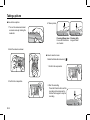
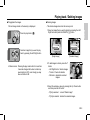
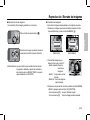
Ê Playingback the images
-The last image stored on the memory is displayed.
1. S
elect an image that you want to delete by pressing the Left /
Right button and press the DELETE ( n ) button.
Delete?
Select an image that you want to play
back by pressing the Left/ Right button
T
Select
OK Comfirm
OK Confirm
[Single Image]
Ä Manner mode : Pressing the play mode button for more than
3 seconds changes the buzzer and start-up
sound setting to OFF, even though you may
have set these to ON.
Delete?
No
Yes
No
Yes
[Thumbnail Image]
2. To add images to delete, press the T
button.
- Left / Right button: S
elects images
- T button : C
hecks for deletion
- OK button : d eletes the selected
images.
Prev
T
Select
Next
OK Delete
3. S
elect the submenu values by pressing the Up / Down button
and then press the OK button.
- If [No] is selected : cancels "Delete Image".
- If [Yes] is selected : deletes the selected images.
EN-
English
Press the play button ( g ).
Ê Deleting images
- This deletes images stored on the memory card.