1
PAIRING
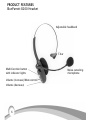
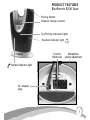
See page 6 & 7 for location of controls and indicator lights.
For your convenience, the BlueParrott B200 base and headset have been paired in advance at the
factory. However, if you have since paired the headset or the base with an alternate Bluetooth
product, you will need to pair the BlueParrott B200 base and headset together again.
Before Pairing: Turn The Headset And Base Off
Note: Be sure the headset is off the base
To turn the B200 headset off: Press and hold down the multifunction button for
about 3 seconds. You will hear 3 beeps in the headset that descend in tone and the
yellow light on the headset will stop flashing.
To turn the B200 base off: Press and hold down the pairing button for about 4 seconds. The yellow light on the base will stop flashing.
Pair The BlueParrott B200 Base With The BlueParrott B200 Headset
Note: Be sure the headset is off the base and see “Before Pairing” above.
1. Turn off all other Bluetooth products or keep them at least 50 feet away.
2. Position the B200 base and B200 headset no more than 3 feet apart.
3. Press and hold down the pairing button on the B200 base for approximately 5 to
10 seconds. The yellow light will flash, followed by the red and yellow indicator
lights flashing alternately. Release the pairing button.
4. Press and hold down the the multifunction button on the B200 headset for about
5-10 seconds until you hear two series of melodic tones (hold it up to your ear)
and the yellow and red indicator lights on the headset will flash alternately. Release
the multifunction button.
5. The red light will stop flashing on both the headset and the base. The yellow will
continue. Successful pairing has been completed.
18