1
RX Express III
Page 7
Automatic Scrubber Option
THE KIT INCLUDES:
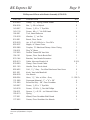
One (1) Squeegee Attachment (mounting hardware included)
One (1) Trailer Hook
One (1) Pad Driver Head or Brush Head Assembly
One (1) Head Removal Wrench
INSTALLATION INSTRUCTIONS
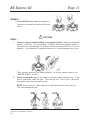
1. Remove the tanks. Place the machine on its right side
and remove the standard cleaning head.
2. Thread on the cleaning head of your choice. Make sure
that it mounts counterclockwise. If you are using the
pad driver head, select the proper pad for the application.
3.
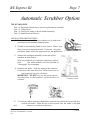
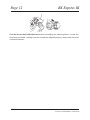
Attach the squeegee assembly to the rear of the
machine as seen below.
With the machine in its upright (cleaning) position,
hook
the cable retainer over the crossbar to
“disengage” the squeegee.
4. Replace the tanks. Add the appropriate solution.
Lower the head onto the floor surface and turn on
the head and vacuum switches.
IMPORTANT: DO NOT turn on the pump switch.
Use the levers on the handle to control the flow of
solution.
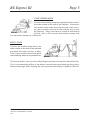
5. To resume carpet cleaning capabilities, remove the pad driver head with the
wrench provided. Place the tip of the wrench into the holes in the pad
and
rotate in a clockwise direction.
CleanMaster,
a Division of HydraMaster Corporation
1/10/00