1
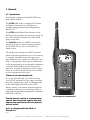
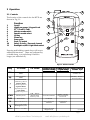
On/Off (1)
Press to turn the HT50 on. To turn off, press
and hold the key for approximately 2 seconds.
This is to avoid accidental power off.
Hi/Lo (2)
Toggles between high and low transmit power
(see specification section 3.8). Use the low setting over short ranges to preserve battery life.
a
c
b
e
d
VOL - Volume (4)
SQ - Squelch (5)
Press to select Volume or Squelch mode then
use the and keys to adjust the level.
The display shows “VOL” or “SQL” for 3 seconds - if or are not pressed within this
time, their function reverts to channel select.
/ (6 & 7)
These keys will change the selected channel.
Pressing VOL, SQ or , then / within 3
seconds will adjust the volume, squelch or
backlighting level respectively. The bargraph
will indicate the level selected.
f
a
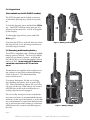
SCAN mode (8)
Scans through the channels stored in the channel memory (display shows MEM SCAN).
• Select channel and press twice to add/delete
to memory scan (display shows ENT or DEL
respectively). The
icon indicates that the
selected channel is included in memory scan.
• Press and hold until double beep sounds to
scan all channels (display shows SCAN).
• Press and hold until triple beep sounds to
inhibit/enable selected channel from scan
(display shows INH or ENA respectively).
The
icon indicates the channel is inhibited.
b
c
d
e
f
g
h
i
g
h
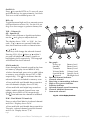
Bar graph Power up
Battery level
Standby
Battery level
Transmit
Battery Level
Volume Mode
Volume Level
Squelch Mode
Squelch Level
pressed
Backlight level
Personal channel indicator
Channel selected
Receiving or transmitting indicator
High or Low power indicator
Function indicator
Selected channel stored in memory
Channel inhibited from scan
Scan mode selected
Fig 2.2 - HT50 display functions
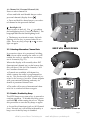
D/W - Dual Watch / Triwatch (9)
Press to select Dual Watch of selected channel
and Ch16. Display shows D/W.
• Press and hold until double beep sounds for
Triwatch - selected channel, personal channel
and Ch 16. Display shows T/W.
Page 8
offerd by www.Busse-Yachtshop.de
i
email: [email protected]