1
WHAT’S IN THIS GUIDE.
Set up
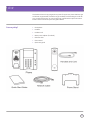
Got everything?
Getting started
Turn it over
Set the position of your phone
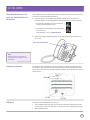
Get everything connected Check that the automatic set up
for the Cloud Voice Service has worked
Connect your headset
USB ports
3
4
4
4
5
5
5
Getting to know your phone
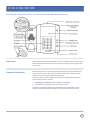
Touchscreen6
Cleaning the Touchscreen
6
Phone display (views)
7
Home view
7
Lines view
7
Calls view
8
Using your phone
Time and Date
9
Making Calls
9
Answering Calls
9
Transferring Calls
9
Ending Calls
9
Conference Calls
9
Do Not Disturb (DND)
10
Favourites10
Recent Calls List
10
Contact Directory
10
Changing Ring Tone
11
Update Configuration
11
Listening to Voicemail
11
General information12
NEED
HELP?
If you have any problems setting
up or using your Polycom IP
Phone, contact the IP Comms
Service Hub on 0800 389 0537
999 or 112 emergency calls.
EMERGENCY
CALLS.
Your BT Cloud Voice phone number is
registered to a specific address, so when
you make a 999 or 112 call from your
phone number, that’s the address the
emergency services will see. If you use
your BT Cloud Voice service at a different
address, the registered address does not
automatically change. So if your work
location changes let your BT Cloud Voice
service administrator know as they might
also need to change your registered
address.
You might not be able to make 999 or
112 calls when there’s a power or
network failure or if using the service
through an app on a mobile device.