1
SQL Sentry Quick Start
21
any associated configured Conditions and Actions.
Note: Immediately after adding a Connection or setting a Connection to watched status, SQL
Sentry will begin to synchronize with that Connection. Exactly how long the synchronization
process takes depends on the number of objects associated with the Connection, the amount of
historical data available, and how many Connections are being watched at the same time. The
Watch Status Window will keep you informed of the process and alert you about any errors.
8.3 Introduction to Actions and Settings
When you run the Setup Wizard a number of global Settings are configured for your installation. If you
entered your SMTP Settings and added a User, a number of default Conditions and Actions were also
added to help you get up and running quickly. As a reminder, the Wizard can be accessed through the
Help menu at any time.
Before proceeding you should introduce yourself with these basic SQL Sentry Alerting and Response
System concepts.
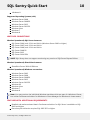
Conditions Conditions describe the various states of any
monitored objects.
Actions
Actions determine what happens when a Condition
is met.
Settings
Settings define criteria for when a Condition is
considered to be met. Certain Settings known as
Source Settings are used to define what events are
collected by SQL Sentry.
There are a couple of ways to see how Settings and Conditions/Actions are configured for your SQL
Sentry installation. You can use the Reports menu to run the Active Settings List and the Configured
Actions List reports. (Reports menu > General) Or you can view configured Actions and Settings
directly in the Actions and Settings Pane. By default the Actions and Settings pane is displayed on
the right side of the SQL Sentry Client. If you do not see the Actions and Settings pane, it can be
restored with the View menu.
If you would like to configure global Actions or Settings, be sure that the Shared Groups node is
selected in the Navigator pane. The Shared Groups node is the global or root node of your SQL
Sentry installation. The SQL Sentry Alerting and Response System uses the principle of inheritance, so
any Action or Setting you configure at the Shared Groups node will be passed down to all
applicable objects below it.
For example, if you configure a Send Email Action for the SQL Server Agent Job: Failure Condition at
the global level (Shared Groups), you will receive an email anytime a SQL Server Agent job fails across
your entire monitored enterprise.
You can further refine Actions or Settings at each level, as needed. For instance, if you have a
development server in your environment that you don't wish to be alerted about, you can easily
©2015 SQL Sentry. All Rights Reserved.