1
SuperLoader™ 3A Series Quick Start Guide
Autoloader Panel Overviews
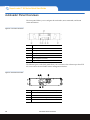
The front panel allows you to configure the autoloader, enter commands, and obtain
status information.
Figure 8 Front Panel Overview
1
Power switch
2
Mailslot
3
Front panel LEDs
4
Front panel LCD screen
5
Function keys
6
Left magazine (or blank)
7
Right magazine (or blank)
The Ethernet ports on the back panel allow you to connect to the A-Series tape drive FTP
file server and to the autoloader remote management interface.
Figure 9 Back Panel Overview
12
1
A-Series tape drive FTP file server Ethernet port
2
Fan vent
3
Power connector
4
Autoloader remote management Ethernet port
5
Power switch
Autoloader Panel Overviews