1
Filters are described in the [filters] Section. Every line in this section
describes one filter position. Filter description is a comma-separated list of
three values:
•
Filter name: This name is returned to the client application, which
can use it to list available filters in the filter wheel.
•
Filter color: This color can be used by client application to display
the filter name with a color, hinting the filter type. The color can
be expressed by a name (White, Red, LRed, etc.) or directly by
number representing the particular color (0 represents black).
•
Filter offset: Distance to move the focuser to refocus upon filter
change. Plan-parallel glass shifts the actual focus position back for
1/3 of the glass thickness (exact value depends on the glass
refraction index, but for almost all glasses 1/3 is very close to exact
value). Refocusing is useful when changing filters of different
thickness among exposures or when some exposures are performed
through filters and other without filters at all.
Filter offsets can be defined in focuser dependent units (steps) or in
micrometers (μm). If the micrometers are used, it is necessary to inform
driver by the “MicrometerFilterOffsets” parameter in the “[driver]” section
of the ini file.
[driver]
MicrometerFilterOffsets = true
[filters]
Luminance, Gray, 660
...
Value of the “MicrometerFilterOffsets” parameter can be expressed as
keywords “true” or “false” as well as numbers “0” (for false) or “1” (for
true).
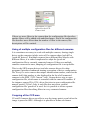
The above mentioned information will be displayed e.g. in the filterchoosing combo-box this way:
32