1
CUEMIX FX BASIC OPERATION
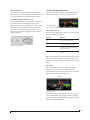
Here is a brief overview of the CueMix FX mixer.
Four stereo mix busses
CueMix FX provides four stereo mix busses: Mix 1, Mix 2,
Mix 3, and Mix 4. Each mix bus can take any number of
inputs and mix them together into a single stereo audio
stream that you can then assign to any MicroBook II output
pair — or combination of output pairs — that you choose.
For example, Mix 1 could go to the headphones, Mix 2 could
go to the main outs, Mix 3 could go to a piece of outboard
gear connected to analog outputs 3-4, and so on. You can also
assign a mix to multiple output pairs. For example, you could
assign Mix 1 to the Main Out, Phones, and Line Out.
Many inputs to one output pair
It might be useful to think of each mix bus as some number
of inputs all mixed down to a stereo output pair. CueMix FX
lets you choose which inputs to include in the mix, and it lets
you specify the level, pan and other input-specific mix
controls for each input being fed into the mix.
Viewing one mix bus at a time
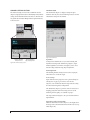
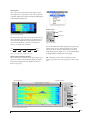
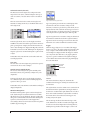
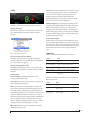
CueMix FX displays one mix bus at a time in the Mixes tab
(Figure 2 on page 2). To select which mix you are viewing,
choose it from the mix bus menu. The mix name appears
above the mix bus master fader, where you can click the
name to change it.
Each mix bus is independent
Each mix bus has its own settings. Settings for one bus will
not affect another. For example, if an input is used for one
bus, it will still be available for other busses. In addition,
inputs can have a different volume, pan, mute and solo
setting in each bus.
Input channels
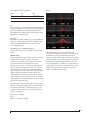
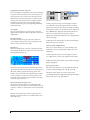
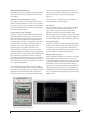
The Inputs tab (Figure 3 on page 3) gives you access to
settings for individual MicroBook II inputs (or input pairs),
such as phase, trim, EQ and dynamics processing. These
settings are applied to the signal before it goes anywhere else
(to a mix bus or the computer).
Output channels
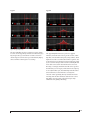
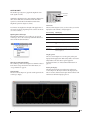
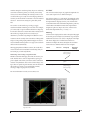
The Outputs tab (Figure 7 on page 7) gives you access to
settings for each MicroBook II output pair, including EQ and
dynamics processing. These settings are applied to the signal
just before it is sent to the output.
Mix bus
menu
Tabs for
inputs, mix
busses and
outputs
Mix bus
master
fader
Channel
settings
Solo
light
Channel
Focus
Output
volume
controls
Channel
scroll
bar
Grow
handle
Inputs
Aux
channel
audio
Tabs for channel strip
settings, including EQ and
dynamics, as well as
global settings such as the
meter bridge and Signal
Generator.
Figure 2: CueMix FX is a virtual mixer that gives you control
over the MicroBook II’s on-board mixing features.
2
MICROBOOK II CUEMIX FX GUIDE