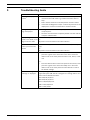
1
UML-202-90
Navigating the Monitor | en
7.7
25
Setup Menu
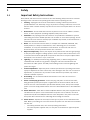
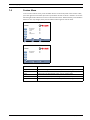
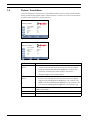
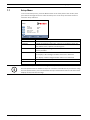
To access the Setup menu, press the Menu button on the front panel of the monitor, then
press the left and right arrows to select the Setup icon. Press the up and down arrows to
select the Setup submenu.
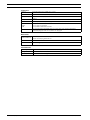
Setup
Reset
Language
OSD Tone
Blue Screen
Key Lock
Firmware Version
:Move
:Input
English
Blue
Off
Off
1.2
:Menu
Submenu
Definition
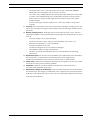
Reset
Restores default settings.
Language
Adjusts the language of the OSD. Choices are: English, French, German, Italian, Dutch, Spanish, and Portuguese.
OSD Tones
Selects the type of background for the OSD menu. Choices are: Transparency and Blue.
Blue Screen
Enables or disables video loss indication. Choices are:
On: displays a blue background when video loss is detected.
Off: displays a black backgound when video loss is detected.
i
Key Lock
Enables or disables the Key Lock function.
Firmware Version
Displays the release level of the monitor firmware.
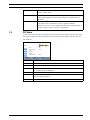
NOTICE! When key lock is enabled through the front panel, use either the remote control or
the front panel buttons to disable the key lock command. To disable the key lock feature using
the front panel buttons, press and hold both the Input and the Menu buttons until the monitor
displays the Key Unlocked message.
Bosch Security Systems, Inc.
Instruction Manual
F01U076723 | 1.0 | 2007.09