1
Technical Notes
NEC iStorage
Storage Path
Savior Multipath
I/O
Protecting Applications and File Systems That Use Multipath
Devices:
In order for LifeKeeper to configure and protect applications or file
systems that use SPS devices, the SPS recovery kit must be installed.
Once the SPS kit is installed, simply creating an application hierarchy that
uses one or more of the multipath device nodes will automatically
incorporate the new resource types provided by the SPS kit.
Multipath Device Nodes:
To use the SPS kit, any file systems and raw devices must be mounted or
configured on the multipath device nodes (/dev/dd*) rather than on the
native /dev/sd* device nodes.
Use of SCSI-3 Persistent Reservations:
The SPS kit uses SCSI-3 persistent reservations with a "Write Exclusive"
reservation type. This means that devices reserved by one node in the
cluster will remain read-accessible to other nodes in the cluster, but those
other nodes will be unable to write to the device. Note that this does not
mean that you can expect to be able to mount file systems on those other
nodes for ongoing read-only access.
LifeKeeper uses the sg_persist utility to issue and monitor persistent
reservations. If necessary, LifeKeeper will install the sg_persist(8) utility.
Hardware Requirements:
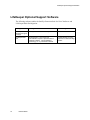
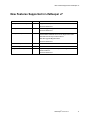
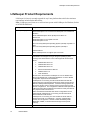
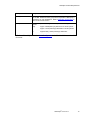
The SPS kit has been tested and certified with the NEC iStorage disk
array using Emulex LP952, LP9802, LP1050 HBAs and Emulex lpfc
driver. This kit is expected to work equally well with other NEC
iStorage D and S supported by SPS.
Multipath Software Requirements:
The SPS kit has been tested with SPS for Linux 3.3.001. There are
no known dependencies on the version of the SPS package installed.
Installation Requirements:
SPS software must be installed prior to installing the SPS recovery kit.
Adding or Repairing SPS Paths:
When LifeKeeper brings an SPS resource into service, it establishes a
persistent reservation registered to each path that was active at that time.
If new paths are added after the initial reservation, or if failed paths are
repaired and SPS automatically reactivates them, those paths will not be
registered as a part of the reservation until the next LifeKeeper
quickCheck execution for the SPS resource. If SPS allows any writes to
that path prior to that point in time, reservation conflicts that occur will be
logged to the system message file. The SPS driver will retry these IOs on
the registered path resulting in no observable failures to the application.
Once quickCheck registers the path, subsequent writes will be successful.
®
LifeKeeper for Linux v7
41