1
Table of Contents
Setting Up the MFC
Step 1
1.
2.
3.
4.
5.
6.
7.
8.
9.
Step 2
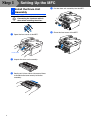
Install the Drum Unit Assembly ........................................................................ 4
Load Paper in the Paper Tray ........................................................................... 5
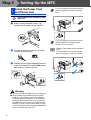
Install the Power Cord and Phone Line ........................................................... 6
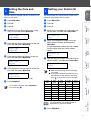
Setting the Date and Time ................................................................................. 7
Setting your Station ID ...................................................................................... 7
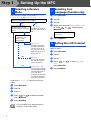
Selecting a Receive Mode ................................................................................. 8
Selecting Your Language (Canada only) ......................................................... 8
Setting the LCD Contrast .................................................................................. 8
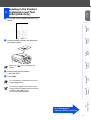
Sending in the Product Registration and Test Sheet (USA Only) ................. 9
Installing the Drivers & Software
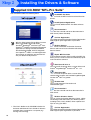
Supplied CD-ROM “MFL-Pro Suite”................................................................... 10
For USB Interface Cable Users
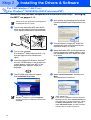
■ For Windows® 98/98SE/Me/2000 Professional/XP ...........................................12
For Parallel Interface Cable Users
■ For Windows® 98/98SE/Me/2000 Professional/XP ...........................................15
For Windows NT® Workstation Version 4.0 Users ........................................... 18
For Network Interface Cable Users (MFC-7820N and Optional NC-2200w only)
■ For Windows® 98/98SE/Me/NT/2000 Professional/XP ..................................... 20
For USB Interface Cable Users
■ For Mac OS® 9.1 to 9.2 .......................................................................................22
■ For Mac OS® X 10.2.4 or greater........................................................................24
For Network Interface Cable Users (MFC-7820N and Optional NC-2200w only)
■ For Mac OS® 9.1 to 9.2 .......................................................................................27
■ For Mac OS® X 10.2.4 or greater........................................................................29
■ For Network Users
Installing the BRAdmin Professional Configuration Utility
(Windows® Users Only) .................................................................................... 32
Setting your IP Address, Subnet Mask and Gateway using
BRAdmin Professional (Windows® Users Only)............................................. 33
■ Options and Consumables
Options ................................................................................................................. 34
Replacement Consumables................................................................................ 34
3