1
Instruction Manual
INSTALLATION (continued)
Connecting A/V Equipment
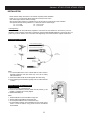
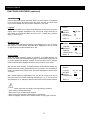
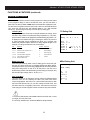
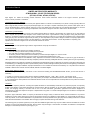
The following are diagrams showing basic instructions for attaching external equipment, like a VCR or DVD player, to
your TV set. Please refer to operation manuals of external audio/video equipment that will be connected to your set for
additional instructions. PLEASE TURN ALL POWER IS OFF BEFORE CONNECTING DEVICES TOGETHER.
Connect VCR's RF OUT terminal to the ANTENNA IN jack
located on the real panel of the TV.
Coaxial Cable
Coaxial Cable
ANTENNA IN
VCR with Modulator
Input From Device to TV
AUDIO/VIDEO OUT
Do NOT connect the yellow composite video
terminal if using the S-Video terminal.
AT2402, AT2702 only
DVD Player
With S - VIDEO Terminal
The front or side terminals may be
easier to use with a camcorder. The
connections are identical.
Yellow
Camcorder
White
OR
VIDEO
AUDIO
Yellow
White
Actual back of TV may vary. Please see pgs.
9-12 for your TV’s back panel illustration.
VCR
Output From TV to Device
AUDIO/VIDEO IN
Yellow
White
VIDEO
AUDIO
VCR
13
Yellow
White