1
6
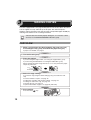
TROUBLESHOOTING THE UNIT
This chapter describes misfeed removal and troubleshooting.
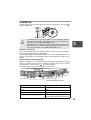
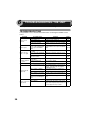
TROUBLESHOOTING
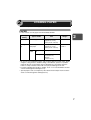
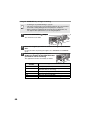
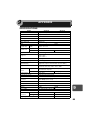
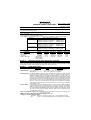
If any problem occurs, check the list below before contacting the SHARP service
center.
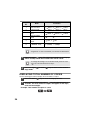
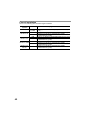
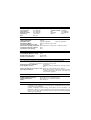
Problem
Unit does not
operate.
Blank copies
Copies are too
dark or too light.
Dust, dirt,
smudges appear
on copies.
Striped copies
Possible cause
Unit plugged in?
Power switch on?
Side cover closed securely?
Front cover closed?
Is the original placed face
down on the original table
or face up in the RSPF/
SPF?
Is original image too dark or
too light?
Is the unit in the automatic
exposure mode?
Is the unit in the photo
exposure mode?
Original table or original
cover dirty?
Original smudged or
blotchy?
Is transfer charger clean?
Non-standard paper used?
Solution
Page
Plug the unit into a grounded outlet.
–
Turn the power switch on.
13
Gently close the side cover.
27
Gently close the front cover and then
27
close the side cover.
Place the original face down on the
original table or face up in the RSPF/
14, 15
SPF.
Adjust the exposure manually.
Adjust the automatic exposure level.
17
Cancel the photo exposure mode.
16
Clean regularly.
28
Use a clean original.
Clean the transfer charger.
Use standard paper. If using special
papers, feed the paper through the
multi-bypass tray.
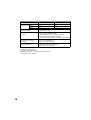
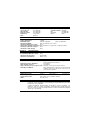
Paper curled or damp?
Store paper flat in the wrapper in a
dry location.
Paper misfeeds
Pieces of paper inside unit? Remove all pieces of misfed paper.
frequently.
Paper guides in the paper Set the guides properly depending on
tray not set properly?
the paper size.
Too much paper in the
Remove excessive paper from the
paper tray or multi-bypass tray.
tray?
Is the paper too heavy?
Use paper within the specified range.
Paper
damp?
Replace with dry paper. If the unit is
Images rub off the
not used for long time, remove the
copy easily.
paper from the paper tray and store it
in its wrapper in a dry location.
30
16
–
29
7
–
32
8
8
7
2