1
3.1.3
Network settings
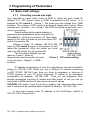
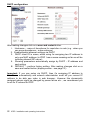
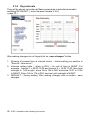
Network settings you find at the Network seting menu . It is possible to use
DHCP service (1) or you can enter IP addresses manually.
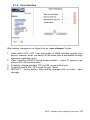
Manual configuration:
After making changes click on a save and restart button.
1. Hostname – name of doorphone for resolution in nets (e.g . when you use
more doorphones – more entrance)
2. Enable/disable ethernet settings via DHCP
3. Setting IP address, mask, eventually next network parameters, in case of
any issue contact your IT manager
4. Showing of current mode of IPDP – DAY / NIGHT
5. Return back to main page with showing the video from door phone
6. short help for quick assistance in setting the parameters
7. Factory setting – DEFAULT – perform default settings. After default setting
click on button „save and restart“. It is showing screen with restarting of
the unit – via page Fel! Bokmärket är inte definierat..
IPDP - installation and operating instructions
21