1
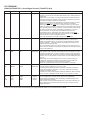
QT-CD250H/W
SERVICE MANUAL
No. S3017QTCD250H
QT-CD250H(S)
QT-CD250W(S)
• In the interests of user-safety the set should be restored to its
original condition and only parts identical to those specified should
be used.
• Note for users in U.K.
Recording and playback of any material may require consent
which SHARP is unable to give. Please refer particularly to the
provisions of Copyright Act 1956, the Dramatic and Musical
Performers Protection Act 1956, the Performers Protection Acts
1963 and 1972 and to any subsequent statutory enactments and
orders.
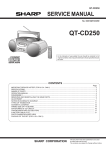
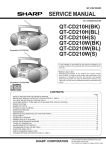
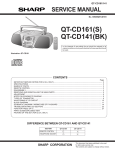
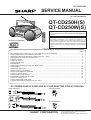
Illustration: QT-CD250H
CONTENTS
Page
AC POWER SUPPLY CORD AND AC PLUG ADAPTOR (FOR QT-CD250W) ................................................................ 1
SAFETY PRECAUTION FOR SERVICE MANUAL ........................................................................................................... 2
IMPORTANT SERVICE NOTES (QT-CD250H FOR U.K. ONLY) .................................................................................... 3
VOLTAGE SELECTION (QT-CD250W ONLY) .................................................................................................................. 3
SPECIFICATIONS ............................................................................................................................................................. 3
NAMES OF PARTS ........................................................................................................................................................... 4
OPERATION MANUAL ...................................................................................................................................................... 5
DISASSEMBLY .................................................................................................................................................................. 8
REMOVING AND REINSTALLING THE MAIN PARTS ..................................................................................................... 8
ADJUSTMENT ................................................................................................................................................................. 10
SCHEMATIC DIAGRAM .................................................................................................................................................. 14
WIRING SIDE OF P.W.BOARD ....................................................................................................................................... 16
NOTES ON SCHEMATIC DIAGRAM .............................................................................................................................. 18
TYPES OF TRANSISTOR ............................................................................................................................................... 18
WAVEFORMS OF CD CIRCUIT ...................................................................................................................................... 19
TROUBLESHOOTING (CD SECTION) ........................................................................................................................... 20
FUNCTION TABLE OF IC ................................................................................................................................................ 24
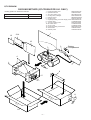
PARTS GUIDE/EXPLODED VIEW
PACKING METHOD (QT-CD250H FOR U.K. ONLY)
AC POWER SUPPLY CORD AND AC PLUG ADAPTOR (FOR QT-CD250W)
QPLGA0253AFZZ
QACCA0001SJ00
QACCB0001SJ00
QPLGA0250AFZZ
QACCE0001SJZZ
SHARP CORPORATION
–1–
This document has been published to be used
for after sales service only.
The contents are subject to change without notice.
QT-CD250H/W
SAFETY PRECAUTION FOR SERVICE MANUAL
Precaution to be taken when replacing and servicing the Laser Pickup.
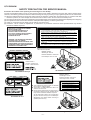
The AEL (Accessible Emission Level) of Laser Power Output for this model is specified to be lower than Class I Requirements.
However, the following precautions must be observed during servicing to protect your eyes against exposure to the Laser beam.
(1) When the cabinet has been removed, the power is turned on without a compact disc, and the Pickup is on a position outer than
the lead-in position, the Laser will light for several seconds to detect a disc. Do not look into the Pickup Lens.
(2) The Laser Power Output of the Pickup inside the unit and replacement service parts have already been adjusted prior to shipping.
(3) No adjustment to the Laser Power should be attempted when replacing or servicing the Pickup.
(4) Under no circumstances look directly into the Pickup Lens at any time.
(5) CAUTION - Use of controls or adjustments, or performance of procedures other than those specified herein may result in
hazardous radiation exposure.
VAROITUS! LAITTEEN KéYTTéMINEN
MUULLA KUIN TéSSé
KéYTTôOHJEESSA MAINITULLA
TAVALLA SAATTAA ALTISTAA
KéYTTéJéN TURVALLISUUSLUOKAN 1
YLITTéVéLLE NéKYMéTTôMéLLE
LASERSéTEILYLLE.
CAUTION-INVISIBLE LASER RADIATION WHEN OPEN. DO NOT STARE INTO
BEAM OR VIEW DIRECTLY WITH OPTICAL INSTRUMENTS.
VARNING-OSYNLIG LASERSTRALNING NAR DENNA DEL AR OPPNAD. STIRRA
EJ IN I STRALEN OCH BETRAKTA EJ STRALEN MED OPTISKA INSTRUMENT.
ADVERSEL-USYNLIG LASERSTRALING VED ABNING. SE IKKE IND I
STRALEN-HELLER IKKE MED OPTISKE INSTRUMENTER.
VARO! AVATTAESSA OLET ALTTIINA NAKYMATON LASERSATEILYLLE.
ALA TUIJOTA SATEESEEN ALAKA KATSO SITA OPTISEN LAITTEEN LAPI.
VARNING - OM APPARATEN ANVéNDS
Pè ANNAT SéTT éN I DENNA
BRUKSANVISNING SPECIFICERAS. KAN
ANVéNDAREN UTSéTTAS FôR OSYNLIG
LASERSTRèLNING, SOM ôVERSKRIDER
GRéNSEN FôR LASERKLASS 1.
VARNING-OSYNLIG LASERSTRALNING NAR DENNA DEL AR OPPNAD.
STIRRA EJ IN I STRALEN OCH BETRAKTA EJ STRALEN GENOM OPTISKT
INSTRUMENT.
ADVERSEL-USYNLIG LASERSTRALING NAR DEKSEL APNES. STIRR IKKE
INN I STRALEN ELLER SE DIREKTE MED OPTISKE INSTRUMENTER.
Laser Diode Properties
Material: GaAIAs
Wavelength: 780 nm
Emission Duration: continuous
Laser Output: max. 0.6 mW
LASER KLASSE 1
LUOKAN 1 LASERLAITE
KLASS 1 LASERAPPARAT
QT-CD250H for Europe
QT-CD250H for Europe
CAUTION
Laser Diode Properties
Material: GaAIAs
Wavelength: 780 nm
Emission Duration: continuous
Laser Output: max. 0.6 mW
CAUTION-INVISIBLE LASER RADIATION WHEN OPEN. DO NOT STARE INTO
BEAM OR VIEW DIRECTLY WITH OPTICAL INSTRUMENTS.
VARNING-OSYNLIG LASERSTRALNING NAR DENNA DEL AR OPPNAD. STIRRA
EJ IN I STRALEN OCH BETRAKTA EJ STRALEN MED OPTISKA INSTRUMENT.
● This Portable CD Stereo System is classified
as a CLASS 1 LASER product.
● The CLASS 1 LASER PRODUCT label is located on the rear cover.
● Use of controls, adjustments or performance of
procedures other than those specified herein
may result in hazardous radiation exposure.
QT-CD250H for U.K.
ADVERSEL-USYNLIG LASERSTRALING VED ABNING. SE IKKE IND I
STRALEN-HELLER IKKE MED OPTISKE INSTRUMENTER.
VARO! AVATTAESSA OLET ALTTIINA NAKYMATON LASERSATEILYLLE.
ALA TUIJOTA SATEESEEN ALAKA KATSO SITA OPTISEN LAITTEEN LAPI.
VARNING-OSYNLIG LASERSTRALNING NAR DENNA DEL AR OPPNAD.
STIRRA EJ IN I STRALEN OCH BETRAKTA EJ STRALEN GENOM OPTISKT
INSTRUMENT.
ADVERSEL-USYNLIG LASERSTRALING NAR DEKSEL APNES. STIRR IKKE
INN I STRALEN ELLER SE DIREKTE MED OPTISKE INSTRUMENTER.
As the laser beam used in this compact disc
player is harmful to the eyes, do not attempt to
disassemble the cabinet. Refer servicing to
qualified personnel only.
QT-CD250H for Australia/New Zealand/Philippines/QT-CD250W
–2–
QT-CD250H/W
FOR A COMPLETE DESCRIPTION OF THE OPERATION OF THIS UNIT, PLEASE REFER
TO THE OPERATION MANUAL.
IMPORTANT SERVICE NOTES (QT-CD250H FOR U.K. ONLY)
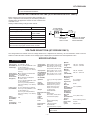
Before returning the unit to the customer after completion of a
repair or adjustment it is necessary for the following withstand
voltage test to be applied to ensure the unit is safe for the
customer to use.
Setting of Withstanding Voltage Tester and set.
Set name
Set value
WITHSTANDING
VOLTAGE TESTER
Withstanding Voltage Tester
Test voltage
4,240 VPEAK
OUT
3,000 VRMS
Set time
6 secs
Set current (Cutoff current)
4 mA
PROBE
AC
UNIT
SHORT-CIRCUT
AC POWER
SUPPLY CORD
Unit
Judgment
CONNECT THE PROBE
TO GND OF CHASSIS
SCREW TERMINAL
OK: The “GOOD” lamp lights.
NG: The “NG” lamp lights and the buzzor sounds.
VOLTAGE SELECTION (QT-CD250W ONLY)
The voltage selector is located on the AC voltage selector box. If adjustment is necessary, use a screwdriver in order to turn the
selector in either direction unitil the correct voltage figure is displayed in the window next the adjustment screw.
SPECIFICATIONS
QT-CD250H/W
● General
Power source: AC 230-240 V, 50 Hz
(QT-CD250H for DC 9 V ["D" size (UM/SUM-1, R20
U.K./Europe)
or HP-2) battery × 6]
DC 4.5 V ["AA" size (UM/SUM-3,
R6 or HP-7) battery × 3 for backup
memory]
Power source:
(QT-CD250H for
Australia/
New Zealand/
Philippines)
Power source:
(QT-CD250W)
● For customers in Australia and
New Zealand;
AC 230-240 V, 50 Hz
● For customers in Philippines;
AC 220 V, 60 Hz
DC 9 V ["D" size (UM/SUM-1, R20
or HP-2) battery × 6]
DC 4.5 V ["AA" size (UM/SUM-3,
R6 or HP-7) battery × 3 for backup
memory]
AC 110-127/220-240 V, 50/60 Hz
DC 9 V ["D" size (UM/SUM-1, R20
or HP-2) battery × 6]
DC 4.5 V ["AA" size (UM/SUM-3,
R6 or HP-7) battery × 3 for backup
memory]
Power
consumption:
(QT-CD250H)
8W
Power
consumption:
(QT-CD250W)
10 W
● Radio
Output power: RMS; 4.6 W (2.3 W + 2.3 W)
(QT-CD250H for (DC operation, DIN 45 324)
Europe)
MPO; 8.4 W (4.2 W + 4.2 W)
(AC operation, DIN 45 324)
Output power:
(QT-CD250H for
U.K./Australia/
New Zealand/
Philippines/
OT-CD250W)
RMS; 4.6 W (2.3 W + 2.3 W)
(DC operation, 10 % T.H.D.)
MPO; 8.4 W (4.2 W + 4.2 W)
(AC operation, 10 % T.H.D.)
Speakers:
10 cm (4") full-range speaker
x2
Headphones; 16-50 ohms
(recommended; 32 ohms)
Width; 400 mm (15-3/4")
Height; 158 mm (6-1/4")
Depth; 212 mm (8-3/8")
2.7 kg (6.0 lbs.)
without batteries
Output
terminals:
Dimensions:
Weight:
● Compact disc player
Type:
Compact disc
Signal
Non-contact, 3-beam semireadout:
conductor laser pickup
Audio
channels:
2
Filter:
8-times oversampling
digital filter
D/A converter: 1-bit D/A converter
Wow and
Unmeasurable
flutter:
(less than 0.001% W. peak)
Frequency
range:
(QT-CD250H)
FM; 87.5 - 108 MHz
AM; 522 - 1,620 kHz
● Radio
Frequency
range:
(QT-CD250W)
FM; 88 - 108 MHz
AM; 531 - 1,602 kHz
● Tape recorder
Frequency
response:
50 - 14,000 Hz
(Normal tape)
Signal/noise
ratio:
50 dB
Wow and
flutter:
0.25 % (WRMS)
(QT-CD250H for
U.K./Australia/
New Zealand/
Philippines/
QT-CD250W)
Wow and
0.3 % (DIN 45 511)
flutter:
(QT-CD250H for
Europe)
Motor:
Bias system:
Erase
system:
DC 9 V electric governor
AC bias
Magnet erase
Specifications for this model are subject to change without
prior notice.
–3–
QT-CD250H/W
NAMES OF PARTS
Illustration: QT-CD250W
1
2 3 4 5 6
7
9
8
33
34
36
37
38
39
35
40
32
10
14
15
11
12
16
13
30
17
VOLTAGE
SELECTOR
AC
220V - 240V
31
18
AC
110V - 127V
19
11.
12.
13.
14.
15.
16.
17.
18.
19.
10.
3
11.
3
12.
13.
14.
3
28 29
26 27
20 21 22 23
(TAPE) Record Button
(TAPE) Play Button
(TAPE) Rewind Button
(TAPE) Fast Forward Button
(TAPE) Stop/Eject Button
(TAPE) Pause Button
Cassette Compartment
CD Compartment
CD Eject Button
(CD) Stop Button
(TUNER) Tuning Down Button
(CD) Repeat Button
(TUNER) Band Selector Button
(TUNER) Preset Memory Button
Extra Bass Button
(CD) Play/Pause Button
(TUNER) Tuning Up Button
15.
3
16.
3
17.
18.
19.
20.
21.
22.
23.
24.
25.
26.
27.
28.
29.
24 25
(CD) Track Up/Cue Button
(TUNER) Preset Up Button
(CD) Track Down/Review Button
(TUNER) Preset Down Button
Volume Up/Down Buttons
Stand-by, On/Function Switch
(CD) Play Indicator
(CD) Repeat Indicator
(CD) Pause Indicator
Extra Bass Indicator
(TUNER) Memory Indicator
(TUNER) FM Stereo Mode Indicator
(TUNER) FM Stereo Indicator
Battery Compartment
FM Telescopic Rod Aerial
Headphone Socket
AC Power Input Socket
30.
31.
32.
3
33.
3
34.
3
35.
3
36.
37.
38.
3
39.
40.
Backup Memory Battery
Compartment
Voltage Selector (QT-CD250W Only)
(CD) Play/Pause Button
(TUNER) Tuning Up Button
(CD) Track Down/Review Button
(TUNER) Preset Down Button
(CD) Stop Button
(TUNER) Tuning Down Button
(CD) Repeat Button
(TUNER) Band Selector Button
(TUNER) Memory Button
(TUNER) Clear Button
(CD) Track Up/Cue Button
(TUNER) Preset Up Button
Extra Bass Button
Volume Up/Down Buttons
REMOTE CONTROL
Remote sensor
15
15
0.2 m - 6 m
(8" - 20')
Notes:
● Replace the batteries if the operating distance is
reduced or if the operation becomes erratic.
● Periodically clean the transmitter LED on the
remote control and the sensor on the main unit
with a soft cloth.
● Exposing the sensor on the main unit to strong
light may interfere with operation. Change the
lighting or the direction of the unit.
● Keep the remote control away from moisture,
excessive heat, shock, and vibrations.
–4–
–5–
■
■
● QT-CD250H for
customers in
Australia and
New Zealand
1
3
4
To an AC socket
2
6
or similar)
Headphones
■
5
1
TUNER
■
AC
110V - 127V
Turning the power ON
and to STAND-BY
● Batteries are not included.
To an AC socket
2
Volume control
To AC INPUT
AC
220V - 240V
1
AC 110-127/220-240 V,
50/60 Hz
AC power (For QT-CD250W)
● For QT-CD250W
● QT-CD250H for
customers in Europe
VOLTAGE SELECTOR
■
● For QT-CD250W
● QT-CD250H for
customers in
Philippines
● 6 “D” size batteries (UM/SUM-1, R20, HP-2
Battery power
(For Europe)
AC 230 - 240 V, 50 Hz
To an AC socket
(For Australia/New Zealand)
AC 230 - 240 V, 50 Hz
To AC INPUT
(For U.K.)
AC 230 - 240 V, 50 Hz
AC power (For QT-CD250H)
(For Philippines)
AC 220 V, 60 Hz
■
● For QT-CD250W
● QT-CD250H for
customers in U.K.
AC power lead x 1
1 Preparation for use
TUNER
2
4
1
TUNER
3 Listening to a tape
STOP
TUNING
To stop playback
1
2 Listening to a CD
2
2
3
Label side up.
PLAY / PAUSE
TUNING
3
To stop playback
5
4
QT-CD250H/W
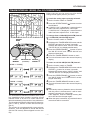
OPERATION MANUAL
–6–
REPEAT
BAND
3
5
4
PLAY / PAUSE
TUNING
FM
To stop recording
3
1
Tune in to the desired station.
STOP
TUNING
5 Recording from CDs
Aerial adjustment
3
■
2
4 Listening to the radio
TUNER
AM
1
PLAY / PAUSE
TUNING
Label side up.
6
2
TUNER
After use
TUNER
2
7
1
REPEAT
BAND
TUNER
3
4
PLAY / PAUSE
TUNING
To stop recording
8
6
5
4
or dust accumulate on the pickup, clean it using
commercial cleaning disc (brush type.)
● Do not touch the Laser pickup lens. If fingerprints
CD pickup cleaning
Tune in to the desired station.
STOP
TUNING
6 Recording from the radio
QT-CD250H/W
QT-CD250H/W
FM/AM INTERVAL (SPAN) (For QT-CD250W Only)
Before using the unit, be sure to set it for the AM
tuning interval (span) used in your area.
To check the tuning span currently selected:
1 Set the function switch to TUNER.
2 Press the REPEAT/BAND ( ) button to select
the AM band.
● If “AM 531 kHz” is displayed, it means that the
radio has been adjusted for a 9 kHz span.
If “AM 530 kHz” is displayed, it means that the
radio has been adjusted for a 10 kHz span.
To change from a 9 kHz AM (50 kHz FM) interval
to a 10 kHz AM (100 kHz FM) interval:
1 Set the function switch to TUNER.
2 Hold down the TUNER MEMORY button and the
REPEAT
BAND
PRESET
button for at least 3 seconds.
Release the buttons when “AM SP 9 kHz” and
“FM SP 50 kHz” are displayed alternately.
3 Press the REPEAT/BAND (
) button to select
the “AM SP 10 kHz” and “FM SP 100 kHz” are
displayed alternately.
4 Press the TUNER MEMORY button to set it.
TUNER
MEMORY
ON/STAND-BY
(Function)
● The unit will return back to the normal frequency
display.
REVIEW
PRESET
To return to a 9 kHz AM (50 kHz FM) interval:
[9 kHz ➞ 10 kHz]
kHz
kHz
kHz
kHz
kHz
PRESET
button for at least 3 seconds.
Release the buttons when “AM SP 10 kHz” and
“FM SP 100 kHz” are displayed alternately.
3 Press the REPEAT/BAND (
) button to select
the “AM SP 9 kHz” and “FM SP 50 kHz” are displayed alternately.
4
[10 kHz ➞ 9 kHz]
kHz
1 Set the function switch to TUNER.
2 Hold down the TUNER MEMORY button and the
kHz
kHz
The International Telecommunication Union (ITU)
has established that member countries should
maintain either a 10 kHz or a 9 kHz interval between broadcasting frequencies of any AM station.
The illustration shows the 9 kHz interval zones (regions 1 and 3), and the 10 kHz interval zone (region 2).
This product is not equipped with a span selector.
However, it will be adjusted to 9 kHz AM interval
(50 kHz FM interval) when shipped from the factory.
Press the TUNER MEMORY button to set it.
● The unit will return back to the normal frequency
display.
Notes:
● If the backup memory batteries are not inserted
and the power is disconnected, it will be automatically returned to a 9 kHz span.
If this happens, insert the backup memory batteries first and set the span again.
● When the span is switched, any stations that are
memorised will be cancelled.
–7–
QT-CD250H/W
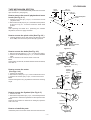
DISASSEMBLY
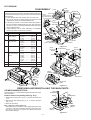
Caution on Disassembly
Follow the below-mentioned notes when disassembling the
unit and reassembling it, to keep it safe and ensure excellent
performance:
1. Take cassette tape and compact disc out of the unit.
2. Be sure to remove the power supply plug from the wall
outlet before starting to disassemble the unit.
3. Take off nylon bands or wire holders where they need to
be removed when disassembling the unit. After servicing
the unit, be sure to rearrange the leads where they were
before disassembling.
4. Take sufficient care on static electricity of integrated
circuits and other circuits when servicing.
(C4)x4
ø3x10mm
(C1)x2
ø3x12mm
(C3)x2
Switch PWB
SW651
(Voltage Selector)
QT-CD250W Only
(D3)x1
ø2.5x8mm
CD Lid
Switch
Power Transformer
(C2)x1
(D2)x7
ø3x12mm
(B3)x1
(D1)x1
Main PWB
(D4)x3
(B4)x2
STEP
REMOVAL
PROCEDURE
FIGURE
1
Top Cabinet/
Front Cabinet
1. Screw ................... (A1) x7
2. Socket .................. (A2) x1
3. Screw ................... (A3) x1
8-1
2
Power PWB/
Terminal PWB
1. Screw ................... (B1) x2
2. Hook ..................... (B2) x2
3. Socket .................. (B3) x1
4. Hook ..................... (B4) x2
8-2
1. Screw ................... (C1) x2
2. Socket .................. (C2) x1
3. Hook ..................... (C3) x2
4. Screw ................... (C4) x4
8-2
1. Socket .................. (D1) x1
2. Screw ................... (D2) x7
3. Screw ................... (D3) x1
4. Solder ................... (D4) x3
5. Socket .................. (D5) x3
6. Screw ................... (D6) x6
7. Hook ..................... (D7) x2
8-2
3
4
Switch PWB
Main PWB/
CD Control PWB
(Note)
Terminal
PWB
(B2)x2
Top Cabinet
Power PWB
Power Transformer
AC Socket
(B1)x2
ø3x12mm
Figure 8-2
(E1)x3
ø2.5x10mm
CD Mechanism
(D5)x2
(F1)x4
ø3x10mm
Washer
(D5)x1
8-3
5
CD Mechanism
1. Screw ................... (E1) x3
8-3
6
Tape Mechanism
1. Screw ................... (F1) x4
8-3
Tape
Mechanism
Top Cabinet
SP202
R-CH
(D6)x6
ø3x8mm
(A3)x1
ø3x10mm
(D7)x2
Top Cabinet
Front Cabinet
Main
PWB
(A2)x1
(A1)x4
ø3x12mm
CD Control
PWB
(A1)x3
ø3x12mm
Figure 8-1
Figure 8-3
REMOVING AND REINSTALLING THE MAIN PARTS
CD MECHANISM SECTION
(A1) x2
ø2.6 x6mm
Perform steps 1 to 5 of the disassembly method to remove the
CD mechanism.
CD
Mechanism
Pickup
How to remove the pickup (See Fig. 8-4.)
1. Remove the screws (A1) x 2 pcs., to remove the shaft (A2)
x1 pc.
2. Remove the stop washer (A3) x1 pc., to remove the gear
(A4) x 1 pc.
3. Remove the pickup.
Note : (Figure 8-3 and Figure 8-4)
After removing the connector for the optical pickup from the
connector, wrap the conductive aluminium foil around the
front end of connector to protect the optical pickup from
electrostatic damage.
Shaft
(A2) x1
Gear
(A4) x1
Figure 8-4
–8–
Stop
Washer
(A3) x1
QT-CD250H/W
TAPE MECHANISM SECTION
(A1) x1
ø2x7mm
(A1) x1
ø2x3mm
Hook
(A2)x2
Perform steps 1 to 6 of the disassembly method to remove the
tape mechanism. (See page 8.)
How to remove the record / playback and erase
heads (See Fig. 9-1.)
Record/Playback
Head
Erase Head
1. Remove the screws (A1) x 2 pcs., to remove the record/
playback head.
2. Remove the hooks (A2) x 2 pcs., toward the center position
as shown in Fig. 9-1. and then extract the erase head
upward.
Note:
After replacing the heads and performing the azimuth
adjustment, be sure to apply screwlock.
Figure 9-1
How to remove the pinch roller (See Fig. 9-2.)
1. Carefully bend the pinch roller pawl in the direction of the
arrow <A>, and remove the pinch roller (B1) upwards.
<A>
Pinch Roller
Pawl
Pinch Roller
(B1)x1
Figure 9-2
How to remove the belts (See Fig. 9-3.)
Main Belt
(C1)x1
1. Remove the main belt (C1) x 1 pc., from the motor pulley.
2. Remove the FF/REW belt (C2) x 1 pc., from the REW/FF
roller.
3. Put on the belts in the reverse order of removal.
Note:
When putting on the belt, ascertain that the belt is not twisted,
and clean it.
Motor
Flywheel
REW/FF
Clutch Ass'y
FF/REW Belt
(C2)x1
Figure 9-3
How to remove the motor
(See Figs. 9-4.)
(D2)x2
Special
Screw
1. Remove the mainbelt.
2. Remove the screw (D1) x 1 pc., to remove the motor mount.
3. Remove the screws (D2) x 2 pcs., to remove the motor.
Note:
When mounting the motor, pay attention to the motor mounting
angle.
Motor
Mount
(D1)x1
Special
Screw
Motor
Motor
Motor Mount
Figure 9-4
How to remove the flywheel (See Fig. 9-5.)
(E1) x 1
Stop Washer
1. Remove the belt.
2. Remove the stop washer (E1) x 1 pc., with a small precision
screwdriver to extract the flywheel from the capstan metal.
Note:
When the stop washer is deformed or damaged, replace it
with a new one.
Washer
Flywheel
How to reinstall the parts
Install each part in the reverse order of the removal with care.
Figure 9-5
–9–
QT-CD250H/W
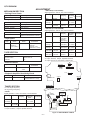
ADJUSTMENT
• AM IF/RF (For QT-CD250H)
Signal generator: 400 Hz, 30%, AM modulated
MECHANISM SECTION
• Driving Force Check
Torque Meter
PLAY: TW-2412
Frequency
Frequency
Display
AM IF
450 kHz
1,620 kHz
T3
AM Band
Coverage
—
522 kHz
(fL): L4
*3
1.0 ±0.05V
603 kHz
1,404 kHz
(fL): L3
(fH): TC1
Test Stage
Specified Value
Over 120 g
• Torque Check
Torque Meter
Specified Value
Play: TW-2111
25 to 65 g.cm
Fast Forward: TW-2231
60 to 130 g.cm
Rewind: TW-2231
60 to 130 g.cm
AM Tracking 600 kHz
1,400 kHz
Torque Meter
Specified Value
MTT-114
Output: Speaker Terminal
(CNP201 Load resistance: 4 ohms)
MTT-111 Variable
resistor in
motor. (M601)
Specified
Value
Instrument
Connection
3,000 ± 90 Hz
Output: Speaker
Teaminal
(CNP201 Load
resistance: 4 ohms)
TAPE SECTION
Position of each switch or control
Volume control
Function switch
X-BASS
Frequency
Display
Frequency
AM IF
450 kHz
1,602 kHz
(9kHz span)
1,620 kHz
(10kHz span)
AM Band
Coverage
—
531 kHz
(9kHz span)
(fL): L4
*3
1.0 ±0.05V
AM Band
Coverage
—
530 kHz
(10kHz span)
(fL): L4
*3
1.0 ±0.05V
AM Tracking 603 kHz
(9kHz span) 1,404 kHz
603 kHz
1,404 kHz
(fL): L3
(fH): TC1
*2
AM Tracking 600 kHz
(10kHz span) 1,400 kHz
600 kHz
1,400 kHz
(fL): L3
(fH): TC1
*2
Max
Tape/Power Off
On
CNP101
Specified Value
82 kHz ± 6 kHz
- 6 kHz
L301
Setting/ Instrument
Adjusting Connection
Parts
T3
*1
*1. Input: Antenna, Output: Pin 16 of IC1
*2. Input: Antenna, Output: Speaker Terminal
*3. Input: Input is not connected, Output: TP1
• Bias Oscillation
Adjustment Point
*2
Test Stage
• Tape Speed
Adjusting
Point
*1
• AM IF/RF (For QT-CD250W)
Signal generator: 400 Hz, 30%, AM modulated
• Head Azimuth
Test
Tape
Setting/ Instrument
Adjusting Connection
Parts
Instrument
Connection
L301
Pin 2 of CNP201
SW102
• Playback Amplifier Sensitivity Check
Test Tape
Specified Value
MTT-118
1.1 V ± 3 dB
4 3 21
BIAS OSC.
IC101
1
11
12
2
Instrument Connection
Speaker Terminal
(Load resistance: 4 ohms)
TUNER SECTION
CNP201
CNP602
HPJ201
HEADPHONES
3 2 1
3
2
1
MAIN PWB
fL: Low-range frequency
fH: High-range frequency
• FM RF
Signal generator: 1 kHz, 75 kHz dev., FM modulated
FM Band
Coverage
—
87.5 MHz
FM RF
98.0 MHz 98.0 MHz
(10-30 dB)
Serring/
Adjusting
Point
Instrument
Connection
(fL): L2
1.7 V ± 0.05V
*1
L1
*2
TC1
FM RF
L1
AM IF
T3
24
1
12
*1. Input: Antenna, Output: TP1
*2. Input: Antenna, Output: Speaker terminal
R7
L4
TP1
L2
IC1
Test Stage Frequency Frequency
Display
AM
TRACKING fH
L3
AM BAR
ANTENNA
AM BAND
COVERAGE fL
16 FM BAND
COVERAGE fL
13
AM
TRACKING fL
Figure 10 ADJUSTMENT POINTS
– 10 –
QT-CD250H/W
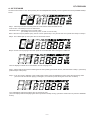
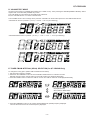
A. CD TEST MODE
Set the function switch to "CD" when pressing the "REVIEW(PRESET DOWN )" button together with "STOP(TUNING DOWN)"
button.
Step-1. CD Pickup can be move when press the "CUE" button either "REVIEW" button.
"CUE" button : CD Pickup move to out side of disc.
"REVIEW" button : CD Pickup move to in side of disc.
(CD Pickup can't move any more, if reach to most in side.)
Note: If the CD Lid open (SW810 open), the unit can be operate Step-1 only and the unit can't operate from Step-2 to Step-5.
Step-2. The LASER light up when press the "PLAY/PAUSE" button.
Step-3. CD disc can be playing mode when press the "PLAY/PAUSE" button during the LASER ON.
The LCD displays indicate the "Track Number" and the "Playing Time".
Step-4. CD disc will be stop and the LASER goes out when pressing the "STOP" button, and return back to Step-1. (CD Pickup
position keeps at that point).
Step-5. It can be control to ON/OFF of the Tracking Servo when press the "MEMORY" button during the CD playing mode.
(The Servo will be ON when playing mode again, if to make stop mode during the Servo OFF condition.)
The LCD displays indicate the playing time of CD Pickup point.
(The LCD displays indicate the playing time at that point when Pickup moving, if press the "CUE" button or press the "REVIEW"
button.)
– 11 –
QT-CD250H/W
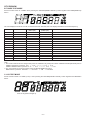
B. TUNER TEST MODE
Set the function switch to "TUNER" when pressing the "REVIEW(PRESET DOWN )" button together with "BAND(REPEAT)"
button.
The LCD displays indicate the "TunEr" for several seconds. after that, the LCD displays indicate to the normal frequency.
PRESET. NO
QT-CD250H
QT-CD250W
(9kHz span)
QT-CD250W
(10kHz span)
FM MODE
P-01
FM 87.50 MHz
FM 87.50 MHz
FM 87.5 MHz
STEREO
P-02
FM 108.00 MHz
FM 108.00 MHz
FM 108.0 MHz
STEREO
P-03
FM 98.00 Hz
FM 98.00 Hz
FM 98.0 Hz
STEREO
P-04
FM 90.00 MHz
FM 90.00 MHz
FM 90.0 MHz
STEREO
P-05
FM 106.00 MHz
FM 106.00 MHz
FM 106.0 MHz
STEREO
P-06
AM 522 KHz
AM 531 KHz
AM 530 KHz
P-07
AM 1620 KHz
AM 1602 KHz
AM 1620 KHz
P-08
AM 990 KHz
AM 990 KHz
AM 990 KHz
P-09
AM 603 KHz
AM 603 KHz
AM 600 KHz
P-10
AM 1404 KHz
AM 1404 KHz
AM 1400 KHz
P-11
FM 106.00 MHz
FM 106.00 MHz
FM 106.0 MHz
MONO
P-12
FM 90.00 MHz
FM 90.00 MHz
FM 90.0 MHz
MONO
P-13
FM 98.00 MHz
FM 98.00 MHz
FM 98.0 MHz
MONO
P-14
FM 108.00 MHz
FM 108.00 MHz
FM 108.0 MHz
MONO
P-15
FM 87.50 MHz
FM 87.50 MHz
FM 87.5 MHz
MONO
Note:
1. The Preset Channel can be change when press the "PRESET UP (CUE) button either "PRESET DOWN (REVIEW)" button.
PRESET UP button is pressed : P-01 -> P-02 -> > > > > P-15 -> P-01
PRESET DOWN button is pressed : P-15 -> P-14 -> > > > > P-01 -> P-15
2. The Tuner Mode can be change when press the "BAND (REPEAT)" button.
BAND button is pressed : FM stereo -> FM mono -> AM -> FM stereo
C. LCD TEST MODE
Set the function switch to "TUNER (or CD)" when pressing the "REVIEW(PRESET DOWN )" button together with "MEMORY"
button.
All of the segments will light up.
– 12 –
QT-CD250H/W
D. VOLUME TEST MODE
Set the function switch to "POWER ON (TAPE PLAY, TUNER or CD)" when pressing the "REVIEW(PRESET DOWN )" button
together with "PLAY/PAUSE (TUNING UP)" button.
The LCD display do not indicate the VOLUME level at this time.
But, the VOLUME level is "12" which is defaults level.
The VOLUME LEVEL can be change when press the "VOLUME UP" button either press the "VOLUME DOWN" button.
"VOLUME UP" button is pressed : (12 VoL) -> 30 VoL -> 30 VoL (30 is flashing)
"VOLUME DOWN" button is pressed : (12 VoL) -> 1 VoL-> 0 VoL -> 0 VoL (0 is flashing)
E. TUNER FM/AM INTERVAL (SPAN) SELECTION (for QT-CD250W Only)
To change the tuning span: (default: AM 9 kHz/FM 50 kHz SPAN)
1. Set the function switch to TUNER.
2. Hold down the "MEMORY" button and the "PRESET DOWN button for at least 3-seconds.
Release the button when "AM SP 9 kHz" and "FM SP 50 kHz" are displayed alternately.
3. Press the "BAND" button to select the "AM SP 10 kHz" and "FM SP 100 kHz" are displayed alternately.
1 sec
Displayed alternately
When press the "BAND" button
1 sec
4. Press the "MEMORY" button to set it when desired INTERVAL (SPAN) frequency displayed.
The unit will return back to the normal frequency displayed.
– 13 –
QT-CD250H/W
SW810
3.8V
R826
220K
C842
0.047
+B
30 29 28 27 26 25 24 23 22 21 20 19 18 17 16
RES
C807
0.047
+B
CF4
FM DET
C108
820P
SW102
RECORD/
PLAYBACK
9 8 7
R
P
SW102-C
C112
330P
16 17 18
L108
R
P CHOKE
R110
COIL
SW102-G
120
C106
0.0018
IN2
NF2
0.6V 11
C110
270P
NC
4
GND
6
12
7
3.2V
C118
10/16
C114
47/16
C116
0.018
(ML)
R114
8.2K
R116
3.9K
R118
3.9K
4.4V
R879
4.7K
R865
47K
4.5V
(TUN:
0.5V)
R62
1K
R60
1K
R61
1K
XOUT XIN
GND(AUDIO)
C54
0.022
C56
0.022
C59
0.01
R77
3.3K
GND 5.0V
(CD: OPEN)
L-CH(CD)
R-CH(CD)
AOUT
PD
AIN
R53
4.7K
VSSA VSSX
CL
CE
DO
DI
BO1
FMIN
MONO/
AMIN
ST
BO2
BO4
IO2
SW102-E
P
R
22 23 24
C119
2.2/50
R
P
SW102-H
SW102
RECORD/
PLAYBACK
GND GND
2
3
C243 0.8V
330P
0.2V
2.0V
R246
5.6K
R249
220
+B
+B
BIAS OSC.
L301
R351
100
C354
0.022(ML)
BIAS OSC.
Q351
KTC3199 GR
0V
R353(REC: 0.4V)
33K
R352
150
C352
100/10
C353
0.0056
(ML)
M601
TAPE
MOTOR
R354
4.7
SW601
TAPE
MAIN
• The numbers 1 to 17 are waveform numbers shown in page 19.
1
C245
1/50
C223
0.1/50
C224
0.1/50
Q211,Q212
LINE AMP
C244
R248 330P R247
560
560
R235
47K
0V
C242
1/50 R244
560K
SW102-D
SW102
P RECORD/
R
12 11 10 NC PLAYBACK
NC
13 14 15
R122
2.7K
R240
2.2K
IC101
REC./P.B.EQUALIZER AMP.
BA3311L
R126
100
C123
220/10
R125
680K
R106
15K
SW102
RECORD/
PLAYBACK
R123
3.3K
+B
D101
1N4148
FILTER 10
7.3V
ALC T 2
OUT2 0V
C121
0.01
R119
3.3K
C117
10/16
PRE AMP
1 3.1V
OUT1
8
VOLTAGE:
VCC 7.3V
PLAY and REC.
IC101
BA3311L
0V
6 5 4
P
R
SW102-B
H
3
NF1
IN1
0V
9
R117
3.9K
R115
3.9K
R242
10K
0V(OFF:0.6V)
Q210
KTC3199 GR
R238
2.7K
R234
2.2K
C351
0.0022(ML)
4
C107
820P C111
330P
0.6V
5
R113
8.2K
C113
47/16
C120
47/16
3
ERASE HEAD
L107
CHOKE
COIL
C109
270P
D102
1N4148
R-CH
1
2
3
4
R101
330
SW102-F
R109
120
C122
0.01
2
C115
0.018(ML)
C105
0.0018
R
P
19 20 21
3 2 1
SW102
RECORD/
PLAYBACK
R121
2.7K
R120
3.3K
1
CNP101
CNS101
SW102-A
R
P
R103
12K
R-CH SW201-C
14
CD
TU
11
13
TA
12
Speaker Case
R72
4.7K
R105
15K
R104
SW102
12K
RECORD/
PLAYBACK
R102
330
FM/AM
VSSD BO3
IO1
R74
3.3K
Q209,Q210
X-BASS ON/OFF
R241
10K
0.2V
3
FM IF
SW201
FUNCTION
SELECTOR
0.8V
1
3
SW201-B
COR1
R239
2.2K
C241
R237
1/50
2.7K
Q209
KTC3199 GR
0V(OFF:0.6V)
0V
(REC: 4.0V)
1
FM IF
10
R243
560K
0V
3
R233
2.2K
R73
3.3K
C74
1/50
AM IF
Q2
KRA102 M
TUNER
SWITHCING
0V
1
+B
R245
5.6K
L-CH
CD 7
TU 8
TA 9
C29
100P
L-CH
CF1 2
C75
100P
R455
15K
R457
1K
R51
150
R71
4.7K
R124
3.3K
IC1
FM/AM IF MPX.,
TA2104BN
C73
1/50
C72
0.018
(ML)
CF2 2
R458
1K
1
3
R18
100
C71
0.018(ML)
12
C16
4.7/50
CF3 2
R59
1K
R58
1K
LPF1
VCO
10 11
NC
AM IF
T3
5.0V
(CD: 0.4V)
2
R76
820
R52
2.2K
C55
2.2/50
C61
100/10
13
R-CH
7 8 9
C60
0.0022
R456
15K
X51
4.5MHz
C52
12P
(CH)
20 21 22
L51
100µH
C24
0.1
R16
3.3K
C26
0.1
DET
OUT
MPX
IN
IF
REQ
OSC
OUT
C25 D1
0.047 1N4148
6
C15
220/10
R10
330
C13
0.47/50
C14
0.047
GND
AM
OSC
IC1
TA2104BN
FM IF
IN
14
AM IF
IN
15
FM RF
VCC
19 18 17 16
AM RF
IN
FM
OSC
C23
10/16
20
C51
15P
(CH)
R54
10K
C22
1/50
R12
10
C21
10/16
C7
FM BAND
0.001 COVERAGE fL L2
C68
220P
C34
220P
VD2
KV1370NT
C6
22P(CH)
R17
47K
23 22 21
VCC
RF
GND
C33
220P
R14
2.2K
R13
10K
IC51 LC72121
12 13 14 15 16 17 18 19
0.001
100P
100P
24
MIX
OUT
FM BAND
PASS
FILTER
R4
10
R5
22K
R3
100K
L2
L1
C2
FM RF
0.001
AM LOW
CUT
C1
15P(CH)
C5
0.1
FM OSC
C32
0.1
C3
0.01
F
R20
470
R6
15K
C8
0.001
C18
C57
C58
+B
7 6 5 4 3 2 1
11 10 9 8
C19
2.2/50
0V
+7.5V(CD)
GND
NC
R15
39K
IFIN
C12
1/50
AM TRACKING fH
C53
100/10
Q1
KTC3199 GR
GND
0V
TUNER
MUTE
NC
L807
0.82µH
+B
R55
56K
LPF2
FM/AM
R8
220K
C10
8P
C9
0.022
TC1
IC51
LC72121
ELECTRONIC
TUNING
NC
1 2 3 4 5
L-CH
6.9V
(TUN:7.5V)
7.5V(TUN:0V)
R852
2.2K
+B
VD3
AM TRACKING fL
KV1520NT
L3
AM BAR ANTENNA
C845
0.047
R854
100
+B
0V
Q805
(TUN:7.5V)
KRC107 M
4.4V
2
3
R862
SWITCHING D806
47K
1N4148 1
Q804
KTA12
SWITC
GND
R861
10K
R850
2
3
1.5K
0V
(TUN:7.5V)
1
D807
1N4148
SWITCHING
D804
1N4148
C805
0.022
C806
330/10
F1
RECORD/
PLAYBACK HEAD
Q802
Q803
KTA1273 Y
7.5V KRC107 M
SWITCHING
FMO
AM BAND
COVERAGE fL
L4
C11
360P AM OSC.
R8
1K
D802
1N4148
DMO
R7
10K
C839
0.047(ML)
R845
22K
R866
3.3K
NC
GND
GND
3.4V
3.4V
1.9V
1.9V
7.5V
NC
5.0V
VDD
2
REG IN
GND
VCC
VO1-
VO1+
VG1
VIN1
MT
VCC
3
5.0V
(TUN:0V)
4.3V
(TUN:5.0V)
C835
470P
C836
0.047(ML)
C837
0.047(ML)
C838
0.047(ML)
C843
47/16
SWITCHING
Q806
KTA1273 Y
NC NC
NC
R851
2.2K
1 2 3
TAPE
C834
470P
COR801
SLT-
X801
16.93MHz
TRO
SLT+
R236
47K
FM-
1 2 3 4 5 6 7 8 9 10 11 12 13 14 15
G
R832
3.3K
R833
3.3K
R834
3.3K
R853
2.2K
FM+
IC803
LA6541D
FM
ROD
ANTENNA
R831
3.3K
DM-
VOLTAGE
AM
2V
GND
0.V
0V
0V
4.9V
0.7V
0V
0V
5.0V
0V
0.9V
GND
2.0V
0V
4.2V
0.9V
0.9V
1.0V
GND
2.0V
R829
3.3K
R830
10K
C841
0.047
2.9V(0V)
3.1V
0.7V
1.0V
0.9V
5.0V
3.6V(4.0V)
3.7V(4.1V)
3.7V(4.1V)
3.7V(4.1V)
3.7V(4.1V)
3.7V(4.1V)
( ): AM
IC51
VOLTAGE
FM MONO
1.6V
GND
0.V
0V
0V
4.9V
0V
2.9V
0V
5.0V
0V
0.9V
GND
0V
1.5V
3.2V
0.9V
0.9V
1.7V
GND
1.6V
R812
1K
C854
0.0068
FOO
R2
3.3K
FM ST
1.6V
GND
0.V
0V
0V
4.9V
3.1V
2.9V
0V
5.0V
0V
0.9V
GND
0V
1.5V
3.2V
0.9V
0.9V
1.7V
GND
1.6V
C833
0.033(ML)
C822
0.047
C863
47/16
DM+
VD1
KV1370NT
E
IC1
PIN
NO.
13
14
15
16
17
18
19
20
21
22
23
24
VOLTAGE
GND
0.8V(0V)
0.V
3.5V(4.1V)
3.7V(4.1V)
3.2V(4.1V)
3.7V(4.1V)
GND
0.4V(0.1V)
3.0V(3.6V)
1.2V
1.2V
D
PIN
NO.
1
2
3
4
5
6
7
8
9
10
11
12
13
14
15
16
17
18
19
20
21
22
IC803
FOCUS/
TRACKING/
SPIN/
SLED DRIVER
LA6541D
C27
0.001
PIN
NO.
1
2
3
4
5
6
7
8
9
10
11
12
+B
R828
10K
C814
0.047
C813
47/16
VCC
1.9V
VREF
1.9V
VIN4
VG4
3.4V
VO4+
3.4V
VO4GND
CD MOTOR PWB-B
14
0.8V
13
QUAD
SW702
PICKUP IN
SBAD
AGC
PU-IN
1.9V
TEO
NC
SL-
6
5
4
3
2
1
L803
220µH
R803
82K
C821
100/10
C828
0.0027
C829
0.0047
+B
LD
7.5V
SL+
-
6
5
4
3
2
1
TEN
FEO
12
R1
100K
+
M
GND
C
VR
2VRO
1.9V
C832
47/16
C819
0.1(ML)
C856
100P
6
5
4
3
2
1
BI803
SP+
CNS803
-
SPM701
SLED
MOTOR
1.9V
PD
+
M
CNP803
M702
SPINDLE
MOTOR
GND
10
TEB
1.9V
CNS801
LD
3.7V
9
C827
0.015(M
C818
56P
C830
0.01(ML)
C20
330P
VR
TR-
0V
FC-
1.9V
C820
0.1(ML)
21
0.5V
RFGC 20
1.9V
RFGO 19
1.9V
RFIS 18
0.9V
RFRP 17
1.9V
VRO 16
1.9V
FEN 15
1.9V
PD
FC+
LDO
R806
2.7K
AGCI
ST
IND
G
FO-
B
0V
R827
15K
0.1V
GND
3.4V
VO33.4V
VO3+
1.9V
VG2
VG3
1.9V
VIN2
VIN3
REG OUT
CD
F+
F-
TR-
MDI
22
FM RF FM RF
OUT
IN
FO+
1
2
3
4
5
6
7
8
TNI
23
RFO
VO2+
R+
1
2
3
4
5
6
7
8
R811
22K
1
2
3
4
5
6
7
8
BI801
TR+
TR+
TPI
GND
5 0V
8
9
10
11
SEL
0V
2200P
FPI
4
Figure 14 SCHEMATIC DIAGRAM (1/2)
– 14 –
2.0V
Q211
KTC3199 GR
0.5V
FNI
C826
47P
R807
1K
C247
220/10
F
8
2
3
4
5
6
7
0.5V
R-
GND
R805
39K
Q212
KTC3199 GR
1.9V
1M
1M
R804
68K
C804
2P(CH)
1.9V
B
IC801
TA2109F
A
GND
LTOH30P1
E
3.4V
F
5
4
3
2
1
1.9V
24
RFN
VCC
VO2-
B
5
4
3
2
1
C825
47/16
4.4V
GND
A
2200P
1
C801
0.01
3.4V
5
4
3
2
1
E
A
F
C
R802
2.2K
+B
K
C816
0.022
IC801
SERVO PRE AMP.
TA2109F
GND
K
C802
0.022
BI802
CNS802
A
3.7V(ON:2.1V)
PICK-UP UNIT
LD
MON
K
E
B
+B
+B
C815
47/16
C817
100/10
R801
22
R820
47K
LASER DRIVER
Q801
1.4V(ON:1.9V) KTA1266 GR 4.4V(ON:2.8V)
CD LID
OPEN/CLOSE
5
6
M
+
QT-CD250H/W
FM SIGNAL
2.5V SEG10
2.5V
2.3V
2.3V
GND
5.0V
2.5V
2.4V
5V
5V
GND
GND
2.2V(TUN:0V)
GND
2.1V(TUN:0V)
SEG7
2.5V
SEG6
2.5V
SEG5
2.5V
SEG4
2.5V
SEG3
2.5V
SEG2
SEG1
2.5V
COM3
COM1
COM2
MVDD
2.3V
DVSR
GND 81 82 83 84 85 86 87 88 89 90 91 92 93 94 95 96 97 98 99 100
NC
R825
10K
2.3V
4.4V
(TUN:0V)
SEG8
2.5V
COM4
MVSS
MXI
HOLD
MXO
REMO-IN
NC
NC
RESET
LO
DVSL
RO
DVDD
17
DVRR
80 XVDD
5V
16
SEG9
2.5V
R842
22K
R844
22K
C864
0.1
ST
KHz
MHz
R883
47K
R884
47K
R885
47K
R886
47K
R887
47K
R888
47K
R889
47K
R890
47K
R891
47K
R892
47K
R893
47K
R894
47K
R895
47K
R896
47K
R897
47K
R898
47K
R899
47K
12
11
11
10
10
9
9
7
7
6
6
5
5
4
4
1
1
2
2
3
3
8
8
1
1
2
2
3
3
4
4
5
5
6
6
7
7
8
+B
9
10
10
11
11
CNP801
X802
4.19MHz
C851
3.3/50
1
2
3
4
+B
+B
8
9
FW802
R901
47K
R863
1.8K
12
+B
R864
1M
R839
47K
R835
270
C852
3.3/50
+B
C846
1/50
C848
22/16
C850 C849
0.0022 0.0022
1 2 3 4 5 6 7 8 9 10 1112 13 14 15 16 17 18 19 20
FW801
R882
47K
R856
15K
+B
C862
0.1
R860
4.7K
R836
270
L801
220µH
C847
22/16
C853
0.022
C872
0.0047
C844
100/10
+B
D801
1N4148
5.0V
4.4V
+B
R876
10K
19
18
17 NC
16
15
14
13
12
11
10
9
8
7
6
5
4
3
2
1
LCD801 LCD DISPLAY
X-BASS MEMORY
R900
47K
+B
0V
Q805
(TUN:7.5V)
KRC107 M
4.4V
2
3
R862
5.0V
SWITCHING D806
47K
1N4148 1
Q804
KTA1266 GR
SWITCHING
GND
CD CONTROL PWB-A2
CNS801
0V
R880
22K
0V(TUN:5.0V)
15
4
DVRL
2.2V
(TUN:0V)
2.1V
(TUN:0V)
4.2V(TUN:0V)
78 XI 2.0V(TUN:0V)
79 XO (TUN:0V)
R846
4.7K
R878
10K
R877
10K
R875
10K
C865
100/10
GND
GND
GND
GND R869
4.7K
GND
GND
NC
R868
4.7K
R870
4.7K
0V(X-BASS OFF:4.9V)
R826
220K
GND
4.4V(TUN:0V)
1.9V
(TUN:0V)
3.7V
(TUN:0V)
0V
2.5V SEG14
2.5V SEG13
14
77 XVSS GND
X801
16.93MHz
DO
CL
TEST0
TEST1
2.5V SEG15
75 VDD2 4.4V(TUN:0V)
R821
1K
R854
100
2.5V SEG16
2.5V SEG11
76 VSS2 GND
R840
10
NC
SEG17
70 TEBC 0V
74 SEL 0V
C845
0.047
1
MVDD1
2.5V SEG12
71 FMO 1.9V(TUN:0V)
ML)
IC802
SERVO/
SIGNAL
CONTROL
TC9457F2
11
72 DMO 1.9V(TUN:0V)
C840
0.1
ML)
4.9V(TUN: 0V)
69 RFGC 0.5V(TUN:0V)
73 2VREF 3.7V(TUN:0V)
ML)
0.6V(TUN: 5.0V)
R843
4.7K
+B
KEY1 26
CD
POWER 25
PU IN 24
5.0V
7
66 FOO 1.9V(TUN:0V)
68 VREF 1.9V(TUN:0V)
R834
3.3K
R873
R859 4.7K
47K
GND MVSS1 20
6
65 TEZI 1.9V(TUN:0V)
67 TRO 1.9V(TUN:0V)
R832
3.3K
R833
3.3K
TEST2
5
63 SBAD 0.7V(TUN:0V)
R831
3.3K
28
DOOR IN 23
TUNER- 22
5.0V(TUN:0V)
FUNC
0V(TUN: 5.0V) CD-FUNC 21
64 TEI 1.9V(TUN:0V)
R829
3.3K
ADIN3
CD SIGNAL
PLAYBACK SIGNAL
RECORD SIGNAL
5.0V
(TUN:0V)
DI 30
0V(TUN: 4.9V)
NC 29
0V
61 RFRP 0.9V(TUN:0V)
62 FEI 1.9V(TUN:0V)
R830
10K
QT-CD250H
ONLY
R872
4.7K
5.0V
59 RFCT 1.9V(TUN:0V)
60 RFZI 1.9V(TUN:0V)
R812
1K
+B
5.0V KEY2 27
58 AVDD 4.4V(TUN:0V)
C833
0.033(ML)
C854
0.0068
TEST3
R828
10K
TEST4
56 SLCO 1.9V(TUN:0V)
57 RFI 1.9V(TUN:0V)
+B
CE_(PLL)
C828
0.0027
C829
0.0047
STB_(VOL)
55 AVSS GND
TEST5
(TUN:0V)
13
P_MUTE
(TUN:0V)
X-BASS
(TUN:0V)
54 VCOF 1.7V
DOUT
SBSY
52 LPFO 3.7V
53 PVREF 1.9V
C830
0.01(ML)
SBOK
VDD1
VSS1
51 LPFN
C827
0.015(ML)
R871
4.7K
C870
100P
50 49 48 47 46 45 44 43 42 41 40 39 38 37 36 35 34 33 32 31
P2VREF
12
PDO
R827
15K
TMAX
1.5V
(TUN:0V)
R820
47K
C826
47P
0V
R824
10K
C824
NC 47/16
NC R867
4.7K
C823
0.022
+B
0V
C825
47/16
AM SIGNAL
+B
+B
R847
5.6K
SW801
SW802
PLAY/PAUSE/
STOP/
TUNING UP TUNING
DOWN
R849
18K
SW803
REPEAT/
BAND
SW804
TUNER/
MEMORY
UN801
REMOTE SENSOR
N64H380A
1
2
3
4
R808
100
3
SW809
X-BASS
C810
10/16
2
0V
(REC: 4.0V)
SW807
VOLUME UP
D803
1N4148
8
-
9
5.0V4.6V
D203
1N4148 R202
10K
4.9V
7.0V
+
6
1
R201
1.2K
CNP201
-
SP201
L-CH
4 OHM
SPEAKERS
-
CNS201
3
1
2
3
SP202
R-CH
4 OHM
+
AC220-240V
SW651
VOLTAGE
SELECTOR
C234
1000/10
AC110-127V
QT-CD250W
ONLY
C201
100/16
T651
POWER
TRANSFORMER
C226
0.022
AC110V-127V/
220V-240V,50/60Hz
AC/DC
SO651
AC INPUT
SOCKET
AC INPUT
SELECTOR
FOR QT-CD250W
F651
T1.25A L
250V
C654
0.022
C651
0.022
D651
1N4004
D654
1N4004
D652
1N4004
C652
0.022
3
2
1
D653
1N4004
3
2
1
C653
0.022
CNP602
R204
2.2K
SW201
FUNCTION
SELECTOR
Q204,Q205:5V
REGULATOR
C240
0.1(ML)
CNS602
R206
560
1
2
3
POWER PWB-A3
C206
47/16
0V
7.0V
GND
2
12 9.0V
C227
4700/16
8.2V8.4V
C239
0.1(ML)
13
14
4.5V4.2V
R205
4.7K
C209 D204
0.01 1N4148
8.4V
ZD202
DZ7.5BSB
Q207
KTC3199 GR
8.4V C212
0.047
+
GND
8.6V8.0V
5
0.6V
0V
MAIN PWB-A1
C238
100/10
C235
100/10
R232
120
GND
HPJ201
HEADPHONES
C237
100/10
8.6V8.0V 10
IC201
TA8227P
POWER AMP.
R211
47K
C221
0.001
GND
C225
100/10
C236
100/10
GND
Q202
KTC3199 GR
0V
0.6V
R228
120
C233
1000/10
11
+
4
C220
0.1/50
R227
120
4.5V4.2V
7
R231
120
C222
0.001
VSS VDD
GND
D201
1N4148
C214
0.1/50
R212
47K
4.6V
2.5V
2.5V
2.5V
C218 2.5V
0.0039(ML)
R218
8.2K
7.5V
REGULATOR
D205
1N4148
R203
270
M
Q201
KTC3199 GR
0.V
R253
3.9K
C217
0.0039(ML)
C215
0.039(ML)
R217
8.2K
0V
2.5V
GND
C216
0.039(ML)
R214
1K
2.5V
2.5V
CS R216
1K
CK
+B
Q205
KTC3199 GR
7.0V
199 GR
0V
0V
0V
0V
+B
4.4V
ZD201
DZ5.1BSB
TAPE 2
NC
M601
TAPE
MOTOR
R222
4.7K
C208
0.022
C205
47/16
Q204
C211
KTA1273Y
7.5V 0.047
5V 5.0V
C249
100P
C204
0.022
SW201
FUNCTION
SELECTOR
R855
18K
SWITCH PWB-A4
0V
Q206
KTA1046 Y 7.5V REGULATOR
9V
+B
7.5V
+B
R249
220
R354
4.7
R225
100K
R224
4.7K
R207
560
+B
C232
1/50
SW201-A
CD 4
1
TUN 3
0.4V)
C207
470/10
C247
220/10
7.5V
+B
OSC.
0V(ON:0.6V)
C246
10/16
0V(ON:0.6V)
MUTE
ZD203
ZD2.4BSB
R213
100
R246
5.6K
R AMP.
STB
DATA
2.0V
Q211
KTC3199 GR
C245
1/50
C243 0.8V
330P
0.2V
2.0V
4 3 2 1
R220
220K
C203
0.01
Q211,Q212
LINE AMP
C230
1/50
R252
22K
C210
0.022
C242
1/50 R244
560K
IC202
R210
1K
D202
1N4148
R240
2.2K
C244
R248 330P R247
560
560
0V
0V(OFF:0.6V)
Q210
KTC3199 GR
R238
2.7K
0.2V
R242
10K
0.8V
GND GND
R241
10K
R223
4.7K
13 14 15 16
8 7 6 5
R251
22K
Q212
KTC3199 GR
0V
R237
2.7K
Q209
KTC3199 GR
0V(OFF:0.6V)
C213
0.1/50
MUTE
R219
220K
9 10 11 12
C231
1/50
R243
560K
2.5V
+5V(u COM)
+4.5V(BACK UP)
+5V(CD)
GND(POWER)
GND(CD)
GND(AUDIO)
C229
1/50
R245
5.6K
C241
1/50
R215
1K
R209
1K
+B
Q2
A102 M
UNER
THCING
R239
2.2K
R250
470K
C219
0.1/50
R221
4.7K
1
3
Q203 SWITCHING MUTE
KTA1266 GR
4.8V(ON:4.4V)
4.4V(ON:3.8V)
IC202
ELECTRONIC
0V
VOLUME
TC9260P(ON:4.4V)
R455
15K
R457
1K
R857
47K
SW808
VOLUME DOWN
+B
D805
1N4148
R458
1K
GND 5.0V
(CD: OPEN)
L-CH(CD)
R-CH(CD)
0.4V)
2
R837
10K
SW806
REVIEW/
PRESET
DOWN
SW805
CUE/
PRESET
UP
UN801 1
+B
+B
R838
10K
R456
15K
51
5MHz
R841
5.6K
R848
10K
T651
POWER
TRANSFORMER
SO651
AC INPUT
SOCKET
AC INPUT
SW201-D
19 CD
18 TUN
17 TAPE
AC/DC
SELECTOR
16
C302
0.022
BATTERY
DC 9V ["D" size (UM/SUM-1,R20 or
HP-2) battery x 6]
C202
47/16
For U.K./Europe/Australia/New Zealand;
AC230-240V,50Hz
For Philippines; AC220V,60Hz
FOR QT-CD250H
TERMINAL A PWB-A5/
TERMINAL B PWB-A6
+
SW601
TAPE
MAIN
+B
BATTERY
DC 4.5V ["AA" size (UM/SUM-3,R6 or
HP-7) battery x 3 for backup memory]
• NOTES ON SCHEMATIC DIAGRAM can be found on page 18.
7
8
9
10
Figure 15 SCHEMATIC DIAGRAM (2/2)
– 15 –
11
12
QT-CD250H/W
SPEAKERS
R-CH
1 2 3 4 CNP101
R354
Q351
R351
C352
R228
C233
CNP602
C234
R201
D203
ZD201
D202 C203
R811
IC801
BI802
1
R802
BI801
R853
Q802
C807
25
30
E
C
B
12
13
H
TO
SP202
(R-CH)
FW801
CD CONTROL
PWB-A2
R3
TC1
C12
R2
C1
C3
C21
C20
C22
CF4
C16
C71
C72
R72
R16
R71
C25
C24
C53
CF3
C14
VD2
C23
10
15
1
2
3
3 2 1 CF2
CF1
C15
3 2 1
R10
VD3
C8
C56
L51
C19
BL
R17
1
D1
T3
5
13 12
B
C
E
F1
1
IC1
20
C34
Q1
1
2
3
C33
24
R4
R20
C60
R52
C55
R18
C51
C32
R12
C58
C52
X51
1
C59
22
L2
C7
C57
R53
20
1
R5
R14
R15
5
15
R77
IC51
R60
R61
R62
FW802
C6
L4
C18
11 12
10
R59
SW801
PLAY/PAUSE/
TUNIG UP
C13
C68
R13
R55
R58
R847
SW805
CUE/
PRESET UP
C5
C54
L3
AM BAR ANTENNA
VD1
L1
R6
R54
C61
12
11
R8
C11
R76
G
R841
C10
C26
Q2
SW806
DOWN/
REVIEW/
PRESE
20
C29
R7
C9
R51
3
2
1
R1
C27
C2
C75
BR
15
C73
(255)
C74
MAIN PWB-A1
• The numbers 1 to 17 are waveform numbers shown in page 19.
1
2
3
C202
9
2
3
20
COR1
R806
R805
C804
C838
CNS801
BK
GY
GY
GY
GY
GY
BR
10
R203
C204
C209
ZD202
R205
R204
D204
D205
C212
C206
R206
R232
C210
R850
D804
R851
IC803
R869
Q803
R866
5
6
1
10
R845
D802
D807
1
2
3
BI803
5
Q806
1
8
7
6
5
4
3
2
1
16
15
L803
E C B
1
C842
CNS802
1
2
3
4
5
WH
WH
WH
WH
WH
WH
WH
BR
C806
C856
R865
R877
R873
R875
C843
C817
BR
WH
WH
WH
WH
1
8
R801
R852
C823
1
C816
R804 C801
Q801 B C E
R824
C824
L807
30 31
C870
5
5
C802
R820
R826
10
24
C815
R871
R843
20
C835
C834
51
50
10
8
12
15
C830
R861
LCD801
C821
R828
C833
C828
R870
R876
C841
R868
R867
R859
C814
13
R807
C819
C829
C863
85 75
90
70
65
95
100
60
5
1
10 IC802 55
15
45
20
40
QT25 35
CD250H
R880
C211
R202
IC201
C840
X801
C864
Q204
5
C818
C836
R830
R829
8180
C865
E
C
B
B
C
E
C813
C820
R832
R833
R831
ONLY
SW810
CD LID
F
C222
C221
C832
C822
R803
R834
C845
R872
OPEN/CLOSE
SW804
TUNER/
MEMORY
R840
C839
C872
COR801
R888
R848
B
C
E
Q205
7
C827
R827
C826
R887
R886
R885
R884
R883
R882
R846
R849
R231
D805
C848
R836
R835
C847
R893
E
C
B
C837
C854
C825
R864
R863
Q207
R812
R860
R842
R844
R895
R894
1
D801
C844
C853
C846
R839
X802
R892
R891
R890
R889
17
16
SW802
STOP/TUNING
C850 R854
R878
1
1 6
C302
R837
R897
R896
GY
4
5
6
C227
R825
11
C238
14
R254
C852
R838
C849
R901
R900
R899 C862
R898
GY
E
3
2
1
9
8
7
C225
B C E
R821
12
B
C
E
13
C220
R879
SW803
REPEAT/
BAND
15
14
4
POWER ON
CD
SW201
FUNCTION
SELECTOR
TUNER
SWITCH
PWB-A4
Q805
TAPE
OFF
R856
Q804
L801
D806
R862
D
R212
Q203
C851
A
C237
R211 C213
C219
B
C
E
1
2
3
Q206
11
D
D201
12
11
10
C235
Q202
IC202
R225
C214
R253
R250
R455
CNS801
1
R808
2
3
4
E
C
B
Q201
1
2
3
4
5
C216
6 R223
7 C246
8 R224
R214
C245
R74
R73
3
2
1
C240
D803
Q209
C249
C201
R456
R216
R215
ZD203
R242
SW201
B
C
SW809
X-BASS
R213
C247
Q211
C810
R457
C
CNP801
4
3
2
1
R809
C208
E C B
R458
1
2
3
C226
R221
R210
R222
R218
C218
R220
C229
16
R209
C231
15
R217
R244
R247
C217 14
C244
12
E C B
R219
R240
R243
C215 13
C242
C243
11
R236
R239 R207
10
R234
R238
C241
9
C224
R235
R233
R237
C223
Q210 B C E
B C E
R241
Q212
UN801
R251
R248
R857
R245
R246
C205
HPJ201
HEADPHONES
R227
C123
C230
R252
R353
C353
R126
R249
C232
E
C
B
R352
C239
SW807
VOLUME
UP
C354
IC101
CNP201
1 2 3
SW808
VOLUME
DOWN
H
2 4 6 8 10 12
C120
R855
C207
B
L301
1 3 5 7 9 11
D102
R125
R124
C351
D
L107
C107
C112 C108
C110
L108
C119
R110
R102
R118
R120
C114
C118
C122
R116
R114
C106
R122
C116
R106
CNS201
G
R115
R117
3
F
C121
2
R123
1
R105
R119 D101
GY
BK
RD
C105
R121
E
C109
R104
C
C111
R103
BK
B
C117
A
REC A
C115
R113
C113
R101
R109
PLAY
SW102
RECORD/
PLAYBACK
C805
SP202
C236
L-CH
SP201
4
Figure 16 WIRING OF P.W.BOARD (1/2)
– 16 –
5
6
QT-CD250H/W
TAPE
RECORD/PLAYBACK
HEAD(240-4)
M601
TAPE MOTOR
(240-6)
SW601
TAPE MAIN
(240-7)
(241)
(241)
WH
RD
BK
ERASE HEAD
(240-5)
TERMINAL B PWB-A6
BK
BATTERYS
DC4.5V ["AA" SIZE(UM/SUM-3,
R6 or HP7)battery x 3]
CNS101
WH
1 BK
2
3 RD
4 BK
OR
BR
BK
(241)
OR
TERMINAL A PWB-A5
RD
QT-CD250W ONLY
(230)
(229)
BL
BATTERYS
DC9 V [ "D" size(UM/SUM-1,
R20 or HP2) battery x 6 ]
OR
RD
SW651
VOLTAGE SELECTOR
AC220V-240V
AC110V-127V
F651
T1.25A L 250V
OR
YL
C652
C653
RD
D653
GY
D652
C651
D654
BR
YL
BL
RD
RD
1
2
3
CNS602
For
QT-CD250H
D651
T651
POWER
TRANSFORMER
C654
POWER PWB-A3
SO651
AC INPUT
SOCKET
BR[QT-CD250W]
RD[QT-CD250H]
BR[QT-CD250W]
RD[QT-CD250H]
QT-CD250H
For U.K./Europe/
Australia/
New Zealand;
AC230-240V,50Hz
For Philippines;
AC220V,60Hz
PICK UP UNIT
QT-CD250W
AC110-127V/
AC220-240V,
50/60Hz
CD MOTOR PWB-B
+
M701
SLED MOTOR
5 4 3 2 1
CNP803
1
2
3
4
5
6
CNS803
1
2
3
4
5
6
F3895AF
M702
SPENDLE MOTOR
SW702
PICKUP IN
+
-
BK
GY
GY
GY
GY
GY
-
8 7 6 5 4 3 2 1
(233)
COLOR TABLE
BR
FM ROD ANTENNA(237)
7
8
9
BROWN
RD(R)
RED
OR
ORANGE
YL
YELLOW
GR
GREEN
BL
BLUE
VL
VIOLET
GY
GRAY
WH(W)
WHITE
BK
BLACK
PK
PINK
10
Figure 17 WIRING OF P.W.BOARD (2/2)
– 17 –
11
12
QT-CD250H/W
NOTES ON SCHEMATIC DIAGRAM
• Resistor:
To differentiate the units of resistors, the symbol as K and M
are used: the symbol K means 1000 ohm and the symbol M
means 1000 kohm and the resistor without any symbol is an
ohm resistor. The resistor designated "Fusible" is a fuse type
resistor
• Capacitor:
To indicate the unit of capacitor, a symbol P is used: this
symbol P means micro-micro-farad and the unit of the capacitor
without such a symbol is microfarad. As to electrolytic capacitor,
the expression “capacitance/withstand voltage” is used.
(CH), (TH), (RH), (UJ): Temperature compensation
(ML): Mylar type
(P.P.): Polypropylene type
• The indicated voltage in each section is the one measured by
Digital Multimeter between such a section and the chassis
with no signal given.
REF. NO
DESCRIPTION
POSITION
SW102
RECODE/PLAYBACK
REC—P.B.
SW201
FUNCTION SELECTOR
TAPE/OFF—
TUNER/ON—CD/ON
SW601
TAPE MAIN
OFF—ON
SW651
VOLTAGE SELECTOR
(QT-CD250W ONLY)
AC220-240V—
AC110-127V
SW702
PICKUP IN
OFF—ON
SW801
PLAY/PAUSE/
TUNING UP
OFF—ON
SW802
STOP/TUNING DOWN
OFF—ON
SW803
REPEAT/BAND
OFF—ON
SW804
TUNER/MEMORY
OFF—ON
SW805
CUE/PRESET UP
OFF—ON
SW806
REVIEW/
PRESET DOWN
OFF—ON
SW807
VOLUME UP
OFF—ON
SW808
VOLUME DOWN
OFF—ON
SW809
X-BASS
OFF—ON
SW810
CD LID
OFF—ON
1. Tuner
( ): AM mode
Marking except for ( ): FM mode
2. CD
( ): Play mode
Marking except for ( ): Stop state
3. Deck section
( ): Record mode
Marking except for ( ): Playback mode
Display / Control section:
( ): Active state
Marking except for ( ): CD Function mode at stop state
• Schematic diagram and Wiring Side of P.W.Board for this
model are subject to change for improvement without prior
notice.
• Parts marked with “
”(
) are important for
maintaining the safety of the set. Be sure to replace these
parts with specified ones for maintaining the safety and
performance of the set.
FRONT
VIEW
E C B
(S) (G) (D)
(1) (2) (3)
KRA102 M
KRC107 M
KTA1046 Y
KTA1266 GR
KTA1273 Y
KTC3199 GR
Figure 18 TYPES OF TRANSISTOR
– 18 –
QT-CD250H/W
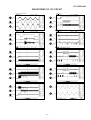
WAVEFORMS OF CD CIRCUIT
NO DISC FOCUS SEARCH
1
STOP
FO+
FO-
SEL
TRO
2
FMO
3
PLAY
CUE
6
1
TEI
1
TRO
2
FMO
3
IC802 64pin
SBAD
11
2
IC802 67pin
RFO
15
3
IC802 71pin
IC801 22pin
STOP
PLAY
REVIEW
6
1
FEI
TEI
1
TRO
2
FMO
3
IC802 64pin
IC802 62pin
RFGO
11
2
IC801 19pin
IC802 67pin
RFRP
15
3
IC801 17pin
IC802 71pin
STOP
TEI
PLAY
TCD-782 TNO-02 PLAYBACK
16
1
IC802 64pin
LO
1
RO
2
IC802 86pin
TRO
2
SBAD
3
IC802 67pin
7
1
IC802 71pin
IC802 63pin
11
15
3
FEI
6
TEI
IC802 67pin
IC802 62pin
10
11
2
STOP
9
PLAY
IC802 64pin
TEI
5
6
1
FEI
8
3
STOP
IC802 64pin
7
DMO
TOC IL
IC802 62pin
5
2
IC802 72pin
IC802 74pin
6
SBOK
14
3
FOCUS SEARCH
5
1
IC802 45pin
IC803 21pin
4
13
2
IC803 20pin
3
TMAX
IC802 50pin
IC802 66pin
2
12
1
FOO
PLAY
17
IC802 82pin
IC802 63pin
– 19 –
QT-CD250H/W
TROUBLESHOOTING (CD SECTION)
When the CD does not function
When the CD section does not operate when the objective lens of the optical pickup is dirty, this section may not operate. Clean
the objective lens, and check the playback operation. When this section does not operate even after the above step is taken,check
the following items.
Remove the cabinet and follow the troubleshooting instructions.
"Track skipping and/or no TOC (Table Of Contents) may be caused by build up of dust other foreign matter on the laser pickup
lens. Before attempting any adjustment make certain that the lens is clean. If not, clean it as mentioned below."
Turn the power off.
Gently clean the lens with a lens cleaning tissue and a small amount of isopropyl alcohol.
Do not touch the lens with the bare hand.
Dust gradually accumulates on the objective lens during use, and it may degrade performance.
To avoid this problem, use a cleaning disc designed for CD optical pickup lenses.
HOW TO USE
1. Using the brush in the cleaner cap, apply 1 or 2 drops of the cleaning fluid to the brush on the CD cleaner disc which has
the mark next to it.
2. Place the CD cleaner disc onto the CD disc tray with the brush side down, then press the play button.
3. You will hear music for about 20 seconds and the CD player will automatically stop. If it continues to turn, press the stop button.
CAUTION
The CD lens cleaner should be effective for 30 - 50 operations, however if the brushes become worn out earlier then please
replace the cleaner disc.
If the CD cleaner brushes become very wet then wipe off any excess fluid with a soft cloth.
Do not drink the cleaner fluid or allow it to come in contact with the eyes. In the event of this happening then drink and / or
rinse with clean water and seek medical advice.
The CD cleaner disc must not be used on car CD player or on computer CD ROM drives.
All rights reserved. Unauthorized duplicating, broadcasting and renting product is prohibited by law.
Cleaning Disc
PARTS CODE:
UDSKA0004AFZZ
Cleaner Liquid
Figure 20
• The CD function will not work.
The CD operating keys don't work.
Yes
Check the power supply, 16.93 MHz clock, and reset terminal.
Yes
Check the pickup-in switch (SW702) position.
Yes
Check the Focus system.
– 20 –
QT-CD250H/W
• Laser failure.
Is +7.5V applied to the Collector of Q206 ?
Check the PWB pattern of Q206.
No
Yes
Is +5V applied to the collector of Q204 and Q806 ?
Check the PWB Patten of IC204 and Q806.
No
Yes
Is +5V applied to the pin 75 (VDD) and pin 96 (MVDD) of
IC802 ?
Yes
No
Check the PWB pattern between collector of Q806 and pin 75 of
IC802, and emiter of Q806 and Q804 and pin 96 of IC802.
No
Check the PWB pattern between collector of Q204 and pin 1 of
IC801.
No
Check the laser come on when pattern cut between pin 8 (SEL) of
IC801 and pin 74 (SEL) of IC802.
No
Check the peripheral parts of IC801 and Q801. If it is normal, the
optical pickup is faulty.
No
Check as stated in item "FOCUS SERVO SAWTOOTH WAVE
FAILURE".
Is +5V applied to the pin 1 (VCC) of IC801 ?
Yes
Is +0V applied to the pin 74 (SEL) of IC802 ?
Yes
Is approx. 1.8V applied to the collector of Q801.
Yes
Check BI801/CNS801. If it is normal, the optical pickup is
faulty.
• Focus failure.
Does the optical pickup move up and down when the disc is
removed?
Yes
Is the following waveform ouput at the pin 62 (FEI) of IC802
when the disc is set?
Check the periphery of IC801 and BI801/CNS801. Is it normal?
No
Yes
Yes
pin 62
The optical pickup is faulty.
(FEI)
pin 86
(FOO)
pin 63
(SBAD)
Is the waveform shown above input at the pin 63 (SBAD) of
IC802?
No
Yes
IC801 is faulty.
– 21 –
Check the pattern between pin 13 of IC801 and pin 63 of IC802.
Check the periphery of IC801 and BI801/CNS801.
QT-CD250H/W
• Focus servo sawtooth wave failure.
Is sawtooh wave output to the pin 66 (FOO) of IC802 ?
No
IC802 is faulty.
Yes
1.5~2.5sec
Check the PWB pattern of IC803.
Is +7.5V applied to the pins 1 and 30 (VCC) of IC803 ?
No
Yes
Check the PWB pattern of IC803.
Is sawtooth wave obtained between pins 20 and 21 of IC803 ?
No
Yes
1.5~2.5sec
Is sawtooth wave obtained between pins 3 and 4 of BI801/
CNS801 ? (as shown above)
Check the PWB pattern between BI801/CNS801 and IC803.
No
Yes
BI801/CNS801 connection failure or optical pickup failure.
• Spindle motor clv servo failure.
Is following wave output to the pin 72 (DMO) of IC802 when
the Function is changed to "PLAY" from "STOP" ?
No
Check the procedure in "HF ERROR".
If OK. IC802 is faulty.
No
Check the PWB pattern between pin 72 (DMO) of IC802 and pins
5 and 6 of IC803. If OK. IC803 is faulty.
Yes
DMO
Is above wave obtained between pins 5 and 6 of IC803 ?
Yes
Is above wave obtained between pins 5 and 6 of BI803/
CNS803 ?
Check the PWB pattern between BI803/CNS803 and IC803.
No
Yes
BI803/CNS803 connection failure or optical pickup failure.
– 22 –
QT-CD250H/W
• Track search failure
Does the sled motor run in FF/REW state when the CD
TEST MODE is set?
No
Check as stated in item "SLED MOTOR OPERATION FAILURE".
Yes
Is the following wave output to the pin 67 (TRO) of IC802
during track search in normal playback?
No
IC802 failure.
Yes
TRO
Is the following wave output to the pins 12 (TEO) of IC801
during track search in normal playback?
No
Yes
TEO
TEI
Check the PWB pattern between pin 67 (TRO) of IC802 and pin
28 of IC803.
Check the PWB pattern between pins 25 and 26 of IC803 and
Optical pickup.
If OK. Optical pickup failure.
TEZI
Is the above wave output to the pins 64 (TEI) and 65 (TEZI)
of IC802 during track serch in normal playback?
No
Check the PWB pattern between pin 12 (TEO) of IC801 and pins 64
(TEI) and 65 (TEZI) of IC802. If OK. IC801 failure.
No
Check the PWB pattern between pin 22 (RFO) and 18 (RFIS), 17
(RFRP) of IC801 and pins 60 and 61 of IC802. If OK. IC801 failure.
Yes
Is the following wave output to the pin 60 (RFZI) and 61
(RFRP) of IC802 during track search in normal playback?
Yes
RFRP
RFZI
Normal.
• Sled motor operation failure.
Is following sled feed signal output the pin 71 (FMO) of IC802
when FF/REW key is pressed after the CD TEST MODE is
seted?
Yes
FF
IC802 is faulty.
No
REW
FMO
Is following sled feed signal input the pins 12 and 13 of IC803
when FF/REW key is pressed after the CD TEST MODE is
seted?
FF
Yes
No
Check the PWB pattern between pin 71 of IC802 and pins 12 and
13 of IC803.
REW
SL ±
Is sled feed signal output the pins 10 and 11 of IC803?
No
Check the peripheral parts of IC803. If OK, IC803 is faulty.
Yes
Is sled feed voltage applied between both terminals of sled
motor?
Yes
No
Check the BI803/CNS803.
Check the CD mechanism (periphery of sled motor).
If the sled motor does not run when DC2.0V is applied to
both terminals of sled motor, the sled motor is faulty.
• Sled servo failure.
Is following sled signal output the pin 71 (FMO) of IC802
during playback?
IC802 is faulty.
No
Yes
FMO
Normal.
– 23 –
QT-CD250H/W
FUNCTION TABLE OF IC
IC51 VHiLC72121/-1: Electronic Tuning (LC72121) (1/2)
Pin No.
Port Name
Terminal
Name
Input/Output
Function
1
Xtal
XIN
Output
Crystal oscillator connection.(4.5 MHz/7.2 MHz)
2
Ground
VSSX
Output
Ground terminal for the crystal oscillation circuit system of LC72121.
3
Chip enable
CE
Output
High level when inputting serial data (DI) to LC72121 or sending
serial data (DO).
4
Input data
DI
Input
5
Clock
CL
Output
Clock that synchronizes data when inputting serial data (DI) to
LC72121 or sending serial data (DO).
6
Output data
DO
Output
Output terminal that sends data from LC72121 to the controller. The
output data is defined by serial data DOC0-DOC2.
7*
Output port
BO1
Output
Output dedicated terminal.
Output state is defined by the serial data BO1-BO4.
Data 0: Open
Data 1: L
Time base signal (8 Hz) output is possible from BO1 terminal.
(When setting serial data TBC = 1.)
8-10
Output port
BO2-BO4
Output
Output dedicated terminal.
Output state is defined by the serial data BO1-BO4.
Data 0: Open
Data 1: L
Time base signal (8 Hz) output is possible from BO1 terminal.
(When setting serial data TBC = 1.)
11
Input/output port
IO1
12
IF counter
IF IN
13
Input/output port
IO2
14
Ground
VSSD
Input terminal for serial data that is transferred from the controller to
LC72121.
Input/Output Terminal for both input and output.
Input and output are defined by serial data IDC1 and IOC2.
Data 0: Input port
Data 1: Output port
When specified as the input port.
The input terminal state is transferred from the DO terminal to the
controller.
Input state "L": Data -> 0
Input state "H": Data -> 1
When specified as the output port.
Output state is defined by the serial data IO1 and IO2.
Data 0: Open
Data 1: L
When turning on the power or resetting, the terminal becomes the
input port.
Input
Input frequency is 0.4-12 MHz.
Signal is transferred to the IF counter directly.
The result is sent from M5B of the IF counter through DO.
4 measuring times: 4, 8, 32, and 64 ms
Input/Output Terminal for both input and output.
Input and output are defined by serial data IDC1 and IOC2.
Data 0: Input port
Data 1: Output port
When specified as the input port.
The input terminal state is transferred from the DO terminal to the
controller.
Input state "L": Data -> 0
Input state "H": Data -> 1
When specified as the output port.
Output state is defined by the serial data IO1 and IO2.
Data 0: Open
Data 1: L
When turning on the power or resetting, the terminal becomes the
input port.
—
Ground terminal for the digital system other than VSSA and VSSX of
LC72121.
In this unit, the terminal with asterisk mark (*) is (open) terminal which is not connected to the outside.
– 24 –
QT-CD250H/W
IC51 VHiLC72121/-1: Electronic Tuning (LC72121) (2/2)
Pin No.
Terminal
Name
Port Name
Input/Output
Function
15
Local oscillation, Signal input
AMIN
Input
Serial data input: AMIN is selected when DVS = 0 is set.
When serial data input SNS = 1 is set:
Input frequency is 2-40 MHz.
Signal is sent to the swallow counter directly.
Dividing number to be set is 272- 65535. The actual dividing number
is the same as the setting value.
When serial data input SNS = 0 is set.
Input frequency is 0.5-10 MHz.
Signal is transferred to the 12-bit programmable divider directly.
Dividing number to be set is 4-4095. The actual dividing number is
the same as the setting value.
16
Local oscillation, Signal input
FMIN
Input
Serial data input: FMIN is selected when DVS = 1 is set.
Input frequency is 10-160 MHz.
Signal is transferred to the swallow counter through the built-in
prescaler (1/2).
Dividing number to be set is 272-65535. The actual dividing number
is twice as the setting value because there is a built-in prescaler(1/2).
17
Power supply
VDD
—
18
Charge pump output
PD
19
L.P.F. Amplifier transistor
AIN
20
L.P.F. Amplifier transistor
AOUT
Output
21
Ground
VSSA
—
22
Xtal
XOUT
Output
VSSx
2
XIN
1
XOUT
22
FMIN
16
AMIN
15
CE
3
DI
4
CL
5
DO
6
VDD
17
VSSd
14
Power supply terminal for LC72121 (VDD = 2.7-3.5 V).
Power on reset circuit works when POWER ON.
Output
Charge pump output terminal for PLL.
When the local oscillation signal frequency divided by N is higher
then the refernce frequency, "H" level is sent from the PD terminal.
When it is lower, "L" level is sent. When the frequencies are the
same, they become high impedance.
Input
L.P.F. Amplifier transistor
L.P.F. Amplifier transistor
Ground terminal for the low-pass filter MOS transistor of LC72121.
Crystal oscillator connection.(4.5 MHz/7.2 MHz)
PHASE DETECTOR
CHARCE PUMP
REFERENCE
DIVIDER
UNLOCK
DETECTOR
SWALLOW COUNTER
1/16, 1/17 4bits
1/2
18
PD
19
AIN
20
AOUT
21
VSSa
12
IFIN
12bits PROGRAMMABLE
DIVIDER
UNIVERSAL
COUNTER
DATA SHIFT REGISTER
LATCH
CCB
I/F
POWER
ON
RESET
7
8
9
10
BO1 BO2 BO3 BO4
11
13
IO1
IO2
Figure 25 BLOCK DIAGRAM OF IC
– 25 –
QT-CD250H/W
IC1 VHiTA2104BN-1: FM /AM IF MPX. (TA2104BN)
FM RF OUT
24
FM RF AM RF IN FM OSC
23
22
21
AM OSC OSC OUT ST IND
20
19
18
AM
OSC
DET OUT MPX IN
17
FW
ST
FM
OSC
IFREQ
16
15
LPF1
LPF2
14
13
AF
IF
REQ
AF
BUFF
VCC
DECODE
DIYIDE
BUFF
IF
BUFF
LEVEL
DET
BUFF
1/8
AN
DET
FM
DET
ST/MO
FM/AM
AM
MIX
1
AGC
FM
MIX
FMRE
2
3
AM
RF GND FM RF ON
LOW OUT
4
MIX OUT
AMIF
5
6
Vcc
MUTE
FMIF
7
AM IF IN
8
FM IF IN
GND
9
10
11
12
AGC
QUAD
R-OUT
L-OUT
IC202 VHiTC9260P/-1: Electronic Volume (TC9260P)
L-ch
VOLUME
Vss
VDD
1
16
OUT
2
15 OUT
IN
3
14
IN
LD1
4
13
LD1
LD2
5
12
LD2
A-GND
6
CS
7
DATA DECODER, STB GENERATOR
10
STB
CK
8
SHIFT REGRATER (13bit)
9
DATA
L-ch
LATCH
R-ch
LATCH
11 A-GND
Figure 26 BLOCK DIAGRAM OF IC
– 26 –
R-ch
VOLUME
QT-CD250H/W
IC802 VHiTC9457F2-1: Servo/Signal Control (TC9457F2) (1/4)
Pin No.
Port Name
1*
2
3
4
5
6*
7*
8*
9*
10*
11*
(OT5)S1
(OT6)S2
(OT7)S3
(OT8)S4
(OT9)S5
(OT10)S6
(OT11)S7
(OT12)S8
(OT13)S9
(OT14)S10
(CLCK/OT15)
S11
(DATA/OT16)
S12
(SFSY/OT17)
S13
(LRCK/OT18)
S14
(BCK/S15)
P8-0
(AOUT/S16)
P8-1
(MBOV/S17)
P8-2
(IPF/S18)
P8-3
12*
13*
14*
15
16
17
18
Input/Output
Function
SEG1
SEG2
SEG3
SEG4
SEG5
SEG6
SEG7
SEG8
SEG9
SEG10
SEG11
Terminal Name
Output
Output
Output
Output
Output
Output
Output
Output
Output
Output
Output
SEG12
Output
SEG13
Output
SEG14
Output
SEG15
Output
Segment signal output to the LCD panel.
Up to 72 segments in a matrix with COM1 to COM4 can be displayed.
All of the S1 to S18 pins can be switched for output ports by a program.
Also, the S15 to S18 pins each can be switched for I/O ports individually.
When set for I/O ports, these pins become Nch open-drain output.
Furthermore, the S11 to S14 and the P8-0 to P8-3 pins can be switched for
use as CD signal (CLCK to IPF) input/output pins by a program.
• CLCK: Subcodes P thru W data readout clock input/output.
Selected between input and output by a command.
• DATA: Subcodes P thru W data output.
• SFSY: Playback system frame sync signal output.
• LRCK: Channel clock (44.1kHz) output.
It outputs a low for L channel and a high for R channel.
Polarity can be inverted by a command.
• BCK : Bit clock (1.4122MHz) output.
• AOUT: Audio data output.
• MBOV: Buffer memory-over signal output.
It outputs a high when buffer overflows.
• IPF : Correction flag output. When AOUT is C2 correction output, it
outputs a high indicating that correction is impossible.
SEG16
Output
NC
Output
NC
Output
19
20
MVDD
MVSS
MVDD1
MVSS1
21*
22*
23
24
(K0)P1-0
(K1)P1-1
(K2)P1-2
(K3)P1-3
CD-FUNC
TUNER-FUNC
DOOR IN
PU IN
25
26
27
28
29
(DCREF)P3-0
(ADin1)P3-1
(ADin2)P3-2
(ADin3)P3-3
(BUZR/
ADin4)P4-0
CD POWER
KEY 1
KEY 2
ADIN 3
NC
Input/Output
Input/Output
Power supply pins.
Normally, apply a voltage of 4.5 to 5.5V to VDD.
In a backup state (when the CKSTP instruction executed), the device's
current consumption is reduced to 1µA or less, allowing for the supply
voltage to be lowered to 2.0V.
The device is reset and the program starts from address 0 when a voltage
of 2.7V or more is applied to this pin when it is at 0V (power-on reset).
Input
Input
Input
Input
4-bit CMOS I/O ports.
These ports can be set for input or output bit for bit by a program.
These pins can be pulled up to VDD or down to GND by program.
Therefore, they can be used as key input pins. Also, when they are set for
I/O port, a change of state in this input can be used to clear the clock stop
or wait mode.
Output
Input
Input
Input
Input
5-bit CMOS I/O ports.
These ports can be set for input or output bit for bit by a program.
The P3-0 to P4-0 pins serve dual purposes as analog inputs for the internal
6-bit 4-channel A/D converters.
The internal A/D converters can complete conversion in 6 instruction cycles
using a successive approximation method. The required pins can be set for
A/D analog input bit for bit by a program. P3-0 can be set for reference
voltage input, and the internal power supply (MVDD) can be used for this
reference voltage.
The P4-0 pin serves dual purposes as a buzzer output pin.
The buzzer output can be selected from 8 frequencies, 0.625 to 3kHz.
Each selected frequency can be output in one of four modes: continuous,
single, 10Hz intermittent, and 10Hz intermittent at 1Hz interval.
Whether or not to use and how to control the A/D converter and buzzer all
can be set by a prograam.
In this unit, the terminal with asterisk mark (*) is (open) terminal which is not connected to the outside.
– 27 –
QT-CD250H/W
IC802 VHiTC9457F2-1: Servo/Signal Control (TC9457F2) (2/4)
Pin No.
Port Name
30
31*
(S12)P4-1
(SO/S11/
SDA)P4-2
(SCK/SCL)
P4-3
DI
DO
Input
Output
CL
Output
33
34
35
36
37
38
TEST0
TEST1
TEST2
TEST3
TEST4
TEST5
TEST0
TEST1
TEST2
TEST3
TEST4
TEST5
39*
40*
41*
42*
(OT19)/HSO
(OT20)SPCK
(OT21)SPDA
(OT22)COFS
CE_(PLL)
STB_(VOL)
P_MUTE
X-BASS
43*
DOUT
NC
Input/Output
Digital output pin.
44*
SBSY
NC
Input/Output
Subcode block sync output pin. It outputs a high at the S1 position when
subcode sync is detected.
45*
SBOK
NC
Input/Output
Subcode Q data CRCC determination result output pin. It outputs a high
when CRCC check is found OK.
46
47
VDD
VSS
VDD1
VSS1
Input/Output
Input/Output
CD unit's digital block power supply pins.
Normally, apply 5V to VDD.
When not using a CD (CD off), this power supply can be turned off, with
only the controller power supply kept active, so that the contrller alone is
operating. In this case, the CD off bit must be set to 1. When this bit is set
to 1, pins 11 through 18 and pins 39 through 42 all are changed for output
ports if they have been set for CD control signal input/output pins.
48
P2VREF
P2VREF
Input/Output
PLL block-2 VREF pin.
49
PDO
PDO
Input/Output
This pin outputs a phase error between EFM and PLCK signals.
50
TMAX
TMAX
Input/Output
TMAX detection result output pin.
Selected by command bit TMPS.
Longer than preset period: Outputs P2VREF.
Shorter than preset period: Low level (Vss).
Within preset period: High impedance.
51
LPFN
LPFN
Input/Output
Inverted input of low-pass filter amp.
52
LPFO
LPFO
Input/Output
Output of low-pass filter amp.
53
PVREF
PVREF
Input/Output
PLL block VREF pin.
54
VCOF
VCOF
Input/Output
VCO filter pin.
55
AVSS
AVSS
Input/Output
Analog block ground pin.
56
SLCO
SLCO
Input/Output
DAC output pin for data slice level generation.
57
RFI
RFI
Input/Output
RF signal input pin.
58
AVDD
AVDD
Input/Output
Analog block power supply pin.
59
RFCT
RFCT
Input/Output
RFRP signal center level input pin.
60
RFZI
RFZI
Input/Output
RFRP zero-cross input pin.
61
RFRP
RFRP
Input/Output
RF ripple signal input pin.
62
FEI
FEI
Input/Output
Focus error signal input pin.
32*
Terminal Name
Input/Output
Input
Input
Input
Input
Input
Input
Output
Output
Output
Output
Function
3-bit CMOS I/O ports.
DI: Tuner Data Input pin.
DO: Tuner Data Output pin.
CL: Tuner/Volume Clock Output pin.
These ports can be set for input or output bit for bit by a program.
These pins serve dual purposes as input or output pins for the serial
interface circuit (SIO).
The SIO is a 2-wire/3-wire compatible serial interface. 4 or 8 bits of serial
data, beginning with the MSB or LSB, are serially output from the SO/SDA,
pin at each clock edge on the SCK/SCL pin, and the data on S11 or S12
pin is serially input to the device.
The serial clock (SCK/SCL) allows selection between the internal (450/225/
150/75 kHz) and external sources and a selection of the active edge, rise or
fall. Moreover, since the clock and data can be output via Nch open-drain
outputs, variouts, device controls and communication between controllers
can be greatly facilitated.
When an SIO interrupt is enabled, an interrupt is generated at completion
of SIO execution and the program jumps to address 4.
All inputs to SIO contain a Schmitt trigger circuit.
Test mode control input pins.
The test mode is selected when these pins are set high and normal
operation is selected when they are low.
CE_(PLL): Tuner Chip Enable Input pin.
STB_(VOL): Volume Storobe Input pin.
P_MUTE: MUTE ON/OFF Output pin.
X-BASS: X-BASS ON/OFF Output pin.
In this unit, the terminal with asterisk mark (*) is (open) terminal which is not connected to the outside.
– 28 –
QT-CD250H/W
IC802 VHiTC9457F2-1: Servo/Signal Control (TC9457F2) (3/4)
Pin No.
Port Name
63
SBAD
SBAD
Terminal Name
Input/Output
Input/Output
Subbeam add signal input pin.
64
TEI
TEI
Input/Output
Tracking error input pin.
This input is read when tracking servo is on.
65
TEZI
TEZI
Input/Output
Tracking error zero-cross input pin.
66
FOO
FOO
Input/Output
Focus equalizer output pin.
67
TRO
TRO
Input/Output
Tracking equalizer output pin.
68
VREF
VREF
Input/Output
Analog reference power supply pin.
69
RFGC
RFGC
Input/Output
RF amplitude adjusting control signal output pin. It outputs 3-level PWM
signals. (PWM carrier = 88.2kHz)
70
TEBC
TEBC
Input/Output
Tracking balance control signal output pin. It outputs 3-level PWM signals.
(PWM carrier = 88.2kHz)
71
FMO
FMO
Input/Output
Focus equalizer output pin. It outputs 3-level PWM signals.
(PWM carrier = 88.2kHz)
72
DMO
DMO
Input/Output
Disc equalizer output pin. It outputs 3-level PWM signals.
(PWM carrier = DSP block 88.2kHz, synchronized to PXO)
73
2VREF
2VREF
Input/Output
Analog reference power supply pin. (2 x VREF)
74
SEL
SEL
Input/Output
APC circuit on/off signal output pin.
When laser is on, this pin goes to a high-impedance state when UHS = low
and outputs a high when UHS = high
75
76
VDD
VDD
VDD2
VSS2
Input/Output
Input/Output
CD unit's digital block power supply pins.
Normally, apply 5V to VDD.
When not using a CD (CD off), this power supply can be turned off, with
only the controller power supply kept active, so that the contrller alone is
operating. In this case, the CD off bit must be set to 1. When this bit is set
to 1, pins 11 through 18 and pins 39 through 42 all are changed for output
ports if they have been set for CD control signal input/output pins.
77
XVSS
XVSS
Input/Output
CD's crystal oscillator power supply pins.
Normally, connect these pins to the power supply lines that are used in
common for the VDD and VSS pins.
78
79
XI
XO
XI
XO
Input/Output
Input/Output
CD's crystal oscillator input/output pins.
Normally, connect 16.934MHz here. This clock is used as the system clock
for the CD. After a system reset, it also is used as the system clock on the
controller side.
80
XVDD
XVDD
Input/Output
CD's crystal oscillator input/output pins.
Normally, connect these pins to the power supply lines that are used in
common for the VDD and VSS pins.
81
DVSR
DVSR
Input/Output
R-channel D/A converter unit ground pin.
82
RO
RO
Input/Output
R-channel data forward output pin.
83
DVRR
DVRR
Input/Output
R-channel reference voltage pin.
84
DVDD
DVDD
Input/Output
D/A converter unit power supply pin.
85
DVRL
DVRL
Input/Output
L-channel reference voltage pin.
86
LO
LO
Input/Output
L-channel data forward output pin.
87
DVSL
DVSL
Input/Output
L-channel D/A converter unit ground pin.
88
89*
NC
NC/VPP
NC
NC
Input/Output
Input/Output
NC pins. Normally, connect these pins to ground or leave them open.
90
/RST
RESET
Input
Function
Device's system reset signal input pin.
The device remains reset while RESET is held low and when RESET is
released back high, the CD unit becomes operational and the program
starts from address 0. Normally, a system reset is asserted when a voltage
of 2.7V or more is applied to VDD when it is at 0V (power-on reset).
Therefore, this pin must be pulled high when used for this purpose.
In this unit, the terminal with asterisk mark (*) is (open) terminal which is not connected to the outside.
– 29 –
QT-CD250H/W
IC802 VHiTC9457F2-1: Servo/Signal Control (TC9457F2) (4/4)
Pin No.
Port Name
91
/HOLD
92
Terminal Name
Input/Output
Function
HOLD
Input
This pin is used to input a signal that requests or clears the hold mode.
Normally, use this pin for CD mode select signal input or battery detection
signal input.
There are two hold modes: clock stop mode (crystal oscillator turned off)
and a wait mode (CPU stopped). These modes are entered by executing
the CKSTP and WAIT instructions, respectively.
The clock stop mode can be requested by a programmed input: low level
detection on HOLD pin or forced execution, and can be cleared by
detecting a high on the HOLD pin or a change of state in its input signal.
When the CKSTP instruction is executed, the clock generator and the CPU
stop operating and the device is placed in a memory backup state. During
this state, the device's current consumption is reduced to 1µA or less.
At the same time, the display output and CMOS output ports are
automatically set low, and the Nch open-drain outputs are turned off.
The wait mode is executed regardles of the input state on the HOLD pin,
with the device's current consumption reduced.
This mode is cleared by a change of state in the HOLD input.
INTR
REMO-IN
Input
External interrupt input pin.
When the interrupt facility is enabled and a pulse of 1.11 to 2.22µs in
duration is applied to this pin, an interrupt is generated and the program
jumps to address 1. Input logic and the active edge (rise or fall) can be
selected for each interrupt input.
Also, the internal 8-bit time clock can be chosen for this interrupt input, in
which case it is possible to count pulses or generate an interrupt at a given
pulse count (address 3).
93*
94*
MXO
MXI
MXO
MXI
Input/Output
Input/Output
Crystal oscillator pins for the controller.
The oscillator clock is used as the timebase for the clock facility or as the
controller's system clock. Connect a 4.5MHz or 75kHz crystal resonator to
the MXO and MXI pins. Since these pins do not contain internal feedback
resistors, etc, an amp resistor or output resistor must be added external to
the chip.
When using the clock generated by the CD unit's crystal oscillator for
clocking the entire device operation, fix the MXI pin to the GND level.
Oscillation is stopped by executing a CKSTP instruction.
Select the crystal oscillator and control its operation by a program.
95
96
MVSS
MVDD
MVSS
MVDD
Input/Output
Input/Output
Power supply pins.
Normally, apply a voltage of 4.5 to 5.5V to VDD.
In a backup state (when the CKSTP instruction executed), the device's
current consumption is reduced to 1µA or less, allowing for the supply
voltage to be lowered to 2.0V.
The device is reset and the program starts from address 0 when a voltage
of 2.7V or more is applied to this pin when it is at 0V (power-on reset).
97
98
99
100
OT1
OT2
OT3
OT4
COM1
COM2
COM3
COM4
Output
Output
Output
Output
Common signal outputs to the LCD panel.
Up to 72 segments in a matrix with S1 to S18 can be displayed.
Three voltage levels MVDD, VEE (1/2 MVDD), and GND are output for
83Hz period at 2ms intervals.
After a system reset and after deassertion of a clock stop instruction, the
VEE voltage is output and the DISP OFF bit is set to 0 before common
signals are output.
In this unit, the terminal with asterisk mark (*) is (open) terminal which is not connected to the outside.
– 30 –
QT-CD250H/W
PARTS GUIDE
MODEL
QT-CD250H(S)
QT-CD250W(S)
“HOW TO ORDER REPLACEMENT PARTS”
To have your order filled promptly and correctly, please furnish the
following information.
1. MODEL NUMBER
2. REF. No.
3. PART NO.
4. DESCRIPTION
For U.S.A. only
Contact your nearest SHARP Parts Distributor to order.
For location of SHARP Parts Distributor,
Please call Toll-Free;
1-800-BE-SHARP
MARK: SPARE PARTS-DELIVERY SECTION
Explanation of capacitors/resistors parts codes
Capacitors
Resistors
VCC ....................... Ceramic type
VCK ........................ Ceramic type
VCT ........................ Semiconductor type
VC • • MF ............... Cylindrical type (without lead wire)
VC • • MN ............... Cylindrical type (without lead wire)
VC • • TV ................ Square type (without lead wire)
VC • • TQ ............... Square type (without lead wire)
VC • • CY ............... Square type (without lead wire)
VC • • CZ ............... Square type (without lead wire)
VC • • • • • • • • • J .. The 13th character represents capacity difference.
("J" ±5%, "K" ±10%, "M" ±20%, "N" ±30%,
"C" ±0.25 pF, "D" ±0.5 pF, "Z" +80-20%.)
VRD ....................... Carbon-film type
VRS ........................ Carbon-film type
VRN ....................... Metal-film type
VR • • MF ............... Cylindrical type (without lead wire)
VR • • MN ............... Cylindrical type (without lead wire)
VR • • TV ................ Square type (without lead wire)
VR • • TQ ............... Square type (without lead wire)
VR • • CY ............... Square type (without lead wire)
VR • • CZ ............... Square type (without lead wire)
VR • • • • • • • • • J .. The 13th character represents error.
("J" ±5%, "F" ±1%, "D" ±0.5%.)
If there are no indications for the electrolytic capacitors, error is ±20%.
If there are no indications for other parts, the resistors are ±5%
carbon-film type.
NOTE:
Parts marked with “
” are important for maintaining the safety of the set.
Be sure to replace parts with specified ones for maintaining the safety and performance of the set.
QT-CD250H/W
NO.
PRICE
RANK
PARTS CODE
DESCRIPTION
IC1
IC51
IC101
VHITA2104BN-1
VHILC72121/-1
VHIBA3311L/-1
J
J
J
IC201
IC202
IC801
IC802
IC803
VHITA8227P/-1
VHITC9260P/-1
VHITA2109F/-1
VHITC9457F2-1
VHILA6541D/-1
J
J
J
J
J
AQ FM/AM IF MPX.,TA2104BN
AN Electronic Tuning,LC72121
AK REC./P.B.Equalizer Amp.,
BA3311L
AH Power Amp.,TA8227P
AN Electronic Volume,TC9260P
AL Servo Pre Amp.,TA2109F
AZ Servo/Signal Control,TC9457F2
AW Focus/Tracking/Spin/Sled Driver,
LA6541D
TRANSISTORS
VSKTC3199GR-1
VSKRA102M//-1
VSKTC3199GR-1
VSKTA1266GR-1
VSKTA1273Y/-1
VSKTC3199GR-1
VSKTA1046Y/-1
VSKTC3199GR-1
VSKTC3199GR-1
VSKTC3199GR-1
VSKTA1266GR-1
VSKTA1273Y/-1
VSKRC107M//-1
VSKTA1266GR-1
VSKRC107M//-1
VSKTA1273Y/-1
J
J
J
J
J
J
J
J
J
J
J
J
J
J
J
J
AB
AC
AB
AB
AE
AB
AC
AB
AB
AB
AB
AE
AC
AB
AC
AE
Silicon,NPN,KTC3199 GR
Digital,PNP,KRA102 M
Silicon,NPN,KTC3199 GR
Silicon,PNP,KTA1266 GR
Silicon,PNP,KTA1273 Y
Silicon,NPN,KTC3199 GR
Sillicon,PNP,KTA1046 Y
Silicon,NPN,KTC3199 GR
Silicon,NPN,KTC3199 GR
Silicon,NPN,KTC3199 GR
Silicon,PNP,KTA1266 GR
Silicon,PNP,KTA1273 Y
Digital,NPN,KRC107 M
Silicon,PNP,KTA1266 GR
Digital,NPN,KRC107 M
Silicon,PNP,KTA1273 Y
VHD1N4148//-1
VHD1N4148//-1
VHD1N4148//-1
VHD1N4004//-1
VHD1N4148//-1
VHCKV1370NT-1
VHCKV1520NT-1
VHEDZ5R1BSB-1
VHEDZ7R5BSB-1
VHEDZ2R4BSB-1
J
J
J
J
J
J
J
J
J
J
AA
AA
AA
AB
AA
AG
AK
AC
AB
AB
Silicon,1N4148
Silicon,1N4148
Silicon,1N4148
Silicon,1N4004
Silicon,1N4148
Variable Capacitance,KV1370NT
Variable Capacitance,KV1520NT
Zener,5.1V,DZ5.1BSB
Zener,7.5V,DZ7.5BSB
Zener,2.4V,DZ2.4BSB
RFILF0006SJZZ
RFILF0004SJZZ
RFILA0003SJZZ
RFILF0005SJZZ
RFILR0001SJZZ
J
J
J
J
J
AE
AG
AF
AF
AD
FM IF
FM IF
AM IF
FM Detection
FM Band Pass Filter
RCILI0008SJZZ
RTRNP0038SJZZ
RTRNP0039SJZZ
J
J
J
AC AM IF
AR Power [QT-CD250H]
AE Power [QT-CD250W]
RCORF0005SJZZ
RCORF0005SJZZ
RCILR0004SJZZ
RCILB0015SJZZ
RCILA0011SJZZ
RCILB0014SJZZ
VP-DH101K0000
RCILC0001SJZZ
RCILB0003SJZZ
VP-DH221K0000
VP-DH221K0000
VP-DHR82K0000
J
J
J
J
J
J
J
J
J
J
J
J
AB
AB
AE
AC
AC
AC
AB
AB
AD
AB
AB
AE
J
AG Trimmer
DIODES
D1
D101,102
D201~205
D651~654
D801~807
VD1,2
VD3
ZD201
ZD202
ZD203
FILTERS
CF1
CF2
CF3
CF4
F1
TRANSFORMERS
!
!
T3
T651
T651
COILS
COR1
COR801
L1
L2
L3
L4
L51
L107,108
L301
L801
L803
L807
Core
Core
FM RF
FM Oscillation
AM Bar Antenna
AM Oscillation
100 µH,Choke
Choke Coil
Bias Oscillation
220 µH,Choke
220 µH,Choke
0.82 µH,Choke
VARIABLE CAPACITOR
TC1
RTO-H1003SJZZ
PRICE
RANK
PARTS CODE
DESCRIPTION
VIBRATORS
INTEGRATED CIRCUITS
Q1
Q2
Q201,202
Q203
Q204
Q205
Q206
Q207
Q209~212
Q351
Q801
Q802
Q803
Q804
Q805
Q806
NO.
X51
X801
X802
RCRSP0003SJZZ
RCRM-0002SJZZ
RCRM-0003SJZZ
J
J
J
AL Crystal,4.5 MHz
AE Ceramic,16.93 MHz
AK Ceramic,4.19 MHz
J
J
J
J
J
J
J
J
J
J
J
J
J
J
J
J
J
J
J
J
J
J
J
J
J
J
J
J
J
J
J
J
J
J
J
J
J
J
J
J
J
J
J
J
J
J
J
J
J
J
J
J
J
J
J
J
J
J
J
J
J
J
J
J
J
J
J
J
J
J
J
J
J
AA
AA
AA
AA
AA
AA
AA
AA
AA
AB
AA
AA
AB
AB
AA
AB
AA
AB
AB
AB
AB
AA
AB
AA
AA
AA
AA
AA
AA
AB
AA
AB
AA
AA
AA
AA
AB
AA
AB
AB
AA
AB
AA
AA
AA
AB
AB
AB
AB
AB
AA
AB
AB
AB
AA
AA
AB
AC
AA
AA
AA
AA
AB
AB
AA
AB
AA
AB
AB
AA
AF
AB
AD
CAPACITORS
C1
C2
C3
C5
C6
C7,8
C9
C10
C11
C12
C13
C14
C15
C16
C18
C19
C20
C21
C22
C23
C24
C25
C26
C27
C29
C32
C33,34
C51
C52
C53
C54
C55
C56
C57,58
C59
C60
C61
C68
C71,72
C73,74
C75
C105,106
C107,108
C109,110
C111,112
C113,114
C115,116
C117,118
C119
C120
C121,122
C123
C201
C202
C203
C204
C205,206
C207
C208
C209
C210
C211,212
C213,214
C215,216
C217,218
C219,220
C221,222
C223,224
C225
C226
C227
C229~232
C233,234
–1–
VCCCPA1HH150J
VCKYPA1HB102K
VCKZPA1HF103Z
VCKYTV1EF104Z
VCCCPA1HH220J
VCKYPA1HB102K
VCKZPA1HF223Z
VCCUPA1HJ8R0D
VCCSPA1HL361J
RC-GZA105AF1H
RC-GZA474AF1H
VCKZPA1HF473Z
RC-GZA227AF1A
RC-GZA475AF1H
VCKYTV1HB102K
RC-GZA225AF1H
VCKYPA1HB331K
RC-GZA106AF1C
RC-GZA105AF1H
RC-GZA106AF1C
VCTYPA1CU104M
VCKZPA1HF473Z
VCTYPA1CU104M
VCKYPA1HB102K
VCKYPA1HB101K
VCKYTV1EF104Z
VCKYTV1HB221K
VCCCPA1HH150J
VCCCPA1HH120J
RC-GZA107AF1A
VCKZPA1HF223Z
RC-GZA225AF1H
VCKZPA1HF223Z
VCKYTV1HB101K
VCKZPA1HF103Z
VCKYPA1HB222K
RC-GZA107AF1A
VCKYTV1HB221K
VCQYKA1HM183K
RC-GZA105AF1H
VCKYPA1HB101K
VCKYPA1HB182K
VCKYPA1HB821K
VCKYPA1HB271K
VCKYPA1HB331K
RC-GZA476AF1C
VCQYKA1HM183K
RC-GZA106AF1C
RC-GZA225AF1H
RC-GZA476AF1C
VCKZPA1HF103Z
RC-GZA227AF1A
RC-GZA107AF1C
RC-GZA476AF1C
VCKZPA1HF103Z
VCKZPA1HF223Z
RC-GZA476AF1C
RC-GZA477AF1A
VCKZPA1HF223Z
VCKZPA1HF103Z
VCKZPA1HF223Z
VCKZPA1HF473Z
RC-GZA104AF1H
VCQYKA1HM393K
VCQYKA1HM392K
RC-GZA104AF1H
VCKYPA1HB102K
RC-GZA104AF1H
RC-GZA107AF1A
VCKZPA1HF223Z
RC-GZW478AF1C
RC-GZA104AF1H
RC-GZV108AF1A
15 pF (CH),50V
0.001 µF,50V
0.01 µF,50V
0.1 µF,25V
22 pF (CH),50V
0.001 µF,50V
0.022 µF,50V
8 pF,50V
360 pF,50V
1 µF,50V,Electrolytic
0.47 µF,50V,Electrolytic
0.047 µF,50V
220 µF,10V,Electrolytic
4.7 µF,50V,Electrolytic
0.001 µF,50V
2.2 µF,50V,Electrolytic
330 pF,50V
10 µF,16V,Electrolytic
1 µF,50V,Electrolytic
10 µF,16V,Electrolytic
0.1 µF,16V
0.047 µF,50V
0.1 µF,16V
0.001 µF,50V
100 pF,50V
0.1 µF,25V
220 pF,50V
15 pF (CH),50V
12 pF (CH),50V
100 µF,10V,Electrolytic
0.022 µF,50V
2.2 µF,50V,Electrolytic
0.022 µF,50V
100 pF,50V
0.01 µF,50V
0.0022 µF,50V
100 µF,10V,Electrolytic
220 pF,50V
0.018 µF,50V,Mylar
1 µF,50V,Electrolytic
100 pF,50V
0.0018µF,50V
820 pF,50V
270 pF,50V
330 pF,50V
47 µF,16V,Electrolytic
0.018 µF,50V,Mylar
10 µF,16V,Electrolytic
2.2 µF,50V,Electrolytic
47 µF,16V,Electrolytic
0.01 µF,50V
220 µF,10V,Electrolytic
100 µF,16V,Electrolytic
47 µF,16V,Electrolytic
0.01 µF,50V
0.022 µF,50V
47 µF,16V,Electrolytic
470 µF,10V,Electrolytic
0.022 µF,50V
0.01 µF,50V
0.022 µF,50V
0.047 µF,50V
0.1 µF,50V,Electrolytic
0.039 µF,50V,Mylar
0.0039 µF,50V,Mylar
0.1 µF,50V,Electrolytic
0.001 µF,50V
0.1 µF,50V,Electrolytic
100 µF,10V,Electrolytic
0.022 µF,50V
4700 µF,16V,Electrolytic
0.1 µF,50V,Electrolytic
1000 µF,10V,Electrolytic
QT-CD250H/W
NO.
C235~238
C239,240
C241,242
C243,244
C245
C246
C247
C249
C302
C351
C352
C353
C354
C651~654
C801
C802
C804
C805
C806
C807
C810
C813
C814
C815
C816
C817
C818
C819,820
C821
C822
C823
C824,825
C826
C827
C828
C829
C830
C832
C833
C834,835
C836~839
C840
C841,842
C843
C844
C845
C846
C847,848
C849,850
C851,852
C853
C854
C856
C862
C863
C864
C865
C870
C872
PRICE
RANK
PARTS CODE
RC-GZA107AF1A
VCQYKA1HM104K
RC-GZA105AF1H
VCKYPA1HB331K
RC-GZA105AF1H
RC-GZA106AF1C
RC-GZA227AF1A
VCKYPA1HB101K
VCKZPA1HF223Z
VCQYKA1HM222K
RC-GZA107AF1A
VCQYKA1HM562K
VCQYKA1HM223K
VCKZPA1HF223Z
VCKZPA1HF103Z
VCKZPA1HF223Z
VCCCPA1HH2R0C
VCKYTV1EF223Z
RC-GZA337AF1A
VCKZPA1HF473Z
RC-GZA106AF1C
RC-GZA476AF1C
VCKZPA1HF473Z
RC-GZA476AF1C
VCKZPA1HF223Z
RC-GZA107AF1A
VCCSPA1HL560J
VCQYKA1HM104K
RC-GZA107AF1A
VCKZPA1HF473Z
VCKYTV1EF223Z
RC-GZA476AF1C
VCCSPA1HL470J
VCQYKA1HM153K
VCKYPA1HB272K
VCKYPA1HB472K
VCQYKA1HM103K
RC-GZA476AF1C
VCQYKA1HM333K
VCKYPA1HB471K
VCQYKA1HM473K
VCKYTV1EF104Z
VCKZPA1HF473Z
RC-GZA476AF1C
RC-GZA107AF1A
VCKZPA1HF473Z
RC-GZA105AF1H
RC-GZA226AF1C
VCKYPA1HB222K
RC-GZA335AF1H
VCKZPA1HF223Z
VCKYPA1HB682K
VCKYPA1HB101K
VCKYTV1EF104Z
RC-GZA476AF1C
VCKYTV1EF104Z
RC-GZA107AF1A
VCKYTV1HB101K
VCKYTV1HB472K
DESCRIPTION
J
J
J
J
J
J
J
J
J
J
J
J
J
J
J
J
J
J
J
J
J
J
J
J
J
J
J
J
J
J
J
J
J
J
J
J
J
J
J
J
J
J
J
J
J
J
J
J
J
J
J
J
J
J
J
J
J
J
J
AB
AB
AB
AA
AB
AB
AB
AA
AA
AA
AB
AA
AB
AA
AA
AA
AA
AA
AB
AA
AB
AB
AA
AB
AA
AB
AA
AB
AB
AA
AA
AB
AA
AB
AA
AB
AA
AB
AB
AA
AB
AA
AA
AB
AB
AA
AB
AB
AA
AB
AA
AB
AA
AA
AB
AA
AB
AA
AA
100 µF,10V,Electrolytic
0.1 µF,50V,Mylar
1 µF,50V,Electrolytic
330 pF,50V
1 µF,50V,Electrolytic
10 µF,16V,Electrolytic
220 µF,10V,Electrolytic
100 pF,50V
0.022 µF,50V
0.0022 µF,50V,Mylar
100 µF,10V,Electrolytic
0.0056 µF,50V,Mylar
0.022 µF,50V,Mylar
0.022 µF,50V
0.01 µF,50V
0.022 µF,50V
2 pF (CH),50V
0.022 µF,25V
330 µF,10V,Electrolytic
0.047 µF,50V
10 µF,16V,Electrolytic
47 µF,16V,Electrolytic
0.047 µF,50V
47 µF,16V,Electrolytic
0.022 µF,50V
100 µF,10V,Electrolytic
56 pF,50V
0.1 µF,50V,Mylar
100 µF,10V,Electrolytic
0.047 µF,50V
0.022 µF,25V
47 µF,16V,Electrolytic
47 pF,50V
0.015 µF,50V,Mylar
0.0027 µF,50V
0.0047 µF,50V
0.01 µF,50V,Mylar
47 µF,16V,Electrolytic
0.033 µF,50V,Mylar
470 pF,50V
0.047 µF,50V,Mylar
0.1 µF,25V
0.047 µF,50V
47 µF,16V,Electrolytic
100 µF,10V,Electrolytic
0.047 µF,50V
1 µF,50V,Electrolytic
22 µF,16V,Electrolytic
0.0022 µF,50V
3.3 µF,50V,Electrolytic
0.022 µF,50V
0.0068 µF,50V
100 pF,50V
0.1 µF,25V
47 µF,16V,Electrolytic
0.1 µF,25V
100 µF,10V,Electrolytic
100 pF,50V
0.0047 µF,50V
J
J
J
J
J
J
J
J
J
J
J
J
J
J
J
J
J
J
J
AA
AA
AA
AA
AA
AA
AA
AA
AA
AA
AA
AA
AA
AA
AA
AA
AA
AA
AA
100 kohm,1/6W
3.3 kohms,1/6W
100 kohm,1/6W
10 ohm,1/6W
22 kohms,1/6W
15 kohms,1/6W
10 kohm,1/6W
220 kohms,1/6W
330 ohms,1/6W
10 ohm,1/6W
10 kohm,1/6W
2.2 kohms,1/10W
39 kohms,1/6W
3.3 kohms,1/6W
47 kohms,1/6W
100 ohm,1/6W
470 ohms,1/10W
150 ohms,1/6W
2.2 kohms,1/6W
NO.
R53
R54
R55
R58~62
R71,72
R73,74
R76
R77
R101,102
R103,104
R105,106
R109,110
R113,114
R115~118
R119,120
R121,122
R123,124
R125
R126
R201
R202
R203
R204
R205
R206,207
R209,210
R211,212
R213
R214~216
R217,218
R219,220
R221~224
R225
R227,228
R231,232
R233,234
R235,236
R237,238
R239,240
R241,242
R243,244
R245,246
R247,248
R249
R250
R251,252
R253
R351
R352
R353
R354
R455,456
R457,458
R801
R802
R803
R804
R805
R806
R807
R808
R811
R812
R820
R821
R824,825
R826
R827
R828
R829
R830
R831~834
R835,836
R837,838
R839
R840
R841
R842
R843
R844,845
R846
R847
RESISTORS
R1
R2
R3
R4
R5
R6
R7
R8
R10
R12
R13
R14
R15
R16
R17
R18
R20
R51
R52
VRD-ST2CD104J
VRD-ST2CD332J
VRD-ST2CD104J
VRD-ST2CD100J
VRD-ST2CD223J
VRD-ST2CD153J
VRD-ST2CD103J
VRD-ST2CD224J
VRD-ST2CD331J
VRD-ST2CD100J
VRD-ST2CD103J
VRS-TV2AB222J
VRD-ST2CD393J
VRD-ST2CD332J
VRD-ST2CD473J
VRD-ST2CD101J
VRS-TV2AB471J
VRD-ST2CD151J
VRD-ST2CD222J
–2–
PRICE
RANK
PARTS CODE
VRD-ST2CD472J
VRD-ST2CD103J
VRD-ST2CD563J
VRD-ST2CD102J
VRD-ST2CD472J
VRD-ST2CD332J
VRD-ST2CD821J
VRS-TV2AB332J
VRD-ST2CD331J
VRD-ST2CD123J
VRD-ST2CD153J
VRD-ST2CD121J
VRD-ST2CD822J
VRD-ST2CD392J
VRD-ST2CD332J
VRD-ST2CD272J
VRD-ST2CD332J
VRD-ST2CD684J
VRD-ST2CD101J
VRD-ST2CD122J
VRD-ST2CD103J
VRD-ST2CD271J
VRD-ST2CD222J
VRD-ST2CD472J
VRD-ST2CD561J
VRD-ST2CD102J
VRD-ST2CD473J
VRD-ST2CD101J
VRD-ST2CD102J
VRD-ST2CD822J
VRD-ST2CD224J
VRD-ST2CD472J
VRD-ST2CD104J
VRD-ST2CD121J
VRD-ST2CD121J
VRD-ST2CD222J
VRD-ST2CD473J
VRD-ST2CD272J
VRD-ST2CD222J
VRD-ST2CD103J
VRD-ST2CD564J
VRD-ST2CD562J
VRD-ST2CD561J
VRD-ST2CD221J
VRD-ST2CD474J
VRD-ST2CD223J
VRD-ST2CD392J
VRD-ST2CD101J
VRD-ST2CD151J
VRD-ST2CD333J
VRD-ST2CD4R7J
VRD-ST2CD153J
VRD-ST2CD102J
VRD-ST2EE220J
VRD-ST2CD222J
VRD-ST2CD823J
VRD-ST2CD683J
VRD-ST2CD393J
VRD-ST2CD272J
VRD-ST2CD102J
VRD-ST2CD101J
VRD-ST2CD223J
VRD-ST2CD102J
VRD-ST2CD473J
VRS-TV2AB102J
VRD-ST2CD103J
VRD-ST2CD224J
VRD-ST2CD153J
VRD-ST2CD103J
VRD-ST2CD332J
VRD-ST2CD103J
VRD-ST2CD332J
VRD-ST2CD271J
VRD-ST2CD103J
VRD-ST2CD473J
VRD-ST2EE100J
VRD-ST2CD562J
VRD-ST2CD223J
VRD-ST2CD472J
VRD-ST2CD223J
VRD-ST2CD472J
VRD-ST2CD562J
J
J
J
J
J
J
J
J
J
J
J
J
J
J
J
J
J
J
J
J
J
J
J
J
J
J
J
J
J
J
J
J
J
J
J
J
J
J
J
J
J
J
J
J
J
J
J
J
J
J
J
J
J
J
J
J
J
J
J
J
J
J
J
J
J
J
J
J
J
J
J
J
J
J
J
J
J
J
J
J
J
J
AA
AA
AA
AA
AA
AA
AA
AA
AA
AA
AA
AA
AA
AA
AA
AA
AA
AA
AA
AA
AA
AA
AA
AA
AA
AA
AA
AA
AA
AA
AA
AA
AA
AA
AA
AA
AA
AA
AA
AA
AA
AA
AA
AA
AA
AA
AA
AA
AA
AA
AA
AA
AA
AA
AA
AA
AA
AA
AA
AA
AA
AA
AA
AA
AA
AA
AA
AA
AA
AA
AA
AA
AA
AA
AA
AA
AA
AA
AA
AA
AA
AA
DESCRIPTION
4.7 kohms,1/6W
10 kohm,1/6W
56 kohms,1/6W
1 kohm,1/6W
4.7 kohms,1/6W
3.3 kohms,1/6W
820 ohms,1/6W
3.3 kohms,1/10W
330 ohms,1/6W
12 kohms,1/6W
15 kohms,1/6W
120 ohms,1/6W
8.2 kohms,1/6W
3.9 kohms,1/6W
3.3 kohms,1/6W
2.7 kohms,1/6W
3.3 kohms,1/6W
680 kohms,1/6W
100 ohm,1/6W
1.2 kohms,1/6W
10 kohm,1/6W
270 ohms,1/6W
2.2 kohms,1/6W
4.7 kohms,1/6W
560 ohms,1/6W
1 kohm,1/6W
47 kohms,1/6W
100 ohm,1/6W
1 kohm,1/6W
8.2 kohms,1/6W
220 kohms,1/6W
4.7 kohms,1/6W
100 kohm,1/6W
120 ohms,1/6W
120 ohms,1/6W
2.2 kohms,1/6W
47 kohms,1/6W
2.7 kohms,1/6W
2.2 kohms,1/6W
10 kohm,1/6W
560 kohms,1/6W
5.6 kohms,1/6W
560 ohms,1/6W
220 ohms,1/6W
470 kohms,1/6W
22 kohms,1/6W
3.9 kohms,1/6W
100 ohm,1/6W
150 ohms,1/6W
33 kohms,1/6W
4.7 ohms,1/6W
15 kohms,1/6W
1 kohm,1/6W
22 ohms,1/4W
2.2 kohms,1/6W
82 kohms,1/6W
68 kohms,1/6W
39 kohms,1/6W
2.7 kohms,1/6W
1 kohm,1/6W
100 ohm,1/6W
22 kohms,1/6W
1 kohm,1/6W
47 kohms,1/6W
1 kohm,1/10W
10 kohm,1/6W
220 kohms,1/6W
15 kohms,1/6W
10 kohm,1/6W
3.3 kohms,1/6W
10 kohm,1/6W
3.3 kohms,1/6W
270 ohms,1/6W
10 kohm,1/6W
47 kohms,1/6W
10 ohm,1/4W
5.6 kohms,1/6W
22 kohms,1/6W
4.7 kohms,1/6W
22 kohms,1/6W
4.7 kohms,1/6W
5.6 kohms,1/6W
QT-CD250H/W
NO.
PRICE
RANK
PARTS CODE
R848
R849
R850
R851~853
R854
R855
R856
R857
R859
R860
R861
R862
R863
R864
R865
R866
R867~873
R875~878
R879
R880
VRD-ST2CD103J
VRD-ST2CD183J
VRD-ST2CD152J
VRD-ST2CD222J
VRD-ST2CD101J
VRD-ST2CD183J
VRD-ST2CD153J
VRD-ST2CD473J
VRD-ST2CD473J
VRD-ST2CD472J
VRD-ST2CD103J
VRD-ST2CD473J
VRS-TV2AB182J
VRS-TV2AB105J
VRD-ST2CD473J
VRD-ST2CD332J
VRD-ST2CD472J
VRD-ST2CD103J
VRD-ST2CD472J
VRD-ST2CD223J
J
J
J
J
J
J
J
J
J
J
J
J
J
J
J
J
J
J
J
J
R882~895
R896,897
R898~901
VRD-ST2CD473J
VRS-TV2AB473J
VRD-ST2CD473J
J
J
J
DESCRIPTION
AA
AA
AA
AA
AA
AA
AA
AA
AA
AA
AA
AA
AA
AA
AA
AA
AA
AA
AA
AA
10 kohm,1/6W
18 kohms,1/6W
1.5 kohms,1/6W
2.2 kohms,1/6W
100 ohm,1/6W
18 kohms,1/6W
15 kohms,1/6W
47 kohms,1/6W
47 kohms,1/6W
4.7 kohms,1/6W
10 kohm,1/6W
47 kohms,1/6W
1.8 kohms,1/10W
1 Mohm,1/10W
47 kohms,1/6W
3.3 kohms,1/6W
4.7 kohms,1/6W
10 kohm,1/6W
4.7 kohms,1/6W
22 kohms,1/6W [QT-CD250H
Only]
AA 47 kohms,1/6W
AA 47 kohms,1/10W
AA 47 kohms,1/6W
NO.
!
!
!
!
QCNWN0206SJZZ
QCNWN0207SJZZ
QCNWN0208SJZZ
QCNCW001DSJZZ
QCNCW001CSJZZ
QCNCW002CSJZZ
QCNCM010DAWZZ
QCNCM932FAFZZ
QCNWN0205SJZZ
QCNWN0213SJZZ
QCNWN0216SJZZ
QCNCW010DAWZZ
QFS-C132ASJNA
QCNWN0169SJZZ
QCNWN0168SJZZ
QJAKM0001SJZZ
RV-LX0009SJZZ
9GD192112346
RMOTV0409AFM1
RMOTV0408AFM3
QSOCA0006SJZZ
VSPA010PB024S
QSW-S0001SJZZ
J
J
J
J
J
J
J
J
J
J
J
J
J
J
J
J
J
J
J
J
J
J
J
AB
AB
AB
AC
AC
AD
AH
AD
AD
AG
AM
AX
AN
AN
AB
AC
AD
SW201
QSW-S0008SJZZ
J
AG
SW601(240-7) 9GD640101149
SW651
QSW-S0004SJZZ
J
J
AK
SW702
SW801
QSW-F9001AWZZ
QSW-K0001SJZZ
J
J
AE
AC
SW802
QSW-K0001SJZZ
J
AC
SW803
SW804
QSW-K0001SJZZ
QSW-K0001SJZZ
J
J
AC
AC
SW805
QSW-K0001SJZZ
J
AC
SW806
QSW-K0001SJZZ
J
AC
SW807
SW808
SW809
SW810
UN801
QSW-K0001SJZZ
QSW-K0001SJZZ
QSW-K0001SJZZ
QSW-F0001SJZZ
VHLN64H380A-1
J
J
J
J
J
AC
AC
AC
AD
AK
Connector Ass’y,8/8Pin
Connector Ass’y,5/5Pin
Connector Ass’y,6/6Pin
Plug,4Pin
Plug,3Pin
Plug,3Pin
Plug,4Pin
Plug,6Pin
Connector Ass’y,4Pin
Connector Ass’y,3Pin
Connector Ass’y,3Pin
Connector Ass’y,4Pin
Fuse,T1.25A L 250V
Flat Wire,12Pin
Flat Wire,11Pin
Jack,Headphone
LCD Display
Motor with Pulley [Tape]
Motor with Gear [Sled]
Motor with Chassis [Spindle]
AC Input Socket
Speaker,Woofer
Switch,Slide Type
[Record/Playback]
Switch,Slide Type
[Function Selector]
Switch,Leaf Type [Tape Main]
Switch,Slide Type [Voltage
Selector] [QT-CD250W Only]
Switch,Push Type [Pickup In]
Switch,Key Type
[Play/Pause/Tuning Up]
Switch,Key Type
[Stop/Tuning Down]
Switch,Key Type [Repeat/Band]
Switch,Key Type
[Tuner/Memory]
Switch,Key Type
[Cue/Preset Up]
Switch,Key Type
[Review/Preset Down]
Switch,Key Type [Volume Up]
Switch,Key Type [Volume Down]
Switch,Key Type [X-BASS]
Switch,Leaf [CD Lid]
Remote Sensor,N64H380A
J
J
J
J
J
AC
AC
AC
AD
AC
Gear,Middle
Gear,Drive
Rail,Guide
Shaft,Guide
Cushion
AC
AD
AG
AC
CD MECHANISM PARTS
301
302
303
304
305
NGERH0586AFZZ
NGERH0587AFZZ
MLEVP1054AFZZ
NSFTM0291AFFW
PCUSG0613AFZZ
DCTRH8003SJ01
XBSSD26P06000
XHBSD20P05000
XBBSD20P03000
LX-WZ1070AFZZ
RMOTV0409AFM1
RMOTV0408AFM3
QSW-F9001AWZZ
DESCRIPTION
J
J
J
J
J
J
J
J
BC
AA
AA
AA
AA
AN
AN
AE
Pickup Unit Ass’y
Screw,ø2.6×6mm
Screw,ø2×5mm
Screw,ø2×3mm
Washer,ø1.5×ø3.8×0.25mm
Motor with Gear [Sled]
Motor with Chassis [Spindle]
Switch,Push Type [Pickup In]
AV Front Cabinet [QT-CD250H]
Front Cabinet [QT-CD250W]
AR Top Cabinet
CD Lid
AG Stabilizer Ass’y
AE Magnet
AC Holder,Stabilizer
AG Sheet,Stabilizer Holder
AD Battery Compartment Lid,Rear
Cassette Holder
AB Cover,Remote Sensor
AB Panel,Control
AD Ring,Speaker
AC Holder,CD Control PWB
AB Button,Pause
AB Button,Stop/Eject
AB Button,Fast Forward
AB Button,Rewind
AB Button,Play
AB Button,Record
AG Handle
AB Knob,X-BASS/Volume
AD Knob,Function
AB Button,CD Stop
AC Button,CD Play/Pause
AF Damper Gear Ass’y
AC Bracket,Button
Bracket,Battery
AC Holder,AM Bar Antenna
AD Nylon Band
AC Core
AB Holder,LCD
AB Spring,Battery,AB Spring,Battery,+/AC Spring,CD Lid
AB Spring,Cassette Holder Up
AB Spring,Rod Antenna
AD Holder,CD Switch PWB
AD Decoration Plate,LCD Display
Bracket,Shield
AG Rod Antenna
AC Bracket,Record
AC Label,Specifications
[QT-CD250H for Europe]
AC Label,Specifications
[QT-CD250H for Australia/New
Zealand/U.K.]
Label,Specifications
[QT-CD250W]
Label,Specifications
[QTCD-250H for Philippines]
AZ Tape Mechanism Ass’y
AR Pinch Roller Arm Ass’y
AE Belt,REW/FF
Belt,Main
AT Head,Record/Playback
AQ Head,Erase
AM Head,Erase
AX Motor with Pulley [Tape]
Switch,Leaf Type [Tape Main]
AF Spring,Battery,AC Heat Sink,Q206
Heat Sink,IC201 [QT-CD250H]
AE Heat Sink,IC201 [QT-CD250W]
AD Battery Compartment Lid,Bottom
AB Holder,Fuse
AC Cover,Voltage Selector Switch
[QT-CD250W Only]
AM Cover,AC Input Socket
Bracket,Power Transformer
CABINET PARTS
OTHER CIRCUITRY PARTS
BI801/CNS801
BI802/CNS802
BI803/CNS803
CNP101
CNP201
CNP602
CNP801
CNP803
CNS101
CNS201
CNS602
CNS801
F651
FW801
FW802
HPJ201
LCD801
M601(240-6)
M701
M702
SO651
SP201,202
SW102
306
701
702
703
704
M701
M702
SW702
PRICE
RANK
PARTS CODE
!
201
201
202
203
204
204- 1
204- 2
204- 3
205
206
207
208
209
210
211
212
213
214
215
216
217
218
219
220
221
222
223
224
225
226
227
228
229
230
231
232
233
234
235
236
237
238
239
GCABA1046SJM1
GCABA1047SJM1
GCABB1046SJSA
GFTAT1005SJSB
CHLDM1001SJ01
PMAGF0002AWZZ
LHLDM1001SJZZ
PSHEZ0003SJZZ
GFTAB1009SJSB
GFTAC0004SJSB
GCOVA1002SJSA
HPNLC1052SJSA
HDECQ0038SJSA
LHLDZ1028SJZZ
JBTN-0013SJSB
JBTN-0014SJSB
JBTN-0015SJSB
JBTN-0016SJSB
JBTN-0017SJSB
JBTN-0018SJSB
JHNDP1003SJSB
JKNBK0026SJSA
JKNBZ0043SJSA
JKNBZ0044SJSA
JKNBZ0045SJSA
CGERH0001SJ01
LANGK0001SJFW
LANGZ0004SJZA
LHLDA1001SJZZ
LHLDW1001SJZZ
RCORF0002SJZZ
LHLDZ1027SJZZ
MSPRC0004SJFN
MSPRC0005SJFD
MSPRD0011SJFD
MSPRD0009SJFD
MSPRZ0002SJFD
LHLDZ1029SJZZ
HDECQ0039SJSA
PSLDM3005SJFW
QANTR0001SJZZ
MSPRP0002SJFW
TSPC-0143SJZZ
J
J
J
J
J
J
J
J
J
J
J
J
J
J
J
J
J
J
J
J
J
J
J
J
J
J
J
J
J
J
J
J
J
J
J
J
J
J
J
J
J
J
J
239
TSPC-0144SJZZ
J
239
TSPC-0152SJZZ
J
239
TSPC-0171SJZZ
J
240
240- 1
240- 2
240- 3
240- 4
240- 5
240- 5
240- 6(M601)
240- 7(SW601)
241
242
243
243
244
245
246
CMECB0003SJ01
9GD192104309
9GD19210703
9GD19210938
9GD62140116
9GD62071008
9GD62091010
9GD192112346
9GD640101149
MSPRC0003SJFE
PRDAR0029SJZZ
PRDAR0030SJZZ
PRDAR0032SJFW
GFTAB1010SJSA
QFSHD0001AWZZ
PCOVW1011SJZZ
J
J
J
J
J
J
J
J
J
J
J
J
J
J
J
J
247
248
PCOVW1002SJZZ
PSLDM3006SJFW
J
J
–3–
QT-CD250H/W
NO.
249
250
251
252
253
254
255
601
602
603
604
605
606
607
610
PRICE
RANK
PARTS CODE
JKNBZ0042SJSA
MLEVP0003SJZZ
CHLDZ1003SJZZ
PSPAI0001SJZZ
TLABS0003SJZZ
TLABS0004SJZZ
QCNWN0223SJZZ
XUBSD30P18000
XUBSD25P10000
XUPSD25P08000
XUBSD30P10000
XUBSD30P12000
XUPSD25P08000
XWHSD28-08120
XHPSD20P03000
J
J
J
J
J
J
J
J
J
J
J
J
J
J
J
DESCRIPTION
NO.
AB Button,CD Eject
AB Lever,CD Eject
Holder,Damper Gear
AB Washer,Power Transformer
AD Label,Class 3A
AC Label,Laser
AB Lead Wire with Lug
Screw,ø3×18mm
AB Screw,ø2.5×10mm
AB Screw,ø3×8mm
AA Screw,ø3×10mm
AA Screw,ø3×12mm
AB Screw,ø2.5×8mm
AB Washer,ø2.8×ø12×0.8mm
AA Screw,ø2×3mm
QACCA0001SJ00
J
!
QACCA0001SJ00
J
!
QACCB0001SJ00
J
!
QACCE0001SJZZ
J
!
QACCE0001SJZZ
J
!
QACCL0002AW00
J
!
QPLGA0250AFZZ
J
!
QPLGA0253AFZZ
J
SPAKA0036SJZZ
SPAKC0124SJZZ
SPAKC0125SJZZ
SPAKZ0013SJZZ
SSAKH0001SJZZ
SSAKK0001SJZZ
J
J
J
J
J
J
SSAKK0001SJZZ
J
SSAKK0002SJZZ
J
SSAKK0002SJZZ
J
TGANE0001SJZZ
J
TGANE0002SJ12
TINSE0044SJZZ
J
J
TINSZ0061SJZZ
TINSZ0062SJZZ
TLABE0067SJZZ
J
J
J
TLABG0001SJZZ
J
TLABG0023SJZZ
J
TLABR1118SJZZ
J
TLABS0008SJZZ
J
TLABZ0009SJZZ
J
TLABZ0010SJZZ
J
TLABZ0011SJZZ
J
TLABZ0012SJZZ
J
TLABZ0015SJZZ
TLABZ0019SJZZ
J
J
TLABZ0046SJZZ
J
RRMCG0023SJSA J
GFTAB1012SJ0V
J
DESCRIPTION
AC Label,SHARP [W for Syria/Chile/
Peru/Bolivia/U.A.E. Only]
AC Label,VJ No.,Packing Case
AC Label,Made in China
[W for Egypt/Kuwait/Bahrain/
Cyprus/Jordan/Reunion/Saudi
Arabia Only]
Label,Feature [QT-CD250H]
AU Remote Control
Battery Lid,Remote Control
ACCESSORIES/PACKING PARTS (For U.K.)
!
ACCESSORIES/PACKING PARTS
!
PRICE
RANK
PARTS CODE
AS AC Power Supply Cord
[W for Saudi Arabia]
AS AC Power Supply Cord
[H for Philippines]
AW AC Power Supply Cord
[W for Hong Kong]
AH AC Power Supply Cord
[H for Europe]
AH AC Power Supply Cord
[W Except for Saudi Arabia/
Hong Kong]
AN AC Power Supply Cord
[H for Australia/New Zealand]
AF Adaptor,AC Plug [W for Central
and South America/Chile/Peru/
Bolivia/U.A.E. Only]
AE Adaptor,AC Plug
[W for Saudi Arabia Only]
AG Packing Add.,Left/Right
AK Packing Case [QT-CD250H]
Packing Case [QT-CD250W]
AB Top Pad,Packing Case
AC Polyethylene Bag,Unit
AD Polyethylene Bag,Accessories
[W for Central and South
America/Saudi Arabia/Chile/
Peru/Bolivia/U.A.E. Only]
AD Polyethylene Bag,Accessories
[H for Australia/New Zealand/
Philippines Only]
AC Polyethylene Bag,AC Power
Supply Cord [W for Saudi
Arabia/Hong Kong Only]
AC Polyethylene Bag,AC Power
Supply Cord
[H for Australia/New Zealand/
Philippines Only]
AM Warranty Card [H for Australia/
New Zealand Only]
G-Card [H for Philippines Only]
Operation Manual
[H for Australia/New Zealand/
Philippines]
AG Operation Manual [H for Europe]
Operation Manual [QT-CD250W]
Label,Bar Code,Packing Case
[QT-CD250H]
AB Label,Hong Kong
[W for Hong Kong Only]
AB Label,Rated Input
[W for Hong Kong Only]
Label,Bar Code,Packing Case
[QT-CD250W]
Caution Label [QT-CD250H for
East Europe Only]
AD Label,C [W for Syria/Central and
South America]
AD Label,Made in China
[W for Central and South
America Only]
AD Label,SHARP [W for Syria/Chile/
Peru/Bolivia/U.A.E. Only]
–4–
1
2
3
4
5
5- 1
6
7
SSAKH0001SJZZ
TINSE0043SJZZ
QACCB0001SJ00
SPAKA0036SJZZ
RRMCG0023SJSA
GFTAB1012SJ0V
SPAKC0124SJZZ
SSAKK0002SJZZ
J
J
J
J
J
J
J
J
8
9
10
11
12
13
14
TLABZ0046SJZZ
SPAKZ0013SJZZ
TLABE0067SJZZ
TLABZ0015SJZZ
SSAKK0001SJZZ
TINSE0049SJZZ
TCADN0001SJZZ
J
J
J
J
J
J
J
AC
AC
AW
AG
AU
AK
AC
AB
AC
AD
AE
Polyethylene Bag,Unit
Operation Manual
AC Power Supply Cord
Packing Add.,Left/Right
Remote Control
Battery Lid,Remote Control
Packing Case
Polyethylene Bag,AC Power
Supply Cord
Label,Feature
Top Pad,Packing Case
Label,Bar Code,Packing Case
Label,VJ No.,Packing Case
Polyethylene Bag,Accessories
Quick Guide [U.K. Only]
Warranty Card [U.K. Only]
P.W.B. ASSEMBLY (Not Replacement Item)
PWB-A1~7
DCEK-0008SJ06
J
PWB-A1~7
DCEK-0008SJ09
J
PWB-B
QPWBF3895AFZZ
J
—
Main/CD Control/Power/Switch/
Terminal A/Terminal B/Washer
(Combined Ass’y)
[QT-CD250H]
— Main/CD Control/Power/Switch/
Terminal A/Terminal B/Washer
(Combined Ass’y)
[QT-CD250W]
AC CD Motor (PWB Only)
OTHER SERVICE PARTS
UDSKA0004AFZZ
J
AZ
CD Pickup Lens Cleaner
QT-CD250H/W
306
701
A
304
701
B
704
302
702
C
301
303
D
703x2
E
M702
F
305
M701
305x2
G
SW702
H
PWB-B
1
2
3
4
Figure 5 CD MECHANISM EXPLODED VIEW
–5–
5
6
QT-CD250H/W
217
206
205
237
216 215214
213
212
211
A
223
605x2
203
222
249
231
240(240-1,
240-2, 240-3,
240-4, 240-5
240-6(M601),
240-7(SW601))
B
604
603x2
204
605x2
202
204-1
239
204-2
204-3
238
235
251
604x4
C
610
TAPE
MECHANISM
254
PWB-A7
606
Silicon
Grease Q206 603
PWB-A1
243
210
PWB-A2
606
SW810
233
232
Silicon
Grease
D
250
253
602
602x3
604
603x6
225
242
236
LCD801
CD
MECHANISM
607x3
227
605x2
SO651
252
208
247
605x2
252
603x4
255
T651
228
220
234
E
218
221
PWB-A4
219
207
604x7
601x2
SP201
QT-CD250W
Only
604x2
246
252
252
248
224
604x4
201
F
209
SW651
230
241x2
604x2
PWB-A5
241
PWB-A6
229
PWB-A3
245x2
244
G
604x4
BELT CONNECTION
605x3
Main Belt
226
209
Motor
M601
Flywheel
SP202
H
FF/REW Belt
REW/FF
Clutch
Note: Only the unit and consumale parts are supplied as parts supply for the Tape mechanism.
1
2
3
4
Figure 6 CABINET EXPLODED VIEW
–6–
5
6
QT-CD250H/W
PACKING METHOD (QT-CD250H FOR U.K. ONLY)
• Setting position of switches and knobs
Tape Mechanism Control
STOP STATE
FUNCTION SELECTOR
OFF/TAPE
13
1.
2.
3.
4.
5.
6.
7.
8.
9.
10.
11.
12.
13.
14.
Polyethylene Bag, Unit
Operation Manual
AC Power Supply Cord
Packing Add., Left/Right
Remote Control
Packing Case
Polyethylene Bag, AC Power Supply Cord
Feature Label
Top Pad, Packing Case
Bar Code Label
VJ No. Label
Polyethylene Bag, Accessories
Quick Guide
Warranty Card
SSAKH0001SJZZ
TiNSE0043SJZZ
QACCB0001SJ00
SPAKA0036SJZZ
RRMCG0023SJSA
SPAKC0124SJZZ
SSAKK0002SJZZ
TLABZ0046SJZZ
SPAKZ0013SJZZ
TLABE0067SJZZ
TLABZ0015SJZZ
SSAKK0001SJZZ
TiNSE0049SJZZ
TCADN0001SJZZ
1
2,14
12
3
Battery
Compartment
4
L
7
8
9
FR
ON
T
5
R
11
FR
ON
T
FR
10
ON
T
6
–7–
QT-CD250H/W
—MEMO—
–8–
QT-CD250H/W
COPYRIGHT © 2000 BY SHARP CORPORATION
ALL RIGHTS RESERVED.
No part of this publication may be reproduced,
stored in a retrieval system, or transmitted in
any form or by any means, electronic, mechanical,
photocopying, recording, or otherwise, without
prior written permission of the publisher.
SHARP CORPORATION
Communication Systems Group
Quality & Reliability Control Center
Higashihiroshima, Hiroshima 739-0192, Japan
Printed in Japan
A0003-4303NS•HA•C
SG • SK • SA • SZ • EX