1
–6–
■
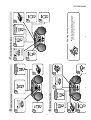
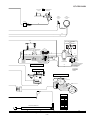
Headphones
■
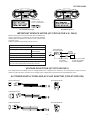
To AC INPUT
Battery power
1
1
■
3
4
2
6
Volume control
● Batteries are not included.
R20, HP-2 or similar)
2
5
To an AC socket
● 6 “D” size batteries (UM/SUM-1,
■
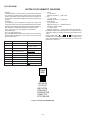
AC
110V - 127V
AC
220V - 240V
1
AC 110-127/220-240 V,
50/60 Hz
AC power (For QT-CD210W)
● For QT-CD210W
● QT-CD210H for
customers in
Thailand and Europe
VOLTAGE SELECTOR
■
● For QT-CD210W
● QT-CD210H for
customers in
Philippines
Tuning the power ON
and to STAND-BY
To an AC socket
(For Thailand/Europe)
AC 230 - 240 V, 50 Hz
(For Australia/New Zealand)
AC 230 - 240 V, 50 Hz
(For U.K.)
AC 230 - 240 V, 50 Hz
To AC INPUT
AC power (For QT-CD210H)
(For Philippines)
AC 220 V, 60 Hz
■
● QT-CD210H for
customers in
Australia and
New Zealand
2 Preparation for use
● For QT-CD210W
● QT-CD210H for
customers in U.K.
AC power lead x 1
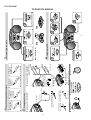
1 Check the supplied accessory
To stop playback
1
FM
2
4 Listening to a CD
Aerial adjustment
1
■
After use
3 Listening to the radio
2
3
Label side up.
AM
5
4
Tune in to the desired station.
2
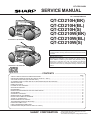
QT-CD210H/W
OPERATION MANUAL