1
User Guide
Scalers
IN1604 DTP
IN1604 HD
Scaling Presentation Switchers
68-2631-01 Rev. A
08 14
Safety Instructions
Safety Instructions • English
WARNING: This symbol,
, when used on the product, is intended to
alert the user of the presence of uninsulated dangerous voltage within the
product’s enclosure that may present a risk of electric shock.
ATTENTION: This symbol,
, when used on the product, is intended
to alert the user of important operating and maintenance (servicing)
instructions in the literature provided with the equipment.
For information on safety guidelines, regulatory compliances, EMI/EMF
compatibility, accessibility, and related topics, see the Extron Safety and
Regulatory Compliance Guide, part number 68-290-01, on the Extron website,
www.extron.com.
Instructions de sécurité • Français
AVERTISSEMENT : Ce pictogramme,
, lorsqu’il est utilisé sur le
produit, signale à l’utilisateur la présence à l’intérieur du boîtier du produit
d’une tension électrique dangereuse susceptible de provoquer un choc
électrique.
ATTENTION :Ce pictogramme,
, lorsqu’il est utilisé sur le produit,
signale à l’utilisateur des instructions d’utilisation ou de maintenance
importantes qui se trouvent dans la documentation fournie avec le
matériel.
Pour en savoir plus sur les règles de sécurité, la conformité à la réglementation,
la compatibilité EMI/EMF, l’accessibilité, et autres sujets connexes, lisez les
informations de sécurité et de conformité Extron, réf. 68-290-01, sur le site
Extron, www.extron.com.
Sicherheitsanweisungen • Deutsch
WARNUNG: Dieses Symbol
auf dem Produkt soll den Benutzer
darauf aufmerksam machen, dass im Inneren des Gehäuses dieses
Produktes gefährliche Spannungen herrschen, die nicht isoliert sind
und die einen elektrischen Schlag verursachen können.
VORSICHT: Dieses Symbol
auf dem Produkt soll dem Benutzer in der
im Lieferumfang enthaltenen Dokumentation besonders wichtige Hinweise
zur Bedienung und Wartung (Instandhaltung) geben.
Weitere Informationen über die Sicherheitsrichtlinien, Produkthandhabung,
EMI/EMF-Kompatibilität, Zugänglichkeit und verwandte Themen finden Sie in
den Extron-Richtlinien für Sicherheit und Handhabung (Artikelnummer
68-290-01) auf der Extron-Website, www.extron.com.
Instrucciones de seguridad • Español
ADVERTENCIA: Este símbolo,
, cuando se utiliza en el producto,
avisa al usuario de la presencia de voltaje peligroso sin aislar dentro del
producto, lo que puede representar un riesgo de descarga eléctrica.
ATENCIÓN: Este símbolo,
, cuando se utiliza en el producto, avisa
al usuario de la presencia de importantes instrucciones de uso y
mantenimiento recogidas en la documentación proporcionada con el
equipo.
Para obtener información sobre directrices de seguridad, cumplimiento
de normativas, compatibilidad electromagnética, accesibilidad y temas
relacionados, consulte la Guía de cumplimiento de normativas y seguridad de
Extron, referencia 68-290-01, en el sitio Web de Extron,www.extron.com.
Инструкция по технике безопасности • Русский
ПРЕДУПРЕЖДЕНИЕ: Данный символ,
, если указан
на продукте, предупреждает пользователя о наличии
неизолированного опасного напряжения внутри корпуса
продукта, которое может привести к поражению электрическим
током.
ВНИМАНИЕ: Данный символ,
, если указан на продукте,
предупреждает пользователя о наличии важных инструкций
по эксплуатации и обслуживанию в руководстве,
прилагаемом к данному оборудованию.
Для получения информации о правилах техники безопасности,
соблюдении нормативных требований, электромагнитной
совместимости (ЭМП/ЭДС), возможности доступа и других
вопросах см. руководство по безопасности и соблюдению
нормативных требований Extron на сайте Extron: www.extron.com,
номер по каталогу - 68-290-01.
Chinese Simplified(简体中文)
警告:
产品上的这个标志意在警告用户该产品机壳内有暴露的危险 电压,
有触电危险。
注 意:
产 品 上 的 这个 标 志 意 在 提 示用 户 设 备 随 附 的 用 户 手 册 中 有
重要的操作和维护(维修)说明。
关于我们产品的安全指南、遵循的规范、EMI/EMF 的兼容性、无障碍
使用的特性等相关内容,敬请访问 Extron 网站 www.extron.com,参见
Extron 安全规范指南,产品编号 68-290-01。
Chinese Traditional(
)
警告:
若產品上使用此符號,是為了提醒使用者,產品機殼內存在著
可能會導致觸電之風險的未絕緣危險電壓。
注意
若產品上使用此符號,是為了提醒使用者,設備隨附的用戶手冊中有重
要的操作和維護(維修)説明。
有關安全性指導方針、法規遵守、EMI/EMF 相容性、存取範圍和相關主題的詳細資
訊,請瀏覽 Extron 網站:www.extron.com,然後參閱《Extron 安全性與法規
遵守手冊》,準則編號 68-290-01。
Japanese
警告: この記号
が製品上に表示されている場合は、筐体内に絶縁されて
いない高電圧が流れ、感電の危険があることを示しています。
注意: この記号
が製品上に表示されている場合は、本機の取扱説明書
に 記載されている重要な操作と保守(整備)の指示についてユーザーの 注
意を喚起するものです。
安全上のご注意、法規厳守、EMI/EMF適合性、その他の関連項目に
ついては、エクストロンのウェブサイト www.extron.com より『Extron Safety
and Regulatory Compliance Guide』(P/N 68-290-01) をご覧ください。
Korean
경고: 이 기호
가 제품에 사용될 경우, 제품의 인클로저 내에 있는
접지되지 않은 위험한 전류로 인해 사용자가 감전될 위험이 있음을
경고합니다.
주의: 이 기호
가 제품에 사용될 경우, 장비와 함께 제공된 책자에 나와
있는 주요 운영 및 유지보수(정비) 지침을 경고합니다.
안전 가이드라인, 규제 준수, EMI/EMF 호환성, 접근성, 그리고 관련 항목에
대한 자세한 내용은 Extron 웹 사이트(www.extron.com)의 Extron 안전 및
규제 준수 안내서, 68-290-01 조항을 참조하십시오.
FCC Class A Notice
This equipment has been tested and found to comply with the limits for a Class A digital
device, pursuant to part 15 of the FCC rules. The Class A limits provide reasonable
protection against harmful interference when the equipment is operated in a commercial
environment. This equipment generates, uses, and can radiate radio frequency energy and,
if not installed and used in accordance with the instruction manual, may cause harmful
interference to radio communications. Operation of this equipment in a residential area is
likely to cause interference. This interference must be corrected at the expense of the user.
ATTENTION: The Twisted Pair Extension technology works with shielded twisted pair
(STP) cables only. To ensure FCC Class A and CE compliance, STP cables and STP
connectors are also required.
For more information on safety guidelines, regulatory compliances, EMI/EMF
compatibility, accessibility, and related topics, see the “Extron Safety and Regulatory
Compliance Guide” on the Extron website.
Copyright
© 2014 Extron Electronics. All rights reserved.
Trademarks
All trademarks mentioned in this guide are the properties of their respective owners.
The following registered trademarks(®), registered service marks(SM), and trademarks(TM) are the property of
RGB Systems, Inc. or Extron Electronics:
Registered Trademarks (®)
AVTrac, Cable Cubby, CrossPoint, eBUS, EDID Manager, EDID Minder, Extron, Flat Field, GlobalViewer, Hideaway, Inline, IP Intercom,
IP Link, Key Minder, LockIt, MediaLink, PlenumVault, PoleVault, PowerCage, PURE3, Quantum, SoundField, SpeedMount, SpeedSwitch,
System INTEGRATOR, TeamWork, TouchLink, V‑Lock, VersaTools, VN‑Matrix, VoiceLift, WallVault, WindoWall, XTP, and XTP Systems
Registered Service Mark (SM) : S3 Service Support Solutions
Trademarks (™)
AAP, AFL (Accu‑Rate Frame Lock), ADSP (Advanced Digital Sync Processing), Auto‑Image, CableCover, CDRS (Class D Ripple Suppression),
DDSP (Digital Display Sync Processing), DMI (Dynamic Motion Interpolation), Driver Configurator, DSP Configurator, DSVP (Digital Sync
Validation Processing), EQIB, FastBite, FOXBOX, Global Configurator, IP Intercom HelpDesk, LinkLicense, MAAP, MicroDigital, ProDSP,
QS-FPC (QuickSwitch Front Panel Controller), Scope‑Trigger, SIS, Simple Instruction Set, Skew‑Free, SpeedNav, Triple‑Action Switching, XTRA,
ZipCaddy, ZipClip
Conventions Used in this Guide
Notifications
The following notifications are used in this guide:
WARNING: Potential risk of severe injury or death.
AVERTISSEMENT : Risque potentiel de blessure grave ou de mort.
ATTENTION:
• Risk of property damage.
• Risque de dommages matériels.
NOTE: A note draws attention to important information.
TIP: A tip provides a suggestion to make working with the application easier.
Software Commands
Commands are written in the fonts shown here:
^AR Merge Scene,,Op1 scene 1,1 ^B 51 ^W^C
[01] R 0004 00300 00400 00800 00600 [02] 35 [17] [03]
E X! *X1&* X2)* X2#* X2! CE}
NOTE: For commands and examples of computer or device responses mentioned
in this guide, the character “0” is used for the number zero and “O” represents the
capital letter “o.”
Computer responses and directory paths that do not have variables are written in the font
shown here:
Reply from 208.132.180.48: bytes=32 times=2ms TTL=32
C:\Program Files\Extron
Variables are written in slanted form as shown here:
ping xxx.xxx.xxx.xxx —t
SOH R Data STX Command ETB ETX
Selectable items, such as menu names, menu options, buttons, tabs, and field names are
written in the font shown here:
From the File menu, select New.
Click the OK button.
Specifications Availability
Product specifications are available on the Extron website, www.extron.com.
Contents
Introduction.................................................... 1
SIS Configuration and Control................... 27
About This Guide................................................. 1
About the IN1604 DTP and IN1604 HD
Scalers............................................................... 1
Key Features....................................................... 2
Video............................................................... 2
Audio............................................................... 3
General............................................................ 3
Controlling the Scaler.......................................... 5
Host and Scaler Communication....................... 27
Scaler-Initiated Messages.............................. 27
Error Responses............................................ 28
SIS Overview..................................................... 28
Using the Command and Response
Tables........................................................... 28
Symbol Definitions......................................... 28
Command and Response Tables....................... 33
Input Configuration Commands..................... 33
Picture Adjustment Commands..................... 36
Preset Commands......................................... 38
Output Configuration Commands.................. 39
Audio Configuration Commands.................... 41
Advanced Configuration Commands............. 42
On-Screen Menu Configuration
Commands.................................................. 45
Device Commands........................................ 45
Installation...................................................... 6
Rear Panel Connections...................................... 6
Connection Details.............................................. 9
Analog Video Wiring........................................ 9
HDMI Connections........................................ 10
Twisted Pair Recommendations for DTP
Communication............................................ 11
Operation...................................................... 12
Front Panel Overview......................................... 12
Powering Up..................................................... 13
Input Selection.................................................. 13
Output Resolution Change................................ 13
Auto-Image from the Front Panel....................... 13
On-Screen Display (OSD) Menu System............ 13
Menu Navigation Using Front Panel
Controls........................................................ 13
Menu Overview.............................................. 14
Quick Setup Submenu.................................. 15
User Presets Submenu.................................. 16
Picture Controls Submenu............................. 17
Input Submenu.............................................. 18
Output Submenu........................................... 20
Audio Submenu............................................. 22
Advanced Submenu...................................... 23
Communication Submenu............................. 25
Device Info Submenu..................................... 26
Front Panel Lockout (Executive Modes)............. 26
Configuration Software............................... 47
Installing the Software........................................ 47
Starting the Software......................................... 48
Device Discovery Panel.................................. 49
Offline Device Preview.................................... 50
Using the Software............................................ 51
Device Menu................................................. 51
Software Menu.............................................. 55
AV Controls Panel.......................................... 57
Configuration Pages.......................................... 58
Input and Output Configuration Page............. 58
EDID Minder Page......................................... 61
Image Settings Page..................................... 63
Size and Position Page.................................. 67
Audio Configuration Page.............................. 68
Preset Management Page............................. 70
General Settings Page................................... 71
IN1604 DTP and IN1604 HD Scalers • Contents
v
Reference Information................................ 75
Mounting........................................................... 75
Tabletop Mounting......................................... 75
Rack Mounting.............................................. 75
Furniture Mounting........................................ 76
Downloading Updated Firmware........................ 77
IN1604 DTP and IN1604 HD Scalers • Contents
vi
Introduction
This section provides general information about this guide and the IN1604 DTP Scaler with
DTP Extension and the IN1604 HD Scaler with HDMI output. Topics in this section include:
•
About This Guide
•
About the IN1604 DTP and IN1604 HD Scalers
•
Key Features
•
Controlling the Scaler
About This Guide
This guide contains information about installing, operating, and configuring the
IN1604 DTP Scaler with DTP Extension and the IN1604 HD Scaler with HDMI output. In this
guide, the term “IN1604 DTP” refers to the IN1604 DTP Scaler with DTP Extension,
“IN1604 HD” refers to the IN1604 HD Scaler with HDMI output, and “scalers” refer to both
models.
About the IN1604 DTP and IN1604 HD Scalers
The scalers are HDCP-compliant video scalers with three HDMI inputs and a universal
analog video input in a compact 1U, half rack enclosure. The IN1604 DTP includes a DTP
output while the IN1604 HD includes an HDMI output. The scalers are ideal for installation
beneath conference tables and in lecterns to provide localized switching support for sources
such as presenter devices. The IN1604 DTP also supports signal extension up to 330 feet
(100 meters) over shielded twisted pair cable to reach a wall or ceiling-mounted display. The
scalers provide the convenience of fast and reliable automatic switching, along with a high
performance scaling engine for HDMI and analog video sources. They also include a host of
audio processing features and many versatile options for control and configuration.
IN1604 DTP and IN1604 HD Scalers • Introduction
1
The following diagram shows the IN1604 DTP mounted under a table with four inputs and
one output.
Flat Panel Display
MODEL 80
Extron
TLP Pro 720T
FLAT PANEL
HDMI
Laptop
7" Table Top
TouchLink Pro
Touchpanel
PC
DVD
Display
1
2
Tuner
123
Volume
Channel
3
4
5
7
8
9
0
Enter
Screen
Presets
6
Mute
Lighting
Last
More
Presets
System
Off
December 15, 2013 - 7:58 AM
Help
Audio
Control
Extron
RS-232
Ethernet
Shielded Twisted Pair Cable
up to 330' (100 m)
OUTPUTS
OUTPUTS
TCP/IP
Network
OVER
OVERDTP
DTP
RS-232
RS-232
Doc
Cam
VCR
Tuner
On
Off
Mute
Room
Control
IR
IR
Laptops
AUDIO
AUDIO
Tx
TxRx
Rx GG Tx
TxRx
Rx
Extron
DTP HDMI 330 D Rx
Receiver
Ethernet
HDMI
DisplayPort
HDMI
Audio
VGA
Extron
Cable Cubby 1200
Cable Access
Enclosure
100-240V ~ 0.5 A MAX
Extron
IN1604 DTP
OUTPUT
OUT
1 CONFIGURABLE
50-60 Hz
Four Input Scaler
with DTP Extension
2
HDMI
INPUT
3
HDMI
4
HDMI
1
IN
2
L
R
L
R
AUDIO
1
2
3
4 G
CONTACT IN
SIG
LINK
OVER TP
HDBT RS-232 IR
OUT
DTP
Tx Rx G Tx Rx
1
2
3
COM 1
4 +V
TALLY OUT
REMOTE
Tx Rx G
VOL
RELAYS
V
C G
DIGITAL I/O
COM 2
Tx Rx G RTS CTS
POWER
12V
--A MAX
RS-232
Tx Rx G
1
2
C
1
2
3
4
PWR OUT = 6W
HDMI
HDMI
IPCP PRO 250
G
eBUS
IR/S
+V +S -S G
S
G
LAN
Extron
IPCP Pro 250
IP Link Pro
Control Processor
HDMI
VGA
Audio
RS-232
RS-232 to Display
Figure 1.
Typical IN1604 DTP Application Diagram
Key Features
Video
•
Three HDMI inputs and one configurable analog video input — Allow for
switching between HDMI and analog video sources. One configurable analog input
accepts most standard analog video formats, including RGB, SD and HD component
video, S-video, and composite video signals.
•
HDMI, analog video, and audio source integration into presentation systems
with audio switching — Provides centralized switching for a wide range of AV
sources.
•
Interface format correction — Automatically reformats HDMI source signals for
output to a connected DVI display.
•
Auto-switching between inputs — Enhances presentations by eliminating
distractions during switching with glitch-free cut through black and fade through black
transition effects.
IN1604 DTP and IN1604 HD Scalers • Introduction
2
•
Selectable output rates — Include computer-video output rates from 640x480 to
1920x1200, HDTV rates up to 1080p/60, and 2K.
•
Integrated DTP output (IN1604 DTP only) — Supports digital signal transmission of
HDMI or DVI plus control and analog audio up to 330 feet (100 meters) over a single
shielded twisted pair cable, providing high reliability and maximum performance on an
easily installed cable infrastructure.
•
HDMI output (IN1604 HD only) — Provides one HDMI output.
•
Audio input gain and attenuation — Gain or attenuation can be adjusted for each
analog input to eliminate noticeable differences when switching between sources.
•
Audio input assignment — Enables all four video inputs to share a single analog
audio input. Each video input can be assigned to either of the two available analog
audio inputs.
•
Audio switching transition — Lowers the audio of the switched-out source while
simultaneously bringing up the audio of the activated source. The duration of the audio
crossfade matches the duration of the video switching transition.
•
Automatic integrated audio delay — Compensates for latency introduced by the
video processing.
•
HDMI audio embedding — Embeds analog audio signals onto the DTP or HDMI
output.
•
Output volume control — Provides master volume control for the audio output.
•
Selectable audio muting — Individually or simultaneously mutes the analog and
embedded digital audio outputs.
•
Supported HDMI specification features — Includes data rates up to 6.75 Gbps,
Deep Color, and HD lossless audio formats.
•
HDCP-compliance — Fully supports HDCP-encrypted sources, with selectable
authorization for unencrypted content.
•
HDCP authentication and signal presence confirmation — Provides real-time
verification of HDCP status for each digital video input and output. This allows for quick
signal and HDCP verification through RS-232, USB, or front panel LED indicators,
providing feedback to a system operator or helpdesk support staff.
•
HDCP Visual Confirmation — Sends a full-screen green signal when
HDCP-encrypted content is transmitted to a non-HDCP compliant display, providing
immediate visual confirmation that protected content cannot be viewed on the display.
•
Bidirectional RS-232 and IR insertion for AV device control (IN1604 DTP only)
— Transmits RS-232 control and IR signals alongside the video signal over DTP
connection, allowing the remote device to be controlled without the need for additional
cabling. Bidirectional control extension eliminates the need for control system wiring to
remote devices.
•
Support for integrated DTP output (IN1604 DTP only) — Supports transmission
of HDMI, control, and analog audio up to 330 feet (100 meters) over a shielded twisted
pair cable, providing high reliability and maximum performance on an easily installed
cable infrastructure.
Audio
General
IN1604 DTP and IN1604 HD Scalers • Introduction
3
•
Remote powering of a DTP receiver (IN1604 DTP only) — Provides power to
a remote DTP receiver over the twisted pair connection, eliminating the need for a
separate power supply at the remote unit.
•
DTP 230 and DTP 330 compatibility (IN1604 DTP only) — Enables mixing and
matching with desktop and wallplate receivers, as well as other DTP-enabled products
to meet application requirements.
•
HDBaseT compatibility (IN1604 DTP only) — Allows the TP output to be configured
to send video and embedded audio, plus bidirectional RS-232 and IR signals to an
HDBaseT-enabled display.
NOTE: When configured for HDBaseT mode, “Over DTP” analog audio and remote
power capabilities are disabled.
•
Key Minder — Authenticates and maintains continuous HDCP encryption between
input and output devices to ensure quick and reliable switching in professional AV
environments, while enabling simultaneous distribution of a single source signal to one
or more displays.
•
Advanced scaling engine — Scales inputs to a common high resolution output with
30-bit processing and 1080i deinterlacing.
•
EDID Minder — Ensures that all sources power up properly and reliably output content
for display.
•
SpeedSwitch Technology — Provides high-speed switching for HDCP-encrypted
content.
•
Aspect ratio control — Controls the aspect ratio by selecting a Fill mode, which
provides a full screen output, or a Follow mode, which preserves the original aspect
ratio of the input signal.
•
Image freeze control — Freezes a live image.
•
Automatic input cable equalization — Actively conditions incoming HDMI signals
to compensate for signal loss when using long cables, low quality cables, or source
devices with poor signal output.
•
Auto-Image — Automatically optimizes the image by analyzing and adjusting to the
video input signal.
•
Auto Input Memory — Automatically stores size, position, and picture settings based
on the incoming signal. When the same signal is detected again, these image settings
are automatically recalled from memory.
•
On-screen menus — Allows for easy system setup using the front panel controls.
Key parameters such as input and output video formats and resolutions are grouped
on the initial Quick Setup screen, while additional screens provide full control over other
functions and settings.
•
Output Standby Mode — Mutes video and sync output to the display device when
no active input signal is detected. This allows the projector or flat-panel display to
automatically enter into standby mode to save energy and enhance lamp or panel life.
•
Power Save Mode — Places the scaler in a low power standby state to conserve
energy when not in use.
•
Picture controls — Includes controls for brightness, contrast, color, tint, detail,
horizontal and vertical positioning, and sizing.
•
Automatic 3:2 and 2:2 pulldown detection — Helps maximize image detail and
sharpness for NTSC, PAL, and HDTV 1080i sources that originated from film.
IN1604 DTP and IN1604 HD Scalers • Introduction
4
•
Quad standard, 3D composite video decoding — Provides advanced decoding
of composite NTSC 3.58, NTSC 4.43, PAL, and SECAM for integration into systems
worldwide using a temporal 3D adaptive comb filter.
•
User presets — Store optimized image settings to be recalled later.
•
Internal test patterns — Include a crop pattern, grayscale, color bars, alternating
pixels, blue mode, and audio pink noise for calibration and setup.
•
Front panel security lockout (executive modes) — Locks out all or some front
panel functions. Full controls remain available through the Extron Product Configuration
Software, USB, or RS-232 control.
•
Contact closure remote control with tally output — Allows for remote selection of
an input channel, while a tally output provides +5 VDC to light an LED to indicate the
currently selected input.
•
RS-232 control port — Enables the use of serial commands for complete control
and configuration via an integrated control system. Extron products use the Simple
Instruction Set (SIS) command protocol, a set of basic ASCII commands that allow for
quick and easy programming.
•
Front panel USB configuration port — Enables easy configuration without having to
access the rear panel.
•
Compact 1U, half rack width metal enclosure — Allows for inconspicuous
under-table placement using the optional mounting kits.
•
Includes LockIt HDMI cable lacing brackets
•
Internal universal power supply — The 100-240 VAC, 50-60 Hz international power
supply provides worldwide power compatibility.
Controlling the Scaler
The scaler can be controlled using one or more of the following methods:
•
The front panel controls and the On-screen Display (OSD) menu.
•
A computer, a touch screen panel, or any other device that can send and receive serial
communications through the USB or RS-232 port. Use the Extron DataViewer utility on
the connected device to enter SIS commands.
•
The Extron Product Configuration Software (PCS) on a computer with a Windows®
operating system.
IN1604 DTP and IN1604 HD Scalers • Introduction
5
Installation
This section contains information on how to connect cables to the scalers. Topics in this
section include:
•
Rear Panel Connections
•
Connection Details
Rear Panel Connections
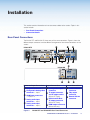
The IN1604 DTP and IN1604 HD have many of the same connectors. Figure 2 shows the
different output connectors and the different arrangement of the remote connectors on the
scalers.
J
F
IN1604 DTP
100-240V ~ 0.5 A MAX
OUTPUT
OUT
1 CONFIGURABLE
2
HDMI
3
HDMI
4
1
HDMI
IN
2
INPUT
50-60 Hz
A
B
1
L
R
L
R
D
3
LINK
CONFIGURABLE
2
HDMI
3
OUT
DTP
G
E
4
HDMI
INPUT
50-60 Hz
1
2
L
R
L
R
AUDIO
HDMI
RS-232
REMOTE
L
H
K
2
3
4 +V
TALLY OUT
1
2
OUTPUT
Power and Input Connections Output Connections
4 +V
TALLY OUT
CONTACT IN
I
3
Tx Rx G
Tx Rx G Tx Rx
1
HDMI
IN
2
OVER TP
OUT
1
1
HDBT RS-232 IR
IN1604 HD
100-240V ~ 0.5 A MAX
4 G
CONTACT IN
SIG
AUDIO
C
2
K
3
4 G
RS-232
Tx Rx G
REMOTE
J
L
Control Connections
A
B
AC power connector
F
J
Configurable Analog video
connector — input 1
Analog audio output
connector
Contact closure
connector
G
K
C
HDMI input connectors
— inputs 2-4
TP output connector
and TP output switch
(IN1604 DTP only)
Tally output
connector
H
RS-232 and IR Over
TP output connector
(IN1604 DTP only)
L
Remote RS-232
connector
I
HDMI output connector
(IN1604 HD only)
D
Analog audio input
connector — input 1
E
Analog audio input
connector — input 2
Figure 2.
IN1604 DTP and IN1604 HD Rear Panel Connectors
IN1604 DTP and IN1604 HD Scalers • Installation
6
Sleeve ( )
A
RCA Connector
Power connector — Connect the standard IEC power cord from a 100 to 240 VAC,
50-60 Hz power source into this connector. The front panel control and input selection
buttons light in sequence during power-up.
Tip (+)
video
connector — Connect a video source to the 15-pin HD connector. It
B AnalogRing
(-)
accepts RGB, YUV, S-video, and composite video (see Analog Video Wiring on
page 9).
C HDMI input connectors — Connect video sources to the HDMI connectors.
Sleeve ( )
TIP:
Use Extron
LockIt Lacing Brackets to secure HDMI cables to the device
3.5
mm Stereo
Plug HDMI
Connector
(see HDMI
Connections on page 10).
(balanced)
D
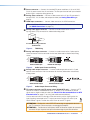
Analog audio input connector — Connect an audio source to the 3.5 mm
tip-ring-sleeve (TRS) connector for unbalanced analog audio.
Tip (L)
Ring (R)
Sleeve ( )
3.5 mm Stereo Plug Connector
(unbalanced)
Figure 3.
TRS Wiring
E Analog audio input connector — Connect an audio source to the 5-pole captive
screw connector. Wire the connector for line level, balanced or unbalanced, analog
stereo.
R
R
F
Tip
Sleeve
Tip
Sleeve
Do not tin the wires!
Unbalanced Audio Input
Balanced Audio Input
Figure 4.
L
L
Tip
Ring
Sleeves
Tip
Ring
Audio Input Connector Wiring
Analog audio output connector — Connect audio output devices to this 5-pole
captive screw connector. Wire the connector for line level, balanced or unbalanced,
analog stereo.
No Ground Here
L
L
R
Tip
Sleeves
Tip
R
Tip
Ring
Sleeves
Tip
Ring
Do not tin the wires!
No Ground Here
Balanced Audio Output
Figure 5.
G
Unbalanced Audio Output
Audio Output Connector Wiring
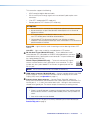
TP output connector and TP output switch (IN1604 DTP only) — Connect a DTP
receiver or HDBaseT-enabled device to the TP output RJ-45 connector to send all
signals over a single twisted pair cable (see Twisted Pair Recommendations for DTP
Communication on page 11 for wiring and cable recommendations).
Use the recessed switch to the right of the connector to set the signal type to the
type of receiver connected to the TP output connector. Position the switch Up to
send HDBaseT signals. Position the switch Down to send DTP signals.
HDBT
DTP
ATTENTION: Position this switch BEFORE connecting the appropriate device to
the TP connector. Failure to comply can damage the endpoint.
ATTENTION : Positionnez ce interrupteur AVANT d’alimenter le point de connexion
connecté. Ne pas respecter cela pourrait endommager le point de connexion.
IN1604 DTP and IN1604 HD Scalers • Installation
7
This connection supports the following:
•
HDCP-compliant digital video and audio
•
RS-232 and IR pass-through signals on the associated 5-pole captive screw
connectors
•
“Over DTP” analog audio (DTP mode only)
•
Remote power to a DTP receiver (DTP mode only)
ATTENTION:
• Do not connect this connector to a computer or telecommunications network.
• Ne connectez pas ce port à des données informatiques ou à un réseau de
télécommunications.
• DTP remote power is intended for indoor use only. No part of the network that
uses DTP remote power should be routed outdoors.
• L’alimentation DTP à distance est destiné à une utilisation en intérieur
seulement. Aucune partie du réseau qui utilise l’alimentation DTP à distance ne
peut être routée en extérieur.
Signal LED — Lights when the scaler is receiving an active video signal from a DTP
receiver.
Link LED — Lights when a valid link is established to a DTP receiver.
H
RS-232 Over TP port (IN1604 DTP only) — To pass bidirectional serial
control between DTP-compatible or HDBaseT-compatible devices, connect a
control device to the 5-pole captive screw connector. This port includes only
the 3 poles labeled “RS-232.”
IR Over TP port (IN1604 DTP only) — To transmit and receive IR signals,
connect a control device to the 5-pole captive screw connector. This port
includes only the 2 poles labeled “IR” and shares the ground pole with the
RS-232 port.
RS-232
IR
Tx Rx G Tx Rx
RS-232
IR
Tx Rx G Tx Rx
NOTE: RS-232 and IR data can be transmitted simultaneously.
I
HDMI output connector (IN1604 HD only) — Connect a display device to the HDMI
output connector. Use this connector for a local monitor to display the On-screen
Display (OSD) menu (see Operation on page 12).
J
Contact closure input connector — Connect Extron “Show Me” cables or a
locally-constructed contact closure device to the 5-pole captive screw connector. The
four left ports (1, 2, 3, and 4) are used to select inputs 1 through 4 when momentarily
shorted to the ground port. The closure accepts a momentary or latching contact.
NOTES:
• If there is a conflict between a request to change inputs from another method
and the contact closure is currently held closed by a latch, the input does not
switch.
• Auto switch mode must be disabled.
In conjunction with the Tally port, the currently selected input can be indicated (see
Remote Tally port on page 9).
IN1604 DTP and IN1604 HD Scalers • Installation
8
K
Remote Tally port — If desired, to remotely identify the currently selected input, plug a
locally-constructed device into the 5-pole captive screw connector. Connect the power
wire for the device into the +V pin and connect the ground wire for the each indicator
into the corresponding tally out pin, 1, 2, 3, or 4.
When an input is selected, by either contact closure of front panel selection, the
corresponding tally out pin shorts to ground, closing the circuit and lighting the
connected indicator (LED).
1
This connector can also be used with Extron “Show Me”
cables and the Contact Closure input connector. For each
“Show Me” cable, connect the red pigtail to the associated
pin of the Contact Closure input connector and the black
pigtail to the associated pin on the Tally Out connector (see
the diagram to the right). For more information and installation
details for the Extron “Show Me” cable, see the “Show Me”
Cable Series Setup Guide at www.extron.com.
L
2
3
4 +V
TALLY OUT
CONTACT IN
1
2
3
RS-232
4 G
Tx Rx G
REMOTE
Red
Black
“Show Me” Cable
Pigtail
Remote RS-232 connector — Connect a host device to the three rightmost poles of
the 5-pole captive screw connector for RS-232 serial control. The scaler uses a protocol
of 9600 baud, 1 stop bit, no parity, and no flow control.
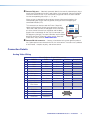
Connection Details
Analog Video Wiring
Pinout Table for 15-pin HD Connectors
Pin
RGBHV
RGBs
Component
S-video
Composite
1
Red
Red
R-Y
2
Green
Green
3
Blue
Blue
Y
Luma
Video
B-Y
Chroma
5
H Sync Return
C Sync Return
6
Red Return
Red Return
7
Green Return
Green Return
Y Return
L Return
8
Blue Return
Blue Return
B-Y Return
C Return
V Sync Return/
DDC Return
DDC Return
12
EDID/DDC
EDID/DDC
13
H Sync
C Sync
14
V Sync
15
EDID/DDC
4
R-Y Return
Video Return
9
10
11
EDID/DDC
5
1
15
11
IN1604 DTP and IN1604 HD Scalers • Installation
9
HDMI Connections
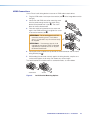
Use an Extron LockIt lacing bracket to secure an HDMI cable to each device.
1. Plug the HDMI cables into the panel connection (see 1 of the image below and to
the right).
2. Loosen the side HDMI connection mounting screw
from the panel enough to allow the LockIt lacing
bracket to be placed over it (see 2). The screw
does not have to be removed.
3. Place the LockIt lacing bracket on the screw and
against the HDMI connector, then tighten the screw
to secure the bracket (see 3).
1
2
3
ATTENTION: Do not overtighten the HDMI
connector mounting screw. The shield to
which it is fastened is very thin and can easily
be stripped.
ATTENTION : Ne serrez pas trop la vis de
montage du connecteur HDMI. Le blindage
auquel elle est attachée est très fin et peut
facilement être dénudé.
4
4. Loosely place the included tie wrap around the HDMI connector and the LockIt
lacing bracket (see 4).
5. While holding the connector securely against the lacing bracket, use pliers or a
similar tool to tighten the tie wrap, then remove any excess length.
The LockIt bracket can also be used in a stacked formation, as shown below.
Side Mounted
Figure 6.
Stacked
LockIt Bracket Mounting Options
IN1604 DTP and IN1604 HD Scalers • Installation
10
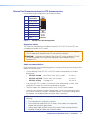
Twisted Pair Recommendations for DTP Communication
Use the following pin configurations for twisted pair cables.
Pin
1
T568B
Wire Color
Pins:
12345678
Pin
T568A
Wire color
T568B
Wire color
White-orange
1 White-green
White-orange
2
Orange
2 Green
Orange
3
White-green
3 White-orange
White-green
4 Blue
Blue
4
Blue
5 White-blue
White-blue
5
White-blue
6 Orange
Green
6
Green
7
White-brown
8
Brown
Figure 7.
Insert Twisted
Pair Wires
7 White-brown
White-brown
8 Brown
Brown
RJ-45
Connector
Twisted Pair Cable Configuration
Supported cables
The scalers are compatible with shielded twisted pair (F/UTP, SF/UTP, and S/FTP) and
unshielded twisted pair (U/UTP) cable.
ATTENTION: Do not use Extron UTP23SF-4 Enhanced Skew-Free AV UTP cable or
STP201 cable to link the device with DTP transmitters or receivers.
ATTENTION : N’utilisez pas le câble AV Skew-Free UTP version améliorée UTP23SF
d’Extron ou le câble STP201 pour relier le appareil avec les émetteurs ou les
récepteurs DTP.
Cable recommendations
Extron recommends using the following practices to achieve full transmission distances and
reduce transmission errors.
•
Use the following Extron XTP DTP 24 SF/UTP cables and connectors for the best
performance:
•
XTP DTP 24/1000
•
XTP DTP 24P/1000 Plenum 1000’ (305 m) spool
22-235-03
•
XTP DTP 24 Plug
101-005-02
Non-Plenum 1000’ (305 m) spool
Package of 10
22-236-03
•
If not using XTP DTP 24 cable, at a minimum, Extron recommends 24 AWG, solid
conductor, STP cable with a minimum bandwidth of 400 MHz.
•
Terminate cables with shielded connectors to the TIA/EIA-T568B standard.
•
Limit the use of more than two pass-through points, which may include patch points,
punch down connectors, couplers, and power injectors. If these pass-through points
are required, use shielded couplers and punch down connectors.
NOTE: When using shielded twisted pair cable in bundles or conduits, consider the
following:
• Do not exceed 40% fill capacity in conduits.
• Do not comb the cable for the first 20 meters, where cables are straightened,
aligned, and secured in tight bundles.
• Loosely place cables and limit the use of tie wraps or hook-and-loop fasteners.
• Separate twisted pair cables from AC power cables.
IN1604 DTP and IN1604 HD Scalers • Installation
11
Operation
This section contains information on the front panel operation, On-screen Display Menu
System, and reset modes of the scalers. Topics in this section include:
•
Front Panel Overview
•
Powering Up
•
Input Selection
•
Output Resolution Change
•
Auto-Image from the Front Panel
•
On-Screen Display (OSD) Menu System
•
Front Panel Lockout (Executive Modes)
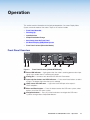
Front Panel Overview
Extron
1
2
3
4
HDCP
IN1604 DTP
MENU
INPUT 2
CONFIG
OUTPUT
A B
Figure 8.
A
C
AUTOIMAGE
INPUT 3
INPUT 4
D
ENTER
E
HOLD
FOR XGA/720p
F
Front Panel Features (IN1604 DTP Shown)
Power LED indicator — Lights green when the scaler is receiving power and an input
signal. Lights amber when it is receiving only power.
B Config port — Connect a host device to the USB mini-B connector.
C Input selection buttons and LED indicators — Press one of these buttons to select
an input. The buttons light when the input is selected.
D HDCP status LED indicators — Light when the HDMI input or the output is
HDCP-compliant.
E Menu and Enter buttons — Press this button to enter the OSD menu system, select
options, or exit the OSD menu system.
F Navigation buttons — Press any of the four buttons to navigate the OSD menu
system or change values of adjustable features.
IN1604 DTP and IN1604 HD Scalers • Operation
12
Powering Up
When power is applied to the scaler, the Input selection buttons light green before
illuminating just the selected input.
Input Selection
Press any of the Input selection buttons on the front panel to select an input.
Output Resolution Change
When the On-screen Display (OSD) menu system is not active, press and hold (for about
5 seconds) the Down (<) button to toggle between 1024x768 @ 60 Hz and 720p @ 60 Hz
output rates.
Auto-Image from the Front Panel
>
When the OSD menu system is not active, press the Right ( ) button to activate a
one-time Auto-Image. When asked to confirm the Auto-Image, press the Right ( ) button
again to confirm or wait until the message disappears to cancel the Auto-Image. This
feature is not available when the scaler is in executive mode 1, but is available when the
scaler is in executive mode 2.
>
On-Screen Display (OSD) Menu System
The OSD menu is used primarily when the scaler is initially set up. Configuration and
adjustments can also be performed with Extron SIS commands or the Extron Product
Configuration Software. The OSD menu presents configuration options on a local monitor
and can be adjusted with front panel controls.
Menu Navigation Using Front Panel Controls
Menu button — Press the Menu button to activate or exit the OSD menu, deselect a
submenu, or cancel a pending change.
Enter button — Press the Enter button to activate the OSD menu, select submenus or
submenu items, or accept pending changes.
>
>
Navigation buttons — Press the Up (>) button or the Down (<) button to navigate
submenus or submenu items. Press the Right ( ) button to access currently selected
submenus or submenu items. Press the Left ( ) button to exit currently selected submenus
or submenu items. Also use the navigation buttons to adjust settings according to specific
setting directions.
NOTE: The Down button can be used when the OSD is inactive to quickly change the
output resolution between several rates.
Input selection buttons — Press any of the Input selection buttons to change the
selected input.
IN1604 DTP and IN1604 HD Scalers • Operation
13
Menu Overview
In the OSD menu, the firmware version is displayed in the top border. The active input
settings and output resolution are displayed in the bottom border. The OSD menu contains
nine submenus with various submenu items of adjustable settings or device information.
Use the Menu, Enter, and Navigation buttons to navigate the OSD menu.
To open the OSD menu:
1. Connect a display device to an HDMI output connector on a DTP receiver connected
to an IN1604 DTP (see figure 2, G on page 6) or the HDMI output connector on an
IN1604 HD (see figure 2, I on page 6).
2. Press the Menu or Enter button to open the OSD menu.
To navigate the OSD menu:
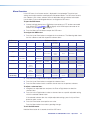
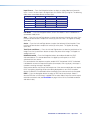
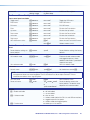
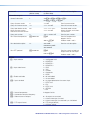
1. Press the Up or Down button to navigate the nine submenus. The following table shows
the nine submenus and their respective submenu items.
Submenus
Submenu Items
Quick Setup
Auto-Image
Input Format
EDID
User Presets
Recall
Save
Clear
Picture Controls
Image
Position
Image Size
Input
Auto-Image
Output
Audio
Output
Resolution
Aspect Ratio
Audio Mute
Test Pattern
Brightness/
Contrast
Color/Tint
Detail
Input Format
Film Mode
Horizontal/
Vertical Start
Horizontal/
Vertical
Active
Total Pixels/
Phase
HDCP
Authorization
EDID
Output
Resolution
HDMI Format
HDCP
Notification
Audio
Audio Mute
Audio Format
Analog Gain/
Attenuation
Output
Format
Output
Volume
Advanced
Test Pattern
Screen
Saver/
Timeout
Auto-Image
Aspect Ratio
Auto Memory
Overscan
Auto Switch
Factory
Reset
Communication
Remote Port
Contact
Mute/
Tally LED
Device Info
(Read Only)
Temperature
Input
Information
Output
Information
HDCP Status
Display
Information
Firmware
Version
2. Press the Enter or Right button to open submenu items.
3. Press the Up or Down button to navigate the submenu items.
4. Press the Menu button to exit a submenu item or return to the previous submenu.
To adjust a submenu item:
1. Navigate to an adjustable item and press the Enter or Right button to select the
submenu item.
2. Press the Left or Right button to select a submenu item or a specific adjustable setting
within the selected submenu item.
If the selected submenu item has multiple adjustable settings, press the Up or Down
button to select a value.
3. Press the Enter button to accept the new value.
Press the Menu button to cancel any pending changes.
To exit the OSD menu:
Hold the Menu button for 3 seconds to exit the OSD menu.
IN1604 DTP and IN1604 HD Scalers • Operation
14
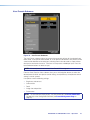
Quick Setup Submenu
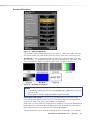
Figure 9.
Quick Setup Submenu
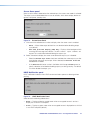
The Quick Setup submenu allows quick access to common input, output, and
communication settings. This submenu contains the following submenu items:
Auto-Image — Press the Enter button to execute an Auto-Image on the current input (see
Auto-Image on page 18).
Input Format — Press the Navigation buttons to select the desired video input format (see
Input Format on page 19). The current input is displayed in the title of the submenu.
Input EDID — Press the Navigation buttons to select a discrete EDID or match the output
resolution (see EDID on page 19). The current input is displayed in the title of the submenu.
Input Audio Format — Press the Navigation buttons to select an audio format (see Audio
Format on page 22).
Output Resolution — Press the Navigation buttons to select from a list of output
resolutions and refresh rates (see Resolution on page 20). There are five custom options,
prefaced by C1 through C5. The default setting is 720p @ 60 Hz.
Input Aspect Ratio — Press the Navigation buttons to select the aspect ratio for the
current input (see Aspect Ratio on page 24).
Audio Mute — Press the Navigation buttons to globally mute or unmute the audio.
Test Pattern — Press the Navigation buttons to select an available test pattern to display
or to turn a test pattern off (see Test Pattern on page 23). The available test patterns are
Crop, Alternating Pixels, Crosshatch, Color Bars, Grayscale, Blue Mode, and Audio Test
Pattern (pink noise). The default setting is Off.
IN1604 DTP and IN1604 HD Scalers • Operation
15
User Presets Submenu
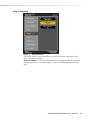
Figure 10. User Presets Submenu
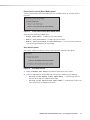
The User Presets submenu allows the current picture control settings for the selected input
to be saved, a user preset to be recalled, or a user preset to be erased. User presets can be
saved and recalled later on another input, allowing them to also be used as aspect ratio or
discrete size and center shortcuts. There are 16 user presets available per input. Press the
Input Selection buttons to select an input.
NOTE: If a saved preset is not named, “User Preset XX” is assigned.
From the Save, Recall, or Clear submenu item, press the Navigation buttons to select the
desired preset to either save picture control settings, recall previously saved picture control
settings, or reset a preset.
User presets save the following settings:
•
Brightness and contrast
•
Color and tint
•
Detail
•
Image size and position
•
Preset name
NOTE: To save and recall input presets, use SIS commands (see Preset Commands
on page 38) or the Configuration Software (see Preset Management Page on
page 70).
IN1604 DTP and IN1604 HD Scalers • Operation
16
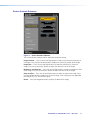
Picture Controls Submenu
Figure 11. Picture Controls Submenu
The Picture Controls submenu allows adjustment of picture settings.
Image Position — Press the Left and Right buttons to adjust the horizontal (H) position of
the image. Press the Up and Down buttons to adjust the vertical (V) position of the image.
Image Size — Press the Left and Right buttons to select the horizontal (H) size of the
image. Press the Up and Down buttons to adjust the vertical (V) size of the image.
Brightness and Contrast — Press the Left and Right buttons to select the brightness level
of the image. Press the Up and Down buttons to adjust the contrast of the image.
Color and Tint — Press the Left and Right buttons to select the color of the image. Press
the Up and Down buttons to adjust the tint of the image. These settings are only applicable
to analog NTSC, PAL, and SECAM signals.
Detail — Press the Navigation buttons to adjust the detail of the image.
IN1604 DTP and IN1604 HD Scalers • Operation
17
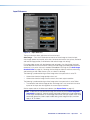
Input Submenu
Figure 12. Input Submenu
The Input submenu allows adjustment of the active input.
Auto-Image — Press the Enter button to execute an Auto-Image on the active input.
Auto-Image updates active pixel, active lines, horizontal and vertical start, phase, horizontal
and vertical image position, and horizontal and vertical image size settings.
For analog video sources with dark backgrounds or borders, the Auto-Image threshold
can be adjusted with SIS commands. Raising the Auto-Image threshold ignores potential
extraneous sync pulses that may have been embedded in RGB signals (see Auto-Image
threshold value on page 33). Lowering the threshold can allow for more accurate sizing
and centering on dark video sources (such as a dark PC desktop).
The following is performed during an Auto-Image when the aspect ratio is set to Fill:
•
Horizontal and vertical image position return to 0.
•
Horizontal and vertical image size fill to match the current output resolution.
The following is performed during an Auto-Image when the aspect ratio is set to Follow:
•
The horizontal and vertical image position and image size is set to maintain the native
aspect of the input rate with regard to the current output resolution.
Set the aspect ratio on the Advanced submenu (see Aspect Ratio on page 24).
NOTE: Aside from the standard Auto-Image SIS command (see the Auto-Image SIS
commands on page 33), there are unique commands to execute an Auto-Image and
fill the output and to execute an Auto-Image and maintain the input aspect ratio. These
commands ignore the current aspect mode setting, auto-image the input, and then
apply a “fill” or “follow.”
IN1604 DTP and IN1604 HD Scalers • Operation
18
Input Format — Press the Navigation buttons to select an analog video input format for
inputs 1 and 2. All other inputs are digital inputs for HDMI or DVI input signals. The following
table shows the available formats for each input.
Input 1
Input 2
Input 3
Input 4
RGB (default)
HDMI (default)
HDMI (default)
HDMI (default)
YUV
S-Video
Composite
NOTE: Input 1 does not automatically detect the format.
Film Mode — Press the Navigation buttons to turn Film Mode 3:2 and 2:2 detection on
(auto detect mode) or off.
Start — Press the Left and Right buttons to select the horizontal (H) pixel start value. Press
the Up and Down buttons to adjust the vertical (V) pixel start value. This applies to analog
inputs only.
Active — Press the Left and Right buttons to select the horizontal (H) active pixels. Press
the Up and Down buttons to adjust the vertical (V) active pixels. This applies to analog
inputs only.
Total Pixels and Phase — Press the Left and Right buttons to select the total pixels of the
image. Press the Up and Down buttons to adjust the phase of the image. This applies to
analog inputs only.
HDCP Authorized — Press the Navigation buttons to enable or disable the HDCP
Authorized feature. This feature determines if a digital input will report as an HDCP
authorized sink to a source.
For source devices that require encryption, enable HDCP Authorized. If HDCP Authorized
is disabled for sources that require encryption (for example, a Blu-ray player), the output is
muted or a warning message is displayed.
Some source devices may encrypt their output even if the source material does not require
HDCP encryption, preventing content from being displayed on a non-HDCP compliant
display. Disable HDCP Authorized to allow the output of the scaler to remain unencrypted.
EDID — Press the Navigation buttons to select an EDID for the active input. Select a
discrete EDID from a list of factory-supplied EDID or select Match Output to use the output
resolution and refresh rate (see Resolution on page 20 for a full list of available resolution
and refresh rates).
IN1604 DTP and IN1604 HD Scalers • Operation
19
Output Submenu
Figure 13. Output Submenu
The Output submenu allows configuration of the output resolution, refresh rate, HDMI
format, and HDCP notification.
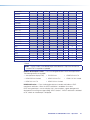
Output Resolution — Press the Navigation buttons to change the resolution and refresh
rate from the select list. The table on page 21 shows the available resolution and refresh
rates.
IN1604 DTP and IN1604 HD Scalers • Operation
20
Resolution
23.98 Hz
24 Hz
25 Hz
29.97 Hz
30 Hz
50 Hz
59.94 Hz
60 Hz
640x480
X
800x600
X
1024x768
X
1280x768
X
1280x800
X
1280x1024
X
1360x768
X
1366x768
X
1440x900
X
1400x1050
X
1600x900
X
1680x1050
X
1600x1200
X
1920x1200
X
480p
576p
X
X
X
X
X*
X
720p
X
X
X
1080i
X
X
X
1080p
X
X
X
X
X
X
X
X
2K (2048x1080)
X
X
X
X
X
X
X
X
Custom 1 through 5
For captured or uploaded EDID tables
* Default
NOTE: The five custom, user-defined output rates default to 720p @ 60 Hz when no
custom EDID is captured or uploaded.
HDMI or DTP Output Format — Press the Navigation buttons to set the output format.
The following formats are available:
• Auto (based on display EDID)
• DVI RGB 444
• HDMI RGB 444 Full
• HDMI RGB 444 Limited
• HDMI YUV 444 Full
• HDMI YUV 444 Limited
• HDMI YUV 422 Full
• HDMI YUV 422 Limited
HDCP Notification — Press the Navigation buttons to enable or disable an HDCP
compliance notification. When the HDCP notification is enabled or On and an
HDCP-encrypted input is sent to a display that is non-compliant, a green background is
displayed with a moving message reading “HDCP Content.” If HDCP notification is disabled
or Off, a black or muted output is displayed.
IN1604 DTP and IN1604 HD Scalers • Operation
21
Audio Submenu
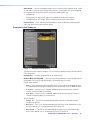
Figure 14. Audio Submenu
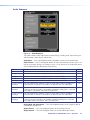
The Audio submenu allows adjustment of audio settings, including mute, input format, gain
and attenuation, output format, and volume.
Audio Mute — Press the Navigation buttons to globally mute or unmute audio output.
Audio Format — Press the Navigation buttons to select the audio input format. Input 1 can
only be set to None, Analog 1, or Analog 2. Inputs 2-4 can be set for any audio input format
(see the table below for a description of the formats).
Format
Details
Inputs
None
Mutes audio for the selected input. Sets “No Audio” EDID.
All
Analog 1
Sets the selected input to analog input 1. Sets “No Audio” EDID.
All
Analog 2
Sets the selected input to analog input 2. Sets “No Audio” EDID.
All
LPCM-2Ch
Sets the selected input to LPCM-2Ch audio. Sets 2Ch audio EDID.
2-4
Multi-Ch
Sets the selected input to Multi-Ch audio. Sets Multi-Ch audio EDID.
2-4
LPCM-2Ch Auto Sets the selected input prioritize 2-channel LPCM audio. Audio on analog input 1
(Analog 1)
is passed when 2-channel LPCM audio is not present. Sets 2Ch audio EDID.
2-4
Multi-Ch Auto
(Analog 1)
Sets the selected input to prioritize multi-channel audio, but will pass 2-channel
LPCM if multi-channel audio is not available. Audio from analog input 1 is passed
when digital is not present. Sets Multi-Ch audio EDID.
2-4
LPCM-2Ch Auto Sets the selected input prioritize 2-channel LPCM audio. Audio on analog input 2
(Analog 2)
is passed when 2-channel LPCM audio is not present. Sets 2Ch audio EDID.
2-4
Multi-Ch Auto
(Analog 2)
2-4
Sets the selected input prioritize multi-channel audio, but will pass 2-channel
LPCM if multi-channel audio is not available. Audio on analog input 2 is passed
when digital audio is not present. Sets 2Ch audio EDID.
Analog Gain and Attenuation — Press the Navigation buttons to set the gain (in dB) for
the applicable analog input.
Output Format — Press the Navigation buttons to set the output format.
Output Volume — Press the Navigation buttons to set the audio output volume.
IN1604 DTP and IN1604 HD Scalers • Operation
22
Advanced Submenu
Figure 15. Advanced Submenu
The Advanced submenu allows adjustment of test patterns, screen saver mode, automatic
Auto-Image, aspect ratio, auto memory, overscan settings, auto switch, and factory reset.
Test Pattern — Press the Navigation buttons to select a test pattern to display or to turn
off a test pattern. The available test patterns are Crop, Alternating Pixels, Crosshatch, Color
Bars, Grayscale, Blue Mode, and Audio Test (pink noise). The default setting is Off.
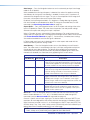
Figure 16. Available Test Patterns
NOTES:
• The audio test outputs pink noise on the embedded digital audio output (2-channel,
48 kHz, 16 bit).
• All test patterns include a single pixel border (except Blue mode).
Screen Saver and Timeout — Press the Left and Right buttons to select the screen
saver setting: Black (default) or Blue. Press the Up or Down buttons to set the duration (in
seconds) the screen saver remains active before sync is disabled.
When there is no active video on the selected input, the device can mute the video output to
black or blue for a set duration before disabling output sync. By default, the scaler outputs
black video and sync (no sync time-out) with no active input applied.
The time-out duration can be set to Never (default) or to any duration from 1-500 seconds.
IN1604 DTP and IN1604 HD Scalers • Operation
23
Auto-Image — Press the Navigation buttons to turn the automatic per-input Auto-Image
mode On or Off (default).
When enabled and a new input frequency is detected, the scaler first applies an existing
Auto Memory for the signal (if Auto Memory is enabled). If no entry exists, it performs an
automatic Auto-Image on the new signal. This sets a size and position for the image to fill
the screen, with respect to the current Aspect Ratio setting.
By default, the Auto-Image threshold is 25% brightness. Analog video signals greater
than the threshold are considered active video. To change the threshold value, use SIS
commands (see Auto-Image threshold value on page 33).
Aspect Ratio — Press the Navigation buttons to set the aspect ratio setting of the active
input to Fill (default) or Follow. The scaler clears the previous size and position settings
whenever the aspect ratio setting for an input is adjusted.
When in Fill mode, all inputs automatically fill the entire output. For an adjustment to the
aspect ratio of a single input rate, use Image Size and Image Position under Picture Controls
(see Picture Controls Submenu on page 17). If auto memory is enabled, these settings
are saved and recalled the next time the signal is detected.
In Follow mode, each input rate is displayed with its native aspect ratio mode with the
correct letter box or pillar box settings visible.
Auto Memory — Press the Navigation buttons to turn Auto Memory on or off for each
input. The scaler stores 32 auto memories per input, with input configuration and picture
control data for each video resolution. The default setting enables these memories to
automatically recall input and picture controls for previously applied signals. When auto
memories are disabled, the scaler treats every applied signal as a new source.
Auto Memory and Auto-Image Interaction
Auto Memory Auto-Image
Information
On
On
“New” signals and rates not previously detected by the
scaler are set up using default parameters, then Auto-Image
is automatically applied. The next time the signal is detected,
the values stored in the auto memory location are applied.
On (default)
Off (default)
Off
On
Each change in input sync, input switch, or power cycle
triggers an automatic Auto-Image. When auto memory is
disabled, each change in sync is treated as a new signal.
Manual changes made to the image and picture controls are
lost each time a new rate is detected.
Off
Off
Each change in input sync causes default values to be
applied. Manual changes made to the image and picture
controls are lost when a new rate is applied, a new input is
applied, or after a power cycle.
“New” signals and rates not previously detected by the
scaler are set up using default parameters. If manual input
or picture settings are made, an auto memory location is
created and recalled each time the input is detected.
Overscan — Press the Navigation buttons to select the overscan value for each input
format. Choose between 0%, 2.5%, or 5%. Set default overscan mode through SIS
commands (see the Overscan mode SIS commands on page 43).
Overcan is specific to each input signal type. This feature zooms and crops SMPTE input
resolutions to mask edge effects and ancillary data that are common in broadcast signals.
When the overscan mode is not at 0%, an Auto-Image on a SMPTE input rate (NTSC, PAL,
SECAM, 480p, 576p, 720p, 1080i, 1080p, and 2K [2048x1080]) refers to the default input
lookup table values instead of performing a “true” auto image.
NOTE: Overscan is valid only on SMPTE input rates (NTSC, PAL, 480p, 576p, 720p,
1080i, 1080p, or 2K [2048x1080]) and is global for each video format.
IN1604 DTP and IN1604 HD Scalers • Operation
24
Auto Switch — Press the Navigation buttons to turn the auto switch mode on or off, and to
set the priority. The auto switch setting allows for basic, unmanaged, input switching based
on the presence of active input signals. Auto switch mode options are:
•
Disabled (off)
•
Setting priority to “high to low” (highest numbered active input to the lowest)
•
Setting priority to “low to high” (lowest numbered active input to the highest)
Factory Reset — Press and hold the Enter button to reset the device to factory defaults.
The scaler retains the current firmware version.
Communication Submenu
Figure 17. Communication Submenu
The Communication submenu displays RS-232 settings and allows contact closure and tally
LED configuration.
Remote Port — Displays the Baud rate for the serial RS-232.
Contact Mute and Tally LED — Press the Left and Right buttons to select contact closure
mute mode. Press the Up and Down buttons to select the tally LED action.
Contact Mute options:
•
None — The initial contact closure provides input switching to the corresponding input.
Any additional button presses or contact closures on the input have no additional effect.
•
A/V Mute — Once an input is selected, additional contact closure pulses mutes or
unmutes audio and video on the output.
•
Sync Mute — Once an input is selected, additional contact closure pulses mutes or
unmutes audio and video sync on the output.
Tally LED options:
•
Always On — The LED on the corresponding tally output pin to the selected input
remains lit at all times.
•
Mute Off — The LED on the corresponding tally output pin to the selected input turns
off when video or sync is muted; otherwise, the it remains lit.
•
Mute Blink — The LED on the corresponding tally output pin to the selected input
blinks when video or sync is muted; otherwise, the LED remains lit.
IN1604 DTP and IN1604 HD Scalers • Operation
25
Device Info Submenu
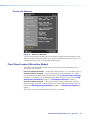
Figure 18. Device Info Submenu
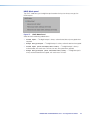
The Device Info submenu displays device information including internal temperature, input
and output signal information, HDCP status, display information, and firmware version. This
submenu does not contain any adjustable submenu items.
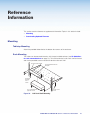
Front Panel Lockout (Executive Modes)
The scalers have three modes of front panel security lock that limit the operation of the
device from the front panel.
Executive mode 0 (disabled) — Unlocks front panel functions. This is the default setting.
Executive mode 1 (enabled) — Locks all front panel functions completely. This mode
can be enabled or disabled only by SIS commands (see the executive mode commands
on page 43). All functions can still be performed through USB or RS-232 control (see SIS
Configuration and Control on page 27 or Configuration Software on page 47).
Executive mode 2 (enabled) — Locks all front panel functions except input switching
and Auto-Image. All functions and adjustments can still be made through USB or RS-232
control (see SIS Configuration and Control on page 27 or Configuration Software on
page 47).
The menu system returns to the default menu within 10 seconds.
IN1604 DTP and IN1604 HD Scalers • Operation
26
SIS Configuration
and Control
The scaler can be configured and controlled with Extron Simple Instruction Set (SIS)
commands when connected to a host computer or other device (such as a control system).
Attach the host device to the rear panel RS-232 connector or the front panel USB port.
Commands can be entered using a Telnet application such as the Extron DataViewer,
available at www.extron.com (see the DataViewer Help file for more details). RS-232
connection uses a protocol of 9600 baud, 1 stop bit, no parity, and no flow control. The
protocol cannot be adjusted. This section describes SIS communication and control. Topics
in this section include:
•
Host and Scaler Communication
•
SIS Overview
•
Command and Response Tables
Host and Scaler Communication
SIS commands consist of one or more characters per field. No special characters are
required to begin or end a command sequence. When the scaler determines that a
command is valid, it executes the command and sends a response to the host device. All
responses from the scaler to the host end with a carriage return and a line feed
(CR/LF = ]), indicating the end of the response character string (one or more characters).
Scaler-Initiated Messages
When a local event such as a front panel selection or adjustment takes place, the scaler
responds by sending a message to the host. No response is required from the host.
Example scaler-initiated messages are listed here.
X! All ] (where X! is the input number during an input switch).
•
In
•
Reconfig ] The scaler sends this response when an input is switched or when a new
•
signal is detected.
HplgO X@] The scaler sends this response when a hot plug event on output X@ is
detected.
IN1604 DTP and IN1604 HD Scalers • SIS Configuration and Control
27
Error Responses
When the scaler receives a valid command, it executes the command and sends a
response to the host device. If the unit is unable to execute the command, it returns an error
response tot he host.
E01 — Invalid input number
E13 — Invalid parameter
E06 — Invalid switch attempt in this mode
E14 — Not valid for this configuration
E10 — Invalid command
E17 — Invalid command for signal type
E11 — Invalid preset number
E22 — Busy
E12 — Invalid port number
SIS Overview
Using the Command and Response Tables
The Command and Response Tables for SIS commands beginning on page 33 lists
the commands that the scaler recognizes as valid, the responses that are returned to the
host, a description of the command function or the results of executing the command, and
examples of commands in ASCII (Telnet) and URL encoded (Web).
NOTE: Upper and lower case text can be used interchangeably unless otherwise
stated.
ASCII to Hex Conversion Table
Space
•
Figure 19. ASCII to Hexadecimal Character Conversion Table
Symbol Definitions
• = Space
] = Carriage return with line feed
} = Carriage return with no line feed
|
= Pipe (can be used interchangeably with the } character)
E = Escape
W
= Can be used interchangeably with the E character
X! = Input selection
1 = configurable VGA
2 = HDMI/DVI 1
3 = HDMI/DVI 2
4 = HDMI/DVI 3
IN1604 DTP and IN1604 HD Scalers • SIS Configuration and Control
28
X@ = Input video format
X#
X$
X%
X^
X&
X*
X(
1
2
3
4
5
= RGB
= YUV
= S-video
= composite
= HDMI/DVI
= Horizontal or vertical start
0-255 (128 = default)
= Pixel phase
0-63 (31 = default)
= Total lines
±512 of the default value
= Total pixels
±512 of the default value
= Active pixels
±512 of the default value
= Active lines
±256 of the default value
= Enable or disable
0 = off or disabled
1 = on or enabled
X1) = Input standard
0
1
2
3
4
-
= no signal detected on the current input
= NTSC 3.85
= PAL
= NTSC 4.43
= SECAM
= N/A (occurs when the input is active RGB,
YUV, or HDMI signal)
X1! = Internal temperature
X1@ = Horizontal and vertical
In degrees Celsius
xxx.x
frequencies
X1#
X1$
X1%
X1^
X1&
X1*
X1(
= Text label
Up to 16 characters
= Picture adjustment
0-127 (64 = default)
= Horizontal position
±2048
= Vertical position
±1200
= Horizontal size
0-04096
= Vertical size
0-02400
= Test patterns
0
1
2
3
4
5
6
7
X2) = User presets
X2! = Input presets
X2@ = Screen saver timeout
= off (default)
= crop
= alternating pixels
= crosshatch
= color bars
= grayscale
= blue mode
= audio test (pink noise)
1-16
1-16
0 = OSD is never displayed, output sync is
instantly disabled with no active input
1-500 = 1 second increments
501 = OSD bug never times out, output sync
never times out (default)
IN1604 DTP and IN1604 HD Scalers • SIS Configuration and Control
29
X2# = Executive mode status
0 = off or disabled (default)
1 = mode 1 (complete front panel lockout)
2 = mode 2 (only allow input switching and
Auto-Image)
X2$ = Verbose mode
0
1
2
3
= clear or none
= verbose mode
= tagged responses
= verbose mode and tagged responses
X2% = Device name
Text label up to 24 characters drawn from the
alphabet (A-Z), digits (0-9), and the minus or
hyphen symbol (-).
X2^ = Overscan
0 = 0.0% (default for RGB, HDMI)
1 = 2.5% (default for RGBcvS, YUV, S-video,
and CV)
2 = 5.0%
X2& = Aspect ratio setting
1 = fill (default)
2 = follow
X2* = Screen saver mode
1 = black output (default)
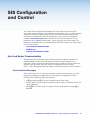
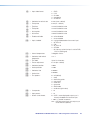
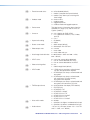
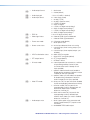
2 = blue output with OSD text
X2( = Video output mute
0 = unmute
1 = mute video
2 = mute video and sync
X3) = Auto-Image threshold value
0-100 (where 0 = black and 100 = white;
025 = default)
X3! = HDCP status
0 = no sink or source device detected
1 = sink or source detected with HDCP
2 = sink or source detected but no HDCP
X3@ = Video switching effect
0 = cut
1 = fade through black (default)
X3# = HDCP mode
0 = HDMI outputs are always authenticated,
but only encrypted when required
1 = HDMI outputs are always authenticated and
encrypted
2 = HDMI outputs are always authenticated,
with continuous DVI trials, but only
encrypted when required
3 = HDMI outputs are always authenticated and
encrypted, with continuous DVI trials
X3$ = TMDS output format
0
1
2
3
4
5
6
7
= auto (based on the display EDID: default)
= DVI RGB 444
= HDMI RGB “Full”
= HDMI RGB “Limited”
= HDMI YUV 444 “Full”
= HDMI YUV 444 “Limited”
= HDMI YUV 422 “Full”
= HDMI YUV 422 “Limited”
X3% = Auto switch mode
0 = disable
1 = prioritizes the highest numbered active input
2 = prioritizes the lowest numbered active input
X3^ = Audio volume
-100 to 0 in 1 dB steps (where -100 = -100 DB
and 0 = 0 dB; -10 = default)
IN1604 DTP and IN1604 HD Scalers • SIS Configuration and Control
30
X3& = Audio output format
1 = dual mono
2 = stereo (default)
X3* = Audio input gain
X3( = Audio input format
-18 to +24 in dB (0 = default)
X4) = EDID file
X4! = Video signal status
0
1
2
3
4
5
6
7
8
= none (input muted)
= analog 1 (TRS)
= analog 2 (captive screw)
= LPCM-2Ch digital
= Multi-Ch digital
= LPCM-2Ch digital auto (analog 1)
= Multi-Ch digital auto (analog 1)
= LPCM-2Ch digital auto (analog 2)
= Multi-Ch digital auto (analog 2)
128 or 256 bytes of binary data
0 = video or HDMI signal not detected
1 = video or HDMI signal detected
X4@ = Power save mode
0 = full power mode (default)
1 = lower power state
X4# = Screen saver status
0 = active input detected, timer not running
1 = no active input, timer running, output sync
still active
2 = no active input, timer expired, output sync
disabled
X4$
= HDCP authorization status
0 = block HDCP encryption
1 = allow HDCP encryption (default)
X4% = DTP output format
0 = DTP format (default)
1 = HDBaseT format
X4^ = AV mute mode
0 = normal operation (no mute occurs, switches
X4& = Mute LED mode
0 = always on (Tally Out port will remain enabled
to input designated by Contact-In port,
no further action taken if already on the
input specified)
1 = perform video and audio mute (enable or
disable during subsequent Contact-In action
if already on the input specified)
2 = perform video sync and audio mute (enable
or disable during subsequent Contact-In
action if already on the input specified)
for the corresponding selected input choice)
1 = off when muted (Tally Out port for the
corresponding currently selected input will
be off when video mute is enabled;
otherwise, it will be On)
2 = blink when muted (Tally Out port for the
corresponding currently selected input
will blink when video sync mute is enabled;
otherwise, it will be On)
X4* = Audio output mute
1 = local 5-pole captive screw connector and
remote 5-pole remote (DTP) captive screw
connector
2 = embedded TMDS audio output
IN1604 DTP and IN1604 HD Scalers • SIS Configuration and Control
31
X4( = EDID emulation or output
rate
0 = automatic (matches the current output
resolution; default for EDID emulation only)
1 = output (available for EDID export only)
201 = custom EDID/output rate 1
202 = custom EDID/output rate 2
203 = custom EDID/output rate 3
204 = custom EDID/output rate 4
205 = custom EDID/output rate 5
SIS Variables for EDID Resolution and Refresh Rate Combinations (where
Resolution
23.98 Hz
24 Hz
25 Hz
29.97 Hz
30 Hz
50 Hz
X4( = 10-53)
59.94 Hz
60 Hz
640x480
10
800x600
11
1024x768
12
1280x768
13
1280x800
14
1280x1024
15
1360x768
16
1366x768
17
1440x900
18
1400x1050
19
1600x900
20
1680x1050
21
1600x1200
22
1920x1200
23
480p
576p
24
25
32
33
34*
26
720p
29
30
31
1080i
35
36
37
1080p
38
39
40
41
42
43
44
45
2048x1080 (2K)
46
47
48
49
50
51
52
53
* = Default output resolution
IN1604 DTP and IN1604 HD Scalers • SIS Configuration and Control
32
Command and Response Tables
Command
ASCII Command
(host to scaler)
Response
Additional Description
(scaler to host)
Input Configuration Commands
Input selection
Select input
X! !
In X! • All]
Select input X!.
View current input
!
X!]
View the current input.
X! * X@\
X! \
X! *\
Typ X! * X@]
Set input X! to format X@.
X@]
X@]
Vtyp X! * X@]
View the video format.
Input video format
Set video format
View set format
View detected format
View actual video format on input X!.
Verbose mode 2 and 3
Input EDID (VGA and HDMI)
Assign EDID
View assigned EDID
Save an output EDID
to custom slot
E A X! *X4( EDID} Edid X!* X4(]
E A X! EDID}
X4(]
E S 1* X4( EDID} EdidS 1* X4(]
Set the EDID X4( to input X!.
View the EDID for input X!.
Save output EDID to X4(.
Auto-Image
Enable
1*1A
Img 1*1]
Activate Auto-Image for input 1.
Disable
1*0A
Img 1*0]
Turn off Auto-Image for input 1.
View
1A
View the Auto-Image setting for input 1.
Execute
A
X(]
Img X(]
Img0 ]
Execute and fill
1*A
Img1]
Execute an Auto-Image and fill the output.
Execute and follow
2*A
Img2]
Execute an Auto-Image and maintain the
aspect ratio of the current input.
Verbose mode 2 and 3
Execute an Auto-Image for the current input
(follows the aspect ratio of the current input).
Auto-Image threshold value (luminosity value which the scaler defines as active video for Auto-Image)
Set value
View
E X3) ALVL}
E ALVL}
NOTES:
X! = Input selection
Alvl X3)]
Set the global Auto-Image luminosity to X3).
X3)]
View the global Auto-Image luminosity.
1 = configurable VGA
2 = HDMI/DVI 1
3 = HDMI/DVI 2
4 = HDMI/DVI 3
X@ = Input video format
0 = No input detected
1 = RGB (input 1 only)
2 = YUV (input 1 only)
3 = S-video (input 1 only)
4 = Composite (input 1 only)
5 = HDMI (inputs 2-4 only)
X( = Enable or disable
0 = off or disabled
1 = on or enabled
X3) = Auto-Image threshold value
X4( = EDID emulation
0-100 (where 0 = black and 100 = white; 25 = default)
See the X4( definition on page 32.
IN1604 DTP and IN1604 HD Scalers • SIS Configuration and Control
33
Command
ASCII Command
Response
Additional Description
Hsrt X! * X#]
Set the horizontal start position.
Increment value
E X# HSRT}
E +HSRT}
Hsrt X! * X#]
Increase the horizontal start
position.
Decrement value
E -HSRT}
Hsrt X! * X#]
Decrease the horizontal start
position.
View
E HSRT}
X#]
View the horizontal start position.
Vsrt X! * X#]
Set the vertical start position.
Vsrt X! * X#]
Increase the vertical start position.
Decrement value
E X# VSRT}
E +VSRT}
E -VSRT}
Vsrt X! * X#]
Decrease the vertical start
position.
View
E VSRT}
X#]
View the vertical start position.
(host to scaler)
(scaler to host)
Horizontal start
Specify a value
Vertical start
Specify a value
Increment value
Pixel phase (available only for RGB and YUV-HD input signals)
Specify a value
E X$ PHAS}
Phas X! * X$]
Set the pixel phase to X$ on the
current input.
Increment value
E +PHAS}
Phas X! * X$]
Increase the pixel phase on the
current input.
Decrement value
E -PHAS}
Phas X! * X$]
Decrease the pixel phase on the
current input.
View
E PHAS}
X$]
View the pixel phase setting on the
current input.
Total pixels (available only for RGB and YUV-HD input signals)
Specify a value
E X^ TPIX}
Tpix X! * X^]
Set the total pixels to X^ on the
current input.
Increment value
E +TPIX}
Tpix X! * X^]
Increase the total pixels on the
current input.
Decrement value
E -TPIX}
Tpix X! * X^]
Decrease the total pixels on the
current input.
View
E TPIX}
X^]
View the total pixel setting on the
current input.
NOTES:
X! = Input selection
X# = H/V start
X$ = Pixel phase
X^ = Total pixels
1 = configurable VGA
2 = HDMI/DVI 1
3 = HDMI/DVI 2
4 = HDMI/DVI 3
0-255 (128 = default)
0-63 (31 = default)
±512 of the default value
IN1604 DTP and IN1604 HD Scalers • SIS Configuration and Control
34
Command
ASCII Command
Response
Additional Description
Specify a value
E X& APIX}
Apix X! * X&]
Set the active pixels to X& on the current
input.
Increment value
Apix X! * X&]
Increase the active pixels on the current input.
Decrement value
E +APIX}
E -APIX}
Apix X! * X&]
Decrease the active pixels on the current
input.
View
E APIX}
X&]
View the active pixels on the current input.
E X* ALIN}
E +ALIN}
E -ALIN}
E ALIN}
Alin X! * X*]
Set the active lines to X* on the current input.
Alin X! * X*]
Increase the active lines on the current input.
Alin X! * X*]
Decrease the active lines on the current input.
X*]
View the active lines on the current input.
Film X! * X(]
Set film mode detection to automatic (default).
Film X! * X(]
Disable film mode detection.
X(]
View the current film mode setting.
(host to scaler)
(scaler to host)
Active pixels
Active lines
Specify a value
Increment value
Decrement value
View
3:2, 2:2, 24:1 Film mode detect
Auto
Off
View setting
E X! *1FILM}
E X! *0FILM}
E X! FILM}
HDCP authorized setting (valid for HDMI inputs only, to allow or block HDCP input signals)
Enable HDCP
authorization
E E X! *1HDCP}
HdcpE X! *1 ]
Enable HDCP authorization.
Disable HDCP
authorization
E E X! *0HDCP}
HdcpE X! *0 ]
Disable HDCP authorization.
Query HDCP
authorization status
E E X! HDCP}
X4$]
HdcpE X! * X4$]
View HDCP authorization setting.
Verbose mode 2 and 3
HDCP status (valid for HDMI inputs and the DTP output only)
Query input
Query output
E I X! HDCP}
X3!]
HdcpI X! * X3!]
X3!]
HdcpO1* X3!]
E O 1HDCP}
NOTES:
X! = Input selection
View the HDCP status on input X!.
Verbose mode 2 and 3
View the HDCP status on the output.
Verbose mode 2 and 3
1 = configurable VGA
2 = HDMI/DVI 1
3 = HDMI/DVI 2
4 = HDMI/DVI 3
X& = Active pixels
X* = Active lines
X( = Enable or disable
X3! = HDCP status
X4$ = HDMI input HDCP authorization status
±512 of the default value
±256 of the default value
0 = off or disabled
1 = on or enabled
0 = no sink or source device detected
1 = sink or source detected with HDCP
2 = sink or source detected but no HDCP is present
0 = block HDCP encryption
1 = allow HDCP encryption (default)
IN1604 DTP and IN1604 HD Scalers • SIS Configuration and Control
35
Command
ASCII Command
Response
Additional Description
E X1$ CONT}
E +CONT}
E -CONT}
E CONT}
Cont X! * X1$]
Set the contrast for the current input.
Cont X! * X1$]
Increase the contrast.
Cont X! * X1$]
Decrease the contrast.
X1$]
View the contrast setting.
E X1$ BRIT}
E +BRIT}
E -BRIT}
E BRIT}
Brit X! * X1$]
Set the brightness on the current input.
Brit X! * X1$]
Increase the brightness.
Brit X! * X1$]
Decrease the brightness.
X1$]
View the brightness setting.
E X1$ HDET}
E +HDET}
E -HDET}
E HDET}
Hdet X! * X1$]
Set the detail filter for the current input.
Hdet X! * X1$]
Increase the detail.
Hdet X! * X1$]
Decrease the detail.
X1$]
View the detail filter setting.
E X1$ COLR}
E +COLR}
E -COLR}
E COLR}
Colr X! * X1$]
Set the color level on the current input.
Colr X! * X1$]
Increase the color level.
Colr X! * X1$]
Decrease the color level.
X1$]
View the color level setting.
E X1$ TINT}
E +TINT}
E -TINT}
E TINT}
Tint X! * X1$]
Set the tint on the current input.
Tint X! * X1$]
Increase the tint.
Tint X! * X1$]
Decrease the tint.
X1$]
View the tint setting.
E X! *1AMEM}
E X! *0AMEM}
E X! AMEM}
Amem X! *1]
Enable Auto Memory on input X!.
Amem X! *0 ]
Disable Auto Memory on input X!.
X(]
View the Auto Memories status.
(host to scaler)
(scaler to host)
Picture Adjustment Commands
Contrast
Specify a value
Increment value
Decrement value
View
Brightness
Specify a value
Increment value
Decrement value
View
Detail filter
Specify a value
Increment value
Decrement value
View
Color (NTSC, PAL, and SECAM inputs only)
Specify a value
Increment value
Decrement value
View
Tint (NTSC inputs only)
Specify a value
Increment value
Decrement value
View
Auto Memories
Enable
Disable
View
NOTES:
X! = Input selection
1 = configurable VGA
2 = HDMI/DVI 1
3 = HDMI/DVI 2
4 = HDMI/DVI 3
X( = Enable or disable
0 = off or disabled
1 = on or enabled
X1$ = Picture adjustment
0-127 (64 = default)
IN1604 DTP and IN1604 HD Scalers • SIS Configuration and Control
36
Command
ASCII Command
Response
Additional Description
E X1% HCTR}
E +HCTR}
E -HCTR}
E HCTR}
Hctr X1%]
Set the horizontal position to X1%.
Hctr X1%]
Increase the horizontal position.
Hctr X1%]
Decrease the horizontal position.
X1%]
View the horizontal position setting.
E X1^ VCTR}
E +VCTR}
E -VCTR}
E VCTR}
Vctr X1^]
Set the vertical position to X1^.
Vctr X1^]
Increase the vertical position.
Vctr X1^]
Decrease the vertical position.
X1^]
View the vertical position setting.
E X1& HSIZ}
E +HSIZ}
E -HSIZ}
E HSIZ}
Hsiz X1&]
Set the horizontal size to X1&.
Hsiz X1&]
Increase the horizontal size.
Hsiz X1&]
Decrease the horizontal size.
X1&]
View the horizontal size setting.
E X1* VSIZ}
E +VSIZ}
E -VSIZ}
E VSIZ}
Vsiz X1*]
Set the vertical size to X1*.
Vsiz X1*]
Increase the vertical size.
Vsiz X1*]
Decrease the vertical size.
X1*]
View the vertical size setting.
(host to scaler)
(scaler to host)
Horizontal shift (image)
Specify a value
Increment value
Decrement value
View
Vertical shift (image)
Specify a value
Increment value
Decrement value
View
Horizontal size (image)
Specify a value
Increment value
Decrement value
View
Vertical size (image)
Specify a value
Increment value
Decrement value
View
Compound image position and size
Specify a value
View
E X1% * X1^ *...
X1& * X1* XIMG}
E XIMG}
NOTES:
X! = Input selection
X1% = Horizontal position
X1^ = Vertical position
X1& = Horizontal size
X1* = Vertical size
Ximg X1% * X1^ * X1& * X1*] Set the horizontal and vertical
positions and sizes.
X1% * X1^ * X1& * X1*]
View all position and size settings.
1 = configurable VGA
2 = HDMI/DVI 1
3 = HDMI/DVI 2
4 = HDMI/DVI 3
±2048
±1200
0-4096
0-2400
IN1604 DTP and IN1604 HD Scalers • SIS Configuration and Control
37
Command
ASCII Command
(host to scaler)
Response
Additional Description
(scaler to host)
Preset Commands
User presets
Recall preset
1* X2).
1Rpr X2)]
Recall user preset X2).
Save preset
1* X2),
1Spr X2)]
Save the current picture controls.
Delete preset
E X1* X2) PRST}
PrstX1* X2)]
Clear user preset X2).
E 1* X2), X1# PNAM}
E 1* X2) PNAM}
Pnam1* X2), X1#]
Set user preset X2) name to X1#.
X1#]
View the name of user preset X2).
User preset name
Write name
View name
NOTE: To clear a user preset name, enter a single space character for X1#. This resets the user preset name
to the default value, “[User Preset XX].” This is valid only for existing presets.
Input presets
Recall preset
2* X2!.
2Rpr X2!]
Recall input preset X2!.
Save preset
2* X2!,
2Spr X2!]
See the table below for settings
saved on input presets.
Delete preset
E X2* X2! PRST}
PrstX2* X2!]
Clear input preset X2!.
E 2* X2!, X1# PNAM}
E 2* X2! PNAM}
Pnam2* X2!, X1#]
Set input preset X2! name to X1#.
X1#]
View the name of user preset X2!.
Input preset name
Write name
View name
NOTE: To clear an input preset name, enter a single space character for X1#. This resets the input preset name
to the default value, “[Input Preset XXX].” This is valid only for existing presets.
Saved Settings for User Presets
Saved Settings for Input Presets
Color
Detail
Input Type
Contrast
V Start
Image H/V Position
Tint
Preset Name
Preset Name
Brightness
H Active
Image H/V Size
Contrast
Image H/V Position
Audio Gain/Attenuation
Detail
V Active
Brightness
Image H/V Size
Color
Total Pixels
Phase
Tint
H Start
Film Mode
NOTES:
X1# = Text label
X2) = User presets
X2! = Input presets
Up to 16 characters
1-16
1-16
IN1604 DTP and IN1604 HD Scalers • SIS Configuration and Control
38
Command
ASCII Command
(host to scaler)
Response
Additional Description
(scaler to host)
Output Configuration Commands
TMDS output format
Set format
E X3$ VTPO}
Vtpo X3$]
Set the color space and format of the
output to X3$.
View setting
E VTPO}
X3$]
Vtpo X3$]
X3$]
View the color space and format setting.
Psav0 ]
Operate at full power.
Power save on
E 0PSAV}
E 1PSAV}
Psav1]
Operate in a low power state. No video
output.
View setting
E PSAV}
X4@]
View the power mode.
E M X2* SSAV}
E MSSAV}
SsavM X2*]
Set the color of the screen saver to X2*.
X2*]
SsavM X2*]
SsavT X2@]
X2@]
SsavT X2@]
X4#]
SsavS X4#]
View the color of the screen saver.
View auto output format
E1*VTPO}
Verbose mode 2 and 3
View the Auto output color space.
Power save mode
Power save off
Screen saver
Set mode
View mode
Set time-out duration
View time-out duration
View screen saver status
NOTES:
X2@ = Output sync timeout
E T X2@ SSAV}
E TSSAV}
E SSSAV}
Verbose mode 2 and 3
Set the time-out duration to X2@.
View the time-out duration.
Verbose mode 2 and 3
View the screen saver status.
Verbose mode 2 and 3
0 = output sync is instantly disabled with no active input
1-500 (in 1 second increments)
501 = output sync never times out
X2* = Screen saver mode
1 = black output (default)
2 = blue output
X3$ = HDMI output format
0
1
2
3
4
5
6
7
X4@ = Power save mode
X4# = Screen saver status
= auto (default)
= DVI RGB 444
= HDMI RGB “Full”
= HDMI RGB “Limited”
= HDMI YUV 444 “Full”
= HDMI YUV 444 “Limited”
= HDMI YUV 422 “Full”
= HDMI YUV 422 “Limited”
0 = full power mode (default)
1 = low power state
0 = active input detected, timer not running
1 = no active input, timer running, output sync enabled
2 = no active input, timer expired, output sync disabled
IN1604 DTP and IN1604 HD Scalers • SIS Configuration and Control
39
Command
ASCII Command Response
(host to scaler)
(scaler to host)
Additional Description
Video mute (defaults to unmuted after a power cycle)
Mute video to black
1B
Vmt1]
Mute the video and display a black
screen.
Mute output sync/video
2B
Vmt2]
Mute the video and sync on all outputs.
Unmute output
0B
Vmt0]
Display the selected input.
View mute status on all outputs
B
X2(]
Vmt X2(]
View the video mute setting.
Verbose mode 2 and 3
Output scaler rate
Set output rate
E X4( RATE}
Rate X4(]
Set the output resolution and rate to
X4(.
View output rate
E RATE}
X4(]
View the selected output rate.
NOTES:
X( = Enable or disable
0 = off or disabled
1 = on or enabled
X2( = Video mute on all outputs
0 = unmute
1 = mute to black
2 = mute all output sync and video
X4( = Output rate
See the X4( definition on page 32.
IN1604 DTP and IN1604 HD Scalers • SIS Configuration and Control
40
Command
ASCII Command
(host to scaler)
Response
Additional Description
(scaler to host)
Audio Configuration Commands
Output audio mute
Enable global audio mute
1Z
Amt1]
Enables audio mute on all outputs.
Disable global audio mute
0Z
Amt0]
Disable audio mute on all outputs.
Set discrete audio mute
X4* * X( Z
Amt X4* * X(]
Set audio mute on output X4*.
View output audio mute
Z
X( • X(]
View the audio mute status on the
analog and digital audio output.
Amt X( • X(]
Verbose mode 2 and 3
Audio input format
NOTE: For audio input format details, see Audio Configuration Page on page 68.
Set audio input format
E I X! *X3% AFMT}
AfmtI X! * X3%]
Set the audio format of input X! to X3%.
NOTES:
• For input 1, X3% can only be set to 0, 1, and 2. Attempting to set this input to a digital format returns an
E14 error message.
• For inputs 2-4, digital auto modes (X3% = 5, 6, 7, and 8) detect and use embedded digital audio when
present or will use the analog audio input when digital audio is not detected.
View audio input format
E I X! AFMT}
X3%]
View the audio input format of input X!.
Audio gain and attenuation (analog inputs only)
Set gain or attenuation
E X3* G
Aud X3*]
Set the audio input gain to X3*.
Increment gain or
attenuation
+G
Aud X3*]
Increase the audio input gain by 1 dB.
Decrement gain or
attenuation
-G
Aud X3*]
Decrease the audio input gain by 1 dB.
View audio gain level
G
X3*]
View the audio level of the current input.
NOTES:
X! = Input selection
1 = configurable VGA
2 = HDMI/DVI 1
3 = HDMI/DVI 2
4 = HDMI/DVI 3
X( = Enable or disable
0 = off or disabled
1 = on or enabled
X3% = Audio input format
0 = none (input muted)
1 = analog 1 (TRS) (default for input 1)
2 = analog 2 (captive screw)
3 = LPCM-2Ch digital (default for inputs 2-4)
4 = Multi-Ch digital
5 = LPCM-2Ch digital auto (analog 1)
6 = Multi-Ch digital auto (analog 1)
7 = LPCM-2Ch digital auto (analog 2)
8 = Multi-Ch digital auto (analog 2)
X3* = Audio input gain
X4* = Audio output mute
-18 to +24 in dB (0 = default)
1 = local 5-pole captive and remote 5-pole remote (DTP)
captive analog audio output
2 = embedded HDMI audio
IN1604 DTP and IN1604 HD Scalers • SIS Configuration and Control
41
Command
ASCII Command
Response
Additional Description
Set volume
X3^ V
Vol X3^]
Set the volume.
Increment the volume
+V
Vol X3^]
Increase the volume by 1 dB.
Decrement the volume
-V
Vol X3^]
Decrease the volume by 1 dB.
View the volume setting
V
X3^]
Vol X3^]
View the volume level.
AfmtO1* X3&]
Set the audio output format to X3&.
X3&]
View the audio output format.
AfmtO1* X3&]
Verbose mode 2 and 3
(host to scaler)
(scaler to host)
Volume
Verbose mode 2 and 3
Audio output format (analog outputs only)
Set audio output format
View audio output format
E O1*X3& AFMT}
E OAFMT}
Advanced Configuration Commands
Test pattern
Set pattern
E X1( TEST}
Test X1(]
Set test pattern X1(.
View test pattern
E TEST}
X1(]
View the current test pattern.
Enable
1F
Frz1]
Freeze the current input.
Disable
0F
Frz0]
Unfreeze the current input.
View freeze status
F
X(]
View the freeze setting.
Freeze
NOTES:
X( = Enable or disable
0 = off or disabled
1 = on or enabled
X1( = Test patterns
0 = none (default)
1 = crop
2 = alternating pixels
3 = crosshatch
4 = color bars
5 = grayscale
6 = blue mode
7 = audio test pattern (pink noise)
X3^ = Audio volume
-100 to 0 in 1 dB steps where 0 = 0 dB and
-100 = -100 dB (-10 = default)
X3& = Audio output format
1 = dual mono
2 = stereo (default)
IN1604 DTP and IN1604 HD Scalers • SIS Configuration and Control
42
Command
ASCII Command
(host to scaler)
Response
Additional Description
Aspr X! *1 ]
Fill the entire output.
Aspr X! *2 ]
Maintain the input aspect ratio.
X2&]
View the aspect ratio setting.
(scaler to host)
Input aspect ratio (per input)
Set for fill
Set to follow
View aspect setting
E X! *1ASPR}
E X! *2ASPR}
E X! ASPR}
Front panel lockout mode (executive mode)
Enable mode 1
1X
Exe1 ]
Lock the entire front panel.
Enable mode 2
2X
Exe2]
Limit front panel control to input
switching and Auto-Image.
Disable
0X
Exe0]
Unlock the front panel.
View status
X
X2#]
View the lock mode.
Overscan mode (applies only to SMPTE input resolutions)
Set value
View status
E X@* X2^ OSCN} Oscn X@* X2^]
E X@ OSCN}
X2^]
Set the overscan value to X2^.
E 0LS}
X4!X4!X4!X4!]
View video signal presence for
all inputs.
In00 • X4!X4!X4!X4!]
Verbose modes 2 and 3
View the overscan setting.
Video signal presence
View video signal
presence status
NOTES:
X! = Input selection
1 = configurable VGA
2 = HDMI/DVI 1
3 = HDMI/DVI 2
4 = HDMI/DVI 3
X@ = Input video format
1 = RGB
2 = YUV
3 = S-video
4 = Composite
5 = HDMI
X( = Enable or disable
0 = off or disabled
1 = on or enabled
X2# = Executive mode status
0 = off or disabled (default)
1 = mode 1 (complete front panel lockout)
2 = mode 2 (input selection and Auto-Image only)
X2^ = Overscan
0 = 0.0% (default for RGB and HDMI)
1 = 2.5% (default for YUV, S-Video, and CV)
2 = 5.0%
X2& = Aspect ratio setting
1 = fill (default)
2 = follow
X4! = Video signal status
0 = video/HDMI signal not detected
1 = video/HDMI signal detected
IN1604 DTP and IN1604 HD Scalers • SIS Configuration and Control
43
Command
ASCII Command
Response
Additional Description
E 0AUSW}
E 1AUSW}
Ausw0]
Manual input switching only.
Ausw1]
Automatically switches to the
highest numbered active input.
Prioritize lowest active
input
E 2AUSW}
Ausw2]
Automatically switches to the
lowest numbered active input.
View auto switch mode
E AUSW}
X3%]
View the current auto switch
mode.
Swef0]
Set the switch effect to cut.
Fade through black
E 0SWEF}
E 1SWEF}
Swef1]
Set the switch effect to fade
through black (default).
View setting
E SWEF}
X3@]
View the switch effect setting.
(host to scaler)
(scaler to host)
Auto switch mode
Disable auto switch mode
Prioritize highest active
input
Video switch effect
Cut
HDCP notification (displayed on non-HDCP displays with HDCP input selected)
Enable notification
Disable notification
Query notification
E N1HDCP}
E N0HDCP}
E NHDCP}
HdcpN1 ]
Display a green screen.
HdcpN0 ]
Mute output to black.
X(]
View the HDCP notification
setting.
AV mute (from contact and tally pins)
Configure AV mute
E X4^ * X4& MUTM}
Mutm X4^ * X4&]
Configure the operation of
Contact In and Tally Out ports.
View AV mute setting
E MUTM}
X4^ * X4&]
View the current status of
Contact In and Tally Out port
configuration.
NOTES:
X( = Enable or disable
0 = off or disabled
1 = on or enabled
X3@ = Video switching effect
0 = cut
1 = fade through black (default)
X3% = Auto switch mode
0 = disable (default)
1 = gives priority to the highest numbered active input
2 = gives priority to the lowest numbered active input
X4^ = AV mute mode
0 = normal operation
1 = perform video and audio mute
2 = perform video sync and audio mute
X4& = Mute LED mode
0 = always on
1 = off when muted
2 = blink when muted
IN1604 DTP and IN1604 HD Scalers • SIS Configuration and Control
44
Command
ASCII Command
(host to scaler)
Response
(scaler to host)
Additional Description
On-Screen Menu Configuration Commands
Front control panel emulation
Menu*M]
Toggle the OSD menu.
Menu*A]
Enter OSD menu.
Menu*X]
Exit OSD menu.
Menu*E]
Emulate the Enter button.
Menu*U]
Emulate the Up button.
Menu*D]
Emulate the Down button.
Menu*L]
Emulate the Left button.
Menu*R]
Emulate the Right button.
X(]
Menu X(]
Show the status of the OSD menu.
E ZXXX}
Zpx]
Reset all device settings the factory
defaults.
Set verbose mode
E X2$ CV}
Vrb X2$]
Enable or disable verbose mode
and tagged responses, where
additional information is provided in
response to a query.
View verbose mode
E CV}
X2$]
View the verbose mode.
E X2% CN}
Ipn • X2%]
Set the device name to X2%.
Toggle menu
Enter menu
Exit menu
Enter
Up arrow
Down arrow
Left arrow
Right arrow
View OSD menu status
E MMENU}
E AMENU}
E XMENU}
E EMENU}
E UMENU}
E DMENU}
E LMENU}
E RMENU}
E MENU}
Verbose mode 2 and 3
Device Commands
Reset
Reset all device settings to
factory default
Verbose mode
Unit name
Set unit name
NOTE: Characters must be from the alphabet (A-Z), digits (0-9), or the minus or hyphen sign (-). Lowercase
and uppercase letters are interchangeable. The first character must be an alpha character. The last
character cannot be a minus sign or hyphen.
View unit name
Reset unit name
E CN}
E • CN}
X2%]
View the device name.
Ipn • IN1604• DTP]
Reset the device name to the
factory default. The device name
depends on the device model.
or
Ipn • IN1604• HD]
NOTES:
X( = Enable or disable
X2$ = Verbose mode
X2% = Device name
0 = off or disabled
1 = on or enabled
= clear or none
= verbose mode (default for RS-232 and USB connections)
= tagged responses for queries
= verbose mode and tagged queries
text label up to 24 characters
0
1
2
3
IN1604 DTP and IN1604 HD Scalers • SIS Configuration and Control
45
Command
ASCII Command
Response
General Information
I
Vid X! • Typ X@ • Std X1) • Amt X( • ...
Query firmware version
Q
x.xx ]
View firmware version.
Query full firmware version
*Q
x.xx.xxxx ]
View full firmware version.
0Q
Query boot loader version,
factory firmware version,
and current firmware version
x.xx-x.xx.xxxxx.xx.xxxx]
View boot loader version,
factory firmware, and current
user firmware.
Query part number
N
<part number>]
View the part number.
View internal temperature
E 20STAT}
X1!]
View the temperature in
degrees Celsius.
20Stat • X1!]
Verbose mode 2 and 3
View device description
2i
SCALING•...
View the unit description.
(host to scaler)
(scaler to host)
Additional Description
Information request
Blk X2( • Hrt X1@ • Vrt X1@]
PPRESENTATION•...
SWITCHER]
View DTP protocol
E O1HDBT}
NOTES:
X! = Input selection
X4%]
View the current twisted pair
output format for the output.
HdbtO1*X4%]
Verbose mode 2 and 3
1 = configurable VGA
2 = HDMI/DVI 1
3 = HDMI/DVI 2
4 = HDMI/DVI 3
X@ = Input video format
1 = RGB
2 = YUV
3 = S-video
4 = Composite
5 = HDMI
X( = Enable or disable
0 = off or disabled
1 = on or enabled
X1) = Input standard
0 = no signal detected on the current input
1 = NTSC 3.85
2 = PAL
3 = NTSC 4.43
4 = SECAM
X1! = Internal temperature
X1@ = Horizontal and vertical frequency
X2( = Video mute on all outputs
X4% = DTP output format
- = N/A
In degrees Celsius
0 = all outputs are unmuted
1 = at least one output is muted
2 = at least one output is muted and sync is disabled
0 = DTP format (default)
1 = HDBaseT format
IN1604 DTP and IN1604 HD Scalers • SIS Configuration and Control
46
Configuration
Software
The Extron Product Configuration Software (PCS) offers another way to control the scalers
via USB connection in addition to the SIS commands.
This section describes the software installation and communication (see the IN1604 Series
Product Configuration Software help file for additional control information). Topics in this
section include:
•
Installing the Software
•
Starting the Software
•
Using the Software
•
Configuration Pages
The graphical interface includes the same functions as those on the device front panel with
additional features that are available only through the software.
The control software is compatible with Microsoft Windows operating systems. The software
program is available on the Extron website.
Installing the Software
Figure 20. PCS Download from the Extron Website
IN1604 DTP and IN1604 HD Scalers • Configuration Software
47
1. On the Extron website, select the Download tab (see figure 20, 1).
2. From the left sidebar, click the PCS link (2).
3. Click the Download Now button (3).
4. Submit any required information to start the download. Note where the file is saved.
5. Open the executable (.exe) file from the save location.
6. Follow the instructions that appear on the screen. By default, the installation creates a
directory in the Program Files or Program Files (x86) folder.
Starting the Software
Open the Product Configuration Software program from the Start menu or desktop
shortcut. The Extron Product Configuration Software window opens with the Start-up
screen open. Connect to the scaler using the Device Discovery panel.
Figure 21. Start-up Window (IN1604 DTP Connected)
NOTE: PCS versions prior to 2.0 do not have the Device Discovery feature. Connect
to the scaler by choosing the connection method and submitting the required
information.
Offline device configuration is not supported with the IN1604 DTP and IN1604 HD scalers,
but the configuration screens and panels can be still be viewed.
IN1604 DTP and IN1604 HD Scalers • Configuration Software
48
Device Discovery Panel
The Device Discovery panel displays accessible Extron devices connected directly to the
PC using the software. Devices can be identified and sorted by model, IP address, device
name, or connection method.
Figure 22. Device Discovery Panel
To sort the list of available devices:
1. Click the Device Discovery tab (see figure 22, 1).
2. Click the desired column heading (2) to sort the category in ascending or descending
order.
To connect to a device:
1. Click the Device Discovery tab (1).
2. Select the desired device (3).
3. Click the Connect button (4). A new device configuration tab opens.
IN1604 DTP and IN1604 HD Scalers • Configuration Software
49
Offline Device Preview
The configuration options for scalers can be viewed without connecting to a device, but the
settings cannot be changed or saved.
To open a scaler device tab:
1. In the Start-up drop-down menu, select New Configuration File. The New
Configuration File dialog box opens.
Figure 23. Start-up Drop-down Menu
Figure 24. New Configuration File Dialog Box (IN1604 DTP Selected)
2. Select the desired device model from the Device Models list (see figure 24, 1).
3. Click the Configure button (see figure 24, 2). A new offline device configuration tab
opens.
IN1604 DTP and IN1604 HD Scalers • Configuration Software
50
Using the Software
Figure 25. Online Device Tab (IN1604 DTP Shown)
Each device tab has a Device drop-down menu to the right of the device name for
device-specific configuration options. The Software menu provides software configuration
and information options for PCS and is available to all device modules.
Device Menu
The Device drop-down menu contains options for disconnecting, changing hardware
settings, resetting the device, saving and opening configuration settings, updating firmware,
and viewing software information.
Figure 26. Device Menu
Disconnect
This option disconnects the PCS program from the connected device and closes the device
tab.
From the Device Menu, select Disconnect.
IN1604 DTP and IN1604 HD Scalers • Configuration Software
51
Hardware Settings
This option opens a dialog box that displays unit information of the connected device.
From the Device drop-down menu, select Settings > Hardware Settings.... The
Hardware Settings dialog box opens.
Unit Information tab
The Unit Information tab displays basic information about the connected device.
Figure 27. Unit Information Tab (IN1604 DTP Shown)
Click the Cancel button (1) to close the dialog box.
IN1604 DTP and IN1604 HD Scalers • Configuration Software
52
Reset Device
This option opens a dialog box to confirm the resetting of device settings.
From the Device drop-down menu, select Reset Device.... The Reset Device dialog box
opens.
Figure 28. Reset Device Dialog Box
The reset changes all device settings to the factory defaults. It is the same as the
E ZXXX} SIS command (see Reset SIS commands on page 45).
To reset the connected device, click the Reset button. To exit the Reset Device dialog box
without making any changes, click the Cancel button.
Backup and Restore
This option saves current configurations and restores saved configurations.
From the Device drop-down menu, click Backup and Restore.... The System Backup
and Restore dialog box opens.
Figure 29. Backup and Restore Dialog Box
To save the current configuration settings to an external file:
1. In the Backup panel, click the Browse button. The Save As window opens.
2. Navigate to the desired save location on the host device and click the Save button. The
window closes.
3. Click the Backup button to save the configuration to an external file on the host device.
4. Click the Close button to close the System Backup and Restore window.
To restore a saved configuration settings file:
1. In the Restore panel, click the Browse button. The Open window opens.
2. Navigate to the save location of the saved file and click the Open button. The Open
window closes.
NOTE: Valid configuration files have a .extz file extension.
3. Click the Restore button to apply the saved configuration settings.
4. Click the Close button to close the System Backup and Restore window.
IN1604 DTP and IN1604 HD Scalers • Configuration Software
53
Update Firmware
This option uploads firmware from the host device to the connected device.
NOTE: If necessary, download new firmware from the Extron website (see
Downloading Updated Firmware on page 77).
1. From the Device drop-down menu, select Update Firmware. A dialog box opens to
ask permission to disconnect from the device.
2. Click the Continue button to disconnect from the device and continue with the
firmware update process. The Update Firmware dialog box opens.
Figure 30. Update Firmware Dialog Box (Update)
3. Click the Browse button.
4. Navigate to the desired firmware file and select the device-specific firmware file. Valid
firmware files have an .eff or .esf file extension.
5. Click the Open button.
6. In the Update Firmware dialog box, click the Update button.
Product help file
This option contains a link to the device help file.
From the Device drop-down menu, select [Device] Help. The help file opens in a
separate window.
About This Module
This option contains the module part number and version number of the device tab in PCS.
1. From the Device drop-down menu, select About This Module.... The About This
Module dialog box opens.
Figure 31. About This Module Dialog Box
2. Click the Close button to close the dialog box.
IN1604 DTP and IN1604 HD Scalers • Configuration Software
54
Software Menu
The Software menu contains options to display device connection methods in the device
tabs, re-enable confirmation dialogs, and view software information.
Figure 32. Software Menu
Show Expanded Device Tabs
This option contains a setting to display the device connection method in the Device tab.
From the Software menu, select Show Expanded Device Tabs.
Figure 33. Expanded Device Tab (IN1604 DTP Connected through USB)
Software Settings
This option resets all disabled confirmation dialogs to the default settings.
1. From the Software Menu, select Software Settings. The Software Settings dialog
box opens.
Figure 34. Software Settings Dialog Box
2. Click the Re-enable Confirmation Dialogs button. The dialog box closes and the
reset is complete. Click the Close button to close the dialog box without re-enabling
the confirmation dialogs.
IN1604 DTP and IN1604 HD Scalers • Configuration Software
55
Tutorial
This option displays a general overview of where to find features in the PCS framework.
1. From the Software menu, select Tutorial. The Tutorial dialog box opens.
2. Click the I Get It! button to close the dialog box.
Extron PCS Help
This options opens the PCS Help file for general PCS operations. For product-specific help
files, see Product help file on page 54.
From the Software menu, select Extron PCS Help.
About Extron PCS
This option contains information about the current PCS version.
1. From the Software menu, select About Extron PCS. The About - Extron PCS dialog
box opens.
Figure 35. About - Extron PCS Dialog Box
2. Click the Details button for more information.
3. Click the OK button to close the dialog box.
Exit
This option disconnects PCS from connected devices and closes the application.
1. From the Software menu, select Exit. If device tabs are open, the Exit dialog box
opens.
Figure 36. Exit Dialog Box
2. If necessary, click the Close Session(s) and Exit button to disconnect the software
from connected devices, close all offline device tabs, and close the software. Click the
Cancel button to leave the software open.
IN1604 DTP and IN1604 HD Scalers • Configuration Software
56
AV Controls Panel
The AV controls panel is used to control AV settings such as input selection, one-time
Auto-Image to an input, video and audio mute, and image freeze.
The panel also displays input and output information.
Figure 37. AV Controls Panel
AV Inputs buttons
Click an AV Inputs button (1) to select an input. As a new input is selected, the Active
Input section displays information about the current input.
NOTE: The signal indicators on the AV input buttons display green when a signal is
present on the corresponding input or gray when there is no signal present.
Auto-Image button
Click the Auto-Image button (2) to start a one-time Auto-Image on the currently selected
input.
Freeze button
Click the Freeze button (3) to freeze the input. The button turns blue.
Mute buttons
•
Click the Audio Mute button (4) to globally mute only the audio. The button turns red
when enabled.
•
Click the Video Mute button (5) to mute only the video. The button turns red when
enabled.
•
Click the AV Mute button (6) to mute both the video and audio simultaneously. The
button turns red along with the Video Mute and Audio Mute buttons when enabled.
•
Click the Sync Mute button (7) to mute the video and sync. The button turns red
along with the Video Mute button when enabled.
To unmute any signal, click the appropriate button. The button reverts to the default color,
indicating the signal has been unmuted.
IN1604 DTP and IN1604 HD Scalers • Configuration Software
57
Configuration Pages
The configuration pages contain options for input and output configuration, EDID
management, image settings, image size and position, audio configuration, preset
management, and general settings.
Figure 38. Global Navigation Bar
Input and Output Configuration Page
To open this page, click the Input/Output Config icon (1) on the Global Navigation Bar.
It contains panels for individual input configuration, output configuration, switch transitions,
and test pattern generation.
Figure 39. Input/Output Configuration Page
IN1604 DTP and IN1604 HD Scalers • Configuration Software
58
Input Configuration panel
Figure 40. Input Configuration Panel
To configure an input, adjust the following:
1. For analog input 1, select the desired input signal type from the Signal Type dropdown menu (1). Available options include RGB (default), YUV, S-Video, Composite,
and HDMI_DVI. For all other inputs, HDMI/DVI is the only available signal type.
2. From the Aspect Ratio drop-down menu (2), select one of the following:
•
Fill — Scales the input signal to fill the entire video output.
•
Follow — Follows the signal aspect ratio, with respect to the current output
resolution setting. Black letter box or pillar box bars may be applied for aspect ratio
compensation.
3. For analog input 1, select the Auto-Image check box (3) to enable an automatic AutoImage to the input. When enabled, Auto-Image is applied whenever there is a change
in the input sync. Auto-Image attempts to size and center the input signal based on the
aspect ratio setting.
By default, the Auto-Image threshold is 25% brightness. An analog video signal greater
than the threshold are considered active video. To change the threshold value, use SIS
commands (see Auto-Image threshold value commands on page 33).
4. To enable the Auto Memory for an individual input, select the Auto Memory check box
(4) of the desired input. Auto Memory recalls input and image settings for signals that
have previously been applied. When Auto Memory is disabled, the scaler treats every
newly applied input as a new source.
5. To enable the HDCP Authorized feature for inputs 2-4, select the HDCP Authorized
check box (5). This feature determines if a digital input will report as an HDCP
authorized sink to a source.
NOTE: This option is not available for analog input 1.
For source devices that require encryption, enable HDCP Authorized. If HDCP
Authorized is disabled for sources that require encryption (for example, a Blu-ray player),
the output is muted or a warning message is displayed.
Some source devices may encrypt their output even if the source material does not
require HDCP encryption, preventing content from being displayed on a non-HDCP
compliant display. Disable HDCP Authorized to allow the output of the scaler to remain
unencrypted.
6. To enable automatic 3:2 and 2:2 film pulldown detection for NTSC, PAL, SECAM, and
1080i input signals, select the Film Detect check box (6).
IN1604 DTP and IN1604 HD Scalers • Configuration Software
59
Output Configuration panel
The Output Configuration panel contains controls for output resolution and rate, format
settings, switch transitions, and available test pattern selections.
Figure 41. Output Configuration
To configure the output, perform the following:
1. From the Resolution drop-down menu (1), select the desired output resolution.
2. From the Refresh Rate drop-down menu (2), select the desired refresh rate.
3. From the HDMI drop-down menu (3), select the desired output format.
4. In the Switch Transitions panel (4), select one of the following radio buttons:
•
Fade Through Black — Fades video to a black screen before switching to the
newly selected video.
•
Cut — Switches video directly to the newly selected input.
5. To aid display device setup and optimization, select a test pattern from the drop-down
menu (5) in the Test Patterns panel.
Figure 42. Available Test Patterns
NOTE: No input signal is needed when using a test pattern for display device setup.
IN1604 DTP and IN1604 HD Scalers • Configuration Software
60
EDID Minder Page
EDID Minder is an EDID management process that manages the EDID information between
the scaler and one or more input sources. Click the EDID Minder icon (see figure 38, 2
on page 58) on the Global Navigation Bar to open the EDID Minder page.
Figure 43. EDID Minder Page
The EDID properties currently assigned to each input are displayed in the table of inputs.
The audio input format listed in an EDID is determined by the audio input format selected on
the Audio Configuration page (unless a custom EDID is used).
Audio Input Format
Audio Capabilities Listed in EDID
None
No audio
Analog 1 or 2
No audio
LPCM-2Ch
2-channel LPCM audio
Multi-Ch
Multi-channel audio
LPCM-2Ch Auto (analog 1 or 2)
Multi-Ch Auto (analog 1 or 2)
2-channel LPCM audio
Multi-channel audio
EDID can be stored or imported as custom EDID files. Up to five EDID files can be stored
on the scaler depending on the scaler model. Audio settings from custom EDID files take
priority over current settings on the input.
NOTE: If an analog custom EDID file is assigned to a digital input or a digital custom
EDID file assigned to an analog input, the display may not appear correctly.
Filtering Available EDID
Use the Filter tab to limit the number of available EDID displayed in the Favorites,
Available EDID, and Connected Outputs sections.
1. From the Resolution drop-down menu (see figure 43, 1), select a specific resolution
or Any.
2. From the Refresh Rate drop-down menu (2), select a specific refresh rate or Any.
3. Click the Clear button (3) to remove any active filters.
IN1604 DTP and IN1604 HD Scalers • Configuration Software
61
Assigning EDID
To assign EDID to selected inputs:
1. From the inputs group box (table of inputs) on the right, select the check boxes for the
desired inputs (see figure 44, 8 on page 61).
2. From the Favorites, Connected Outputs, or Available EDID panel (4-6) on the left,
select the desired EDID.
3. From the inputs group box, click the Assign button (9) to assign EDID to the selected
input or inputs.
To assign EDID to all inputs:
1. From the Favorites, Connected Outputs, or Available EDID panel (4-6), select an
EDID.
2. From the inputs group box, click the Assign to All button (-).
NOTE: Checked or unchecked inputs are ignored and the EDID is assigned to all
inputs.
To match the selected inputs to the current output resolution:
Matching the output resolution is the default value for all inputs.
1. From the inputs group box (table of inputs) on the right, select the check boxes for the
desired inputs (8).
2. In the Output Resolution panel, click the Match Output button (7).
Adding EDID to the EDID Library
1. Click the Add EDID to Library button (=). The Add EDID to Library window opens.
2. Navigate to the desired EDID file location and select it.
NOTE: Valid EDID files have a .bin file extension.
3. Click the Open button. The EDID is added to the Available EDID panel (6).
Saving EDID to the EDID Library
1. From the Favorites or Connected Outputs panel (4-5), right-click on an EDID.
2. Select Save to EDID Library.
3. Click the OK button to save the file.
NOTE: Saving a factory scaler EDID exports an HDMI, LPCM-2Ch EDID to the PC. The
file is saved as a .bin file.
IN1604 DTP and IN1604 HD Scalers • Configuration Software
62
Image Settings Page
From this page, signal sampling and picture control settings can be adjusted, user and input
presets can be saved and recalled, and overscan settings can be applied. Click the Image
Settings icon (see figure 39, 3 on page 58) on the Global Navigation Bar to open the
Image Settings page.
Figure 44. Image Settings Page
Signal Sampling panel
Signal sampling optimizes the input signal to the scaler for the currently selected input.
Figure 45. Signal Sampling Panel
To manually adjust signal sampling settings, enter a value within the Min and Max values
displayed to the right of each adjustable settings (see figure 45, 1) or click the Up or Down
arrows. An asterisk beside a chosen value indicates that it is a default value.
To automatically adjust these settings, perform one of the following:
•
Click the Auto-Image button (2) to perform a one-time Auto-Image.
•
Click the Auto-Image & Fill button (3) to perform a one-time Auto-Image and fill
the entire video output (ignores aspect ratio setting).
•
Click the Auto-Image & Follow button (4) to perform a one-time Auto-Image and to
maintain the aspect ratio of the input signal (ignores aspect ratio setting).
IN1604 DTP and IN1604 HD Scalers • Configuration Software
63
Picture Controls panel
The Pictures Controls panel shows adjustable image settings for the selected input.
Figure 46. Picture Controls Panel
To adjust the picture settings, click and drag the associated slider for any applicable image
setting (brightness, contrast, color, tint, or detail) to the desired value.
Alternatively, enter a value within the field associated with the image setting, or click the Up
and Down arrows to change the value in the field.
Overscan panel
Overscan mode zooms and crops SMPTE input resolutions to mask edge effects and
ancillary data common in broadcast signals. Issuing an Auto-Image with overscan enabled
runs an Auto Phase routine (YUV and RGB only) and centers and sizes the input.
Figure 47. Overscan Panel
For each input signal type, select a value from the corresponding drop-down menu.
NOTE: Setting a value of 0% disables overscan for the corresponding input format.
IN1604 DTP and IN1604 HD Scalers • Configuration Software
64
Presets panel
Presets save output settings to be recalled (see the following table for a comparison of
saved settings for input and user presets).
Settings Included Within Presets
Setting
User Preset
Input Preset
Horizontal and Vertical Start
X
Active Lines
X
Pixel Phase
X
Active Pixels
X
Total Pixels
X
Input Type
X
Audio Gain and Attenuation
X
Film Detect
X
Brightness and Contrast
X
X
Color and Tint
X
X
Detail
X
X
Image Size and Position
X
X
Preset Name
X
X
NOTE: User presets can be saved on one input resolution and recalled on a different
one. Input presets can only be recalled on the same input resolution that was present
when the preset was saved.
Figure 48. Input and User Presets Panels
IN1604 DTP and IN1604 HD Scalers • Configuration Software
65
Input presets
There are 16 presets that are global to all inputs. The presets contain all of the settings for
an input when used with an upstream matrix switcher. Input presets save signal type, signal
sampling, and picture control settings.
To save an input preset:
1. From the Input Presets list (see figure 48, 1 on page 65), select the desired preset.
2. Click the Save Preset button (2). If the selected preset already has stored information
on it, the Presets dialog box opens. Click the Overwrite button to erase the previous
data and save the new settings. Click the Cancel button to cancel pending changes.
To rename a preset:
1. In the Input Preset Name column, double-click an Input Preset Name (1).
2. Change the name as desired.
3. Press the <Enter> key to save the new name.
To recall an input preset:
1. From the Input Presets list (1), select the desired preset.
2. Click the Recall Preset button (3). The Presets dialog box opens.
3. Click the Recall button to recall the preset. Click the Cancel button to return to the
Image Settings page.
To clear a preset:
1. From the Input Presets list (1), select the desired preset.
2. Click the Clear button (4). The Presets dialog box opens.
3. Click the Clear button to erase saved data. Click the Cancel button to return to the
Image Settings page.
User Presets
There are 16 user presets per input to save picture control settings only.
To save a user preset:
1. From the User Presets list (5), select the desired preset.
2. Click the Save Preset button (6). If the selected preset already has stored information
on it, the Presets dialog box opens. Click the Overwrite button to erase the previous
data and save the new settings. Click the Cancel button to cancel pending changes.
To rename a preset:
1. In the User Preset Name column, double-click a User Preset Name (5).
2. Change the name as desired.
3. Press the <Enter> key to save the new name.
To recall a user preset:
1. From the User Presets list (5), select the desired preset.
2. Click the Recall Preset button (7). The Presets dialog box opens.
3. Click the Recall button to recall the preset. Click the Cancel button to return to the
Image Settings page.
To clear a preset:
1. From the User Presets list (5), select the desired preset.
2. Click the Clear button (8). The Presets dialog box opens.
3. Click the Clear button to erase saved data. Click the Cancel button to return to the
Image Settings page.
IN1604 DTP and IN1604 HD Scalers • Configuration Software
66
Size and Position Page
The Size and Position page provides three methods of adjusting image output size and
position: graphically, numerically, or automatically with Auto-Image. Click the Size and
Position icon (see figure 38, 4 on page 58) on the Global Navigation Bar to open the
Size and Position page.
Figure 49. Size and Position Page
To adjust the size and position graphically:
If desired, click the Lock Aspect Ratio check box (see figure 49, 1) to constrain the
proportions of the output image. With this selected, the horizontal or vertical dimension of
the output will change relative to the change of the other dimension.
1. Click and drag the drag points of the sample image (2) to resize the image within the
designated space (defined by the black area in figure 49).
2. Click anywhere inside the sample image (see the blue rectangle with a circle inside in
figure 50) and drag it anywhere within the designated space to reposition the image.
To adjust the size and position numerically:
1. Enter a value or click the Up or Down arrow in the Horizontal Size and
Vertical Size fields (3).
2. Enter a value or click the Up or Down arrow in the Horizontal Position and
Vertical Position fields (3).
To adjust the size and position automatically:
To automatically adjust these settings, perform one of the following (see Auto-Image on
page 18 for more details on Auto-Image settings):
•
Click the Auto-Image button (4) to perform a one-time Auto-Image.
•
Click the Auto-Image & Fill button (5) to perform a one-time Auto-Image and fill
the entire video output (ignores aspect ratio settings).
•
Click the Auto-Image & Follow button (6) to perform a one-time Auto-Image and to
maintain the aspect ratio of the input signal (ignores aspect ratio settings).
IN1604 DTP and IN1604 HD Scalers • Configuration Software
67
Audio Configuration Page
From the Audio Config page, audio inputs and outputs can be configured and mixed. Click
the Audio Config icon (see figure 38, 5 on page 58) on the Global Navigation Bar to
open this page.
Figure 50. Audio Configuration Page
1. From the Audio Format drop-down menu (see figure 50, 1), select the desired audio
input format. The audio input format specifies whether the audio input is analog, digital,
or not to be sent to the output.
NOTE: Analog Input gain adjustment applies only to analog signals. The Input
Gain fader is available only when the audio format is set to Analog 1, Analog 2,
LPCM-2Ch Auto (Analog 1), Multi-Ch Auto (Analog 1), LPCM-2Ch Auto
(Analog 2), or Multi-Ch Auto (Analog 2).
For input 1, available formats include:
•
None — Audio is not sent to the output. This option sets “No Audio” EDID.
•
Analog 1 — Analog audio from analog audio input 1 (TRS) is sent to the output.
This option sets “No Audio” EDID.
•
Analog 2 — Analog audio from analog audio input 2 (captive screw) is sent to the
output. This option sets “No Audio” EDID.
For all other inputs, available formats include:
•
None — Audio is not sent to the output. This option sets “No Audio” EDID.
•
Analog 1 — Analog audio from analog input 1 is sent to the output. This option
sets “No Audio” EDID.
•
Analog 2 — Analog audio from analog input 2 is sent to the output. This option
sets “No Audio” EDID.
•
LPCM-2Ch — The digital input is configured to receive 2-channel LPCM audio. This
option sets 2Ch audio EDID.
•
Multi-Ch — The digital input is configured to receive multi-channel audio. If
multi-channel audio is not available, 2-channel LPCM audio is passed to the digital
outputs. This option sets Multi-Ch audio EDID.
IN1604 DTP and IN1604 HD Scalers • Configuration Software
68
•
LPCM-2Ch Auto (Analog 1) — The digital input is configured to receive
2-channel LPCM audio. If 2-channel LPCM audio is not detected, the input
switches to analog input 1 to send to the output. This option sets 2Ch audio EDID.
•
Multi-Ch Auto (Analog 1) — The digital input is configured to receive multi-
channel audio, but will pass 2-channel LPCM if multi-channel audio is not available.
If neither multi-channel audio nor 2-channel LPCM audio is detected, the input
switches to analog input 1 to send to the output. This option sets Multi-Ch audio
EDID.
•
LPCM-2Ch Auto (Analog 2) — The digital input is configured to receive
2-channel LPCM audio. If 2-channel LPCM audio is not detected, the input
switches to analog input 2 to send to the output. This option sets 2Ch audio EDID.
•
Multi-Ch Auto (Analog 2) — The digital input is configured to receive
multi-channel audio, but will pass 2-channel LPCM if multi-channel audio is not
available. If neither multi-channel audio nor 2-channel LPCM audio is detected, the
input switches to analog input 2 to send to the output. This option sets Multi-Ch
audio EDID.
2. For analog audio inputs, adjust the level using any of the following methods
(see figure 50, 2 on page 68):
•
Click and drag the fader handle to the desired level.
•
Press the <Up Arrow> or <Down Arrow> key to respectively increase or decrease
the level in 1 dB increments.
•
Press the <Page Up> or <Page Down> key to respectively increase or decrease the
level in 5 dB increments.
•
Click in the level text field below the fader and enter a new value. Press the <Enter>
or <Tab> key to apply the change.
•
Click the Up or Down arrow button to the right of the level text field to respectively
increase or decrease the level in 1 dB increments.
IN1604 DTP and IN1604 HD Scalers • Configuration Software
69
Preset Management Page
The Preset Management page gives access to input and user presets. Click the Preset
6 on page 58) on the Global Navigation Bar to open the
Preset Management page.
Management icon (see figure 38,
Figure 51. Preset Management Page
For information on presets, see Presets panel on page 65.
To save a preset:
1. Select the input preset or user preset (see figure 51, 1) to store the current
configuration.
2. Click the Save Preset button (2) located in the same Input Presets or User Presets
panel. If the selected preset already has stored information on it, a confirmation dialog
box opens.
3. Click the Overwrite button to erase the previous data and save the new settings or
click the Cancel button to return to the Preset Management page.
To recall a preset:
1. Select the input preset or user preset (1) to be recalled.
2. Click the Recall Preset button (3) located in the same Input Presets or User Presets
panel. A confirmation dialog box opens.
3. Click the Recall button to recall the preset or click the Cancel button to return to the
Preset Management page.
IN1604 DTP and IN1604 HD Scalers • Configuration Software
70
To clear a preset:
1. Select the input preset or user preset (see figure 51, 1 on page 70) to be cleared.
2. Click the Clear button (4) located in the same section of the screen. A confirmation
dialog box opens.
3. Click the Clear button to erase saved data or click the Cancel button to return to the
Preset Management page.
To rename a preset:
1. Double-click a Preset Name or right-click a Preset Name (1) and select Rename.
2. Enter a new preset name and press the <Enter> key.
General Settings Page
The General Settings page allows configuration of Screen Saver settings, auto switch
modes, HDCP notifications, video and sync muting, and HDCP modes. Click the General
Settings icon (see figure 38, 7 on page 58) on the Global Navigation Bar to open the
General Settings page.
Figure 52. General Settings Page
To access the Hardware Settings dialog box, click the Hardware Settings button.
IN1604 DTP and IN1604 HD Scalers • Configuration Software
71
Screen Saver panel
When no active video is detected on the selected input, the screen saver mode is activated.
The output sync can be disabled after a user-set duration, which allows display devices to
go into a low power, standby state.
Figure 53. Screen Saver Panel
1. Click one of the radio buttons to select a display when the screen saver is enabled.
•
Black — Mutes video output to black for a set duration before disabling output
sync (default).
•
Blue with On Screen Display (OSD) Bug — Displays a blue background with
a moving OSD message that indicates “<scaler model>: Input <number> No
Signal” for a set duration before disabling the output sync.
2. Select a duration to display the screen saver before the output sync is disabled.
•
Select the Disable Sync After check box to disable the scaler output sync after
a set duration without an active input. When selected, the Duration On Screen
field becomes available.
•
In the Duration field, enter a value in the field or click the Up and Down arrows to
specify a duration to wait before disabling output sync during inactivity. The default
is to never disable the output sync.
HDCP Notification panel
HDCP notification indicates when HDCP content restrictions prevent a video signal from
passing.
Figure 54. HDCP Notification Panel
Select one of the following radio buttons:
•
Black — Displays a black or muted screen when an encrypted source is sent to a
display that is not HDCP-compliant.
•
Green — Displays a green screen when an encrypted source is displayed on a sink that
is not HDCP-compliant (default).
IN1604 DTP and IN1604 HD Scalers • Configuration Software
72
Front Panel Lockout (Exec Mode) panel
The front panel lockout (executive mode) limits the available features on the front panel of
the scaler.
Figure 55. Front Panel Lockout (Exec Mode) Panel
Select one of the following radio buttons:
•
Unlock Front Panel — Enables the front panel control.
•
Mode 1: Lock Front Panel — Disables front panel control.
•
Mode 2: Limit Front Panel to Input Selection — Limits front panel control to
input switching and applying an Auto-Image.
Auto Switch panel
Auto switch mode automatically switches inputs based on detected input signals.
Figure 56. Auto Switch Panel
1. Select the Enable Auto Switch check box to enable auto switch mode.
2. Click the radio button of the desired type of auto switch mode from the following:
•
Priority to the highest active input number — Automatically switches
the input to the highest numbered active input.
•
Priority to the lowest active input number — Automatically switches the
input to the lowest numbered active input.
IN1604 DTP and IN1604 HD Scalers • Configuration Software
73
HDCP Mode panel
The HDCP mode encrypts the digital output based on the input or always encrypts the
HDMI outputs.
Figure 57. HDCP Mode Panel
Select one of the following radio buttons:
•
Follow Input — The digital output is always authenticated, but only encrypted when
required.
•
Always Encrypt Output — The digital output is always authenticated and encrypted.
•
Follow Input (with continuous DVI trials) — The digital output is always
authenticated, with continuous DVI trials, but only encrypted when required.
•
Always Encrypt Output (with continuous DVI trials) — The digital output is
always authenticated and encrypted, with continuous DVI trials.
IN1604 DTP and IN1604 HD Scalers • Configuration Software
74
Reference
Information
This section contains reference or supplemental information. Topics in this section include:
•
Mounting
•
Downloading Updated Firmware
Mounting
Tabletop Mounting
Attach the provided rubber feet to the bottom four corners of the enclosure.
Rack Mounting
The scalers can be mounted into racks with the pre-installed rack ears (see UL Guidelines
for rack mounted devices on page 76). To install the device, install a rack shelf to the rack
and use the provided screws to attach the device to the rack shelf.
1U Universal Rack Shelf
1/2 Rack Width Front False
Faceplate
Front false
faceplate
uses 2
screws.
(2) 4-40 x 3/16"
Screws
Use 2 mounting holes on
opposite corners.
Figure 58. Half Rack Shelf Mounting
IN1604 DTP and IN1604 HD Scalers • Reference Information
75
UL Guidelines for rack mounted devices
The following Underwriters Laboratories (UL) guidelines pertain to the safe installation of the
scaler in a rack.
1. Elevated operating ambient temperature — If the equipment is installed in a closed
or multi-unit rack assembly, the operating ambient temperature of the rack environment
may be greater than room ambient temperature. Therefore, install the scaler in an
environment compatible with the maximum ambient temperature (Tma = +122 ˚F,
+50 ˚C) specified by Extron.
2. Reduced air flow — Install the equipment in a rack so that the amount of air flow
required for safe operation of the equipment is no compromised.
3. Mechanical loading — Mount the equipment in the rack so that a hazardous
condition is not achieved due to uneven mechanical loading.
4. Circuit overloading — Connect the equipment to the supply circuit and consider the
effect that circuit overloading might have on overcurrent protection and supply wiring.
Appropriate consideration of equipment nameplate ratings should be used when
addressing this concern.
5. Reliable earthing (grounding) — Maintain reliable grounding of rack-mounted
equipment. Pay particular attention to supply connections other than direct connections
to the branch circuit (e.g. use of power strips).
Furniture Mounting
Go to www.extron.com, for a list of available furniture mounting kits. To install the scaler to
furniture, follow the mounting kit instructions.
Mounting Screws
(2) Places
Each Side
#8 Screw
(4) Places
Each Side
MBU 125
Mounting Bracket
Figure 59. Under-Desk Mounting
IN1604 DTP and IN1604 HD Scalers • Reference Information
76
Downloading Updated Firmware
Figure 60. Downloading Firmware from the Extron Website
1. On the Extron website, click the Download tab (1).
2. From the left sidebar, click the Firmware link (2).
3. Navigate to the IN1604 DTP or IN1604 HD (3).
4. Ensure the available firmware version is a later version than the current one on the
device.
NOTE: The firmware release notes provide details about the changes between
different firmware versions. The file can be downloaded from the same page as the
firmware.
5. Click the Download link (4) to the right of the desired device.
6. Submit required information to start the download. Note where the file is saved.
7. From the save location, open the executable (.exe) file.
8. Follow the instructions on the Installation Wizard screens to install the new firmware on
the computer. A Release Notes file, giving information on what has changed in the new
firmware version, and a set of instructions for updating the firmware are also loaded.
9. Use Extron Firmware Loader,or the Product Configuration Software (see Update
Firmware on page 54) to upload firmware from the PC to the scaler.
IN1604 DTP and IN1604 HD Scalers • Reference Information
77
Extron Warranty
Extron Electronics warrants this product against defects in materials and workmanship for a period of three years
from the date of purchase. In the event of malfunction during the warranty period attributable directly to faulty
workmanship and/or materials, Extron Electronics will, at its option, repair or replace said products or components,
to whatever extent it shall deem necessary to restore said product to proper operating condition, provided that it is
returned within the warranty period, with proof of purchase and description of malfunction to:
USA, Canada, South America,
and Central America:
Extron Electronics
1230 South Lewis Street
Anaheim, CA 92805
U.S.A.
Japan:
Extron Electronics, Japan
Kyodo Building, 16 Ichibancho
Chiyoda-ku, Tokyo 102-0082
Japan
Europe and Africa:
Extron Europe
Hanzeboulevard 10
3825 PH Amersfoort
The Netherlands
China:
Extron China
686 Ronghua Road
Songjiang District
Shanghai 201611
China
Asia:
Extron Asia Pte Ltd
135 Joo Seng Road, #04-01
PM Industrial Bldg.
Singapore 368363
Singapore
Middle East:
Extron Middle East
Dubai Airport Free Zone
F12, PO Box 293666
United Arab Emirates, Dubai
This Limited Warranty does not apply if the fault has been caused by misuse, improper handling care, electrical
or mechanical abuse, abnormal operating conditions, or if modifications were made to the product that were not
authorized by Extron.
NOTE: If a product is defective, please call Extron and ask for an Application Engineer to receive an RA (Return
Authorization) number. This will begin the repair process.
USA: 714.491.1500 or 800.633.9876
Asia:65.6383.4400
Europe:31.33.453.4040
Japan:81.3.3511.7655
Units must be returned insured, with shipping charges prepaid. If not insured, you assume the risk of loss or damage
during shipment. Returned units must include the serial number and a description of the problem, as well as the
name of the person to contact in case there are any questions.
Extron Electronics makes no further warranties either expressed or implied with respect to the product and its quality,
performance, merchantability, or fitness for any particular use. In no event will Extron Electronics be liable for direct,
indirect, or consequential damages resulting from any defect in this product even if Extron Electronics has been
advised of such damage.
Please note that laws vary from state to state and country to country, and that some provisions of this warranty may
not apply to you.
Extron Headquarters
Extron Europe
Extron Asia
Extron Japan
+1.800.633.9876 (Inside USA/Canada Only)
Extron USA - West
Extron USA - East
+1.714.491.1500+1.919.850.1000
+1.714.491.1517 FAX
+1.919.850.1001 FAX
+800.3987.6673
(Inside Europe Only)
+31.33.453.4040
+31.33.453.4050 FAX
+65.6383.4400
+65.6383.4664 FAX
+81.3.3511.7655
+81.3.3511.7656 FAX
Extron China
+86.21.3760.1568
+86.21.3760.1566 FAX
Extron Middle East
Extron Korea
Extron India
+971.4.299.1800
+971.4.299.1880 FAX
+82.2.3444.1571
+82.2.3444.1575 FAX
1.800.3070.3777
(Inside India Only)
+91.80.3055.3777
+91.80.3055.3737 FAX
© 2014 Extron Electronics All rights reserved. www.extron.com