1
ADDITIONAL UPS FEATURES
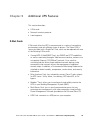
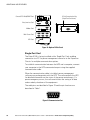
X-Slot Communication Bay
(Single-Port Card shown)
ConnectUPS-X Web/SNMP Card
Relay Interface Card
Modbus Card
Multi-Server Card
USB Card
Figure 18. Optional X-Slot Cards
Single-Port Card
The Eaton 5125 is factory-installed with a Single-Port Card, enabling
connection to a PC for power management control or to the Expansion
Chassis for multiple communication options.
To establish communication between the UPS and a computer, connect
your computer to the UPS communication port using the supplied
communication cable.
When the communication cable is installed, power management
software can exchange data with the UPS. The software polls the UPS
for detailed information on the status of the power environment. If a
power emergency occurs, the software initiates the saving of all data
and an orderly shutdown of the equipment.
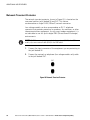
The cable pins are identified in Figure 19 and the pin functions are
described in Table 1.
5
4
9
3
8
2
7
1
6
Figure 19. Communication Port
36
Eaton 5125 Tower UPS (1000–2200 VA) User's Guide S 05147304 Rev C www.eaton.com/powerquality