1
UPS MAINTENANCE
Storing the UPS and Batteries
If you store the UPS for a long period, recharge the battery every
6 months by plugging the UPS into a power outlet. The batteries charge
to 90% capacity in approximately 3 hours. However, it is recommended
that the batteries charge for 24 hours after long-term storage.
Check the battery recharge date on the shipping carton label. If the date
has passed and the batteries were never recharged, do not use the UPS.
Contact your service representative.
When to Replace Batteries
When the
indicator flashes and there is a continuous audible alarm,
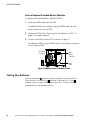
the batteries may need replacing. Conduct a self‐test by pressing and
holding the
button for three seconds. If the
indicator stays on,
contact your service representative to order new batteries.
Replacing Batteries
NOTE DO NOT DISCONNECT the batteries while the UPS is in Battery mode.
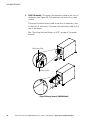
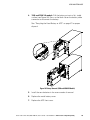
With the hot‐swappable battery feature, UPS batteries can be replaced
easily without turning the UPS off or disconnecting the load.
If you prefer to remove input power to change the batteries, see
“Turning the UPS Off” on page 30.
Consider all warnings, cautions, and notes before replacing batteries.
WARNING
S Batteries can present a risk of electrical shock or burn from high short-circuit current. The
following precautions should be observed: 1) Remove watches, rings, or other metal
objects; 2) Use tools with insulated handles; 3) Do not lay tools or metal parts on top of
batteries.
S ELECTRIC ENERGY HAZARD. Do not attempt to alter any battery wiring or connectors.
Attempting to alter wiring can cause injury.
42
Eaton 5125 Tower UPS (1000–2200 VA) User's Guide S 05147304 Rev C www.eaton.com/powerquality